DATABASES By Chinmay Kumar Raul
INTRODUCTION Database is a collection of data and information in an organized form. Databases are designed to support:- Storage Retrieval Modification and Deletion of data Database can be stored on:- Magnetic tapes Magnetic disks Optical disks and  other secondary storage devices.
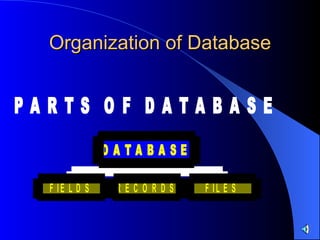
Organization of Database
FIELDS A  FIELD  is an item of information consisting of number of characters, bytes or words that are treated together. Examples:-  To form a Name To form a Date To form a Number
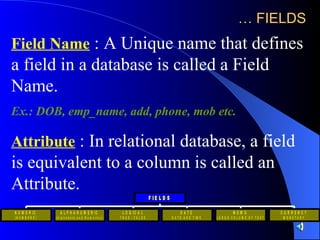
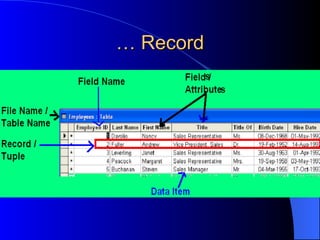
…  FIELDS Field Name  : A Unique name that defines a field in a database is called a Field Name. Ex.: DOB, emp_name, add, phone, mob etc. Attribute  : In relational database, a field is equivalent to a column is called an Attribute.
Data types in Microsoft Access Text   Use for text or combinations of text and numbers, such as addresses, or for numbers that do not require calculations, such as phone numbers, part numbers, or postal codes.  Stores up to 255 characters. The FieldSize property controls the maximum number of characters that can be entered.
…  Data types in Microsoft Access Memo   Use for lengthy text and numbers, such as notes or descriptions.  Stores up to 65,536 characters.  Number   Use for data to be included in mathematical calculations, except calculations involving money (use Currency type).
…  Data types in Microsoft Access Date/Time  Use for dates and times.  Currency   Use for currency values and to prevent rounding off during calculations.  AutoNumber   Use for unique sequential (incrementing by 1) or random numbers that are automatically inserted when a record is added.
…  Data types in Microsoft Access Yes/No  Use for data that can be only one of two possible values, such as Yes/No, True/False, On/Off.  Null values are not allowed.   OLE Object  Use for OLE objects (such as Microsoft Word documents, Microsoft Excel spreadsheets, pictures, sounds, or other binary data) that were created in other programs using the OLE protocol.  Stores up to 1 gigabyte (limited by disk space).
…  Data types in Microsoft Access Hyperlink   Use for hyperlinks. A hyperlink can be a UNC path or a URL.  Stores up to 64,000 characters.
RECORD A collection of related data items, each with their own field type is called a  Record . Or row wise data is knows as  Record. In relational database a record is known as  Tuple .
… Record
File A  File  is a collection of related records, that has a particular name. Or we can say in another way this unique name is called a filename. Contents of a file (or a file may store):- Data Programs Documents Pictures Sound or  Other information. In relational databases, a file is also known as a  Table . Each record in a table contains a unique field is known as  primary key .
QUERY Users retrieve database information using queries. A  QUERY  is a request for information from a database. The set of rules for constructing queries is known as a  Query Language . The Example is : SQL (Structured Query Language)
Database Management System (DBMS) Database Management System is a collection of software programs that provides facilities to store, modify and extract information from a database. Database management systems are categorized according to the ‘data model’ they implement. Data Models define the methods used inside the database management systems to organize the structure of the databases.
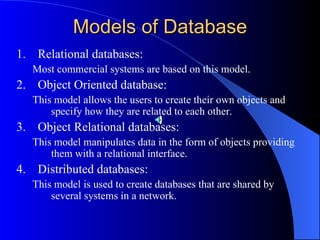
Models of Database Relational databases: Most commercial systems are based on this model. Object Oriented database: This model allows the users to create their own objects and specify how they are related to each other. Object Relational databases: This model manipulates data in the form of objects providing them with a relational interface. Distributed databases: This model is used to create databases that are shared by several systems in a network.
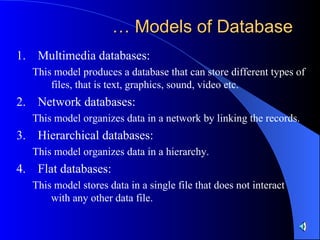
…  Models of Database Multimedia databases: This model produces a database that can store different types of files, that is text, graphics, sound, video etc. Network databases: This model organizes data in a network by linking the records. Hierarchical databases: This model organizes data in a hierarchy. Flat databases: This model stores data in a single file that does not interact with any other data file.

Database

  • 1.
  • 2.
    INTRODUCTION Database isa collection of data and information in an organized form. Databases are designed to support:- Storage Retrieval Modification and Deletion of data Database can be stored on:- Magnetic tapes Magnetic disks Optical disks and other secondary storage devices.
  • 3.
  • 4.
    FIELDS A FIELD is an item of information consisting of number of characters, bytes or words that are treated together. Examples:- To form a Name To form a Date To form a Number
  • 5.
    … FIELDSField Name : A Unique name that defines a field in a database is called a Field Name. Ex.: DOB, emp_name, add, phone, mob etc. Attribute : In relational database, a field is equivalent to a column is called an Attribute.
  • 6.
    Data types inMicrosoft Access Text Use for text or combinations of text and numbers, such as addresses, or for numbers that do not require calculations, such as phone numbers, part numbers, or postal codes. Stores up to 255 characters. The FieldSize property controls the maximum number of characters that can be entered.
  • 7.
    … Datatypes in Microsoft Access Memo Use for lengthy text and numbers, such as notes or descriptions. Stores up to 65,536 characters. Number Use for data to be included in mathematical calculations, except calculations involving money (use Currency type).
  • 8.
    … Datatypes in Microsoft Access Date/Time Use for dates and times. Currency Use for currency values and to prevent rounding off during calculations. AutoNumber Use for unique sequential (incrementing by 1) or random numbers that are automatically inserted when a record is added.
  • 9.
    … Datatypes in Microsoft Access Yes/No Use for data that can be only one of two possible values, such as Yes/No, True/False, On/Off. Null values are not allowed. OLE Object Use for OLE objects (such as Microsoft Word documents, Microsoft Excel spreadsheets, pictures, sounds, or other binary data) that were created in other programs using the OLE protocol. Stores up to 1 gigabyte (limited by disk space).
  • 10.
    … Datatypes in Microsoft Access Hyperlink Use for hyperlinks. A hyperlink can be a UNC path or a URL. Stores up to 64,000 characters.
  • 11.
    RECORD A collectionof related data items, each with their own field type is called a Record . Or row wise data is knows as Record. In relational database a record is known as Tuple .
  • 12.
  • 13.
    File A File is a collection of related records, that has a particular name. Or we can say in another way this unique name is called a filename. Contents of a file (or a file may store):- Data Programs Documents Pictures Sound or Other information. In relational databases, a file is also known as a Table . Each record in a table contains a unique field is known as primary key .
  • 14.
    QUERY Users retrievedatabase information using queries. A QUERY is a request for information from a database. The set of rules for constructing queries is known as a Query Language . The Example is : SQL (Structured Query Language)
  • 15.
    Database Management System(DBMS) Database Management System is a collection of software programs that provides facilities to store, modify and extract information from a database. Database management systems are categorized according to the ‘data model’ they implement. Data Models define the methods used inside the database management systems to organize the structure of the databases.
  • 16.
    Models of DatabaseRelational databases: Most commercial systems are based on this model. Object Oriented database: This model allows the users to create their own objects and specify how they are related to each other. Object Relational databases: This model manipulates data in the form of objects providing them with a relational interface. Distributed databases: This model is used to create databases that are shared by several systems in a network.
  • 17.
    … Modelsof Database Multimedia databases: This model produces a database that can store different types of files, that is text, graphics, sound, video etc. Network databases: This model organizes data in a network by linking the records. Hierarchical databases: This model organizes data in a hierarchy. Flat databases: This model stores data in a single file that does not interact with any other data file.