© 2015 IBM Corporation
Interactive Analytics Using Apache Spark
Bangalore Spark Enthusiasts Group
http://www.meetup.com/Bangalore-Spark-Enthusiasts/
1
Bagavath Subramaniam, IBM Analytics
Shally Sangal, IBM Analytics
© 2015 IBM Corporation
Agenda
▪ Overview of Interactive Analytics
▪ Spark Application User Types
▪ Spark Context
▪ Spark Shell
▪ Spark Submit
▪ Spark JDBC Thrift Server
▪ Apache Zeppelin
▪ Jupyter
▪ Spark Kernel
▪ Spark Job Server
▪ Livy
2
© 2015 IBM Corporation
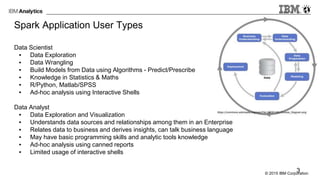
Spark Application User Types
Data Scientist
▪ Data Exploration
▪ Data Wrangling
▪ Build Models from Data using Algorithms - Predict/Prescribe
▪ Knowledge in Statistics & Maths
▪ R/Python, Matlab/SPSS
▪ Ad-hoc analysis using Interactive Shells
Data Analyst
▪ Data Exploration and Visualization
▪ Understands data sources and relationships among them in an Enterprise
▪ Relates data to business and derives insights, can talk business language
▪ May have basic programming skills and analytic tools knowledge
▪ Ad-hoc analysis using canned reports
▪ Limited usage of interactive shells
3
© 2015 IBM Corporation
Typical User Roles
Business Analyst
▪ Industry Expert
▪ Understand business needs and works on solutions
▪ Improve business processes and design new systems to support them
▪ Not a programmer / Analytics expert
▪ Typical user of reporting systems
Data Engineer / Application Developer
▪ Programmer with S/W Engineering background
▪ Builds production data pipelines, data warehouses, reporting solutions and apps
▪ Productionize models built by data scientists
▪ Builds s/w applications to solve business problems
▪ Maintains, Monitors, Tunes data processing platform and applications
> Roles are often fluid and overlapping
4
© 2015 IBM Corporation
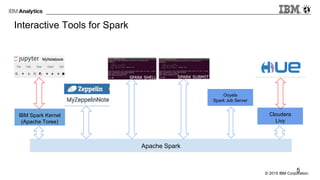
Interactive Tools for Spark
Apache Spark
IBM Spark Kernel
(Apache Toree)
Cloudera
Livy
Ooyala
Spark Job Server
5
© 2015 IBM Corporation
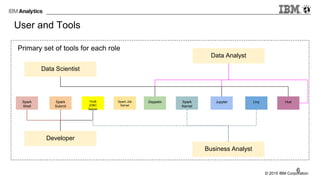
User and Tools
Primary set of tools for each role
Spark
Shell
Spark
Submit
Thrift
JDBC
Server
Zeppelin Spark
Kernel
Jupyter Livy Hue
Data Scientist
Data Analyst
Developer
Business Analyst
6
Spark Job
Server
© 2015 IBM Corporation
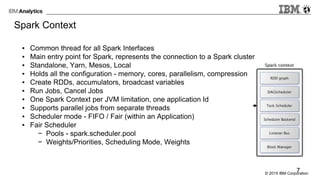
Spark Context
▪ Common thread for all Spark Interfaces
▪ Main entry point for Spark, represents the connection to a Spark cluster
▪ Standalone, Yarn, Mesos, Local
▪ Holds all the configuration - memory, cores, parallelism, compression
▪ Create RDDs, accumulators, broadcast variables
▪ Run Jobs, Cancel Jobs
▪ One Spark Context per JVM limitation, one application Id
▪ Supports parallel jobs from separate threads
▪ Scheduler mode - FIFO / Fair (within an Application)
▪ Fair Scheduler
− Pools - spark.scheduler.pool
− Weights/Priorities, Scheduling Mode, Weights
7
© 2015 IBM Corporation
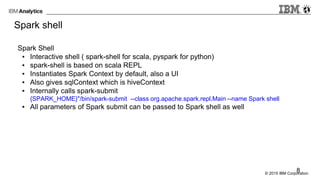
Spark shell
Spark Shell
▪ Interactive shell ( spark-shell for scala, pyspark for python)
▪ spark-shell is based on scala REPL
▪ Instantiates Spark Context by default, also a UI
▪ Also gives sqlContext which is hiveContext
▪ Internally calls spark-submit
{SPARK_HOME}"/bin/spark-submit --class org.apache.spark.repl.Main --name Spark shell
▪ All parameters of Spark submit can be passed to Spark shell as well
8
© 2015 IBM Corporation
Spark submit
▪ Launch/Submit a spark application to a spark cluster
▪ org.apache.spark.launcher.Main gets called with org.apache.spark.deploy.SparkSubmit
as a parameter along with the other params passed to spark-submit
org.apache.spark.launcher.Main org.apache.spark.deploy.SparkSubmit "$@"
▪ spark-submit --help => list of supported parameters
▪ kill a job ( spark-submit --kill) and get job status (spark-submit --status)
▪ spark-defaults.conf in SPARK_CONF_DIR
▪ Precedence - Explicit set on SparkConf, flags passed to spark-submit, values from
defaults
9
© 2015 IBM Corporation
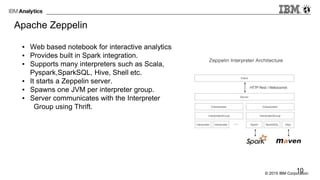
▪ Web based notebook for interactive analytics.
▪ Provides built in Spark integration.
▪ Supports many interpreters such as Scala,
Pyspark,SparkSQL, Hive, Shell etc.
▪ It starts a Zeppelin server.
▪ Spawns one JVM per interpreter group.
▪ Server communicates with the Interpreter
Group using Thrift.
10
Apache Zeppelin
© 2015 IBM Corporation
Zeppelin Demo
To know more : http://zeppelin.incubator.apache.org/
11
© 2015 IBM Corporation
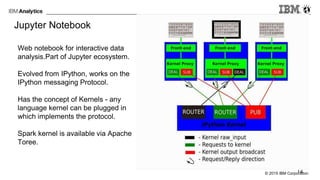
Jupyter Notebook
Web notebook for interactive data
analysis.Part of Jupyter ecosystem.
Evolved from IPython, works on the
IPython messaging Protocol.
Has the concept of Kernels - any
language kernel can be plugged in
which implements the protocol.
Spark kernel is available via Apache
Toree.
12
© 2015 IBM Corporation
Jupyter Notebook Demo
To know more : http://jupyter.org/
13
© 2015 IBM Corporation
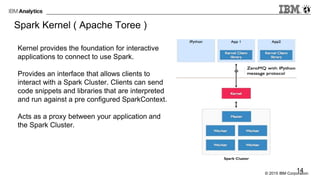
Spark Kernel ( Apache Toree )
Kernel provides the foundation for interactive
applications to connect to use Spark.
Provides an interface that allows clients to
interact with a Spark Cluster. Clients can send
code snippets and libraries that are interpreted
and run against a pre configured SparkContext.
Acts as a proxy between your application and
the Spark Cluster.
14
© 2015 IBM Corporation
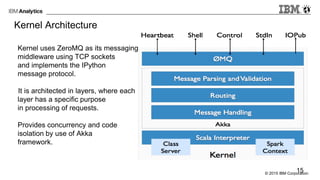
Kernel Architecture
Kernel uses ZeroMQ as its messaging
middleware using TCP sockets
and implements the IPython
message protocol.
It is architected in layers, where each
layer has a specific purpose
in processing of requests.
Provides concurrency and code
isolation by use of Akka
framework.
15
© 2015 IBM Corporation
How does it talk to Spark?
Kernel is launched by a spark-submit process. It works with local spark, Standalone Spark
Cluster as well as Spark with Yarn.
SPARK_HOME is a mandatory environment variable needed.
SPARK_OPTS is an optional environment variable - we can use to configure spark master,
deploy mode, driver memory, number of executors etc.
Uses the same Scala Interpreter as Spark shell. The interpreter holds a Spark Context and
the class server uri used to host compiled code.
16
© 2015 IBM Corporation
How to communicate with Kernel
Two forms of communication :
1. Client library for code execution
1. Directly talk to Kernel like Jupyter notebook
17
© 2015 IBM Corporation
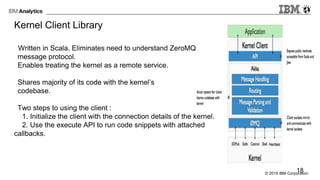
Kernel Client Library
Written in Scala. Eliminates need to understand ZeroMQ
message protocol.
Enables treating the kernel as a remote service.
Shares majority of its code with the kernel’s
codebase.
Two steps to using the client :
1. Initialize the client with the connection details of the kernel.
2. Use the execute API to run code snippets with attached
callbacks.
18
© 2015 IBM Corporation
How to run Kernel and Client:
https://github.com/ibm-et/spark-kernel/wiki/Getting-Started-with-the-Spark-Kernel
https://github.com/ibm-et/spark-kernel/wiki/Guide-for-the-Spark-Kernel-Client
CODE DEMO
19
© 2015 IBM Corporation
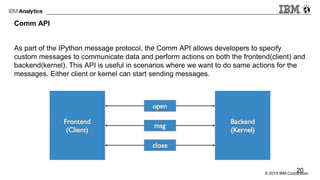
Comm API
As part of the IPython message protocol, the Comm API allows developers to specify
custom messages to communicate data and perform actions on both the frontend(client) and
backend(kernel). This API is useful in scenarios where we want to do same actions for the
messages. Either client or kernel can start sending messages.
20
© 2015 IBM Corporation
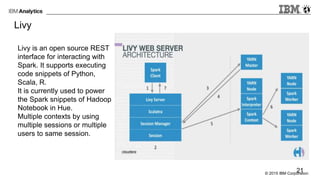
Livy
Livy is an open source REST
interface for interacting with
Spark. It supports executing
code snippets of Python,
Scala, R.
It is currently used to power
the Spark snippets of Hadoop
Notebook in Hue.
Multiple contexts by using
multiple sessions or multiple
users to same session.
21
© 2015 IBM Corporation
LIVY CODE EXECUTION DEMO
To know more : https://github.com/cloudera/hue/tree/master/apps/spark/java
22
© 2015 IBM Corporation
Spark Job Server
JobServer provides a REST interface for submitting and managing Spark jobs/jars.
It is intended to be run as one or more independent processes, separate from the Spark
cluster or within the spark cluster. It works with Mesos as well as Yarn.
It supports multiple Spark Context. Runs SparkContext in their own forked JVM process.
This is available via a config parameter spark.jobserver.context-per-jvm. It is by default set
to false for local development mode, but recommended to be set to true for production
deployment.
It exposes APIs to upload your jars, get contexts, run jobs, get data, configure contexts etc.
It used Spray, Akka actors , Akka Cluster for separate contexts.
23
© 2015 IBM Corporation
JOB SERVER DEMO
To know more : https://github.com/spark-jobserver/spark-jobserver
24

Interactive Analytics using Apache Spark

  • 1.
    © 2015 IBMCorporation Interactive Analytics Using Apache Spark Bangalore Spark Enthusiasts Group http://www.meetup.com/Bangalore-Spark-Enthusiasts/ 1 Bagavath Subramaniam, IBM Analytics Shally Sangal, IBM Analytics
  • 2.
    © 2015 IBMCorporation Agenda ▪ Overview of Interactive Analytics ▪ Spark Application User Types ▪ Spark Context ▪ Spark Shell ▪ Spark Submit ▪ Spark JDBC Thrift Server ▪ Apache Zeppelin ▪ Jupyter ▪ Spark Kernel ▪ Spark Job Server ▪ Livy 2
  • 3.
    © 2015 IBMCorporation Spark Application User Types Data Scientist ▪ Data Exploration ▪ Data Wrangling ▪ Build Models from Data using Algorithms - Predict/Prescribe ▪ Knowledge in Statistics & Maths ▪ R/Python, Matlab/SPSS ▪ Ad-hoc analysis using Interactive Shells Data Analyst ▪ Data Exploration and Visualization ▪ Understands data sources and relationships among them in an Enterprise ▪ Relates data to business and derives insights, can talk business language ▪ May have basic programming skills and analytic tools knowledge ▪ Ad-hoc analysis using canned reports ▪ Limited usage of interactive shells 3
  • 4.
    © 2015 IBMCorporation Typical User Roles Business Analyst ▪ Industry Expert ▪ Understand business needs and works on solutions ▪ Improve business processes and design new systems to support them ▪ Not a programmer / Analytics expert ▪ Typical user of reporting systems Data Engineer / Application Developer ▪ Programmer with S/W Engineering background ▪ Builds production data pipelines, data warehouses, reporting solutions and apps ▪ Productionize models built by data scientists ▪ Builds s/w applications to solve business problems ▪ Maintains, Monitors, Tunes data processing platform and applications > Roles are often fluid and overlapping 4
  • 5.
    © 2015 IBMCorporation Interactive Tools for Spark Apache Spark IBM Spark Kernel (Apache Toree) Cloudera Livy Ooyala Spark Job Server 5
  • 6.
    © 2015 IBMCorporation User and Tools Primary set of tools for each role Spark Shell Spark Submit Thrift JDBC Server Zeppelin Spark Kernel Jupyter Livy Hue Data Scientist Data Analyst Developer Business Analyst 6 Spark Job Server
  • 7.
    © 2015 IBMCorporation Spark Context ▪ Common thread for all Spark Interfaces ▪ Main entry point for Spark, represents the connection to a Spark cluster ▪ Standalone, Yarn, Mesos, Local ▪ Holds all the configuration - memory, cores, parallelism, compression ▪ Create RDDs, accumulators, broadcast variables ▪ Run Jobs, Cancel Jobs ▪ One Spark Context per JVM limitation, one application Id ▪ Supports parallel jobs from separate threads ▪ Scheduler mode - FIFO / Fair (within an Application) ▪ Fair Scheduler − Pools - spark.scheduler.pool − Weights/Priorities, Scheduling Mode, Weights 7
  • 8.
    © 2015 IBMCorporation Spark shell Spark Shell ▪ Interactive shell ( spark-shell for scala, pyspark for python) ▪ spark-shell is based on scala REPL ▪ Instantiates Spark Context by default, also a UI ▪ Also gives sqlContext which is hiveContext ▪ Internally calls spark-submit {SPARK_HOME}"/bin/spark-submit --class org.apache.spark.repl.Main --name Spark shell ▪ All parameters of Spark submit can be passed to Spark shell as well 8
  • 9.
    © 2015 IBMCorporation Spark submit ▪ Launch/Submit a spark application to a spark cluster ▪ org.apache.spark.launcher.Main gets called with org.apache.spark.deploy.SparkSubmit as a parameter along with the other params passed to spark-submit org.apache.spark.launcher.Main org.apache.spark.deploy.SparkSubmit "$@" ▪ spark-submit --help => list of supported parameters ▪ kill a job ( spark-submit --kill) and get job status (spark-submit --status) ▪ spark-defaults.conf in SPARK_CONF_DIR ▪ Precedence - Explicit set on SparkConf, flags passed to spark-submit, values from defaults 9
  • 10.
    © 2015 IBMCorporation ▪ Web based notebook for interactive analytics. ▪ Provides built in Spark integration. ▪ Supports many interpreters such as Scala, Pyspark,SparkSQL, Hive, Shell etc. ▪ It starts a Zeppelin server. ▪ Spawns one JVM per interpreter group. ▪ Server communicates with the Interpreter Group using Thrift. 10 Apache Zeppelin
  • 11.
    © 2015 IBMCorporation Zeppelin Demo To know more : http://zeppelin.incubator.apache.org/ 11
  • 12.
    © 2015 IBMCorporation Jupyter Notebook Web notebook for interactive data analysis.Part of Jupyter ecosystem. Evolved from IPython, works on the IPython messaging Protocol. Has the concept of Kernels - any language kernel can be plugged in which implements the protocol. Spark kernel is available via Apache Toree. 12
  • 13.
    © 2015 IBMCorporation Jupyter Notebook Demo To know more : http://jupyter.org/ 13
  • 14.
    © 2015 IBMCorporation Spark Kernel ( Apache Toree ) Kernel provides the foundation for interactive applications to connect to use Spark. Provides an interface that allows clients to interact with a Spark Cluster. Clients can send code snippets and libraries that are interpreted and run against a pre configured SparkContext. Acts as a proxy between your application and the Spark Cluster. 14
  • 15.
    © 2015 IBMCorporation Kernel Architecture Kernel uses ZeroMQ as its messaging middleware using TCP sockets and implements the IPython message protocol. It is architected in layers, where each layer has a specific purpose in processing of requests. Provides concurrency and code isolation by use of Akka framework. 15
  • 16.
    © 2015 IBMCorporation How does it talk to Spark? Kernel is launched by a spark-submit process. It works with local spark, Standalone Spark Cluster as well as Spark with Yarn. SPARK_HOME is a mandatory environment variable needed. SPARK_OPTS is an optional environment variable - we can use to configure spark master, deploy mode, driver memory, number of executors etc. Uses the same Scala Interpreter as Spark shell. The interpreter holds a Spark Context and the class server uri used to host compiled code. 16
  • 17.
    © 2015 IBMCorporation How to communicate with Kernel Two forms of communication : 1. Client library for code execution 1. Directly talk to Kernel like Jupyter notebook 17
  • 18.
    © 2015 IBMCorporation Kernel Client Library Written in Scala. Eliminates need to understand ZeroMQ message protocol. Enables treating the kernel as a remote service. Shares majority of its code with the kernel’s codebase. Two steps to using the client : 1. Initialize the client with the connection details of the kernel. 2. Use the execute API to run code snippets with attached callbacks. 18
  • 19.
    © 2015 IBMCorporation How to run Kernel and Client: https://github.com/ibm-et/spark-kernel/wiki/Getting-Started-with-the-Spark-Kernel https://github.com/ibm-et/spark-kernel/wiki/Guide-for-the-Spark-Kernel-Client CODE DEMO 19
  • 20.
    © 2015 IBMCorporation Comm API As part of the IPython message protocol, the Comm API allows developers to specify custom messages to communicate data and perform actions on both the frontend(client) and backend(kernel). This API is useful in scenarios where we want to do same actions for the messages. Either client or kernel can start sending messages. 20
  • 21.
    © 2015 IBMCorporation Livy Livy is an open source REST interface for interacting with Spark. It supports executing code snippets of Python, Scala, R. It is currently used to power the Spark snippets of Hadoop Notebook in Hue. Multiple contexts by using multiple sessions or multiple users to same session. 21
  • 22.
    © 2015 IBMCorporation LIVY CODE EXECUTION DEMO To know more : https://github.com/cloudera/hue/tree/master/apps/spark/java 22
  • 23.
    © 2015 IBMCorporation Spark Job Server JobServer provides a REST interface for submitting and managing Spark jobs/jars. It is intended to be run as one or more independent processes, separate from the Spark cluster or within the spark cluster. It works with Mesos as well as Yarn. It supports multiple Spark Context. Runs SparkContext in their own forked JVM process. This is available via a config parameter spark.jobserver.context-per-jvm. It is by default set to false for local development mode, but recommended to be set to true for production deployment. It exposes APIs to upload your jars, get contexts, run jobs, get data, configure contexts etc. It used Spray, Akka actors , Akka Cluster for separate contexts. 23
  • 24.
    © 2015 IBMCorporation JOB SERVER DEMO To know more : https://github.com/spark-jobserver/spark-jobserver 24