Introduction to Information Technology
4.4. Information Systems: Software (Downloading)
Introduction to Information Technology
INT-1010
Prof C
Luis R Castellanos
1
04.4
Information Systems:
Software
(Downloading files)
Introduction to Information Technology
4.4. Information Systems: Software (Downloading)
2
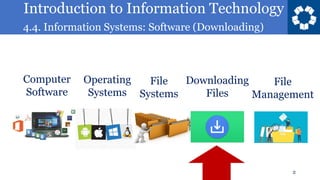
Operating
Systems
Computer
Software
File
Systems
Downloading
Files
File
Management
Introduction to Information Technology
4.4. Information Systems: Software (Downloading)
3
Downloading
files
Information Systems
Software
Introduction to Information Technology
4.4. Information Systems: Software (Downloading)
4
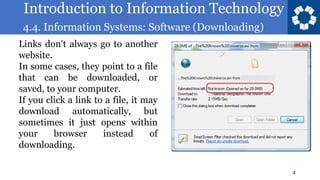
Links don't always go to another
website.
In some cases, they point to a file
that can be downloaded, or
saved, to your computer.
If you click a link to a file, it may
download automatically, but
sometimes it just opens within
your browser instead of
downloading.
Introduction to Information Technology
4.4. Information Systems: Software (Downloading)
5
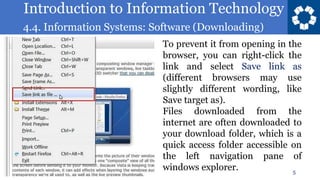
To prevent it from opening in the
browser, you can right-click the
link and select Save link as
(different browsers may use
slightly different wording, like
Save target as).
Files downloaded from the
internet are often downloaded to
your download folder, which is a
quick access folder accessible on
the left navigation pane of
windows explorer.
Introduction to Information Technology
4.4. Information Systems: Software (Downloading)
6
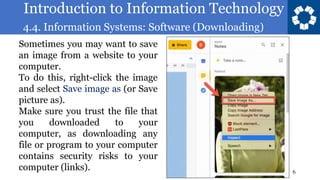
Sometimes you may want to save
an image from a website to your
computer.
To do this, right-click the image
and select Save image as (or Save
picture as).
Make sure you trust the file that
you downloaded to your
computer, as downloading any
file or program to your computer
contains security risks to your
computer (links).
Introduction to Information Technology
4.4. Information Systems: Software (Downloading)
7
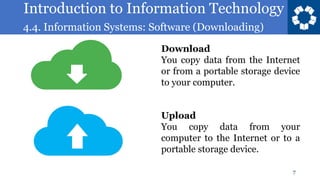
Download
You copy data from the Internet
or from a portable storage device
to your computer.
Upload
You copy data from your
computer to the Internet or to a
portable storage device.
Introduction to Information Technology
4.4. Information Systems: Software (Downloading)
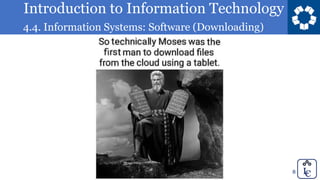
8
Introduction to Information Technology
4.4. Information Systems: Software (Downloading)
9
Introduction to Information Technology
4.4. Information Systems: Software (Downloading)
Introduction to Information Technology
4.4. Information Systems: Software (Downloading)
Textbook
11
https://eng.libretexts.org/Courses/Prince_
Georges_Community_College/INT_1010%
3A_Concepts_in_Computing
Purchase of a book is not
required.
Introduction to Information Technology
4.4. Information Systems: Software (Downloading)
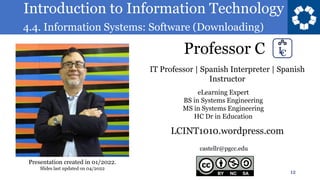
Professor C
12
castellr@pgcc.edu
eLearning Expert
BS in Systems Engineering
MS in Systems Engineering
HC Dr in Education
IT Professor | Spanish Interpreter | Spanish
Instructor
LCINT1010.wordpress.com
Presentation created in 01/2022.
Slides last updated on 04/2022
Introduction to Information Technology
4.4. Information Systems: Software (Downloading)
Introduction to Information Technology
INT-1010
Prof C
Luis R Castellanos
13
04.4
Information Systems:
Software
(Downloading files)

INT 1010 04-4.pdf

  • 1.
    Introduction to InformationTechnology 4.4. Information Systems: Software (Downloading) Introduction to Information Technology INT-1010 Prof C Luis R Castellanos 1 04.4 Information Systems: Software (Downloading files)
  • 2.
    Introduction to InformationTechnology 4.4. Information Systems: Software (Downloading) 2 Operating Systems Computer Software File Systems Downloading Files File Management
  • 3.
    Introduction to InformationTechnology 4.4. Information Systems: Software (Downloading) 3 Downloading files Information Systems Software
  • 4.
    Introduction to InformationTechnology 4.4. Information Systems: Software (Downloading) 4 Links don't always go to another website. In some cases, they point to a file that can be downloaded, or saved, to your computer. If you click a link to a file, it may download automatically, but sometimes it just opens within your browser instead of downloading.
  • 5.
    Introduction to InformationTechnology 4.4. Information Systems: Software (Downloading) 5 To prevent it from opening in the browser, you can right-click the link and select Save link as (different browsers may use slightly different wording, like Save target as). Files downloaded from the internet are often downloaded to your download folder, which is a quick access folder accessible on the left navigation pane of windows explorer.
  • 6.
    Introduction to InformationTechnology 4.4. Information Systems: Software (Downloading) 6 Sometimes you may want to save an image from a website to your computer. To do this, right-click the image and select Save image as (or Save picture as). Make sure you trust the file that you downloaded to your computer, as downloading any file or program to your computer contains security risks to your computer (links).
  • 7.
    Introduction to InformationTechnology 4.4. Information Systems: Software (Downloading) 7 Download You copy data from the Internet or from a portable storage device to your computer. Upload You copy data from your computer to the Internet or to a portable storage device.
  • 8.
    Introduction to InformationTechnology 4.4. Information Systems: Software (Downloading) 8
  • 9.
    Introduction to InformationTechnology 4.4. Information Systems: Software (Downloading) 9
  • 10.
    Introduction to InformationTechnology 4.4. Information Systems: Software (Downloading)
  • 11.
    Introduction to InformationTechnology 4.4. Information Systems: Software (Downloading) Textbook 11 https://eng.libretexts.org/Courses/Prince_ Georges_Community_College/INT_1010% 3A_Concepts_in_Computing Purchase of a book is not required.
  • 12.
    Introduction to InformationTechnology 4.4. Information Systems: Software (Downloading) Professor C 12 castellr@pgcc.edu eLearning Expert BS in Systems Engineering MS in Systems Engineering HC Dr in Education IT Professor | Spanish Interpreter | Spanish Instructor LCINT1010.wordpress.com Presentation created in 01/2022. Slides last updated on 04/2022
  • 13.
    Introduction to InformationTechnology 4.4. Information Systems: Software (Downloading) Introduction to Information Technology INT-1010 Prof C Luis R Castellanos 13 04.4 Information Systems: Software (Downloading files)