Introduction to Information Technology
4.3. Information Systems: Software (File Systems)
Introduction to Information Technology
INT-1010
Prof C
Luis R Castellanos
1
04.3
Information Systems:
Software (File Systems)
Introduction to Information Technology
4.3. Information Systems: Software (File Systems)
2
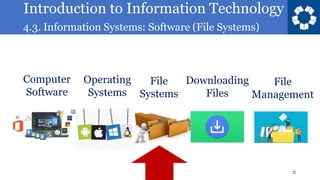
Operating
Systems
Computer
Software
File
Systems
Downloading
Files
File
Management
Introduction to Information Technology
4.3. Information Systems: Software (File Systems)
3
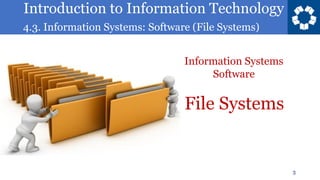
File Systems
Information Systems
Software
Introduction to Information Technology
4.3. Information Systems: Software (File Systems)
4
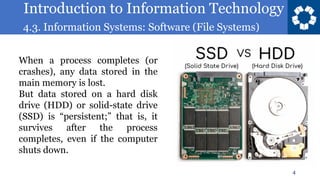
When a process completes (or
crashes), any data stored in the
main memory is lost.
But data stored on a hard disk
drive (HDD) or solid-state drive
(SSD) is “persistent;” that is, it
survives after the process
completes, even if the computer
shuts down.
Introduction to Information Technology
4.3. Information Systems: Software (File Systems)
5
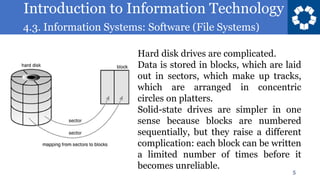
Hard disk drives are complicated.
Data is stored in blocks, which are laid
out in sectors, which make up tracks,
which are arranged in concentric
circles on platters.
Solid-state drives are simpler in one
sense because blocks are numbered
sequentially, but they raise a different
complication: each block can be written
a limited number of times before it
becomes unreliable.
Introduction to Information Technology
4.3. Information Systems: Software (File Systems)
6
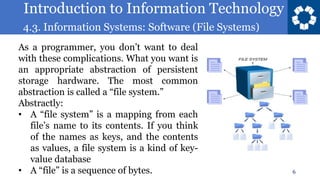
As a programmer, you don’t want to deal
with these complications. What you want is
an appropriate abstraction of persistent
storage hardware. The most common
abstraction is called a “file system.”
Abstractly:
• A “file system” is a mapping from each
file’s name to its contents. If you think
of the names as keys, and the contents
as values, a file system is a kind of key-
value database
• A “file” is a sequence of bytes.
Introduction to Information Technology
4.3. Information Systems: Software (File Systems)
7
Introduction to Information Technology
4.3. Information Systems: Software (File Systems)
8
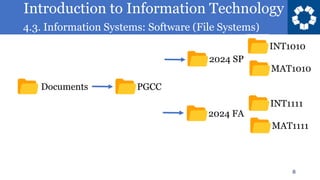
Documents PGCC
2024 SP
2024 FA
INT1010
MAT1010
INT1111
MAT1111
Introduction to Information Technology
4.3. Information Systems: Software (File Systems)
14
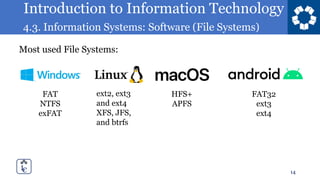
Most used File Systems:
FAT
NTFS
exFAT
ext2, ext3
and ext4
XFS, JFS,
and btrfs
HFS+
APFS
FAT32
ext3
ext4
Introduction to Information Technology
4.3. Information Systems: Software (File Systems)
15
Introduction to Information Technology
4.3. Information Systems: Software (File Systems)
Introduction to Information Technology
4.3. Information Systems: Software (File Systems)
Textbook
17
https://eng.libretexts.org/Courses/Prince_
Georges_Community_College/INT_1010%
3A_Concepts_in_Computing
Purchase of a book is not
required.
Introduction to Information Technology
4.3. Information Systems: Software (File Systems)
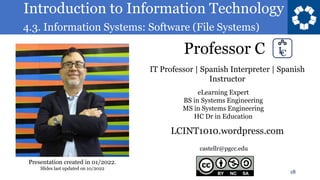
Professor C
18
castellr@pgcc.edu
eLearning Expert
BS in Systems Engineering
MS in Systems Engineering
HC Dr in Education
IT Professor | Spanish Interpreter | Spanish
Instructor
LCINT1010.wordpress.com
Presentation created in 01/2022.
Slides last updated on 10/2022
Introduction to Information Technology
4.3. Information Systems: Software (File Systems)
Introduction to Information Technology
INT-1010
Prof C
Luis R Castellanos
19
04.3
Information Systems:
Software (File Systems)

INT 1010 04-3.pdf

  • 1.
    Introduction to InformationTechnology 4.3. Information Systems: Software (File Systems) Introduction to Information Technology INT-1010 Prof C Luis R Castellanos 1 04.3 Information Systems: Software (File Systems)
  • 2.
    Introduction to InformationTechnology 4.3. Information Systems: Software (File Systems) 2 Operating Systems Computer Software File Systems Downloading Files File Management
  • 3.
    Introduction to InformationTechnology 4.3. Information Systems: Software (File Systems) 3 File Systems Information Systems Software
  • 4.
    Introduction to InformationTechnology 4.3. Information Systems: Software (File Systems) 4 When a process completes (or crashes), any data stored in the main memory is lost. But data stored on a hard disk drive (HDD) or solid-state drive (SSD) is “persistent;” that is, it survives after the process completes, even if the computer shuts down.
  • 5.
    Introduction to InformationTechnology 4.3. Information Systems: Software (File Systems) 5 Hard disk drives are complicated. Data is stored in blocks, which are laid out in sectors, which make up tracks, which are arranged in concentric circles on platters. Solid-state drives are simpler in one sense because blocks are numbered sequentially, but they raise a different complication: each block can be written a limited number of times before it becomes unreliable.
  • 6.
    Introduction to InformationTechnology 4.3. Information Systems: Software (File Systems) 6 As a programmer, you don’t want to deal with these complications. What you want is an appropriate abstraction of persistent storage hardware. The most common abstraction is called a “file system.” Abstractly: • A “file system” is a mapping from each file’s name to its contents. If you think of the names as keys, and the contents as values, a file system is a kind of key- value database • A “file” is a sequence of bytes.
  • 7.
    Introduction to InformationTechnology 4.3. Information Systems: Software (File Systems) 7
  • 8.
    Introduction to InformationTechnology 4.3. Information Systems: Software (File Systems) 8 Documents PGCC 2024 SP 2024 FA INT1010 MAT1010 INT1111 MAT1111
  • 9.
    Introduction to InformationTechnology 4.3. Information Systems: Software (File Systems) 14 Most used File Systems: FAT NTFS exFAT ext2, ext3 and ext4 XFS, JFS, and btrfs HFS+ APFS FAT32 ext3 ext4
  • 10.
    Introduction to InformationTechnology 4.3. Information Systems: Software (File Systems) 15
  • 11.
    Introduction to InformationTechnology 4.3. Information Systems: Software (File Systems)
  • 12.
    Introduction to InformationTechnology 4.3. Information Systems: Software (File Systems) Textbook 17 https://eng.libretexts.org/Courses/Prince_ Georges_Community_College/INT_1010% 3A_Concepts_in_Computing Purchase of a book is not required.
  • 13.
    Introduction to InformationTechnology 4.3. Information Systems: Software (File Systems) Professor C 18 castellr@pgcc.edu eLearning Expert BS in Systems Engineering MS in Systems Engineering HC Dr in Education IT Professor | Spanish Interpreter | Spanish Instructor LCINT1010.wordpress.com Presentation created in 01/2022. Slides last updated on 10/2022
  • 14.
    Introduction to InformationTechnology 4.3. Information Systems: Software (File Systems) Introduction to Information Technology INT-1010 Prof C Luis R Castellanos 19 04.3 Information Systems: Software (File Systems)