


Introduction to Information Technology
1. Introduction
Introduction to Information Technology
INT-1010
Prof C
Luis R Castellanos
01
1
Introduction
Introduction to Information Technology
1. Introduction
2
POTUS 1
Introduction to Information Technology
1. Introduction
3
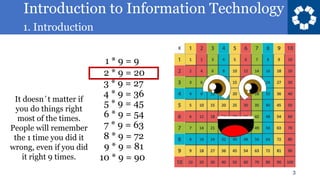
1 * 9 = 9
2 * 9 = 20
3 * 9 = 27
4 * 9 = 36
5 * 9 = 45
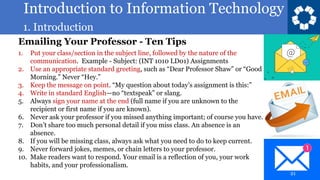
6 * 9 = 54
7 * 9 = 63
8 * 9 = 72
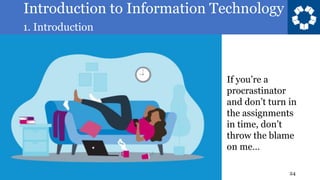
9 * 9 = 81
10 * 9 = 90
It doesn´t matter if
you do things right
most of the times.
People will remember
the 1 time you did it
wrong, even if you did
it right 9 times.
Introduction to Information Technology
1. Introduction
4
Introduction to Information Technology
is a survey course in evolving
information technology and its
relevance to individuals and society.
Students examine the categories of
computing devices and different types
of computer applications, software and
their uses.
Introduction to Information Technology
1. Introduction
5
Student’s outcomes
1. Describe the categories of computing devices.
2. Compare and contrast types of computer
applications and software
3. Demonstrate basic proficiency in data analysis
4. Demonstrate basic proficiency in programming
5. Evaluate ethical principles in emerging
technologies
6. Describe risk management strategies that
address information systems security threats
7. Explore data communications concepts and
basic principles of connectivity
Introduction to Information Technology
1. Introduction
6
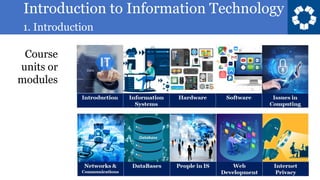
Course
units or
modules
Introduction to Information Technology
1. Introduction
7
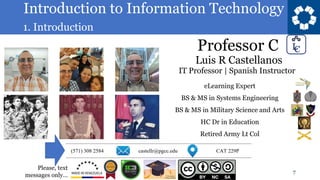
Luis R Castellanos
Professor C
eLearning Expert
BS & MS in Systems Engineering
BS & MS in Military Science and Arts
HC Dr in Education
Retired Army Lt Col
IT Professor | Spanish Instructor
Please, text
messages only…
Introduction to Information Technology
1. Introduction
8
Office hours are available.
Please book an appointment, for Office Hours in person
or on line.
If the assigned schedule doesn’t work for you, we can
find another time slot.
Introduction to Information Technology
1. Introduction
9
Who are you?
Name
City of residence
Major
Introduction to Information Technology
1. Introduction
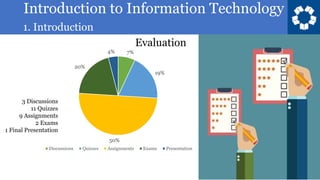
7%
19%
50%
20%
4%
Discussions Quizzes Assignments Exams Presentation
10
Evaluation
3 Discussions
11 Quizzes
9 Assignments
2 Exams
1 Final Presentation
Introduction to Information Technology
1. Introduction
11
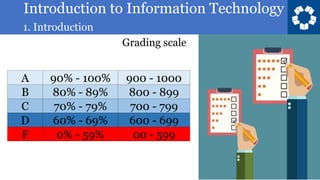
Grading scale
Introduction to Information Technology
1. Introduction
12
• Read carefully and follow the assignment’s
instructions
• Midterm and Final Exams will only be available
on the Exam day, in class, in class schedule. It
can’t be retaken. Notes can be used.
• All quizzes have one attempt
• Late submissions are not graded in 100% basis.
• Don’t wait until the last day to submit all
pending assignments
• Don’t wait until the last day to speak up and say
you couldn’t handle the work load.
Introduction to Information Technology
1. Introduction
13
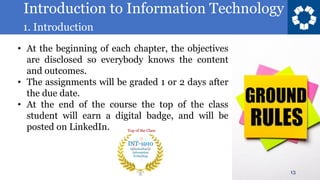
• At the beginning of each chapter, the objectives
are disclosed so everybody knows the content
and outcomes.
• The assignments will be graded 1 or 2 days after
the due date.
• At the end of the course the top of the class
student will earn a digital badge, and will be
posted on LinkedIn.
Introduction to Information Technology
1. Introduction
14
• Please be polite. Say “good morning” or “good
afternoon” when you come inside the classroom,
and in any public space.
• Submissions are due usually on Sundays, before
midnight.
Introduction to Information Technology
1. Introduction
15
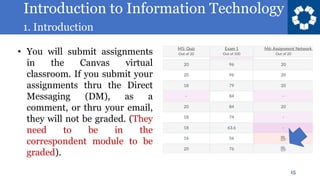
• You will submit assignments
in the Canvas virtual
classroom. If you submit your
assignments thru the Direct
Messaging (DM), as a
comment, or thru your email,
they will not be graded. (They
need to be in the
correspondent module to be
graded).
Introduction to Information Technology
1. Introduction
16
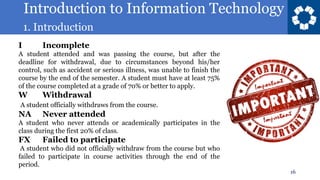
I Incomplete
A student attended and was passing the course, but after the
deadline for withdrawal, due to circumstances beyond his/her
control, such as accident or serious illness, was unable to finish the
course by the end of the semester. A student must have at least 75%
of the course completed at a grade of 70% or better to apply.
W Withdrawal
A student officially withdraws from the course.
NA Never attended
A student who never attends or academically participates in the
class during the first 20% of class.
FX Failed to participate
A student who did not officially withdraw from the course but who
failed to participate in course activities through the end of the
period.
Introduction to Information Technology
1. Introduction
17
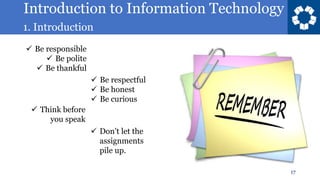
✓ Be responsible
✓ Be polite
✓ Be thankful
✓ Be respectful
✓ Be honest
✓ Be curious
✓ Think before
you speak
✓ Don’t let the
assignments
pile up.
Introduction to Information Technology
1. Introduction
18
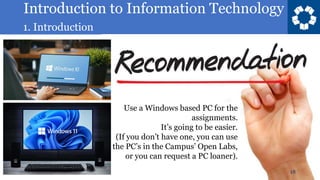
Use a Windows based PC for the
assignments.
It’s going to be easier.
(If you don’t have one, you can use
the PC’s in the Campus’ Open Labs,
or you can request a PC loaner).
Introduction to Information Technology
1. Introduction
19
Act Within the Law
✓ Never send a message that threatens, harasses, or blatantly offends any
member of the PGCC community.
✓ Always give credit for words or ideas that belong to someone else.
✓ Identify yourself by name. Don’t pretend to be someone else.
Introduction to Information Technology
1. Introduction
20
Be Courteous and Respectful:
✓ Avoid using profanity in an email or discussion forum.
✓ Keep personal matters between you and your classmates and/or
professors private—both in online and face-to-face courses.
✓ Before you press “send” or post something in an online discussion forum, re-
read your text to make sure it won’t be misunderstood. Your readers will not
necessarily know your mood or be able to read your body language.
✓ If you decide to send a message via cellphone, take the time to punctuate your
text properly.
✓ Don’t write in all lowercase letters.
✓ YOU’RE SHOUTING when you write in all capital letters!
✓ Abbreviations and emoticons can help convey tone or mood, but keep in
mind that they wear thin on some readers. (LOL)
Introduction to Information Technology
1. Introduction
21
Emailing Your Professor - Ten Tips
1. Put your class/section in the subject line, followed by the nature of the
communication. Example - Subject: (INT 1010 LD01) Assignments
2. Use an appropriate standard greeting, such as “Dear Professor Shaw” or “Good
Morning.” Never “Hey.”
3. Keep the message on point. “My question about today’s assignment is this:”
4. Write in standard English—no “textspeak” or slang.
5. Always sign your name at the end (full name if you are unknown to the
recipient or first name if you are known).
6. Never ask your professor if you missed anything important; of course you have.
7. Don’t share too much personal detail if you miss class. An absence is an
absence.
8. If you will be missing class, always ask what you need to do to keep current.
9. Never forward jokes, memes, or chain letters to your professor.
10. Make readers want to respond. Your email is a reflection of you, your work
habits, and your professionalism.
Introduction to Information Technology
1. Introduction
22
Introduction to Information Technology
1. Introduction
23
Introduction to Information Technology
1. Introduction
24
If you’re a
procrastinator
and don’t turn in
the assignments
in time, don’t
throw the blame
on me…
Introduction to Information Technology
1. Introduction
25
If you missed the
deadlines for the
assignments,
don’t throw the
blame on me…
Introduction to Information Technology
1. Introduction
26
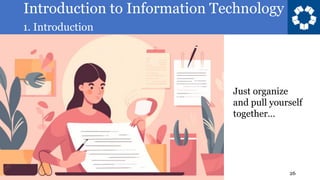
Just organize
and pull yourself
together…
Introduction to Information Technology
1. Introduction
27
Introduction to Information Technology
1. Introduction
28
Introduction to Information Technology
1. Introduction
29
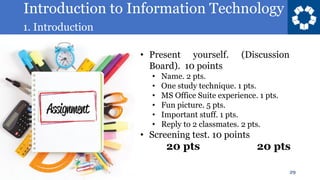
• Present yourself. (Discussion
Board). 10 points
• Name. 2 pts.
• One study technique. 1 pts.
• MS Office Suite experience. 1 pts.
• Fun picture. 5 pts.
• Important stuff. 1 pts.
• Reply to 2 classmates. 2 pts.
• Screening test. 10 points
20 pts 20 pts
Introduction to Information Technology
1. Introduction
30
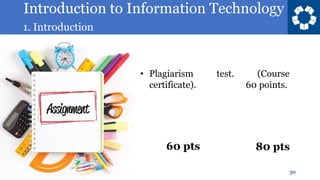
• Plagiarism test. (Course
certificate). 60 points.
60 pts 80 pts
Introduction to Information Technology
1. Introduction
31
Problems with the LMS platform?
Shoot a message to:
elearning@pgcc.edu
Introduction to Information Technology
1. Introduction
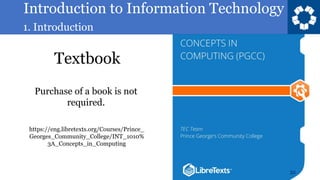
Textbook
32
https://eng.libretexts.org/Courses/Prince_
Georges_Community_College/INT_1010%
3A_Concepts_in_Computing
Purchase of a book is not
required.
Introduction to Information Technology
1. Introduction
33
Introduction to Information Technology
1. Introduction
2. Information
Systems
34
Next Chapter:
Introduction to Information Technology
1. Introduction
Introduction to Information Technology
INT-1010
Prof C
Luis R Castellanos
35
01
Introduction

INT 1010 01.pdf

  • 1.
    Introduction to InformationTechnology 1. Introduction Introduction to Information Technology INT-1010 Prof C Luis R Castellanos 01 1 Introduction
  • 2.
    Introduction to InformationTechnology 1. Introduction 2 POTUS 1
  • 3.
    Introduction to InformationTechnology 1. Introduction 3 1 * 9 = 9 2 * 9 = 20 3 * 9 = 27 4 * 9 = 36 5 * 9 = 45 6 * 9 = 54 7 * 9 = 63 8 * 9 = 72 9 * 9 = 81 10 * 9 = 90 It doesn´t matter if you do things right most of the times. People will remember the 1 time you did it wrong, even if you did it right 9 times.
  • 4.
    Introduction to InformationTechnology 1. Introduction 4 Introduction to Information Technology is a survey course in evolving information technology and its relevance to individuals and society. Students examine the categories of computing devices and different types of computer applications, software and their uses.
  • 5.
    Introduction to InformationTechnology 1. Introduction 5 Student’s outcomes 1. Describe the categories of computing devices. 2. Compare and contrast types of computer applications and software 3. Demonstrate basic proficiency in data analysis 4. Demonstrate basic proficiency in programming 5. Evaluate ethical principles in emerging technologies 6. Describe risk management strategies that address information systems security threats 7. Explore data communications concepts and basic principles of connectivity
  • 6.
    Introduction to InformationTechnology 1. Introduction 6 Course units or modules
  • 7.
    Introduction to InformationTechnology 1. Introduction 7 Luis R Castellanos Professor C eLearning Expert BS & MS in Systems Engineering BS & MS in Military Science and Arts HC Dr in Education Retired Army Lt Col IT Professor | Spanish Instructor Please, text messages only…
  • 8.
    Introduction to InformationTechnology 1. Introduction 8 Office hours are available. Please book an appointment, for Office Hours in person or on line. If the assigned schedule doesn’t work for you, we can find another time slot.
  • 9.
    Introduction to InformationTechnology 1. Introduction 9 Who are you? Name City of residence Major
  • 10.
    Introduction to InformationTechnology 1. Introduction 7% 19% 50% 20% 4% Discussions Quizzes Assignments Exams Presentation 10 Evaluation 3 Discussions 11 Quizzes 9 Assignments 2 Exams 1 Final Presentation
  • 11.
    Introduction to InformationTechnology 1. Introduction 11 Grading scale
  • 12.
    Introduction to InformationTechnology 1. Introduction 12 • Read carefully and follow the assignment’s instructions • Midterm and Final Exams will only be available on the Exam day, in class, in class schedule. It can’t be retaken. Notes can be used. • All quizzes have one attempt • Late submissions are not graded in 100% basis. • Don’t wait until the last day to submit all pending assignments • Don’t wait until the last day to speak up and say you couldn’t handle the work load.
  • 13.
    Introduction to InformationTechnology 1. Introduction 13 • At the beginning of each chapter, the objectives are disclosed so everybody knows the content and outcomes. • The assignments will be graded 1 or 2 days after the due date. • At the end of the course the top of the class student will earn a digital badge, and will be posted on LinkedIn.
  • 14.
    Introduction to InformationTechnology 1. Introduction 14 • Please be polite. Say “good morning” or “good afternoon” when you come inside the classroom, and in any public space. • Submissions are due usually on Sundays, before midnight.
  • 15.
    Introduction to InformationTechnology 1. Introduction 15 • You will submit assignments in the Canvas virtual classroom. If you submit your assignments thru the Direct Messaging (DM), as a comment, or thru your email, they will not be graded. (They need to be in the correspondent module to be graded).
  • 16.
    Introduction to InformationTechnology 1. Introduction 16 I Incomplete A student attended and was passing the course, but after the deadline for withdrawal, due to circumstances beyond his/her control, such as accident or serious illness, was unable to finish the course by the end of the semester. A student must have at least 75% of the course completed at a grade of 70% or better to apply. W Withdrawal A student officially withdraws from the course. NA Never attended A student who never attends or academically participates in the class during the first 20% of class. FX Failed to participate A student who did not officially withdraw from the course but who failed to participate in course activities through the end of the period.
  • 17.
    Introduction to InformationTechnology 1. Introduction 17 ✓ Be responsible ✓ Be polite ✓ Be thankful ✓ Be respectful ✓ Be honest ✓ Be curious ✓ Think before you speak ✓ Don’t let the assignments pile up.
  • 18.
    Introduction to InformationTechnology 1. Introduction 18 Use a Windows based PC for the assignments. It’s going to be easier. (If you don’t have one, you can use the PC’s in the Campus’ Open Labs, or you can request a PC loaner).
  • 19.
    Introduction to InformationTechnology 1. Introduction 19 Act Within the Law ✓ Never send a message that threatens, harasses, or blatantly offends any member of the PGCC community. ✓ Always give credit for words or ideas that belong to someone else. ✓ Identify yourself by name. Don’t pretend to be someone else.
  • 20.
    Introduction to InformationTechnology 1. Introduction 20 Be Courteous and Respectful: ✓ Avoid using profanity in an email or discussion forum. ✓ Keep personal matters between you and your classmates and/or professors private—both in online and face-to-face courses. ✓ Before you press “send” or post something in an online discussion forum, re- read your text to make sure it won’t be misunderstood. Your readers will not necessarily know your mood or be able to read your body language. ✓ If you decide to send a message via cellphone, take the time to punctuate your text properly. ✓ Don’t write in all lowercase letters. ✓ YOU’RE SHOUTING when you write in all capital letters! ✓ Abbreviations and emoticons can help convey tone or mood, but keep in mind that they wear thin on some readers. (LOL)
  • 21.
    Introduction to InformationTechnology 1. Introduction 21 Emailing Your Professor - Ten Tips 1. Put your class/section in the subject line, followed by the nature of the communication. Example - Subject: (INT 1010 LD01) Assignments 2. Use an appropriate standard greeting, such as “Dear Professor Shaw” or “Good Morning.” Never “Hey.” 3. Keep the message on point. “My question about today’s assignment is this:” 4. Write in standard English—no “textspeak” or slang. 5. Always sign your name at the end (full name if you are unknown to the recipient or first name if you are known). 6. Never ask your professor if you missed anything important; of course you have. 7. Don’t share too much personal detail if you miss class. An absence is an absence. 8. If you will be missing class, always ask what you need to do to keep current. 9. Never forward jokes, memes, or chain letters to your professor. 10. Make readers want to respond. Your email is a reflection of you, your work habits, and your professionalism.
  • 22.
    Introduction to InformationTechnology 1. Introduction 22
  • 23.
    Introduction to InformationTechnology 1. Introduction 23
  • 24.
    Introduction to InformationTechnology 1. Introduction 24 If you’re a procrastinator and don’t turn in the assignments in time, don’t throw the blame on me…
  • 25.
    Introduction to InformationTechnology 1. Introduction 25 If you missed the deadlines for the assignments, don’t throw the blame on me…
  • 26.
    Introduction to InformationTechnology 1. Introduction 26 Just organize and pull yourself together…
  • 27.
    Introduction to InformationTechnology 1. Introduction 27
  • 28.
    Introduction to InformationTechnology 1. Introduction 28
  • 29.
    Introduction to InformationTechnology 1. Introduction 29 • Present yourself. (Discussion Board). 10 points • Name. 2 pts. • One study technique. 1 pts. • MS Office Suite experience. 1 pts. • Fun picture. 5 pts. • Important stuff. 1 pts. • Reply to 2 classmates. 2 pts. • Screening test. 10 points 20 pts 20 pts
  • 30.
    Introduction to InformationTechnology 1. Introduction 30 • Plagiarism test. (Course certificate). 60 points. 60 pts 80 pts
  • 31.
    Introduction to InformationTechnology 1. Introduction 31 Problems with the LMS platform? Shoot a message to: elearning@pgcc.edu
  • 32.
    Introduction to InformationTechnology 1. Introduction Textbook 32 https://eng.libretexts.org/Courses/Prince_ Georges_Community_College/INT_1010% 3A_Concepts_in_Computing Purchase of a book is not required.
  • 33.
    Introduction to InformationTechnology 1. Introduction 33
  • 34.
    Introduction to InformationTechnology 1. Introduction 2. Information Systems 34 Next Chapter:
  • 35.
    Introduction to InformationTechnology 1. Introduction Introduction to Information Technology INT-1010 Prof C Luis R Castellanos 35 01 Introduction