Instagram
Tips, Tricks, & Best
Practices
2
Introduction
How It Works
Key Settings
Best Practices
More Ideas
Analytics
Contents
3
You might groan at the idea of introducing another social
platform to your arsenal, but Instagram has become a
marketing essential. 24% of adults are using it (that’s
more than Twitter!) with 55% of young adults ages 18-29
on the service*. Out of all the social platforms, artists
frequently find Instagram the most enjoyable and
intuitive platform to use, making it less of a chore for
them and a more authentic experience for fans.
*Demographics of Social Media Users, Pew Resarch Center, 8/19/15
Introduction
4
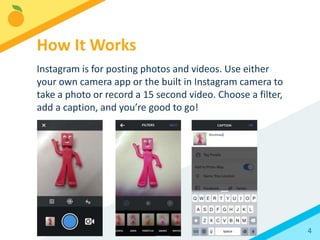
Instagram is for posting photos and videos. Use either
your own camera app or the built in Instagram camera to
take a photo or record a 15 second video. Choose a filter,
add a caption, and you’re good to go!
How It Works
5
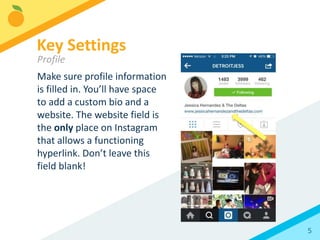
Make sure profile information
is filled in. You’ll have space
to add a custom bio and a
website. The website field is
the only place on Instagram
that allows a functioning
hyperlink. Don’t leave this
field blank!
Key Settings
Profile
6
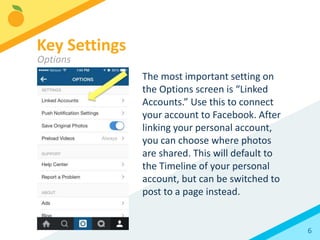
The most important setting on
the Options screen is “Linked
Accounts.” Use this to connect
your account to Facebook. After
linking your personal account,
you can choose where photos
are shared. This will default to
the Timeline of your personal
account, but can be switched to
post to a page instead.
Key Settings
Options
7
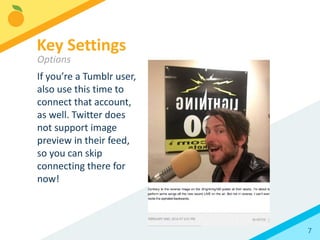
If you’re a Tumblr user,
also use this time to
connect that account,
as well. Twitter does
not support image
preview in their feed,
so you can skip
connecting there for
now!
Key Settings
Options
8
You’ve gotten the hang of the basics. Now it’s time to
make sure you’re getting all you can out of Instagram.
Best Practices
9
You can use any photo or
video content you’d like on
Instagram, including press
materials and clips of official
videos.
Best Practices
Types of Content
10
Promotional content doesn’t
make for the best fan
experience, though. Fans are
looking for candid insight
into the lives of their
favorite artists. Aim for at
least 70% authentic photo
and video posts.
Best Practices
Types of Content
11
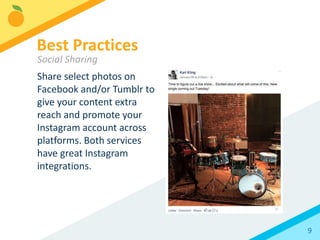
Share select photos and
videos on Facebook and/or
Tumblr to give your content
extra reach and promote
your Instagram account
across platforms. Both
services have great
Instagram integrations.
Best Practices
Social Sharing
12
Instagram has some popular, regularly used hashtags.
Try jumping onto a theme with some of these:
#TBT (Throwback Thursday): An older photo
#MCM (Man-Crush Monday): A man you admire
#WCW (Woman-Crush Wednesday): A woman you admire
#OOTD (Outfit of the Day): For the fashion inclined
Best Practices
Hashtags
13
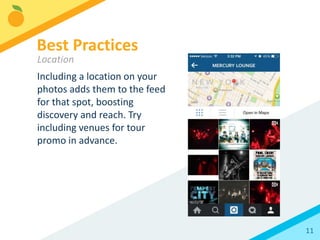
Including a location on your
photos adds them to the feed
for that spot, boosting
discovery and reach. Try
including venues for tour
promo in advance.
Best Practices
Location
14
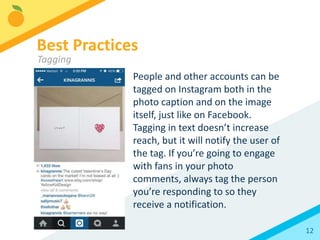
People and other accounts can be
tagged on Instagram both in the
photo caption and on the image
itself, just like on Facebook.
Tagging in text doesn’t increase
reach, but it will notify the user of
the tag. If you’re going to engage
with fans in your photo
comments, always tag the person
you’re responding to so they
receive a notification.
Best Practices
Tagging
15
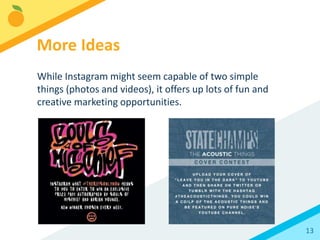
While Instagram might seem capable of two simple
things (photos and videos), it offers up lots of fun and
creative marketing opportunities.
More Ideas
16
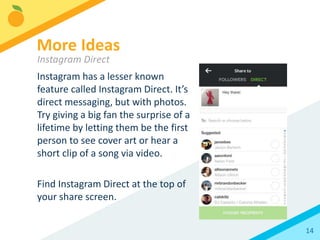
Instagram has a lesser known
feature called Instagram Direct. It’s
direct messaging, but with photos.
Try giving a big fan the surprise of a
lifetime by letting them be the first
person to see cover art or hear a
short clip of a song via video.
Find Instagram Direct at the top of
your share screen.
More Ideas
Instagram Direct
17
Instagram has introduced its own photo
tool apps:
Hyperlapse: Create your own timelapse videos
Boomerang: Make gif-like video posts turning
small, short movements into hypnotic
repetitive images
Layout: Create photo collages and comparisons
More Ideas
Apps from Instagram
18
Use Repost to give fans a shout while
adding their own content to your feed.
The app will credit the original
photographer while generating a new
post for your own account.
More Ideas
Repost
19
Quickly add text to your photos with
Quick (formerly Overgram) for iOS and
Android.
More Ideas
Text on Photos
20
Need to schedule posts for later? If
you’re on the go and planning content
in advance, check out Latergramme.
More Ideas
Schedule Posts
21
Compile existing photos into a slideshow
video. Recap a tour or flip through an
album package. Flipagram is available for
both iOS and Android.
More Ideas
Slideshows
22
There isn’t a built in, universal Instagram analytics tool,
so you’ll need to experiment and pay attention to see
what gets results. There are some free/affordable tools
that can help
• Iconosquare (formerly Statigram) – Great for finding
hashtag usage for a contest
• PicStats – a new tool that analyzes account behaviors
to show what works best
Analytics
Measuring Success
23
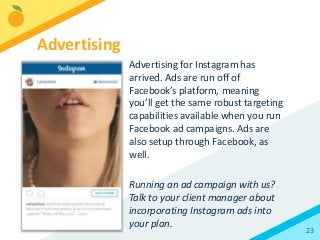
Advertising for Instagram has
arrived. Ads are run off of
Facebook’s platform, meaning
you’ll get the same robust targeting
capabilities available when you run
Facebook ad campaigns. Ads are
also setup through Facebook, as
well.
Running an ad campaign with us?
Talk to your client manager about
incorporating Instagram ads into
your plan.
Advertising
twitter.com/orchtweets
facebook.com/theorchard
linkedin.com/company/the-orchard
The Orchard and its logo are registered trademarks of Orchard
Enterprises NY, Inc. All Rights Reserved. All other trademarks not
owned by the Orchard Enterprises NY, Inc., its parent or affiliates that
appear herein are the property of their respective owners, who may
or may not be affiliated with, connected to, or sponsored by Orchard
Enterprises NY, Inc., its parent or its affiliates.
Thank You!
See you later

Instagram Best Practices 2016

  • 1.
  • 2.
    2 Introduction How It Works KeySettings Best Practices More Ideas Analytics Contents
  • 3.
    3 You might groanat the idea of introducing another social platform to your arsenal, but Instagram has become a marketing essential. 24% of adults are using it (that’s more than Twitter!) with 55% of young adults ages 18-29 on the service*. Out of all the social platforms, artists frequently find Instagram the most enjoyable and intuitive platform to use, making it less of a chore for them and a more authentic experience for fans. *Demographics of Social Media Users, Pew Resarch Center, 8/19/15 Introduction
  • 4.
    4 Instagram is forposting photos and videos. Use either your own camera app or the built in Instagram camera to take a photo or record a 15 second video. Choose a filter, add a caption, and you’re good to go! How It Works
  • 5.
    5 Make sure profileinformation is filled in. You’ll have space to add a custom bio and a website. The website field is the only place on Instagram that allows a functioning hyperlink. Don’t leave this field blank! Key Settings Profile
  • 6.
    6 The most importantsetting on the Options screen is “Linked Accounts.” Use this to connect your account to Facebook. After linking your personal account, you can choose where photos are shared. This will default to the Timeline of your personal account, but can be switched to post to a page instead. Key Settings Options
  • 7.
    7 If you’re aTumblr user, also use this time to connect that account, as well. Twitter does not support image preview in their feed, so you can skip connecting there for now! Key Settings Options
  • 8.
    8 You’ve gotten thehang of the basics. Now it’s time to make sure you’re getting all you can out of Instagram. Best Practices
  • 9.
    9 You can useany photo or video content you’d like on Instagram, including press materials and clips of official videos. Best Practices Types of Content
  • 10.
    10 Promotional content doesn’t makefor the best fan experience, though. Fans are looking for candid insight into the lives of their favorite artists. Aim for at least 70% authentic photo and video posts. Best Practices Types of Content
  • 11.
    11 Share select photosand videos on Facebook and/or Tumblr to give your content extra reach and promote your Instagram account across platforms. Both services have great Instagram integrations. Best Practices Social Sharing
  • 12.
    12 Instagram has somepopular, regularly used hashtags. Try jumping onto a theme with some of these: #TBT (Throwback Thursday): An older photo #MCM (Man-Crush Monday): A man you admire #WCW (Woman-Crush Wednesday): A woman you admire #OOTD (Outfit of the Day): For the fashion inclined Best Practices Hashtags
  • 13.
    13 Including a locationon your photos adds them to the feed for that spot, boosting discovery and reach. Try including venues for tour promo in advance. Best Practices Location
  • 14.
    14 People and otheraccounts can be tagged on Instagram both in the photo caption and on the image itself, just like on Facebook. Tagging in text doesn’t increase reach, but it will notify the user of the tag. If you’re going to engage with fans in your photo comments, always tag the person you’re responding to so they receive a notification. Best Practices Tagging
  • 15.
    15 While Instagram mightseem capable of two simple things (photos and videos), it offers up lots of fun and creative marketing opportunities. More Ideas
  • 16.
    16 Instagram has alesser known feature called Instagram Direct. It’s direct messaging, but with photos. Try giving a big fan the surprise of a lifetime by letting them be the first person to see cover art or hear a short clip of a song via video. Find Instagram Direct at the top of your share screen. More Ideas Instagram Direct
  • 17.
    17 Instagram has introducedits own photo tool apps: Hyperlapse: Create your own timelapse videos Boomerang: Make gif-like video posts turning small, short movements into hypnotic repetitive images Layout: Create photo collages and comparisons More Ideas Apps from Instagram
  • 18.
    18 Use Repost togive fans a shout while adding their own content to your feed. The app will credit the original photographer while generating a new post for your own account. More Ideas Repost
  • 19.
    19 Quickly add textto your photos with Quick (formerly Overgram) for iOS and Android. More Ideas Text on Photos
  • 20.
    20 Need to scheduleposts for later? If you’re on the go and planning content in advance, check out Latergramme. More Ideas Schedule Posts
  • 21.
    21 Compile existing photosinto a slideshow video. Recap a tour or flip through an album package. Flipagram is available for both iOS and Android. More Ideas Slideshows
  • 22.
    22 There isn’t abuilt in, universal Instagram analytics tool, so you’ll need to experiment and pay attention to see what gets results. There are some free/affordable tools that can help • Iconosquare (formerly Statigram) – Great for finding hashtag usage for a contest • PicStats – a new tool that analyzes account behaviors to show what works best Analytics Measuring Success
  • 23.
    23 Advertising for Instagramhas arrived. Ads are run off of Facebook’s platform, meaning you’ll get the same robust targeting capabilities available when you run Facebook ad campaigns. Ads are also setup through Facebook, as well. Running an ad campaign with us? Talk to your client manager about incorporating Instagram ads into your plan. Advertising
  • 24.
    twitter.com/orchtweets facebook.com/theorchard linkedin.com/company/the-orchard The Orchard andits logo are registered trademarks of Orchard Enterprises NY, Inc. All Rights Reserved. All other trademarks not owned by the Orchard Enterprises NY, Inc., its parent or affiliates that appear herein are the property of their respective owners, who may or may not be affiliated with, connected to, or sponsored by Orchard Enterprises NY, Inc., its parent or its affiliates. Thank You! See you later