FUNCTIONAL INFORMATION SYSTEMS
Definition
A functional information system is a system that
provides detailed information for a specific type of
operations activity or related group of activities, as
well as summarized information for management
control of such activities.
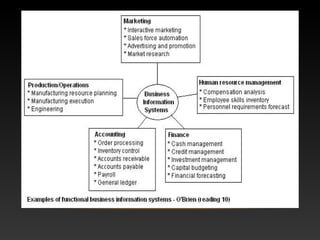
TYPES OF FUNCTIONAL INFORMATION SYSTEM
Finance (FIN): provide internal and external professional access to stock,
investment and capital spending information.
Accounting (ACC): similar to financial MIS more related to invoicing, payroll,
receivables.
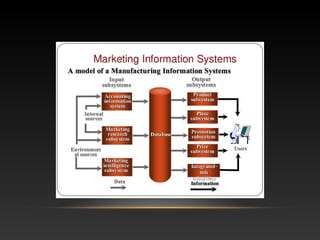
Marketing (MKT): pricing, distribution, promotional, and information by
customer and salesperson.
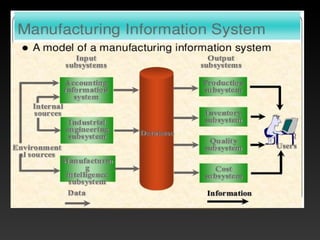
Operations (OPS): regular reports on production, yield, quality, inventory levels.
These systems typically deal with manufacturing, sourcing, and supply chain
management.
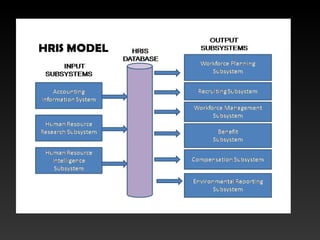
Human Resources Management (HR): employees, benefits, hiring‘s, etc.
DSS
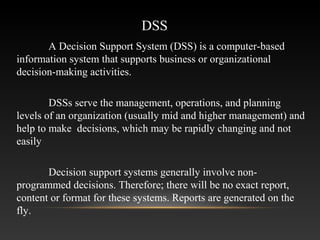
A Decision Support System (DSS) is a computer-based
information system that supports business or organizational
decision-making activities.
DSSs serve the management, operations, and planning
levels of an organization (usually mid and higher management) and
help to make decisions, which may be rapidly changing and not
easily
Decision support systems generally involve non-
programmed decisions. Therefore; there will be no exact report,
content or format for these systems. Reports are generated on the
fly.
CHARACTERISTICS OF A DSS
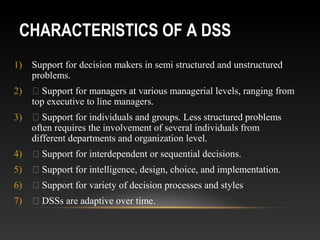
1) Support for decision makers in semi structured and unstructured
problems.
2)  Support for managers at various managerial levels, ranging from
top executive to line managers.
3)  Support for individuals and groups. Less structured problems
often requires the involvement of several individuals from
different departments and organization level.
4)  Support for interdependent or sequential decisions.
5)  Support for intelligence, design, choice, and implementation.
6)  Support for variety of decision processes and styles
7)  DSSs are adaptive over time.
ATTRIBUTES OF A DSS
 Adaptability and flexibility
 High level of Interactivity
 Ease of use
 Efficiency and effectiveness
 Complete control by decision-makers.
 Ease of development
 Extendibility
 Support for modeling and analysis
 Support for data access
 Standalone, integrated and Web-based
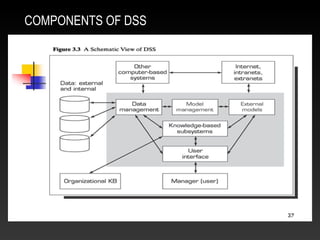
COMPONENTS OF DSS
CLASSIFICATION OF DSS
• File Drawer systems - status inquiries for inventory information, airline reservations requests.
• Data Analysis Systems- budget analysis system
• Analysis information systems – customer info, sales detailed sales data.
• Representational models - A risk analysis models
• Accounting models - monthly budgeting systems and short term financial planning
• Optimization models – material usage optimization system
• Suggestion models – insurance renewal rate calculation system , decision rules.
BENEFITS OF DSS
 Improves efficiency and speed of decision making activities
  Increases the control, competitiveness and capability of futuristic decision
making of the organization
  Facilitates interpersonal communication
  Encourages learning or training
  Since it is mostly used in non-programmed decisions, it reveals new approaches
and sets up new evidences for an unusual decision
  Helps automate managerial processes
DISADVANTAGES OF DSS
 Limited Storage Capability
 Slow
 Limited Information sharing
 Difficult
 Require Extensive Knowledge
 Translation Problems
 Confliction
EXECUTIVE INFORMATION SYSTEM
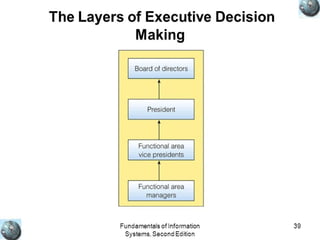
• Executive support systems are intended to be used by
the senior managers directly to provide support to non-
programmed decisions in strategic management. These
information are often external, unstructured and even
uncertain. Exact scope and context of such information is
often not known beforehand
FEATURES OF EIS
• Drill-Down Capabilities – look for details on any specific information. declining
corporate sales in a particular region.
• Designed with management’s Critical Success Factors in Mind
• Status Access, Trend Analysis, and Exception Reporting
• Personalized Analysis- analyze the problematic situation.
• Navigation of Information
• Presents Graphical, Tabular, and/or Textual Information
CAPABILITIES OF EXECUTIVE SUPPORT SYSTEMS
• Support for Defining an Overall Vision
• Support for Strategic Planning
• Support for Strategic Organizing and Staffing
• Support for Strategic Control
• Support for Crisis Management
COMPONENTS OF EIS
• Hardware
• Software
• Interface
• Telecommunication
ADVANTAGES OF EIS
• Easy for upper level executive to use
•  Ability to analyze trends
•  Augmentation of managers' leadership capabilities
•  Enhance personal thinking and decision making
•  Contribution to strategic control flexibility
•  Enhance organizational competitiveness in the market place
•  Instruments of change
•  Increased executive time horizons.
•  Better reporting system
•  Improved mental model of business executive
•  Help improve consensus building and communication
•  Improve office automation
•  Reduce time for finding information
•  Early identification of company performance
DISADVANTAGE OF EIS
• Functions are limited
•  Hard to quantify benefits
•  Executive may encounter information overload
•  System may become slow
•  Difficult to keep current data
•  May lead to less reliable and insecure data
•  Excessive cost for small company
APPLICATIONS OF EIS
• Manufacturing
• Marketing
• Financial
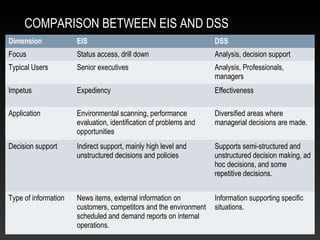
COMPARISON BETWEEN EIS AND DSS
Dimension EIS DSS
Focus Status access, drill down Analysis, decision support
Typical Users Senior executives Analysis, Professionals,
managers
Impetus Expediency Effectiveness
Application Environmental scanning, performance
evaluation, identification of problems and
opportunities
Diversified areas where
managerial decisions are made.
Decision support Indirect support, mainly high level and
unstructured decisions and policies
Supports semi-structured and
unstructured decision making, ad
hoc decisions, and some
repetitive decisions.
Type of information News items, external information on
customers, competitors and the environment
scheduled and demand reports on internal
operations.
Information supporting specific
situations.
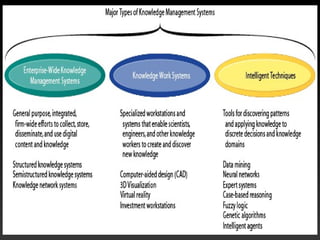
KNOWLEDGE MANAGEMENT SYSTEM(KMS)
• All the systems we are discussing here come under
knowledge management category. A knowledge
management system is not radically different from all
these information systems, but it just extends the already
existing systems by assimilating more information.
• As we have seen data is raw facts, information is
processed and/or interpreted data and knowledge is
personalized information.
WHAT IS KNOWLEDGE?
• personalized information
• state of knowing and understanding
• an object to be stored and manipulated
• a process of applying expertise
• a condition of access to information
• potential to influence action
SOURCES OF KNOWLEDGE OF AN
ORGANIZATION
• Intranet
•  Data warehouses and knowledge repositories
•  Decision support tools
•  Groupware for supporting collaboration
•  Networks of knowledge workers
•  Internal expertise
FEATURES OF KNOWLEDGE MANAGEMENT
• Purpose
• Context
• Processes
• Participants
• Instruments
PURPOSE OF A KMS
 Improved performance
 Competitive advantage
 Innovation
 Sharing of knowledge
 Integration
 Continuous improvement by:
 o Driving strategy
 o Starting new lines of business
 o Solving problems faster
 o Developing professional skills
 o Recruit and retain talent
GEOGRAPHIC INFORMATION SYSTEM (GIS)
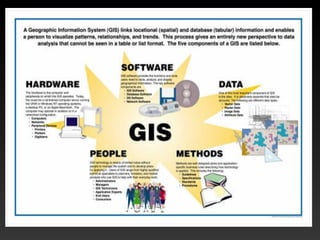
• A geographic information system (GIS)
is a computer system designed to
capture, store, manipulate, analyze,
manage, and present all types of spatial
or geographical data.
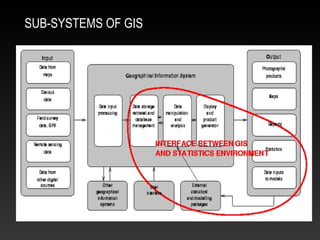
SUB-SYSTEMS OF GIS
33
• Data Capture
• Data sources are mainly obtained from manual digitization and scanning of
aerial photographs, paper maps, and existing digital data sets.
• Database Management and Update
• data security, data integrity, and data storage and retrieval, and data
maintenance abilities
• Geographic Analysis
• The collected information is analyzed and interpreted qualitatively and
quantitatively.
• Preparing Result
• One of the most exciting aspects of GIS technology is the variety of different
ways in which the information can be presented.
Principle
34
• Data Capture
• The input of data into a GIS can be achieved through many different methods of
gathering. For example, aerial photography, scanning, digitizing, GPS or global
positioning system is just a few of the ways a GIS user could obtain data.
• Data Storage
• Some data is stored such as a map in a drawer, while others, such as digital data, can
be as a hardcopy, stored on CD or on your hard drive.
• Data Manipulation
• The digital geographical data can be edited, this allows for many attribute to be added,
edited, or deleted to the specification of the project.
• Query And Analysis
• GIS was used widely in decision making process for the new commission districts. We
use population data to help establish an equal representation of population to area for
each district.
• Visualization
• This represents the ability to display your data, your maps, and information.
Functions
35
• GIS allows us to view, understand, and visualize data in many ways that reveal
relationships, patterns, and trends in the form of maps, globes, reports, and charts.
• A GIS helps you answer questions and solve problems by looking at your data in a way
that is quickly understood and easily shared.
• GIS give the accurate Data.
• Better Predictions and Analysis.
Advantages of
GIS
36
• Excessive damage in case of internal fault. Long outage periods as
Repair of damaged part at site may be difficult.
• Expensive software.
• Integration with traditional map is difficult.
Disadvantages of GIS
INTERNATIONAL INFORMATION SYSTEM
• International information systems are
distributed information systems which
support similar business activities in highly
diverse environments commonly found
across country boundaries.
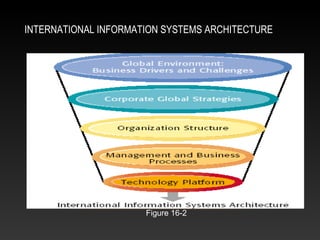
INTERNATIONAL INFORMATION SYSTEMS ARCHITECTURE
Figure 16-2
TYPES OF INTERNATIONAL INFROMATION SYSTEMS
• Transnational Information Systems:
• Global Information Systems
• Collaborative or Cooperative Information Systems
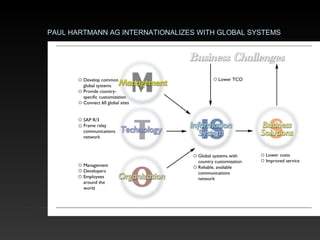
PAUL HARTMANN AG INTERNATIONALIZES WITH GLOBAL SYSTEMS
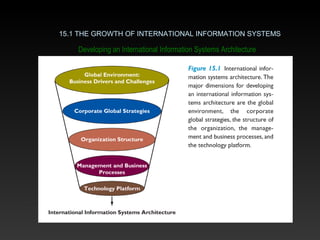
Developing an International Information Systems Architecture
15.1 THE GROWTH OF INTERNATIONAL INFORMATION SYSTEMS
• International Information Systems ArchitectureInternational Information Systems Architecture
– consists of basic information systems required by
organizations to coordinate worldwide trade and
other tasks
• Business DriverBusiness Driver
– an environmental force to which businesses must
respond and that influences a business’ direction
Developing an International Information Systems Architecture
15.1 THE GROWTH OF INTERNATIONAL INFORMATION SYSTEMS
The Global Environment: Business Drivers and Challenges
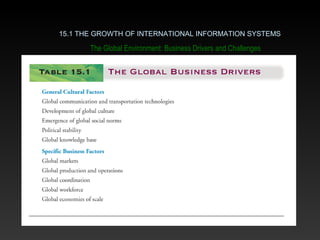
• Global Business DriversGlobal Business Drivers
– general cultural factors
– specific business factors
• Global CultureGlobal Culture
– the development of common expectations,
shared artifacts, and social norms among
different cultures and people
15.1 THE GROWTH OF INTERNATIONAL INFORMATION SYSTEMS
The Global Environment: Business Drivers and Challenges
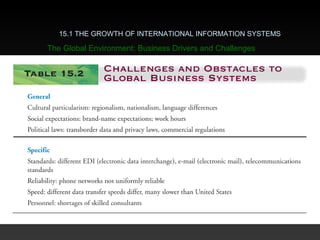
15.1 THE GROWTH OF INTERNATIONAL INFORMATION SYSTEMS
The Global Environment: Business Drivers and Challenges
Business ChallengesBusiness Challenges
• ParticularismParticularism
– making judgments and taking action based on
narrow or personal features, rejects the concept of
shared global culture
• Transborder Data FlowTransborder Data Flow
– the movement of information across international
boundaries in any form
continued
15.1 THE GROWTH OF INTERNATIONAL INFORMATION SYSTEMS
The Global Environment: Business Drivers and Challenges
Business ChallengesBusiness Challenges (continued)(continued)
• National Laws and TraditionsNational Laws and Traditions
– create disparate accounting practices in various
countries, impacting how profits and losses are
analyzed
• Additional FactorsAdditional Factors
– cultural differences about technology
– different languages
– currency fluctuations
15.1 THE GROWTH OF INTERNATIONAL INFORMATION SYSTEMS
The Global Environment: Business Drivers and Challenges
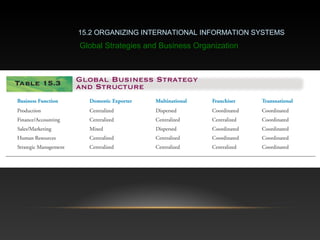
• Domestic Exporter
• characterized by heavy centralization of corporate activities in home country of origin
• Multinational
• concentrates financial management and control out of a home base, but decentralizes
production, sales, and marketing
continued
15.2 ORGANIZING INTERNATIONAL INFORMATION SYSTEMS
Global Strategies and Business Organization
• Franchisers
• Involve creating, designing, and financing in the home country,
then rely on foreign personnel for further production, marketing,
and human resources (e.g., McDonald’s)
• Transnational
• Truly global, no national headquarters, value-added activities
managed with a global perspective
15.2 ORGANIZING INTERNATIONAL INFORMATION SYSTEMS
Global Strategies and Business Organization
15.2 ORGANIZING INTERNATIONAL INFORMATION SYSTEMS
Global Strategies and Business Organization
Global Systems
• Information technology and improved global
telecommunications give international firms more
flexibility to shape global strategies
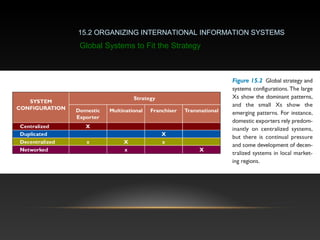
• Domestic exporters tend to have highly centralized
systems in which one domestic systems development
staff develops worldwide applications
Global Systems to Fit the Strategy
15.2 ORGANIZING INTERNATIONAL INFORMATION SYSTEMS
Global Systems to Fit the Strategy
• Organize value-adding services along lines of
comparative advantage
• Develop and operate system units at each level of
corporate activity – regional, national, and international
• Establish a world headquarters at one office responsible
for developing international systems and a global CIO
Reorganizing the Business
15.2 ORGANIZING INTERNATIONAL INFORMATION SYSTEMS
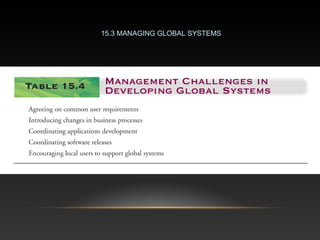
15.3 MANAGING GLOBAL SYSTEMS
• Hardware and Systems Integration
• Developing global systems based on core systems raises
questions about how new cores systems will fit within existing
applications
• Connectivity
• Telecommunications is the heart of international systems, linking
systems and people in a global firm into a single, integrated
network
• Potential solutions include putting together leased private
network, building one’s own network, or creating global intranets
over Intranet
15.4 TECHNOLOGY ISSUES & OPPORTUNITIES FOR GLOBAL VALUE CHAINS
Main Technical Issues
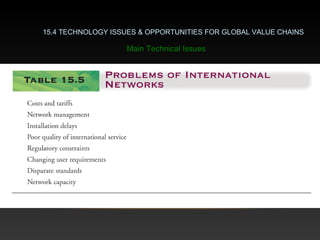
15.4 TECHNOLOGY ISSUES & OPPORTUNITIES FOR GLOBAL VALUE CHAINS
Main Technical Issues
15.4 TECHNOLOGY ISSUES & OPPORTUNITIES FOR GLOBAL VALUE CHAINS
Main Technical Issues
• Software
• Developing new core systems poses unique challenges for software, involves
problems of human interface design and system functionality
• Many firms increasingly turn to supply chain management and enterprise systems to
standardize business processes globally
• Communicate and Compute Anytime, Anywhere Networks
–based on satellites, cell phones, and personal
communications systems; will facilitate work
• Virtual Private Networks (VPNs)
• reduce networking costs and staff
New Technical Opportunities and the Internet

Info sys

  • 1.
  • 2.
    Definition A functional informationsystem is a system that provides detailed information for a specific type of operations activity or related group of activities, as well as summarized information for management control of such activities.
  • 4.
    TYPES OF FUNCTIONALINFORMATION SYSTEM Finance (FIN): provide internal and external professional access to stock, investment and capital spending information. Accounting (ACC): similar to financial MIS more related to invoicing, payroll, receivables. Marketing (MKT): pricing, distribution, promotional, and information by customer and salesperson. Operations (OPS): regular reports on production, yield, quality, inventory levels. These systems typically deal with manufacturing, sourcing, and supply chain management. Human Resources Management (HR): employees, benefits, hiring‘s, etc.
  • 8.
    DSS A Decision SupportSystem (DSS) is a computer-based information system that supports business or organizational decision-making activities. DSSs serve the management, operations, and planning levels of an organization (usually mid and higher management) and help to make decisions, which may be rapidly changing and not easily Decision support systems generally involve non- programmed decisions. Therefore; there will be no exact report, content or format for these systems. Reports are generated on the fly.
  • 9.
    CHARACTERISTICS OF ADSS 1) Support for decision makers in semi structured and unstructured problems. 2)  Support for managers at various managerial levels, ranging from top executive to line managers. 3)  Support for individuals and groups. Less structured problems often requires the involvement of several individuals from different departments and organization level. 4)  Support for interdependent or sequential decisions. 5)  Support for intelligence, design, choice, and implementation. 6)  Support for variety of decision processes and styles 7)  DSSs are adaptive over time.
  • 10.
    ATTRIBUTES OF ADSS  Adaptability and flexibility  High level of Interactivity  Ease of use  Efficiency and effectiveness  Complete control by decision-makers.  Ease of development  Extendibility  Support for modeling and analysis  Support for data access  Standalone, integrated and Web-based
  • 11.
  • 12.
    CLASSIFICATION OF DSS •File Drawer systems - status inquiries for inventory information, airline reservations requests. • Data Analysis Systems- budget analysis system • Analysis information systems – customer info, sales detailed sales data. • Representational models - A risk analysis models • Accounting models - monthly budgeting systems and short term financial planning • Optimization models – material usage optimization system • Suggestion models – insurance renewal rate calculation system , decision rules.
  • 13.
    BENEFITS OF DSS Improves efficiency and speed of decision making activities   Increases the control, competitiveness and capability of futuristic decision making of the organization   Facilitates interpersonal communication   Encourages learning or training   Since it is mostly used in non-programmed decisions, it reveals new approaches and sets up new evidences for an unusual decision   Helps automate managerial processes
  • 14.
    DISADVANTAGES OF DSS Limited Storage Capability  Slow  Limited Information sharing  Difficult  Require Extensive Knowledge  Translation Problems  Confliction
  • 15.
    EXECUTIVE INFORMATION SYSTEM •Executive support systems are intended to be used by the senior managers directly to provide support to non- programmed decisions in strategic management. These information are often external, unstructured and even uncertain. Exact scope and context of such information is often not known beforehand
  • 17.
    FEATURES OF EIS •Drill-Down Capabilities – look for details on any specific information. declining corporate sales in a particular region. • Designed with management’s Critical Success Factors in Mind • Status Access, Trend Analysis, and Exception Reporting • Personalized Analysis- analyze the problematic situation. • Navigation of Information • Presents Graphical, Tabular, and/or Textual Information
  • 18.
    CAPABILITIES OF EXECUTIVESUPPORT SYSTEMS • Support for Defining an Overall Vision • Support for Strategic Planning • Support for Strategic Organizing and Staffing • Support for Strategic Control • Support for Crisis Management
  • 19.
    COMPONENTS OF EIS •Hardware • Software • Interface • Telecommunication
  • 20.
    ADVANTAGES OF EIS •Easy for upper level executive to use •  Ability to analyze trends •  Augmentation of managers' leadership capabilities •  Enhance personal thinking and decision making •  Contribution to strategic control flexibility •  Enhance organizational competitiveness in the market place •  Instruments of change •  Increased executive time horizons. •  Better reporting system •  Improved mental model of business executive •  Help improve consensus building and communication •  Improve office automation •  Reduce time for finding information •  Early identification of company performance
  • 21.
    DISADVANTAGE OF EIS •Functions are limited •  Hard to quantify benefits •  Executive may encounter information overload •  System may become slow •  Difficult to keep current data •  May lead to less reliable and insecure data •  Excessive cost for small company
  • 22.
    APPLICATIONS OF EIS •Manufacturing • Marketing • Financial
  • 23.
    COMPARISON BETWEEN EISAND DSS Dimension EIS DSS Focus Status access, drill down Analysis, decision support Typical Users Senior executives Analysis, Professionals, managers Impetus Expediency Effectiveness Application Environmental scanning, performance evaluation, identification of problems and opportunities Diversified areas where managerial decisions are made. Decision support Indirect support, mainly high level and unstructured decisions and policies Supports semi-structured and unstructured decision making, ad hoc decisions, and some repetitive decisions. Type of information News items, external information on customers, competitors and the environment scheduled and demand reports on internal operations. Information supporting specific situations.
  • 24.
    KNOWLEDGE MANAGEMENT SYSTEM(KMS) •All the systems we are discussing here come under knowledge management category. A knowledge management system is not radically different from all these information systems, but it just extends the already existing systems by assimilating more information. • As we have seen data is raw facts, information is processed and/or interpreted data and knowledge is personalized information.
  • 25.
    WHAT IS KNOWLEDGE? •personalized information • state of knowing and understanding • an object to be stored and manipulated • a process of applying expertise • a condition of access to information • potential to influence action
  • 26.
    SOURCES OF KNOWLEDGEOF AN ORGANIZATION • Intranet •  Data warehouses and knowledge repositories •  Decision support tools •  Groupware for supporting collaboration •  Networks of knowledge workers •  Internal expertise
  • 27.
    FEATURES OF KNOWLEDGEMANAGEMENT • Purpose • Context • Processes • Participants • Instruments
  • 29.
    PURPOSE OF AKMS  Improved performance  Competitive advantage  Innovation  Sharing of knowledge  Integration  Continuous improvement by:  o Driving strategy  o Starting new lines of business  o Solving problems faster  o Developing professional skills  o Recruit and retain talent
  • 30.
    GEOGRAPHIC INFORMATION SYSTEM(GIS) • A geographic information system (GIS) is a computer system designed to capture, store, manipulate, analyze, manage, and present all types of spatial or geographical data.
  • 32.
  • 33.
    33 • Data Capture •Data sources are mainly obtained from manual digitization and scanning of aerial photographs, paper maps, and existing digital data sets. • Database Management and Update • data security, data integrity, and data storage and retrieval, and data maintenance abilities • Geographic Analysis • The collected information is analyzed and interpreted qualitatively and quantitatively. • Preparing Result • One of the most exciting aspects of GIS technology is the variety of different ways in which the information can be presented. Principle
  • 34.
    34 • Data Capture •The input of data into a GIS can be achieved through many different methods of gathering. For example, aerial photography, scanning, digitizing, GPS or global positioning system is just a few of the ways a GIS user could obtain data. • Data Storage • Some data is stored such as a map in a drawer, while others, such as digital data, can be as a hardcopy, stored on CD or on your hard drive. • Data Manipulation • The digital geographical data can be edited, this allows for many attribute to be added, edited, or deleted to the specification of the project. • Query And Analysis • GIS was used widely in decision making process for the new commission districts. We use population data to help establish an equal representation of population to area for each district. • Visualization • This represents the ability to display your data, your maps, and information. Functions
  • 35.
    35 • GIS allowsus to view, understand, and visualize data in many ways that reveal relationships, patterns, and trends in the form of maps, globes, reports, and charts. • A GIS helps you answer questions and solve problems by looking at your data in a way that is quickly understood and easily shared. • GIS give the accurate Data. • Better Predictions and Analysis. Advantages of GIS
  • 36.
    36 • Excessive damagein case of internal fault. Long outage periods as Repair of damaged part at site may be difficult. • Expensive software. • Integration with traditional map is difficult. Disadvantages of GIS
  • 37.
    INTERNATIONAL INFORMATION SYSTEM •International information systems are distributed information systems which support similar business activities in highly diverse environments commonly found across country boundaries.
  • 38.
    INTERNATIONAL INFORMATION SYSTEMSARCHITECTURE Figure 16-2
  • 39.
    TYPES OF INTERNATIONALINFROMATION SYSTEMS • Transnational Information Systems: • Global Information Systems • Collaborative or Cooperative Information Systems
  • 40.
    PAUL HARTMANN AGINTERNATIONALIZES WITH GLOBAL SYSTEMS
  • 41.
    Developing an InternationalInformation Systems Architecture 15.1 THE GROWTH OF INTERNATIONAL INFORMATION SYSTEMS • International Information Systems ArchitectureInternational Information Systems Architecture – consists of basic information systems required by organizations to coordinate worldwide trade and other tasks • Business DriverBusiness Driver – an environmental force to which businesses must respond and that influences a business’ direction
  • 42.
    Developing an InternationalInformation Systems Architecture 15.1 THE GROWTH OF INTERNATIONAL INFORMATION SYSTEMS
  • 43.
    The Global Environment:Business Drivers and Challenges • Global Business DriversGlobal Business Drivers – general cultural factors – specific business factors • Global CultureGlobal Culture – the development of common expectations, shared artifacts, and social norms among different cultures and people 15.1 THE GROWTH OF INTERNATIONAL INFORMATION SYSTEMS
  • 44.
    The Global Environment:Business Drivers and Challenges 15.1 THE GROWTH OF INTERNATIONAL INFORMATION SYSTEMS
  • 45.
    15.1 THE GROWTHOF INTERNATIONAL INFORMATION SYSTEMS The Global Environment: Business Drivers and Challenges
  • 46.
    Business ChallengesBusiness Challenges •ParticularismParticularism – making judgments and taking action based on narrow or personal features, rejects the concept of shared global culture • Transborder Data FlowTransborder Data Flow – the movement of information across international boundaries in any form continued 15.1 THE GROWTH OF INTERNATIONAL INFORMATION SYSTEMS The Global Environment: Business Drivers and Challenges
  • 47.
    Business ChallengesBusiness Challenges(continued)(continued) • National Laws and TraditionsNational Laws and Traditions – create disparate accounting practices in various countries, impacting how profits and losses are analyzed • Additional FactorsAdditional Factors – cultural differences about technology – different languages – currency fluctuations 15.1 THE GROWTH OF INTERNATIONAL INFORMATION SYSTEMS The Global Environment: Business Drivers and Challenges
  • 48.
    • Domestic Exporter •characterized by heavy centralization of corporate activities in home country of origin • Multinational • concentrates financial management and control out of a home base, but decentralizes production, sales, and marketing continued 15.2 ORGANIZING INTERNATIONAL INFORMATION SYSTEMS Global Strategies and Business Organization
  • 49.
    • Franchisers • Involvecreating, designing, and financing in the home country, then rely on foreign personnel for further production, marketing, and human resources (e.g., McDonald’s) • Transnational • Truly global, no national headquarters, value-added activities managed with a global perspective 15.2 ORGANIZING INTERNATIONAL INFORMATION SYSTEMS Global Strategies and Business Organization
  • 50.
    15.2 ORGANIZING INTERNATIONALINFORMATION SYSTEMS Global Strategies and Business Organization
  • 51.
    Global Systems • Informationtechnology and improved global telecommunications give international firms more flexibility to shape global strategies • Domestic exporters tend to have highly centralized systems in which one domestic systems development staff develops worldwide applications Global Systems to Fit the Strategy 15.2 ORGANIZING INTERNATIONAL INFORMATION SYSTEMS
  • 52.
    15.2 ORGANIZING INTERNATIONALINFORMATION SYSTEMS Global Systems to Fit the Strategy
  • 53.
    • Organize value-addingservices along lines of comparative advantage • Develop and operate system units at each level of corporate activity – regional, national, and international • Establish a world headquarters at one office responsible for developing international systems and a global CIO Reorganizing the Business 15.2 ORGANIZING INTERNATIONAL INFORMATION SYSTEMS
  • 54.
  • 55.
    • Hardware andSystems Integration • Developing global systems based on core systems raises questions about how new cores systems will fit within existing applications • Connectivity • Telecommunications is the heart of international systems, linking systems and people in a global firm into a single, integrated network • Potential solutions include putting together leased private network, building one’s own network, or creating global intranets over Intranet 15.4 TECHNOLOGY ISSUES & OPPORTUNITIES FOR GLOBAL VALUE CHAINS Main Technical Issues
  • 56.
    15.4 TECHNOLOGY ISSUES& OPPORTUNITIES FOR GLOBAL VALUE CHAINS Main Technical Issues
  • 57.
    15.4 TECHNOLOGY ISSUES& OPPORTUNITIES FOR GLOBAL VALUE CHAINS Main Technical Issues • Software • Developing new core systems poses unique challenges for software, involves problems of human interface design and system functionality • Many firms increasingly turn to supply chain management and enterprise systems to standardize business processes globally
  • 58.
    • Communicate andCompute Anytime, Anywhere Networks –based on satellites, cell phones, and personal communications systems; will facilitate work • Virtual Private Networks (VPNs) • reduce networking costs and staff New Technical Opportunities and the Internet