UNIT- III
Anatomy of continuous
delivery/deployment
VERSION CONTROL SYSTEM
What is version control?
 Version control - also known as source control or revision control - is an
important software development practice for tracking and managing changes
made to code and other files. It is closely related to source code management.
 The version control system is a collection of software tools that help a team to
manage changes in a source code. It uses a special kind of database to keep
track of every modification to the code.
 Version control enables teams to collaborate and streamline development to resolve
conflicts and create a centralized location for code
Why use version control?
 As organizations accelerate delivery of their software solutions through
DevOps, controlling and managing different versions of application artifacts —
from code to configuration and from design to deployment — becomes
increasingly difficult.
 Version control software facilitates coordination, sharing, and collaboration
across the entire software development team. It enables teams to work in
distributed and asynchronous environments, manage changes and versions of
code and artifacts, and resolve merge conflicts and related anomalies.
Benefits of version control
 Quality
Teams can review, comment, and improve each other's code and assets.
 Acceleration
Branch code, make changes, and merge commits faster.
 Visibility
Understand and spark team collaboration to foster greater release build and
release patterns. Better visibility improves everything from project
management to code quality.
Types of Version Control System
 Localized version Control System
 Centralized version control systems
 Distributed version control systems
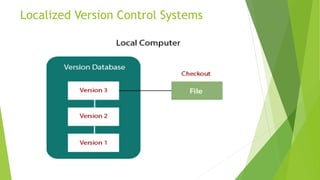
Localized Version Control Systems
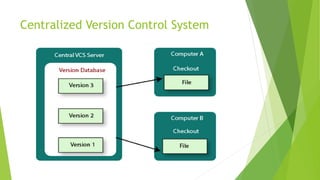
Centralized Version Control System
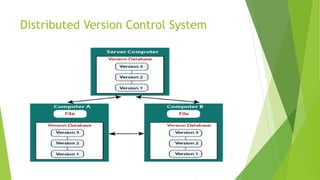
Distributed Version Control System
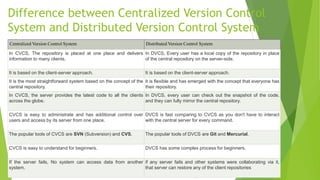
Difference between Centralized Version Control
System and Distributed Version Control System
Centralized Version Control System Distributed Version Control System
In CVCS, The repository is placed at one place and delivers
information to many clients.
In DVCS, Every user has a local copy of the repository in place
of the central repository on the server-side.
It is based on the client-server approach. It is based on the client-server approach.
It is the most straightforward system based on the concept of the
central repository.
It is flexible and has emerged with the concept that everyone has
their repository.
In CVCS, the server provides the latest code to all the clients
across the globe.
In DVCS, every user can check out the snapshot of the code,
and they can fully mirror the central repository.
CVCS is easy to administrate and has additional control over
users and access by its server from one place.
DVCS is fast comparing to CVCS as you don't have to interact
with the central server for every command.
The popular tools of CVCS are SVN (Subversion) and CVS. The popular tools of DVCS are Git and Mercurial.
CVCS is easy to understand for beginners. DVCS has some complex process for beginners.
If the server fails, No system can access data from another
system.
if any server fails and other systems were collaborating via it,
that server can restore any of the client repositories
Build Artifacts (JAR, WAR, Docker images)
 What is artifact JAR file?
An Artifact is “anything” (any file) that can be addressed using its coordinates,
and Maven downloads, installs or deploys for you. Most of them are POMs and JARs
but an artifact can be really anything.
 What is artifact WAR file?
A WAR file may be digitally signed in the same way as a JAR file in order to
allow others to determine where the source code came from.
 What is Docker image file?
A Docker image is a file used to execute code in a Docker container. Docker
images act as a set of instructions to build a Docker container, like a template. Docker
images also act as the starting point when using Docker. An image is comparable to a
snapshot in virtual machine (VM) environments.
Automated tests
 What is automated testing?
Automated testing is a software testing technique that automates the process of
validating the functionality of software and ensures it meets requirements before being
released into production. With automated testing, an organization can run specific
software tests at a faster pace without human testers. Automated testing is best suited
for large or repetitive test cases
What Are the Different Types of Automation
Testing?
 Keyword-driven testing
 Integration testing
 Unit testing
 Smoke testing
 Regression testing
 Performance testing
 Security testing
 Data-driven testing
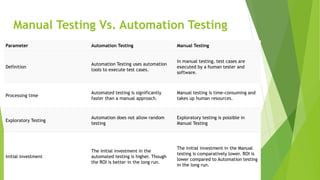
Manual Testing Vs. Automation Testing
Parameter Automation Testing Manual Testing
Definition
Automation Testing uses automation
tools to execute test cases.
In manual testing, test cases are
executed by a human tester and
software.
Processing time
Automated testing is significantly
faster than a manual approach.
Manual testing is time-consuming and
takes up human resources.
Exploratory Testing
Automation does not allow random
testing
Exploratory testing is possible in
Manual Testing
Initial investment
The initial investment in the
automated testing is higher. Though
the ROI is better in the long run.
The initial investment in the Manual
testing is comparatively lower. ROI is
lower compared to Automation testing
in the long run.
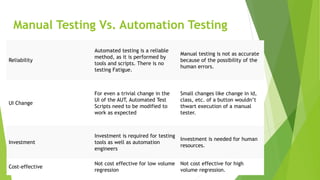
Manual Testing Vs. Automation Testing
Reliability
Automated testing is a reliable
method, as it is performed by
tools and scripts. There is no
testing Fatigue.
Manual testing is not as accurate
because of the possibility of the
human errors.
UI Change
For even a trivial change in the
UI of the AUT, Automated Test
Scripts need to be modified to
work as expected
Small changes like change in id,
class, etc. of a button wouldn’t
thwart execution of a manual
tester.
Investment
Investment is required for testing
tools as well as automation
engineers
Investment is needed for human
resources.
Cost-effective
Not cost effective for low volume
regression
Not cost effective for high
volume regression.
Manual Testing Vs. Automation Testing

CICD.pptx

  • 1.
    UNIT- III Anatomy ofcontinuous delivery/deployment
  • 2.
    VERSION CONTROL SYSTEM Whatis version control?  Version control - also known as source control or revision control - is an important software development practice for tracking and managing changes made to code and other files. It is closely related to source code management.  The version control system is a collection of software tools that help a team to manage changes in a source code. It uses a special kind of database to keep track of every modification to the code.  Version control enables teams to collaborate and streamline development to resolve conflicts and create a centralized location for code
  • 3.
    Why use versioncontrol?  As organizations accelerate delivery of their software solutions through DevOps, controlling and managing different versions of application artifacts — from code to configuration and from design to deployment — becomes increasingly difficult.  Version control software facilitates coordination, sharing, and collaboration across the entire software development team. It enables teams to work in distributed and asynchronous environments, manage changes and versions of code and artifacts, and resolve merge conflicts and related anomalies.
  • 4.
    Benefits of versioncontrol  Quality Teams can review, comment, and improve each other's code and assets.  Acceleration Branch code, make changes, and merge commits faster.  Visibility Understand and spark team collaboration to foster greater release build and release patterns. Better visibility improves everything from project management to code quality.
  • 5.
    Types of VersionControl System  Localized version Control System  Centralized version control systems  Distributed version control systems
  • 6.
  • 7.
  • 8.
  • 9.
    Difference between CentralizedVersion Control System and Distributed Version Control System Centralized Version Control System Distributed Version Control System In CVCS, The repository is placed at one place and delivers information to many clients. In DVCS, Every user has a local copy of the repository in place of the central repository on the server-side. It is based on the client-server approach. It is based on the client-server approach. It is the most straightforward system based on the concept of the central repository. It is flexible and has emerged with the concept that everyone has their repository. In CVCS, the server provides the latest code to all the clients across the globe. In DVCS, every user can check out the snapshot of the code, and they can fully mirror the central repository. CVCS is easy to administrate and has additional control over users and access by its server from one place. DVCS is fast comparing to CVCS as you don't have to interact with the central server for every command. The popular tools of CVCS are SVN (Subversion) and CVS. The popular tools of DVCS are Git and Mercurial. CVCS is easy to understand for beginners. DVCS has some complex process for beginners. If the server fails, No system can access data from another system. if any server fails and other systems were collaborating via it, that server can restore any of the client repositories
  • 10.
    Build Artifacts (JAR,WAR, Docker images)  What is artifact JAR file? An Artifact is “anything” (any file) that can be addressed using its coordinates, and Maven downloads, installs or deploys for you. Most of them are POMs and JARs but an artifact can be really anything.  What is artifact WAR file? A WAR file may be digitally signed in the same way as a JAR file in order to allow others to determine where the source code came from.  What is Docker image file? A Docker image is a file used to execute code in a Docker container. Docker images act as a set of instructions to build a Docker container, like a template. Docker images also act as the starting point when using Docker. An image is comparable to a snapshot in virtual machine (VM) environments.
  • 11.
    Automated tests  Whatis automated testing? Automated testing is a software testing technique that automates the process of validating the functionality of software and ensures it meets requirements before being released into production. With automated testing, an organization can run specific software tests at a faster pace without human testers. Automated testing is best suited for large or repetitive test cases
  • 12.
    What Are theDifferent Types of Automation Testing?  Keyword-driven testing  Integration testing  Unit testing  Smoke testing  Regression testing  Performance testing  Security testing  Data-driven testing
  • 13.
    Manual Testing Vs.Automation Testing Parameter Automation Testing Manual Testing Definition Automation Testing uses automation tools to execute test cases. In manual testing, test cases are executed by a human tester and software. Processing time Automated testing is significantly faster than a manual approach. Manual testing is time-consuming and takes up human resources. Exploratory Testing Automation does not allow random testing Exploratory testing is possible in Manual Testing Initial investment The initial investment in the automated testing is higher. Though the ROI is better in the long run. The initial investment in the Manual testing is comparatively lower. ROI is lower compared to Automation testing in the long run.
  • 14.
    Manual Testing Vs.Automation Testing Reliability Automated testing is a reliable method, as it is performed by tools and scripts. There is no testing Fatigue. Manual testing is not as accurate because of the possibility of the human errors. UI Change For even a trivial change in the UI of the AUT, Automated Test Scripts need to be modified to work as expected Small changes like change in id, class, etc. of a button wouldn’t thwart execution of a manual tester. Investment Investment is required for testing tools as well as automation engineers Investment is needed for human resources. Cost-effective Not cost effective for low volume regression Not cost effective for high volume regression.
  • 15.
    Manual Testing Vs.Automation Testing