Download to read offline
![REACT LAB PROGRAMS
1: Login Form with Validation
import { useState } from "react";
export default function LoginForm() {
const [email, setEmail] = useState("");
const [password, setPassword] = useState("");
const [error, setError] = useState("");
function handleSubmit(e) {
e.preventDefault();
if (!email || !password) {
setError("Both fields are required!");
} else {
setError("");
alert(`Welcome, ${email}`);
}
}
return (
<div className="p-4">
<h2>Login</h2>
<form onSubmit={handleSubmit}>
<input
type="email"
placeholder="Enter email"
value={email}
onChange={(e) => setEmail(e.target.value)}
/><br />
<input
type="password"](https://image.slidesharecdn.com/reactlabprograms-250903160331-40215b93/85/React-Lab-Programs-with-Descriptions-and-explanations-1-320.jpg)
![REACT LAB PROGRAMS
1: Login Form with Validation
import { useState } from "react";
export default function LoginForm() {
const [email, setEmail] = useState("");
const [password, setPassword] = useState("");
const [error, setError] = useState("");
function handleSubmit(e) {
e.preventDefault();
if (!email || !password) {
setError("Both fields are required!");
} else {
setError("");
alert(`Welcome, ${email}`);
}
}
return (
<div className="p-4">
<h2>Login</h2>
<form onSubmit={handleSubmit}>
<input
type="email"
placeholder="Enter email"
value={email}
onChange={(e) => setEmail(e.target.value)}
/><br />
<input
type="password"](https://image.slidesharecdn.com/reactlabprograms-250903160331-40215b93/75/React-Lab-Programs-with-Descriptions-and-explanations-1-2048.jpg)
![placeholder="Enter password"
value={password}
onChange={(e) => setPassword(e.target.value)}
/><br />
<button type="submit">Login</button>
</form>
{error && <p style={{ color: "red" }}>{error}</p>}
</div>
);
}
OUTPUT
2: Shopping Cart
import { useState } from "react";
const products = [
{ id: 1, name: "Laptop", price: 50000 },
{ id: 2, name: "Phone", price: 20000 },
{ id: 3, name: "Headphones", price: 2000 }
];](https://image.slidesharecdn.com/reactlabprograms-250903160331-40215b93/85/React-Lab-Programs-with-Descriptions-and-explanations-2-320.jpg)
![export default function ShoppingCart() {
const [cart, setCart] = useState([]);
function addToCart(product) {
setCart([...cart, product]);
}
const total = cart.reduce((sum, item) => sum + item.price, 0);
return (
<div className="p-4">
<h2>Products</h2>
{products.map((p) => (
<div key={p.id}>
{p.name} - ₹{p.price}
<button onClick={() => addToCart(p)}>Add</button>
</div>
))}
<h2>Cart</h2>
{cart.map((item, index) => (
<p key={index}>{item.name} - ₹{item.price}</p>
))}
<h3>Total: ₹{total}</h3>
</div>
);
}
OUTPUT](https://image.slidesharecdn.com/reactlabprograms-250903160331-40215b93/85/React-Lab-Programs-with-Descriptions-and-explanations-3-320.jpg)
![3: Student Attendance Tracker
import { useState } from "react";
const students = ["Ravi", "Anita", "Kumar", "Priya"];
export default function AttendanceTracker() {
const [attendance, setAttendance] = useState({});
function toggleAttendance(name) {
setAttendance((prev) => ({
...prev,
[name]: !prev[name]
}));
}
return (
<div className="p-4">
<h2>Attendance Tracker</h2>
{students.map((s) => (
<div key={s}>
<span>{s}</span>](https://image.slidesharecdn.com/reactlabprograms-250903160331-40215b93/85/React-Lab-Programs-with-Descriptions-and-explanations-4-320.jpg)
![<button onClick={() => toggleAttendance(s)}>
{attendance[s] ? "Present " : "Absent "}
</button>
</div>
))}
<h3>Summary</h3>
<p>Present: {Object.values(attendance).filter(Boolean).length}</p>
<p>Absent: {Object.values(attendance).filter((v) => !v).length}</p>
</div>
);
}
Output
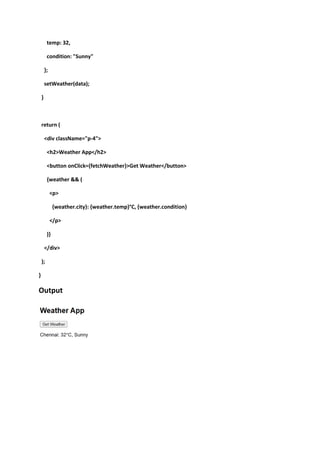
4: Weather App (using fake API data)
import { useState } from "react";
export default function WeatherApp() {
const [weather, setWeather] = useState(null);
function fetchWeather() {
// Simulated API response
const data = {
city: "Chennai",](https://image.slidesharecdn.com/reactlabprograms-250903160331-40215b93/85/React-Lab-Programs-with-Descriptions-and-explanations-5-320.jpg)

React Lab Programs with Descriptions Hello World App – Basic React app displaying text. Simple Counter – Increment & decrement using state. To-Do List – Add, delete, and mark tasks complete. Student Info Card – Display props in a styled card. Form Handling – Capture user input with state. Login Page – Controlled form with validation. Calculator – Perform basic arithmetic operations. Weather App – Fetch & display API data. Shopping Cart – Add/remove items using useState. Image Gallery – Show images with grid & modal. Theme Switcher – Toggle light/dark theme. Digital Clock – Live updating time with hooks. Pagination Example – Display data page by page. Search Filter – Filter list dynamically by input.


