Microsoft ®  Office  InfoPath ®   2007 Training Basic InfoPath 101 IT DPT presents: Presented by: David Liong
Course contents Overview Feature How to create a form? – Demo How to publish a form? Resources FAQ Will not cover: Creating customise workflow for a InfoPath – Advance Dev Tut
See… http://sharenotes.files.wordpress.com/2008/03/moss-arch.jpg   http://msdn.microsoft.com/en-us/library/ms772323.aspx   Overview: InfoPath Architecture
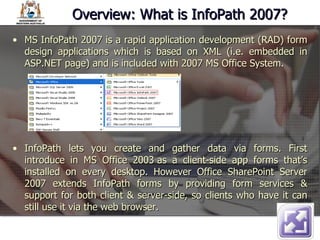
MS InfoPath 2007 is a rapid application development (RAD) form design applications which is based on XML (i.e. embedded in ASP.NET page) and is included with 2007 MS Office System. InfoPath lets you create and gather data via forms. First introduce in MS Office 2003 as a client-side app forms that’s installed on every desktop. However Office SharePoint Server 2007 extends InfoPath forms by providing form services & support for both client & server-side, so clients who have it can still use it via the web browser. Overview: What is InfoPath 2007?
Server-side installs InfoPath forms on client web browser  who don’t have InfoPath installed. Renders the .xsn form into HTML. Security options – E.g. integrates with active directory Includes data binding options – E.g. SQL Has digital signatures and attachment features Basic OFTB workflows For more info  go to “ What’s new in MS InfoPath 2007 ?  “ Feature: What can InfoPath 2007 do?
There are 5 ways to create an InfoPath form: Use an existing temple sample, save it as a different file and customise it Create a form based on a XSD schema Create a form based on a relational data source Create a form based on a web service Use MS Visual Studio How Do I Create a Form?
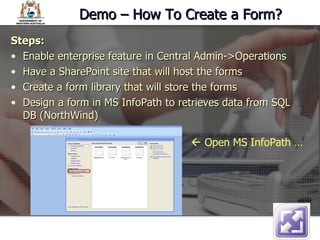
Demo – How To Create a Form? Steps:  Enable enterprise feature in Central Admin->Operations Have a SharePoint site that will host the forms  Create a form library that will store the forms Design a form in MS InfoPath to retrieves data from SQL DB (NorthWind)    Open MS InfoPath …
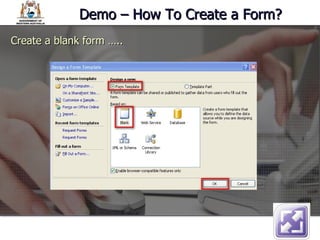
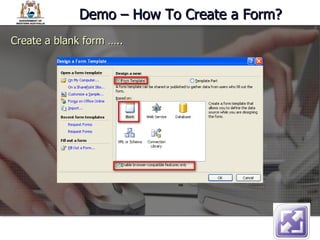
Demo – How To Create a Form? Create a blank form …..
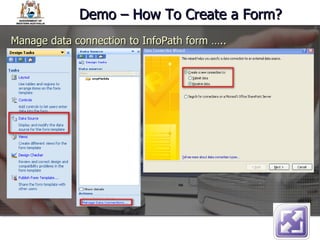
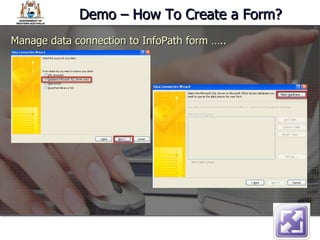
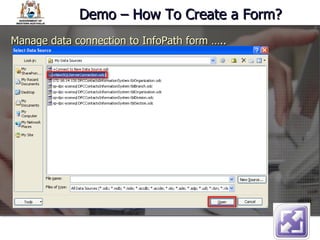
Demo – How To Create a Form? Manage data connection to InfoPath form …..
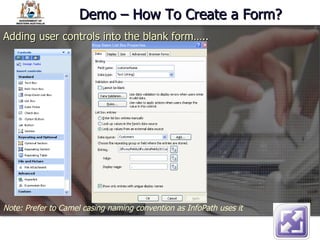
Demo – How To Create a Form? Adding user controls into the blank form….. Note: Prefer to Camel casing naming convention as InfoPath uses it
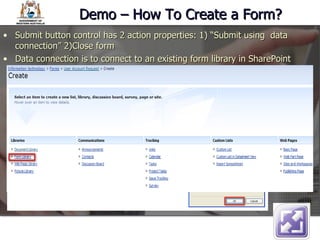
Demo – How To Create a Form? Submit button control has 2 action properties: 1) “Submit using  data connection” 2)Close form Data connection is to connect to an existing form library in SharePoint
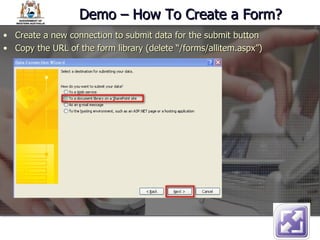
Demo – How To Create a Form? Create a new connection to submit data for the submit button Copy the URL of the form library (delete “/forms/allitem.aspx”)
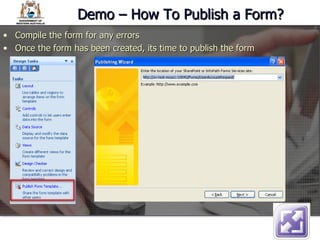
Demo – How To Publish a Form? Compile the form for any errors Once the form has been created, its time to publish the form
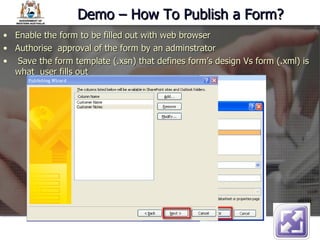
Demo – How To Publish a Form? Enable the form to be filled out with web browser Authorise  approval of the form by an adminstrator Save the form template (.xsn) that defines form’s design Vs form (.xml) is what  user fills out
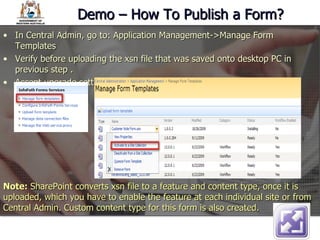
Demo – How To Publish a Form? In Central Admin, go to: Application Management->Manage Form Templates Verify before uploading the xsn file that was saved onto desktop PC in previous step .  Accept upgrade settings by default. Note:  SharePoint converts xsn file to a feature and content type, once it is uploaded, which you have to enable the feature at each individual site or from Central Admin. Custom content type for this form is also created.
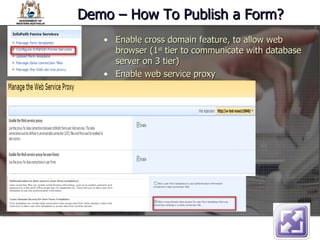
Demo – How To Publish a Form? Enable cross domain feature, to allow web browser (1 st  tier to communicate with database server on 3 tier)  Enable web service proxy
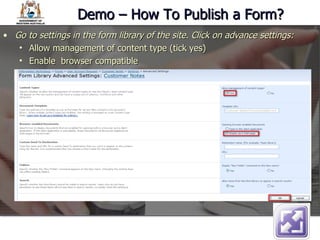
Demo – How To Publish a Form? Go to settings in the form library of the site. Click on advance settings: Allow management of content type (tick yes) Enable  browser compatible
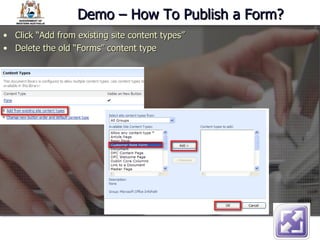
Demo – How To Publish a Form? Click “Add from existing site content types” Delete the old “Forms” content type
Demo – How to start the form? Go to the Form library Click on “New->New Document”
Lesson 1 Make the data connection Resources Visit Lynn Langit  blog site  MS InfoPath Introduction to InfoPath Webpedia   NorthWind sample  DB for SQL 2005
Any Questions? "Live in the present, remember the past, and fear not the future, for it doesn't exist and never shall“ CHRISTOPHER PAOLINI
The End

Info Path 2007 Training

  • 1.
    Microsoft ® Office InfoPath ® 2007 Training Basic InfoPath 101 IT DPT presents: Presented by: David Liong
  • 2.
    Course contents OverviewFeature How to create a form? – Demo How to publish a form? Resources FAQ Will not cover: Creating customise workflow for a InfoPath – Advance Dev Tut
  • 3.
    See… http://sharenotes.files.wordpress.com/2008/03/moss-arch.jpg http://msdn.microsoft.com/en-us/library/ms772323.aspx Overview: InfoPath Architecture
  • 4.
    MS InfoPath 2007is a rapid application development (RAD) form design applications which is based on XML (i.e. embedded in ASP.NET page) and is included with 2007 MS Office System. InfoPath lets you create and gather data via forms. First introduce in MS Office 2003 as a client-side app forms that’s installed on every desktop. However Office SharePoint Server 2007 extends InfoPath forms by providing form services & support for both client & server-side, so clients who have it can still use it via the web browser. Overview: What is InfoPath 2007?
  • 5.
    Server-side installs InfoPathforms on client web browser who don’t have InfoPath installed. Renders the .xsn form into HTML. Security options – E.g. integrates with active directory Includes data binding options – E.g. SQL Has digital signatures and attachment features Basic OFTB workflows For more info go to “ What’s new in MS InfoPath 2007 ? “ Feature: What can InfoPath 2007 do?
  • 6.
    There are 5ways to create an InfoPath form: Use an existing temple sample, save it as a different file and customise it Create a form based on a XSD schema Create a form based on a relational data source Create a form based on a web service Use MS Visual Studio How Do I Create a Form?
  • 7.
    Demo – HowTo Create a Form? Steps: Enable enterprise feature in Central Admin->Operations Have a SharePoint site that will host the forms Create a form library that will store the forms Design a form in MS InfoPath to retrieves data from SQL DB (NorthWind)  Open MS InfoPath …
  • 8.
    Demo – HowTo Create a Form? Create a blank form …..
  • 9.
    Demo – HowTo Create a Form? Create a blank form …..
  • 10.
    Demo – HowTo Create a Form? Manage data connection to InfoPath form …..
  • 11.
    Demo – HowTo Create a Form? Manage data connection to InfoPath form …..
  • 12.
    Demo – HowTo Create a Form? Manage data connection to InfoPath form …..
  • 13.
    Demo – HowTo Create a Form? Adding user controls into the blank form….. Note: Prefer to Camel casing naming convention as InfoPath uses it
  • 14.
    Demo – HowTo Create a Form? Submit button control has 2 action properties: 1) “Submit using data connection” 2)Close form Data connection is to connect to an existing form library in SharePoint
  • 15.
    Demo – HowTo Create a Form? Create a new connection to submit data for the submit button Copy the URL of the form library (delete “/forms/allitem.aspx”)
  • 16.
    Demo – HowTo Publish a Form? Compile the form for any errors Once the form has been created, its time to publish the form
  • 17.
    Demo – HowTo Publish a Form? Enable the form to be filled out with web browser Authorise approval of the form by an adminstrator Save the form template (.xsn) that defines form’s design Vs form (.xml) is what user fills out
  • 18.
    Demo – HowTo Publish a Form? In Central Admin, go to: Application Management->Manage Form Templates Verify before uploading the xsn file that was saved onto desktop PC in previous step . Accept upgrade settings by default. Note: SharePoint converts xsn file to a feature and content type, once it is uploaded, which you have to enable the feature at each individual site or from Central Admin. Custom content type for this form is also created.
  • 19.
    Demo – HowTo Publish a Form? Enable cross domain feature, to allow web browser (1 st tier to communicate with database server on 3 tier) Enable web service proxy
  • 20.
    Demo – HowTo Publish a Form? Go to settings in the form library of the site. Click on advance settings: Allow management of content type (tick yes) Enable browser compatible
  • 21.
    Demo – HowTo Publish a Form? Click “Add from existing site content types” Delete the old “Forms” content type
  • 22.
    Demo – Howto start the form? Go to the Form library Click on “New->New Document”
  • 23.
    Lesson 1 Makethe data connection Resources Visit Lynn Langit blog site MS InfoPath Introduction to InfoPath Webpedia NorthWind sample DB for SQL 2005
  • 24.
    Any Questions? "Livein the present, remember the past, and fear not the future, for it doesn't exist and never shall“ CHRISTOPHER PAOLINI
  • 25.

Editor's Notes

  • #7 Open MS InfoPath 2007
  • #8 Site: http://sv-test-moss1:10040/Forms/UserAccountRequest/Pages/Default.aspx Test database: SV-TETS-SQL1 Web service: http://sv-test-moss1:10080/Contact%20WebService/ContactService.asmx
  • #9 What is a template part See
  • #10 Template part is equilivant to user controls
  • #11 Template part is equilivant to user controls
  • #12 Template part is equilivant to user controls
  • #18 Security level domain if you are within the domain then you are in a secure location and given higher rights.
  • #19 Use stasadm –o execadmsvcjobs to update the job status of xsn upload