



Funnel your Info down a new
Path
Ryan Dennis | MCTS, MCPD, MCITP | Blue Chip Consulting Group
Thank You for being a part of SharePoint
Saturday Columbus!
• Please turn off all electronic devices or set them to vibrate
• If you must take a phone call, please do so in the hall
• Wi-Fi is available, you will need your Guest ID/password
(at registration desk)
• Feel free to tweet and blog during sessions. Remember to follow
@SPSColumbus and tag #SPSCBUS in your tweets!
• GO BUCKS!
SharePoint Saturday Columbus 2013 2
SharePoint Saturday Columbus is hosted by the Buckeye SharePoint User Group
@BuckeyeSPUG
Please fill out session
evaluations and
thank you for attending!
SharePoint Saturday Columbus 2013 3
Thanks to our sponsors!
4
BRONZESILVERGOLD
Where should we SharePint?
• Tweet with hashtag #SPSCBUS
• Option 1: Buckeye Hall of Fame Grill
• Option 2: Eddie George’s Grill 27
• Option 3: Big Bar
• Option 4: Chumley’s
• Option 5: Buffalo Wild Wings
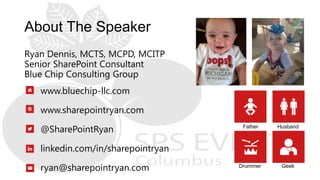
About The Speaker
Ryan Dennis, MCTS, MCPD, MCITP
Senior SharePoint Consultant
Blue Chip Consulting Group
Father Husband
Drummer Geek
www.bluechip-llc.com
www.sharepointryan.com
@SharePointRyan
linkedin.com/in/sharepointryan
ryan@sharepointryan.com
What is InfoPath?
• …a forms-creation and data-gathering tool to streamline
business processes…
• …a tool for advanced business users to design sophisticated
electronic forms with no code…
• …a point-and-click way to connect to LOB systems using data
connections…
Ok Ryan, so what is it really?
• An awesome way for you to make data entry fun, engaging and
powerful…
• A brilliant front-end to SharePoint list and library data…
• …an Office program…
And it works with SharePoint?
• InfoPath forms can be used in SharePoint in multiple ways,
including…
• List Forms
• Customize existing SP Lists
• Browser-based Library Forms
• Publish form templates for viewing in the browser
• Client-based Library Forms
• Publish advanced form templates for viewing in the InfoPath client
• Workflow Forms
• Modify SharePoint workflow forms using InfoPath for a richer experience
• Web Service Forms
• Automatically create forms based on Web Services
What licensing do I need?
• Client (InfoPath Designer)
• Microsoft Office Professional Plus 2013
• Server (Forms Services)
• SharePoint Server 2013 Enterprise
*Without SP Enterprise, you can publish your forms to SharePoint and launch them in the client –
but the InfoPath client is then required on every machine
Is InfoPath going away?
“InfoPath is currently in the product.”
– Microsoft, July 2013
“The future is unclear at best, realistically
pessimistic and a dead-end at worst.”
– Andrew Connell (MVP), April 2013
“Who knows, but for now it’s still the best solution
for building form solutions in SharePoint”
– Me, right now
3 Main Types of Forms in
SharePoint that we’re talking about…
• List form
• Modify an existing list form using InfoPath
• Browser-based form template
• Publish a form template for browser use
• Client-based form template
• Publish a form template for client use
• A modified “front end” to a SharePoint list…
• Limited functionality compared to form templates, but much
nicer than OOTB list forms…
• Can leverage data connections…
• Can be launched within the browser or in an InfoPath Form Web
Part
• Utilize a form template (XSN file)…
• Are stored in a SharePoint Form Library…
• Can leverage data connections and external content types…
• Provide more functionality than list-based forms…
• Can be launched within the browser, in an InfoPath Form Web
Part or in the InfoPath Form Client*
*Some features which are supported in client-based forms are not supported in browser
based forms. More info later…
• Utilize a form template (XSN file)…
• Can be stored in a SharePoint Form Library…
• Can leverage data connections and external content types…
• Provide more functionality than library-based forms…
• Must be launched in the InfoPath Form Client*
*A good option if you have the Office license to support InfoPath but do not have the
Enterprise CAL for SharePoint Server
Working with SharePoint
List Forms
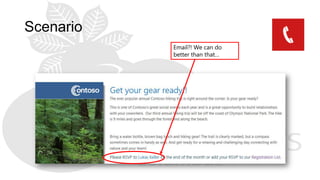
Email?! We can do
better than that…
Creating a SharePoint List
Form
• Created a standard List in SharePoint 2013
• Customized the List Form using InfoPath 2013
• Modified a few fields for better user experience
• Added some Contoso branding elements
• Had fun doing it…
Working with SharePoint
Web Services
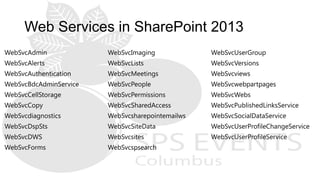
Web Services in SharePoint 2013
WebSvcAdmin
WebSvcAlerts
WebSvcAuthentication
WebSvcBdcAdminService
WebSvcCellStorage
WebSvcCopy
WebSvcdiagnostics
WebSvcDspSts
WebSvcDWS
WebSvcForms
WebSvcImaging
WebSvcLists
WebSvcMeetings
WebSvcPeople
WebSvcPermissions
WebSvcSharedAccess
WebSvcsharepointemailws
WebSvcSiteData
WebSvcsites
WebSvcspsearch
WebSvcUserGroup
WebSvcVersions
WebSvcviews
WebSvcwebpartpages
WebSvcWebs
WebSvcPublishedLinksService
WebSvcSocialDataService
WebSvcUserProfileChangeService
WebSvcUserProfileService
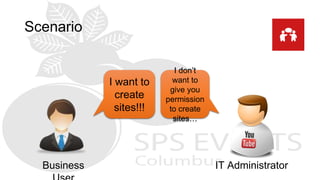
Business
I don’t
want to
give you
permission
to create
sites…
I want to
create
sites!!!
IT Administrator
Using a SharePoint Designer
Workflow and an InfoPath form to
create Sites using the REST API
and the Call HTTP Web Service
Action in SharePoint
Online/Office 365
• Created a browser-based form with a few fields…
• Created a SPD 2013 Workflow and used it to talk to the REST
API…
• Used the form to create a site request for a new subsite under
our Demo Site Collection…
• Used an Approval workflow to manage the site request…
• Used the App Step and App Trust functionality to automatically
provision the SPWeb upon approval…
• Had a lot of fun doing it…
Utilizing SharePoint
Records Center Sites with
InfoPath Forms
• InfoPath Forms can be sent to a Records Center, but there are
some issues…
• The Form Template exists in the source site collection, thus the form won’t open…
• By definition, a Records Center is a locked down site – shouldn’t have dynamic files
such as forms with workflow
• There are some cool opportunities here…
Convert forms to PDF
• There is no out-of-the-box way to do this, but…
• There are 3rd party tools
• You can write your own…
• Limitations with using 3rd party tools in Office 365
• Contoso has made a business decision to start leveraging
InfoPath for different types of data gathering and process
management…
• They would like to archive completed forms in a SharePoint
2013 Records Center Site as a searchable, read-only PDF…
On-Premise
• Send an InfoPath XML form to a Records Center…
• Add a workflow and use Muhimbi PDF converter to convert submitted InfoPath Forms to
PDF…
• Leverage SharePoint Designer Workflow and Muhimbi Workflow Actions to send
converted PDFs to a Records Center
• Alternatively, write custom code to convert the document to PDF (e.g. using Word
Automation Services)…
(For more information on Muhimbi, go to www.muhimbi.com)
Office 365
• Purchase an App from the App Marketplace to convert to PDF…
• Use custom app code to programmatically convert to PDF…
• Use REST Web Service call to send the converted PDF to a Records Center…
• Some controls not supported on List forms…
• External item picker
• Template Parts
• Managed metadata not supported at all… There are some
workarounds, but it requires code-behind…
• Writing to a People Picker column not supported…
• Sending completed forms to Records Center…
Tips & Tricks
• Use Template Parts to create reusable templates to include
branding, help, standard fields, rules, etc.
• Use External Content Types to populate InfoPath Forms with
LOB data…
• Gather requirements and understand them, InfoPath is great,
but it’s not the right tool for everything…
• Don’t recreate the wheel!
• If it’s not the tool for you, don’t use it – but hopefully you’ve
seen what it could do!
Questions?
Ryan Dennis, MCTS, MCPD, MCITP
Senior SharePoint Consultant
Blue Chip Consulting Group
www.bluechip-llc.com
www.sharepointryan.com
@SharePointRyan
linkedin.com/in/sharepointryan
ryan@sharepointryan.com

SPSCBUS Slides Scarlet InfoPath

  • 1.
    Funnel your Infodown a new Path Ryan Dennis | MCTS, MCPD, MCITP | Blue Chip Consulting Group
  • 2.
    Thank You forbeing a part of SharePoint Saturday Columbus! • Please turn off all electronic devices or set them to vibrate • If you must take a phone call, please do so in the hall • Wi-Fi is available, you will need your Guest ID/password (at registration desk) • Feel free to tweet and blog during sessions. Remember to follow @SPSColumbus and tag #SPSCBUS in your tweets! • GO BUCKS! SharePoint Saturday Columbus 2013 2 SharePoint Saturday Columbus is hosted by the Buckeye SharePoint User Group @BuckeyeSPUG
  • 3.
    Please fill outsession evaluations and thank you for attending! SharePoint Saturday Columbus 2013 3
  • 4.
    Thanks to oursponsors! 4 BRONZESILVERGOLD
  • 5.
    Where should weSharePint? • Tweet with hashtag #SPSCBUS • Option 1: Buckeye Hall of Fame Grill • Option 2: Eddie George’s Grill 27 • Option 3: Big Bar • Option 4: Chumley’s • Option 5: Buffalo Wild Wings
  • 6.
    About The Speaker RyanDennis, MCTS, MCPD, MCITP Senior SharePoint Consultant Blue Chip Consulting Group Father Husband Drummer Geek www.bluechip-llc.com www.sharepointryan.com @SharePointRyan linkedin.com/in/sharepointryan ryan@sharepointryan.com
  • 8.
    What is InfoPath? •…a forms-creation and data-gathering tool to streamline business processes… • …a tool for advanced business users to design sophisticated electronic forms with no code… • …a point-and-click way to connect to LOB systems using data connections…
  • 9.
    Ok Ryan, sowhat is it really? • An awesome way for you to make data entry fun, engaging and powerful… • A brilliant front-end to SharePoint list and library data… • …an Office program…
  • 10.
    And it workswith SharePoint? • InfoPath forms can be used in SharePoint in multiple ways, including… • List Forms • Customize existing SP Lists • Browser-based Library Forms • Publish form templates for viewing in the browser • Client-based Library Forms • Publish advanced form templates for viewing in the InfoPath client • Workflow Forms • Modify SharePoint workflow forms using InfoPath for a richer experience • Web Service Forms • Automatically create forms based on Web Services
  • 11.
    What licensing doI need? • Client (InfoPath Designer) • Microsoft Office Professional Plus 2013 • Server (Forms Services) • SharePoint Server 2013 Enterprise *Without SP Enterprise, you can publish your forms to SharePoint and launch them in the client – but the InfoPath client is then required on every machine
  • 12.
    Is InfoPath goingaway? “InfoPath is currently in the product.” – Microsoft, July 2013 “The future is unclear at best, realistically pessimistic and a dead-end at worst.” – Andrew Connell (MVP), April 2013 “Who knows, but for now it’s still the best solution for building form solutions in SharePoint” – Me, right now
  • 13.
    3 Main Typesof Forms in SharePoint that we’re talking about… • List form • Modify an existing list form using InfoPath • Browser-based form template • Publish a form template for browser use • Client-based form template • Publish a form template for client use
  • 14.
    • A modified“front end” to a SharePoint list… • Limited functionality compared to form templates, but much nicer than OOTB list forms… • Can leverage data connections… • Can be launched within the browser or in an InfoPath Form Web Part
  • 15.
    • Utilize aform template (XSN file)… • Are stored in a SharePoint Form Library… • Can leverage data connections and external content types… • Provide more functionality than list-based forms… • Can be launched within the browser, in an InfoPath Form Web Part or in the InfoPath Form Client* *Some features which are supported in client-based forms are not supported in browser based forms. More info later…
  • 16.
    • Utilize aform template (XSN file)… • Can be stored in a SharePoint Form Library… • Can leverage data connections and external content types… • Provide more functionality than library-based forms… • Must be launched in the InfoPath Form Client* *A good option if you have the Office license to support InfoPath but do not have the Enterprise CAL for SharePoint Server
  • 17.
  • 18.
    Email?! We cando better than that…
  • 19.
  • 20.
    • Created astandard List in SharePoint 2013 • Customized the List Form using InfoPath 2013 • Modified a few fields for better user experience • Added some Contoso branding elements • Had fun doing it…
  • 21.
  • 22.
    Web Services inSharePoint 2013 WebSvcAdmin WebSvcAlerts WebSvcAuthentication WebSvcBdcAdminService WebSvcCellStorage WebSvcCopy WebSvcdiagnostics WebSvcDspSts WebSvcDWS WebSvcForms WebSvcImaging WebSvcLists WebSvcMeetings WebSvcPeople WebSvcPermissions WebSvcSharedAccess WebSvcsharepointemailws WebSvcSiteData WebSvcsites WebSvcspsearch WebSvcUserGroup WebSvcVersions WebSvcviews WebSvcwebpartpages WebSvcWebs WebSvcPublishedLinksService WebSvcSocialDataService WebSvcUserProfileChangeService WebSvcUserProfileService
  • 23.
    Business I don’t want to giveyou permission to create sites… I want to create sites!!! IT Administrator
  • 24.
    Using a SharePointDesigner Workflow and an InfoPath form to create Sites using the REST API and the Call HTTP Web Service Action in SharePoint Online/Office 365
  • 25.
    • Created abrowser-based form with a few fields… • Created a SPD 2013 Workflow and used it to talk to the REST API… • Used the form to create a site request for a new subsite under our Demo Site Collection… • Used an Approval workflow to manage the site request… • Used the App Step and App Trust functionality to automatically provision the SPWeb upon approval… • Had a lot of fun doing it…
  • 26.
    Utilizing SharePoint Records CenterSites with InfoPath Forms
  • 27.
    • InfoPath Formscan be sent to a Records Center, but there are some issues… • The Form Template exists in the source site collection, thus the form won’t open… • By definition, a Records Center is a locked down site – shouldn’t have dynamic files such as forms with workflow • There are some cool opportunities here…
  • 28.
    Convert forms toPDF • There is no out-of-the-box way to do this, but… • There are 3rd party tools • You can write your own… • Limitations with using 3rd party tools in Office 365
  • 29.
    • Contoso hasmade a business decision to start leveraging InfoPath for different types of data gathering and process management… • They would like to archive completed forms in a SharePoint 2013 Records Center Site as a searchable, read-only PDF…
  • 30.
    On-Premise • Send anInfoPath XML form to a Records Center… • Add a workflow and use Muhimbi PDF converter to convert submitted InfoPath Forms to PDF… • Leverage SharePoint Designer Workflow and Muhimbi Workflow Actions to send converted PDFs to a Records Center • Alternatively, write custom code to convert the document to PDF (e.g. using Word Automation Services)… (For more information on Muhimbi, go to www.muhimbi.com) Office 365 • Purchase an App from the App Marketplace to convert to PDF… • Use custom app code to programmatically convert to PDF… • Use REST Web Service call to send the converted PDF to a Records Center…
  • 31.
    • Some controlsnot supported on List forms… • External item picker • Template Parts • Managed metadata not supported at all… There are some workarounds, but it requires code-behind… • Writing to a People Picker column not supported… • Sending completed forms to Records Center…
  • 32.
    Tips & Tricks •Use Template Parts to create reusable templates to include branding, help, standard fields, rules, etc. • Use External Content Types to populate InfoPath Forms with LOB data… • Gather requirements and understand them, InfoPath is great, but it’s not the right tool for everything… • Don’t recreate the wheel! • If it’s not the tool for you, don’t use it – but hopefully you’ve seen what it could do!
  • 33.
    Questions? Ryan Dennis, MCTS,MCPD, MCITP Senior SharePoint Consultant Blue Chip Consulting Group www.bluechip-llc.com www.sharepointryan.com @SharePointRyan linkedin.com/in/sharepointryan ryan@sharepointryan.com

Editor's Notes

  • #15 Create a new InfoPath WS Form talking to the Sites web service to show it, then open the existing oneTalk through the form, then show the workflowRun through the approval process
  • #16 Create a new InfoPath WS Form talking to the Sites web service to show it, then open the existing oneTalk through the form, then show the workflowRun through the approval process
  • #17 Create a new InfoPath WS Form talking to the Sites web service to show it, then open the existing oneTalk through the form, then show the workflowRun through the approval process
  • #19 Created a Contacts list called “Outing RSVP List”
  • #20 Create a contacts list, modify the form in InfoPath, change the look & feel – add a dropdown to States list replacing textbox (RGB 5,172,195)