


Streamlining Business Processes with InfoPath and SharePoint Rob Wilson, MCT, MCTS DevLINK 2010 Nashville, TN
Topics Introduction to InfoPath Business problems InfoPath addresses Some common use cases Introduction to SharePoint Designer and Workflows Anatomy of a streamlined solution Some complex use cases Tips for improving your user experience Enhancements in the 2010 product stack
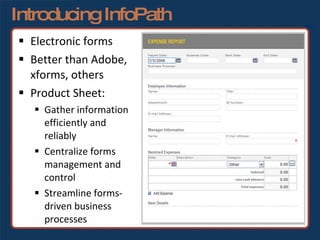
Introducing InfoPath Electronic forms Better than Adobe, xforms, others Product Sheet: Gather information  efficiently and reliably Centralize forms management and  control Streamline forms- driven business  processes
Introducing InfoPath Desktop About $199 retail for standalone Part of Office suites:  Professional Plus Ultimate Enterprise Web-based  Forms Services via SharePoint Enterprise
Business Solutions Efficient data collection, storage and retrieval Near term and long term savings Feed other systems 1
Business Solutions Error reduction Simple validation via wizards More flexible validation via code-behind Drop-down list boxes from external data sources 2
Business Solutions Regulatory compliance Secured (via SharePoint) Retention (via SharePoint) Auditing (via workflow history log) 3
Business Solutions Environmentally friendly No electricity required! Save a tree Reduce waste 4
Common Use Cases New/Terminated Employee 1 2 3 4 New Client, Prospect or Patient Expense Reimbursement IT Support Ticket
When to Use InfoPath To replace paper forms with the best electronic forms solution 1 2 3 4 To feed data collected from a form to another system (email, SharePoint lists, BizTalk, database) To provide offline form capabilities To assist in prototyping or design
About Workflows Business process A series of connected steps Human and computer interaction
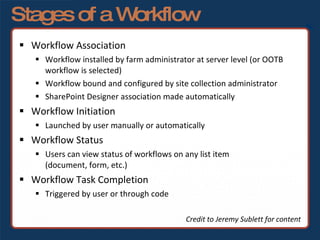
Stages of a Workflow Workflow Association Workflow installed by farm administrator at server level (or OOTB workflow is selected) Workflow bound and configured by site collection administrator SharePoint Designer association made automatically Workflow Initiation Launched by user manually or automatically Workflow Status Users can view status of workflows on any list item  (document, form, etc.) Workflow Task Completion Triggered by user or through code Credit to Jeremy Sublett for content
Introducing SPD and Workflows SharePoint Designer Free No-code workflows Limitations Bound to specific list Sequential workflows only (no state-based) Workarounds exist!!! SPD 2007/2010 cannot co-exist SPD 2010 cannot be used on SharePoint 2007 site
Introducing SPD and Workflows Porting SPD Workflows Save site as template if creating new site Source: Professional Microsoft Office SharePoint Designer 2007 by WROX Manually change the *.xoml.xml file Source:  http://tinyurl.com/portingspdworkflows   (Paul Galvin via EndUserSharePoint.com) Deploy as a SharePoint Feature via Visual Studio Source:  http://spdtoolkit.codeplex.com/ Third party tools http://www.share-gate.com   SharePoint Designer 2010 Improvements
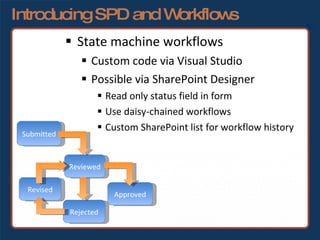
Introducing SPD and Workflows State machine workflows Custom code via Visual Studio Possible via SharePoint Designer Read only status field in form Use daisy-chained workflows Custom SharePoint list for workflow history Submitted Reviewed Rejected Approved Revised
The Streamlined Solution What makes a streamlined solution? Intuitive design + fewer clicks + time saved searching for current status = happy end-users InfoPath Form + custom workflows + SharePoint libraries = streamlined solution
Advanced Use Cases Purchase Requests Event handler to assign next request number from external data source Approval workflows 1
Advanced Use Cases Change Management System State machine workflow developed in Visual Studio Form controls enabled/disabled based on user role and workflow state 2
Advanced Use Cases Timekeeping System Code-behind to calculate week ending date, filter drop-downs and dynamic totals on rows/columns Role-based security Integration with billing system 3
Advanced Use Cases Equipment Inspection Forms Forms dynamically created from Oracle (bluh!) database when check-out occurs Form, template and xml for drop-downs downloaded to local folder When docked, forms uploaded via custom uploader application based on Microsoft’s Managed Addin Framework 4
Tips for a Better User Experience Use content types when appropriate Automatically name forms from an action in SharePoint Designer or an event handler on a form library Include status history in the form on its own tab for search-ability Custom user controls and actions Include link to InfoPath form in email Hide/show buttons on form based on user role or workflow state Quasi-tabbed interface in InfoPath form Autocomplete or delete assigned tasks from workflow or event handler when changing states
SharePoint 2010 Improvements InfoPath Form Web Part 1 2 3 4 SharePoint List Form Customization with InfoPath Re-usable Workflows via Content Type or Site-level Import Workflows from Visio/ Save Workflows as .WSP Template
Resources For more information SharePoint Designer http://office.microsoft.com/sharepointdesigner InfoPath http://office.microsoft.com/infopath http://blogs.msdn.com/infopath http://www.infopathdev.com SharePoint http://office.microsoft.com/sharepoint http://www.sharepointforums.com   http://www.sharepointoverflow.com
Contacting Me [email_address] http://sharepointblog.kellerschroeder.com http://www.therobman.com Links to Blog, Twitter (@theRobManDotNet), FriendFeed

Streamlining Business Processes with InfoPath and SharePoint

  • 1.
    Streamlining Business Processeswith InfoPath and SharePoint Rob Wilson, MCT, MCTS DevLINK 2010 Nashville, TN
  • 2.
    Topics Introduction toInfoPath Business problems InfoPath addresses Some common use cases Introduction to SharePoint Designer and Workflows Anatomy of a streamlined solution Some complex use cases Tips for improving your user experience Enhancements in the 2010 product stack
  • 3.
    Introducing InfoPath Electronicforms Better than Adobe, xforms, others Product Sheet: Gather information efficiently and reliably Centralize forms management and control Streamline forms- driven business processes
  • 4.
    Introducing InfoPath DesktopAbout $199 retail for standalone Part of Office suites: Professional Plus Ultimate Enterprise Web-based Forms Services via SharePoint Enterprise
  • 5.
    Business Solutions Efficientdata collection, storage and retrieval Near term and long term savings Feed other systems 1
  • 6.
    Business Solutions Errorreduction Simple validation via wizards More flexible validation via code-behind Drop-down list boxes from external data sources 2
  • 7.
    Business Solutions Regulatorycompliance Secured (via SharePoint) Retention (via SharePoint) Auditing (via workflow history log) 3
  • 8.
    Business Solutions Environmentallyfriendly No electricity required! Save a tree Reduce waste 4
  • 9.
    Common Use CasesNew/Terminated Employee 1 2 3 4 New Client, Prospect or Patient Expense Reimbursement IT Support Ticket
  • 10.
    When to UseInfoPath To replace paper forms with the best electronic forms solution 1 2 3 4 To feed data collected from a form to another system (email, SharePoint lists, BizTalk, database) To provide offline form capabilities To assist in prototyping or design
  • 11.
    About Workflows Businessprocess A series of connected steps Human and computer interaction
  • 12.
    Stages of aWorkflow Workflow Association Workflow installed by farm administrator at server level (or OOTB workflow is selected) Workflow bound and configured by site collection administrator SharePoint Designer association made automatically Workflow Initiation Launched by user manually or automatically Workflow Status Users can view status of workflows on any list item (document, form, etc.) Workflow Task Completion Triggered by user or through code Credit to Jeremy Sublett for content
  • 13.
    Introducing SPD andWorkflows SharePoint Designer Free No-code workflows Limitations Bound to specific list Sequential workflows only (no state-based) Workarounds exist!!! SPD 2007/2010 cannot co-exist SPD 2010 cannot be used on SharePoint 2007 site
  • 14.
    Introducing SPD andWorkflows Porting SPD Workflows Save site as template if creating new site Source: Professional Microsoft Office SharePoint Designer 2007 by WROX Manually change the *.xoml.xml file Source: http://tinyurl.com/portingspdworkflows (Paul Galvin via EndUserSharePoint.com) Deploy as a SharePoint Feature via Visual Studio Source: http://spdtoolkit.codeplex.com/ Third party tools http://www.share-gate.com SharePoint Designer 2010 Improvements
  • 15.
    Introducing SPD andWorkflows State machine workflows Custom code via Visual Studio Possible via SharePoint Designer Read only status field in form Use daisy-chained workflows Custom SharePoint list for workflow history Submitted Reviewed Rejected Approved Revised
  • 16.
    The Streamlined SolutionWhat makes a streamlined solution? Intuitive design + fewer clicks + time saved searching for current status = happy end-users InfoPath Form + custom workflows + SharePoint libraries = streamlined solution
  • 17.
    Advanced Use CasesPurchase Requests Event handler to assign next request number from external data source Approval workflows 1
  • 18.
    Advanced Use CasesChange Management System State machine workflow developed in Visual Studio Form controls enabled/disabled based on user role and workflow state 2
  • 19.
    Advanced Use CasesTimekeeping System Code-behind to calculate week ending date, filter drop-downs and dynamic totals on rows/columns Role-based security Integration with billing system 3
  • 20.
    Advanced Use CasesEquipment Inspection Forms Forms dynamically created from Oracle (bluh!) database when check-out occurs Form, template and xml for drop-downs downloaded to local folder When docked, forms uploaded via custom uploader application based on Microsoft’s Managed Addin Framework 4
  • 21.
    Tips for aBetter User Experience Use content types when appropriate Automatically name forms from an action in SharePoint Designer or an event handler on a form library Include status history in the form on its own tab for search-ability Custom user controls and actions Include link to InfoPath form in email Hide/show buttons on form based on user role or workflow state Quasi-tabbed interface in InfoPath form Autocomplete or delete assigned tasks from workflow or event handler when changing states
  • 22.
    SharePoint 2010 ImprovementsInfoPath Form Web Part 1 2 3 4 SharePoint List Form Customization with InfoPath Re-usable Workflows via Content Type or Site-level Import Workflows from Visio/ Save Workflows as .WSP Template
  • 23.
    Resources For moreinformation SharePoint Designer http://office.microsoft.com/sharepointdesigner InfoPath http://office.microsoft.com/infopath http://blogs.msdn.com/infopath http://www.infopathdev.com SharePoint http://office.microsoft.com/sharepoint http://www.sharepointforums.com http://www.sharepointoverflow.com
  • 24.
    Contacting Me [email_address]http://sharepointblog.kellerschroeder.com http://www.therobman.com Links to Blog, Twitter (@theRobManDotNet), FriendFeed

Editor's Notes

  • #6 Even if less efficient up front, more efficient on back end (“Did I turn that in on my expense report?”) Can feed any system that has XML endpoints
  • #9 No electricity required – just kidding It can save trees, however and reduce waste
  • #14 As you know, there are out of the box workflows: WSS: Three-State MOSS: Approval Parallel Approval Disposition Approval Collect Feedback Translation workflows