Introduction to InfoPath 2010
  A SharePoint-centric look at InfoPath 2010
What is InfoPath 2010?

  Form building tool for making standalone forms, and SharePoint list forms

  InfoPath 2010 is actually 2 different products
         InfoPath Designer 2010
         InfoPath Filler 2010

  Only available in Microsoft Office 2010 Professional Plus
         Only the richest people get to play (slight downside, one might say)

  SharePoint 2010 (and 2007 as well) have the capability to have a SharePoint
   document library (form library) contain a collection of InfoPath forms
        Essentially, you associate a form with a document library, and the resulting
          answered forms are the contents of the library
More About InfoPath 2010

  Types of Forms
        InfoPath based forms (to be filled in using “Filler”)
        Web based forms

  SharePoint 2010 Licensing – You will require the Enterprise CAL to:
        Use a SharePoint list with InfoPath forms
        Publish SharePoint library forms as web based forms

  Features of InfoPath
        Various UI controls
        Layouts (pre-designed table formats)
        Themes
        Multiple views
        Rules (the real bread and butter)
        Data connectivity (more of an advanced topic)
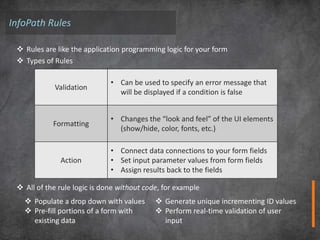
InfoPath Rules

  Rules are like the application programming logic for your form
  Types of Rules

                              • Can be used to specify an error message that
            Validation
                                will be displayed if a condition is false


                              • Changes the “look and feel” of the UI elements
            Formatting
                                (show/hide, color, fonts, etc.)

                              • Connect data connections to your form fields
              Action          • Set input parameter values from form fields
                              • Assign results back to the fields

  All of the rule logic is done without code, for example
    Populate a drop down with values        Generate unique incrementing ID values
    Pre-fill portions of a form with        Perform real-time validation of user
     existing data                            input
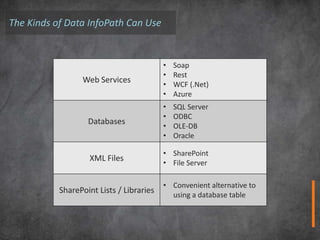
The Kinds of Data InfoPath Can Use


                                          •   Soap
                                          •   Rest
                 Web Services
                                          •   WCF (.Net)
                                          •   Azure
                                          •   SQL Server
                                          •   ODBC
                   Databases
                                          •   OLE-DB
                                          •   Oracle

                                          • SharePoint
                   XML Files
                                          • File Server

                                          • Convenient alternative to
           SharePoint Lists / Libraries
                                            using a database table
SharePoint and Forms
Doesn’t it already do forms without InfoPath?

  Yes, SharePoint forms are great, they’re simple and easy to use

  They’re available on every list and library

  No need for any “client” side tools to create the forms – they’re automatically updated
   when you modify the list or library
     However, this may be a little too simple – no customization possible in SharePoint

  For customization, you can download and install SharePoint Designer and modify your
   forms. However…
     Often people aren’t given access to SharePoint Designer (by their administrator)
     Lots of individuals aren’t comfortable with SharePoint Designer
     The tool can be hard to use/understand for novice users
Where does InfoPath differ?
  InfoPath allows you to create powerful, rich forms
         The forms do not require you to write any code
         This allows non-developers to both create them and maintain them

  You can create forms with
         Both out of the box and complex validation rules
         Lookups to external or SharePoint data
         Master / Detail lists
         Signed forms
         Essentially none of these are available with default SharePoint list forms

  Can be used with SharePoint custom workflows and Nintex workflows (very easily)

  And it’s simply just a really easy to use product to get the hang of

  “InfoPath is very much a rapid development tool. SharePoint list forms cannot do
   even a fraction of what InfoPath does, and InfoPath does it all without writing
   code.”
         - Clayton Cobb, (former) InfoPath MVP – Current SharePoint MVP
What’s new in 2010?

  Ribbon interface
  Form Templates (when building a new form)
  Quick rules
          pre-built conditions and actions
  Create forms for SharePoint lists
  Use SharePoint Workspace for offline form completion of SharePoint lists
  New controls
      Picture Buttons, hyperlinks, date & time picker
  Publish form templates
          Quick Publish (to SharePoint)
  Filler and Designer separated
          Kind of similar to how Adobe has Acrobat and Acrobat Reader
Demo 1

 Customizing SharePoint lists

 Show off various features of InfoPath
     Multiple views
     Various controls
     Layouts (pre-designed table formats)
     Themes
     Rules
     Other ribbon features
Demo 2

 Rules – from the basic to the complex

 The Setup…
     itgroove uses an InfoPath form for time entry records for
       all their consultants
     Some of the rules are basic, simple rules to perform
       simple tasks (like change to a different view)
     Other rules are more complex and chain together to
       make multiple actions appear to happen simultaneously

 Other, more complex/cool forms
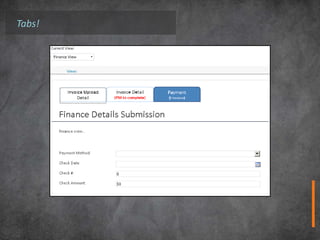
Tabs!
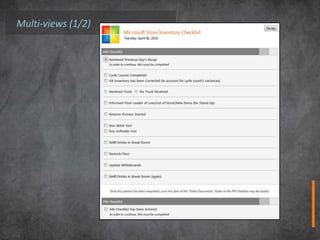
Multi-views (1/2)
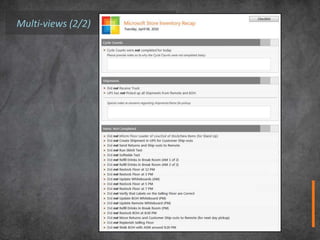
Multi-views (2/2)
In Summary…

 InfoPath Can:
  Be your form product of choice
  Enable easy rule logic and provides plenty of capacity for scaling that logic
  Powerful and extensive data connectivity


 InfoPath combined with SharePoint Enables
  Easy form creation for both lists and libraries
  Very neat and tidy forms OOTB, with easy modifications to add themes and change
   layouts
  Brings form design to anyone with a license to Microsoft Office Professional Plus
Q&A + Contact


 Any Questions?
 Contact Details:         InfoPath:
 Colin Phillips           http://office.microsoft.com/en-
 cphillips@itgroove.net   ca/infopath/
 itgroove.net

Introduction to InfoPath 2010

  • 1.
    Introduction to InfoPath2010 A SharePoint-centric look at InfoPath 2010
  • 2.
    What is InfoPath2010?  Form building tool for making standalone forms, and SharePoint list forms  InfoPath 2010 is actually 2 different products  InfoPath Designer 2010  InfoPath Filler 2010  Only available in Microsoft Office 2010 Professional Plus  Only the richest people get to play (slight downside, one might say)  SharePoint 2010 (and 2007 as well) have the capability to have a SharePoint document library (form library) contain a collection of InfoPath forms  Essentially, you associate a form with a document library, and the resulting answered forms are the contents of the library
  • 3.
    More About InfoPath2010  Types of Forms  InfoPath based forms (to be filled in using “Filler”)  Web based forms  SharePoint 2010 Licensing – You will require the Enterprise CAL to:  Use a SharePoint list with InfoPath forms  Publish SharePoint library forms as web based forms  Features of InfoPath  Various UI controls  Layouts (pre-designed table formats)  Themes  Multiple views  Rules (the real bread and butter)  Data connectivity (more of an advanced topic)
  • 4.
    InfoPath Rules Rules are like the application programming logic for your form  Types of Rules • Can be used to specify an error message that Validation will be displayed if a condition is false • Changes the “look and feel” of the UI elements Formatting (show/hide, color, fonts, etc.) • Connect data connections to your form fields Action • Set input parameter values from form fields • Assign results back to the fields  All of the rule logic is done without code, for example  Populate a drop down with values  Generate unique incrementing ID values  Pre-fill portions of a form with  Perform real-time validation of user existing data input
  • 5.
    The Kinds ofData InfoPath Can Use • Soap • Rest Web Services • WCF (.Net) • Azure • SQL Server • ODBC Databases • OLE-DB • Oracle • SharePoint XML Files • File Server • Convenient alternative to SharePoint Lists / Libraries using a database table
  • 6.
    SharePoint and Forms Doesn’tit already do forms without InfoPath?  Yes, SharePoint forms are great, they’re simple and easy to use  They’re available on every list and library  No need for any “client” side tools to create the forms – they’re automatically updated when you modify the list or library  However, this may be a little too simple – no customization possible in SharePoint  For customization, you can download and install SharePoint Designer and modify your forms. However…  Often people aren’t given access to SharePoint Designer (by their administrator)  Lots of individuals aren’t comfortable with SharePoint Designer  The tool can be hard to use/understand for novice users
  • 7.
    Where does InfoPathdiffer?  InfoPath allows you to create powerful, rich forms  The forms do not require you to write any code  This allows non-developers to both create them and maintain them  You can create forms with  Both out of the box and complex validation rules  Lookups to external or SharePoint data  Master / Detail lists  Signed forms  Essentially none of these are available with default SharePoint list forms  Can be used with SharePoint custom workflows and Nintex workflows (very easily)  And it’s simply just a really easy to use product to get the hang of  “InfoPath is very much a rapid development tool. SharePoint list forms cannot do even a fraction of what InfoPath does, and InfoPath does it all without writing code.” - Clayton Cobb, (former) InfoPath MVP – Current SharePoint MVP
  • 8.
    What’s new in2010?  Ribbon interface  Form Templates (when building a new form)  Quick rules  pre-built conditions and actions  Create forms for SharePoint lists  Use SharePoint Workspace for offline form completion of SharePoint lists  New controls  Picture Buttons, hyperlinks, date & time picker  Publish form templates  Quick Publish (to SharePoint)  Filler and Designer separated  Kind of similar to how Adobe has Acrobat and Acrobat Reader
  • 9.
    Demo 1 CustomizingSharePoint lists Show off various features of InfoPath Multiple views Various controls Layouts (pre-designed table formats) Themes Rules Other ribbon features
  • 10.
    Demo 2 Rules– from the basic to the complex The Setup… itgroove uses an InfoPath form for time entry records for all their consultants Some of the rules are basic, simple rules to perform simple tasks (like change to a different view) Other rules are more complex and chain together to make multiple actions appear to happen simultaneously Other, more complex/cool forms
  • 11.
  • 12.
  • 13.
  • 14.
    In Summary… InfoPathCan:  Be your form product of choice  Enable easy rule logic and provides plenty of capacity for scaling that logic  Powerful and extensive data connectivity InfoPath combined with SharePoint Enables  Easy form creation for both lists and libraries  Very neat and tidy forms OOTB, with easy modifications to add themes and change layouts  Brings form design to anyone with a license to Microsoft Office Professional Plus
  • 15.
    Q&A + Contact Any Questions? Contact Details: InfoPath: Colin Phillips http://office.microsoft.com/en- cphillips@itgroove.net ca/infopath/ itgroove.net

Editor's Notes

  • #7 resourcesa number of workflow examples available on connect.nintex.com – including how to use state machines - how to use error handling