Alteryx SDKs and APIs
Contents
A quick introduction to architecture of Alteryx
Alteryx APIs
Alteryx SDKs
Formula Plug Ins and Alteryx Abacus
Custom Tools and Alteryx Omnibus
Alteryx Engine and Designer
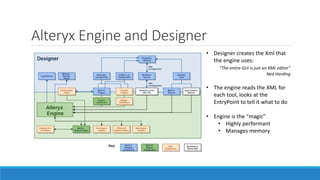
• Designer creates the Xml that
the engine uses:
“The entire GUI is just an XML editor”
Ned Harding
• The engine reads the XML for
each tool, looks at the
EntryPoint to tell it what to do
• Engine is the “magic”
• Highly performant
• Manages memory
The whole of Alteryx is based on plug ins
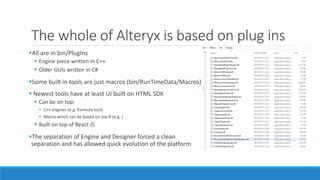
All are in bin/PlugIns
 Engine piece written in C++
 Older GUIs written in C#
Some built in tools are just macros (bin/RunTimeData/Macros)
 Newest tools have at least UI built on HTML SDK
 Can be on top:
 C++ engines (e.g. Formula tool)
 Macro which can be based on top R (e.g. )
 Built on top of React JS
The separation of Engine and Designer forced a clean
separation and has allowed quick evolution of the platform
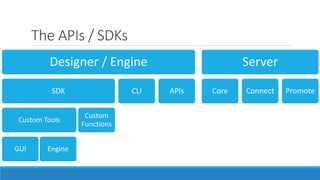
The APIs / SDKs
Designer / Engine
SDK
Custom Tools
GUI Engine
Custom
Functions
CLI APIs
Server
Core Connect Promote
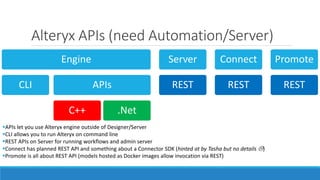
Alteryx APIs (need Automation/Server)
Engine
CLI APIs
C++ .Net
Server
REST
Connect
REST
Promote
REST
APIs let you use Alteryx engine outside of Designer/Server
CLI allows you to run Alteryx on command line
REST APIs on Server for running workflows and admin server
Connect has planned REST API and something about a Connector SDK (hinted at by Tasha but no details )
Promote is all about REST API (models hosted as Docker images allow invocation via REST)
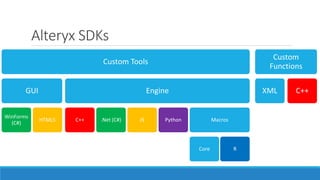
Alteryx SDKs
Custom Tools
GUI
WinForms
(C#)
HTML5
Engine
C++ .Net (C#) JS Python Macros
Core R
Custom
Functions
XML C++
Custom Functions
Add new functions to the formula tool
 Can be used any where expressions are used
Simplest as just Xml functions
 Fixed number of arguments
More complex are C++ based functions
 Cannot work with Spatial
Unlike custom tools, this is not the same API as core team use.
 Bugs and limitations (but nothing too bad)
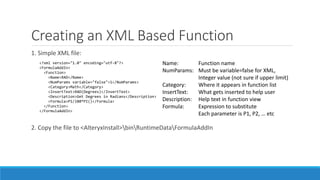
Creating an XML Based Function
1. Simple XML file:
2. Copy the file to <AlteryxInstall>binRuntimeDataFormulaAddIn
<?xml version="1.0" encoding="utf-8"?>
<FormulaAddIn>
<Function>
<Name>RAD</Name>
<NumParams variable="false">1</NumParams>
<Category>Math</Category>
<InsertText>RAD(Degrees)</InsertText>
<Description>Get Degrees in Radians</Description>
<Formula>P1/180*PI()</Formula>
</Function>
</FormulaAddIn>
Name: Function name
NumParams: Must be variable=false for XML,
Integer value (not sure if upper limit)
Category: Where it appears in function list
InsertText: What gets inserted to help user
Description: Help text in function view
Formula: Expression to substitute
Each parameter is P1, P2, … etc
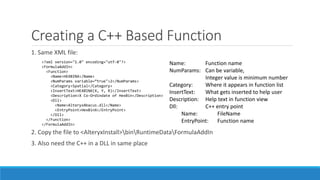
Creating a C++ Based Function
1. Same XML file:
2. Copy the file to <AlteryxInstall>binRuntimeDataFormulaAddIn
3. Also need the C++ in a DLL in same place
<?xml version="1.0" encoding="utf-8"?>
<FormulaAddIn>
<Function>
<Name>HEXBINX</Name>
<NumParams variable=“true">2</NumParams>
<Category>Spatial</Category>
<InsertText>HEXBINX(X, Y, R)</InsertText>
<Description>X Co-Ordindate of HexBin</Description>
<Dll>
<Name>AlteryxAbacus.dll</Name>
<EntryPoint>HexBinX</EntryPoint>
</Dll>
</Function>
</FormulaAddIn>
Name: Function name
NumParams: Can be variable,
Integer value is minimum number
Category: Where it appears in function list
InsertText: What gets inserted to help user
Description: Help text in function view
Dll: C++ entry point
Name: FileName
EntryPoint: Function name
Creating a C++ Based Function (part 2)
extern "C" long _declspec(dllexport) _stdcall TDist(int nNumArgs, FormulaAddInData *pArgs, FormulaAddInData *pReturnValue)
{
pReturnValue->nVarType = 1; // Return a Double (2 for Text)
// Verify Arguments
if (nNumArgs != 2) { return AlteryxAbacusUtils::ReturnError(L"TDist: Syntax x, Degrees of Freedom", pReturnValue, nNumArgs, pArgs); }
for (int i = 0; i < nNumArgs; i++) {
if (pArgs[i].nVarType != 1) { return AlteryxAbacusUtils::ReturnError(L"TDist: Non-numeric argument", pReturnValue, nNumArgs, pArgs); }
}
// Do Calculation
if (pArgs[0].isNull || pArgs[1].isNull || pArgs[1].dVal <= 0) {
pReturnValue->isNull = 1;
} else {
students_t_distribution<double> s(pArgs[1].dVal);
pReturnValue->isNull = 0;
pReturnValue->dVal = (1.0 - cdf(s, pArgs[0].dVal)) * 2;
}
return AlteryxAbacusUtils::ReturnSuccess(nNumArgs, pArgs);
}
Alteryx Abacus
Started with StartsWith, EndsWith and grew from there
 Ned added to v10
 Just XML based
Concentrated on improving Date Time functions (Year, Month, Day amongst others)
 Added to v11.5 finally!
Added C++ based Coalesce function before first release
 C++ allows for custom number of arguments
https://github.com/jdunkerley/AlteryxFormulaAddOns/
Custom Tools…
Create whole new tools for Alteryx
2 Parts
 GUI (Toolbar / Metadata and Configuration Panel)
 Engine (Calculation)
No requirement to build in same technology
 Choices in the GUI layer: .Net (C#) or HTML (still very new)
 Choices in the engine layer: C++, .Net (C#), HTML/JS, Python, Macros (with/without R)
 Separation of Engine and Designer means you can pair whichever you like
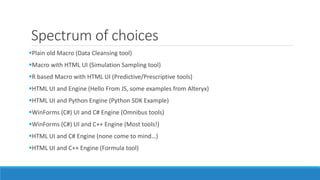
Spectrum of choices
Plain old Macro (Data Cleansing tool)
Macro with HTML UI (Simulation Sampling tool)
R based Macro with HTML UI (Predictive/Prescriptive tools)
HTML UI and Engine (Hello From JS, some examples from Alteryx)
HTML UI and Python Engine (Python SDK Example)
WinForms (C#) UI and C# Engine (Omnibus tools)
WinForms (C#) UI and C++ Engine (Most tools!)
HTML UI and C# Engine (none come to mind…)
HTML UI and C++ Engine (Formula tool)
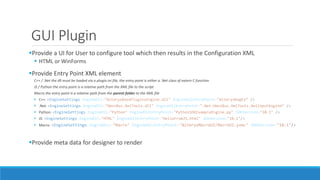
GUI Plugin
Provide a UI for User to configure tool which then results in the Configuration XML
 HTML or WinForms
Provide Entry Point XML element
C++ / .Net the dll must be loaded via a plugin.ini file, the entry point is either a .Net class of extern C function
JS / Python the entry point is a relative path from the XML file to the script
Macro the entry point is a relative path from the parent folder to the XML file
 C++: <EngineSettings EngineDll="AlteryxBasePluginsEngine.dll" EngineDllEntryPoint="AlteryxRegEx“ />
 .Net: <EngineSettings EngineDll="OmniBus.XmlTools.dll" EngineDllEntryPoint=".Net:OmniBus.XmlTools.XmlInputEngine“ />
 Python: <EngineSettings EngineDll="Python" EngineDllEntryPoint="PythonSDKExampleEngine.py" SDKVersion="10.1" />
 JS: <EngineSettings EngineDll="HTML" EngineDllEntryPoint="HelloFromJS.html" SDKVersion="10.1"/>
 Macro: <EngineSettings EngineDLL="Macro" EngineDLLEntryPoint="AlteryxMacroUI/MacroUI.yxmc" SDKVersion="10.1"/>
Provide meta data for designer to render
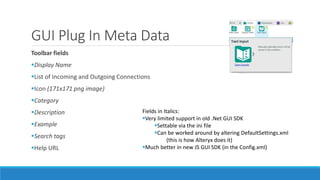
GUI Plug In Meta Data
Toolbar fields
Display Name
List of Incoming and Outgoing Connections
Icon (171x171 png image)
Category
Description
Example
Search tags
Help URL
Fields in Italics:
Very limited support in old .Net GUI SDK
Settable via the ini file
Can be worked around by altering DefaultSettings.xml
(this is how Alteryx does it)
Much better in new JS GUI SDK (in the Config.xml)
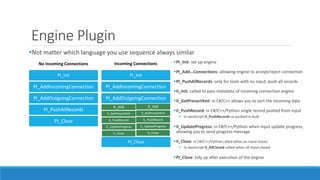
Engine Plugin
Not matter which language you use sequence always similar
No Incoming Connections
PI_Init
PI_AddIncomingConnection
PI_AddOutgoingConnection
PI_PushAllRecords
PI_Close
Incoming Connections
PI_Init
PI_AddIncomingConnection
PI_AddOutgoingConnection
II_Init
II_GetPresortXml
IL_PushRecord
IL_UpdateProgress
IL_Close
II_Init
II_GetPresortXml
IL_PushRecord
IL_UpdateProgress
IL_Close
PI_Close
PI_Init: set up engine
PI_Add…Connections: allowing engine to accept/reject connection
PI_PushAllRecords: only for tools with no input, push all records
II_Init: called to pass metadata of incoming connection engine
II_GetPresortXml: in C#/C++ allows you to sort the incoming data
II_PushRecord: in C#/C++/Python single record pushed from input
 In JavaScript II_PushRecords as pushed in bulk
II_UpdateProgress: in C#/C++/Python when input update progress,
allowing you to send progress message
II_Close: in C#/C++/Python called when an input closes
 In JavaScript II_AllClosed called when all input closed
PI_Close: tidy up after execution of the engine
C# Custom Tools (any .Net)
Alteryx OmniBus
Set of simple C# based tools
Do better than the Date Time Tool!
 Admittedly improved in 11, but still possible to do better
Provide a framework to do some of the boiler work
 GUI provided for free
 Xml serialisation
Roslyn experiment (allows run time .Net code, still pretty early on)
The NuGet packages are designed to create and set up the project for you
Getting Started
 You will want to get access to the help file inside the C++ SDK
 It is in APIsAlteryxSDK.zip within the Alteryx install directory
The C# SDK is documented in APIsSampleCodeDotNetCustomTools.pdf
 Basically just need references to AlteryxRecordInfo.Net.dll and AlteryxGuiToolkit.dll
The HTML SDK is a lot younger…
 Not really documented but there is a sample
 “Reverse engineer the tools!”
Tooling wise
 Decent text editor is enough for Xml formula
 Visual Studio Community fine for .Net and C++ stuff
 Any HTML editor for HTML SDK (Visual Studio Code)
A word of warning… this part of Alteryx is not as polished as the main space
 Documentation is pretty out of date, and I have found the odd bug here
Custom Functions Starters…
Sample
 "C:Program FilesAlteryxbinRuntimeDataFormulaAddInSample.xml“
Sample XML AddIn
 https://drive.google.com/open?id=0B_CeVUJekpm7bnd3YmN0NDUtdlU
Sample C++ AddIn
 https://drive.google.com/open?id=0B_CeVUJekpm7RFpZREkyTThQS3c
Alteryx OmniBus
 https://github.com/jdunkerley/AlteryxFormulaAddOns/
Custom Tool Starters…
 Very old samples in C:Program FilesAlteryxAPIsSampleCodeCustomDotNetTools
OmniBus XML Walkthrough
 https://jdunkerley.co.uk/2017/04/24/how-to-create-a-xml-input-tool-with-alteryx-omnibus/
Hello From Java Script (TypeScript Based HTML/JS Tool)
 https://jdunkerley.co.uk/2017/07/03/beyond-alteryx-macros-alteryxs-javascript-sdk-an-unofficial-guide/
Ned’s Alteryx JS Eval
 https://inspiringingenuity.net/2015/12/03/htmlsdk/
Node library helper has been developed by Alteryx
 https://community.alteryx.com/t5/Engine-Works-Blog/Alteryx-Tool-Generator/ba-p/75216
 Will set up a JS GUI with either a Macro, JS or Python backend

Alteryx SDK

  • 1.
  • 2.
    Contents A quick introductionto architecture of Alteryx Alteryx APIs Alteryx SDKs Formula Plug Ins and Alteryx Abacus Custom Tools and Alteryx Omnibus
  • 3.
    Alteryx Engine andDesigner • Designer creates the Xml that the engine uses: “The entire GUI is just an XML editor” Ned Harding • The engine reads the XML for each tool, looks at the EntryPoint to tell it what to do • Engine is the “magic” • Highly performant • Manages memory
  • 4.
    The whole ofAlteryx is based on plug ins All are in bin/PlugIns  Engine piece written in C++  Older GUIs written in C# Some built in tools are just macros (bin/RunTimeData/Macros)  Newest tools have at least UI built on HTML SDK  Can be on top:  C++ engines (e.g. Formula tool)  Macro which can be based on top R (e.g. )  Built on top of React JS The separation of Engine and Designer forced a clean separation and has allowed quick evolution of the platform
  • 5.
    The APIs /SDKs Designer / Engine SDK Custom Tools GUI Engine Custom Functions CLI APIs Server Core Connect Promote
  • 6.
    Alteryx APIs (needAutomation/Server) Engine CLI APIs C++ .Net Server REST Connect REST Promote REST APIs let you use Alteryx engine outside of Designer/Server CLI allows you to run Alteryx on command line REST APIs on Server for running workflows and admin server Connect has planned REST API and something about a Connector SDK (hinted at by Tasha but no details ) Promote is all about REST API (models hosted as Docker images allow invocation via REST)
  • 7.
    Alteryx SDKs Custom Tools GUI WinForms (C#) HTML5 Engine C++.Net (C#) JS Python Macros Core R Custom Functions XML C++
  • 8.
    Custom Functions Add newfunctions to the formula tool  Can be used any where expressions are used Simplest as just Xml functions  Fixed number of arguments More complex are C++ based functions  Cannot work with Spatial Unlike custom tools, this is not the same API as core team use.  Bugs and limitations (but nothing too bad)
  • 9.
    Creating an XMLBased Function 1. Simple XML file: 2. Copy the file to <AlteryxInstall>binRuntimeDataFormulaAddIn <?xml version="1.0" encoding="utf-8"?> <FormulaAddIn> <Function> <Name>RAD</Name> <NumParams variable="false">1</NumParams> <Category>Math</Category> <InsertText>RAD(Degrees)</InsertText> <Description>Get Degrees in Radians</Description> <Formula>P1/180*PI()</Formula> </Function> </FormulaAddIn> Name: Function name NumParams: Must be variable=false for XML, Integer value (not sure if upper limit) Category: Where it appears in function list InsertText: What gets inserted to help user Description: Help text in function view Formula: Expression to substitute Each parameter is P1, P2, … etc
  • 10.
    Creating a C++Based Function 1. Same XML file: 2. Copy the file to <AlteryxInstall>binRuntimeDataFormulaAddIn 3. Also need the C++ in a DLL in same place <?xml version="1.0" encoding="utf-8"?> <FormulaAddIn> <Function> <Name>HEXBINX</Name> <NumParams variable=“true">2</NumParams> <Category>Spatial</Category> <InsertText>HEXBINX(X, Y, R)</InsertText> <Description>X Co-Ordindate of HexBin</Description> <Dll> <Name>AlteryxAbacus.dll</Name> <EntryPoint>HexBinX</EntryPoint> </Dll> </Function> </FormulaAddIn> Name: Function name NumParams: Can be variable, Integer value is minimum number Category: Where it appears in function list InsertText: What gets inserted to help user Description: Help text in function view Dll: C++ entry point Name: FileName EntryPoint: Function name
  • 11.
    Creating a C++Based Function (part 2) extern "C" long _declspec(dllexport) _stdcall TDist(int nNumArgs, FormulaAddInData *pArgs, FormulaAddInData *pReturnValue) { pReturnValue->nVarType = 1; // Return a Double (2 for Text) // Verify Arguments if (nNumArgs != 2) { return AlteryxAbacusUtils::ReturnError(L"TDist: Syntax x, Degrees of Freedom", pReturnValue, nNumArgs, pArgs); } for (int i = 0; i < nNumArgs; i++) { if (pArgs[i].nVarType != 1) { return AlteryxAbacusUtils::ReturnError(L"TDist: Non-numeric argument", pReturnValue, nNumArgs, pArgs); } } // Do Calculation if (pArgs[0].isNull || pArgs[1].isNull || pArgs[1].dVal <= 0) { pReturnValue->isNull = 1; } else { students_t_distribution<double> s(pArgs[1].dVal); pReturnValue->isNull = 0; pReturnValue->dVal = (1.0 - cdf(s, pArgs[0].dVal)) * 2; } return AlteryxAbacusUtils::ReturnSuccess(nNumArgs, pArgs); }
  • 12.
    Alteryx Abacus Started withStartsWith, EndsWith and grew from there  Ned added to v10  Just XML based Concentrated on improving Date Time functions (Year, Month, Day amongst others)  Added to v11.5 finally! Added C++ based Coalesce function before first release  C++ allows for custom number of arguments https://github.com/jdunkerley/AlteryxFormulaAddOns/
  • 13.
    Custom Tools… Create wholenew tools for Alteryx 2 Parts  GUI (Toolbar / Metadata and Configuration Panel)  Engine (Calculation) No requirement to build in same technology  Choices in the GUI layer: .Net (C#) or HTML (still very new)  Choices in the engine layer: C++, .Net (C#), HTML/JS, Python, Macros (with/without R)  Separation of Engine and Designer means you can pair whichever you like
  • 14.
    Spectrum of choices Plainold Macro (Data Cleansing tool) Macro with HTML UI (Simulation Sampling tool) R based Macro with HTML UI (Predictive/Prescriptive tools) HTML UI and Engine (Hello From JS, some examples from Alteryx) HTML UI and Python Engine (Python SDK Example) WinForms (C#) UI and C# Engine (Omnibus tools) WinForms (C#) UI and C++ Engine (Most tools!) HTML UI and C# Engine (none come to mind…) HTML UI and C++ Engine (Formula tool)
  • 15.
    GUI Plugin Provide aUI for User to configure tool which then results in the Configuration XML  HTML or WinForms Provide Entry Point XML element C++ / .Net the dll must be loaded via a plugin.ini file, the entry point is either a .Net class of extern C function JS / Python the entry point is a relative path from the XML file to the script Macro the entry point is a relative path from the parent folder to the XML file  C++: <EngineSettings EngineDll="AlteryxBasePluginsEngine.dll" EngineDllEntryPoint="AlteryxRegEx“ />  .Net: <EngineSettings EngineDll="OmniBus.XmlTools.dll" EngineDllEntryPoint=".Net:OmniBus.XmlTools.XmlInputEngine“ />  Python: <EngineSettings EngineDll="Python" EngineDllEntryPoint="PythonSDKExampleEngine.py" SDKVersion="10.1" />  JS: <EngineSettings EngineDll="HTML" EngineDllEntryPoint="HelloFromJS.html" SDKVersion="10.1"/>  Macro: <EngineSettings EngineDLL="Macro" EngineDLLEntryPoint="AlteryxMacroUI/MacroUI.yxmc" SDKVersion="10.1"/> Provide meta data for designer to render
  • 16.
    GUI Plug InMeta Data Toolbar fields Display Name List of Incoming and Outgoing Connections Icon (171x171 png image) Category Description Example Search tags Help URL Fields in Italics: Very limited support in old .Net GUI SDK Settable via the ini file Can be worked around by altering DefaultSettings.xml (this is how Alteryx does it) Much better in new JS GUI SDK (in the Config.xml)
  • 17.
    Engine Plugin Not matterwhich language you use sequence always similar No Incoming Connections PI_Init PI_AddIncomingConnection PI_AddOutgoingConnection PI_PushAllRecords PI_Close Incoming Connections PI_Init PI_AddIncomingConnection PI_AddOutgoingConnection II_Init II_GetPresortXml IL_PushRecord IL_UpdateProgress IL_Close II_Init II_GetPresortXml IL_PushRecord IL_UpdateProgress IL_Close PI_Close PI_Init: set up engine PI_Add…Connections: allowing engine to accept/reject connection PI_PushAllRecords: only for tools with no input, push all records II_Init: called to pass metadata of incoming connection engine II_GetPresortXml: in C#/C++ allows you to sort the incoming data II_PushRecord: in C#/C++/Python single record pushed from input  In JavaScript II_PushRecords as pushed in bulk II_UpdateProgress: in C#/C++/Python when input update progress, allowing you to send progress message II_Close: in C#/C++/Python called when an input closes  In JavaScript II_AllClosed called when all input closed PI_Close: tidy up after execution of the engine
  • 18.
    C# Custom Tools(any .Net) Alteryx OmniBus Set of simple C# based tools Do better than the Date Time Tool!  Admittedly improved in 11, but still possible to do better Provide a framework to do some of the boiler work  GUI provided for free  Xml serialisation Roslyn experiment (allows run time .Net code, still pretty early on) The NuGet packages are designed to create and set up the project for you
  • 19.
    Getting Started  Youwill want to get access to the help file inside the C++ SDK  It is in APIsAlteryxSDK.zip within the Alteryx install directory The C# SDK is documented in APIsSampleCodeDotNetCustomTools.pdf  Basically just need references to AlteryxRecordInfo.Net.dll and AlteryxGuiToolkit.dll The HTML SDK is a lot younger…  Not really documented but there is a sample  “Reverse engineer the tools!” Tooling wise  Decent text editor is enough for Xml formula  Visual Studio Community fine for .Net and C++ stuff  Any HTML editor for HTML SDK (Visual Studio Code) A word of warning… this part of Alteryx is not as polished as the main space  Documentation is pretty out of date, and I have found the odd bug here
  • 20.
    Custom Functions Starters… Sample "C:Program FilesAlteryxbinRuntimeDataFormulaAddInSample.xml“ Sample XML AddIn  https://drive.google.com/open?id=0B_CeVUJekpm7bnd3YmN0NDUtdlU Sample C++ AddIn  https://drive.google.com/open?id=0B_CeVUJekpm7RFpZREkyTThQS3c Alteryx OmniBus  https://github.com/jdunkerley/AlteryxFormulaAddOns/
  • 21.
    Custom Tool Starters… Very old samples in C:Program FilesAlteryxAPIsSampleCodeCustomDotNetTools OmniBus XML Walkthrough  https://jdunkerley.co.uk/2017/04/24/how-to-create-a-xml-input-tool-with-alteryx-omnibus/ Hello From Java Script (TypeScript Based HTML/JS Tool)  https://jdunkerley.co.uk/2017/07/03/beyond-alteryx-macros-alteryxs-javascript-sdk-an-unofficial-guide/ Ned’s Alteryx JS Eval  https://inspiringingenuity.net/2015/12/03/htmlsdk/ Node library helper has been developed by Alteryx  https://community.alteryx.com/t5/Engine-Works-Blog/Alteryx-Tool-Generator/ba-p/75216  Will set up a JS GUI with either a Macro, JS or Python backend