Bridging the Gap Between
Development and Regulatory
Teams
Milton Yarberry
Director of Medical Programs, ICS
About ICS and Boston UX
Creating Transformative Products That Advance Patient Care
2
www.ics.com/medical
ICS’ design studio
specializes in intuitive
touchscreen and
multimodal interfaces for
high-impact embedded and
connected devices.
Established in 1987, ICS delivers innovative
medtech solutions with a full suite of
services to accelerate development, testing
and certification of successful next-gen
products.
ICS and Boston UX are headquartered in
Waltham, Mass. with offices in California,
Canada and Europe.
Delivering a Full Suite of Medtech Services
3
● Human Factors Engineering
● IEC 62366-UX/UI Design
● Custom Frontend and Backend Software Development
● Development with IEC 62304-Compliant Platform
● Low-code Tools that Convert UX Prototype to Product
● Medical Device Cybersecurity
● AWS and Azure Cloud Services and Analytics
● ISO 14971-Compliant Hazard Analysis
● Software Verification Testing
● Complimentary Software Technology Assessment
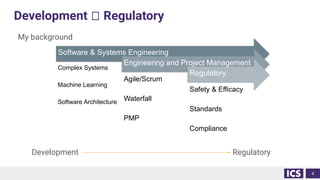
Development 🡪 Regulatory
My background
Development Regulatory
4
Software & Systems Engineering
Complex Systems
Machine Learning
Software Architecture
Engineering and Project Management
Agile/Scrum
Waterfall
PMP
Regulatory
Safety & Efficacy
Standards
Compliance
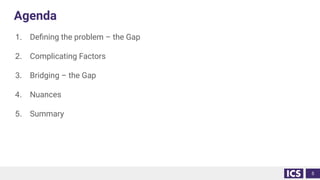
Agenda
1. Defining the problem – the Gap
2. Complicating Factors
3. Bridging – the Gap
4. Nuances
5. Summary
5
Defining the Problem
6
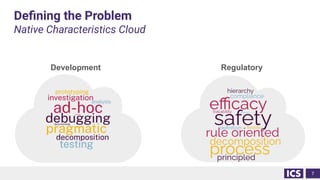
Defining the Problem
Native Characteristics Cloud
7
Development Regulatory
Defining the Problem
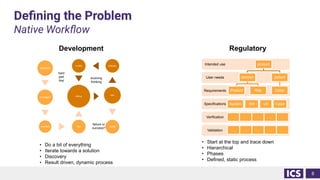
Native Workflow
8
Validation
Verification
Specifications
Requirements
User needs
Intended use product
clinician
Product Risk
patient
Cyber
Development Regulatory
hard
part
first
prioritize
Investigate
example test
debug
modify analysis
test
done
• Do a bit of everything
• Iterate towards a solution
• Discovery
• Result driven, dynamic process
• Start at the top and trace down
• Hierarchical
• Phases
• Defined, static process
failure or
success?
evolving
thinking
System SW UX Cyber
… … … … …
… … … … …
Defining the Problem
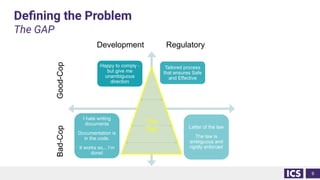
The GAP
9
Happy to comply -
but give me
unambiguous
direction
Tailored process
that ensures Safe
and Effective
I hate writing
documents
Documentation is
in the code.
It works so,.. I’m
done!
Letter of the law
The law is
ambiguous and
rigidly enforced
Development Regulatory
Bad-Cop
Good-Cop
The
Gap
Defining the Problem
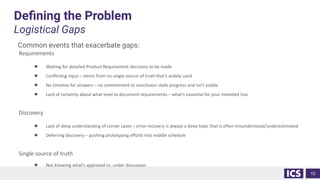
Logistical Gaps
Common events that exacerbate gaps:
Requirements
● Waiting for detailed Product Requirement decisions to be made
● Conflicting input – stems from no single source of truth that’s widely used
● No timeline for answers – no commitment to conclusion stalls progress and isn’t visible
● Lack of certainty about what level to document requirements – what’s essential for your Intended Use
Discovery
● Lack of deep understanding of corner cases – error recovery is always a deep topic that is often misunderstood/underestimated
● Deferring discovery – pushing prototyping efforts into middle schedule
Single source of truth
● Not knowing what's approved vs. under discussion
10
Complicating Factors
11
Complicating Factors
Lagging process
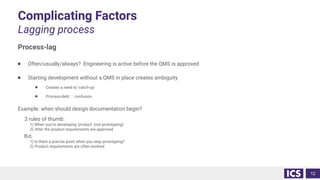
Process-lag
● Often/usually/always? Engineering is active before the QMS is approved
● Starting development without a QMS in place creates ambiguity
● Creates a need to ‘catch-up’
● Process-debt 🡪 confusion
Example: when should design documentation begin?
2 rules of thumb:
1) When you’re developing ‘product’ (not prototyping)
2) After the product requirements are approved
But,
1) Is there a precise point when you stop prototyping?
2) Product requirements are often evolved
12
Complicating Factors
Ambiguous process
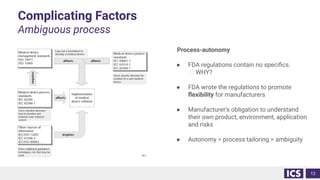
Process-autonomy
● FDA regulations contain no specifics.
🡪 WHY?
● FDA wrote the regulations to promote
flexibility for manufacturers
● Manufacturer’s obligation to understand
their own product, environment, application
and risks
● Autonomy = process tailoring = ambiguity
13
Complicating Factors
Complexity and late discovery
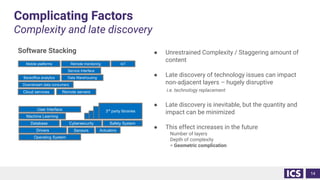
Software Stacking ● Unrestrained Complexity / Staggering amount of
content
● Late discovery of technology issues can impact
non-adjacent layers – hugely disruptive
i.e. technology replacement
● Late discovery is inevitable, but the quantity and
impact can be minimized
● This effect increases in the future
Number of layers
Depth of complexity
= Geometric complication
14
Operating System
Machine Learning
Sensors
Drivers
User Interface
Actuators
Database Cybersecurity
Remote servers
3rd
party libraries
Cloud services
Downstream data consumers
Safety System
Backoffice analytics Data Warehousing
Mobile platforms Remote monitoring IoT
3rd
party libraries
3rd
party libraries
3rd
party libraries
Service Interface
Complicating Factors
Managing change
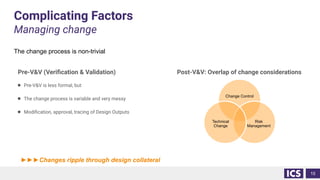
Pre-V&V (Verification & Validation)
● Pre-V&V is less formal, but
● The change process is variable and very messy
● Modification, approval, tracing of Design Outputs
Post-V&V: Overlap of change considerations
15
Change Control
Risk
Management
Technical
Change
►►►Changes ripple through design collateral
The change process is non-trivial
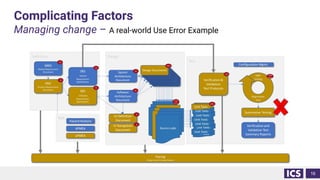
Complicating Factors
Managing change – A real-world Use Error Example
16
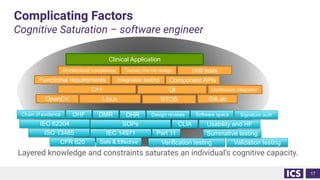
Complicating Factors
Cognitive Saturation – software engineer
Layered knowledge and constraints saturates an individual’s cognitive capacity.
17
Linux RTOS
C++ Qt
GitLab
Continuous Integration
OpenCV
CFR 820
ISO 13485 IEC 14971
IEC 62304 CLIA
Part 11
SOPs
Verification testing Validation testing
Summative testing
Usability and HF
Functional requirements Integration testing Component APIs
Chain of evidence
Safe & Effective
DHF DMR DHR Design reviews Software specs Signature auth
Unit tests
Architectural compliance Tracing into the design
Clinical Application
Bridging
18
Bridging the Gap
Process lag & Ambiguous Process
Don’t create a gap
● Define (document, approve, distribute) design expectations when developments starts
● Interim Development Plan to avoid a gap
● For example, start with a ‘prototyping process’
● If no prototyping requirements, then define the boundary to prototyping
● Size the plan to the risk of the development activity
● Grow the plan with new activities
● Make the process explicit, simple (work instructions)
Implement a QMS progressively
● Use a risk based approach to prioritize QMS procedures
● Start with: Quality Manual, Design Control, Document and Records, Risk Management
● Add as they become relevant
KISS - Keep it simple/stupid
Use tools early – don’t invent and migrate
● Starting in a spreadsheet or simple document and migrating later tends to be vastly inefficient
19
Bridging the Gap
Complexity and late discovery
Assume an environment of change
● Don’t treat change as the exception
● Build technology changes into your process
● i.e. change image library
Write plans to minimize impact of change
● Aggregate design reviews for a sub-component
Tight cross-functional development
● Changes to HW can impact SW and vice-versa
● Incompatibilities drive late discovery
● Design reviews should have exhaustive input from adjacent development groups
● Mechanical, Usability, Systems, Electrical, Software
20
Bridging the Gap
Managing change
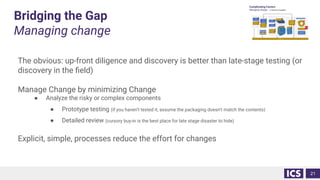
The obvious: up-front diligence and discovery is better than late-stage testing (or
discovery in the field)
Manage Change by minimizing Change
● Analyze the risky or complex components
● Prototype testing (if you haven’t tested it, assume the packaging doesn’t match the contents)
● Detailed review (cursory buy-in is the best place for late stage disaster to hide)
Explicit, simple, processes reduce the effort for changes
21
Bridging the Gap
Cognitive saturation
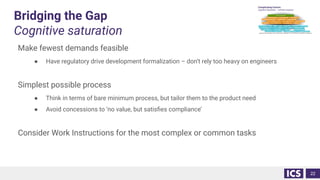
Make fewest demands feasible
● Have regulatory drive development formalization – don’t rely too heavy on engineers
Simplest possible process
● Think in terms of bare minimum process, but tailor them to the product need
● Avoid concessions to ‘no value, but satisfies compliance’
Consider Work Instructions for the most complex or common tasks
22
Nuances
23
Nuances: Single source of truth
The challenge: working-on and accessing approved project documents
File shares
• No Part 11 compliance
• No workflow management
• Weak versioning
• Weak version control
• Weak audit support
• No tracing
Document Control Systems
• Database like – not folder centric
• Access to approved documents license-limited
• Weak work-in-progress management
• Encumbered interface
• Results in lagging updates
• Offline caching
• Not the centralized source of truth
Leads to
• Uncertainty
• Mistakes
• Reworks
• And poor traceability
Solutions
• Design a document process optimized for
• Broad and easy access to approved documents
• Easy review/approval mechanism
• Account for work-in-progress
• Audit trail
• Use customized QMS tools
24
Nuance: Development Prerequisites
When does development start? When to turn on Design Controls?
Why do we need Design Controls?
● Meet the needs of end user and patients
● Ensures Intended Use is achieved
● Prevent unintended behavior in the delivered
product
● Ensures risks are managed
Very little needed to start Design Controls:
● Development Plan (responsibilities, activities:
definition/design/V&V, design outputs, etc.)
● Product Requirements (design inputs)
● QMS Procedures / SOPs?
But, when should we start Design Controls?
● When product development has started
Are we still prototyping?
● Is any part of the prototype going to be used in the
final product?
Yes 🡪 developing
No 🡪 prototyping
Risks without Design Controls
● Developed the wrong functionality
● Leaving unintended features in the product
● No design review of prototypes
25
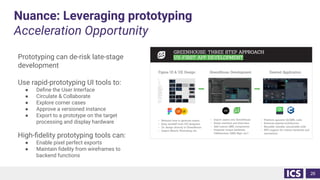
Nuance: Leveraging prototyping
Acceleration Opportunity
Prototyping can de-risk late-stage
development
Use rapid-prototyping UI tools to:
● Define the User Interface
● Circulate & Collaborate
● Explore corner cases
● Approve a versioned instance
● Export to a prototype on the target
processing and display hardware
High-fidelity prototyping tools can:
● Enable pixel perfect exports
● Maintain fidelity from wireframes to
backend functions
26
In a nutshell
27
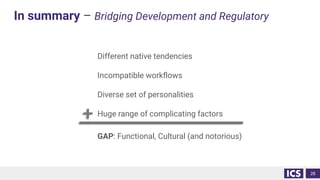
In summary – Bridging Development and Regulatory
Different native tendencies
Incompatible workflows
Diverse set of personalities
Huge range of complicating factors
GAP: Functional, Cultural (and notorious)
28
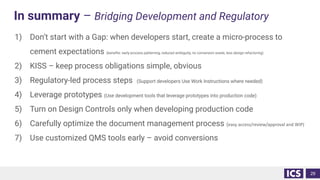
In summary – Bridging Development and Regulatory
1) Don’t start with a Gap: when developers start, create a micro-process to
cement expectations (benefits: early process patterning, reduced ambiguity, no conversion waste, less design refactoring)
2) KISS – keep process obligations simple, obvious
3) Regulatory-led process steps (Support developers Use Work Instructions where needed)
4) Leverage prototypes (Use development tools that leverage prototypes into production code)
5) Turn on Design Controls only when developing production code
6) Carefully optimize the document management process (easy access/review/approval and WIP)
7) Use customized QMS tools early – avoid conversions
29
Questions?
30

Bridging the Gap Between Development and Regulatory Teams

  • 1.
    Bridging the GapBetween Development and Regulatory Teams Milton Yarberry Director of Medical Programs, ICS
  • 2.
    About ICS andBoston UX Creating Transformative Products That Advance Patient Care 2 www.ics.com/medical ICS’ design studio specializes in intuitive touchscreen and multimodal interfaces for high-impact embedded and connected devices. Established in 1987, ICS delivers innovative medtech solutions with a full suite of services to accelerate development, testing and certification of successful next-gen products. ICS and Boston UX are headquartered in Waltham, Mass. with offices in California, Canada and Europe.
  • 3.
    Delivering a FullSuite of Medtech Services 3 ● Human Factors Engineering ● IEC 62366-UX/UI Design ● Custom Frontend and Backend Software Development ● Development with IEC 62304-Compliant Platform ● Low-code Tools that Convert UX Prototype to Product ● Medical Device Cybersecurity ● AWS and Azure Cloud Services and Analytics ● ISO 14971-Compliant Hazard Analysis ● Software Verification Testing ● Complimentary Software Technology Assessment
  • 4.
    Development 🡪 Regulatory Mybackground Development Regulatory 4 Software & Systems Engineering Complex Systems Machine Learning Software Architecture Engineering and Project Management Agile/Scrum Waterfall PMP Regulatory Safety & Efficacy Standards Compliance
  • 5.
    Agenda 1. Defining theproblem – the Gap 2. Complicating Factors 3. Bridging – the Gap 4. Nuances 5. Summary 5
  • 6.
  • 7.
    Defining the Problem NativeCharacteristics Cloud 7 Development Regulatory
  • 8.
    Defining the Problem NativeWorkflow 8 Validation Verification Specifications Requirements User needs Intended use product clinician Product Risk patient Cyber Development Regulatory hard part first prioritize Investigate example test debug modify analysis test done • Do a bit of everything • Iterate towards a solution • Discovery • Result driven, dynamic process • Start at the top and trace down • Hierarchical • Phases • Defined, static process failure or success? evolving thinking System SW UX Cyber … … … … … … … … … …
  • 9.
    Defining the Problem TheGAP 9 Happy to comply - but give me unambiguous direction Tailored process that ensures Safe and Effective I hate writing documents Documentation is in the code. It works so,.. I’m done! Letter of the law The law is ambiguous and rigidly enforced Development Regulatory Bad-Cop Good-Cop The Gap
  • 10.
    Defining the Problem LogisticalGaps Common events that exacerbate gaps: Requirements ● Waiting for detailed Product Requirement decisions to be made ● Conflicting input – stems from no single source of truth that’s widely used ● No timeline for answers – no commitment to conclusion stalls progress and isn’t visible ● Lack of certainty about what level to document requirements – what’s essential for your Intended Use Discovery ● Lack of deep understanding of corner cases – error recovery is always a deep topic that is often misunderstood/underestimated ● Deferring discovery – pushing prototyping efforts into middle schedule Single source of truth ● Not knowing what's approved vs. under discussion 10
  • 11.
  • 12.
    Complicating Factors Lagging process Process-lag ●Often/usually/always? Engineering is active before the QMS is approved ● Starting development without a QMS in place creates ambiguity ● Creates a need to ‘catch-up’ ● Process-debt 🡪 confusion Example: when should design documentation begin? 2 rules of thumb: 1) When you’re developing ‘product’ (not prototyping) 2) After the product requirements are approved But, 1) Is there a precise point when you stop prototyping? 2) Product requirements are often evolved 12
  • 13.
    Complicating Factors Ambiguous process Process-autonomy ●FDA regulations contain no specifics. 🡪 WHY? ● FDA wrote the regulations to promote flexibility for manufacturers ● Manufacturer’s obligation to understand their own product, environment, application and risks ● Autonomy = process tailoring = ambiguity 13
  • 14.
    Complicating Factors Complexity andlate discovery Software Stacking ● Unrestrained Complexity / Staggering amount of content ● Late discovery of technology issues can impact non-adjacent layers – hugely disruptive i.e. technology replacement ● Late discovery is inevitable, but the quantity and impact can be minimized ● This effect increases in the future Number of layers Depth of complexity = Geometric complication 14 Operating System Machine Learning Sensors Drivers User Interface Actuators Database Cybersecurity Remote servers 3rd party libraries Cloud services Downstream data consumers Safety System Backoffice analytics Data Warehousing Mobile platforms Remote monitoring IoT 3rd party libraries 3rd party libraries 3rd party libraries Service Interface
  • 15.
    Complicating Factors Managing change Pre-V&V(Verification & Validation) ● Pre-V&V is less formal, but ● The change process is variable and very messy ● Modification, approval, tracing of Design Outputs Post-V&V: Overlap of change considerations 15 Change Control Risk Management Technical Change ►►►Changes ripple through design collateral The change process is non-trivial
  • 16.
    Complicating Factors Managing change– A real-world Use Error Example 16
  • 17.
    Complicating Factors Cognitive Saturation– software engineer Layered knowledge and constraints saturates an individual’s cognitive capacity. 17 Linux RTOS C++ Qt GitLab Continuous Integration OpenCV CFR 820 ISO 13485 IEC 14971 IEC 62304 CLIA Part 11 SOPs Verification testing Validation testing Summative testing Usability and HF Functional requirements Integration testing Component APIs Chain of evidence Safe & Effective DHF DMR DHR Design reviews Software specs Signature auth Unit tests Architectural compliance Tracing into the design Clinical Application
  • 18.
  • 19.
    Bridging the Gap Processlag & Ambiguous Process Don’t create a gap ● Define (document, approve, distribute) design expectations when developments starts ● Interim Development Plan to avoid a gap ● For example, start with a ‘prototyping process’ ● If no prototyping requirements, then define the boundary to prototyping ● Size the plan to the risk of the development activity ● Grow the plan with new activities ● Make the process explicit, simple (work instructions) Implement a QMS progressively ● Use a risk based approach to prioritize QMS procedures ● Start with: Quality Manual, Design Control, Document and Records, Risk Management ● Add as they become relevant KISS - Keep it simple/stupid Use tools early – don’t invent and migrate ● Starting in a spreadsheet or simple document and migrating later tends to be vastly inefficient 19
  • 20.
    Bridging the Gap Complexityand late discovery Assume an environment of change ● Don’t treat change as the exception ● Build technology changes into your process ● i.e. change image library Write plans to minimize impact of change ● Aggregate design reviews for a sub-component Tight cross-functional development ● Changes to HW can impact SW and vice-versa ● Incompatibilities drive late discovery ● Design reviews should have exhaustive input from adjacent development groups ● Mechanical, Usability, Systems, Electrical, Software 20
  • 21.
    Bridging the Gap Managingchange The obvious: up-front diligence and discovery is better than late-stage testing (or discovery in the field) Manage Change by minimizing Change ● Analyze the risky or complex components ● Prototype testing (if you haven’t tested it, assume the packaging doesn’t match the contents) ● Detailed review (cursory buy-in is the best place for late stage disaster to hide) Explicit, simple, processes reduce the effort for changes 21
  • 22.
    Bridging the Gap Cognitivesaturation Make fewest demands feasible ● Have regulatory drive development formalization – don’t rely too heavy on engineers Simplest possible process ● Think in terms of bare minimum process, but tailor them to the product need ● Avoid concessions to ‘no value, but satisfies compliance’ Consider Work Instructions for the most complex or common tasks 22
  • 23.
  • 24.
    Nuances: Single sourceof truth The challenge: working-on and accessing approved project documents File shares • No Part 11 compliance • No workflow management • Weak versioning • Weak version control • Weak audit support • No tracing Document Control Systems • Database like – not folder centric • Access to approved documents license-limited • Weak work-in-progress management • Encumbered interface • Results in lagging updates • Offline caching • Not the centralized source of truth Leads to • Uncertainty • Mistakes • Reworks • And poor traceability Solutions • Design a document process optimized for • Broad and easy access to approved documents • Easy review/approval mechanism • Account for work-in-progress • Audit trail • Use customized QMS tools 24
  • 25.
    Nuance: Development Prerequisites Whendoes development start? When to turn on Design Controls? Why do we need Design Controls? ● Meet the needs of end user and patients ● Ensures Intended Use is achieved ● Prevent unintended behavior in the delivered product ● Ensures risks are managed Very little needed to start Design Controls: ● Development Plan (responsibilities, activities: definition/design/V&V, design outputs, etc.) ● Product Requirements (design inputs) ● QMS Procedures / SOPs? But, when should we start Design Controls? ● When product development has started Are we still prototyping? ● Is any part of the prototype going to be used in the final product? Yes 🡪 developing No 🡪 prototyping Risks without Design Controls ● Developed the wrong functionality ● Leaving unintended features in the product ● No design review of prototypes 25
  • 26.
    Nuance: Leveraging prototyping AccelerationOpportunity Prototyping can de-risk late-stage development Use rapid-prototyping UI tools to: ● Define the User Interface ● Circulate & Collaborate ● Explore corner cases ● Approve a versioned instance ● Export to a prototype on the target processing and display hardware High-fidelity prototyping tools can: ● Enable pixel perfect exports ● Maintain fidelity from wireframes to backend functions 26
  • 27.
  • 28.
    In summary –Bridging Development and Regulatory Different native tendencies Incompatible workflows Diverse set of personalities Huge range of complicating factors GAP: Functional, Cultural (and notorious) 28
  • 29.
    In summary –Bridging Development and Regulatory 1) Don’t start with a Gap: when developers start, create a micro-process to cement expectations (benefits: early process patterning, reduced ambiguity, no conversion waste, less design refactoring) 2) KISS – keep process obligations simple, obvious 3) Regulatory-led process steps (Support developers Use Work Instructions where needed) 4) Leverage prototypes (Use development tools that leverage prototypes into production code) 5) Turn on Design Controls only when developing production code 6) Carefully optimize the document management process (easy access/review/approval and WIP) 7) Use customized QMS tools early – avoid conversions 29
  • 30.