Zotonic
The Tutorial
Erlang User Conference 2013,
Stockholm
Arjan Scherpenisse - arjan@miraclethings.nl
Zotonic's goals

Maximise the use of hardware
 Frontender friendly

Hit the ground running
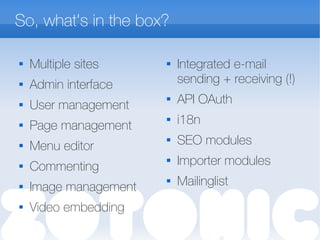
So, what's in the box?

Multiple sites
 Admin interface

User management
 Page management

Menu editor
 Commenting
 Image management
 Video embedding

Integrated e-mail
sending + receiving (!)
 API OAuth
 i18n
 SEO modules
 Importer modules
 Mailinglist
Getting technical

The data model
 HTTP request flow

Modules & sites
 URL dispatching

The building blocks
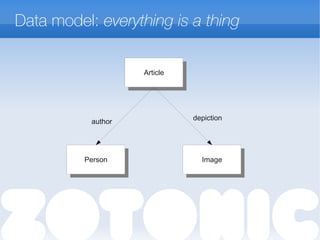
Data model: everything is a thing
ArticleArticle
PersonPerson ImageImage
author depiction
HTTP request flow
Modules

Modules are self-contained:
 Dispatch rules, resources, templates, css, javascript,
images, translations, template filters, actions, validators,
API services, models, …
 Prioritized list
 File lookup mechanism
 Every module can be a gen_server
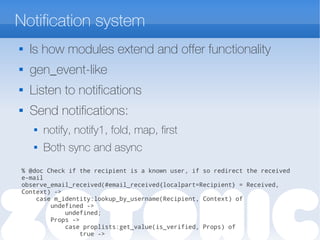
Notification system
 Is how modules extend and offer functionality
 gen_event-like
 Listen to notifications
 Send notifications:
 notify, notify1, fold, map, first
 Both sync and async
% @doc Check if the recipient is a known user, if so redirect the received
e-mail
observe_email_received(#email_received{localpart=Recipient} = Received,
Context) ->
case m_identity:lookup_by_username(Recipient, Context) of
undefined ->
undefined;
Props ->
case proplists:get_value(is_verified, Props) of
true ->
URL dispatching

Dispatch rules per site
 (and per module)

Dispatch rules have names
 e.g. this rule serves the contact.tpl on the /contact
URL:
{contact,
[“contact”], controller_template, [ {template, "contact.tpl"} ]},
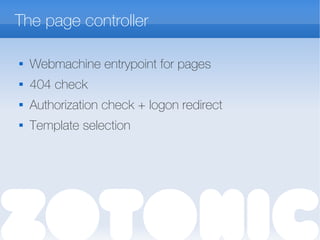
The page controller

Webmachine entrypoint for pages
 404 check

Authorization check + logon redirect
 Template selection
Template system

Extended ErlyDTL
 Expressions: {% if a + b > c %}
 Tuple and list data types
 Data access through models: {{ m.rsc[id].title }}

Templates can be made more specific by category
and/or unique page name
 Templates with the same name override each
other
 Uses module priority
Template ex.: page.page_projects.tpl
{% extends "page.tpl" %}
{% block content_body %}
{% cache 7200 %}
{% for r in m.search[{archive_year cat='project'}] %}
<div class="grid_9 alpha omega">
<h2 class="year">{{ r.year }}</h2>
</div>
{% for group in m.search[{query publication_year=r.year|append:""
cat='project'
sort="-publication_start"}]|chunk:3 %}
<div class="grid_9 alpha omega">
{% for id in group %}
{% catinclude "inc/listitem.tpl" id alpha=forloop.first
omega=forloop.last%}
{% endfor %}
</div>
{% endfor %}
{% endfor %}
{% endcache %}
{% endblock %}
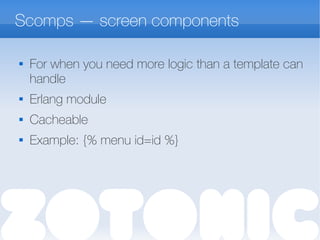
Scomps — screen components

For when you need more logic than a template can
handle
 Erlang module
 Cacheable
 Example: {% menu id=id %}
Javascript — Event handling

Ajax postbacks
 Form submits

Calls event/2 function
 Communicates back to browser by sending
javascript
 Inspired by Nitrogen
{% button postback={click foo=”bar”} text=”click me” %}
event({postback, {click, Args}, _Trigger, _Target}, Context) ->
z_render:wire({alert, [{text,”hello”}]}, Context).
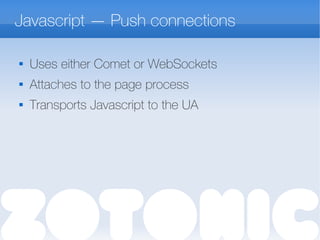
Javascript — Push connections

Uses either Comet or WebSockets
 Attaches to the page process

Transports Javascript to the UA
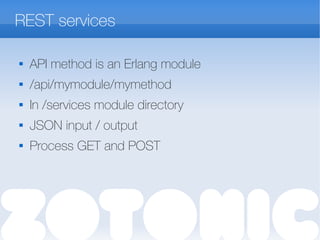
REST services

API method is an Erlang module
 /api/mymodule/mymethod

In /services module directory
 JSON input / output

Process GET and POST
Hands on!

Get Vagrant (version >= 1.1!)
 Clone:
git clone
https://github.com/arjan/zotonic-vagrant-tutorial.git
 Get it running
vagrant up
 … get some coffee...
 Visit: http://localhost:8000
 ...you can also run it on your local machine,
outside vagrant
Let's start!
Tutorial use case: Portfolio site

Site with information about your projects
 Each project has:
 Title, text
 Slide show of large images
 List of related projects
Easy development

apt-get install inotify-tools
 Enable mod_development

Emacs' zotonic-tpl-mode for editing templates
 … and of course erlang-mode / flymake-mode

Each step of this tutorial is a git tag! e.g.
git checkout step-0
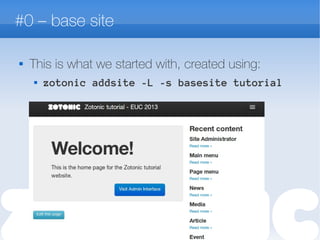
#0 – base site

This is what we started with, created using:
 zotonic addsite -L -s basesite tutorial
#1 – create project category
Define the our site-specific domain model:
specific categories that this site uses.

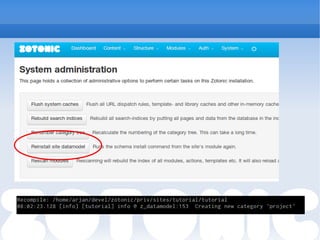
In the site's module (tutorial.erl), we create
manage_schema/2
 Returns a #datamodel{} record
 When done:
 z:m(), z:flush().
 Click “reinstall data model” button in the admin
#2 – create project page template
Create a page specific for resources of the
category project.

Template name: page.project.tpl
 Loops through the list of images
 Note: look at templates/tablet/page.tpl in mod_base_site to see the
template block names that you can use
#3 – project list
A list of recent projects, ordered by their
publication date
 The easy way:
 Create resource with category “search query”
 Search query: “cat=project sort=-publication_start”
 Give it the page path “/projects”
 This can go in your #datamodel{}

#3b – alternative project list
 The hard(coded) way:
 Set up new dispatch rule for /all-projects
 Create all-projects.tpl, write template code...
 (git checkout step-3b)
#4 – feedback form
A form which sends an email to the site
administrator.

Add form to page.project.tpl
 Create event handler in tutorial.erl
 Takes form data,
 Sends email
 Email is HTML; rendered from template
#5 – notification system
We want to make sure a project always has at
least one edge of type “author”

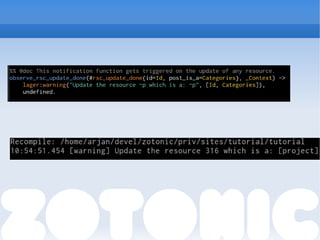
create observe_rsc_update_done/2 in tutorial.erl
 Tip: Look in zotonic_notifications.hrl for more hooks into
the system!

Add code
 Test it in the admin!
 (reload after save to see the new edge)
Thank you!

Please come to my talk on friday!
 “Making it fast” - the performance of Zotonic
 … or chat with me & Andreas :-)
 Online resources:
 http://zotonic.com
 http://zotonic.com/docs
 IRC, XMPP, mailing lists
 Tutorial source code, tutorial slides

Zotonic tutorial EUC 2013

  • 1.
    Zotonic The Tutorial Erlang UserConference 2013, Stockholm Arjan Scherpenisse - arjan@miraclethings.nl
  • 2.
    Zotonic's goals  Maximise theuse of hardware  Frontender friendly  Hit the ground running
  • 3.
    So, what's inthe box?  Multiple sites  Admin interface  User management  Page management  Menu editor  Commenting  Image management  Video embedding  Integrated e-mail sending + receiving (!)  API OAuth  i18n  SEO modules  Importer modules  Mailinglist
  • 4.
    Getting technical  The datamodel  HTTP request flow  Modules & sites  URL dispatching  The building blocks
  • 5.
    Data model: everythingis a thing ArticleArticle PersonPerson ImageImage author depiction
  • 6.
  • 7.
    Modules  Modules are self-contained: Dispatch rules, resources, templates, css, javascript, images, translations, template filters, actions, validators, API services, models, …  Prioritized list  File lookup mechanism  Every module can be a gen_server
  • 8.
    Notification system  Ishow modules extend and offer functionality  gen_event-like  Listen to notifications  Send notifications:  notify, notify1, fold, map, first  Both sync and async % @doc Check if the recipient is a known user, if so redirect the received e-mail observe_email_received(#email_received{localpart=Recipient} = Received, Context) -> case m_identity:lookup_by_username(Recipient, Context) of undefined -> undefined; Props -> case proplists:get_value(is_verified, Props) of true ->
  • 9.
    URL dispatching  Dispatch rulesper site  (and per module)  Dispatch rules have names  e.g. this rule serves the contact.tpl on the /contact URL: {contact, [“contact”], controller_template, [ {template, "contact.tpl"} ]},
  • 10.
    The page controller  Webmachineentrypoint for pages  404 check  Authorization check + logon redirect  Template selection
  • 11.
    Template system  Extended ErlyDTL Expressions: {% if a + b > c %}  Tuple and list data types  Data access through models: {{ m.rsc[id].title }}  Templates can be made more specific by category and/or unique page name  Templates with the same name override each other  Uses module priority
  • 12.
    Template ex.: page.page_projects.tpl {%extends "page.tpl" %} {% block content_body %} {% cache 7200 %} {% for r in m.search[{archive_year cat='project'}] %} <div class="grid_9 alpha omega"> <h2 class="year">{{ r.year }}</h2> </div> {% for group in m.search[{query publication_year=r.year|append:"" cat='project' sort="-publication_start"}]|chunk:3 %} <div class="grid_9 alpha omega"> {% for id in group %} {% catinclude "inc/listitem.tpl" id alpha=forloop.first omega=forloop.last%} {% endfor %} </div> {% endfor %} {% endfor %} {% endcache %} {% endblock %}
  • 13.
    Scomps — screencomponents  For when you need more logic than a template can handle  Erlang module  Cacheable  Example: {% menu id=id %}
  • 14.
    Javascript — Eventhandling  Ajax postbacks  Form submits  Calls event/2 function  Communicates back to browser by sending javascript  Inspired by Nitrogen {% button postback={click foo=”bar”} text=”click me” %} event({postback, {click, Args}, _Trigger, _Target}, Context) -> z_render:wire({alert, [{text,”hello”}]}, Context).
  • 15.
    Javascript — Pushconnections  Uses either Comet or WebSockets  Attaches to the page process  Transports Javascript to the UA
  • 16.
    REST services  API methodis an Erlang module  /api/mymodule/mymethod  In /services module directory  JSON input / output  Process GET and POST
  • 17.
    Hands on!  Get Vagrant(version >= 1.1!)  Clone: git clone https://github.com/arjan/zotonic-vagrant-tutorial.git  Get it running vagrant up  … get some coffee...  Visit: http://localhost:8000  ...you can also run it on your local machine, outside vagrant
  • 18.
  • 19.
    Tutorial use case:Portfolio site  Site with information about your projects  Each project has:  Title, text  Slide show of large images  List of related projects
  • 20.
    Easy development  apt-get installinotify-tools  Enable mod_development  Emacs' zotonic-tpl-mode for editing templates  … and of course erlang-mode / flymake-mode  Each step of this tutorial is a git tag! e.g. git checkout step-0
  • 21.
    #0 – basesite  This is what we started with, created using:  zotonic addsite -L -s basesite tutorial
  • 22.
    #1 – createproject category Define the our site-specific domain model: specific categories that this site uses.  In the site's module (tutorial.erl), we create manage_schema/2  Returns a #datamodel{} record  When done:  z:m(), z:flush().  Click “reinstall data model” button in the admin
  • 24.
    #2 – createproject page template Create a page specific for resources of the category project.  Template name: page.project.tpl  Loops through the list of images  Note: look at templates/tablet/page.tpl in mod_base_site to see the template block names that you can use
  • 25.
    #3 – projectlist A list of recent projects, ordered by their publication date  The easy way:  Create resource with category “search query”  Search query: “cat=project sort=-publication_start”  Give it the page path “/projects”  This can go in your #datamodel{} 
  • 26.
    #3b – alternativeproject list  The hard(coded) way:  Set up new dispatch rule for /all-projects  Create all-projects.tpl, write template code...  (git checkout step-3b)
  • 27.
    #4 – feedbackform A form which sends an email to the site administrator.  Add form to page.project.tpl  Create event handler in tutorial.erl  Takes form data,  Sends email  Email is HTML; rendered from template
  • 28.
    #5 – notificationsystem We want to make sure a project always has at least one edge of type “author”  create observe_rsc_update_done/2 in tutorial.erl  Tip: Look in zotonic_notifications.hrl for more hooks into the system!  Add code  Test it in the admin!  (reload after save to see the new edge)
  • 30.
    Thank you!  Please cometo my talk on friday!  “Making it fast” - the performance of Zotonic  … or chat with me & Andreas :-)  Online resources:  http://zotonic.com  http://zotonic.com/docs  IRC, XMPP, mailing lists  Tutorial source code, tutorial slides