IMPROVEMENTS
PRELIMINARY TASK VS MAIN TASK
PROGRESSION
I feel as though I have really improved my Photoshop skills
as I have moved through the AS course, and comparing my
preliminary task with my music magazine will demonstrate
this. I have also managed to develop my InDesign skills – a
programme which I had never used before I began making
my music magazine.
HOW DID I GET FROM
THIS…
… TO THIS?
COVER
vs
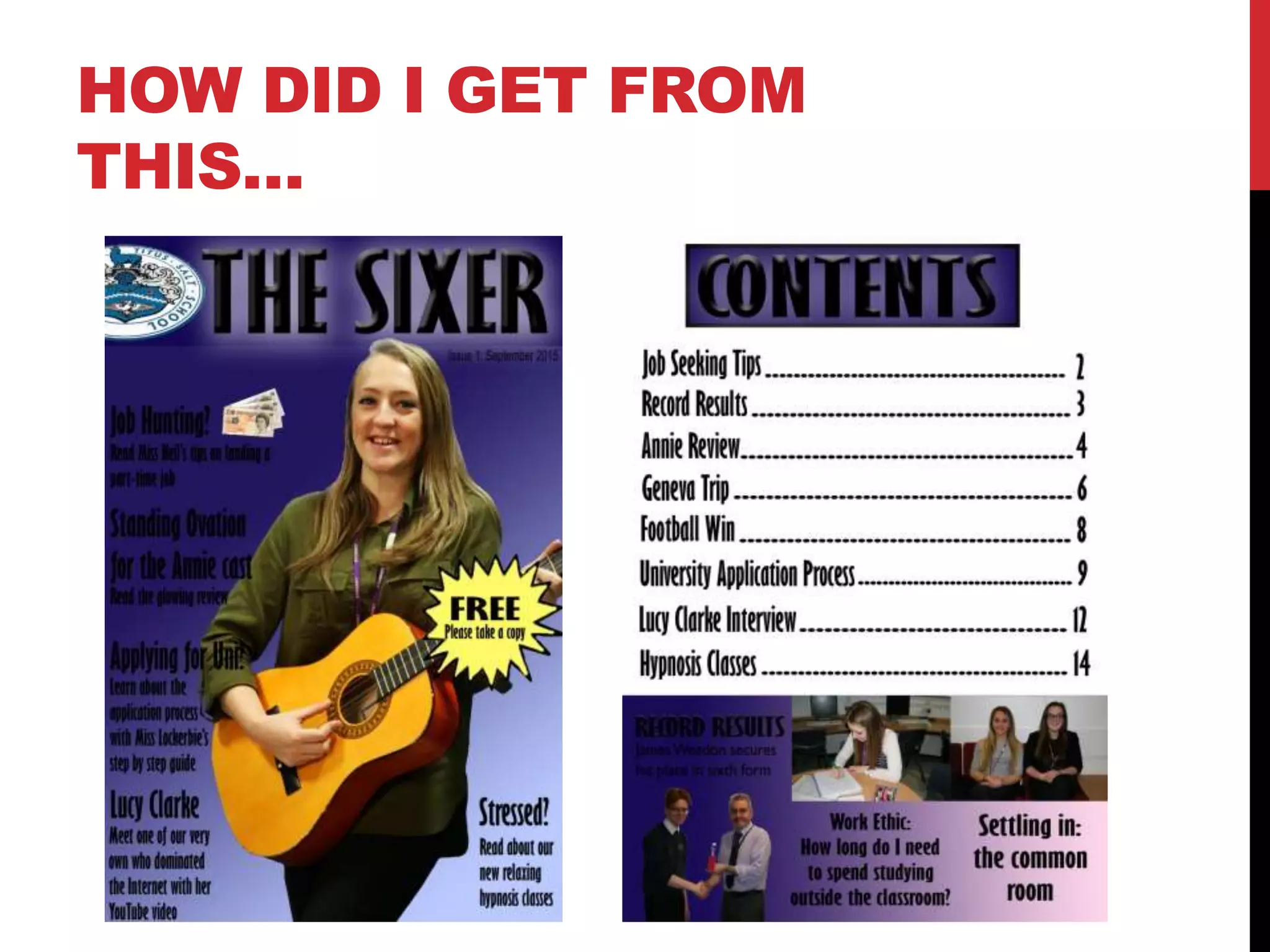
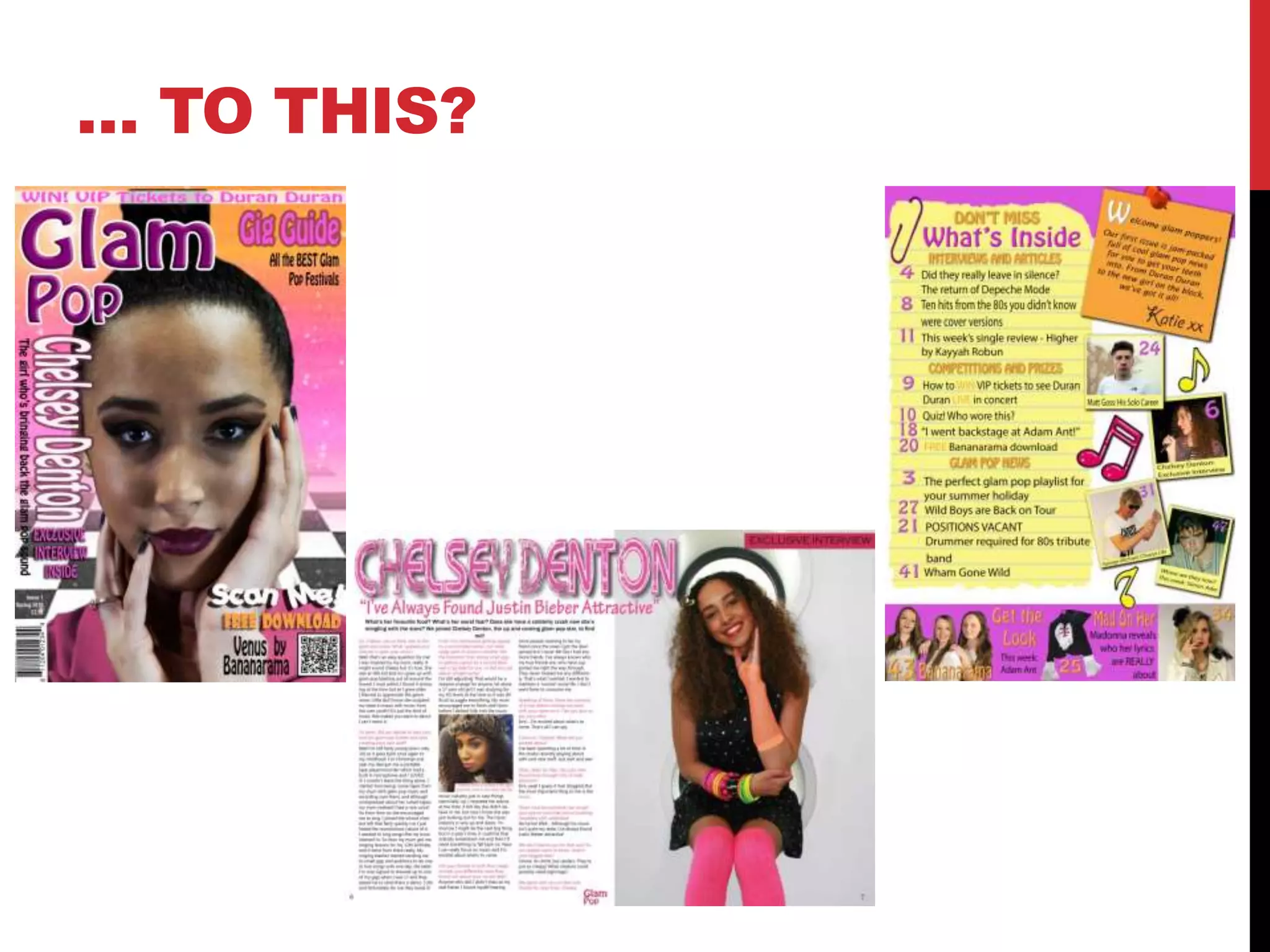
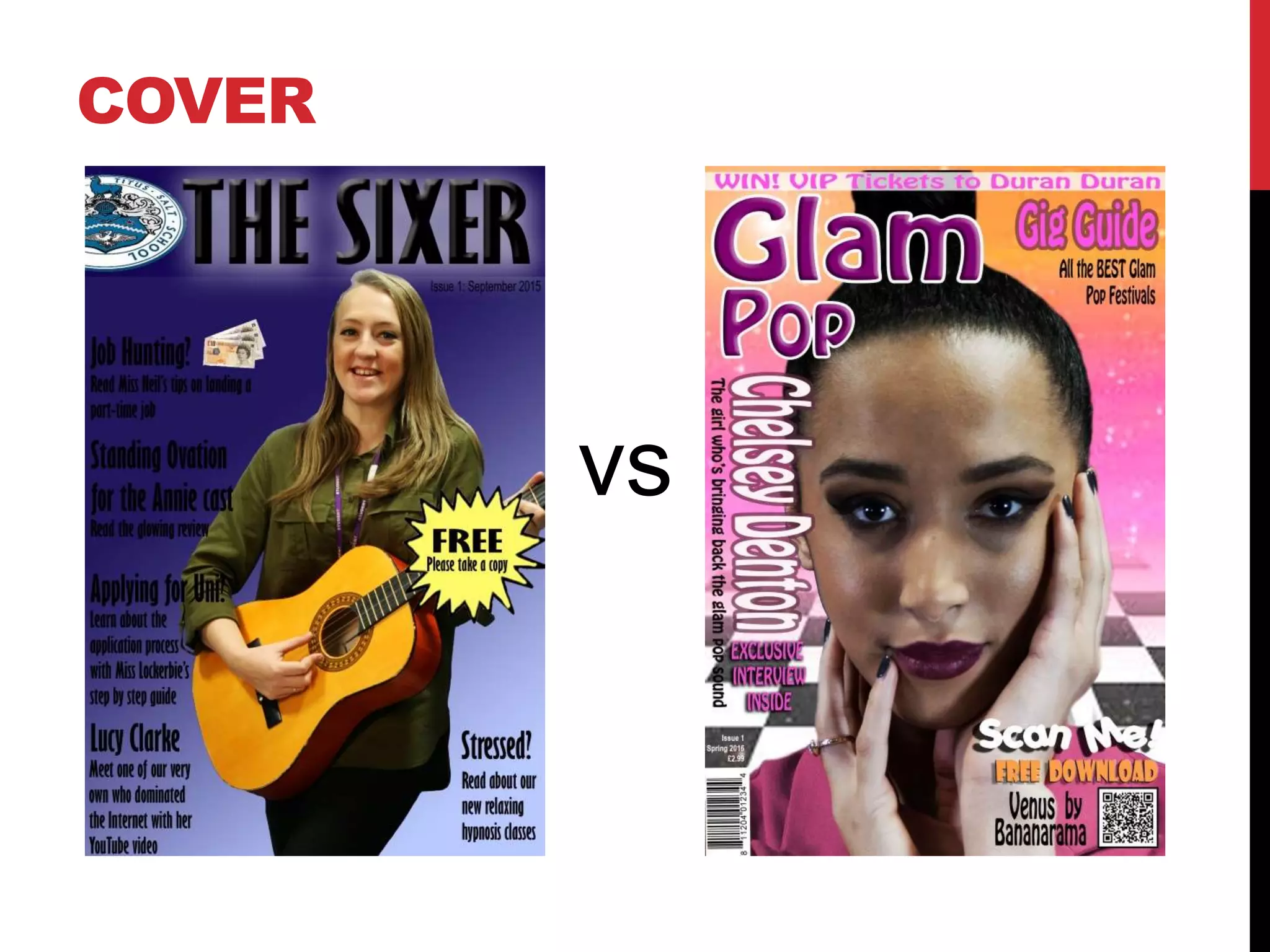
On the previous slide I have included the cover I created for my preliminary task, and
also the cover I created for my main task.
One of the main things I learned from my preliminary task is that dark colours don’t
work well on covers because they are not eye-catching enough and generally make it
difficult to see the text. I also learnt that too many cover lines/too much text on the front
cover and be overpowering for an audience and make the magazine less appealing as a
consequence. So, on my final piece I used bright colours and far less text.
In terms of Photoshop skills, my manipulation of text has become more professional,
and I have used a bigger variety of tools on my music magazine than on my school-
based magazine.
On my preliminary cover, I have only managed to use the bevel and emboss effect and
the drop shadow effect to create my masthead, whereas on my music magazine cover I
have improved my use of these tools by using the more complex settings which allow
you to manipulate factors such as the depth of the bevel, and used them on my heading,
and also some of the other text on cover. I have also included the use of a stroke effect
which I feel helps my typography to stand out.
Additionally, on my preliminary cover, I simply used the magic wand tool to cut Lucy out
from the blue background I took the photo in front of. I then went over the rough edges
with the eraser tool on a low opacity to smooth them out. Whereas, when I created my
music magazine cover I used the magic wand tool, the quick selection tool, the smudge
tool and the eraser tool on a low opacity to cut Chelsey’s face out of the background
properly, catching every bit of blue.
COVER
CONTENTS PAGE
CONTENTS PAGE
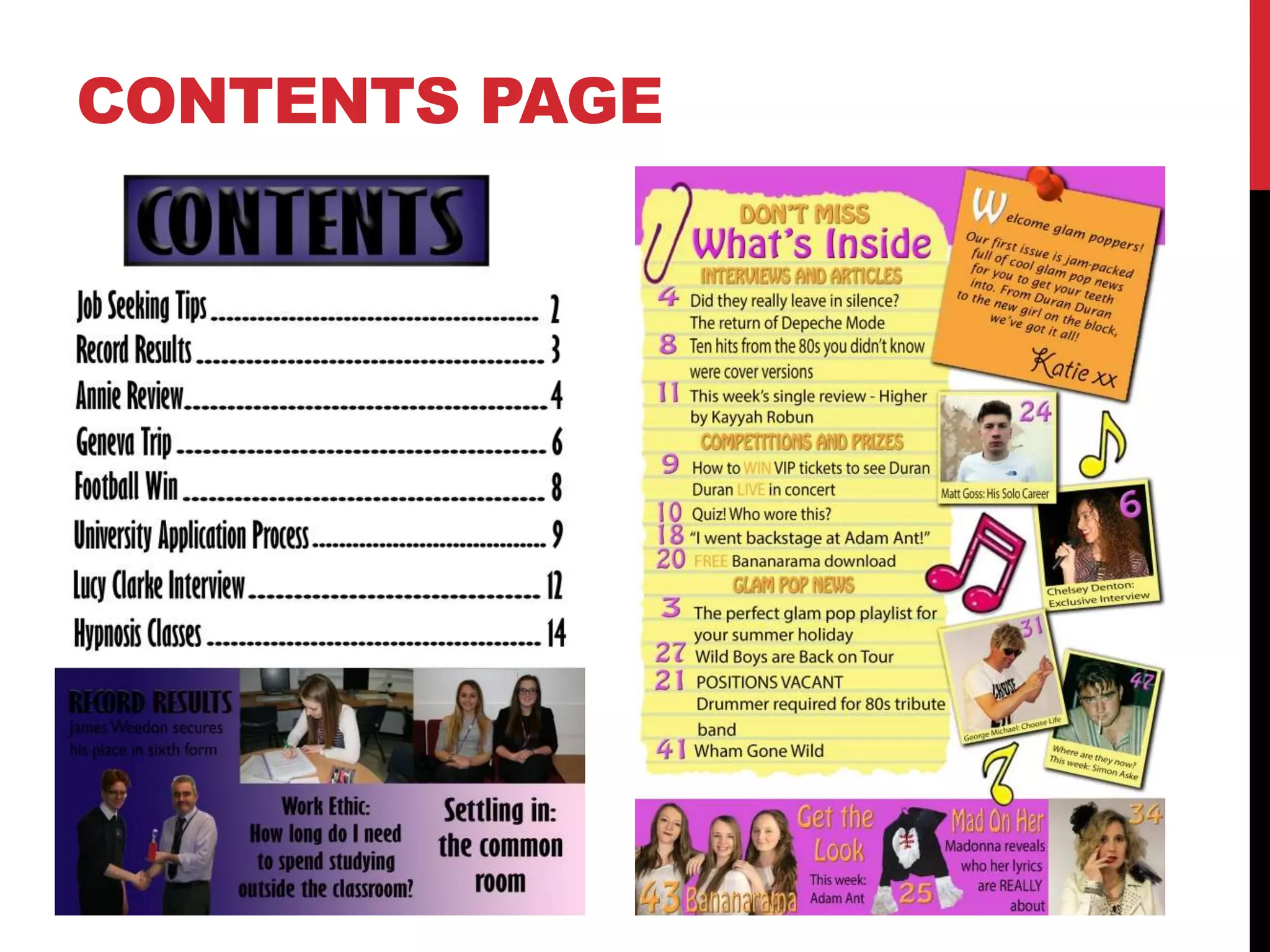
The previous slide shows both my preliminary contents page, and the
contents page which I produced for my main task.
One of the main things I learnt about contents pages from doing the
preliminary task is that the dots in between the article names and the
page numbers aren’t effective because they are so boring functional.
So, when I created my music magazine, I decided to use a different
structure which is similar to some of the ones I saw when I was
researching and deconstructing magazines of a similar genre. I also
used a brighter colour scheme on my music magazine, which like with
my preliminary task, matched the colour scheme of my cover but made
it more fun and eye-catching.
In terms of Photoshop skills, I have used a bigger variety of tools on my
contents page, too. For instance, through making the contents page on
the right I have learned how to add effects, such as drop shadows, to
shapes and images. This is what I did to my pinned editors note and
Polaroid-style photographs to make them look more realistic.
DOUBLE PAGE
SPREAD
Although I didn’t create a double page spread for my preliminary task, the
creation of this double page spread for my music magazine shows how my
skills have developed.
To create these pages I used InDesign because it is a software that is more
suited to this purpose than Photoshop. However, I had never used it before
and so I had to learn how to do it from scratch. I did this by watching
tutorials and seeking advice from my teacher. Through doing this, I learned
how to import and place images, create columns and manipulate text among
a multitude of other things.
I am proud of what I have achieved.
THE LEARNING
PROCESS
The main way I learned how to use Photoshop was through trial
and error. Before I started working on my music magazine, I did a
mock-up of a music magazine cover using an image from the
Internet so that I could become familiar with the different tools and
the software itself, because it is very different to any other
programme that I’ve ever used.
I did the same for InDesign, but as it was a completely new
software, I also watched tutorials and sought some help from my
teacher when I needed it, as I mentioned previously.

Improvement (preliminary vs main) version 2.0

  • 1.
  • 2.
    PROGRESSION I feel asthough I have really improved my Photoshop skills as I have moved through the AS course, and comparing my preliminary task with my music magazine will demonstrate this. I have also managed to develop my InDesign skills – a programme which I had never used before I began making my music magazine.
  • 3.
    HOW DID IGET FROM THIS…
  • 4.
  • 5.
  • 6.
    On the previousslide I have included the cover I created for my preliminary task, and also the cover I created for my main task. One of the main things I learned from my preliminary task is that dark colours don’t work well on covers because they are not eye-catching enough and generally make it difficult to see the text. I also learnt that too many cover lines/too much text on the front cover and be overpowering for an audience and make the magazine less appealing as a consequence. So, on my final piece I used bright colours and far less text. In terms of Photoshop skills, my manipulation of text has become more professional, and I have used a bigger variety of tools on my music magazine than on my school- based magazine. On my preliminary cover, I have only managed to use the bevel and emboss effect and the drop shadow effect to create my masthead, whereas on my music magazine cover I have improved my use of these tools by using the more complex settings which allow you to manipulate factors such as the depth of the bevel, and used them on my heading, and also some of the other text on cover. I have also included the use of a stroke effect which I feel helps my typography to stand out. Additionally, on my preliminary cover, I simply used the magic wand tool to cut Lucy out from the blue background I took the photo in front of. I then went over the rough edges with the eraser tool on a low opacity to smooth them out. Whereas, when I created my music magazine cover I used the magic wand tool, the quick selection tool, the smudge tool and the eraser tool on a low opacity to cut Chelsey’s face out of the background properly, catching every bit of blue. COVER
  • 7.
  • 8.
    CONTENTS PAGE The previousslide shows both my preliminary contents page, and the contents page which I produced for my main task. One of the main things I learnt about contents pages from doing the preliminary task is that the dots in between the article names and the page numbers aren’t effective because they are so boring functional. So, when I created my music magazine, I decided to use a different structure which is similar to some of the ones I saw when I was researching and deconstructing magazines of a similar genre. I also used a brighter colour scheme on my music magazine, which like with my preliminary task, matched the colour scheme of my cover but made it more fun and eye-catching. In terms of Photoshop skills, I have used a bigger variety of tools on my contents page, too. For instance, through making the contents page on the right I have learned how to add effects, such as drop shadows, to shapes and images. This is what I did to my pinned editors note and Polaroid-style photographs to make them look more realistic.
  • 9.
    DOUBLE PAGE SPREAD Although Ididn’t create a double page spread for my preliminary task, the creation of this double page spread for my music magazine shows how my skills have developed. To create these pages I used InDesign because it is a software that is more suited to this purpose than Photoshop. However, I had never used it before and so I had to learn how to do it from scratch. I did this by watching tutorials and seeking advice from my teacher. Through doing this, I learned how to import and place images, create columns and manipulate text among a multitude of other things. I am proud of what I have achieved.
  • 10.
    THE LEARNING PROCESS The mainway I learned how to use Photoshop was through trial and error. Before I started working on my music magazine, I did a mock-up of a music magazine cover using an image from the Internet so that I could become familiar with the different tools and the software itself, because it is very different to any other programme that I’ve ever used. I did the same for InDesign, but as it was a completely new software, I also watched tutorials and sought some help from my teacher when I needed it, as I mentioned previously.