Module2
Image Enhancement in Spatial Domain
and Frequency Domain
01/12/2025 NATIONAL INSTITUTE OF TECHNOLOGY,MEGHALAYA 2
Image Enhancement
Objective of Image enhancement:
Process an image so that the result is more suitable than the original image for a specific application.
Category of Image Enhancement:
 Spatial Domain Image Enhancement
The term spatial domain refers to the image plane itself.
Image plane contains the image itself and the approaches in this categories are based on direct
manipulation of pixel in an image.
 Frequency Domain Image Enhancement
The frequency domain in image processing represents, at each point a particular frequency contained
in the spatial domain of the image.
In frequency domain methods, the image is first transferred into frequency domain, it means that,
The Fourier Transform of the image is computed first. All the enhancement operations are performed
on the Fourier transform of the image and then the Inverse Fourier transform is performed to get the
resultant image.
01/12/2025 NATIONAL INSTITUTE OF TECHNOLOGY,MEGHALAYA 3
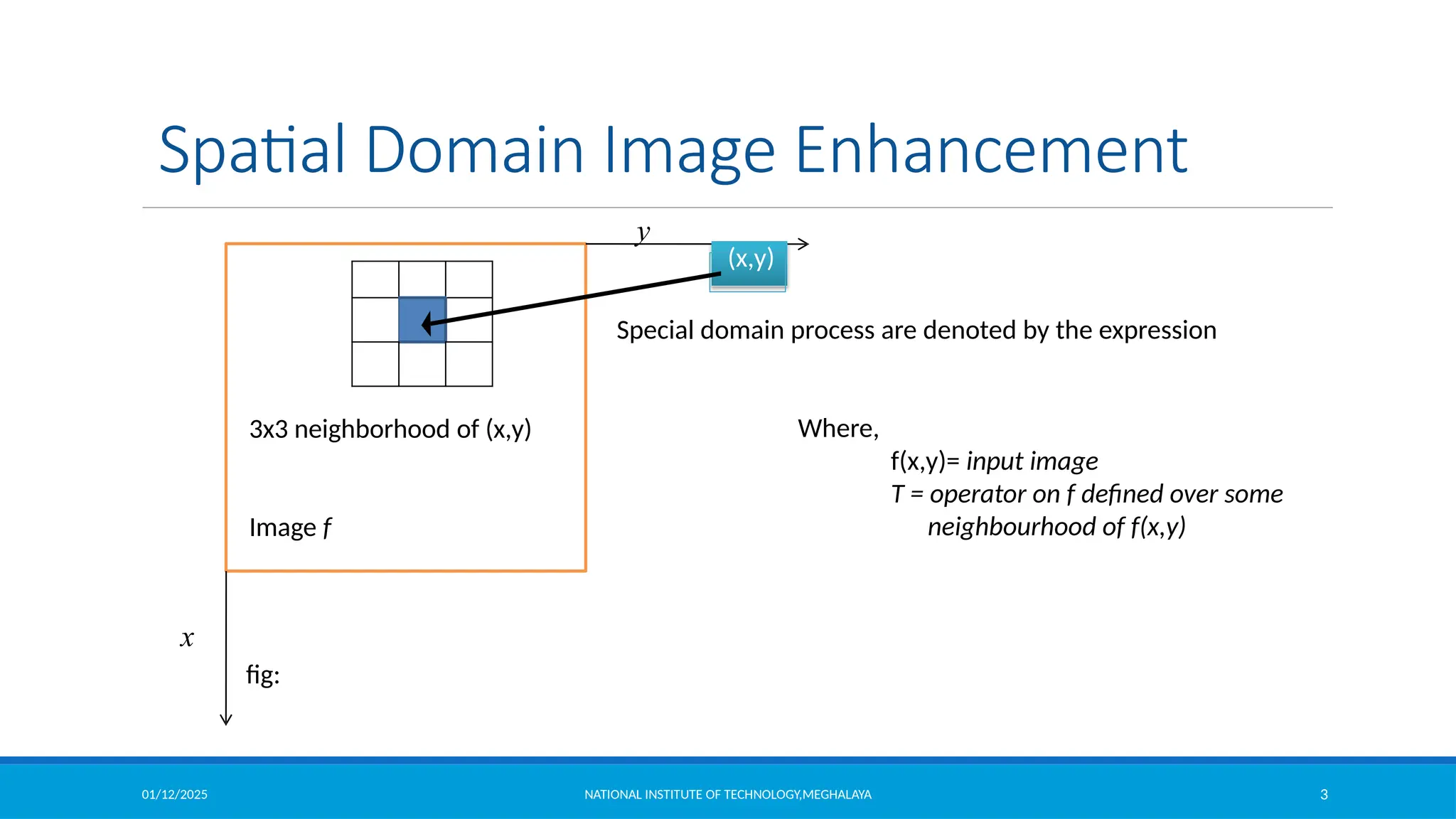
x
y
(x,y)
3x3 neighborhood of (x,y)
Image f
Spatial Domain Image Enhancement
Special domain process are denoted by the expression
Where,
f(x,y)= input image
T = operator on f defined over some
neighbourhood of f(x,y)
fig:
01/12/2025 NATIONAL INSTITUTE OF TECHNOLOGY,MEGHALAYA 4
Grey Level Transformation Function
Point Processing
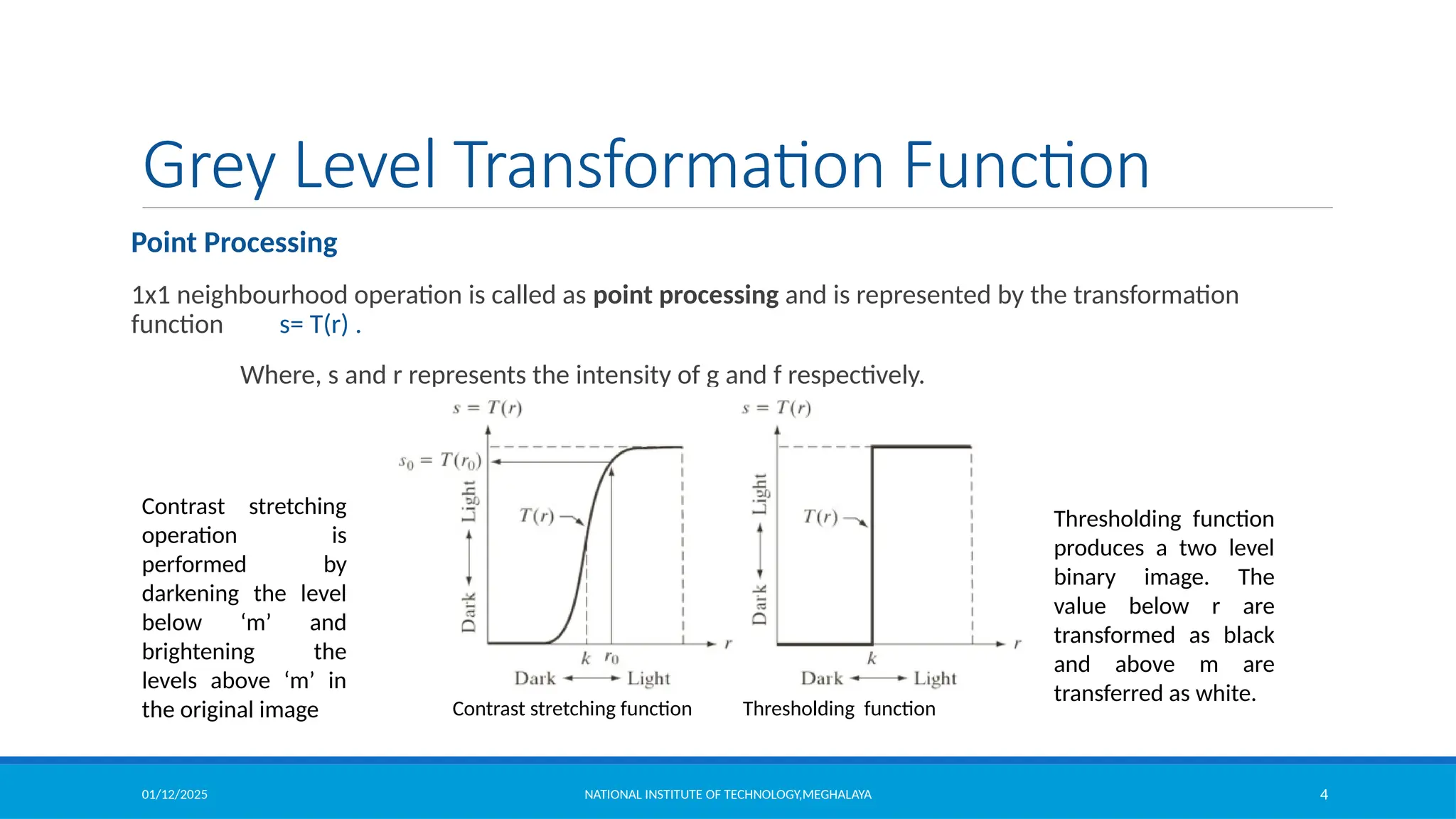
1x1 neighbourhood operation is called as point processing and is represented by the transformation
function s= T(r) .
Where, s and r represents the intensity of g and f respectively.
Contrast stretching function Thresholding function
Contrast stretching
operation is
performed by
darkening the level
below ‘m’ and
brightening the
levels above ‘m’ in
the original image
Thresholding function
produces a two level
binary image. The
value below r are
transformed as black
and above m are
transferred as white.
01/12/2025 NATIONAL INSTITUTE OF TECHNOLOGY,MEGHALAYA 5
Grey Level Transformation Function
Image negative
Let the image has an intensity level in the range [0 L-1], then the intensity transformation is given by
Where,
S is the output intensity value
L is the highest intensity levels
r is the input intensity value
Particularly suited for
enhancing white or grey detail
embedded in dark regions of an
image, especially when the
black areas are dominant in size
01/12/2025 NATIONAL INSTITUTE OF TECHNOLOGY,MEGHALAYA 6
Grey Level Transformation Function
Log Transformations
For an image having intensity ranging from [0 L-1], log transformation is given by
, where c is a constant
• log transformation compresses
the dynamic range of images with
large variations in pixel values.
• It maps a narrow range of low
intensity values in the input into a
wide range of output levels.
• The opposite is true of higher
values of input levels.
• It expands the values of dark
pixels in an image while
compressing the higher level
values.
01/12/2025 NATIONAL INSTITUTE OF TECHNOLOGY,MEGHALAYA 7
Log Transformations (cont’d)
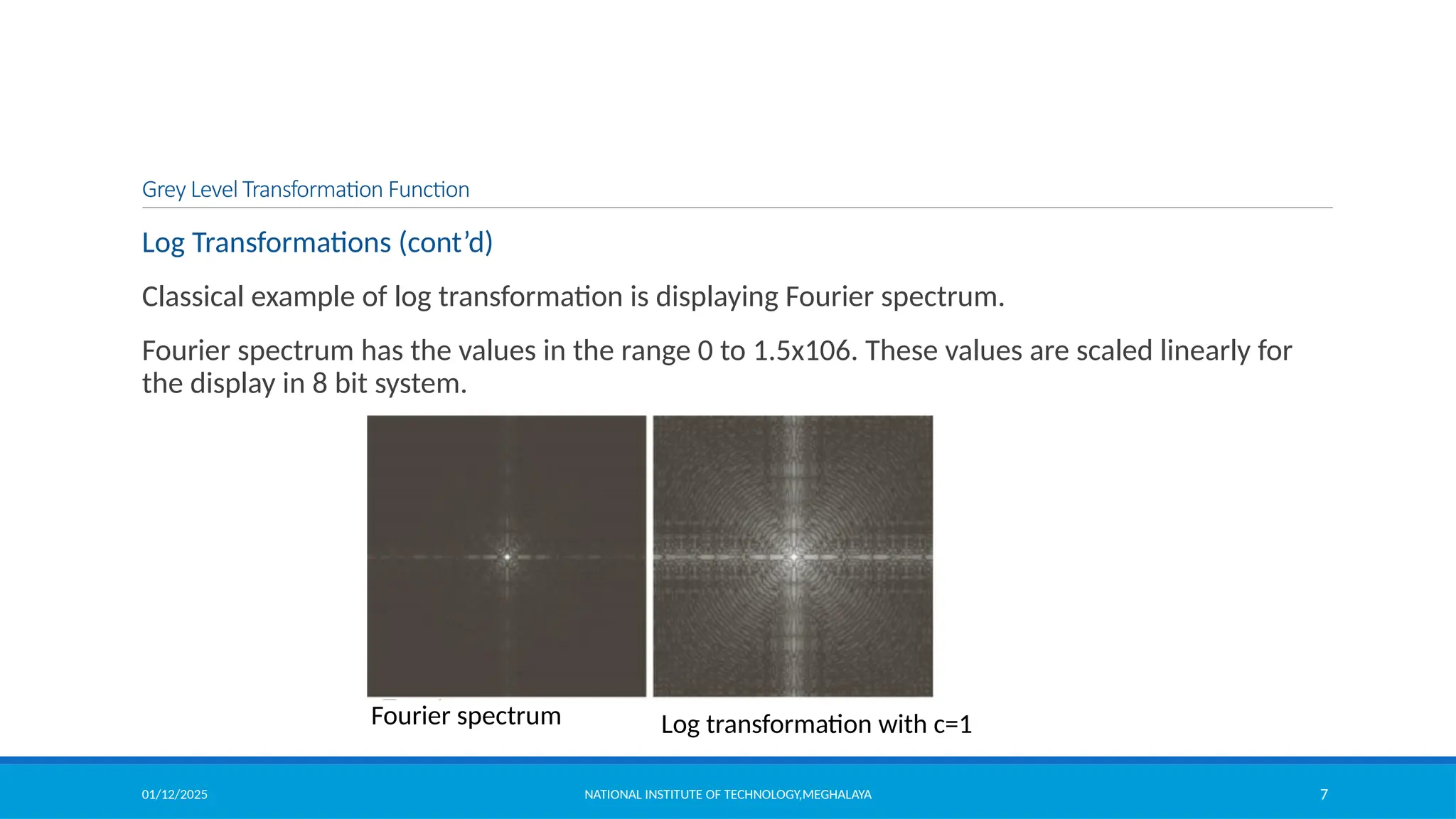
Classical example of log transformation is displaying Fourier spectrum.
Fourier spectrum has the values in the range 0 to 1.5x10⁶. These values are scaled linearly for
the display in 8 bit system.
Fourier spectrum Log transformation with c=1
Grey Level Transformation Function
01/12/2025 NATIONAL INSTITUTE OF TECHNOLOGY,MEGHALAYA 8
Grey Level Transformation Function
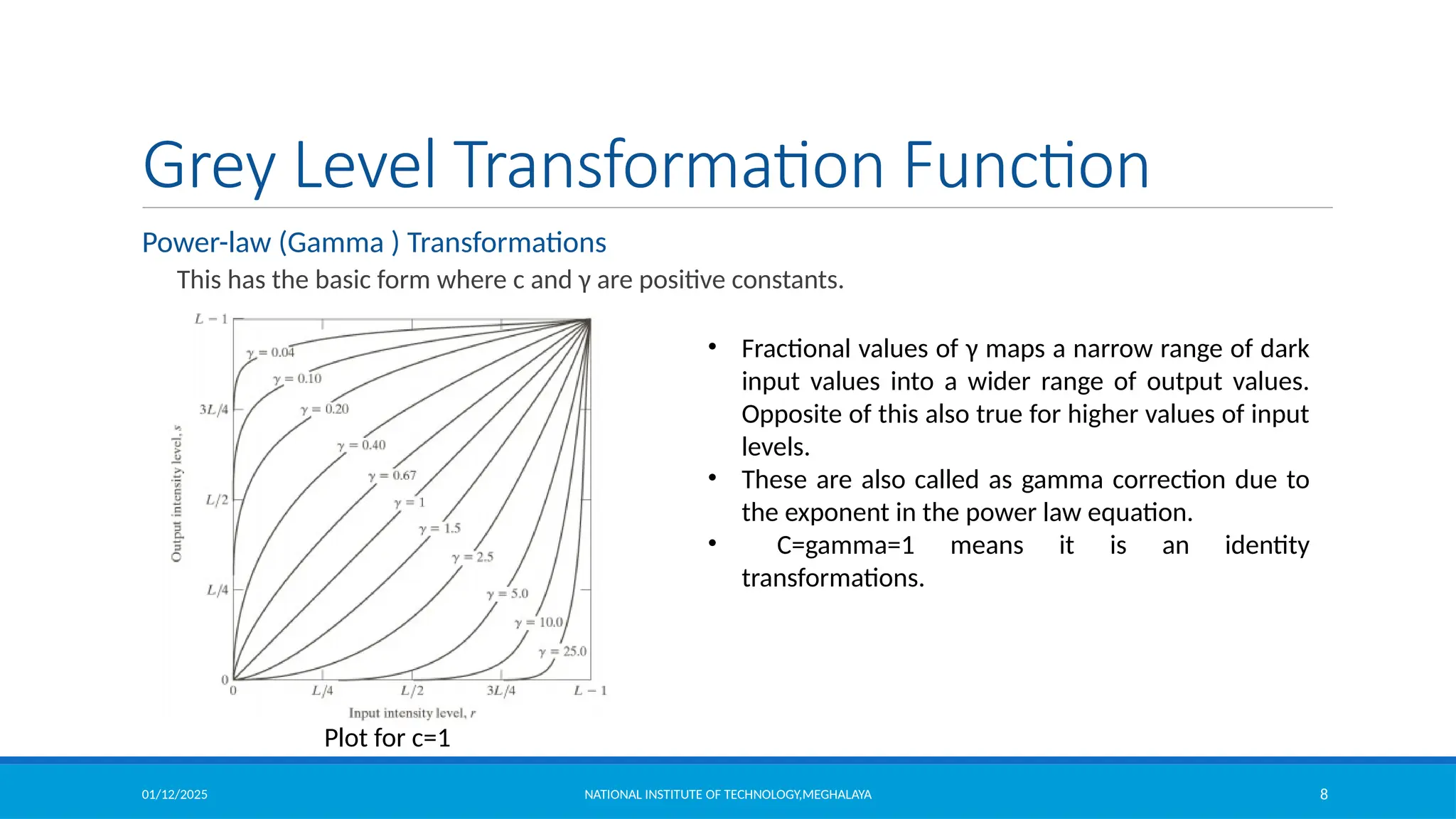
Power-law (Gamma ) Transformations
This has the basic form where c and γ are positive constants.
Plot for c=1
• Fractional values of γ maps a narrow range of dark
input values into a wider range of output values.
Opposite of this also true for higher values of input
levels.
• These are also called as gamma correction due to
the exponent in the power law equation.
• C=gamma=1 means it is an identity
transformations.
01/12/2025 NATIONAL INSTITUTE OF TECHNOLOGY,MEGHALAYA 9
Grey Level Transformation Function
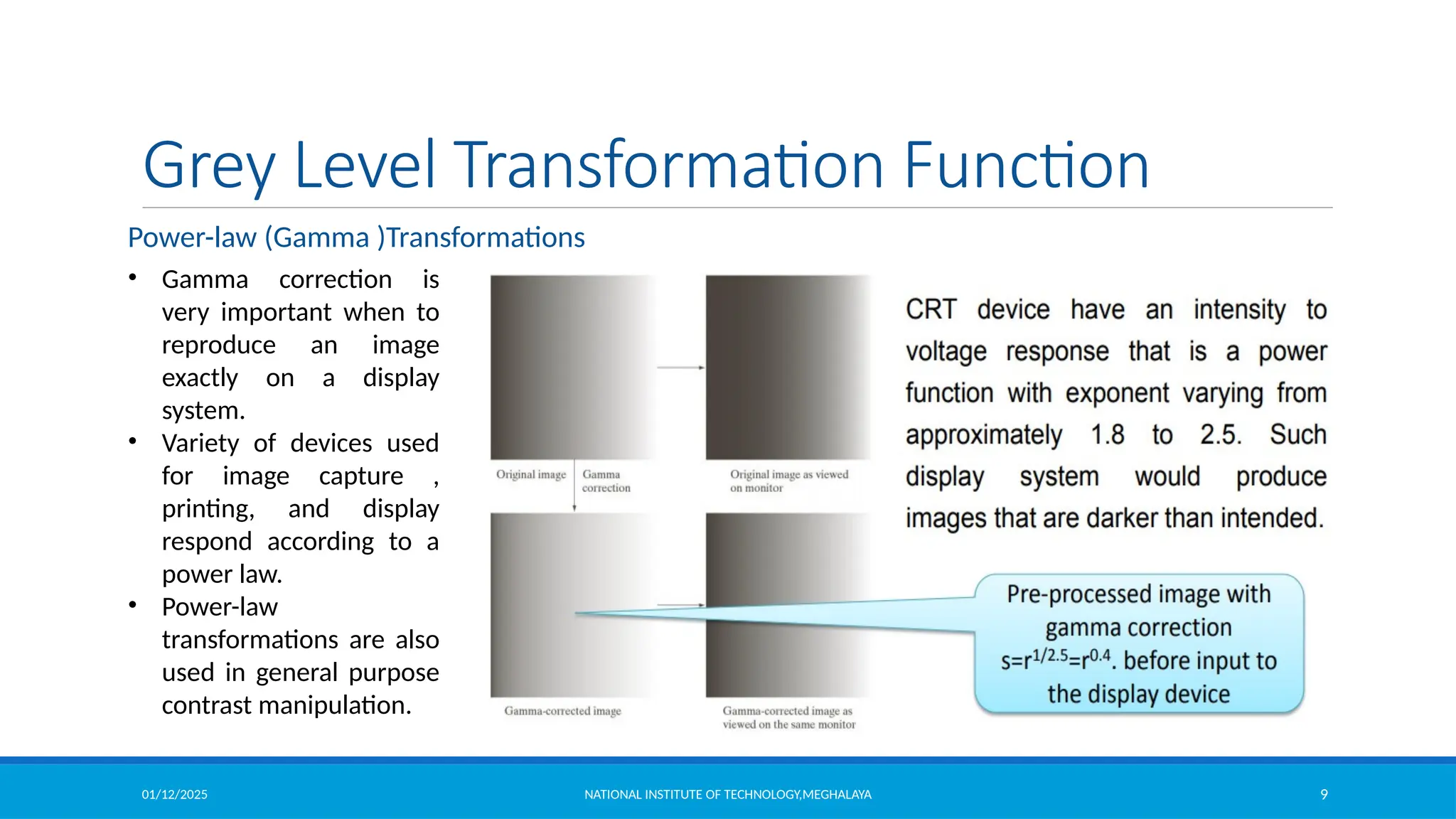
• Gamma correction is
very important when to
reproduce an image
exactly on a display
system.
• Variety of devices used
for image capture ,
printing, and display
respond according to a
power law.
• Power-law
transformations are also
used in general purpose
contrast manipulation.
Power-law (Gamma )Transformations
01/12/2025 NATIONAL INSTITUTE OF TECHNOLOGY,MEGHALAYA 10
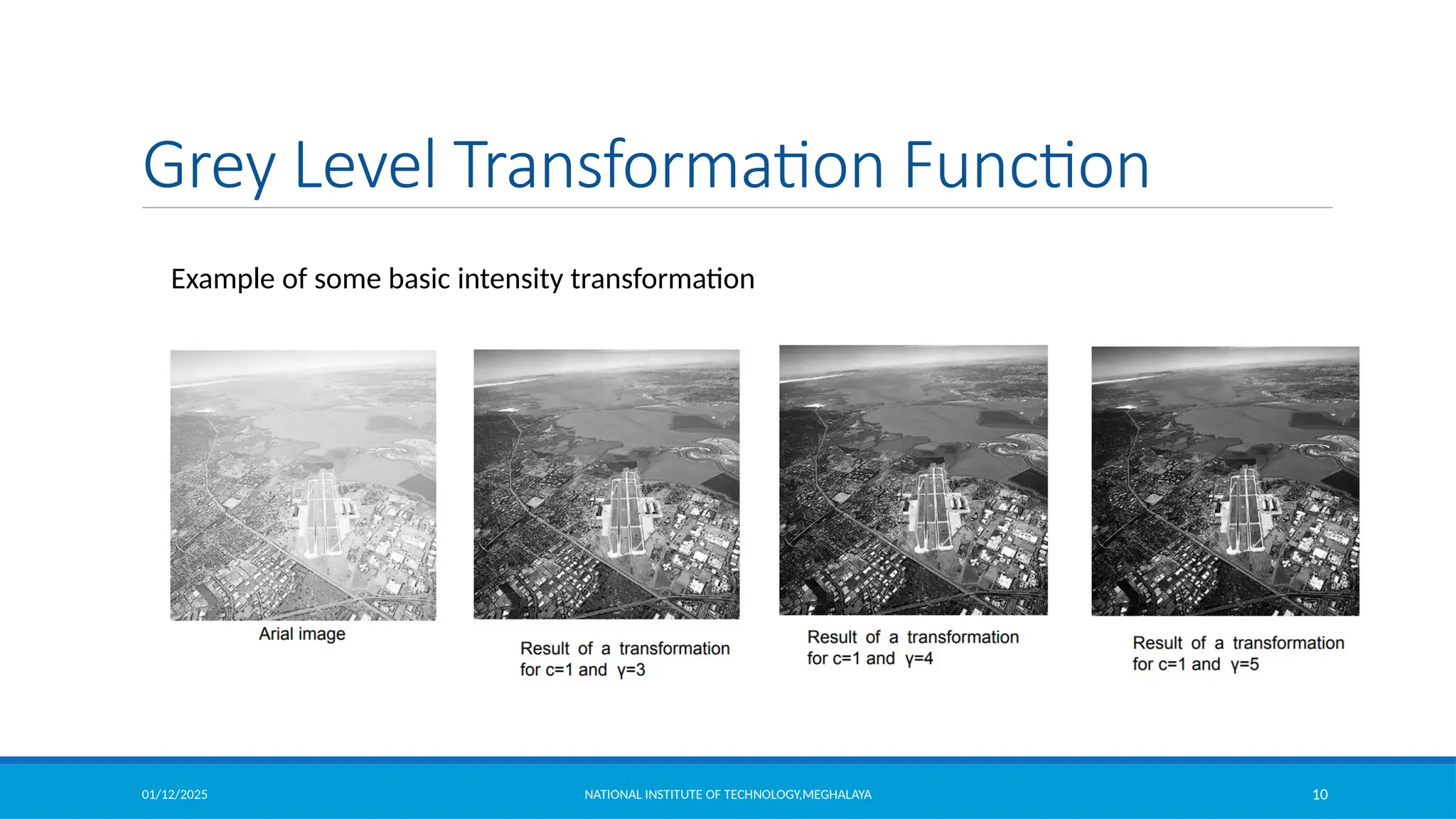
Grey Level Transformation Function
Example of some basic intensity transformation
01/12/2025 NATIONAL INSTITUTE OF TECHNOLOGY,MEGHALAYA 11
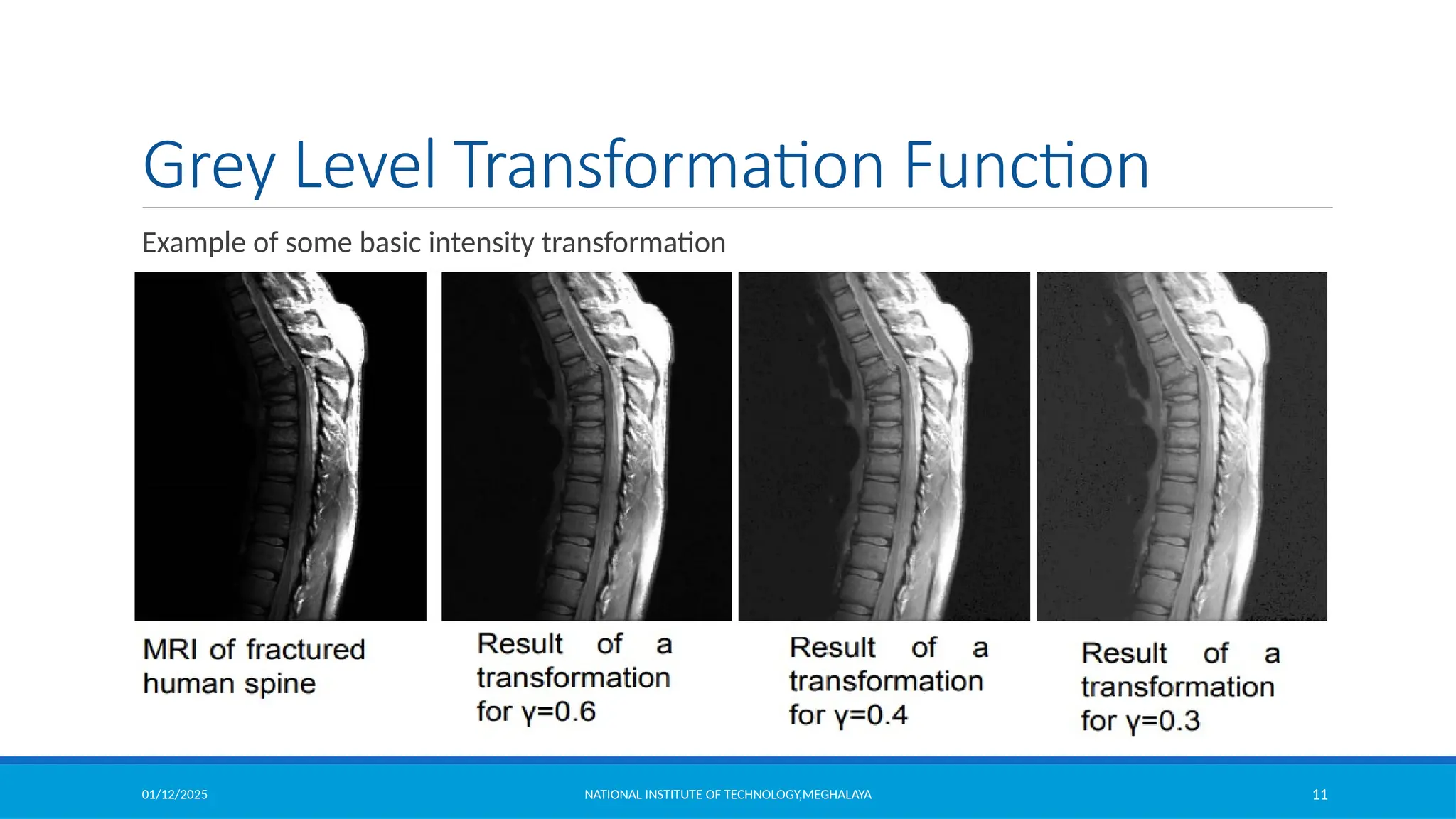
Grey Level Transformation Function
Example of some basic intensity transformation
01/12/2025 NATIONAL INSTITUTE OF TECHNOLOGY,MEGHALAYA 12
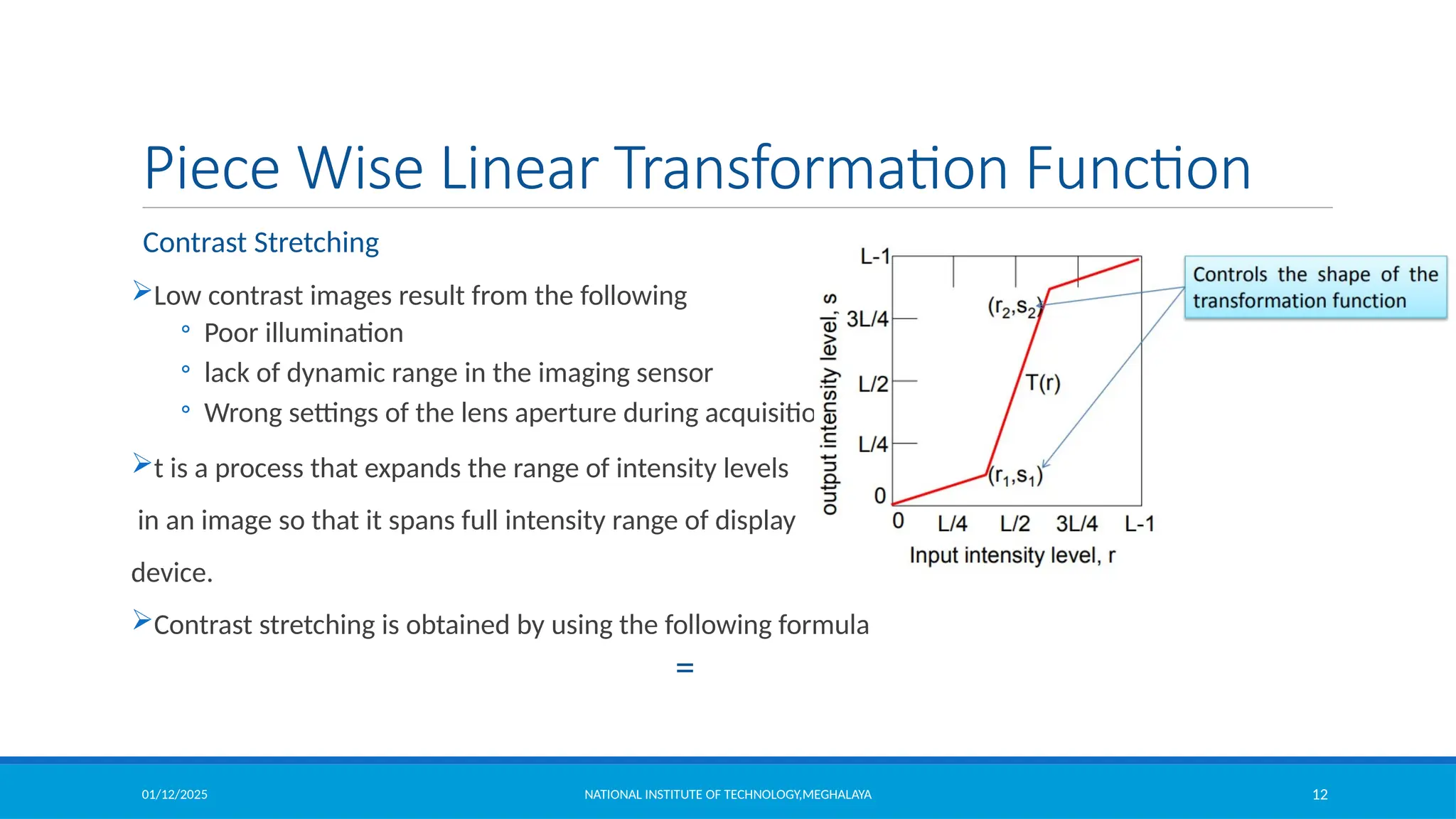
Piece Wise Linear Transformation Function
Contrast Stretching
Low contrast images result from the following
◦ Poor illumination
◦ lack of dynamic range in the imaging sensor
◦ Wrong settings of the lens aperture during acquisition
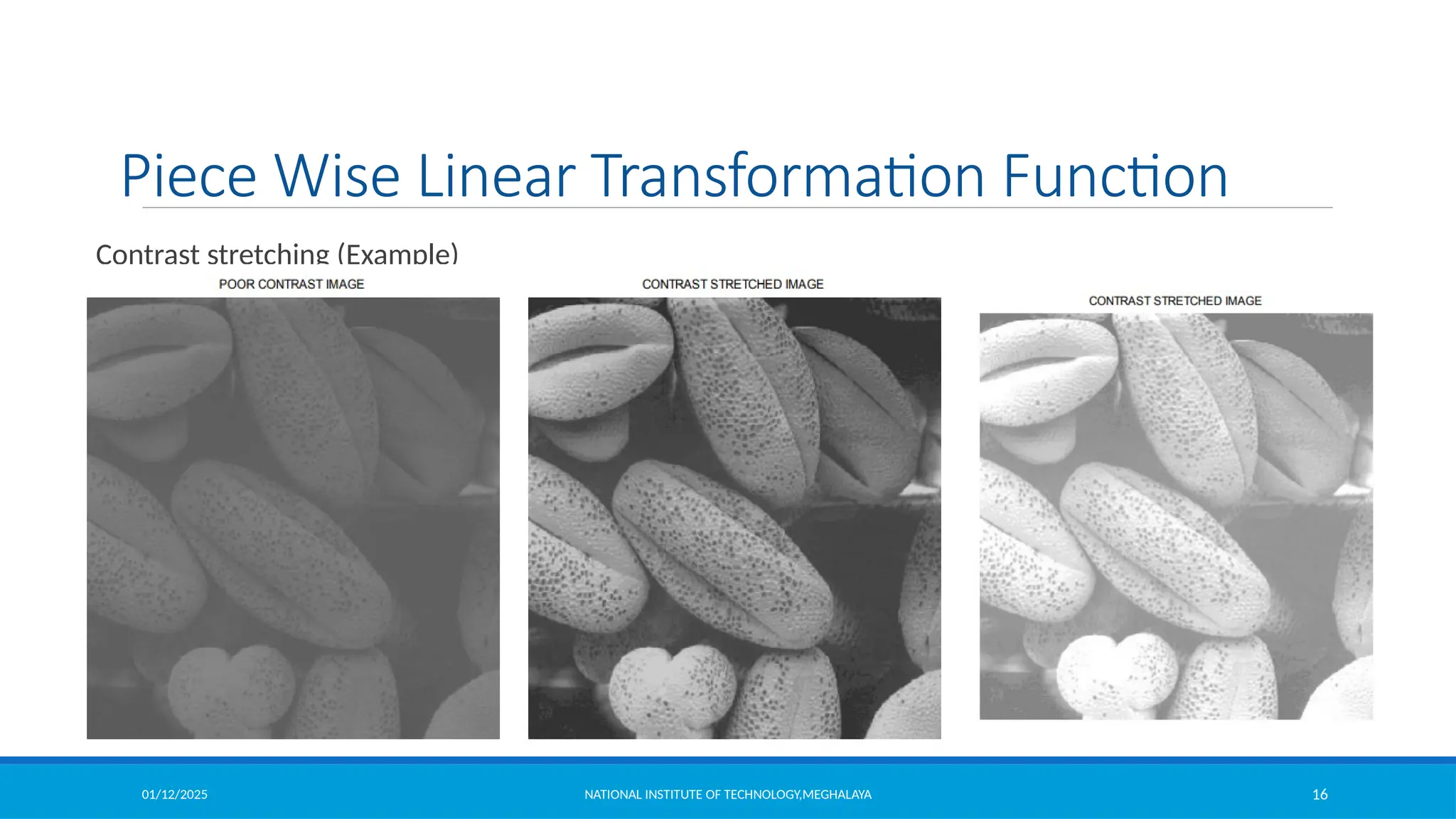
t is a process that expands the range of intensity levels
in an image so that it spans full intensity range of display
device.
Contrast stretching is obtained by using the following formula
=
01/12/2025 NATIONAL INSTITUTE OF TECHNOLOGY,MEGHALAYA 13
Piece Wise Linear Transformation Function
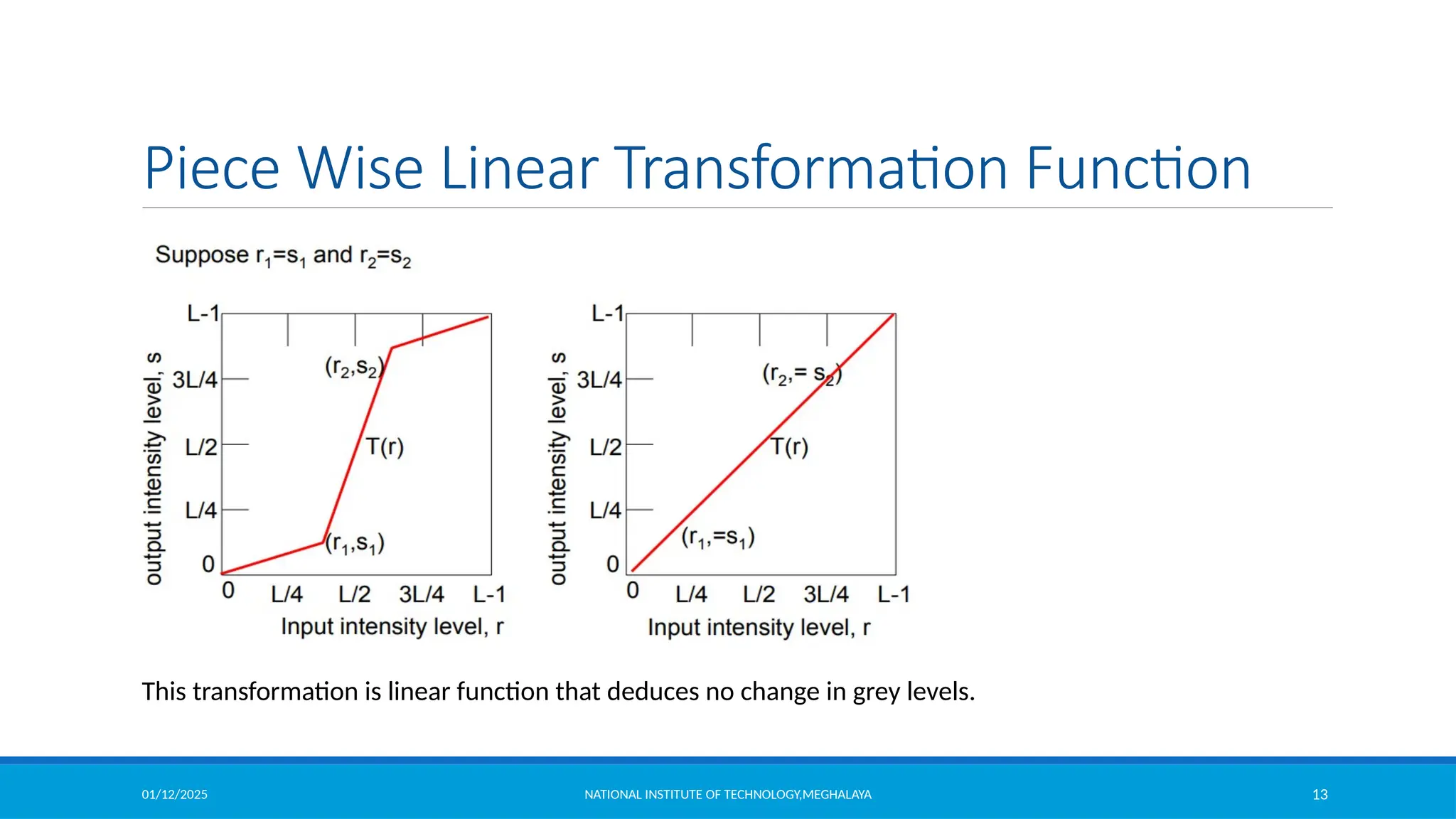
This transformation is linear function that deduces no change in grey levels.
01/12/2025 NATIONAL INSTITUTE OF TECHNOLOGY,MEGHALAYA 14
Piece Wise Linear Transformation Function
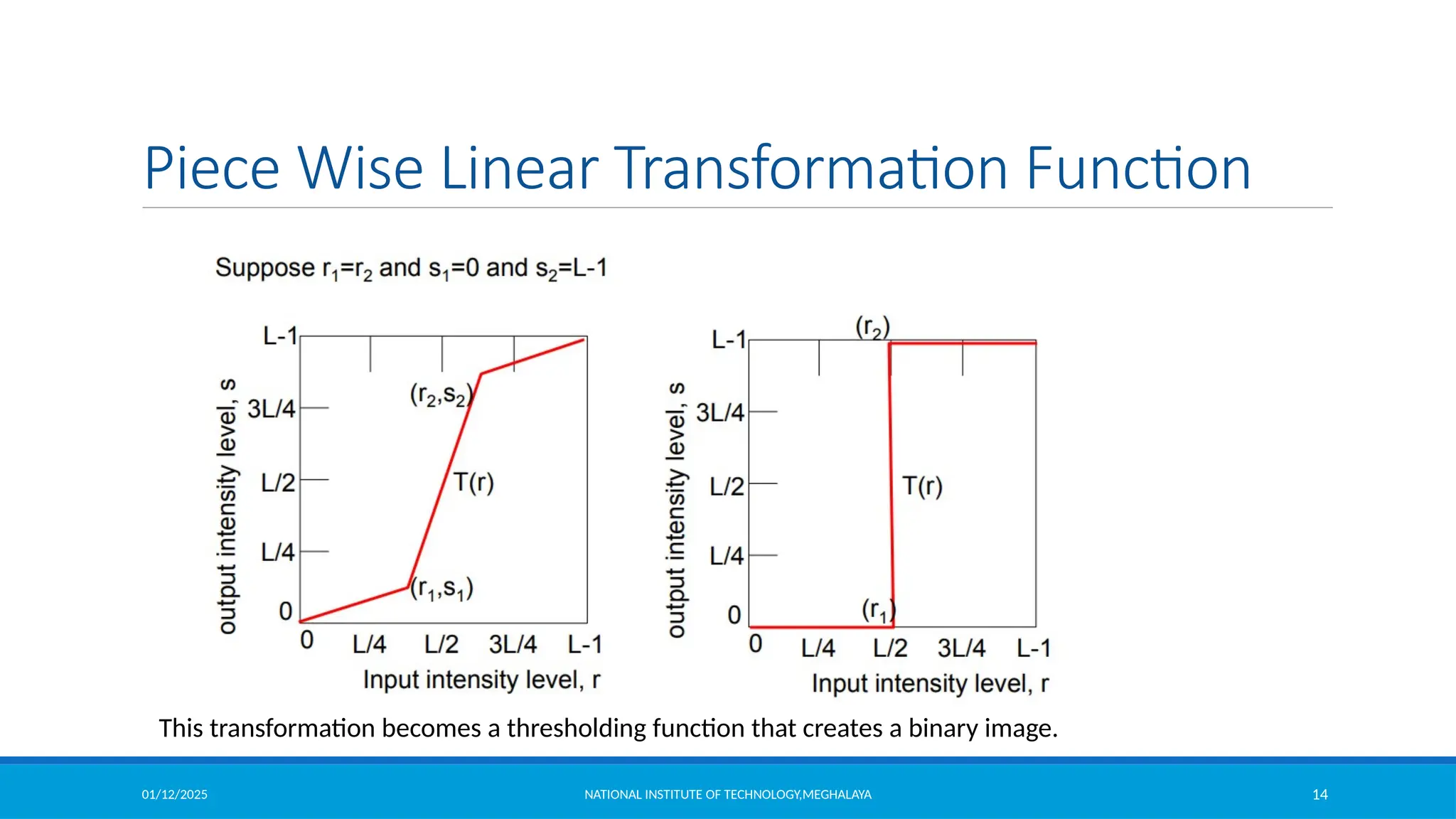
This transformation becomes a thresholding function that creates a binary image.
01/12/2025 NATIONAL INSTITUTE OF TECHNOLOGY,MEGHALAYA 15
Piece Wise Linear Transformation Function
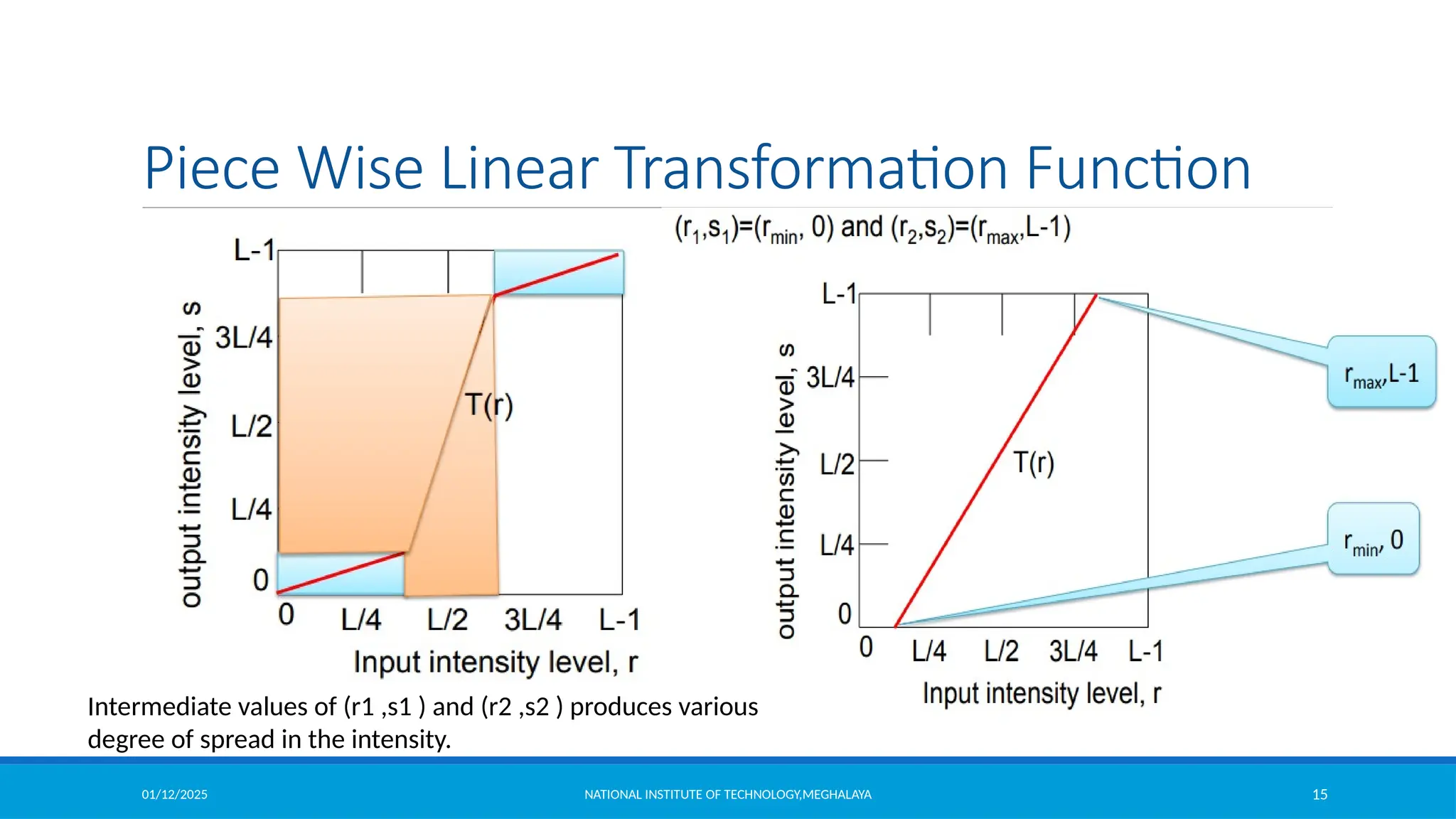
Intermediate values of (r1 ,s1 ) and (r2 ,s2 ) produces various
degree of spread in the intensity.
01/12/2025 NATIONAL INSTITUTE OF TECHNOLOGY,MEGHALAYA 16
Piece Wise Linear Transformation Function
Contrast stretching (Example)
01/12/2025 NATIONAL INSTITUTE OF TECHNOLOGY,MEGHALAYA 17
Piece Wise Linear Transformation Function
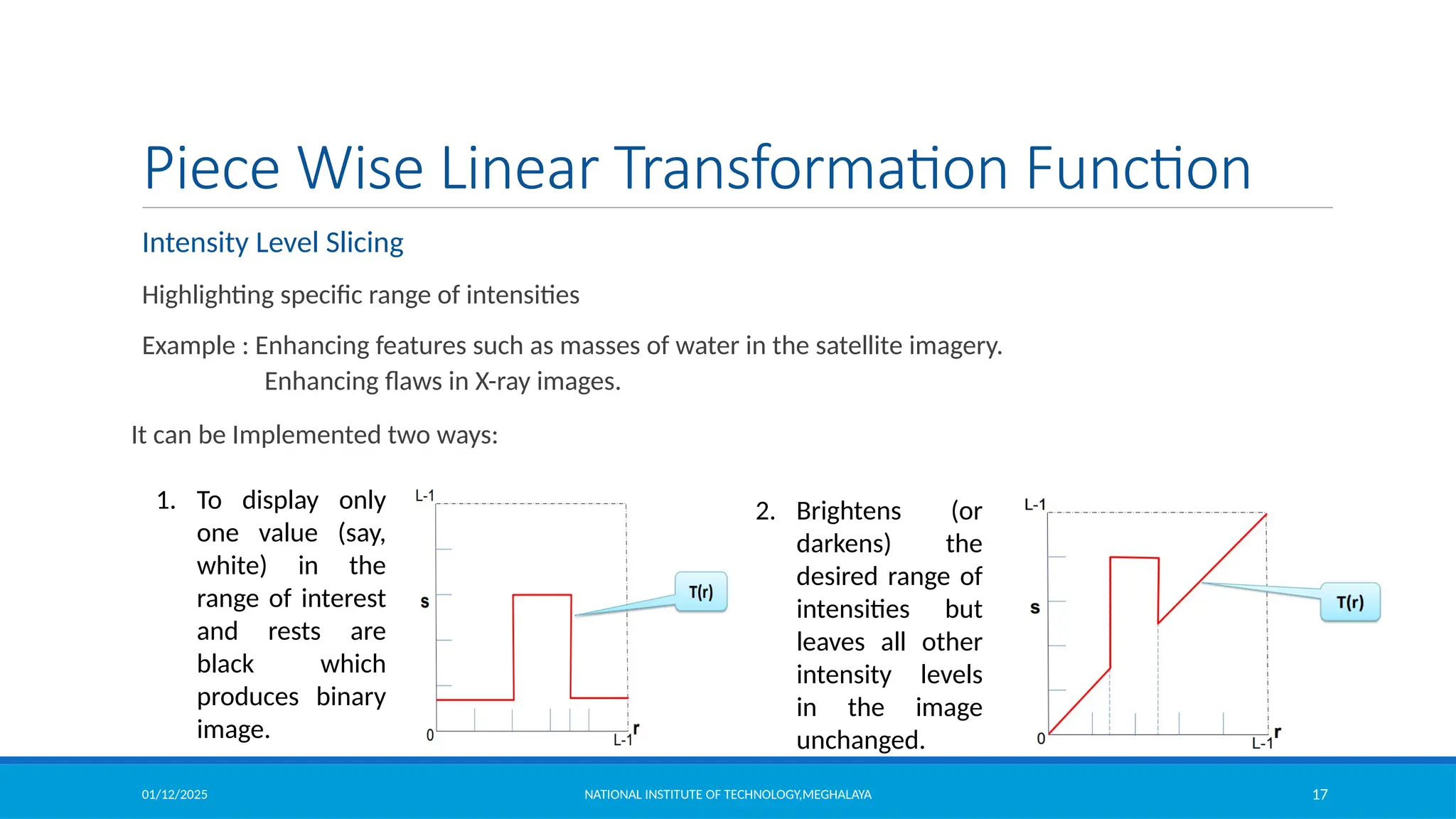
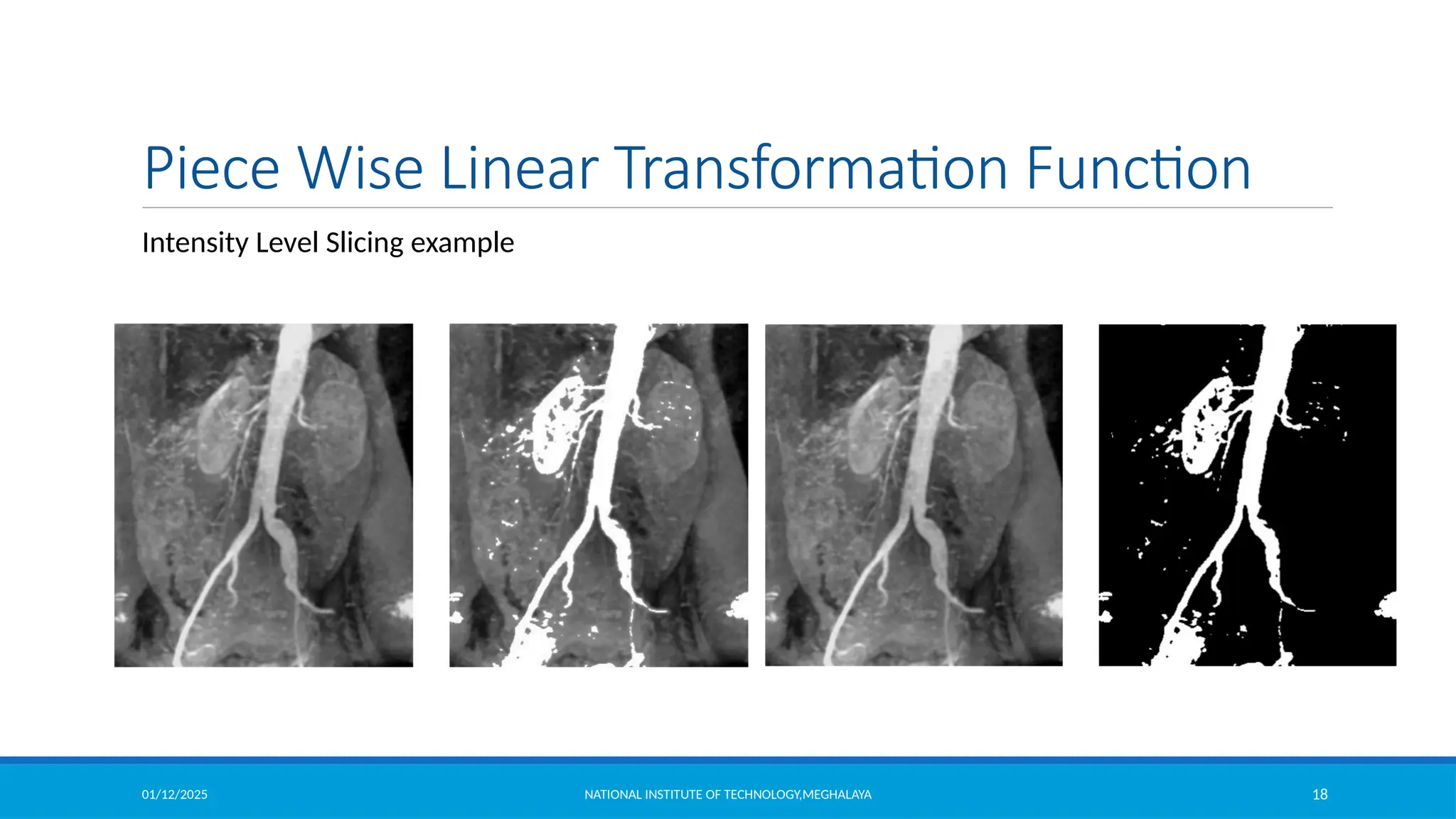
Intensity Level Slicing
Highlighting specific range of intensities
Example : Enhancing features such as masses of water in the satellite imagery.
Enhancing flaws in X-ray images.
It can be Implemented two ways:
1. To display only
one value (say,
white) in the
range of interest
and rests are
black which
produces binary
image.
2. Brightens (or
darkens) the
desired range of
intensities but
leaves all other
intensity levels
in the image
unchanged.
01/12/2025 NATIONAL INSTITUTE OF TECHNOLOGY,MEGHALAYA 18
Piece Wise Linear Transformation Function
Intensity Level Slicing example
01/12/2025 NATIONAL INSTITUTE OF TECHNOLOGY,MEGHALAYA 19
Piece Wise Linear Transformation Function
Intensity Level Slicing example
clear all;
clc;
itemp = imread('intensity_level_slicing.jpg');%read the image
image = itemp(:,:,1);
rmin = 100; %decide the min. level of intensity level slicing range
rmax = 180; %decide the max. level of intensity level slicing range
[r,c]= size(image); % get the dimensions of image
s = zeros(r,c); % pre allocate a variable to store the result image
for i = 1:r
for j = 1:c
% if the current pixel of original image is in the specfied range then make it 0 in the result image
if (rmin < image(i,j)&& image(i,j) < rmax)
s(i,j) = 0;
else
% otherwise store the same value of the pixel in the result image
s(i,j) = image(i,j);
end
end
end
figure,imshow(uint8(image)) %display original image
figure,imshow(uint8(s)) %display result image
01/12/2025 NATIONAL INSTITUTE OF TECHNOLOGY,MEGHALAYA 20
Piece Wise Linear Transformation Function
Intensity Level Slicing example
for i = 1:r
for j = 1:c
% if the current pixel of original image is in the specfie
result image
if (rmin < image(i,j)&& image(i,j) < rmax)
s(i,j) = 0;
else
% otherwise store the same value of the pixel
s(i,j) = image(i,j);
end
end
end
figure,imshow(uint8(image)) %display original image
figure,imshow(uint8(s)) %display result image
01/12/2025 NATIONAL INSTITUTE OF TECHNOLOGY,MEGHALAYA 21
Piece Wise Linear Transformation Function
Bit Plane Slicing
•Pixels are digital numbers composed of bits
•This transformation is useful In determining the number of Visually significant bits in an Image
•Suppose each pixel is represented by 8 bits it is desired To extract the nth most significant bit And display it
•Higher-order bits contain the majority of the visually significant data
•256 grey scale image is composed of 8 bits.
Instead of highlighting intensity level ranges, we
could highlight the contribution made to total
image appearance by specific bits.
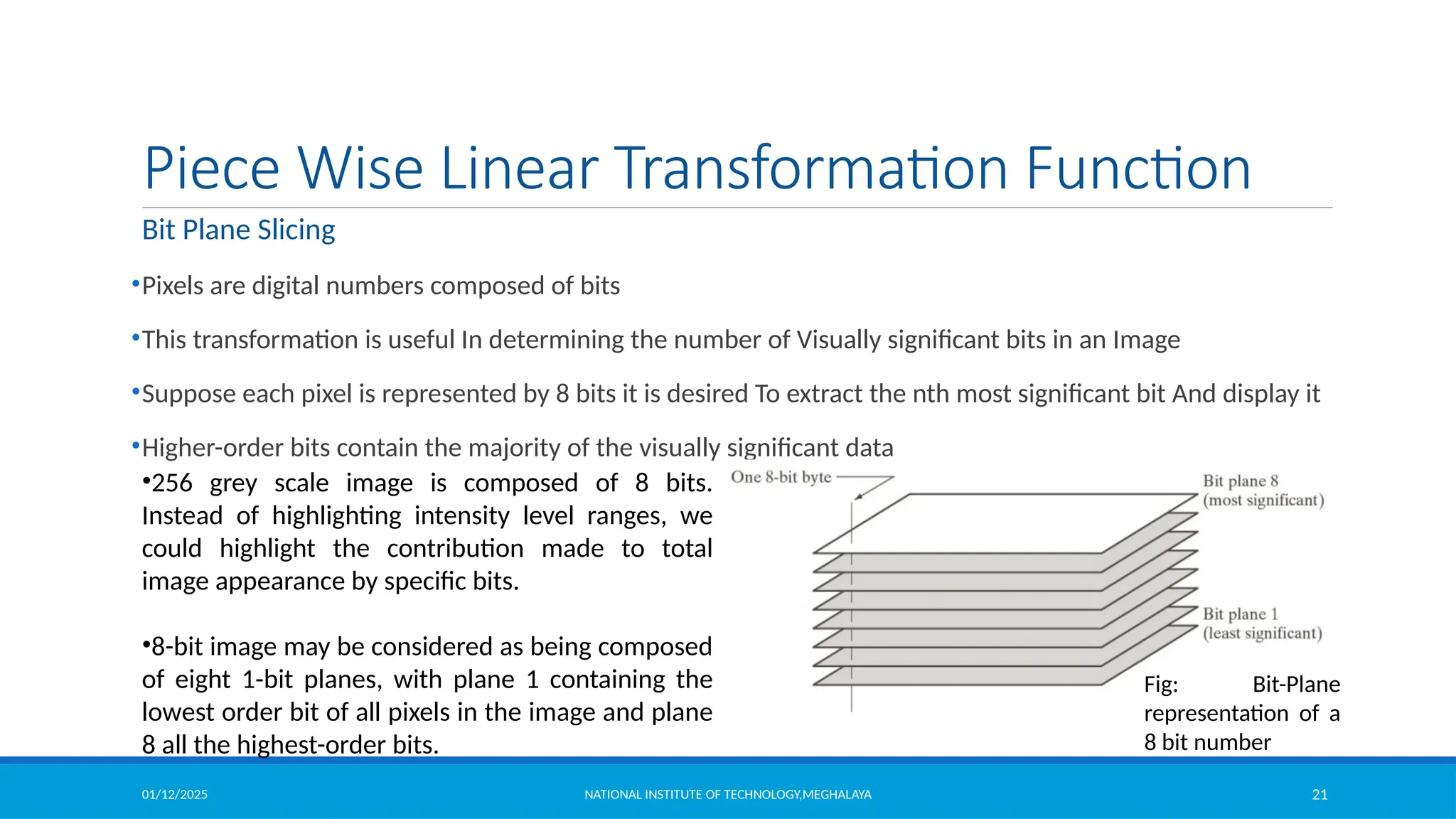
•8-bit image may be considered as being composed
of eight 1-bit planes, with plane 1 containing the
lowest order bit of all pixels in the image and plane
8 all the highest-order bits.
Fig: Bit-Plane
representation of a
8 bit number
01/12/2025 NATIONAL INSTITUTE OF TECHNOLOGY,MEGHALAYA 22
Piece Wise Linear Transformation Function
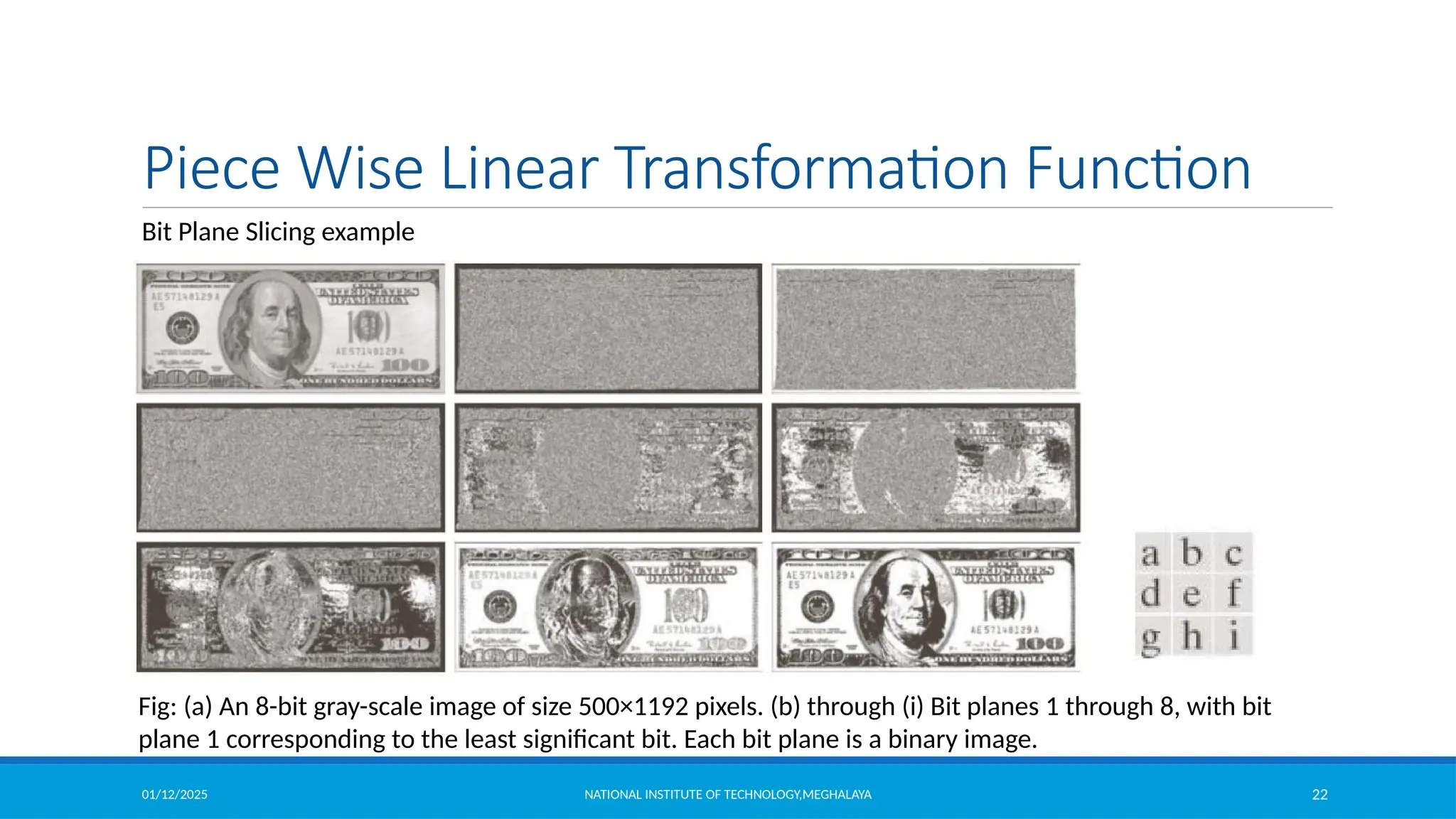
Bit Plane Slicing example
Fig: (a) An 8-bit gray-scale image of size 500×1192 pixels. (b) through (i) Bit planes 1 through 8, with bit
plane 1 corresponding to the least significant bit. Each bit plane is a binary image.
01/12/2025 NATIONAL INSTITUTE OF TECHNOLOGY,MEGHALAYA 23
Piece Wise Linear Transformation Function
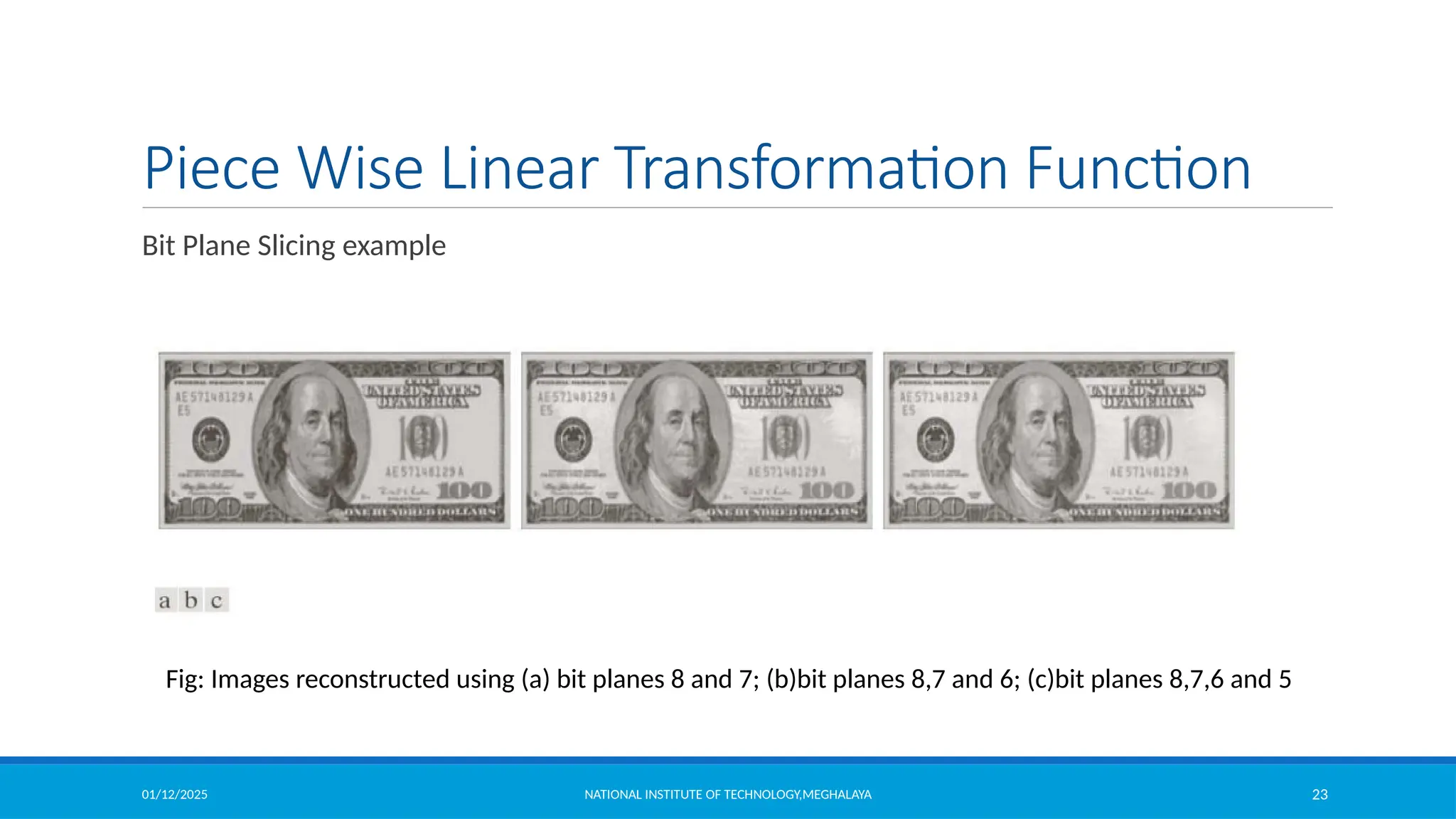
Bit Plane Slicing example
Fig: Images reconstructed using (a) bit planes 8 and 7; (b)bit planes 8,7 and 6; (c)bit planes 8,7,6 and 5
01/12/2025 NATIONAL INSTITUTE OF TECHNOLOGY,MEGHALAYA 24
Histogram
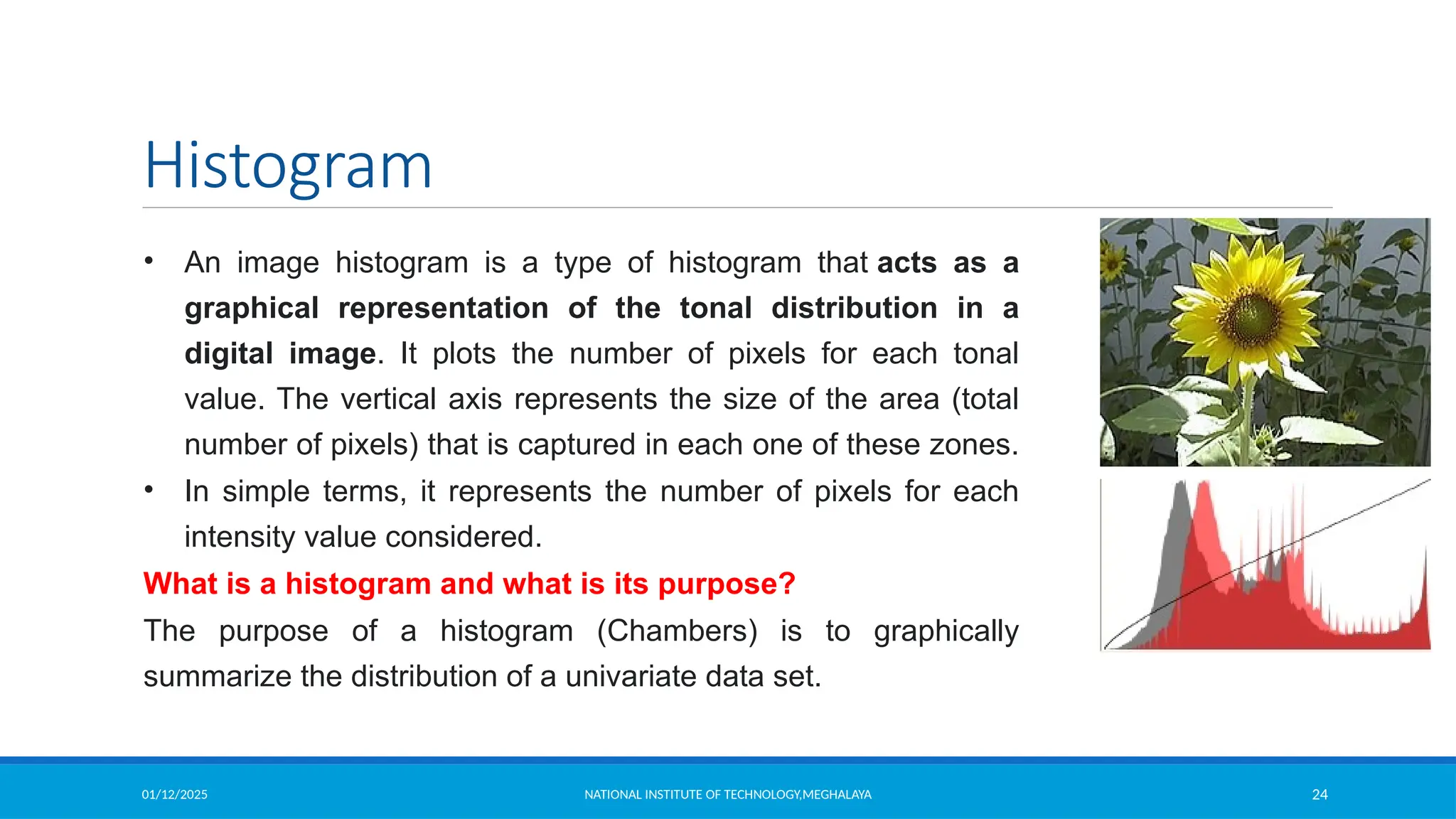
• An image histogram is a type of histogram that acts as a
graphical representation of the tonal distribution in a
digital image. It plots the number of pixels for each tonal
value. The vertical axis represents the size of the area (total
number of pixels) that is captured in each one of these zones.
• In simple terms, it represents the number of pixels for each
intensity value considered.
What is a histogram and what is its purpose?
The purpose of a histogram (Chambers) is to graphically
summarize the distribution of a univariate data set.
01/12/2025 NATIONAL INSTITUTE OF TECHNOLOGY,MEGHALAYA 25
Histogram
• A histogram is used to summarize discrete or continuous data. In other words, it
provides a visual interpretation of numerical data by showing the number of data
points that fall within a specified range of values (called “bins”).
• Where are histograms used in real life?
 The histograms are mainly used to display and organize a large set of measurements or
numerical data in a user-friendly manner. A histogram will make it easy to see where the
majority of values fall on a measurement scale, and how much variation is there among
those values.
• What are the different types of histograms?
 The different types of a histogram are uniform histogram, symmetric histogram, bimodal
histogram, probability histogram.
01/12/2025 NATIONAL INSTITUTE OF TECHNOLOGY,MEGHALAYA 26
Histogram
• What is the importance of image histogram?
 Image histograms are an important tool for inspecting images. They allow you to
spot Background and grey value range at a glance. Also clipping and
Quantization Noise in image values can be spotted immediately.
Types:
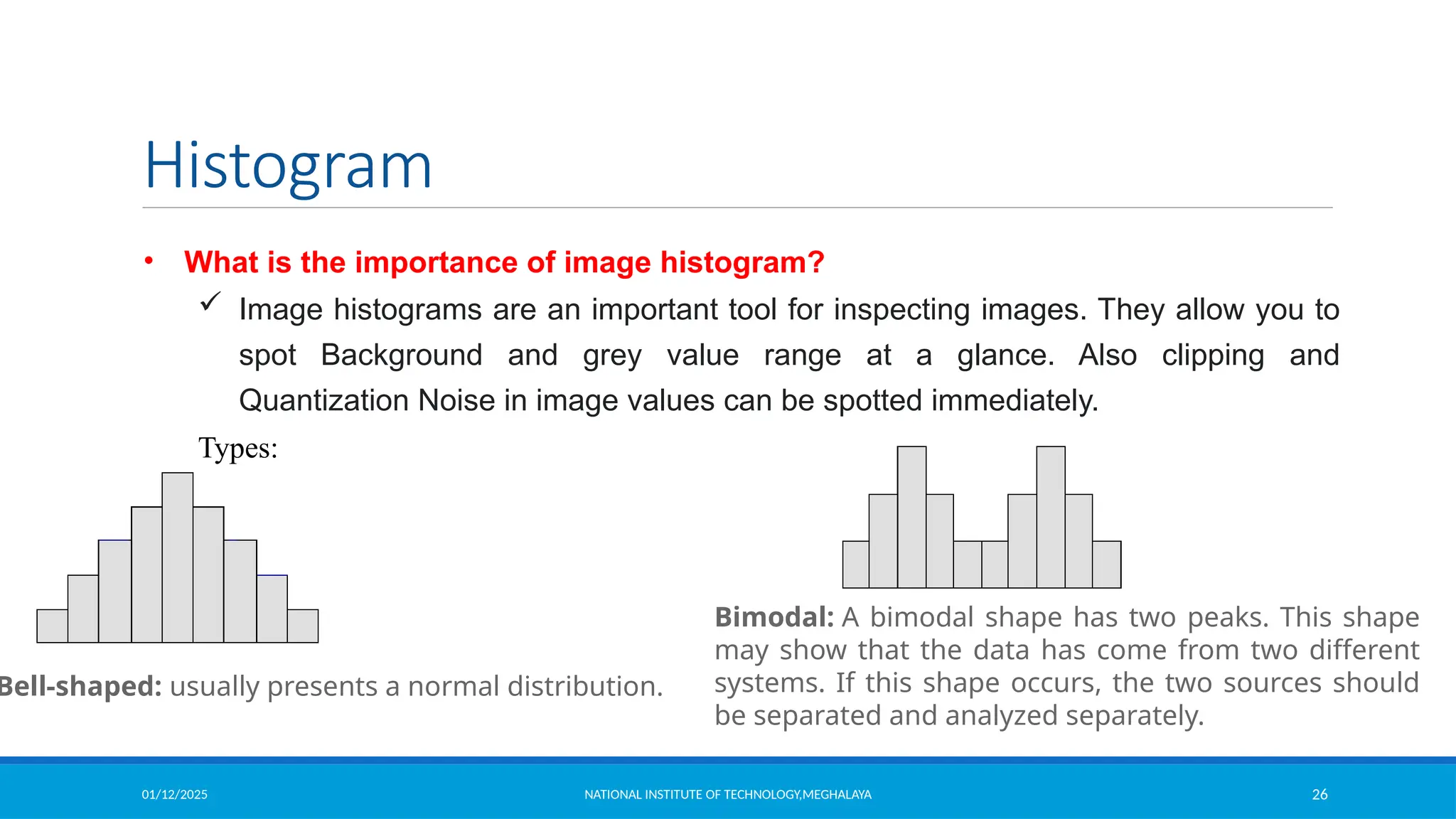
Bell-shaped: usually presents a normal distribution.
Bimodal: A bimodal shape has two peaks. This shape
may show that the data has come from two different
systems. If this shape occurs, the two sources should
be separated and analyzed separately.
01/12/2025 NATIONAL INSTITUTE OF TECHNOLOGY,MEGHALAYA 27
Histogram
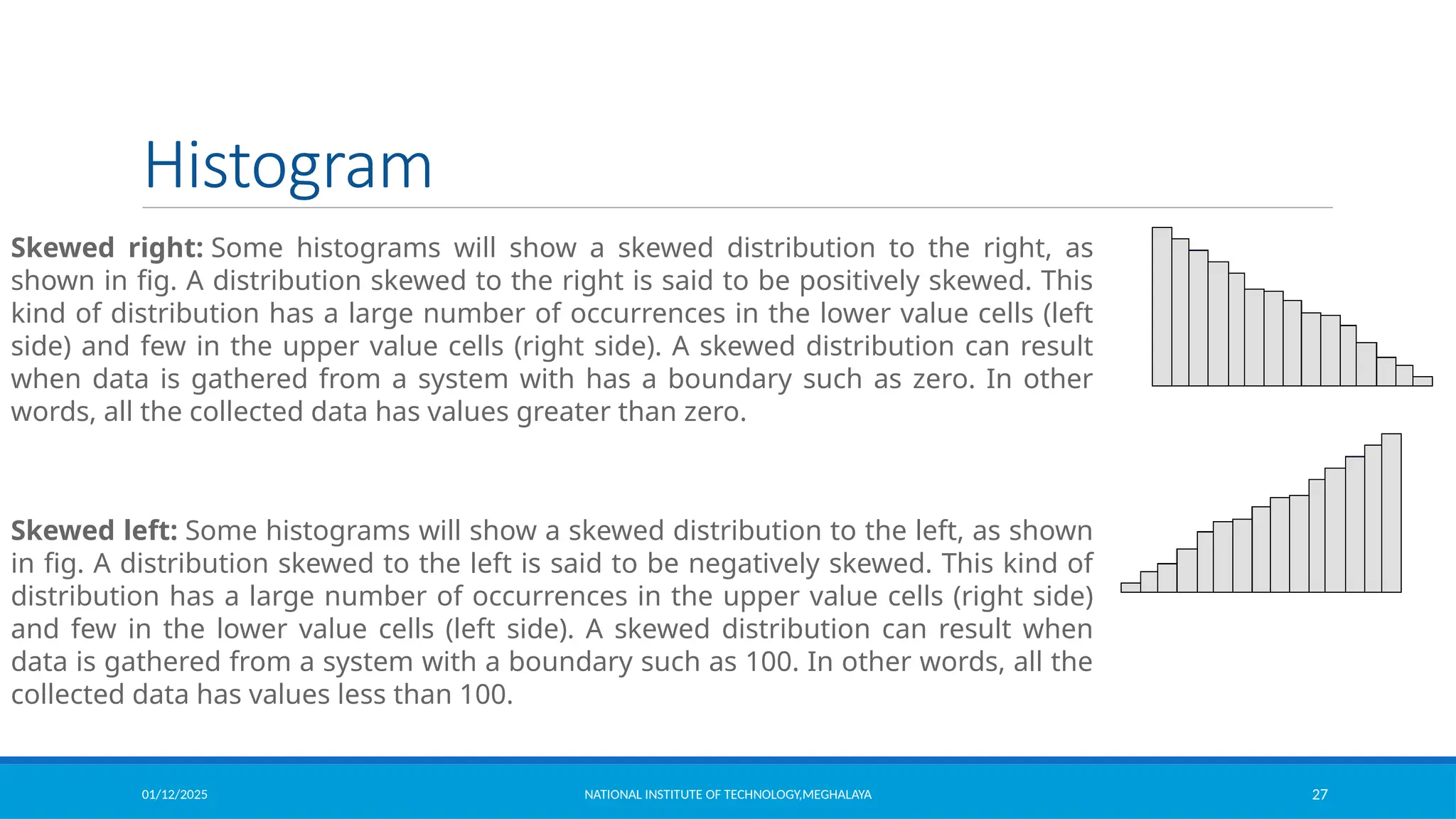
Skewed right: Some histograms will show a skewed distribution to the right, as
shown in fig. A distribution skewed to the right is said to be positively skewed. This
kind of distribution has a large number of occurrences in the lower value cells (left
side) and few in the upper value cells (right side). A skewed distribution can result
when data is gathered from a system with has a boundary such as zero. In other
words, all the collected data has values greater than zero.
Skewed left: Some histograms will show a skewed distribution to the left, as shown
in fig. A distribution skewed to the left is said to be negatively skewed. This kind of
distribution has a large number of occurrences in the upper value cells (right side)
and few in the lower value cells (left side). A skewed distribution can result when
data is gathered from a system with a boundary such as 100. In other words, all the
collected data has values less than 100.
01/12/2025 NATIONAL INSTITUTE OF TECHNOLOGY,MEGHALAYA 28
Histogram
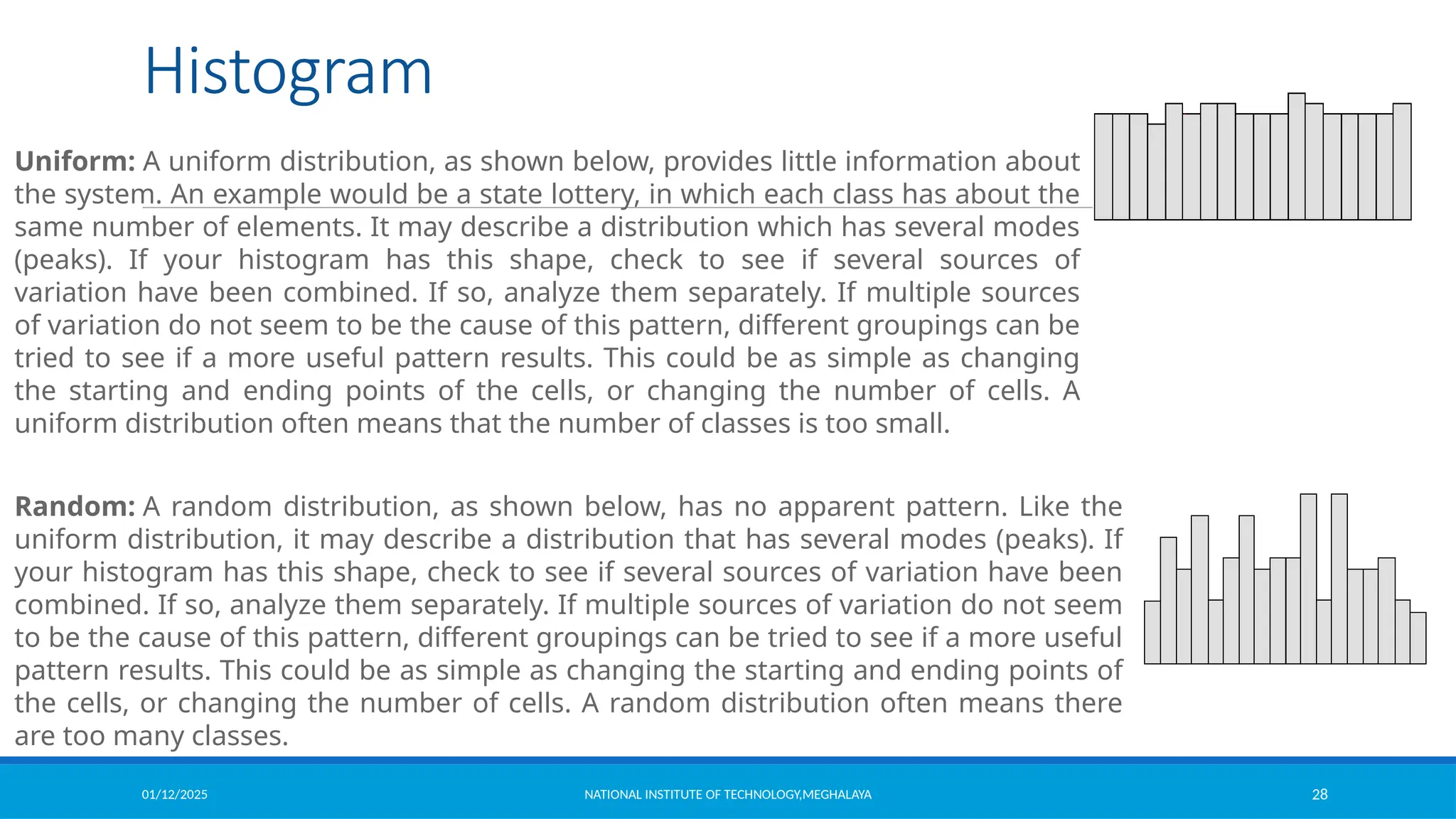
Uniform: A uniform distribution, as shown below, provides little information about
the system. An example would be a state lottery, in which each class has about the
same number of elements. It may describe a distribution which has several modes
(peaks). If your histogram has this shape, check to see if several sources of
variation have been combined. If so, analyze them separately. If multiple sources
of variation do not seem to be the cause of this pattern, different groupings can be
tried to see if a more useful pattern results. This could be as simple as changing
the starting and ending points of the cells, or changing the number of cells. A
uniform distribution often means that the number of classes is too small.
Random: A random distribution, as shown below, has no apparent pattern. Like the
uniform distribution, it may describe a distribution that has several modes (peaks). If
your histogram has this shape, check to see if several sources of variation have been
combined. If so, analyze them separately. If multiple sources of variation do not seem
to be the cause of this pattern, different groupings can be tried to see if a more useful
pattern results. This could be as simple as changing the starting and ending points of
the cells, or changing the number of cells. A random distribution often means there
are too many classes.
01/12/2025 NATIONAL INSTITUTE OF TECHNOLOGY,MEGHALAYA 29
Histogram
Why histogram equalization is used in image processing?
Histogram equalization is a method to process images in order to adjust the contrast of an
image by modifying the intensity distribution of the histogram. The objective of this technique
is to give a linear trend to the cumulative probability function associated to the image.
01/12/2025 NATIONAL INSTITUTE OF TECHNOLOGY,MEGHALAYA 30
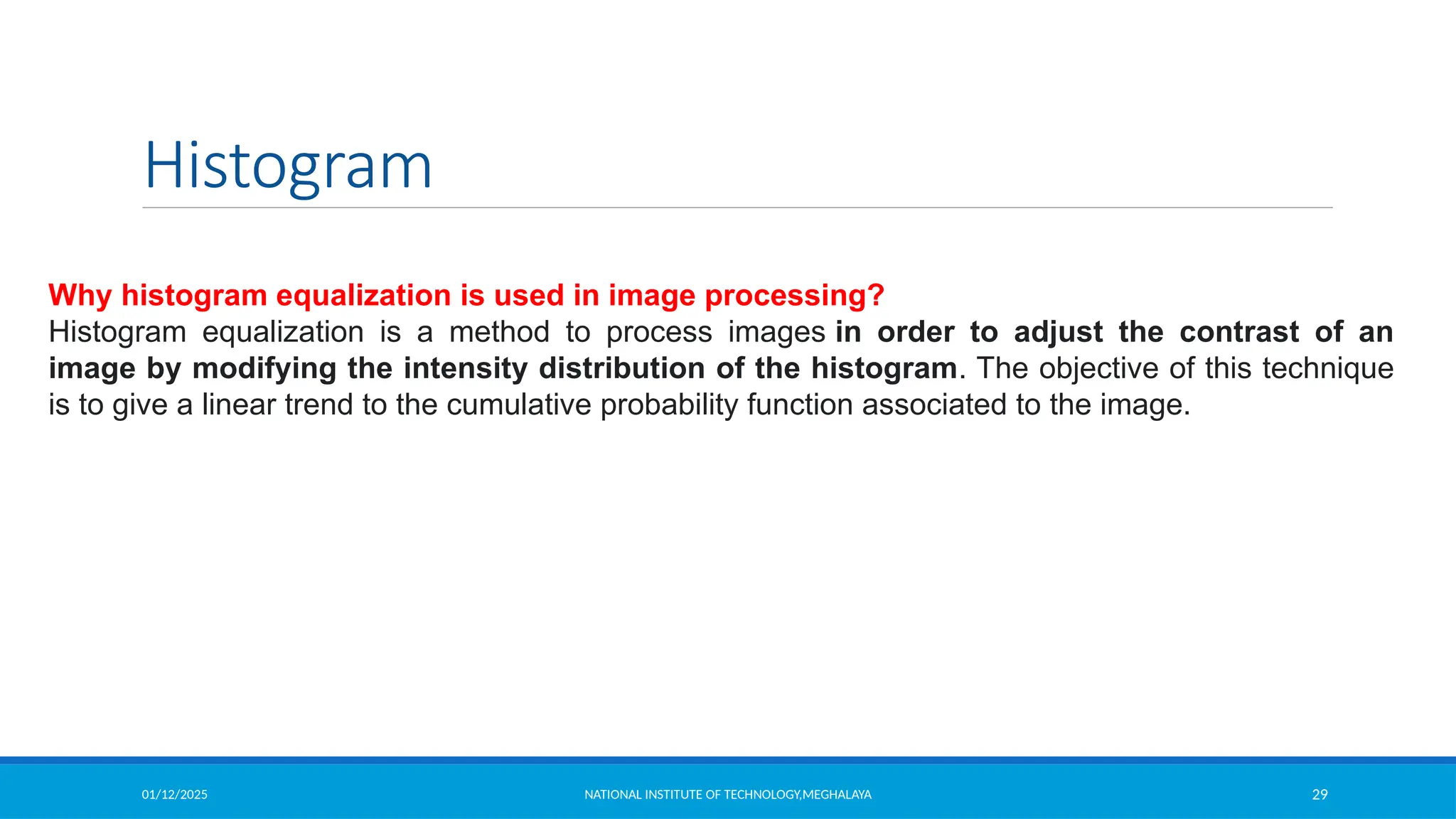
Histogram Processing
Let the intensity level in the image be in the range from [0 L-1] Histogram is a discrete function
,
where rk is the kth intensity value
nk is the number of pixels in the image with pixel level
This histogram is normalized by dividing each component by total number of pixels in the
image.
Thus normalized histogram is given by,
is an estimate of the probability of occurrence of intensity level in an image.
(Sum all the components=1)
01/12/2025 NATIONAL INSTITUTE OF TECHNOLOGY,MEGHALAYA 31
Histogram Processing
6000
5000
4000
3000
2000
1000
0
0 50 100 150 200 250
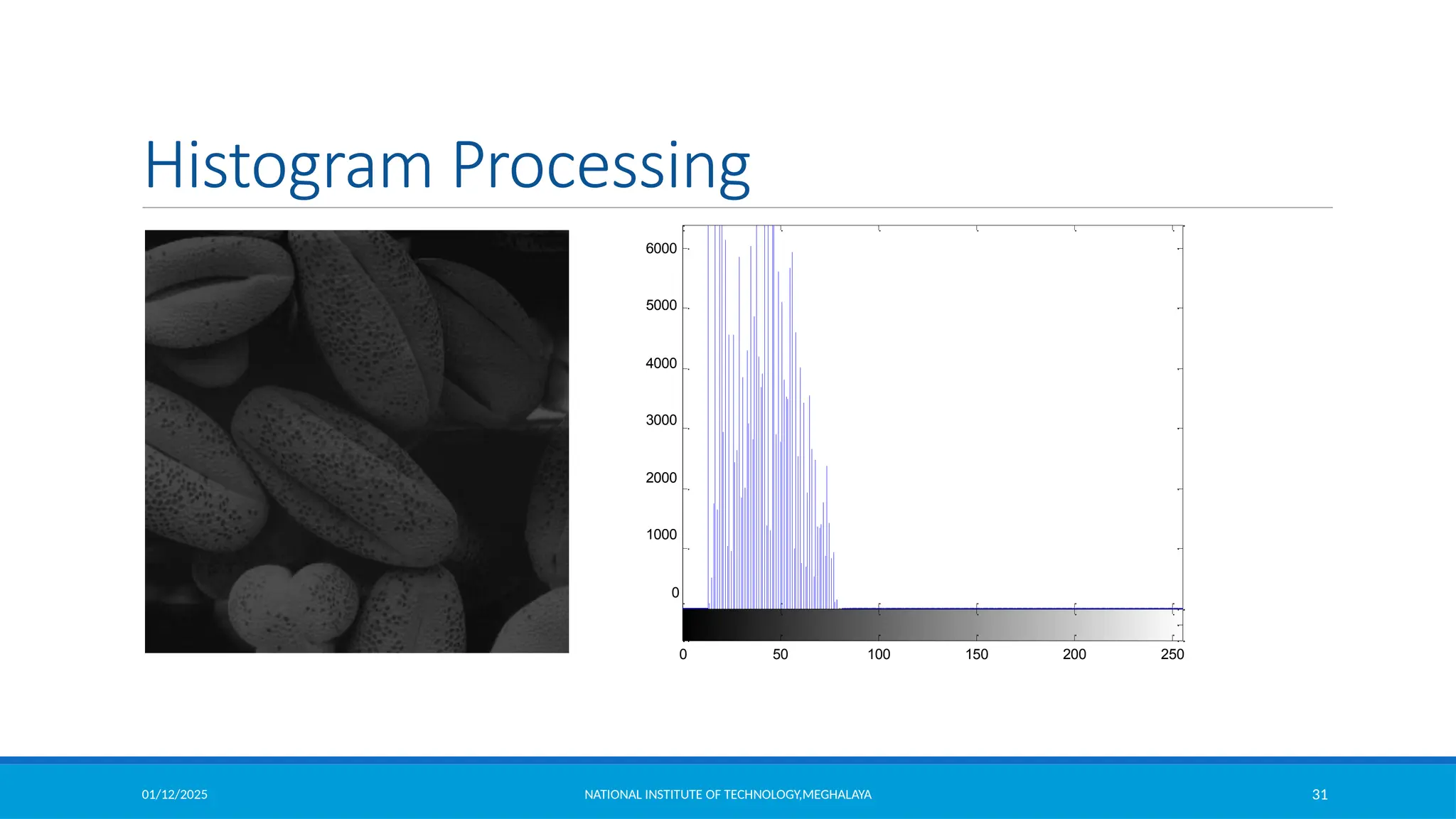
01/12/2025 NATIONAL INSTITUTE OF TECHNOLOGY,MEGHALAYA 32
Histogram Processing
7000
6000
5000
4000
3000
2000
1000
0
0 50 100 150 200 250
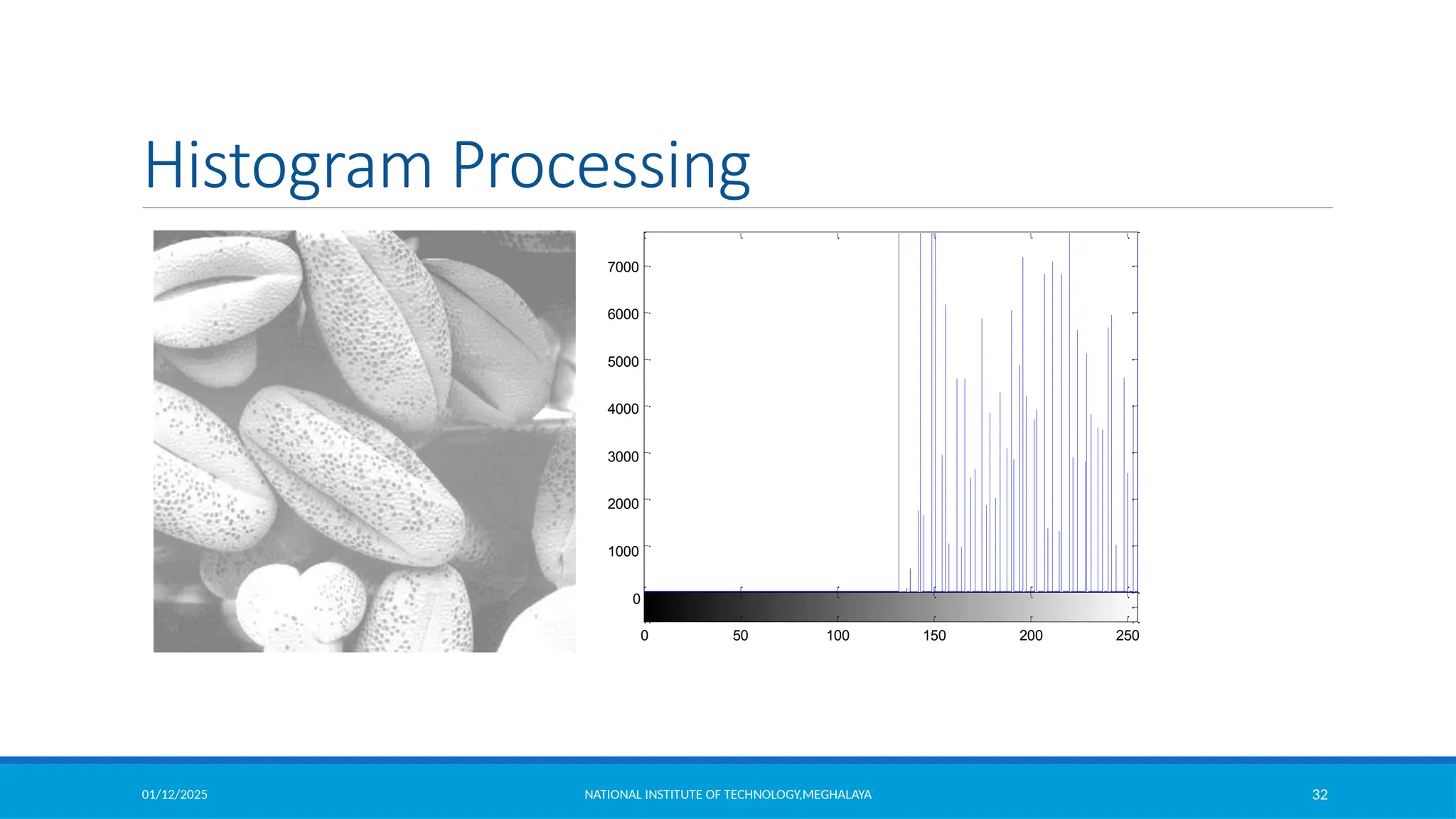
01/12/2025 NATIONAL INSTITUTE OF TECHNOLOGY,MEGHALAYA 33
Histogram Processing
7000
6000
5000
4000
3000
2000
1000
0
0 50 100 150 200 250
01/12/2025 NATIONAL INSTITUTE OF TECHNOLOGY,MEGHALAYA 34
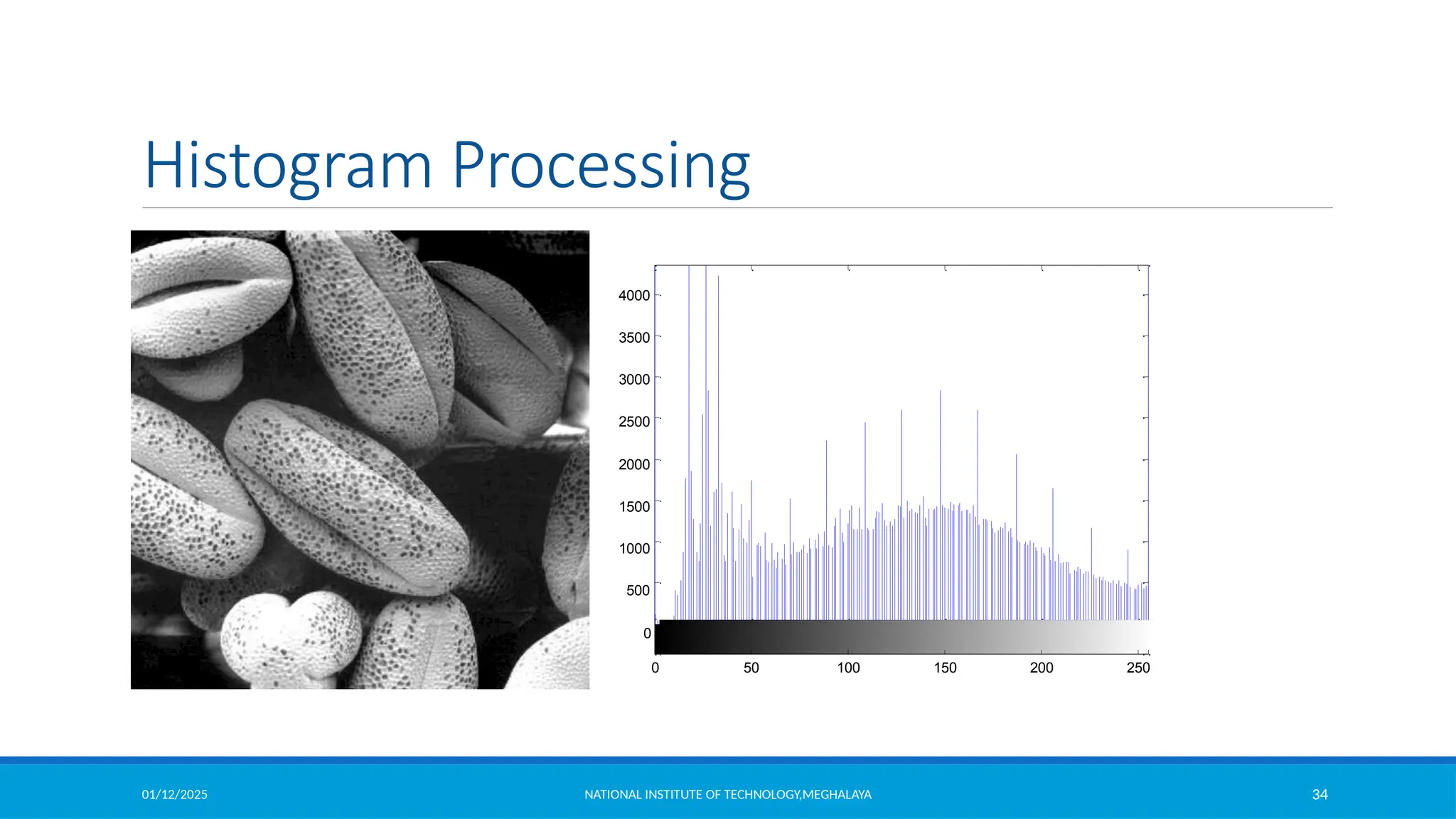
Histogram Processing
4000
3500
3000
2500
2000
1500
1000
500
0
0 50 100 150 200 250
01/12/2025 NATIONAL INSTITUTE OF TECHNOLOGY,MEGHALAYA 35
Histogram Equilization
• A digital image is a two-dimensional matrix of two spatial coordinates,
with each cell specifying the intensity level of the image at that point.
• So, we have an N x N matrix with integer values ranging from a
minimum intensity level of 0 to a maximum level of L-1, where L
denotes the number of intensity levels.
• Hence, the intensity levels of a pixel r can take on values from 0,1,2,3,
…. (L-1). Generally, L = 2m
, where m is the number of bits required to
represent the intensity levels.
• Zero level intensity denotes complete black or dark, whereas L-1 level
indicates complete white or absence of grayscale.
01/12/2025 NATIONAL INSTITUTE OF TECHNOLOGY,MEGHALAYA 36
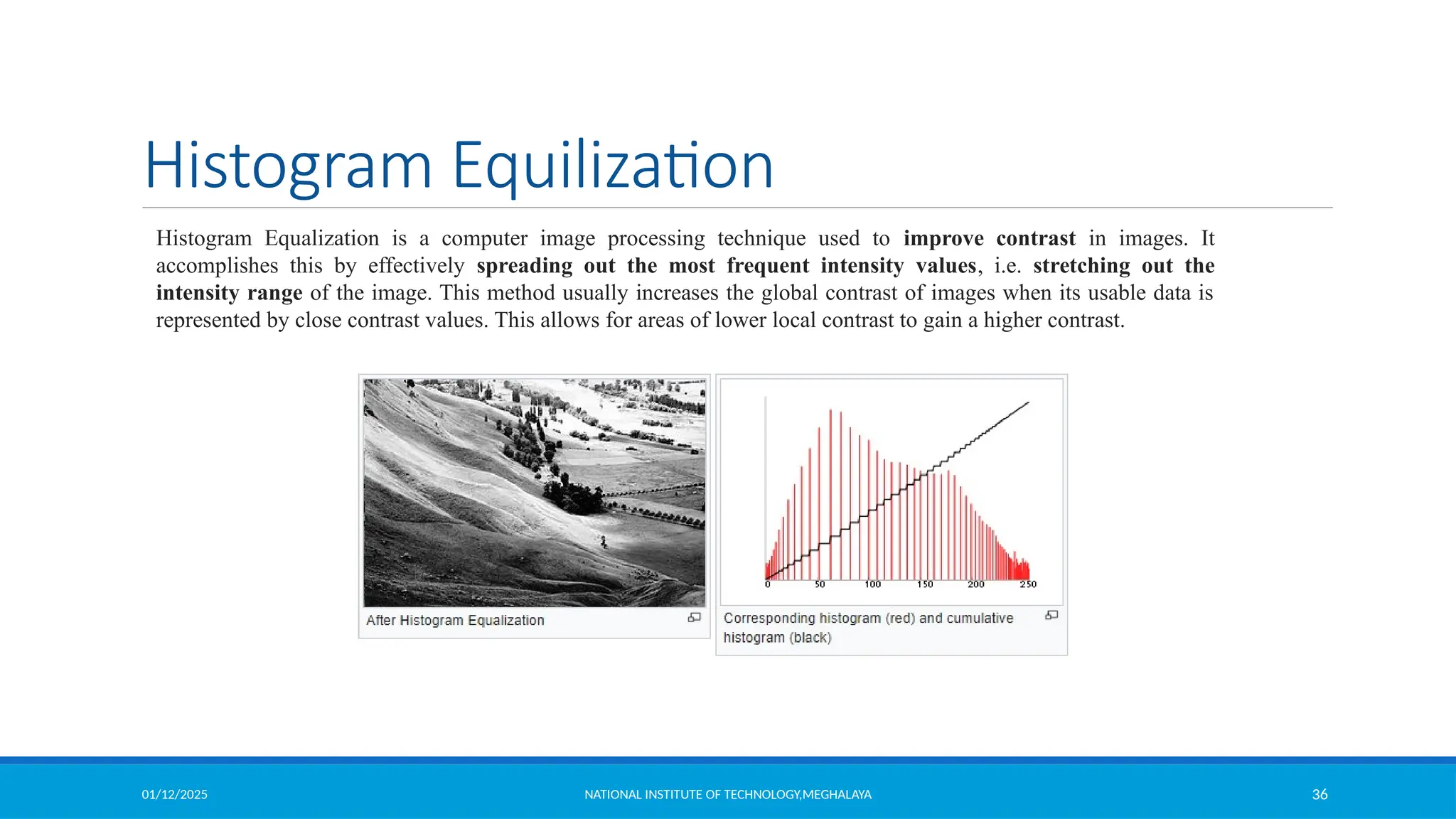
Histogram Equilization
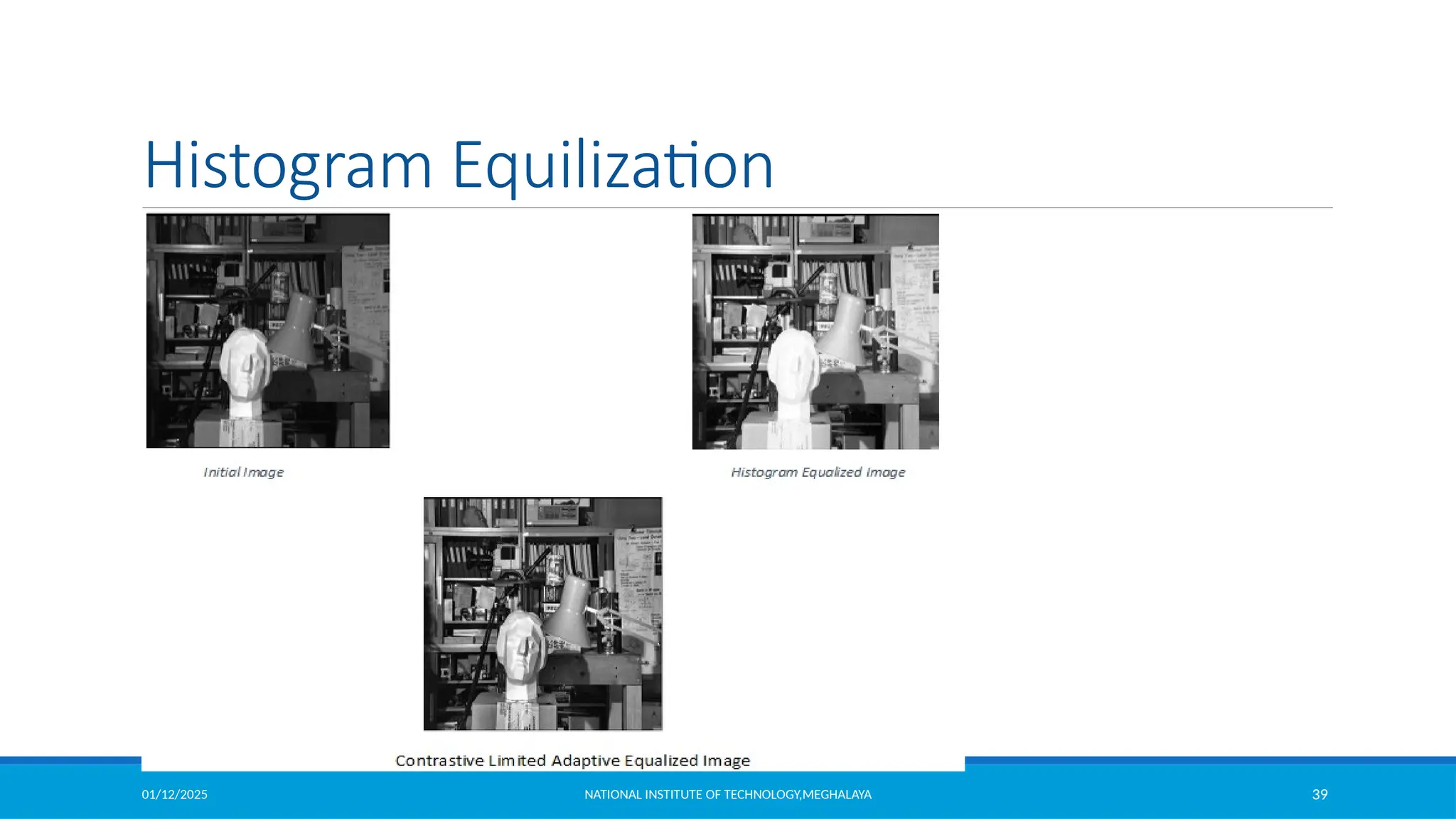
Histogram Equalization is a computer image processing technique used to improve contrast in images. It
accomplishes this by effectively spreading out the most frequent intensity values, i.e. stretching out the
intensity range of the image. This method usually increases the global contrast of images when its usable data is
represented by close contrast values. This allows for areas of lower local contrast to gain a higher contrast.
01/12/2025 NATIONAL INSTITUTE OF TECHNOLOGY,MEGHALAYA 37
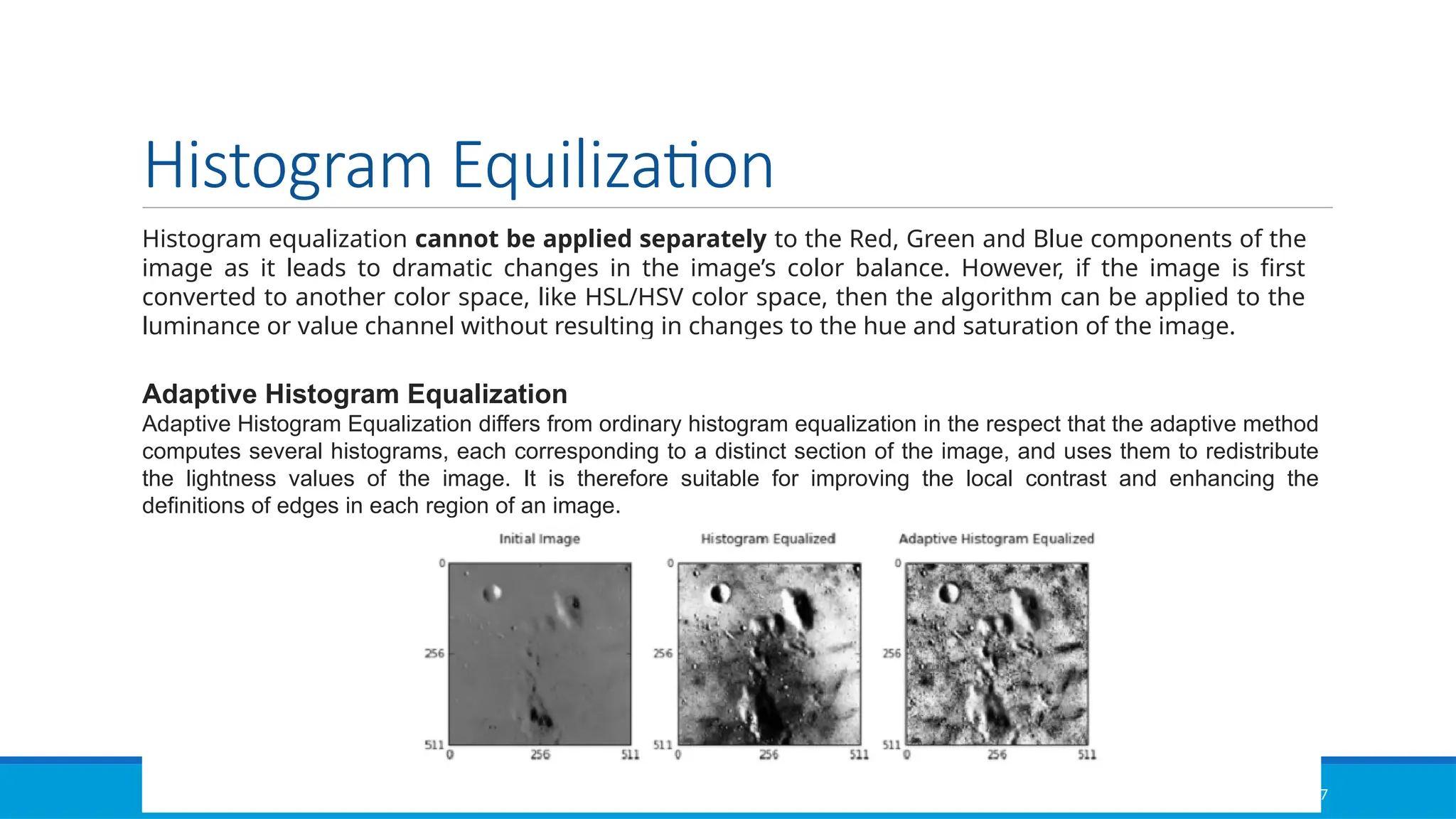
Histogram Equilization
Histogram equalization cannot be applied separately to the Red, Green and Blue components of the
image as it leads to dramatic changes in the image’s color balance. However, if the image is first
converted to another color space, like HSL/HSV color space, then the algorithm can be applied to the
luminance or value channel without resulting in changes to the hue and saturation of the image.
Adaptive Histogram Equalization
Adaptive Histogram Equalization differs from ordinary histogram equalization in the respect that the adaptive method
computes several histograms, each corresponding to a distinct section of the image, and uses them to redistribute
the lightness values of the image. It is therefore suitable for improving the local contrast and enhancing the
definitions of edges in each region of an image.
01/12/2025 NATIONAL INSTITUTE OF TECHNOLOGY,MEGHALAYA 38
Histogram Equilization
Contrastive Limited Adaptive Equalization
Contrast Limited AHE (CLAHE) differs from adaptive histogram equalization in its contrast limiting. In the case of CLAHE,
the contrast limiting procedure is applied to each neighborhood from which a transformation function is derived. CLAHE
was developed to prevent the over amplification of noise that adaptive histogram equalization can give rise to.
01/12/2025 NATIONAL INSTITUTE OF TECHNOLOGY,MEGHALAYA 39
Histogram Equilization
01/12/2025 NATIONAL INSTITUTE OF TECHNOLOGY,MEGHALAYA 40
Histogram Equalization
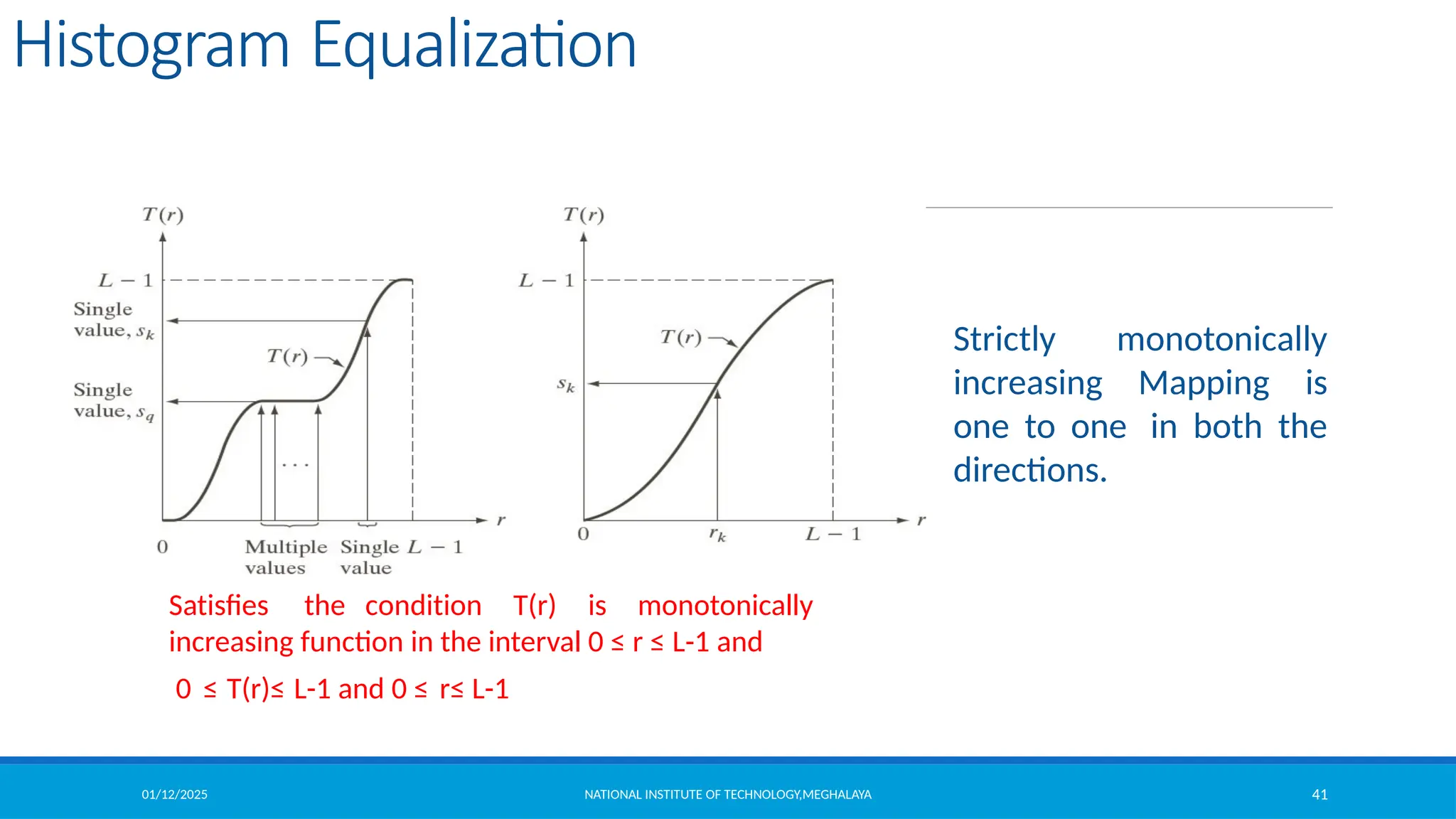
Let us denote r [0 L-1] as intensities of the image to be processed
r=0 corresponding to black and r=L-1 representing white.
Let the intensity transformation is defined by s=T(r) , where0 ≤ r ≤ L-1
 T(r) is monotonically increasing function in the interval 0 ≤ r ≤ L-1
 0 ≤ T(r)≤ L-1 and 0 ≤ r ≤ L-1
Suppose we use the inverse operation as r=T-1(s) , then the condition
should be strictly monotonically increasing.
01/12/2025 NATIONAL INSTITUTE OF TECHNOLOGY,MEGHALAYA 41
Histogram Equalization
Satisfies the condition T(r) is monotonically
increasing function in the interval 0 ≤ r ≤ L-1 and
0 ≤ T(r)≤ L-1 and 0 ≤ r≤ L-1
Strictly monotonically
increasing Mapping is
one to one in both the
directions.
01/12/2025 NATIONAL INSTITUTE OF TECHNOLOGY,MEGHALAYA 42
Histogram Equalization
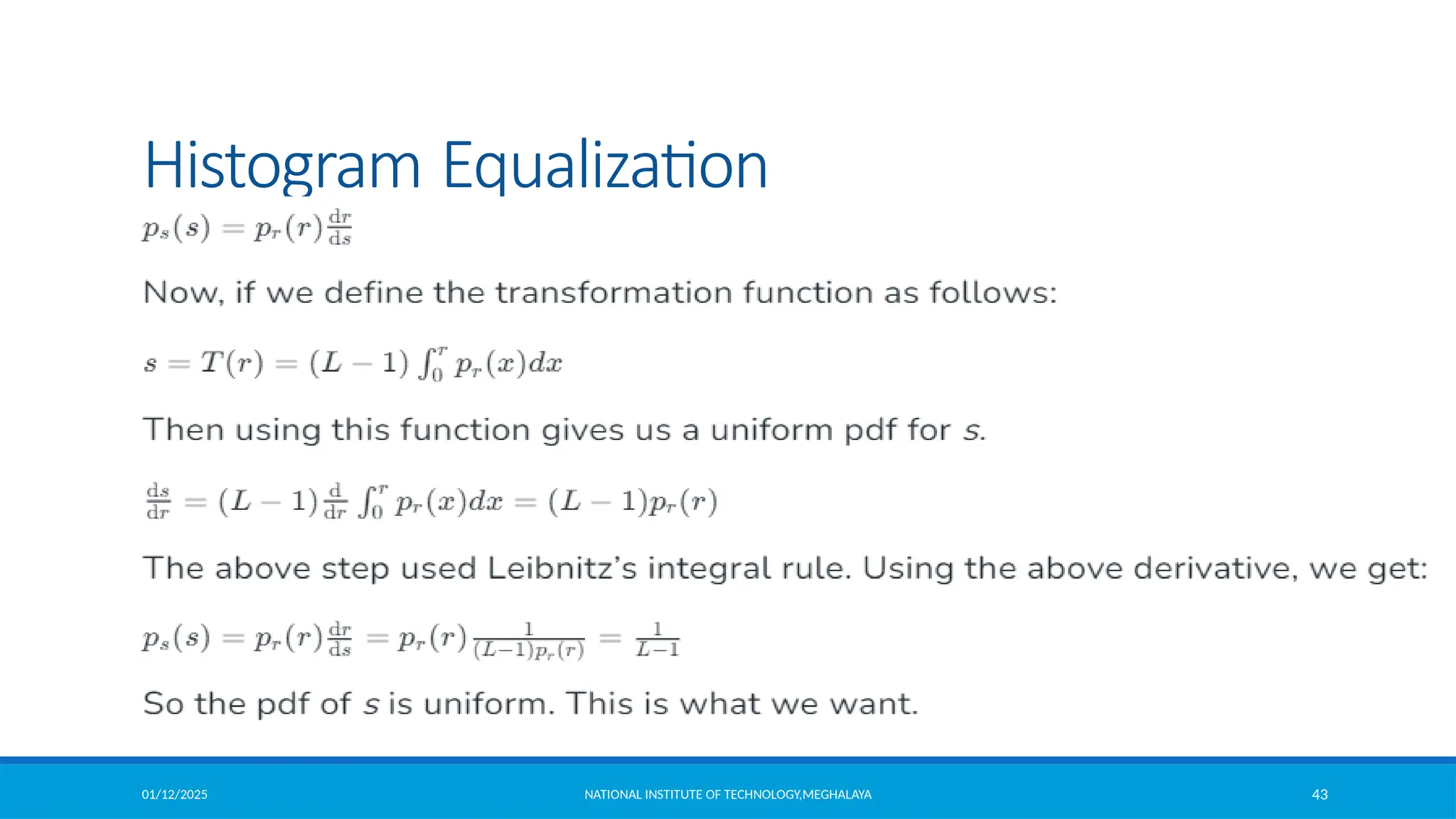
Let us consider intensity levels in the image as random variables in the interval 0 to L-1.
Let us now say that the probability density function (pdf) of r is pr (x) and the cumulative
distribution function (CDF) of r is Fr (x). Now the CDF of s will be :If pr(r) and T(r) is known,
where T(r) is continuous and differentiable over the PDF range , then
01/12/2025 NATIONAL INSTITUTE OF TECHNOLOGY,MEGHALAYA 43
Histogram Equalization
01/12/2025 NATIONAL INSTITUTE OF TECHNOLOGY,MEGHALAYA 44
Histogram Equalization
0
d
(L 1)
dr
ds dT
(r)
dr dr
(L 1) pr (r)
r
pr (w)dw
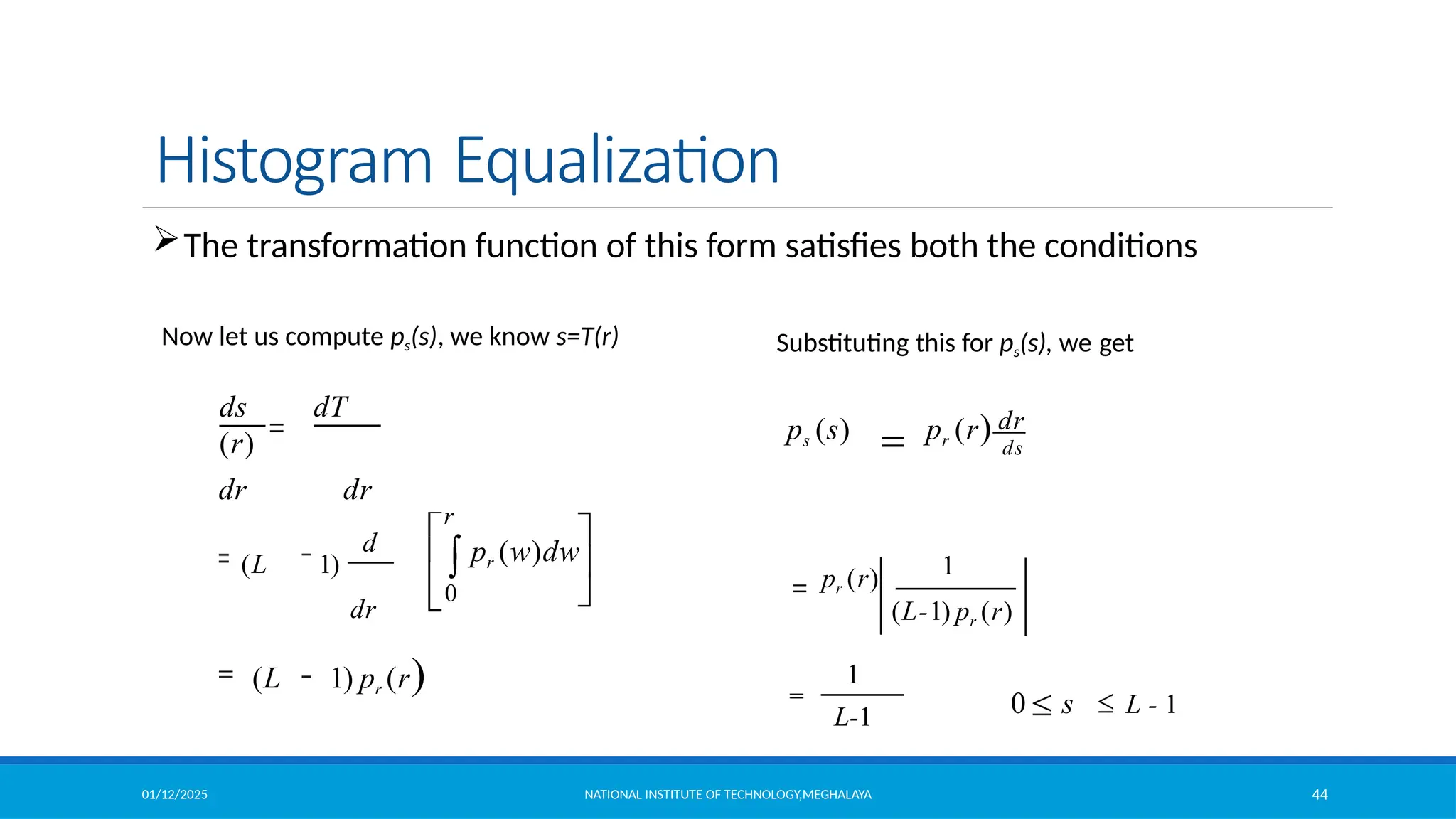
The transformation function of this form satisfies both the conditions
1
0 s L - 1
1
L-1
dr
(L-1) pr (r)
pr (r)
ps (s) pr (r) ds
Substituting this for ps(s), we get
Now let us compute ps(s), we know s=T(r)
01/12/2025 NATIONAL INSTITUTE OF TECHNOLOGY,MEGHALAYA 45
Histogram Equalization
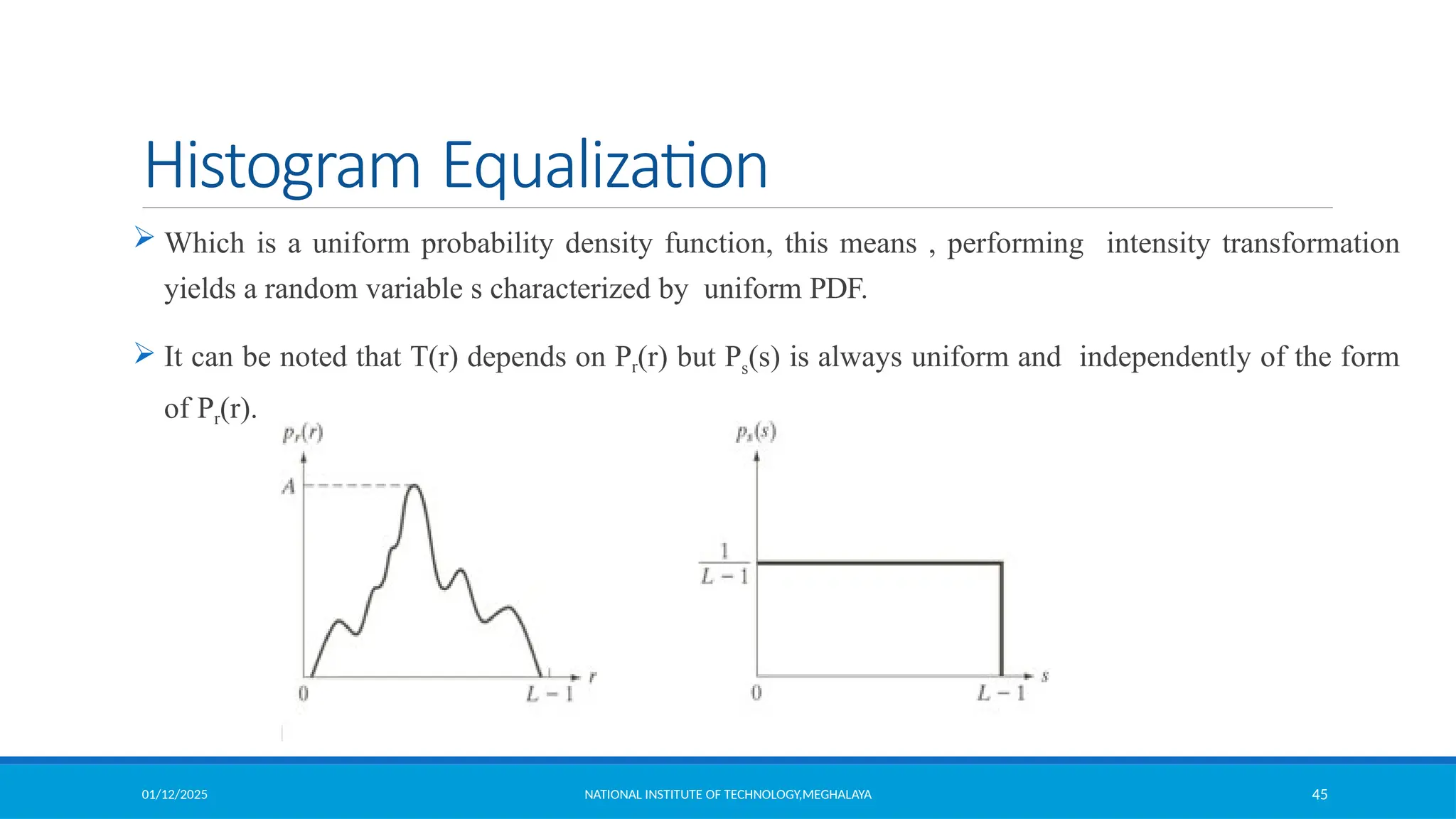
 Which is a uniform probability density function, this means , performing intensity transformation
yields a random variable s characterized by uniform PDF.
 It can be noted that T(r) depends on Pr(r) but Ps(s) is always uniform and independently of the form
of Pr(r).
01/12/2025 NATIONAL INSTITUTE OF TECHNOLOGY,MEGHALAYA 46
Histogram Equalization (Example)
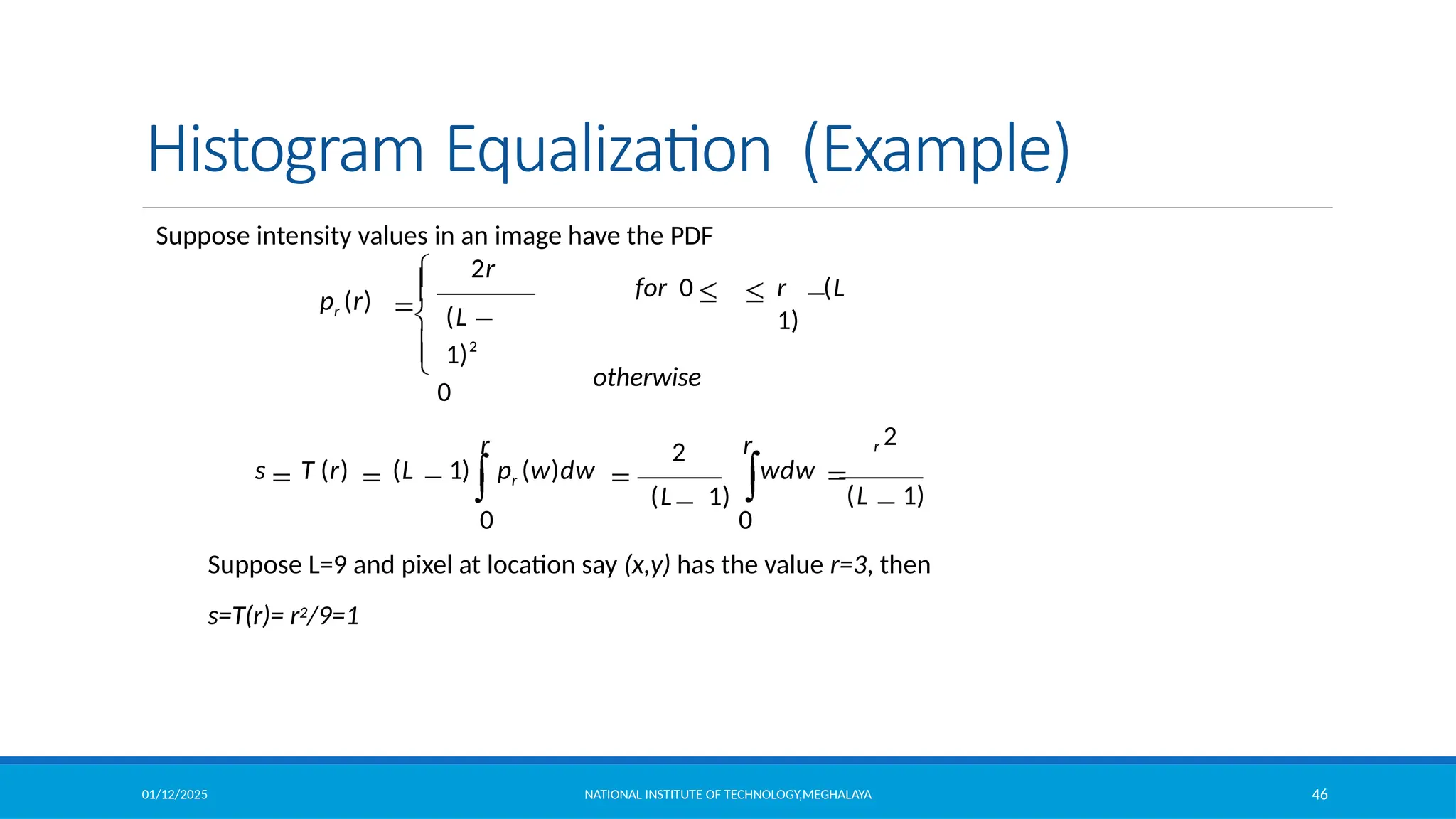
Suppose intensity values in an image have the PDF
2
2r
r r
0 0
wdw
(L 1)
s T (r) (L 1) pr (w)dw
r 2
(L 1)
for 0 r (L
1)
otherwise
pr (r)
(L
1)2
0
Suppose L=9 and pixel at location say (x,y) has the value r=3, then
s=T(r)= r2/9=1
01/12/2025 47
Histogram Equalization (Example)
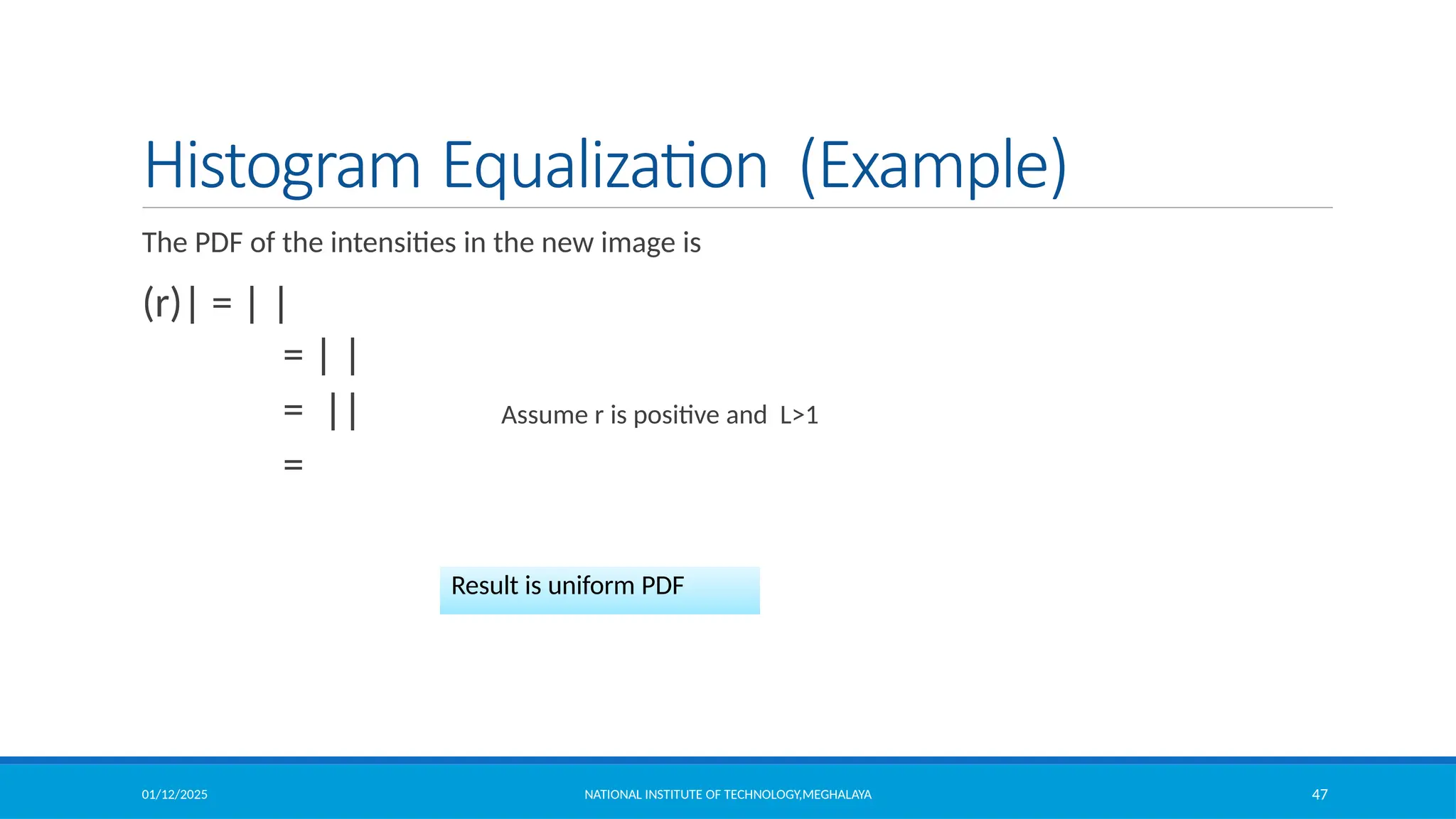
The PDF of the intensities in the new image is
(r)| = | |
= | |
= || Assume r is positive and L>1
=
Result is uniform PDF
NATIONAL INSTITUTE OF TECHNOLOGY,MEGHALAYA
01/12/2025 NATIONAL INSTITUTE OF TECHNOLOGY,MEGHALAYA 48
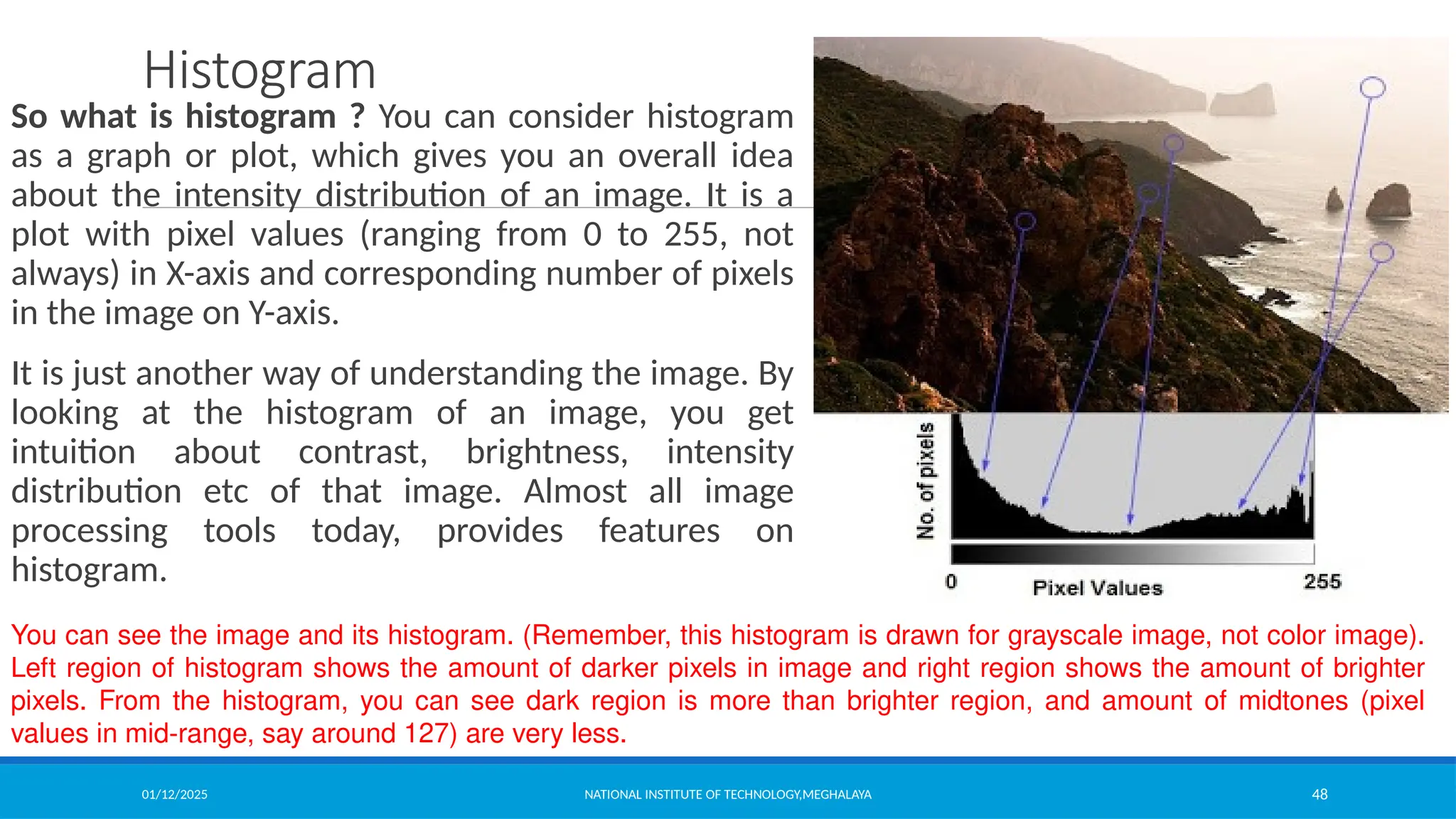
Histogram
So what is histogram ? You can consider histogram
as a graph or plot, which gives you an overall idea
about the intensity distribution of an image. It is a
plot with pixel values (ranging from 0 to 255, not
always) in X-axis and corresponding number of pixels
in the image on Y-axis.
It is just another way of understanding the image. By
looking at the histogram of an image, you get
intuition about contrast, brightness, intensity
distribution etc of that image. Almost all image
processing tools today, provides features on
histogram.
You can see the image and its histogram. (Remember, this histogram is drawn for grayscale image, not color image).
Left region of histogram shows the amount of darker pixels in image and right region shows the amount of brighter
pixels. From the histogram, you can see dark region is more than brighter region, and amount of midtones (pixel
values in mid-range, say around 127) are very less.
01/12/2025 NATIONAL INSTITUTE OF TECHNOLOGY,MEGHALAYA 49
Histogram Equalization
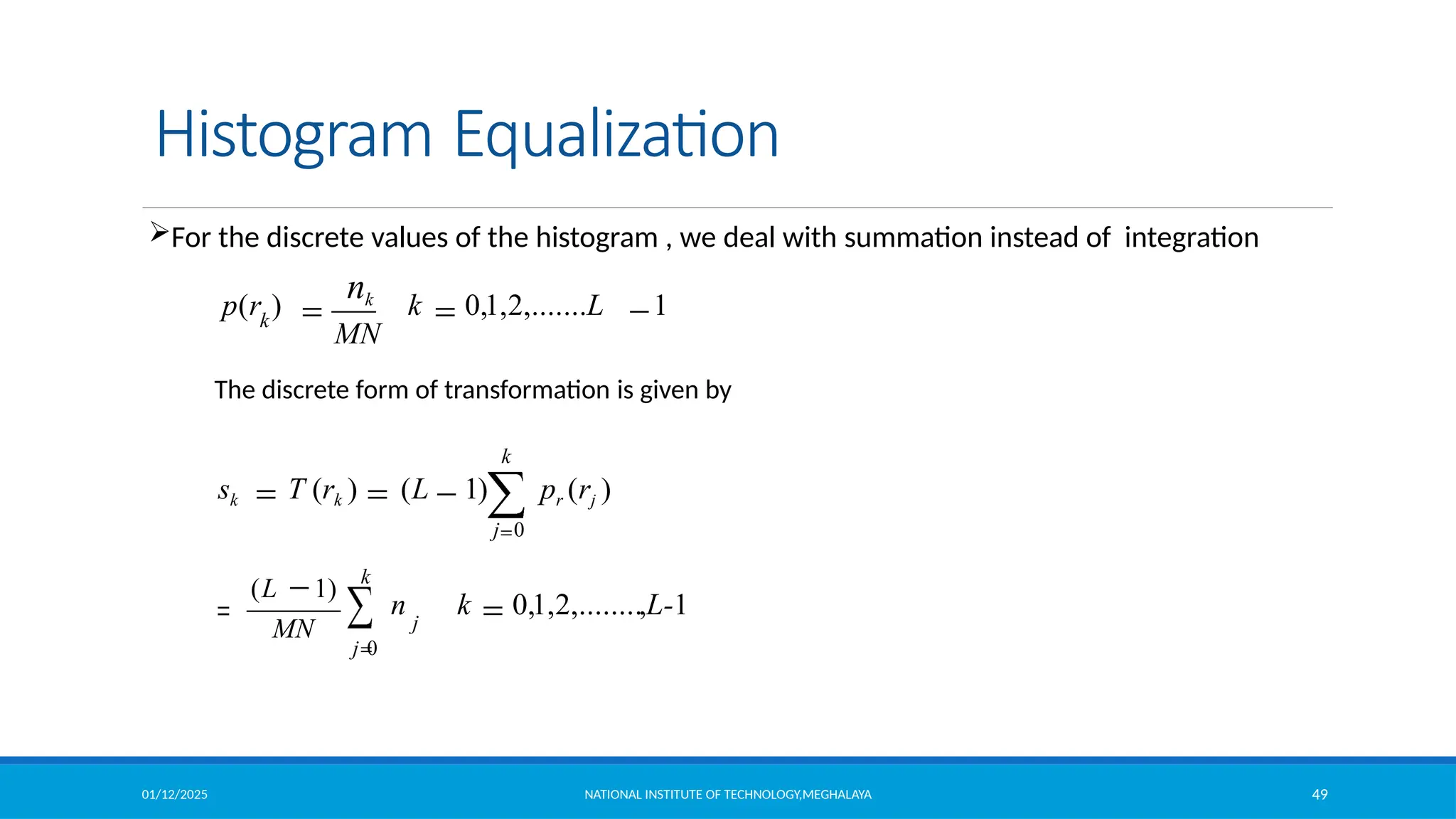
For the discrete values of the histogram , we deal with summation instead of integration
k 0,1,2,.......L 1
MN
p(r )
nk
k
n k 0,1,2,........,L-1
(L 1)
MN
k
j 0
j
The discrete form of transformation is given by
k
sk T (rk ) (L 1) pr (rj )
j 0
01/12/2025 NATIONAL INSTITUTE OF TECHNOLOGY,MEGHALAYA 50
Histogram Equalization (Example)
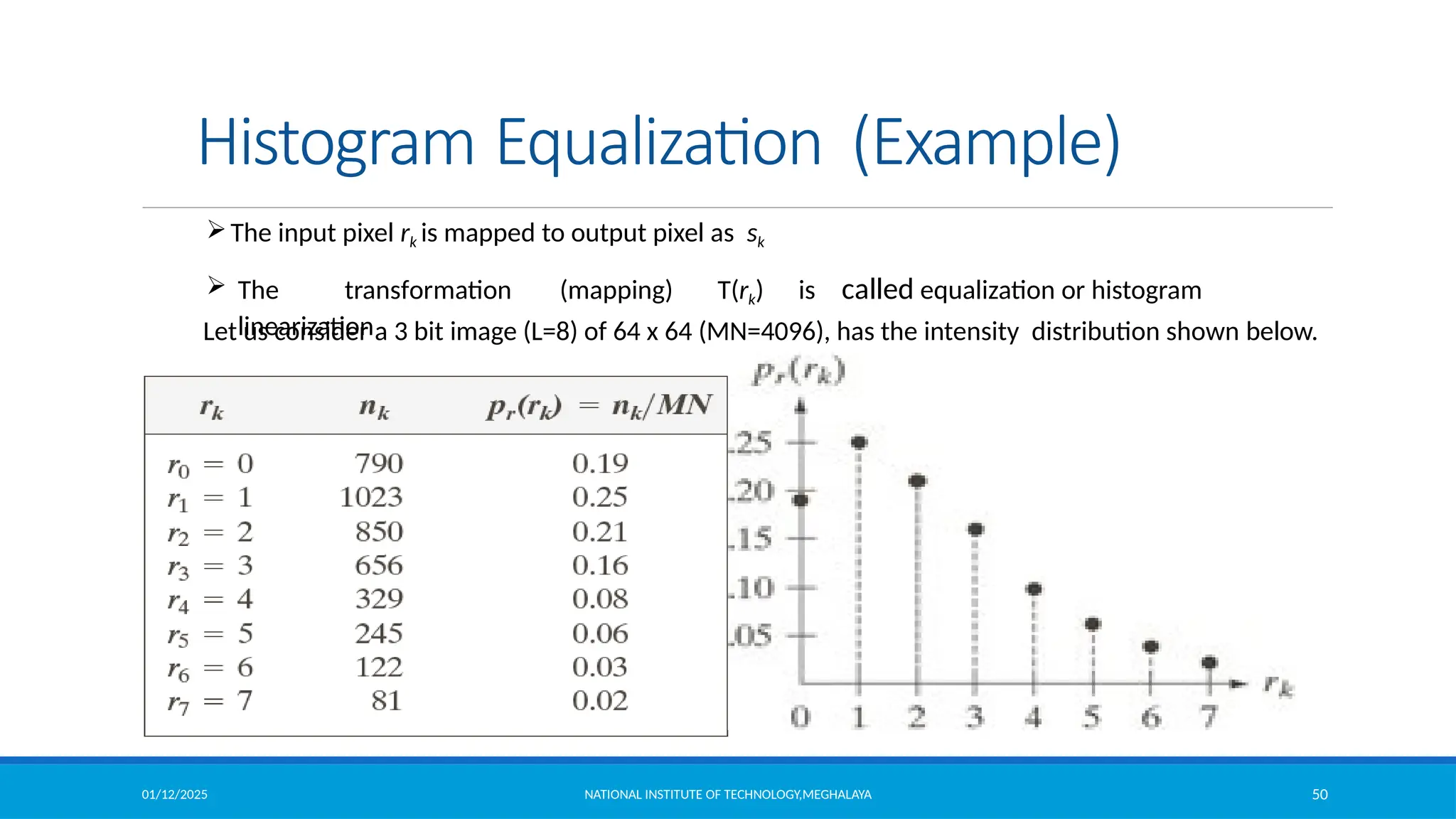
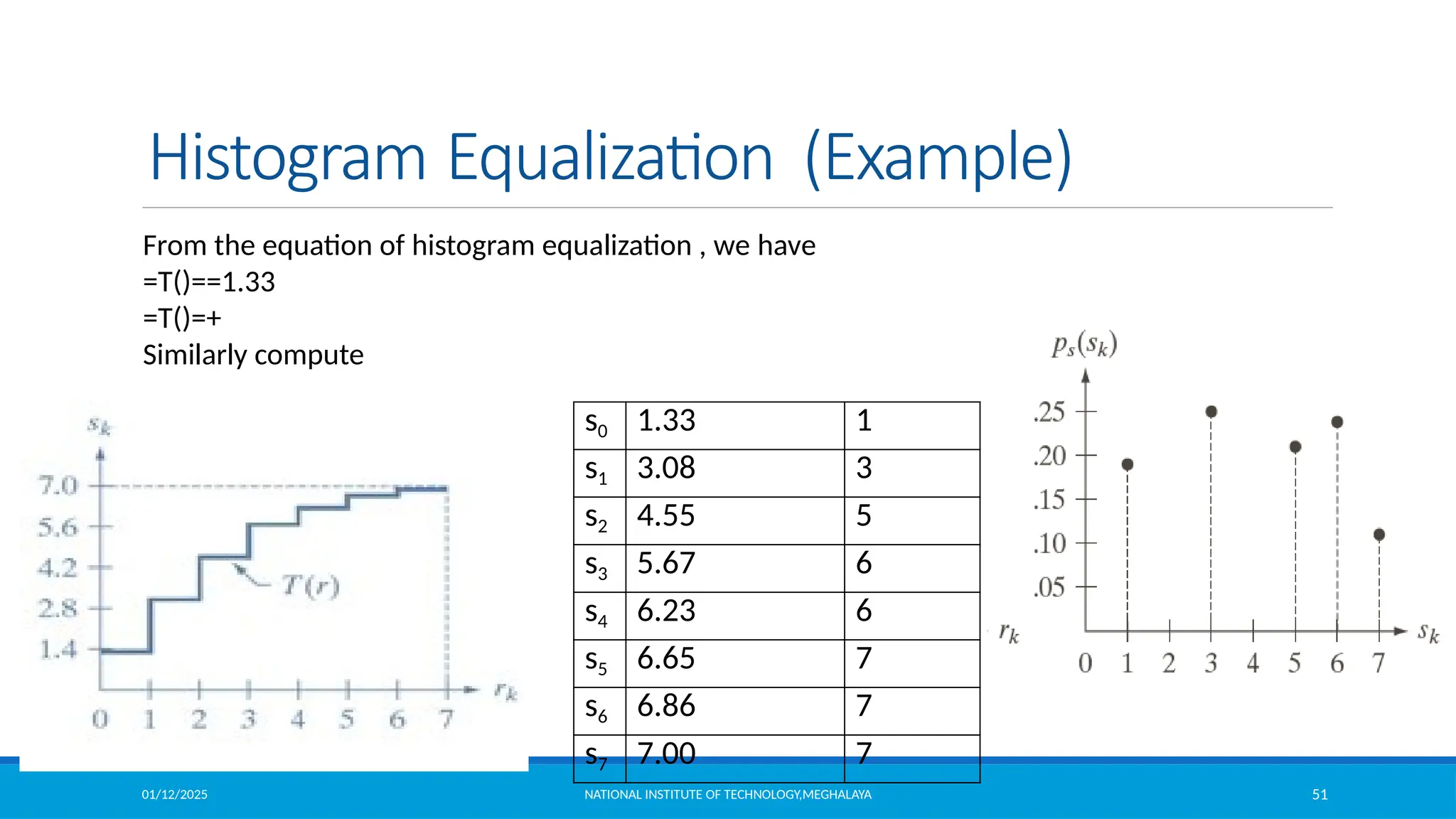
Let us consider a 3 bit image (L=8) of 64 x 64 (MN=4096), has the intensity distribution shown below.
The input pixel rk is mapped to output pixel as sk
 The transformation (mapping) T(rk) is called equalization or histogram
linearization
01/12/2025 NATIONAL INSTITUTE OF TECHNOLOGY,MEGHALAYA 51
Histogram Equalization (Example)
s0 1.33 1
s1 3.08 3
s2 4.55 5
s3 5.67 6
s4 6.23 6
s5 6.65 7
s6 6.86 7
s7 7.00 7
From the equation of histogram equalization , we have
=T()==1.33
=T()=+
Similarly compute
01/12/2025 NATIONAL INSTITUTE OF TECHNOLOGY,MEGHALAYA 52
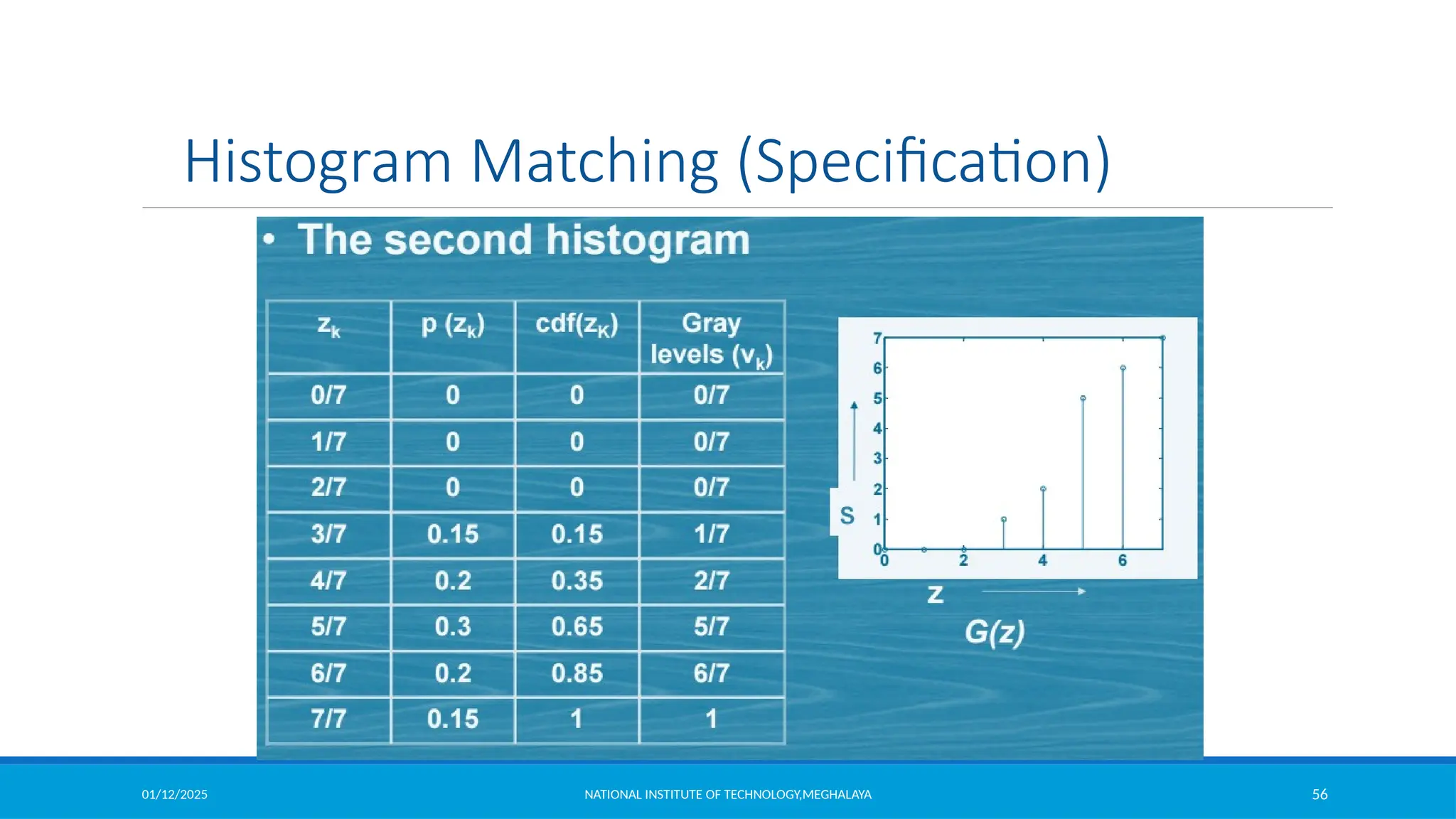
Histogram Matching (Specification)
 Histogram equalization automatically determines a transformation function
produce uniform histogram
 When automatic enhancement is desired, equalization is a good approach
 There are some applications in which attempting to base enhancement on a
uniform histogram is not the best approach
 In particular, it is useful sometimes to be able to specify the shape of the
histogram that we wish the processed image to have.
 The method used to generate a processed image that has a specified histogram is
called histogram matching or specification
01/12/2025 NATIONAL INSTITUTE OF TECHNOLOGY,MEGHALAYA 53
Histogram Matching (Specification)
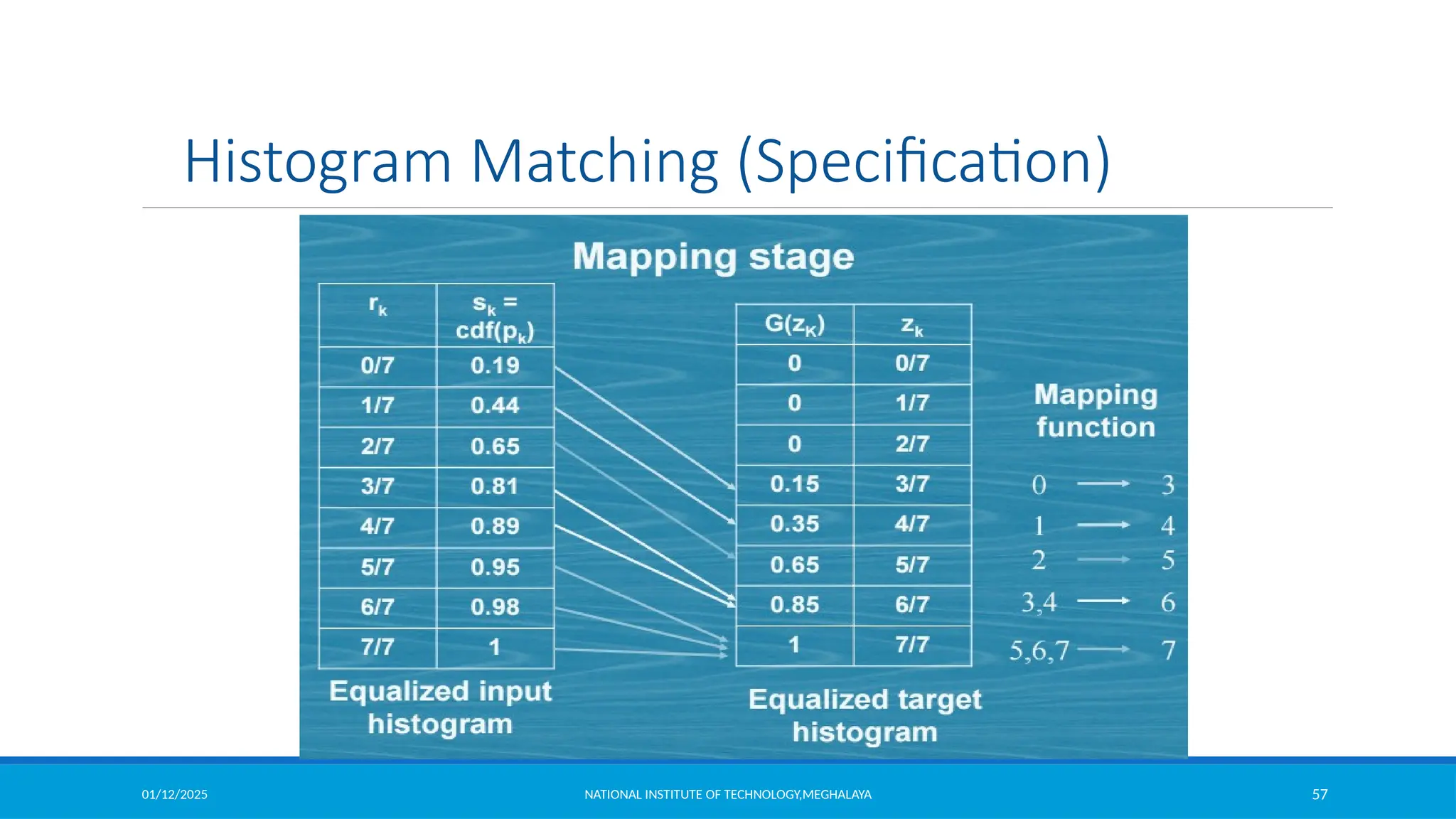
Histogram Specification Procedure:
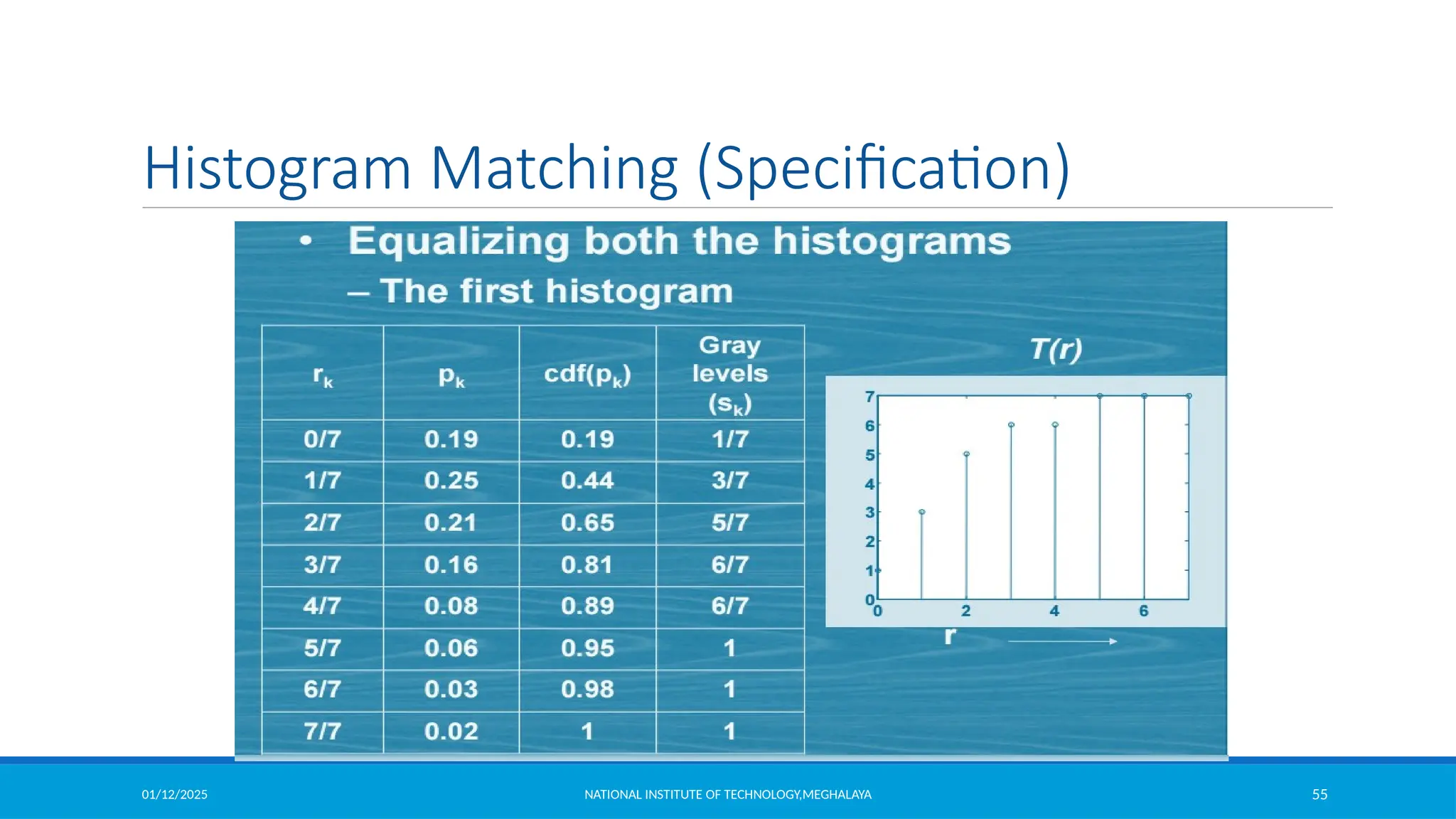
1. Compute the histogram pr (r) of the given image, and use it to find the histogram
equalization transformation in equation
and round the resulting values to the integer range [0, L-1]
2. Compute all values of the transformation function G using same equation G(zq ) = (L -1)
q =0,1,2,..., L -1 and round values of G
3. For every value of sk, k = 0,1,…,L-1, use the stored values of G to find the corresponding
value of zq so that G(zq) is closet to sk and store these mappings from s to z.
 , k = 0,1,2,...,L -1
MN
k
j0
n j
sk = T (rk ) = (L -1)
i0
01/12/2025 NATIONAL INSTITUTE OF TECHNOLOGY,MEGHALAYA 54
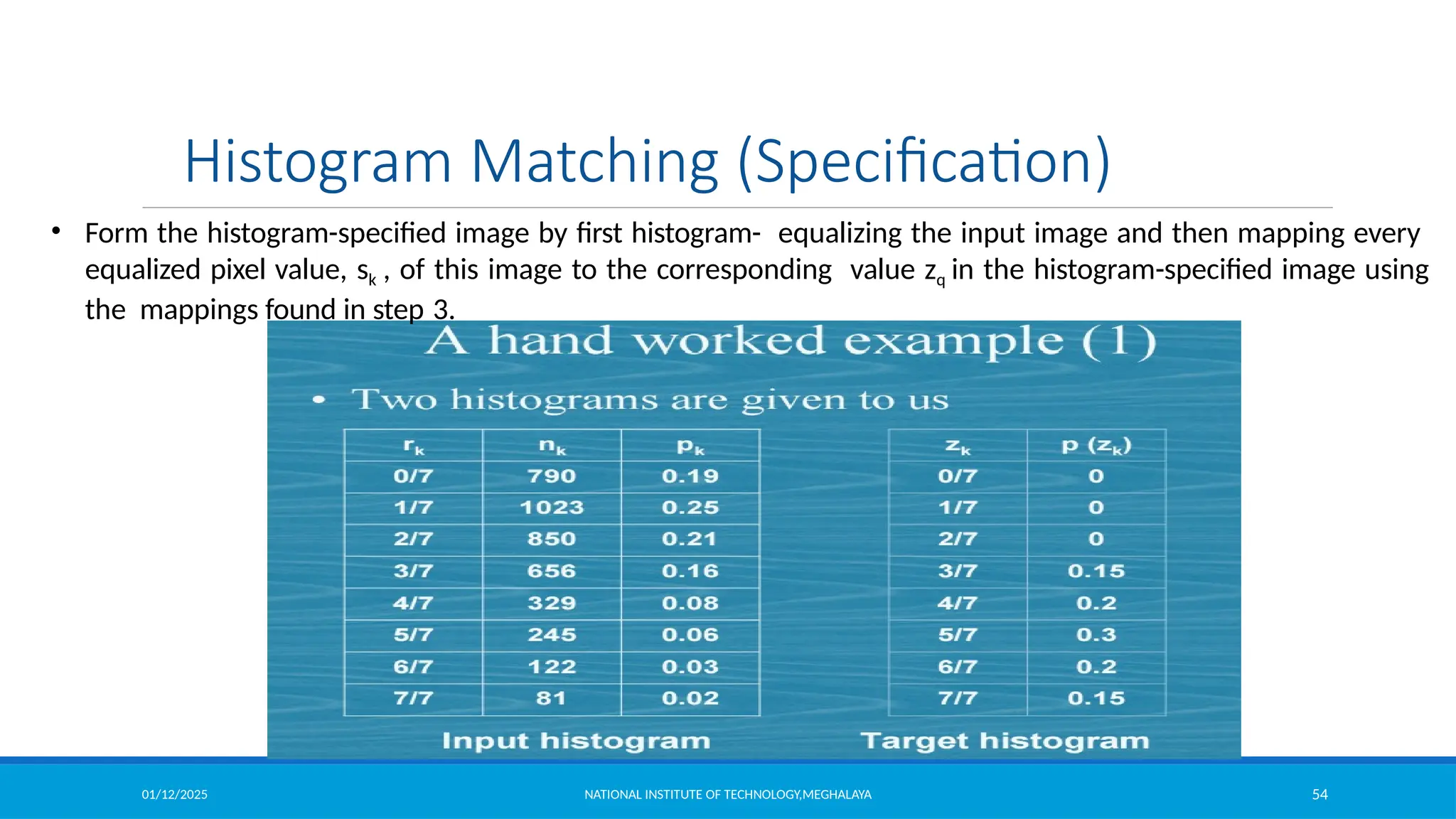
• Form the histogram-specified image by first histogram- equalizing the input image and then mapping every
equalized pixel value, sk , of this image to the corresponding value zq in the histogram-specified image using
the mappings found in step 3.
Histogram Matching (Specification)
01/12/2025 NATIONAL INSTITUTE OF TECHNOLOGY,MEGHALAYA 55
Histogram Matching (Specification)
01/12/2025 NATIONAL INSTITUTE OF TECHNOLOGY,MEGHALAYA 56
Histogram Matching (Specification)
01/12/2025 NATIONAL INSTITUTE OF TECHNOLOGY,MEGHALAYA 57
Histogram Matching (Specification)
01/12/2025 NATIONAL INSTITUTE OF TECHNOLOGY,MEGHALAYA 58
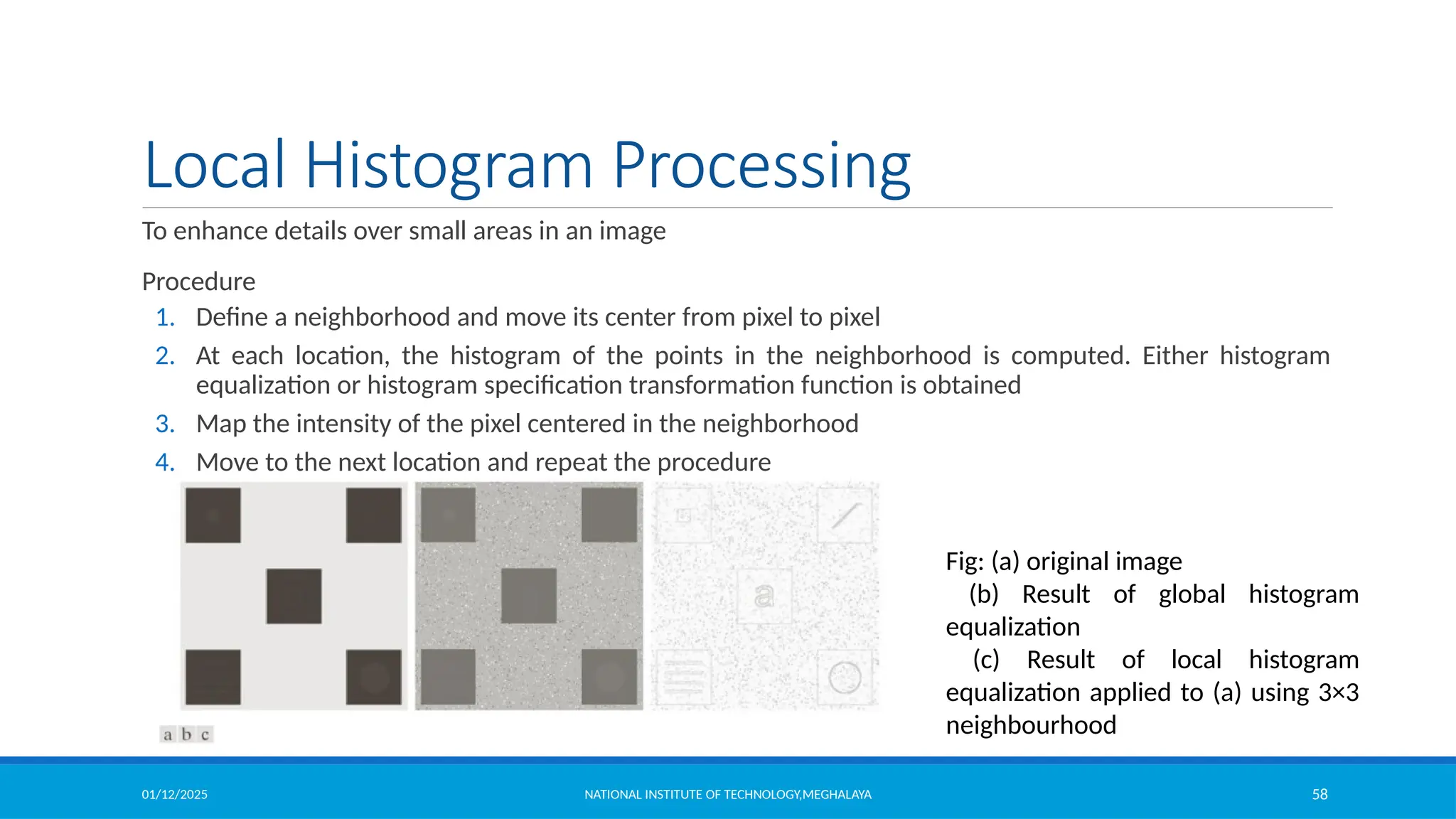
Local Histogram Processing
To enhance details over small areas in an image
Procedure
1. Define a neighborhood and move its center from pixel to pixel
2. At each location, the histogram of the points in the neighborhood is computed. Either histogram
equalization or histogram specification transformation function is obtained
3. Map the intensity of the pixel centered in the neighborhood
4. Move to the next location and repeat the procedure
Fig: (a) original image
(b) Result of global histogram
equalization
(c) Result of local histogram
equalization applied to (a) using 3×3
neighbourhood
01/12/2025 NATIONAL INSTITUTE OF TECHNOLOGY,MEGHALAYA 59
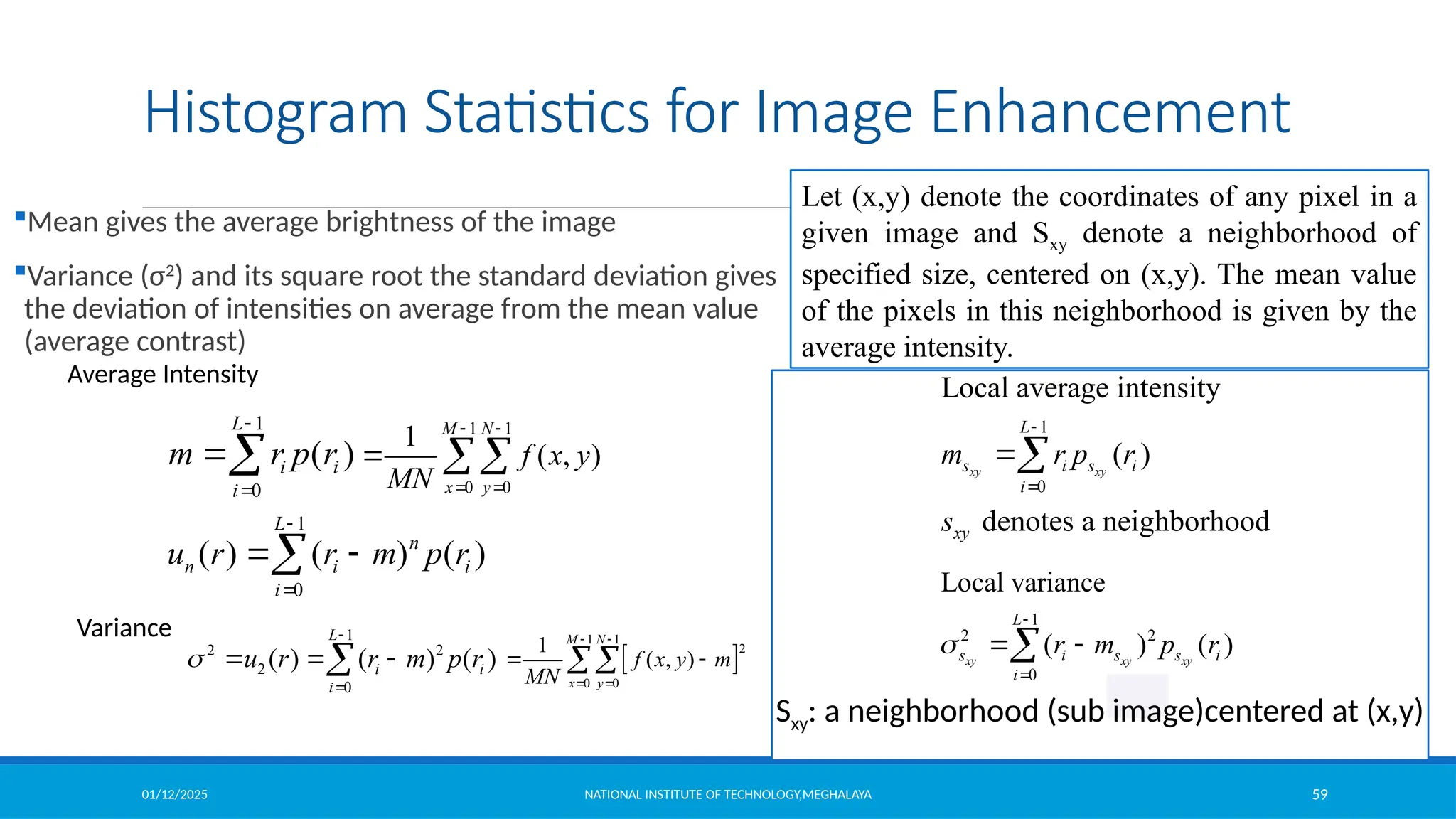
Histogram Statistics for Image Enhancement
Mean gives the average brightness of the image
Variance (σ2
) and its square root the standard deviation gives
the deviation of intensities on average from the mean value
(average contrast)
1
0
( )
L
i i
i
m r p r



1
0
( ) ( ) ( )
L
n
n i i
i
u r r m p r


 

1
2 2
2
0
( ) ( ) ( )
L
i i
i
u r r m p r



  

1 1
0 0
1
( , )
M N
x y
f x y
MN
 
 
 
 
1 1
2
0 0
1
( , )
M N
x y
f x y m
MN
 
 
 

Average Intensity
Variance 1
2 2
0
Local variance
( ) ( )
xy xy xy
L
s i s s i
i
r m p r



 

1
0
Local average intensity
( )
denotes a neighborhood
xy xy
L
s i s i
i
xy
m r p r
s



Sxy: a neighborhood (sub image)centered at (x,y)
Let (x,y) denote the coordinates of any pixel in a
given image and Sxy denote a neighborhood of
specified size, centered on (x,y). The mean value
of the pixels in this neighborhood is given by the
average intensity.
01/12/2025 NATIONAL INSTITUTE OF TECHNOLOGY,MEGHALAYA 60
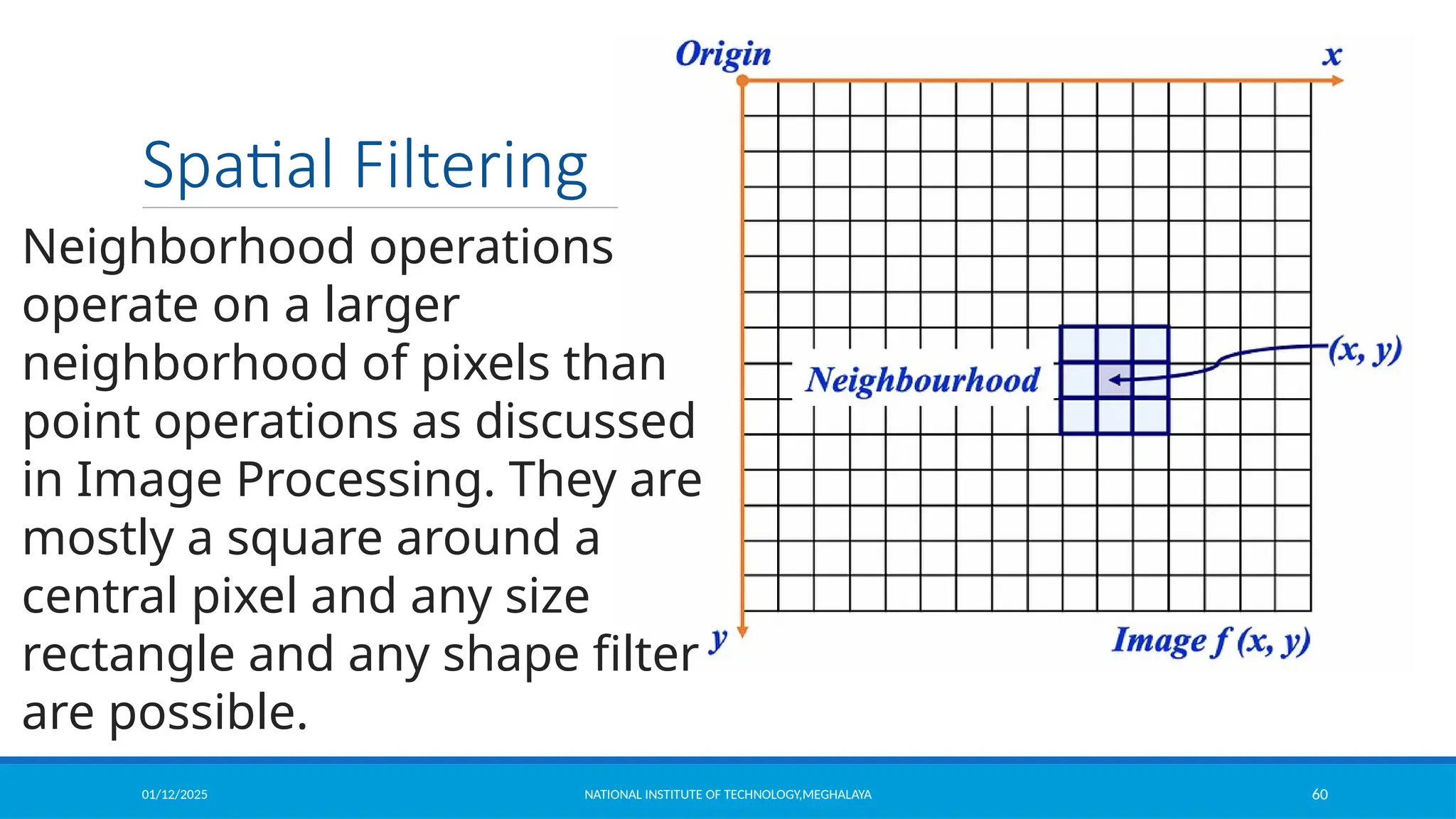
Spatial Filtering
Neighborhood operations
operate on a larger
neighborhood of pixels than
point operations as discussed
in Image Processing. They are
mostly a square around a
central pixel and any size
rectangle and any shape filter
are possible.
01/12/2025 NATIONAL INSTITUTE OF TECHNOLOGY,MEGHALAYA 61
Spatial Filtering
Simple Neighborhood Operations
•Min: Set the pixel value to the minimum in the
neighborhood.
•Max: Set the pixel value to the maximum in the
neighborhood.
•Median: Set the pixel value to the midpoint in the
neighborhood (set). Sometimes the median works better
01/12/2025 NATIONAL INSTITUTE OF TECHNOLOGY,MEGHALAYA 62
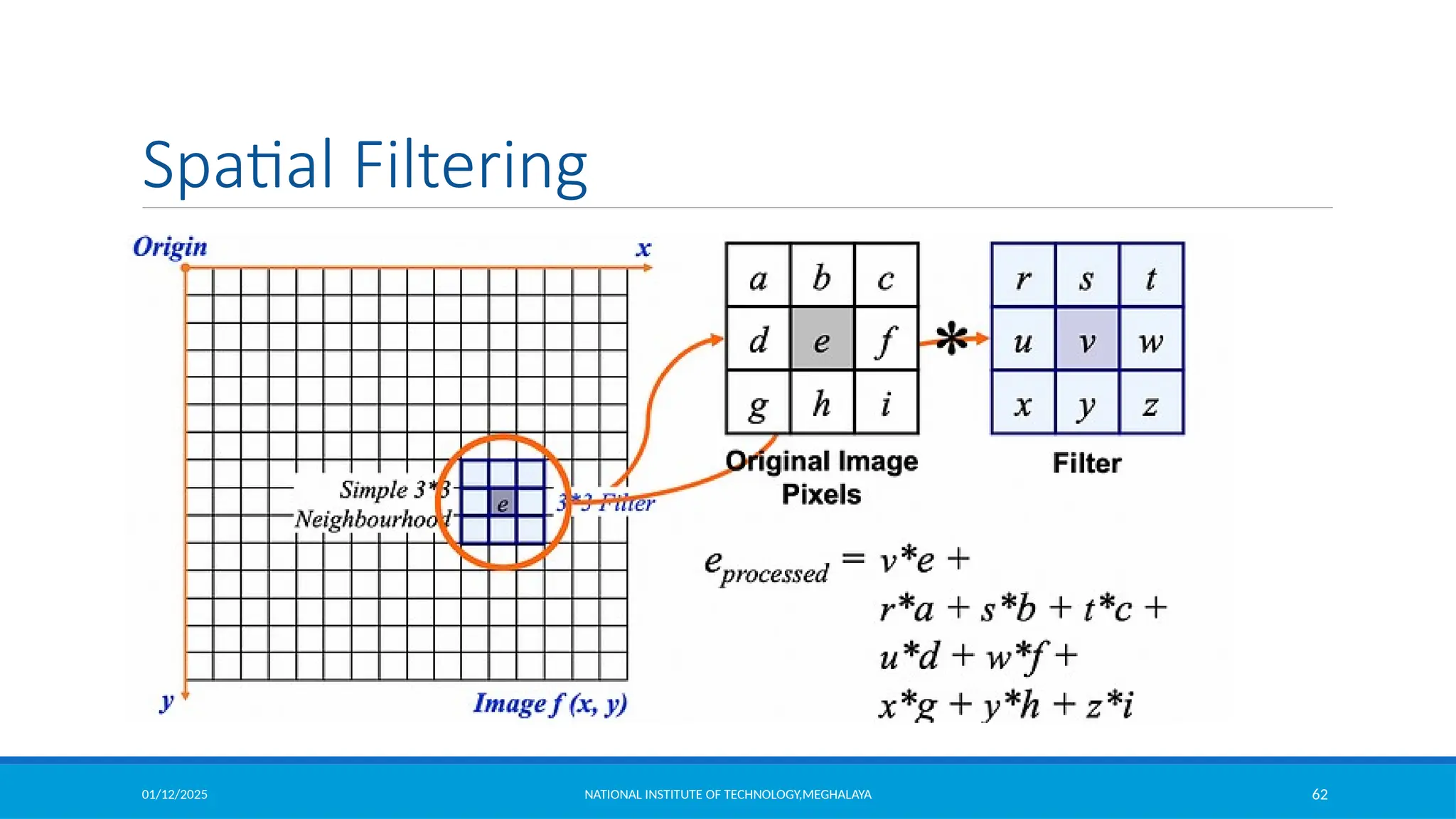
Spatial Filtering
01/12/2025 NATIONAL INSTITUTE OF TECHNOLOGY,MEGHALAYA 63
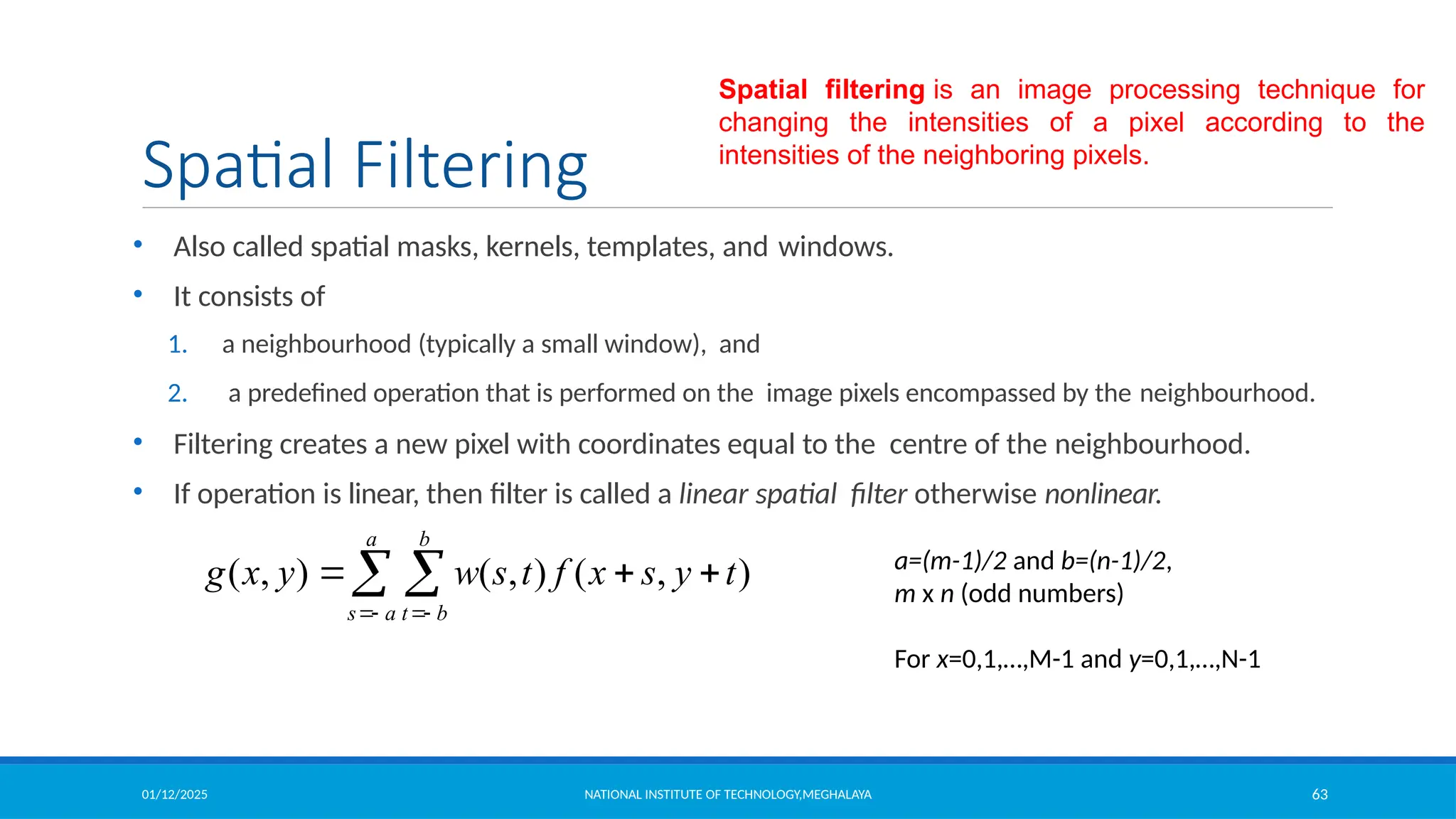
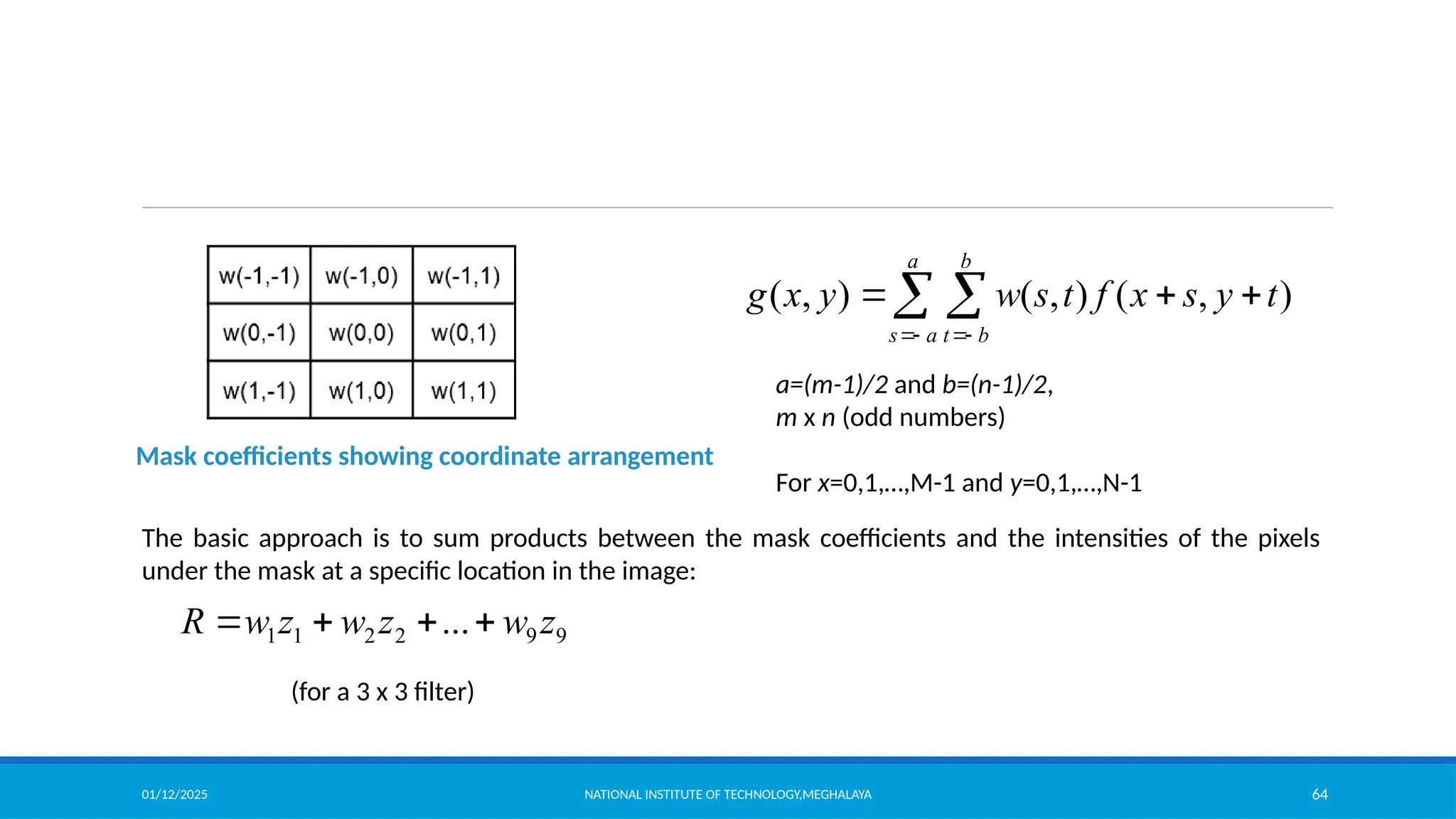
Spatial Filtering
• Also called spatial masks, kernels, templates, and windows.
• It consists of
1. a neighbourhood (typically a small window), and
2. a predefined operation that is performed on the image pixels encompassed by the neighbourhood.
• Filtering creates a new pixel with coordinates equal to the centre of the neighbourhood.
• If operation is linear, then filter is called a linear spatial filter otherwise nonlinear.
( , ) ( , ) ( , )
a b
s a t b
g x y w s t f x s y t
 
  
  a=(m-1)/2 and b=(n-1)/2,
m x n (odd numbers)
For x=0,1,…,M-1 and y=0,1,…,N-1
Spatial filtering is an image processing technique for
changing the intensities of a pixel according to the
intensities of the neighboring pixels.
01/12/2025 NATIONAL INSTITUTE OF TECHNOLOGY,MEGHALAYA 64
Mask coefficients showing coordinate arrangement
( , ) ( , ) ( , )
a b
s a t b
g x y w s t f x s y t
 
  
 
a=(m-1)/2 and b=(n-1)/2,
m x n (odd numbers)
For x=0,1,…,M-1 and y=0,1,…,N-1
The basic approach is to sum products between the mask coefficients and the intensities of the pixels
under the mask at a specific location in the image:
9
9
2
2
1
1 ... z
w
z
w
z
w
R 



(for a 3 x 3 filter)
01/12/2025 NATIONAL INSTITUTE OF TECHNOLOGY,MEGHALAYA 65
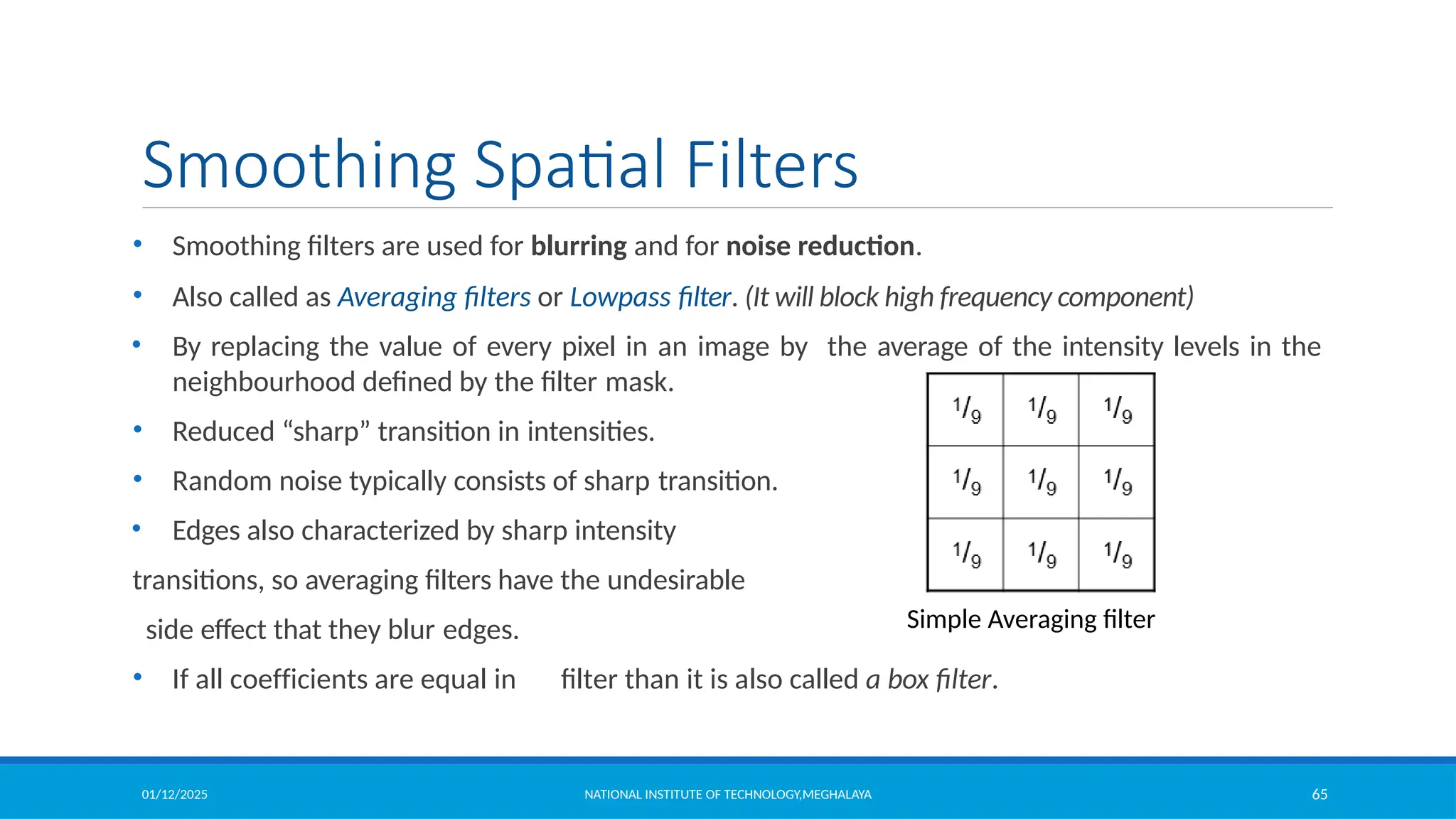
Smoothing Spatial Filters
• Smoothing filters are used for blurring and for noise reduction.
• Also called as Averaging filters or Lowpass filter. (It will block high frequency component)
• By replacing the value of every pixel in an image by the average of the intensity levels in the
neighbourhood defined by the filter mask.
• Reduced “sharp” transition in intensities.
• Random noise typically consists of sharp transition.
• Edges also characterized by sharp intensity
transitions, so averaging filters have the undesirable
side effect that they blur edges.
• If all coefficients are equal in filter than it is also called a box filter.
Simple Averaging filter
01/12/2025 NATIONAL INSTITUTE OF TECHNOLOGY,MEGHALAYA 66
Smoothing Spatial Filters
Types of Smoothing Spatial Filter
1. Linear Filter (Mean Filter)
2. Order Statistics (Non-linear) filter
01/12/2025 NATIONAL INSTITUTE OF TECHNOLOGY,MEGHALAYA 67
Smoothing Spatial Filters
1.Mean Filter: Linear spatial filter is simply the average of the pixels contained in
the neighborhood of the filter mask. The idea is replacing the value of every pixel in
an image by the average of the grey levels in the neighborhood define by the filter
mask. Below are the types of mean filter:
1. Averaging filter: It is used in reduction of the detail in image. All coefficients
are equal.
2. Weighted averaging filter: In this, pixels are multiplied by different
coefficients. Center pixel is multiplied by a higher value than average filter.
01/12/2025 NATIONAL INSTITUTE OF TECHNOLOGY,MEGHALAYA 68
Smoothing Spatial Filters
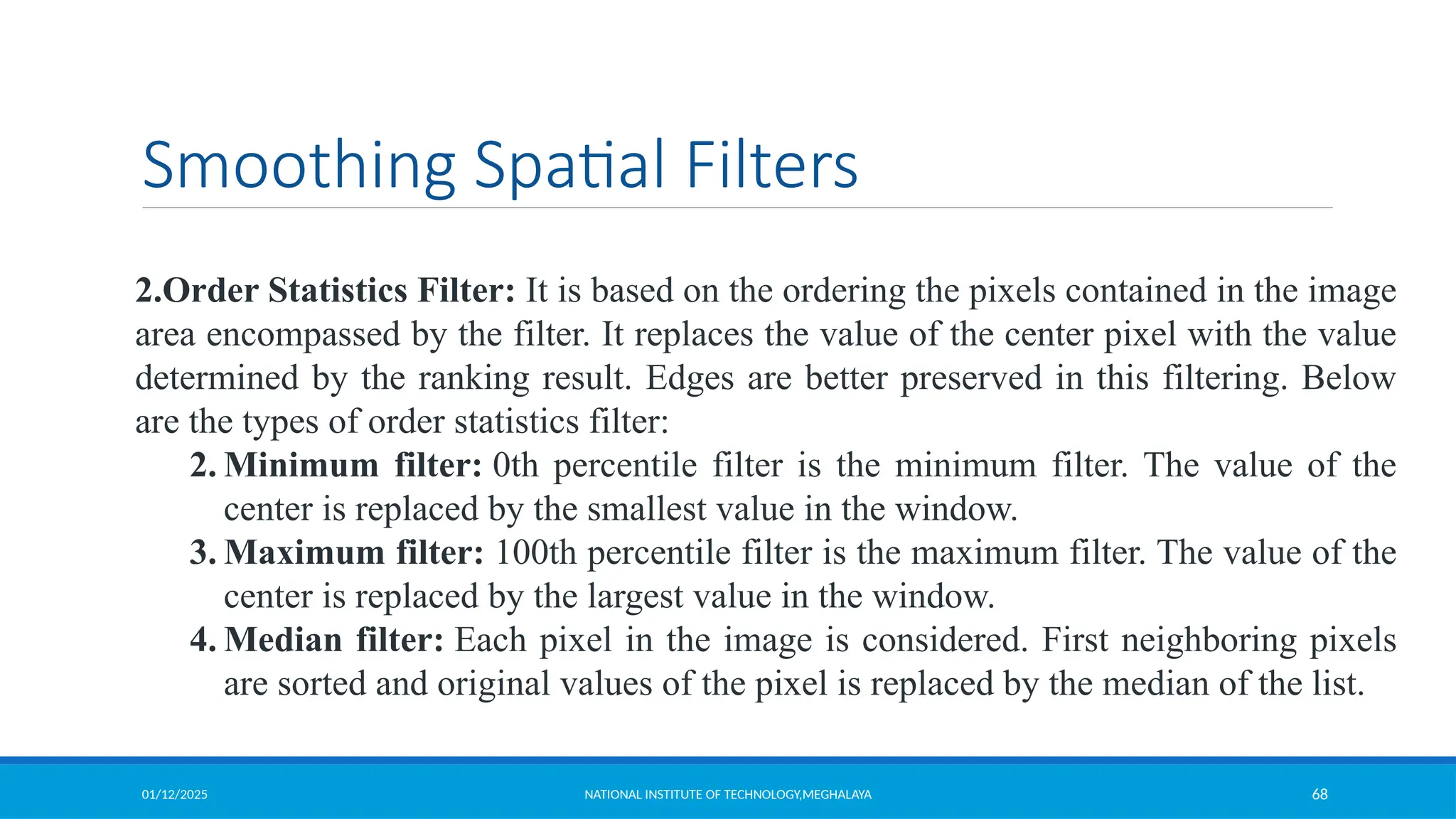
2.Order Statistics Filter: It is based on the ordering the pixels contained in the image
area encompassed by the filter. It replaces the value of the center pixel with the value
determined by the ranking result. Edges are better preserved in this filtering. Below
are the types of order statistics filter:
2. Minimum filter: 0th percentile filter is the minimum filter. The value of the
center is replaced by the smallest value in the window.
3. Maximum filter: 100th percentile filter is the maximum filter. The value of the
center is replaced by the largest value in the window.
4. Median filter: Each pixel in the image is considered. First neighboring pixels
are sorted and original values of the pixel is replaced by the median of the list.
01/12/2025 NATIONAL INSTITUTE OF TECHNOLOGY,MEGHALAYA 69
Smoothing Spatial Filters
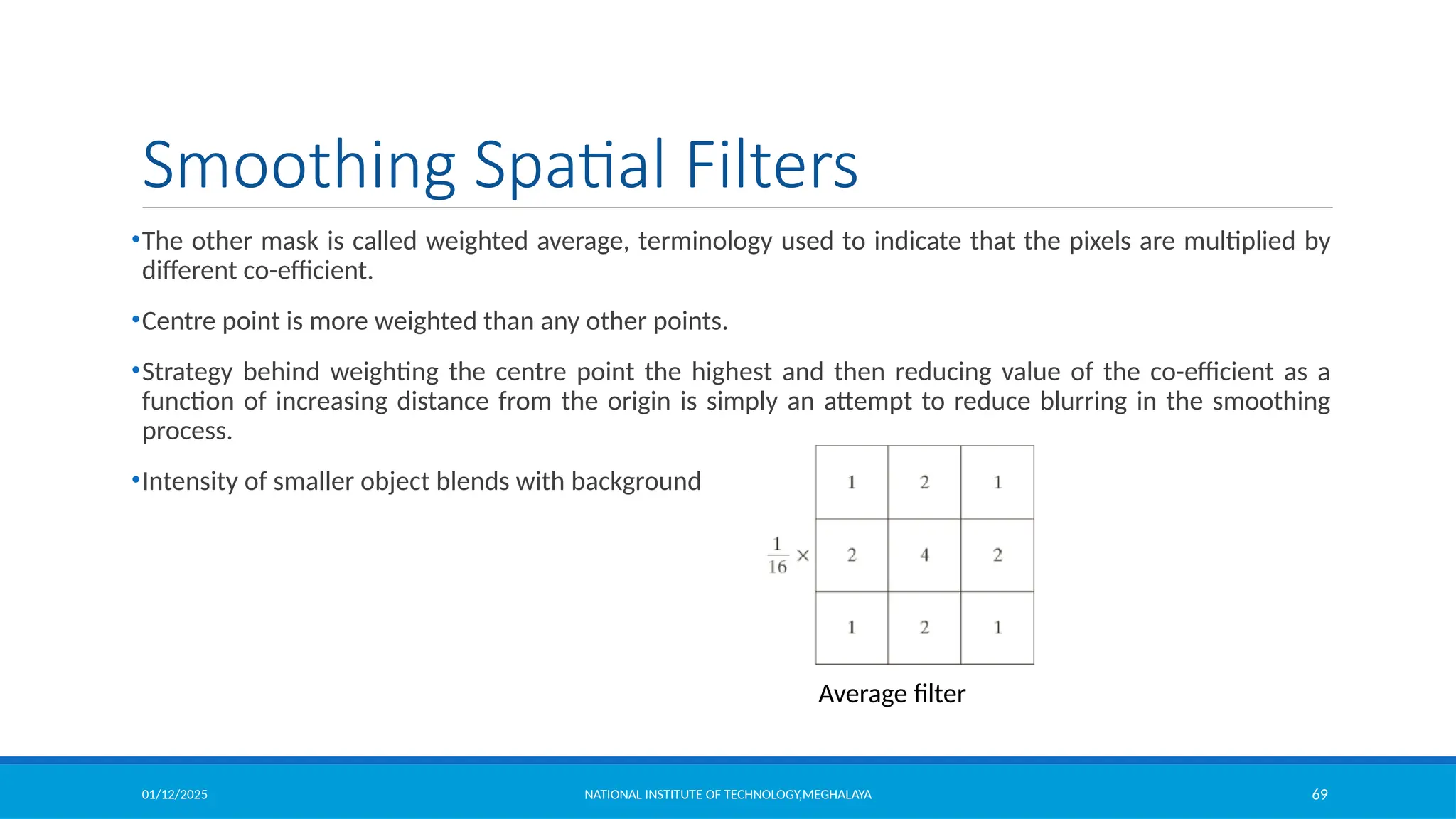
•The other mask is called weighted average, terminology used to indicate that the pixels are multiplied by
different co-efficient.
•Centre point is more weighted than any other points.
•Strategy behind weighting the centre point the highest and then reducing value of the co-efficient as a
function of increasing distance from the origin is simply an attempt to reduce blurring in the smoothing
process.
•Intensity of smaller object blends with background
Average filter
01/12/2025 NATIONAL INSTITUTE OF TECHNOLOGY,MEGHALAYA 70
Smoothing Filter Example
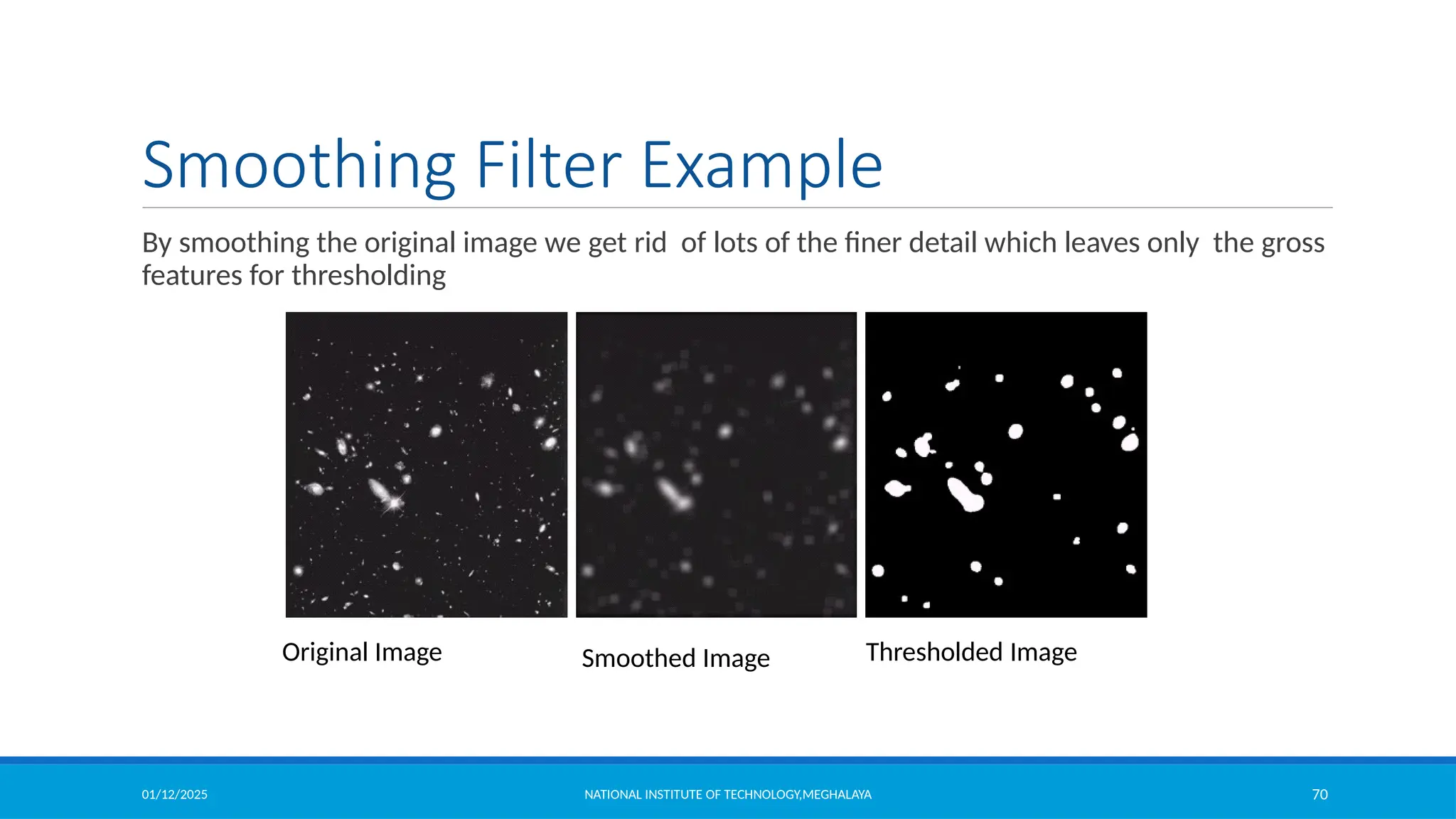
By smoothing the original image we get rid of lots of the finer detail which leaves only the gross
features for thresholding
Original Image Smoothed Image Thresholded Image
01/12/2025 NATIONAL INSTITUTE OF TECHNOLOGY,MEGHALAYA 71
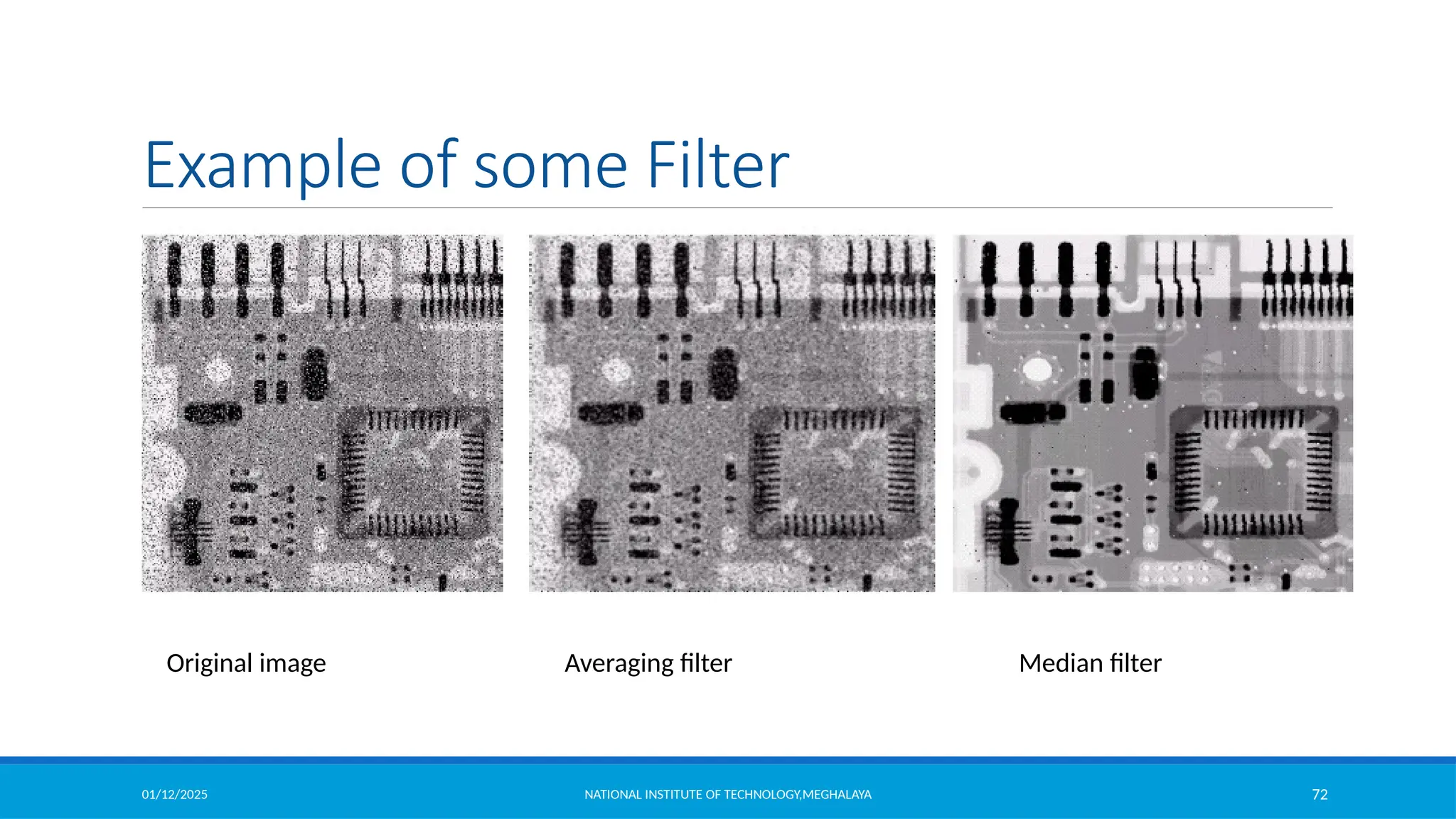
Order Statistics Filter
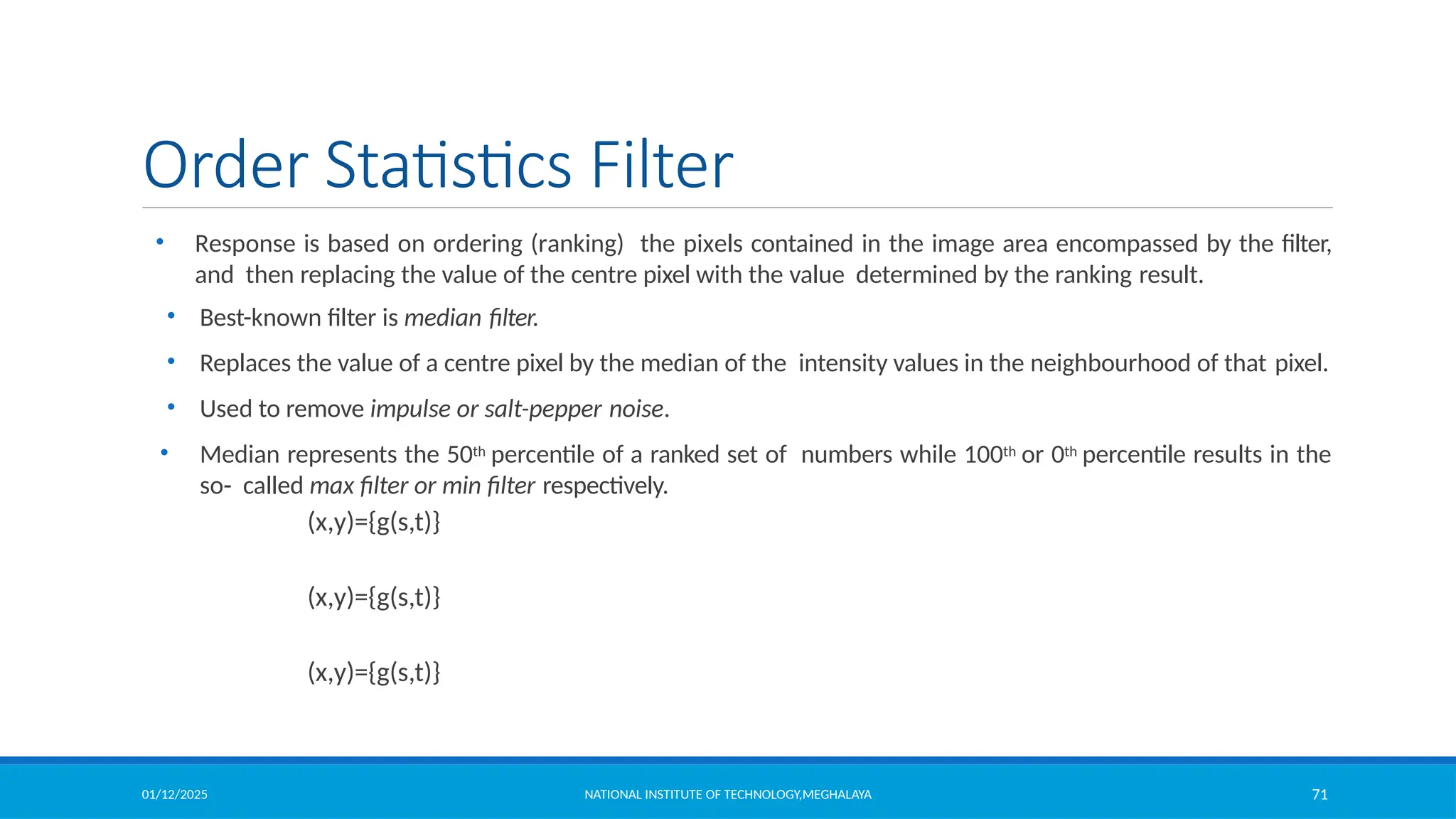
• Response is based on ordering (ranking) the pixels contained in the image area encompassed by the filter,
and then replacing the value of the centre pixel with the value determined by the ranking result.
• Best-known filter is median filter.
• Replaces the value of a centre pixel by the median of the intensity values in the neighbourhood of that pixel.
• Used to remove impulse or salt-pepper noise.
• Median represents the 50th percentile of a ranked set of numbers while 100th or 0th percentile results in the
so- called max filter or min filter respectively.
(x,y)={g(s,t)}
(x,y)={g(s,t)}
(x,y)={g(s,t)}
01/12/2025 NATIONAL INSTITUTE OF TECHNOLOGY,MEGHALAYA 72
Example of some Filter
Original image Median filter
Averaging filter
01/12/2025 NATIONAL INSTITUTE OF TECHNOLOGY,MEGHALAYA 73
Sharpening Spatial Filter
It is also known as derivative filter. The purpose of the sharpening
spatial filter is just the opposite of the smoothing spatial filter. Its main
focus in on the removal of blurring and highlight the edges. It is based
on the first and second order derivative.
First Order Derivative:
•Must be zero in flat segments.
•Must be non zero at the onset of a grey level step.
•Must be non zero along ramps.
First order derivative in 1-D is given by:
f' = f(x+1) - f(x)
01/12/2025 NATIONAL INSTITUTE OF TECHNOLOGY,MEGHALAYA 74
Sharpening Spatial Filters
Previously we have looked at smoothing filters which remove fine detail
Objective of sharpening filter is high-light fine details in an image or to enhance details
that have been blurred.
Sharpening spatial filters seek to highlight fine detail
– Remove blurring from images
– Highlight edges
Sharpening filters are based on spatial differentiation
• image differentiation enhances edges and other discontinuities (such as
noise)and
• deemphasizes areas with slowly varying intensities.
01/12/2025 NATIONAL INSTITUTE OF TECHNOLOGY,MEGHALAYA 75
Sharpening Spatial Filters
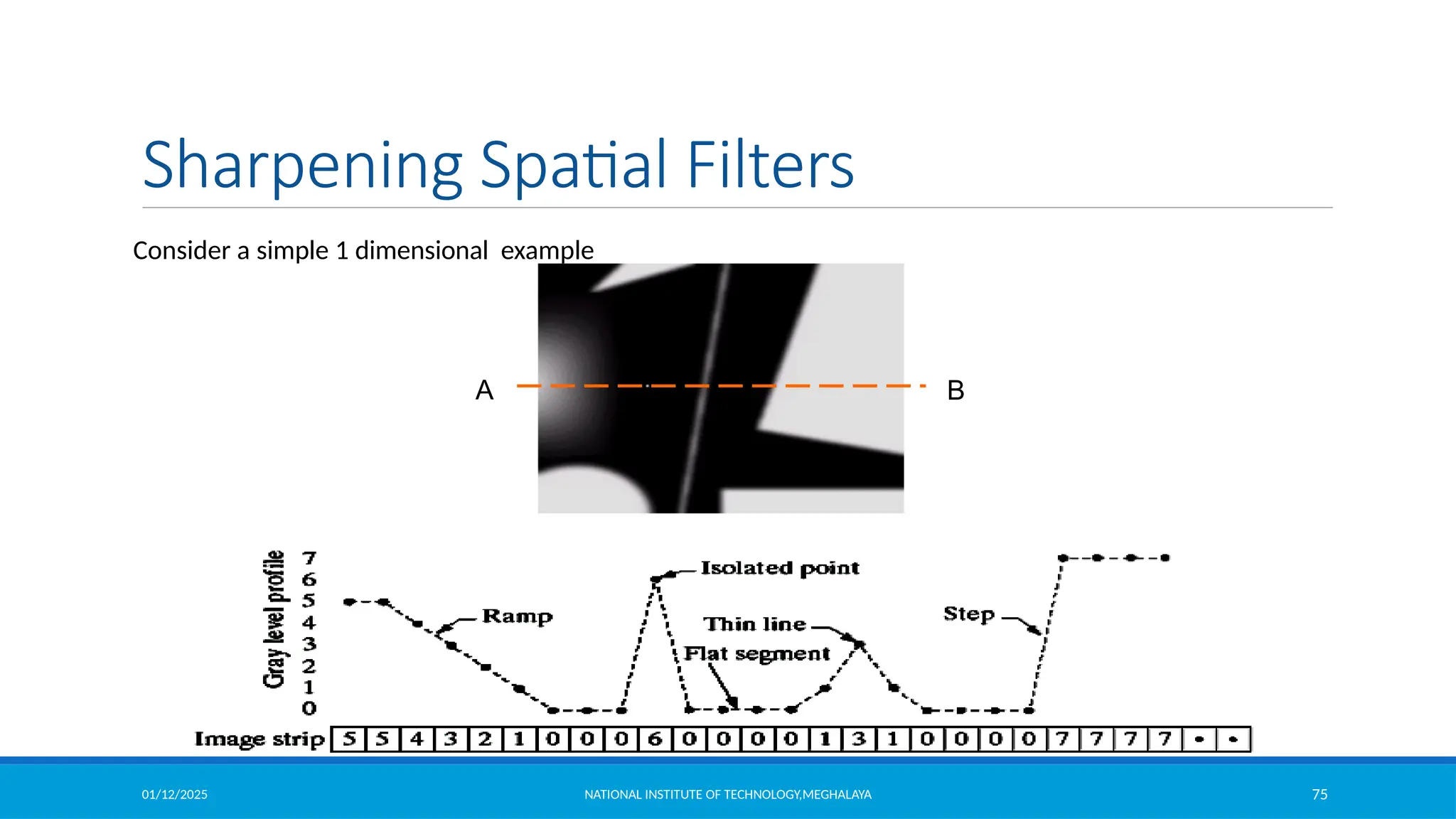
A B
Consider a simple 1 dimensional example
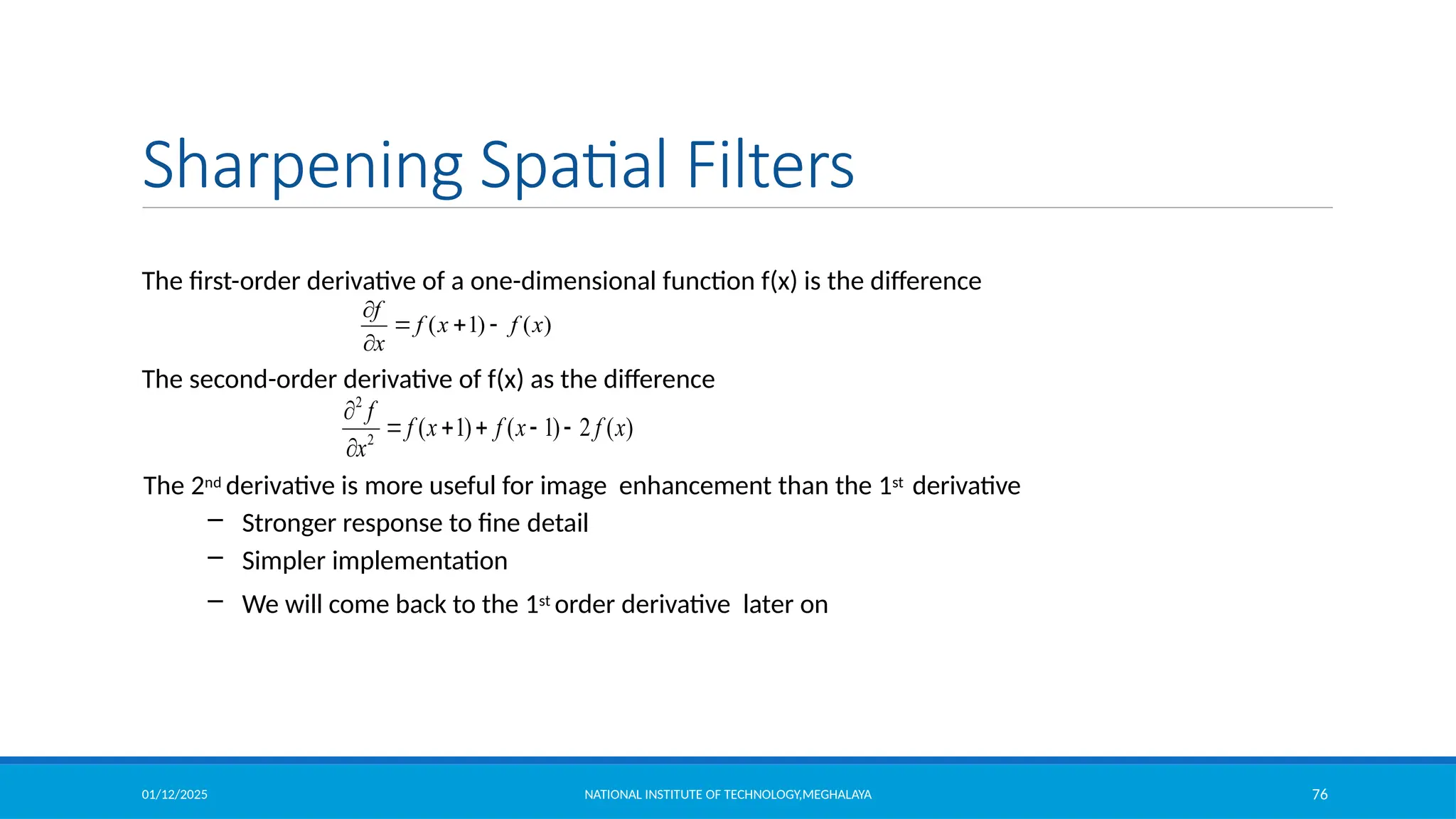
01/12/2025 NATIONAL INSTITUTE OF TECHNOLOGY,MEGHALAYA 76
Sharpening Spatial Filters
The first-order derivative of a one-dimensional function f(x) is the difference
The second-order derivative of f(x) as the difference
The 2nd derivative is more useful for image enhancement than the 1st derivative
– Stronger response to fine detail
– Simpler implementation
– We will come back to the 1st order derivative later on
2
2
( 1) ( 1) 2 ( )
f
f x f x f x
x

    

( 1) ( )
f
f x f x
x

  

01/12/2025 NATIONAL INSTITUTE OF TECHNOLOGY,MEGHALAYA 77
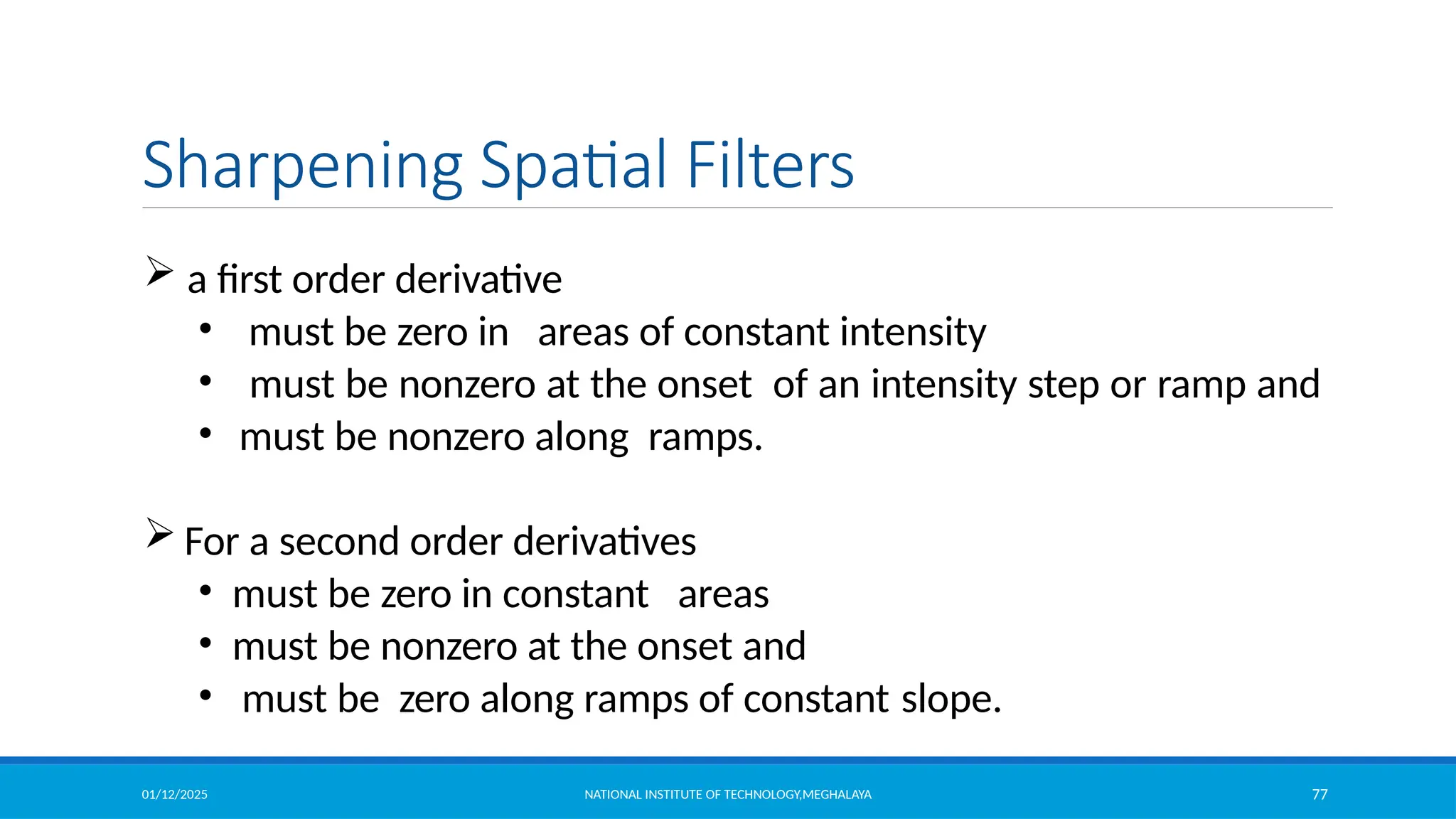
Sharpening Spatial Filters
 a first order derivative
• must be zero in areas of constant intensity
• must be nonzero at the onset of an intensity step or ramp and
• must be nonzero along ramps.
 For a second order derivatives
• must be zero in constant areas
• must be nonzero at the onset and
• must be zero along ramps of constant slope.
01/12/2025 NATIONAL INSTITUTE OF TECHNOLOGY,MEGHALAYA 78
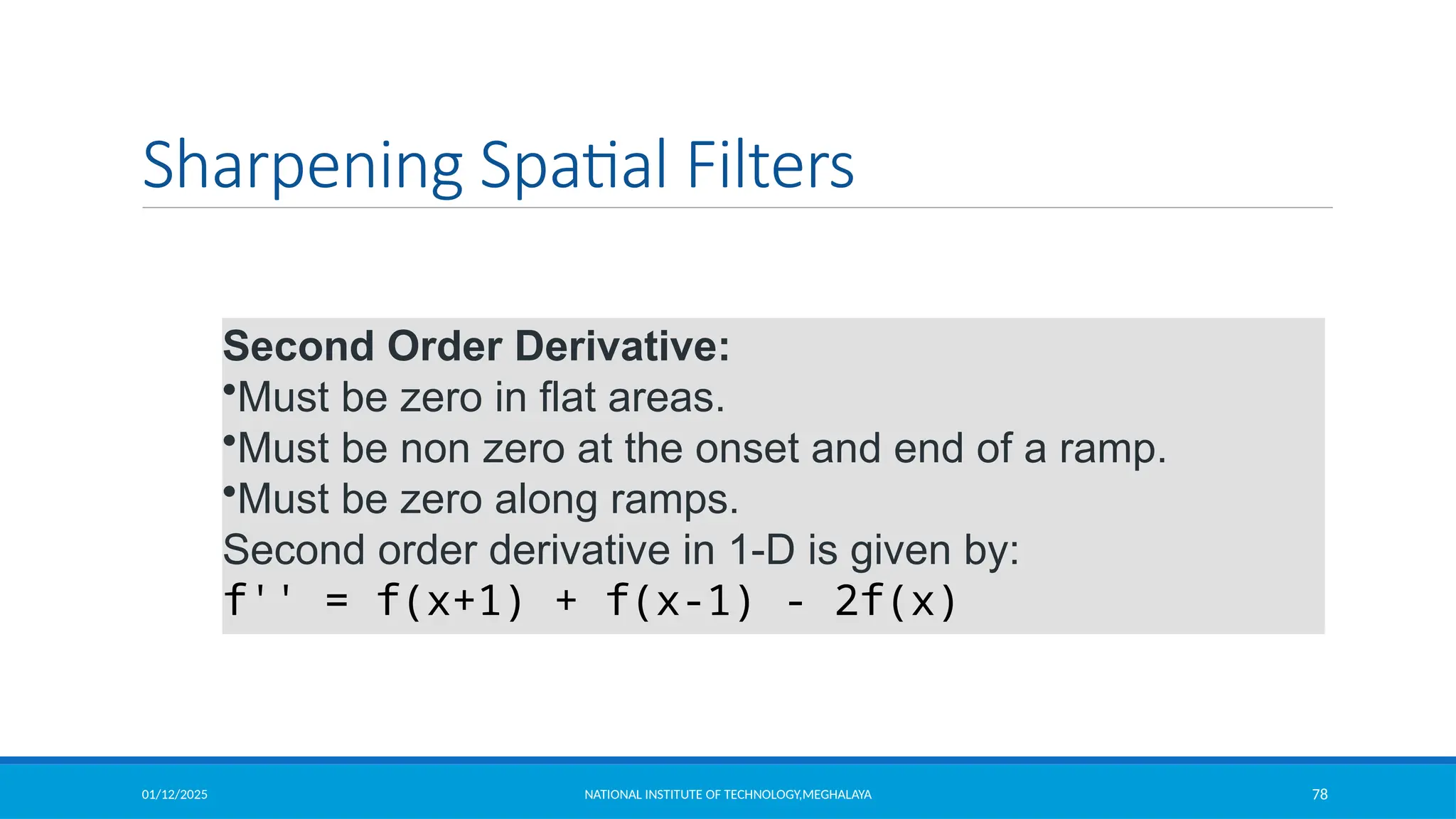
Sharpening Spatial Filters
Second Order Derivative:
•Must be zero in flat areas.
•Must be non zero at the onset and end of a ramp.
•Must be zero along ramps.
Second order derivative in 1-D is given by:
f'' = f(x+1) + f(x-1) - 2f(x)
01/12/2025 NATIONAL INSTITUTE OF TECHNOLOGY,MEGHALAYA 79
Sharpening Spatial Filters
2
2
( , 1) ( , 1) 2 ( , )
f
f x y f x y f x y
y

    

The first sharpening filter we will discuss is the Laplacian
– Isotropic
– One of the simplest sharpening filters
– We will look at a digital implementation
The Laplacian is defined as follows
where.,
and
2 2
2
2 2
f f
f
x y
 
  
 
2
2
( 1, ) ( 1, ) 2 ( , )
f
f x y f x y f x y
x

    

2
f  [ f (x 1, y)  f (x 1, y) f (x, y 1)  f (x, y 1)] 4 f (x, y)
01/12/2025 NATIONAL INSTITUTE OF TECHNOLOGY,MEGHALAYA 80
Laplacian Operator
We can easily build a filter based on 2
f. There are lots of slightly different versions of the
Laplacian that can be used:
2
f  [ f (x 1, y)  f (x 1,y)
 f (x, y 1)  f (x,1)]
 4 f (x, y)
1 1 1
1 -8 1
1 1 1
We can easily build a filter based on 2
f. There are lots of slightly different versions of the
Laplacian that can be used:
-1 -1 -1
-1 8 -1
-1 -1 -1
0 1 0
1 -4 1
0 1 0
0 1 0
1 -4 1
0 1 0
2
f [ f (x 1, y)  f (x 1,y)  f (x, y
1)  f (x,y1)+ f (x 1, y+1)  f (x +1,y-
1)  f (x+1, y 1)  f (x+1,y1] 8 f (x, y
01/12/2025 NATIONAL INSTITUTE OF TECHNOLOGY,MEGHALAYA 81
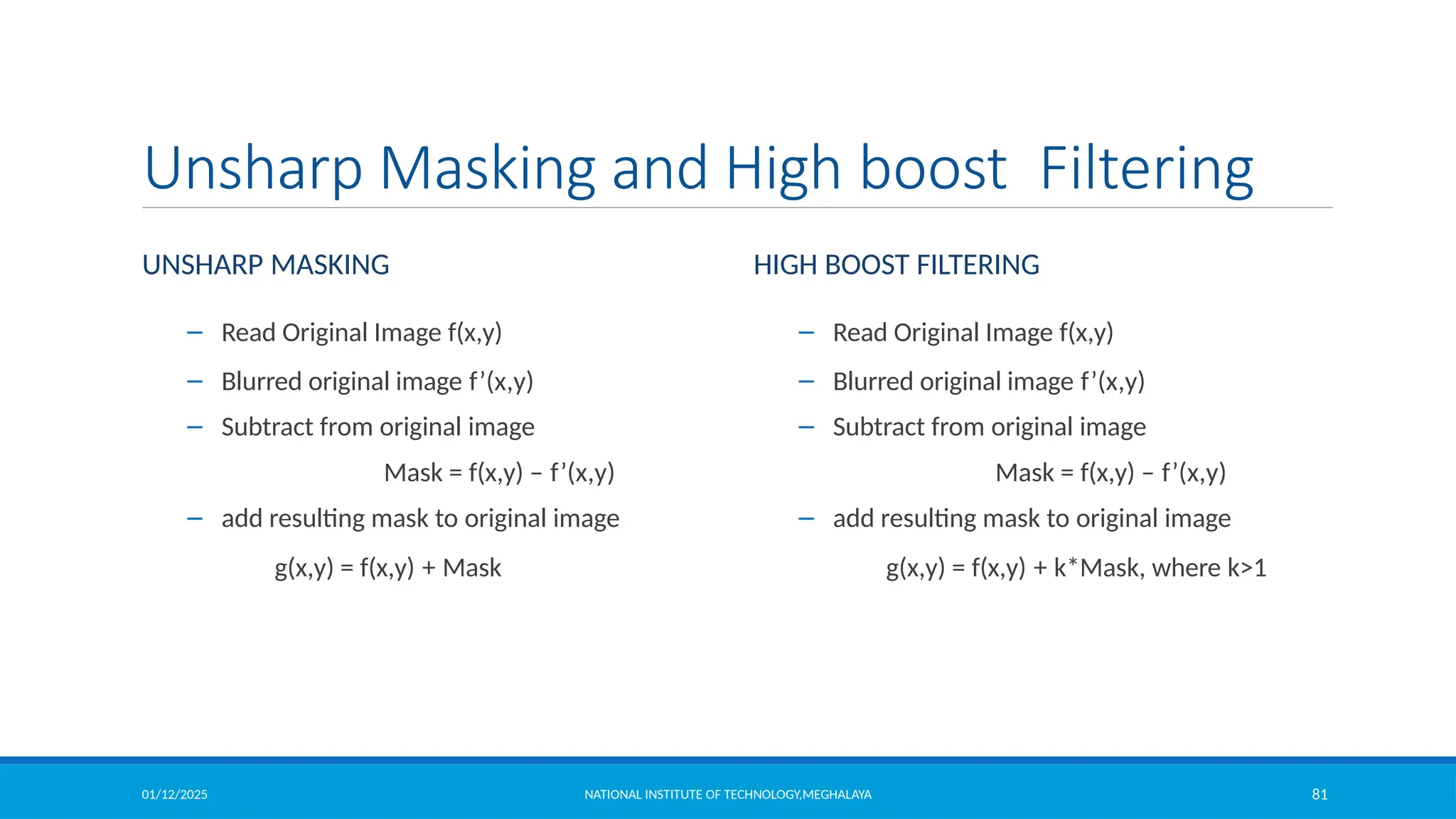
Unsharp Masking and High boost Filtering
UNSHARP MASKING
– Read Original Image f(x,y)
– Blurred original image f’(x,y)
– Subtract from original image
Mask = f(x,y) – f’(x,y)
– add resulting mask to original image
g(x,y) = f(x,y) + Mask
– Read Original Image f(x,y)
– Blurred original image f’(x,y)
– Subtract from original image
Mask = f(x,y) – f’(x,y)
– add resulting mask to original image
g(x,y) = f(x,y) + k*Mask, where k>1
HIGH BOOST FILTERING
01/12/2025 NATIONAL INSTITUTE OF TECHNOLOGY,MEGHALAYA 82
Unsharp Masking and High boost Filtering
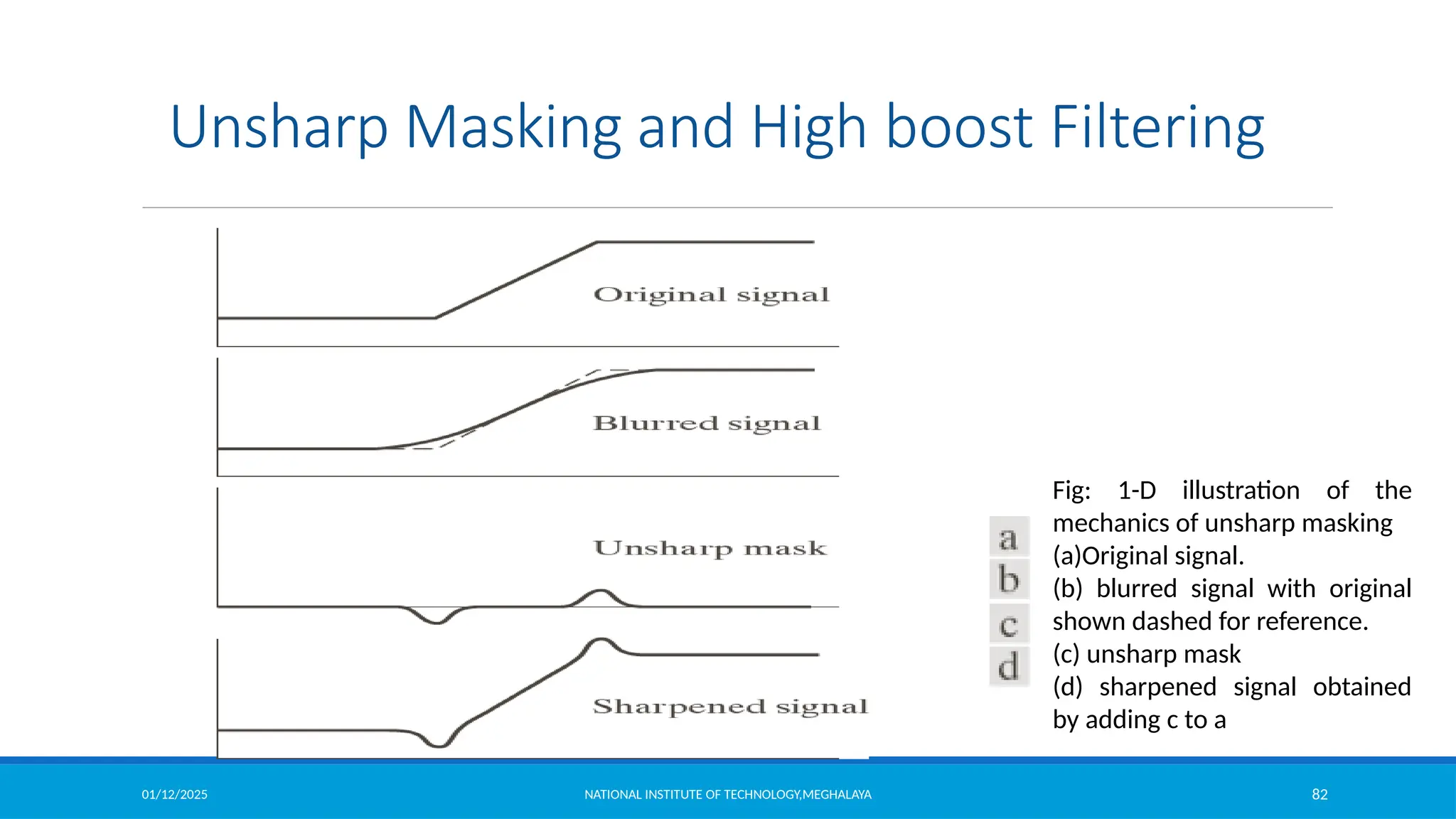
Fig: 1-D illustration of the
mechanics of unsharp masking
(a)Original signal.
(b) blurred signal with original
shown dashed for reference.
(c) unsharp mask
(d) sharpened signal obtained
by adding c to a
01/12/2025 NATIONAL INSTITUTE OF TECHNOLOGY,MEGHALAYA 83
1st Derivative Filtering
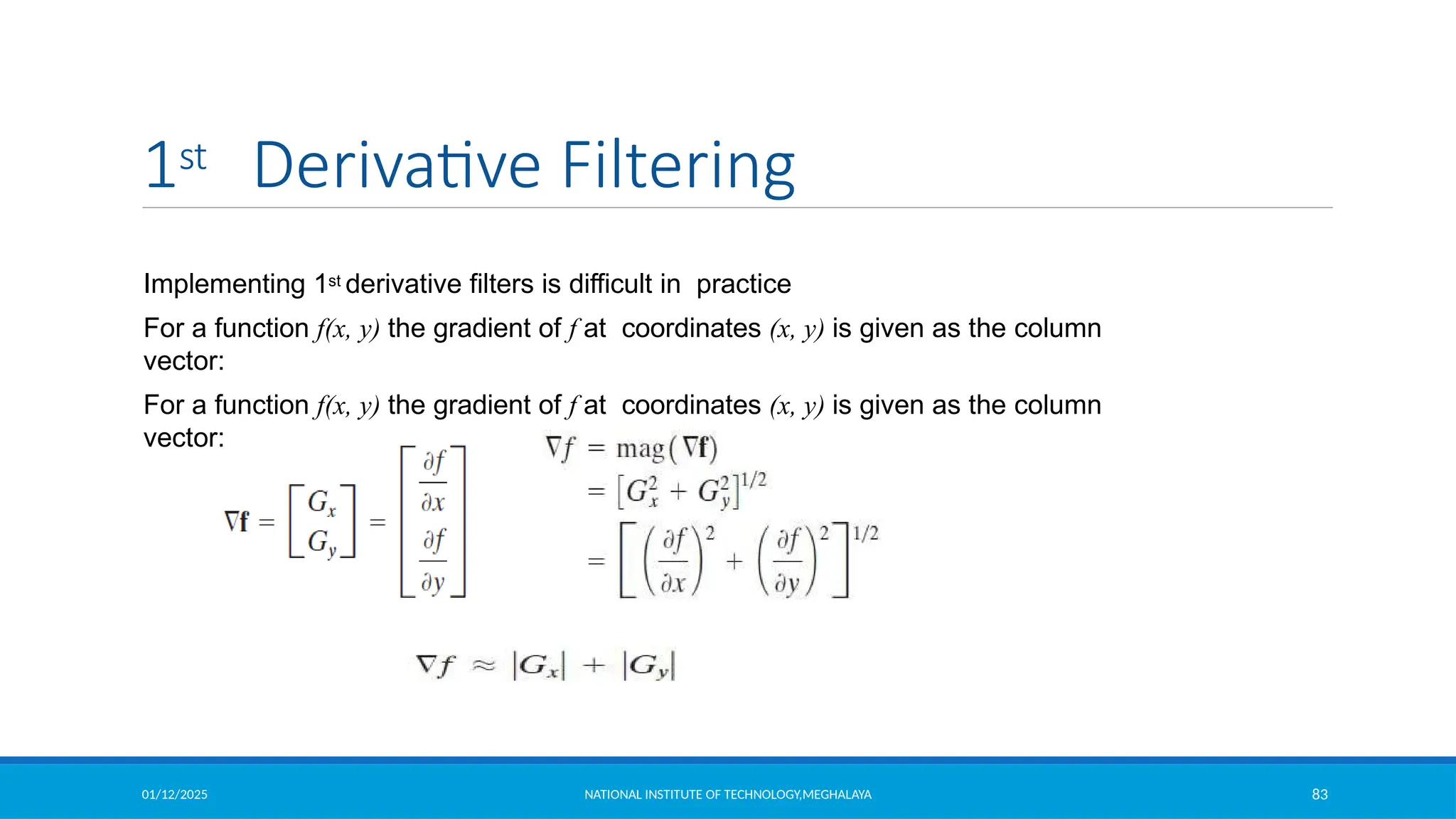
Implementing 1st derivative filters is difficult in practice
For a function f(x, y) the gradient of f at coordinates (x, y) is given as the column
vector:
For a function f(x, y) the gradient of f at coordinates (x, y) is given as the column
vector:
01/12/2025 NATIONAL INSTITUTE OF TECHNOLOGY,MEGHALAYA 84
Sobel Operators
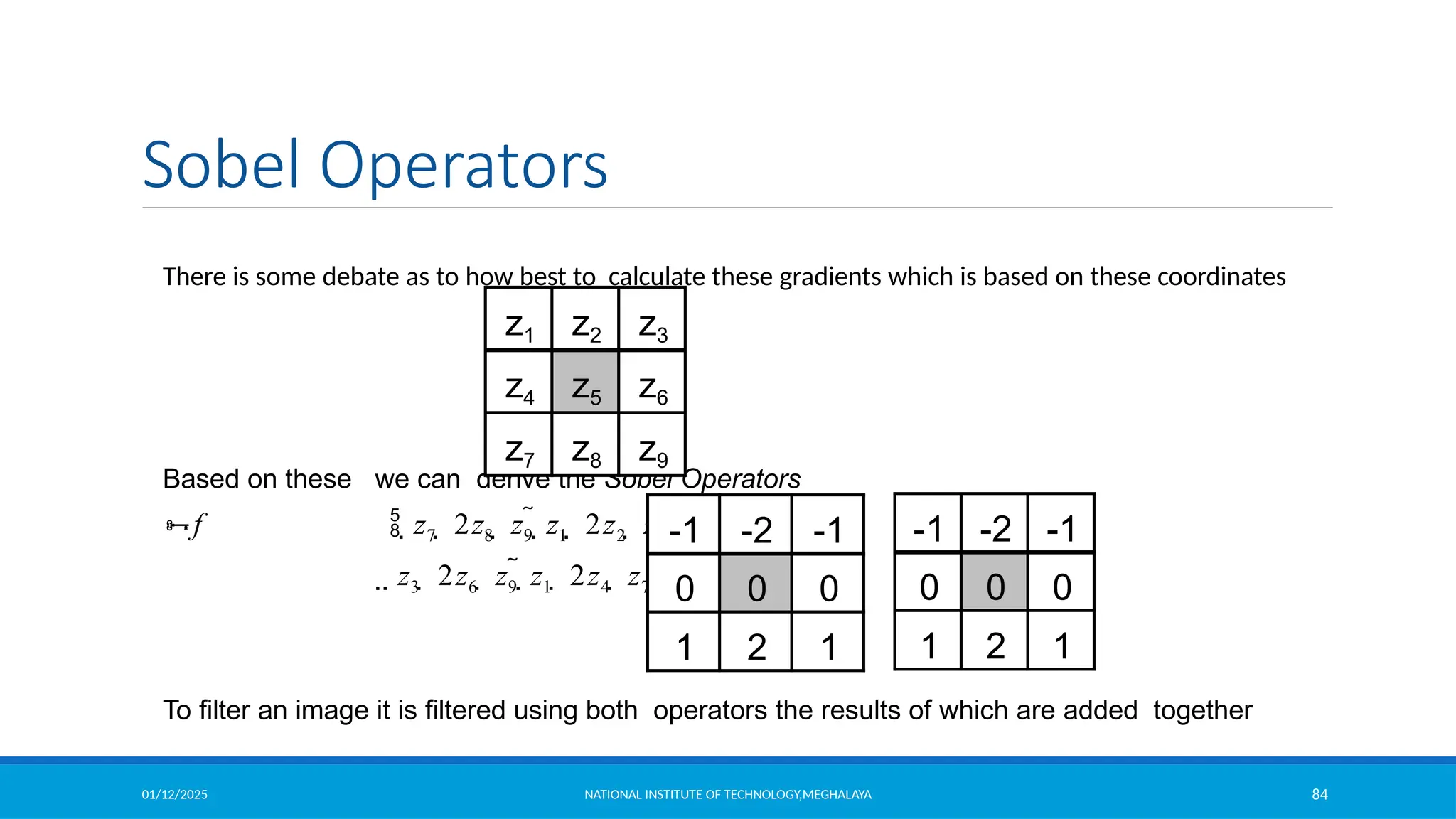
There is some debate as to how best to calculate these gradients which is based on these coordinates
Based on these we can derive the Sobel Operators
f  z7  2z8  z9  z1  2z2  z3 
 z3  2z6  z9  z1  2z4  z7 
To filter an image it is filtered using both operators the results of which are added together
z1 z2 z3
z4 z5 z6
z7 z8 z9
-1 -2 -1
0 0 0
1 2 1
-1 -2 -1
0 0 0
1 2 1
01/12/2025 NATIONAL INSTITUTE OF TECHNOLOGY,MEGHALAYA 85
Example of Sobel Operators
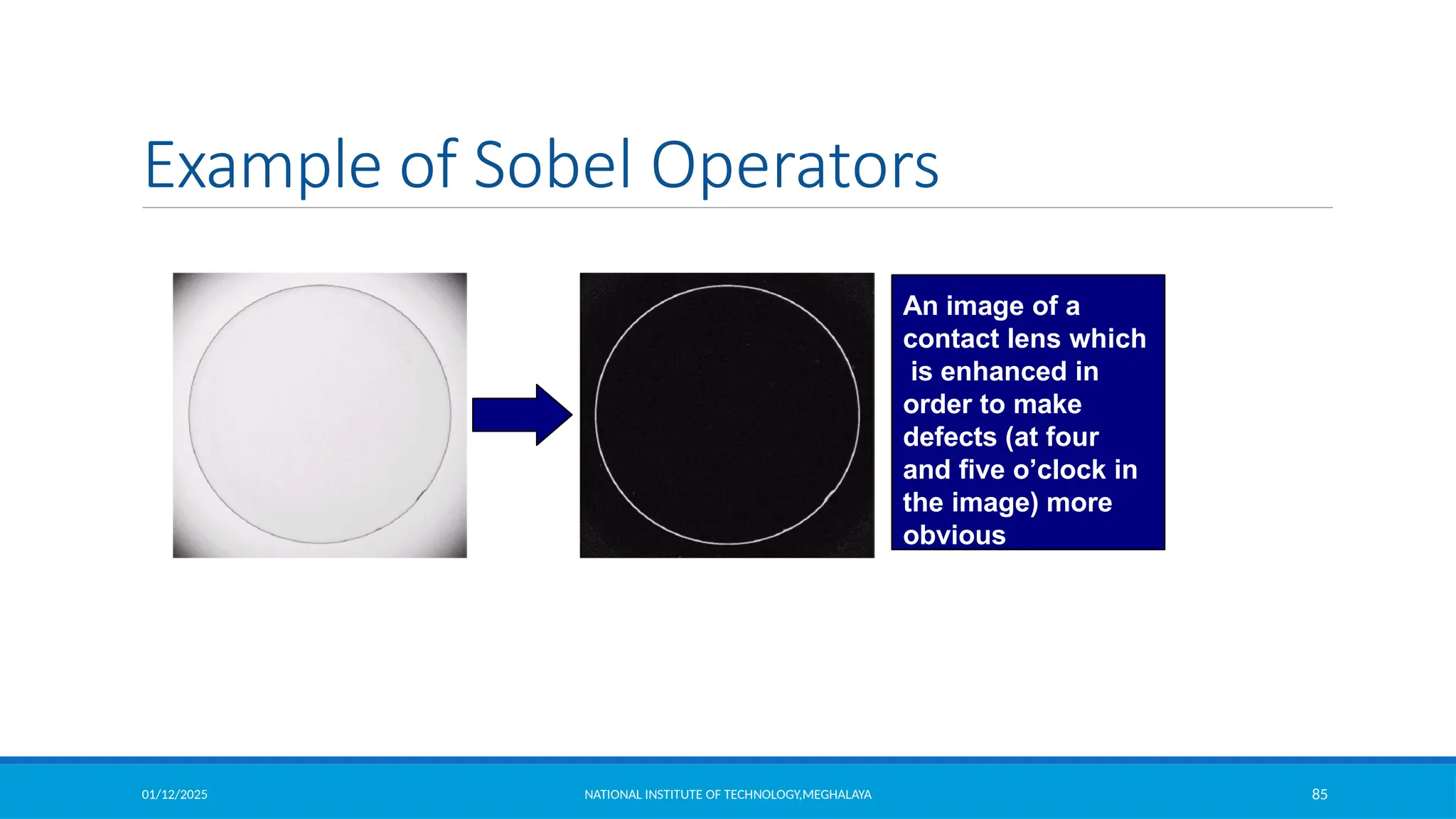
An image of a
contact lens which
is enhanced in
order to make
defects (at four
and five o’clock in
the image) more
obvious
01/12/2025 NATIONAL INSTITUTE OF TECHNOLOGY,MEGHALAYA 86
Comparison of 1st & 2nd Derivatives
 1st order derivatives generally produce thicker edges
 2nd order derivatives have a stronger response to fine detail e.g. thin
lines
 1st order derivatives have stronger response to grey level step
 2nd order derivatives produce a double response at step changes in grey
level
01/12/2025 NATIONAL INSTITUTE OF TECHNOLOGY,MEGHALAYA 87
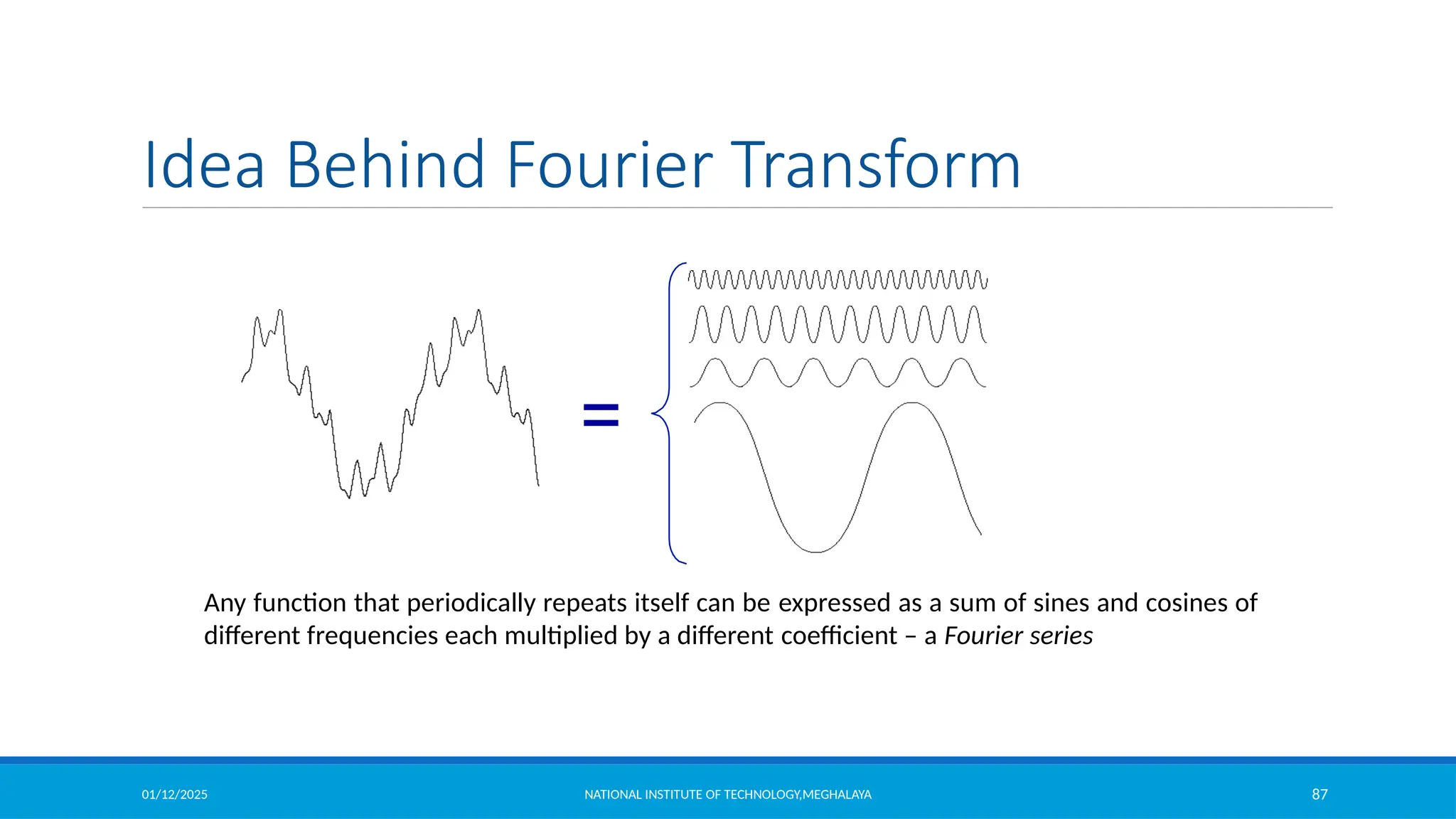
Idea Behind Fourier Transform
=
Any function that periodically repeats itself can be expressed as a sum of sines and cosines of
different frequencies each multiplied by a different coefficient – a Fourier series
01/12/2025 NATIONAL INSTITUTE OF TECHNOLOGY,MEGHALAYA 88
The Discrete Fourier Transform (DFT)
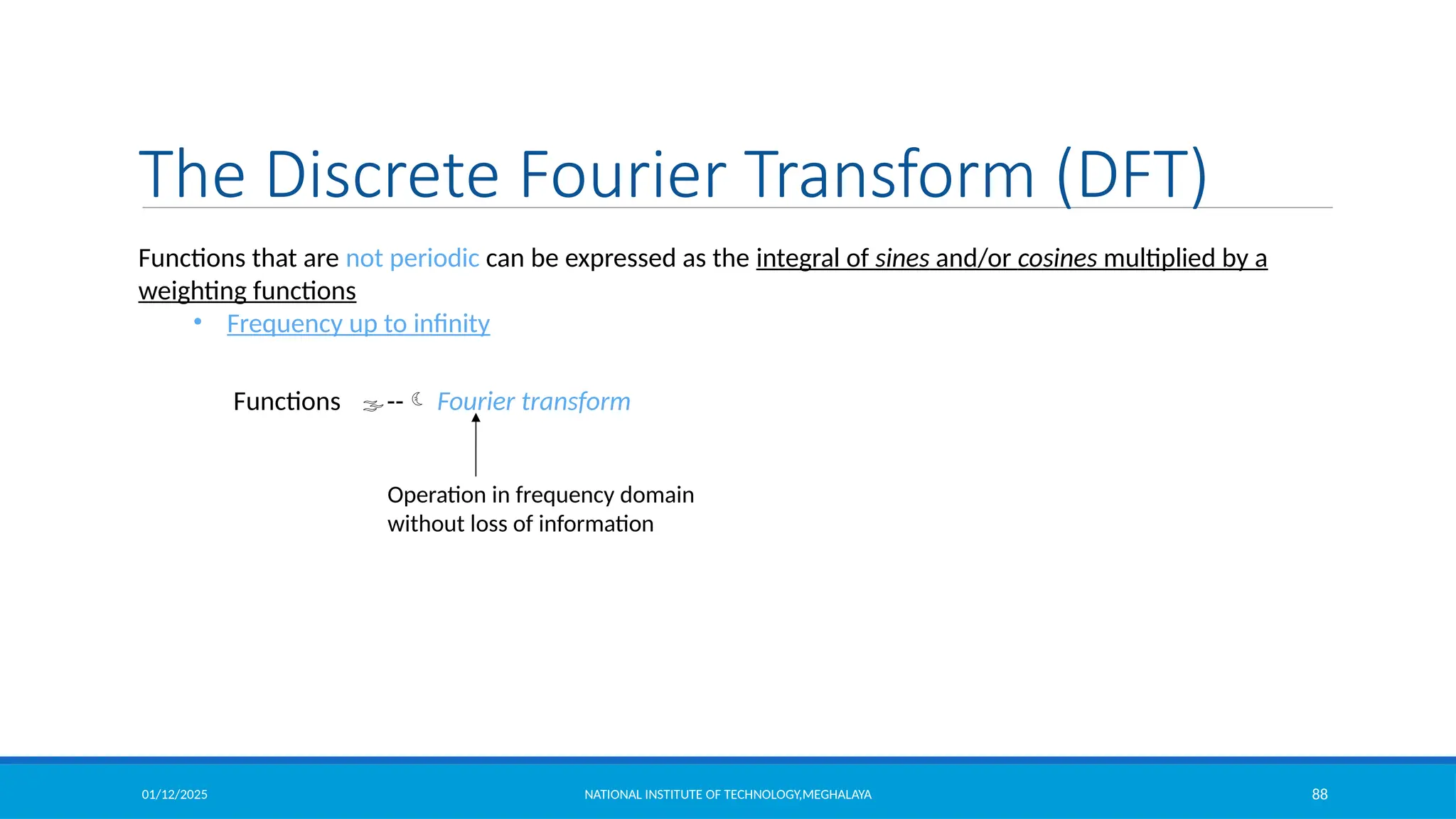
Functions that are not periodic can be expressed as the integral of sines and/or cosines multiplied by a
weighting functions
• Frequency up to infinity
Functions -- Fourier transform
Operation in frequency domain
without loss of information
01/12/2025 NATIONAL INSTITUTE OF TECHNOLOGY,MEGHALAYA 89
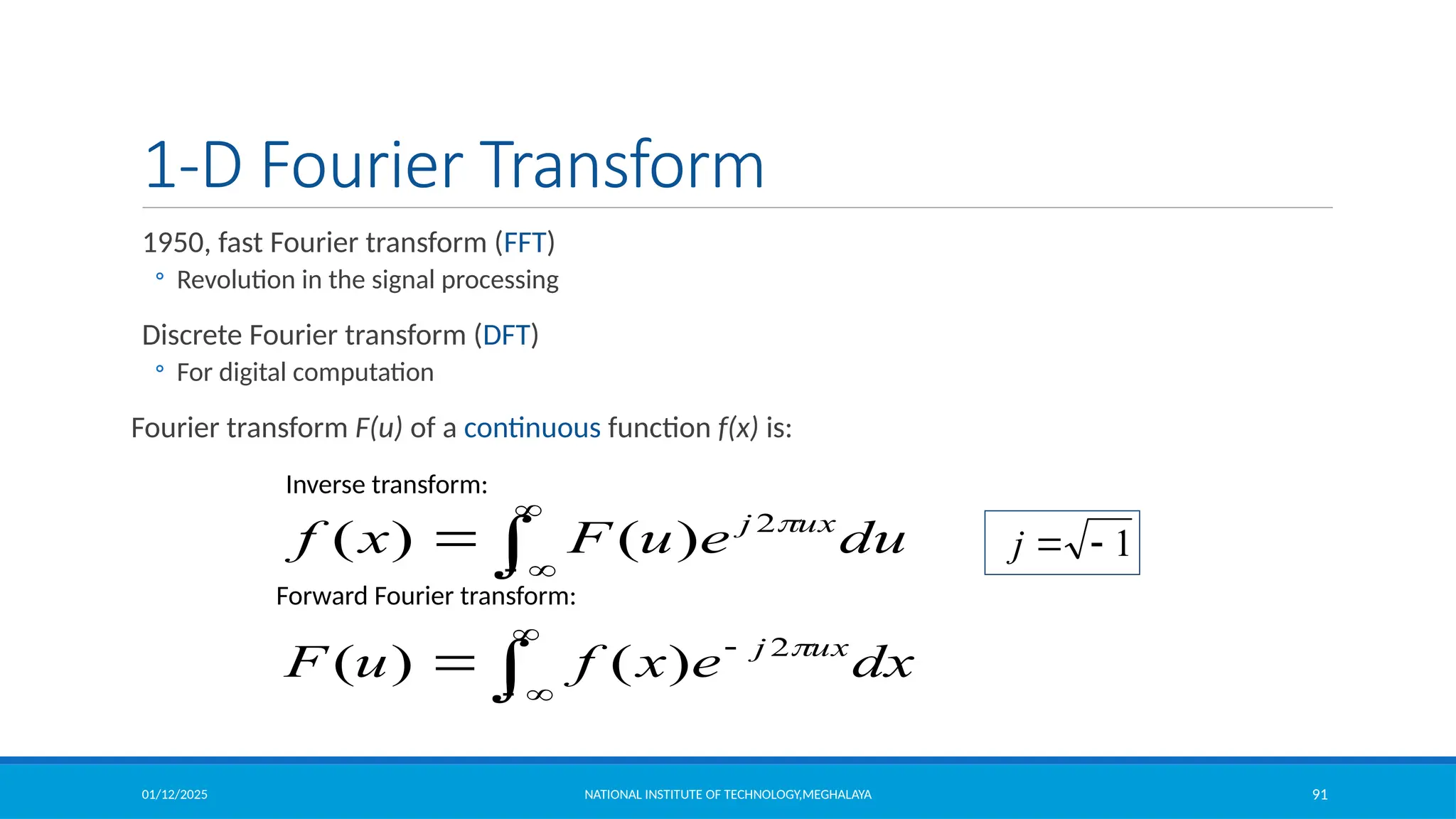
1-D Fourier Transform
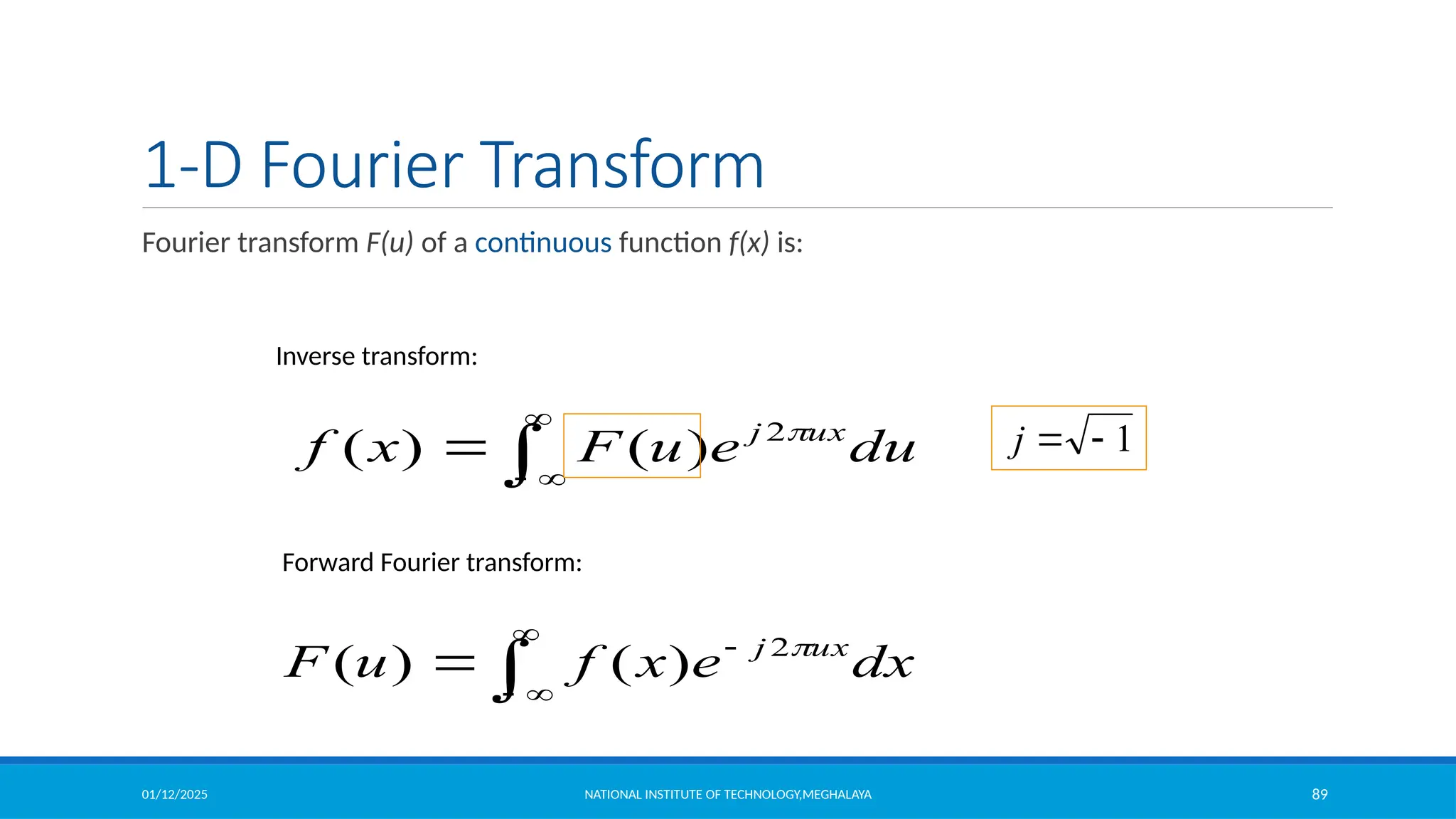
Fourier transform F(u) of a continuous function f(x) is:





 dx
e
x
f
u
F ux
j 
2
)
(
)
(




 du
e
u
F
x
f ux
j 
2
)
(
)
(
Inverse transform:
1


j
Forward Fourier transform:
01/12/2025 NATIONAL INSTITUTE OF TECHNOLOGY,MEGHALAYA 90
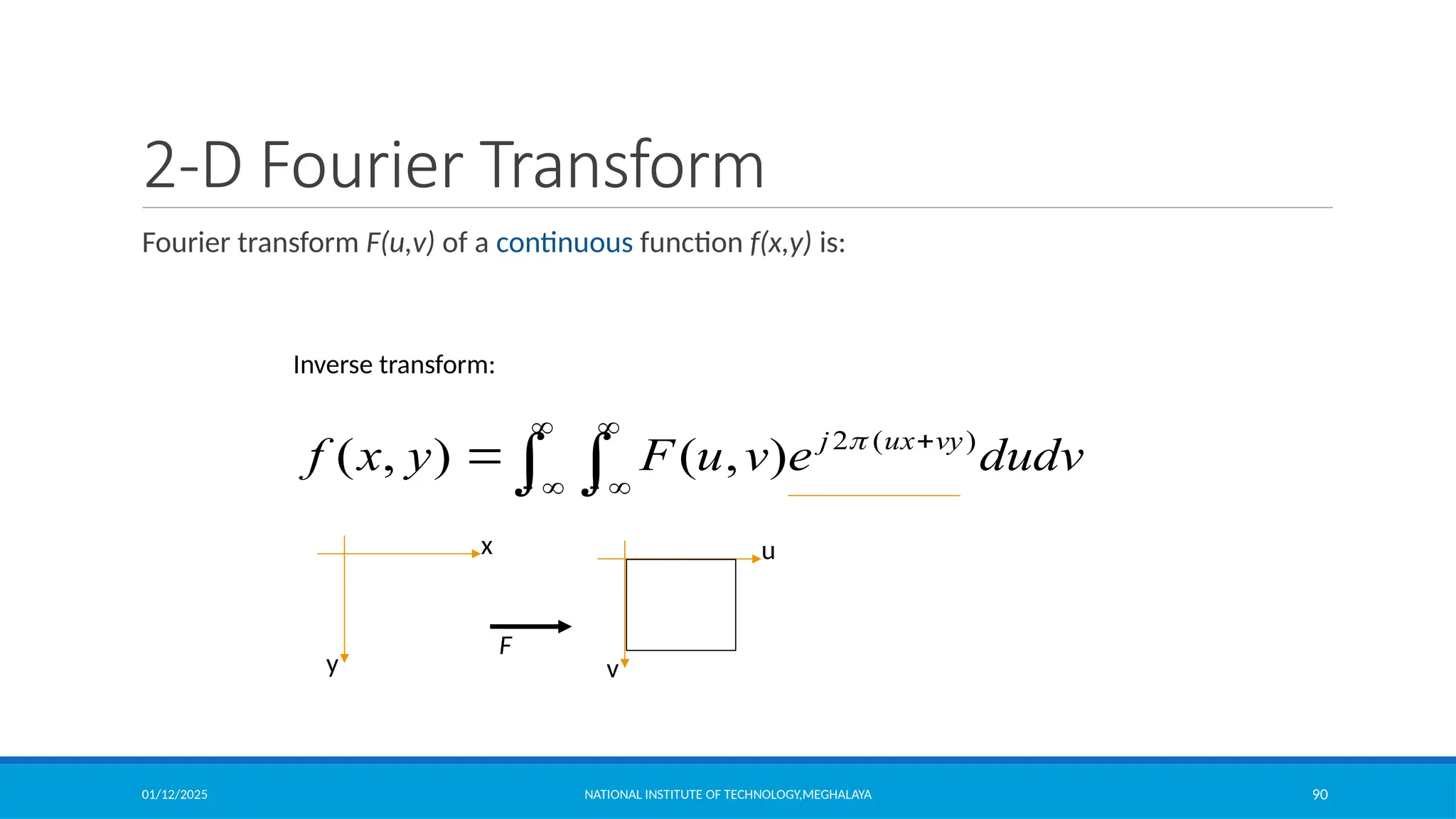
2-D Fourier Transform
Fourier transform F(u,v) of a continuous function f(x,y) is:
 







 dudv
e
v
u
F
y
x
f vy
ux
j )
(
2
)
,
(
)
,
( 
Inverse transform:
x
y
u
v
F
01/12/2025 NATIONAL INSTITUTE OF TECHNOLOGY,MEGHALAYA 91
1-D Fourier Transform
1950, fast Fourier transform (FFT)
◦ Revolution in the signal processing
Discrete Fourier transform (DFT)
◦ For digital computation
Fourier transform F(u) of a continuous function f(x) is:





 dx
e
x
f
u
F ux
j 
2
)
(
)
(




 du
e
u
F
x
f ux
j 
2
)
(
)
(
Inverse transform:
1


j
Forward Fourier transform:
01/12/2025 NATIONAL INSTITUTE OF TECHNOLOGY,MEGHALAYA 92
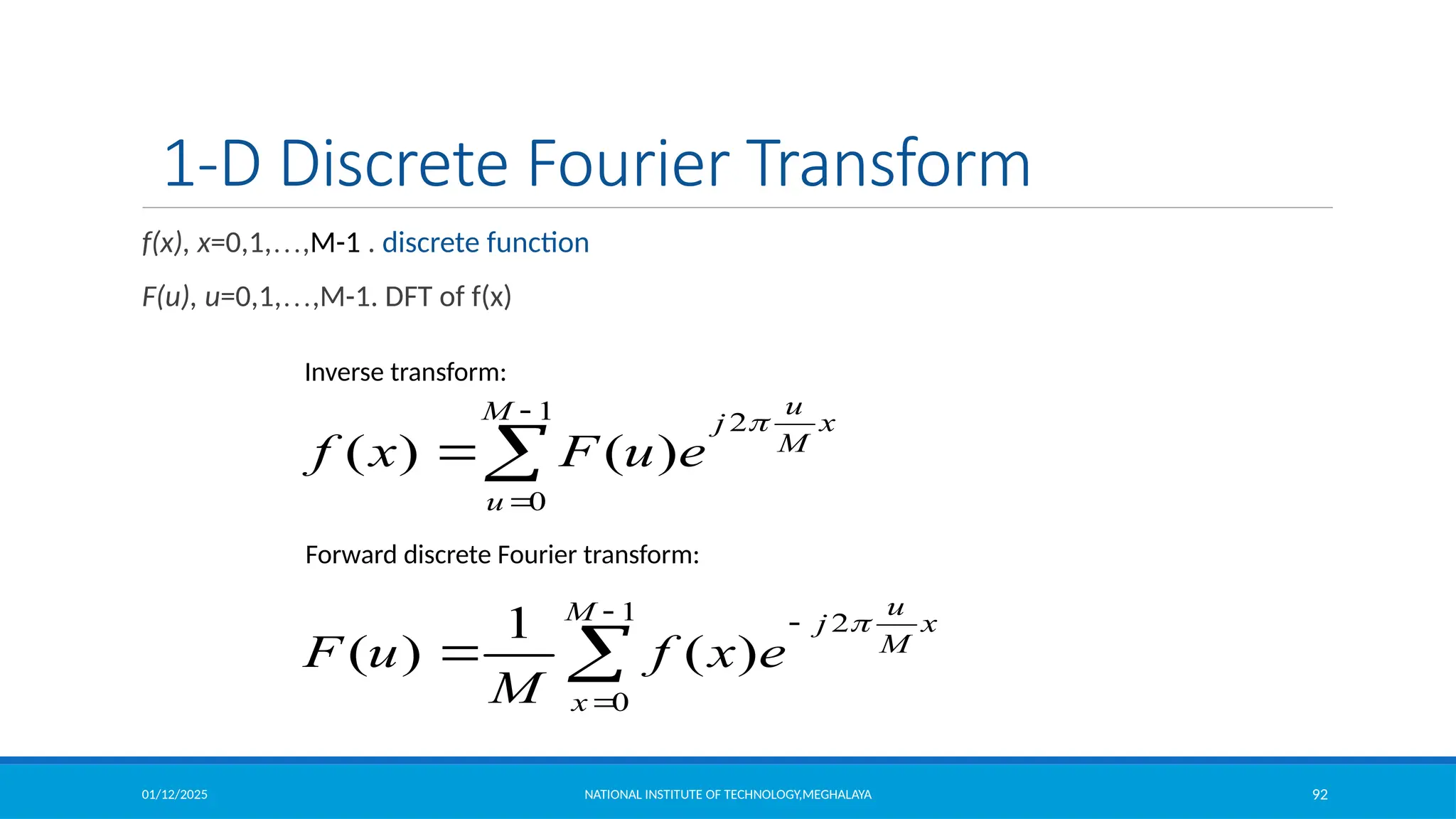
1-D Discrete Fourier Transform
f(x), x=0,1,…,M-1 . discrete function
F(u), u=0,1,…,M-1. DFT of f(x)





1
0
2
)
(
1
)
(
M
x
x
M
u
j
e
x
f
M
u
F





1
0
2
)
(
)
(
M
u
x
M
u
j
e
u
F
x
f

Inverse transform:
Forward discrete Fourier transform:
01/12/2025 NATIONAL INSTITUTE OF TECHNOLOGY,MEGHALAYA 93
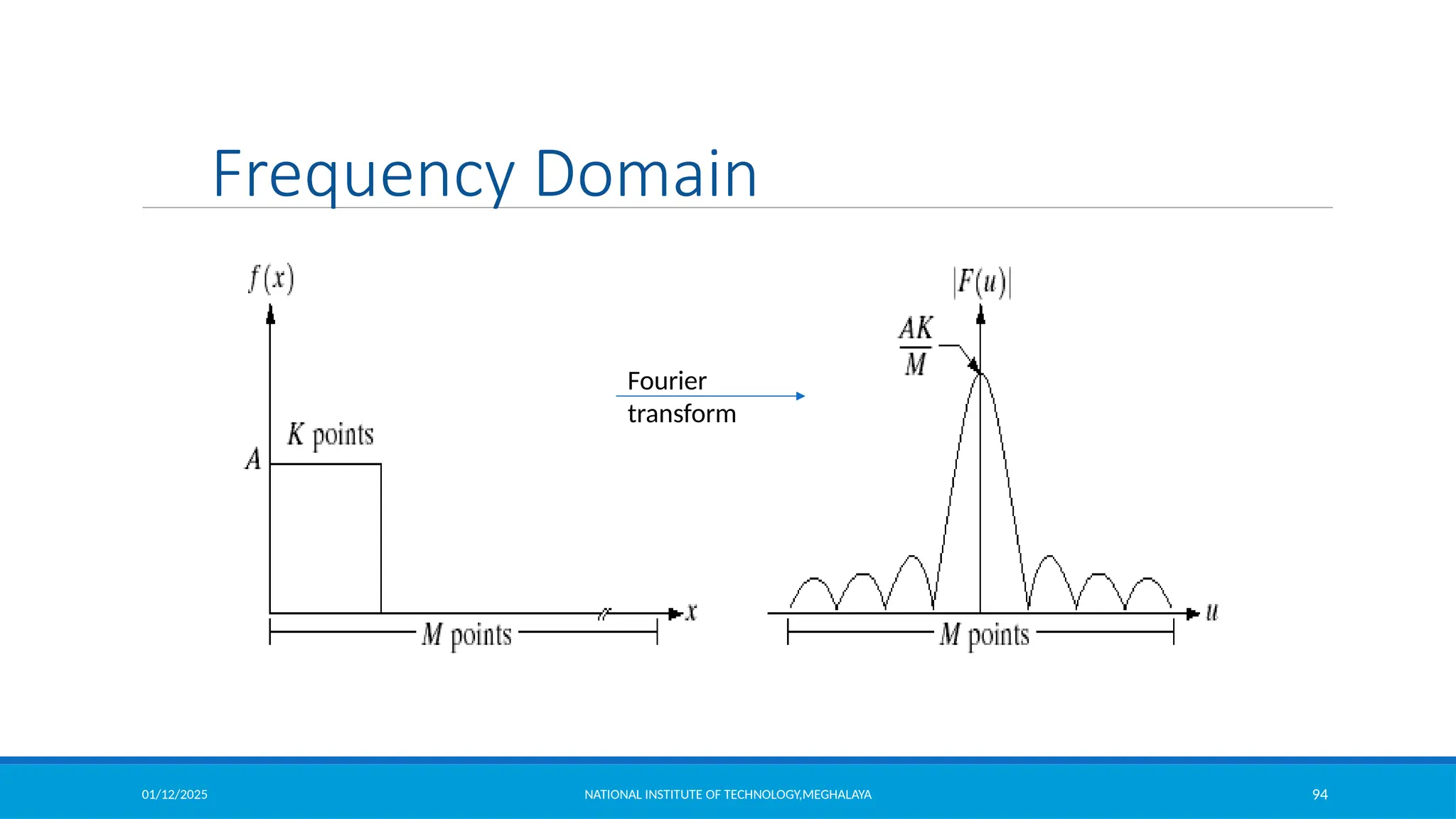
Frequency Domain
frequency domain



sin
cos j
e j

 
j
1

cos

sin
]
2
sin
2
)[cos
(
1
)
(
1
0
x
M
u
j
x
M
u
x
f
M
u
F
M
x







Euler’s formula:
frequency
u
F(u)
for x = 0, 1, 2…M-1 and y = 0, 1, 2…N-1
01/12/2025 NATIONAL INSTITUTE OF TECHNOLOGY,MEGHALAYA 94
Fourier
transform
Frequency Domain
01/12/2025 NATIONAL INSTITUTE OF TECHNOLOGY,MEGHALAYA 95
Complex Quantities to Real Quantities
Useful representation
2
/
1
2
2
)]
,
(
)
,
(
[
)
,
( v
u
I
v
u
R
v
u
F 

]
)
,
(
)
,
(
[
tan
)
,
( 1
v
u
R
v
u
I
v
u 


magnitude
phase
)
,
(
)
,
(
)
,
(
)
,
( 2
2
2
v
u
I
v
u
R
v
u
F
v
u
P 


Power spectrum
01/12/2025 NATIONAL INSTITUTE OF TECHNOLOGY,MEGHALAYA 96
Fourier transform
Fourier transform works globally
◦ No direct relationship between a specific components in an image and frequencies
Intuition about frequency
◦ Frequency content
◦ Rate of change of gray levels in an image
01/12/2025 NATIONAL INSTITUTE OF TECHNOLOGY,MEGHALAYA 97
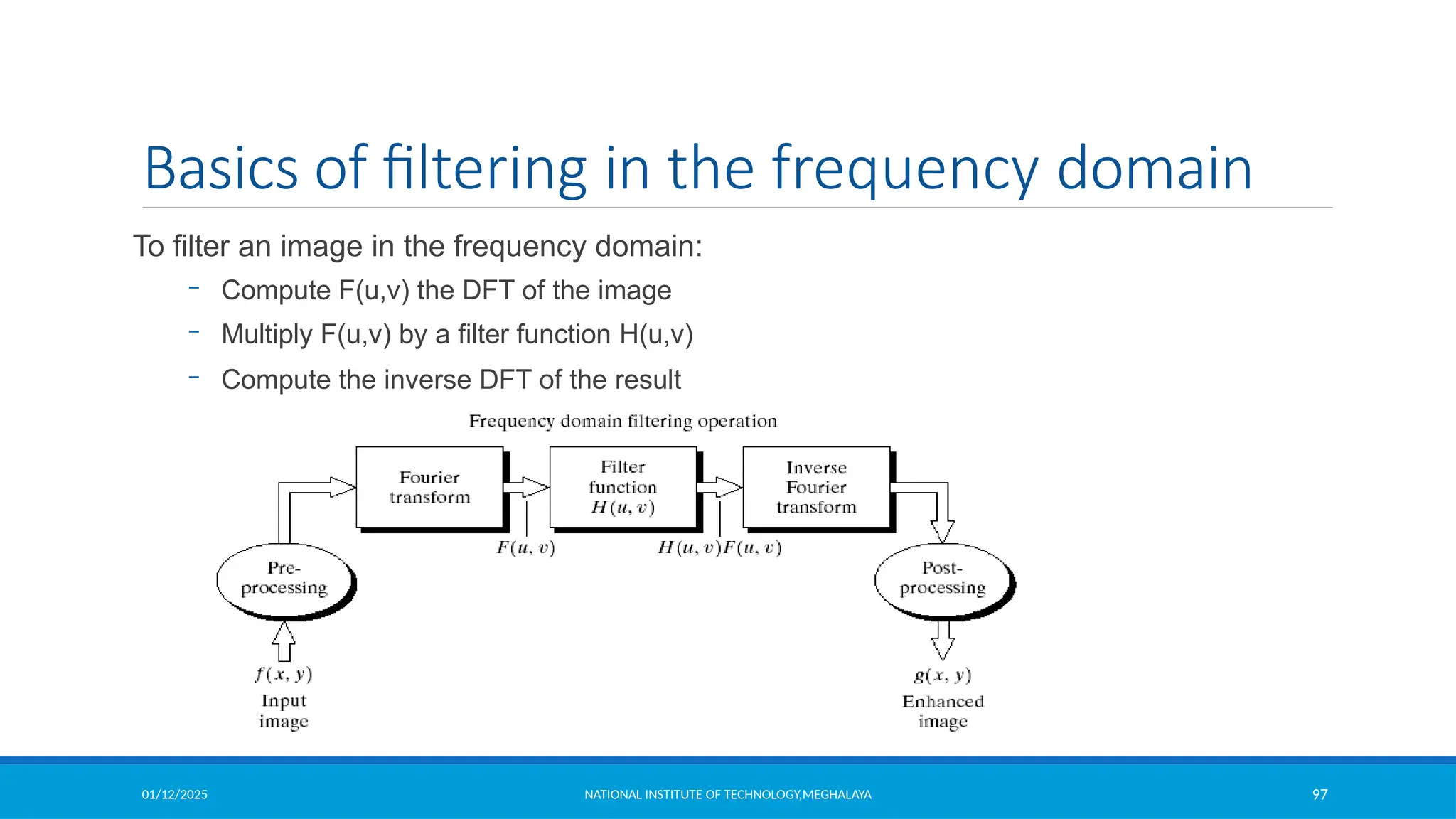
Basics of filtering in the frequency domain
To filter an image in the frequency domain:
– Compute F(u,v) the DFT of the image
– Multiply F(u,v) by a filter function H(u,v)
– Compute the inverse DFT of the result
01/12/2025 NATIONAL INSTITUTE OF TECHNOLOGY,MEGHALAYA 98
Smoothing Frequency Domain Filters
Smoothing is achieved in the frequency domain by dropping out the high frequency
components
The basic model for filtering is: G(u,v) = H(u,v)F(u,v)
where F(u,v) is the Fourier transform of the image being filtered and
H(u,v) is the filter transform function
Low pass filters – only pass the low frequencies, drop the high ones.
01/12/2025 NATIONAL INSTITUTE OF TECHNOLOGY,MEGHALAYA 99
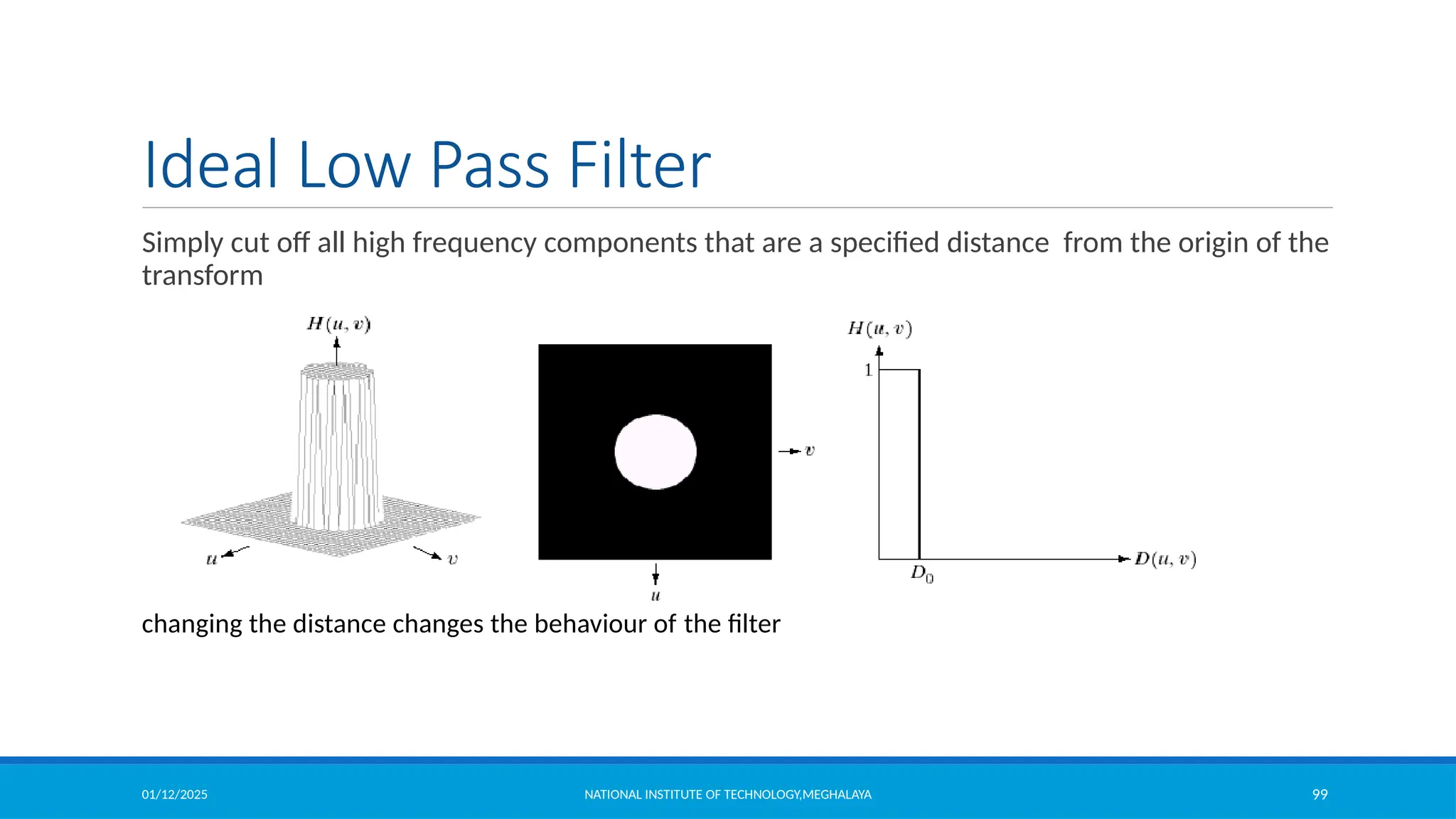
Ideal Low Pass Filter
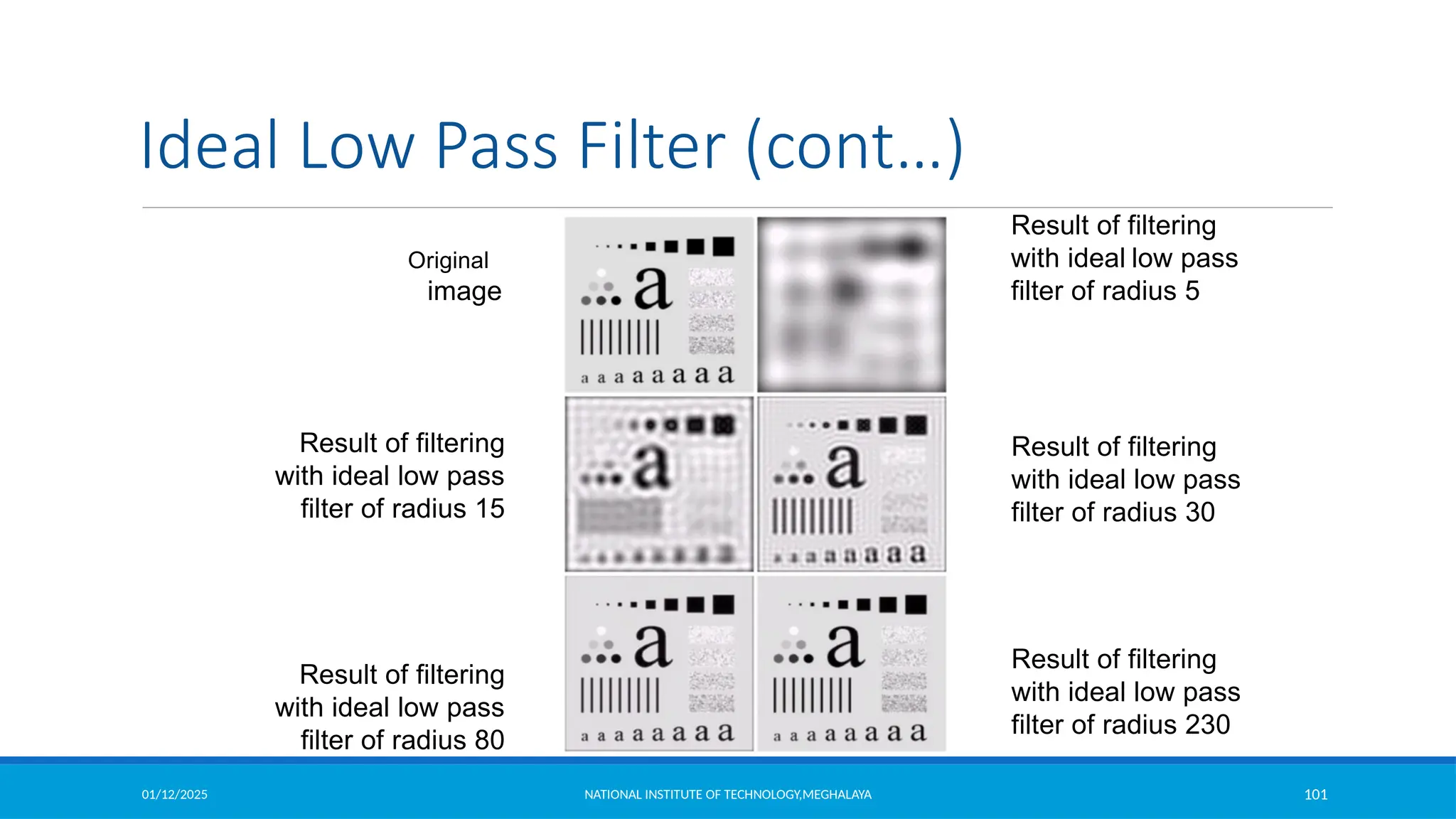
Simply cut off all high frequency components that are a specified distance from the origin of the
transform
changing the distance changes the behaviour of the filter
01/12/2025 NATIONAL INSTITUTE OF TECHNOLOGY,MEGHALAYA 100
Ideal Low Pass Filter (cont…)
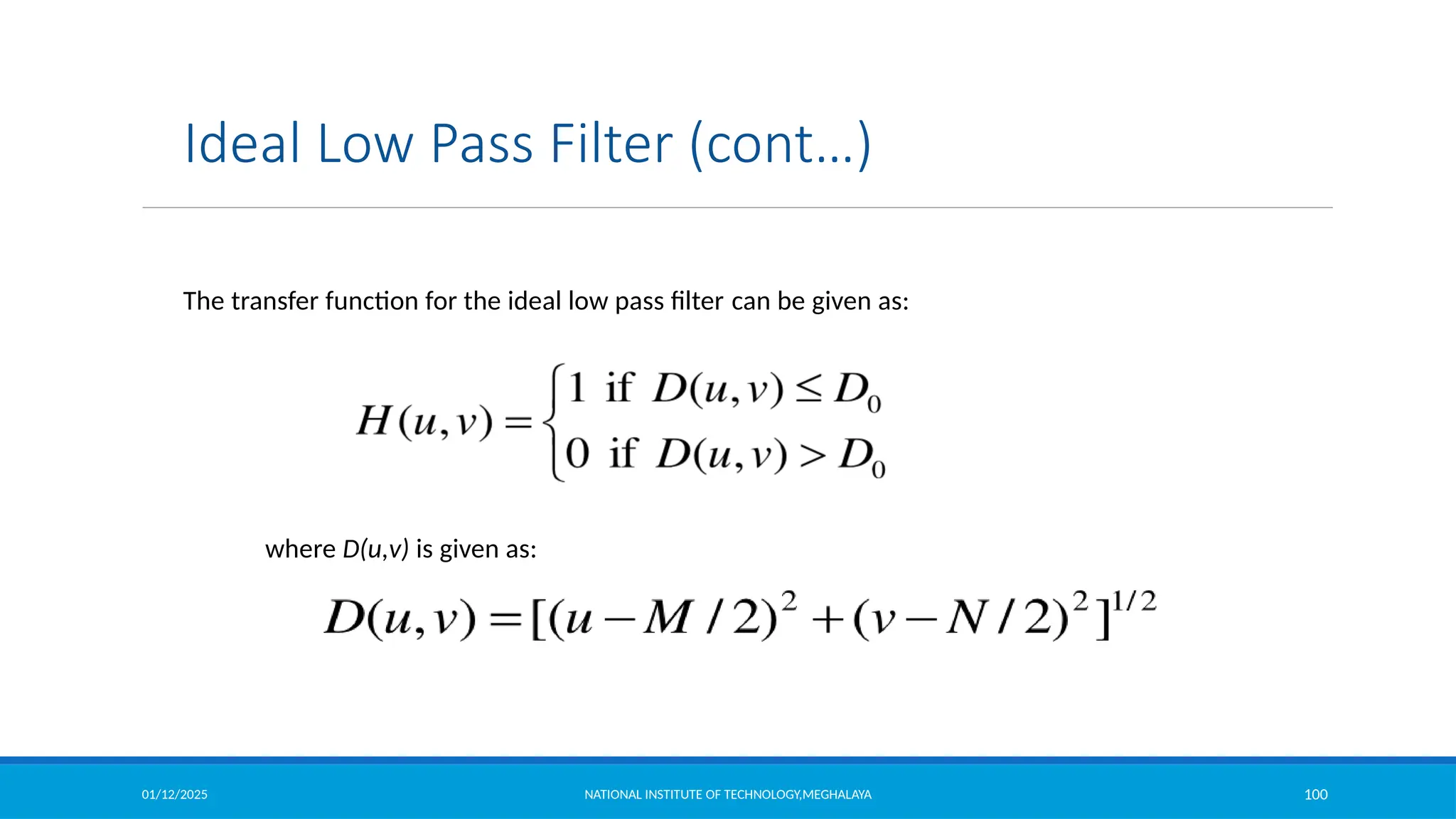
The transfer function for the ideal low pass filter can be given as:
where D(u,v) is given as:
01/12/2025 NATIONAL INSTITUTE OF TECHNOLOGY,MEGHALAYA 101
Original
image
Result of filtering
with ideal low pass
filter of radius 5
Result of filtering
with ideal low pass
filter of radius 30
Result of filtering
with ideal low pass
filter of radius 230
Result of filtering
with ideal low pass
filter of radius 80
Result of filtering
with ideal low pass
filter of radius 15
Ideal Low Pass Filter (cont…)
01/12/2025 NATIONAL INSTITUTE OF TECHNOLOGY,MEGHALAYA 102
Ideal Low Pass Filter (cont…)
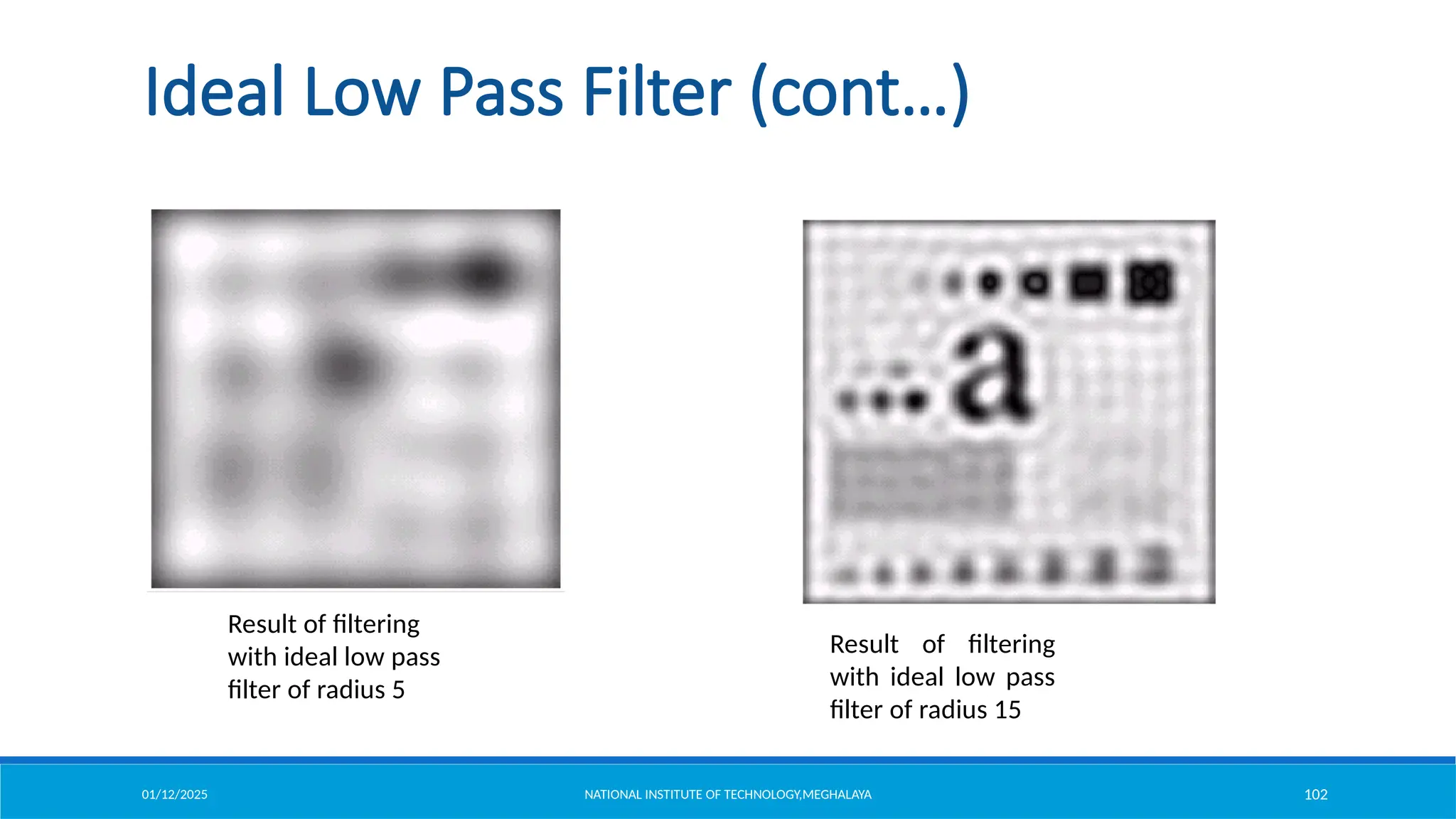
Result of filtering
with ideal low pass
filter of radius 5
Result of filtering
with ideal low pass
filter of radius 15
01/12/2025 NATIONAL INSTITUTE OF TECHNOLOGY,MEGHALAYA 103
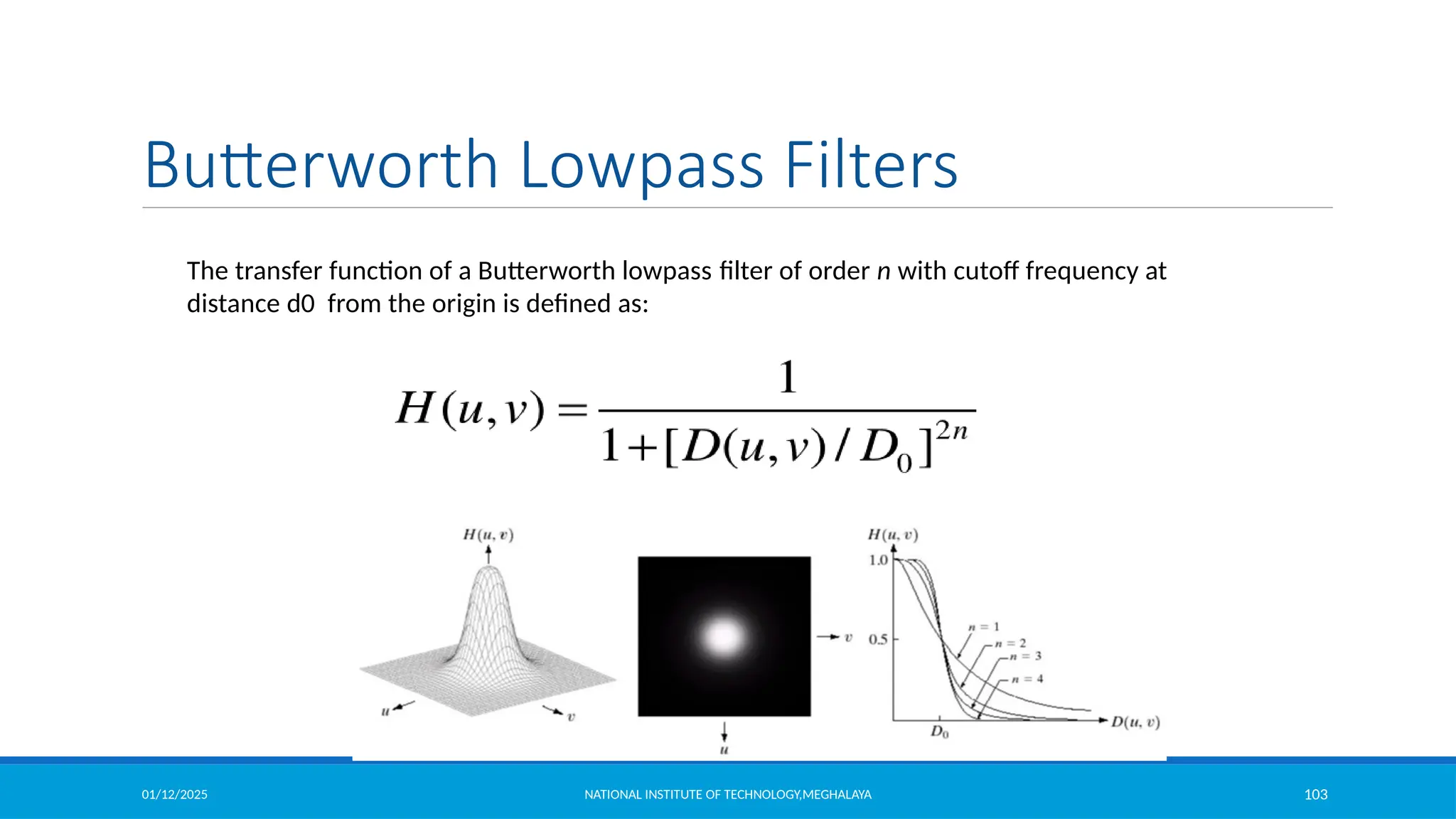
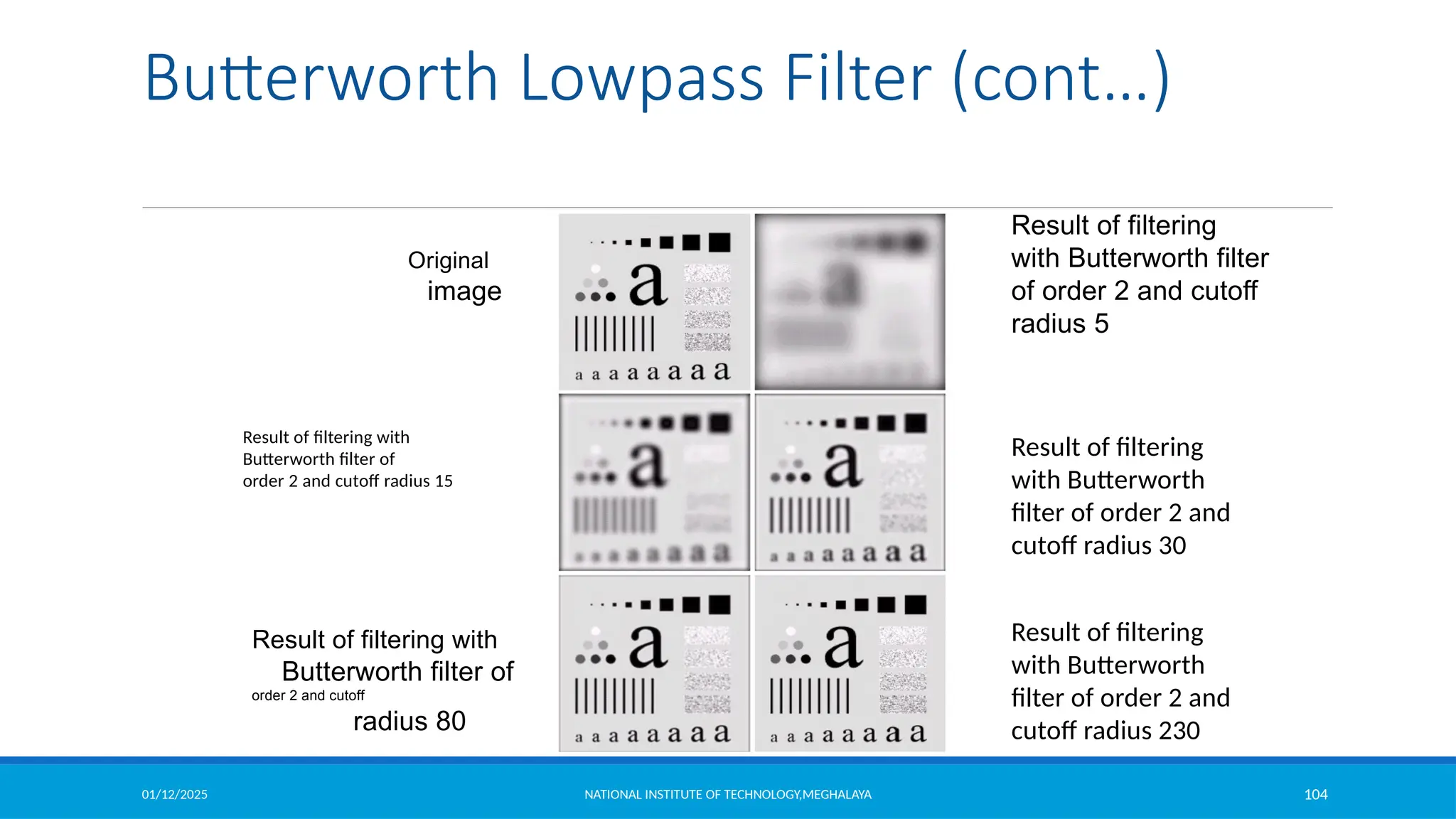
The transfer function of a Butterworth lowpass filter of order n with cutoff frequency at
distance d0 from the origin is defined as:
Butterworth Lowpass Filters
01/12/2025 NATIONAL INSTITUTE OF TECHNOLOGY,MEGHALAYA 104
Original
image
Result of filtering
with Butterworth filter
of order 2 and cutoff
radius 5
Result of filtering
with Butterworth
filter of order 2 and
cutoff radius 30
Result of filtering
with Butterworth
filter of order 2 and
cutoff radius 230
Result of filtering with
Butterworth filter of
order 2 and cutoff
radius 80
Result of filtering with
Butterworth filter of
order 2 and cutoff radius 15
Butterworth Lowpass Filter (cont…)
01/12/2025 NATIONAL INSTITUTE OF TECHNOLOGY,MEGHALAYA 105
Rough Page
01/12/2025 NATIONAL INSTITUTE OF TECHNOLOGY,MEGHALAYA 106
Rough Page
01/12/2025 NATIONAL INSTITUTE OF TECHNOLOGY,MEGHALAYA 107
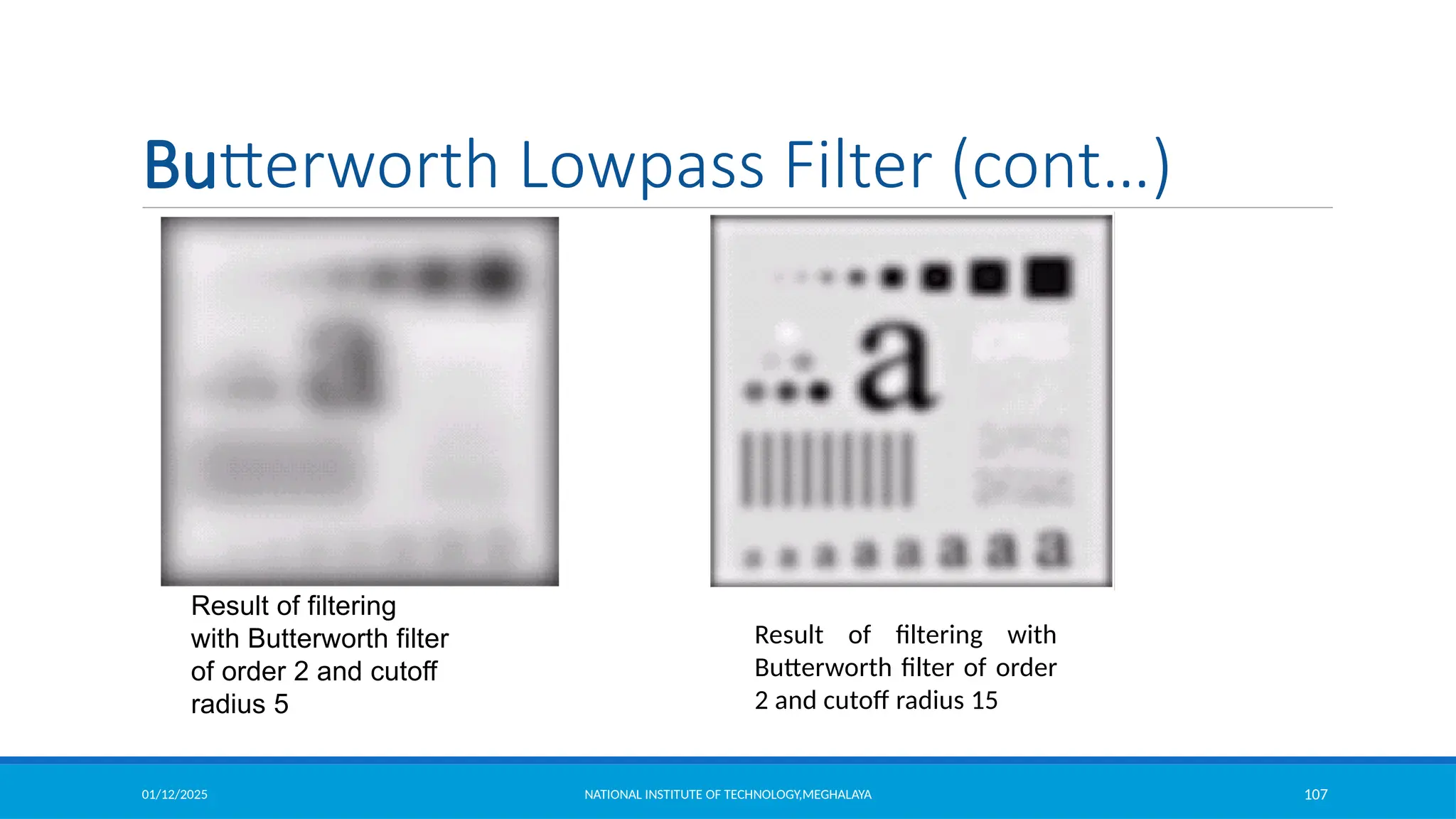
Original
image
Result of filtering
with Butterworth filter
of order 2 and cutoff
radius 5
Result of filtering with
Butterworth filter of order
2 and cutoff radius 15
Butterworth Lowpass Filter (cont…)
01/12/2025 NATIONAL INSTITUTE OF TECHNOLOGY,MEGHALAYA 108
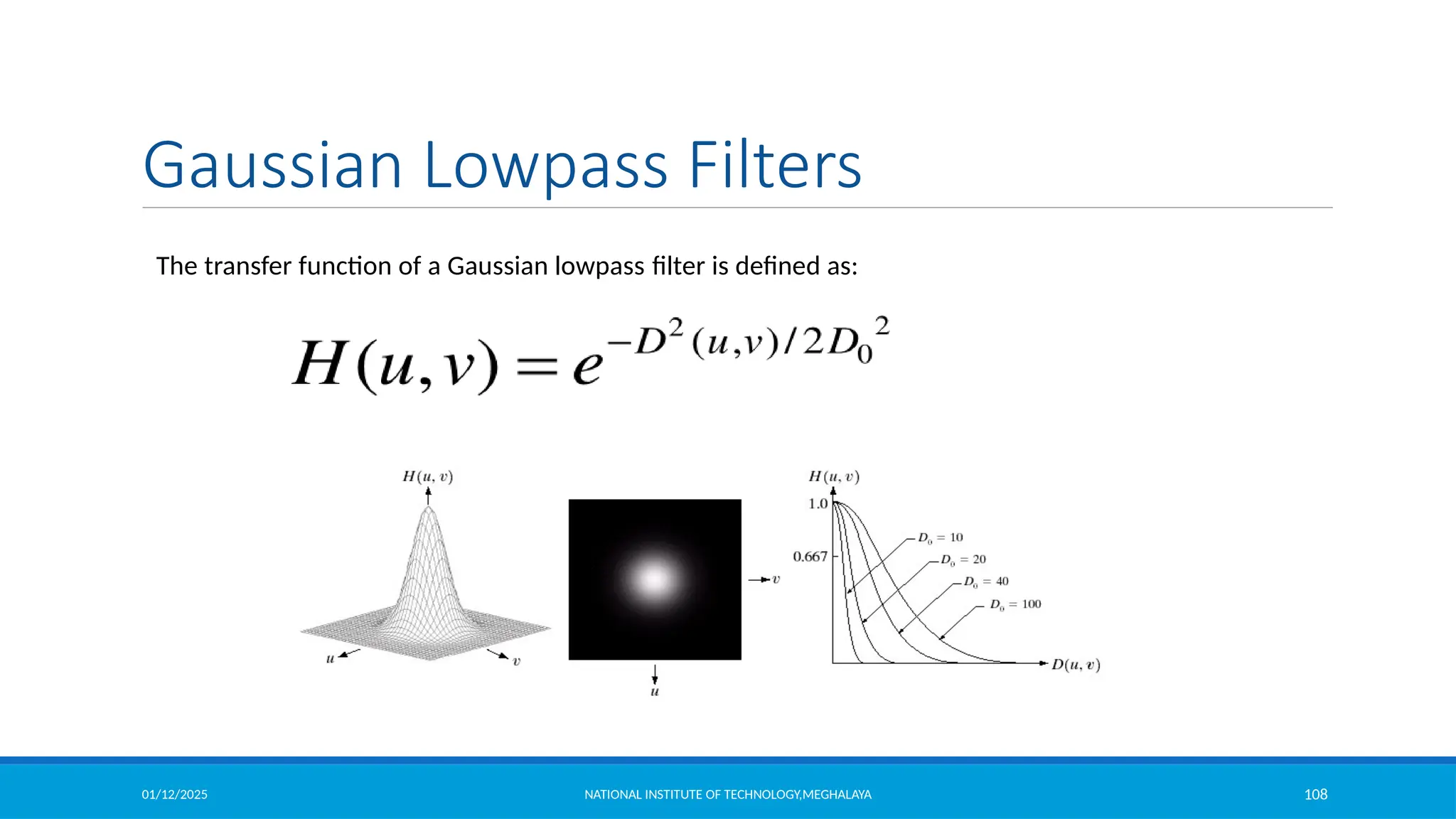
The transfer function of a Gaussian lowpass filter is defined as:
Gaussian Lowpass Filters
01/12/2025 NATIONAL INSTITUTE OF TECHNOLOGY,MEGHALAYA 109
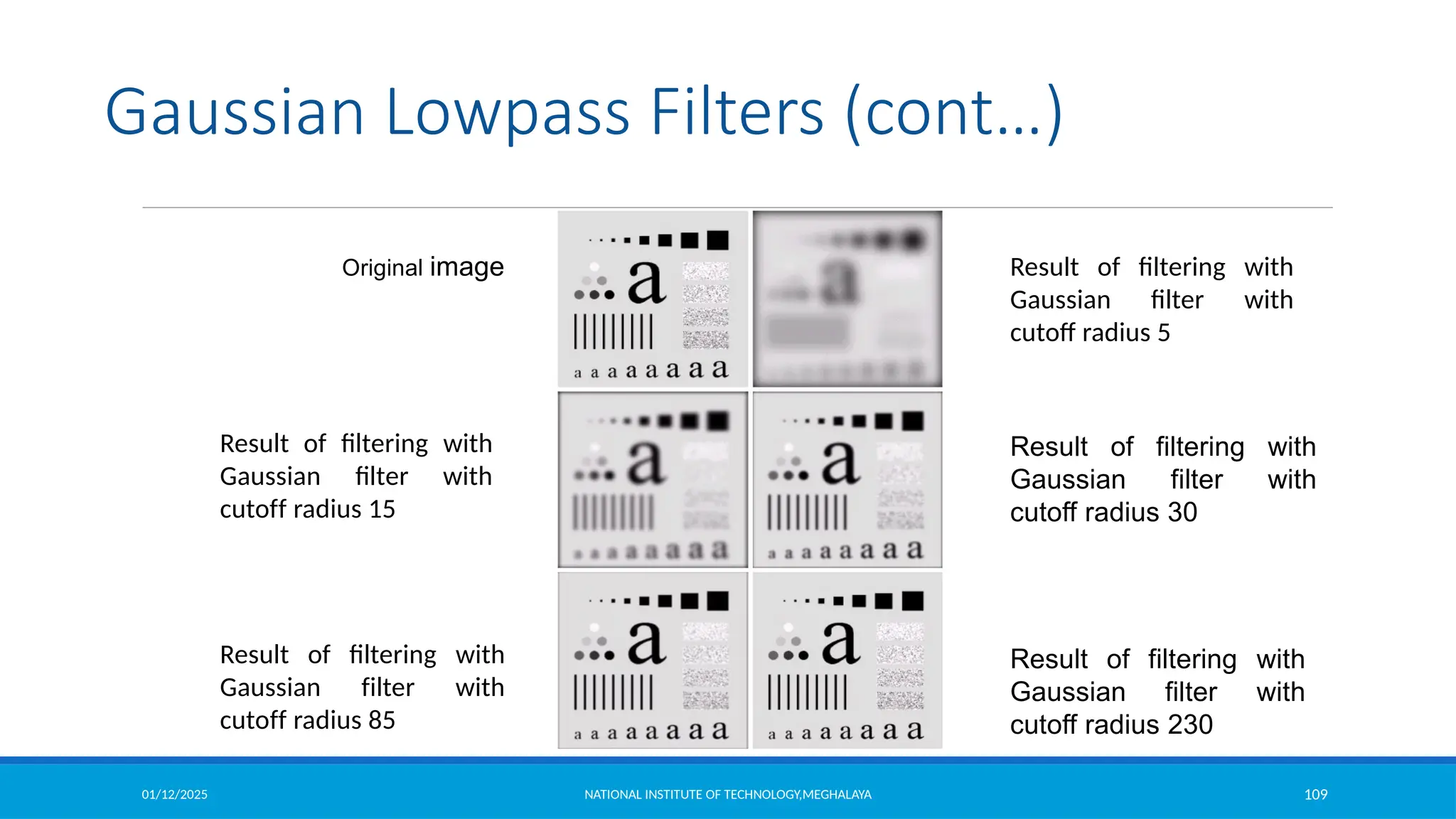
Original image Result of filtering with
Gaussian filter with
cutoff radius 5
Result of filtering with
Gaussian filter with
cutoff radius 30
Result of filtering with
Gaussian filter with
cutoff radius 230
Result of filtering with
Gaussian filter with
cutoff radius 85
Result of filtering with
Gaussian filter with
cutoff radius 15
Gaussian Lowpass Filters (cont…)
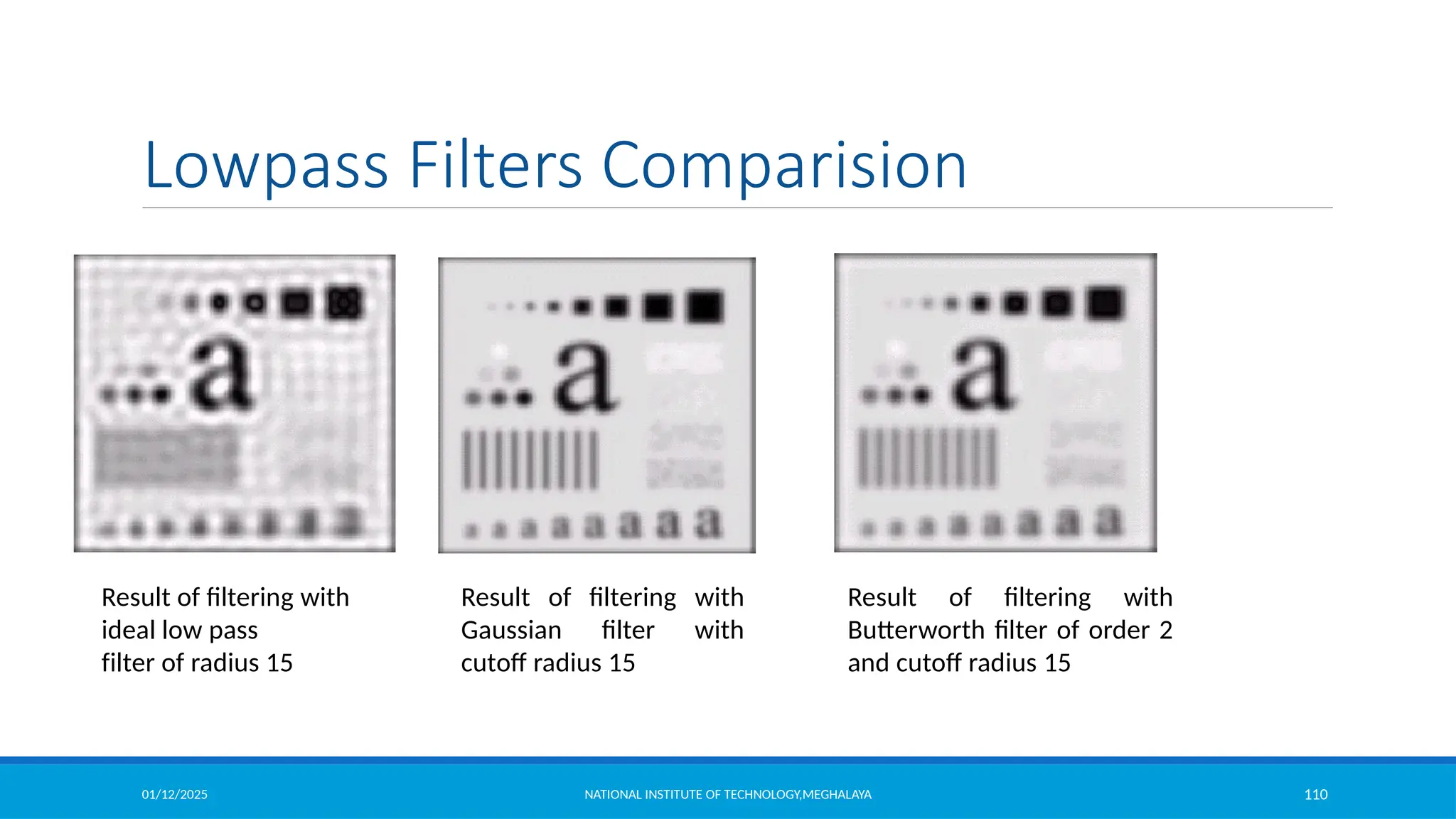
01/12/2025 NATIONAL INSTITUTE OF TECHNOLOGY,MEGHALAYA 110
Result of filtering with
ideal low pass
filter of radius 15
Result of filtering with
Butterworth filter of order 2
and cutoff radius 15
Result of filtering with
Gaussian filter with
cutoff radius 15
Lowpass Filters Comparision
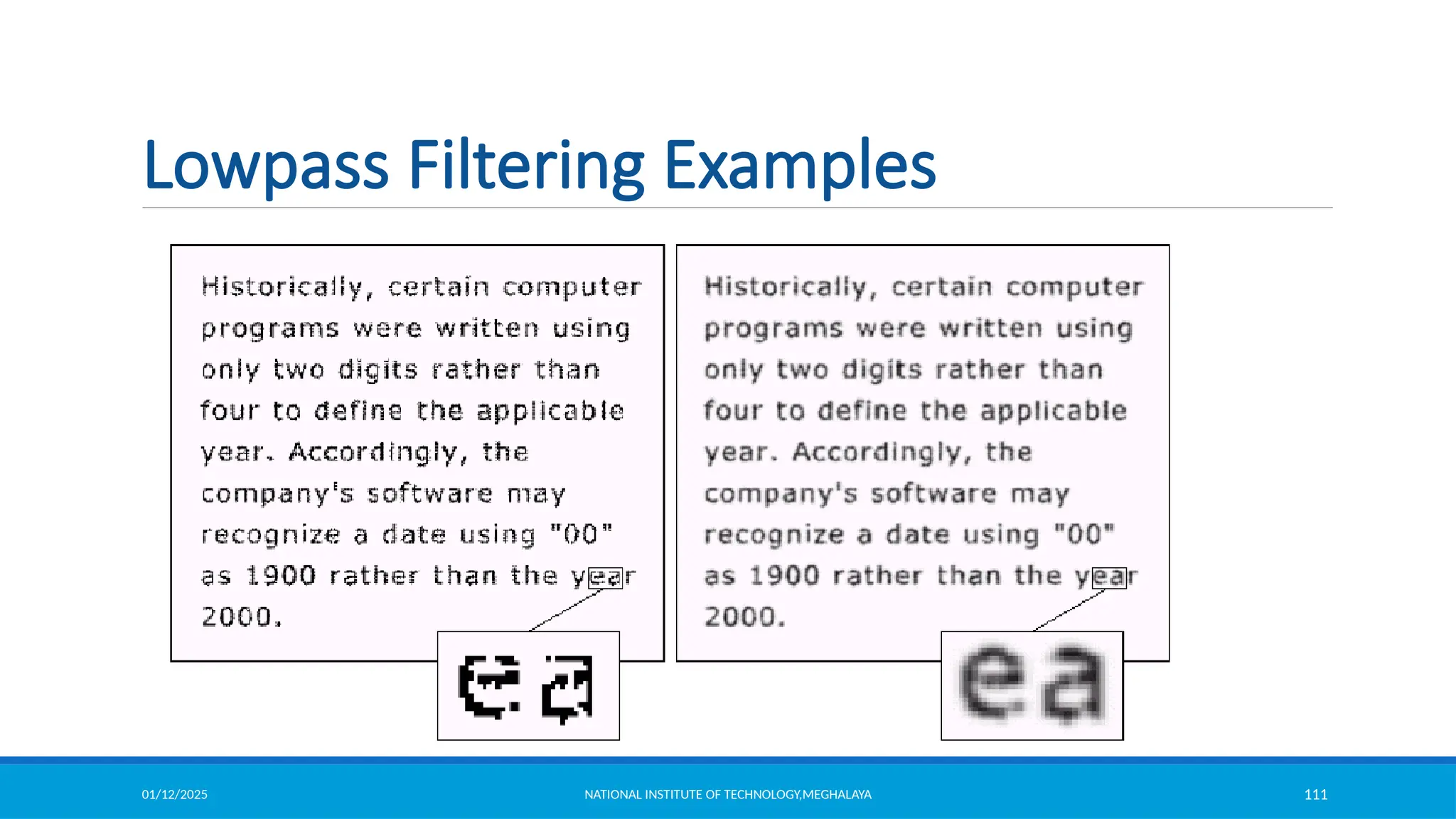
01/12/2025 NATIONAL INSTITUTE OF TECHNOLOGY,MEGHALAYA 111
Lowpass Filtering Examples
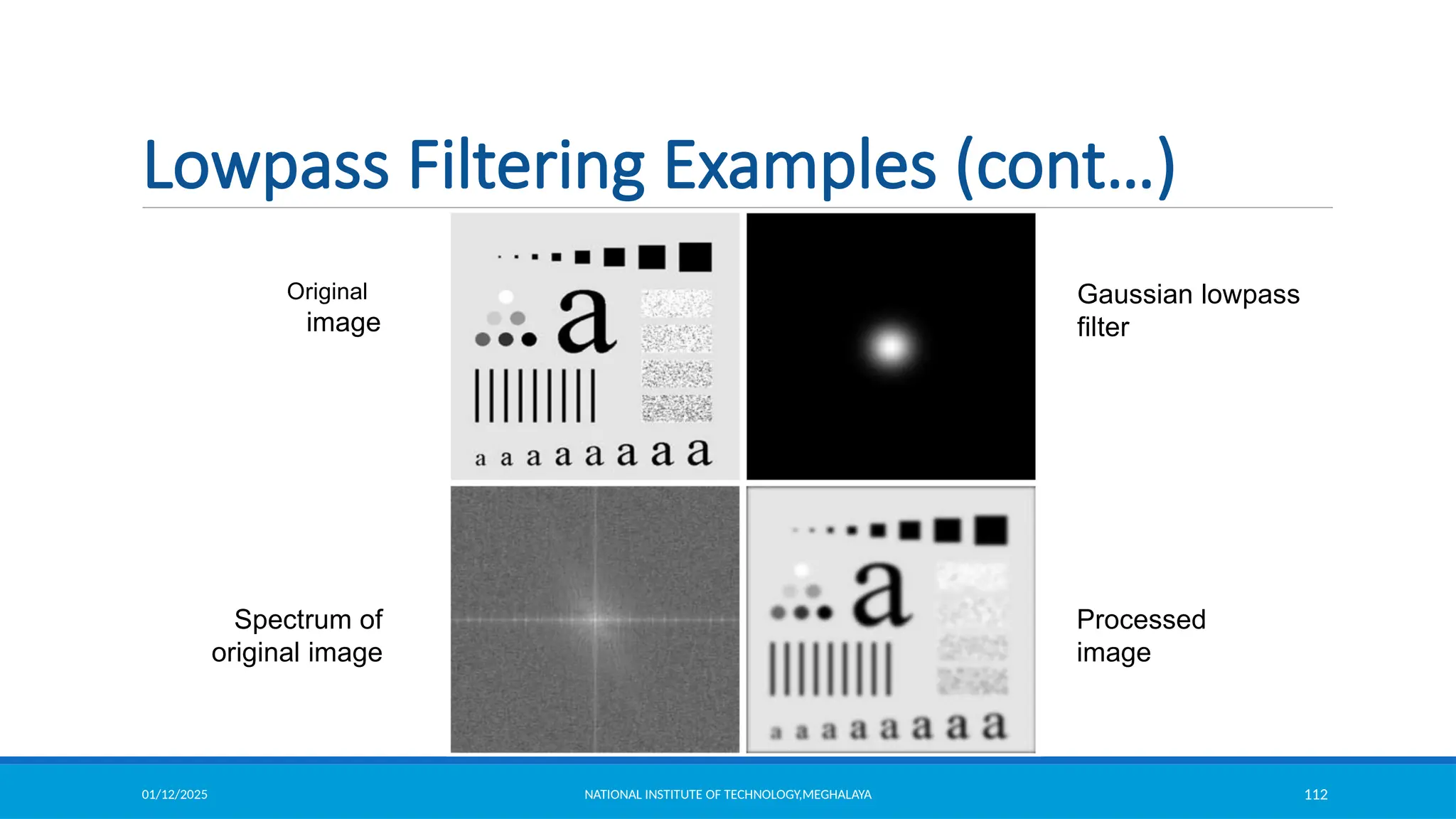
01/12/2025 NATIONAL INSTITUTE OF TECHNOLOGY,MEGHALAYA 112
Original
image
Gaussian lowpass
filter
Processed
image
Spectrum of
original image
Lowpass Filtering Examples (cont…)
01/12/2025 NATIONAL INSTITUTE OF TECHNOLOGY,MEGHALAYA 113
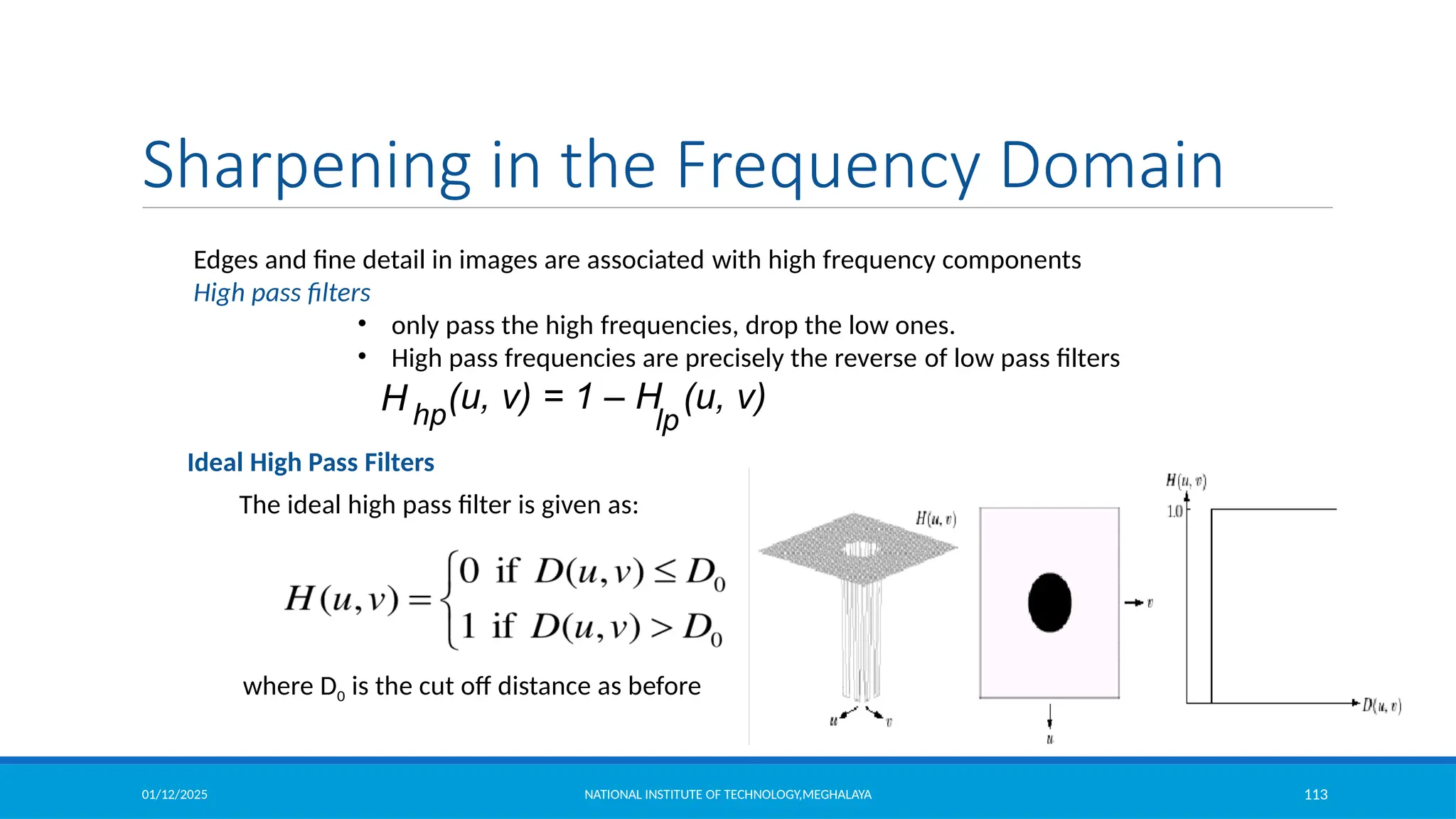
Edges and fine detail in images are associated with high frequency components
High pass filters
• only pass the high frequencies, drop the low ones.
• High pass frequencies are precisely the reverse of low pass filters
H hp
(u, v) = 1 – H (u, v)
lp
Sharpening in the Frequency Domain
Ideal High Pass Filters
The ideal high pass filter is given as:
where D0 is the cut off distance as before
01/12/2025 NATIONAL INSTITUTE OF TECHNOLOGY,MEGHALAYA 114
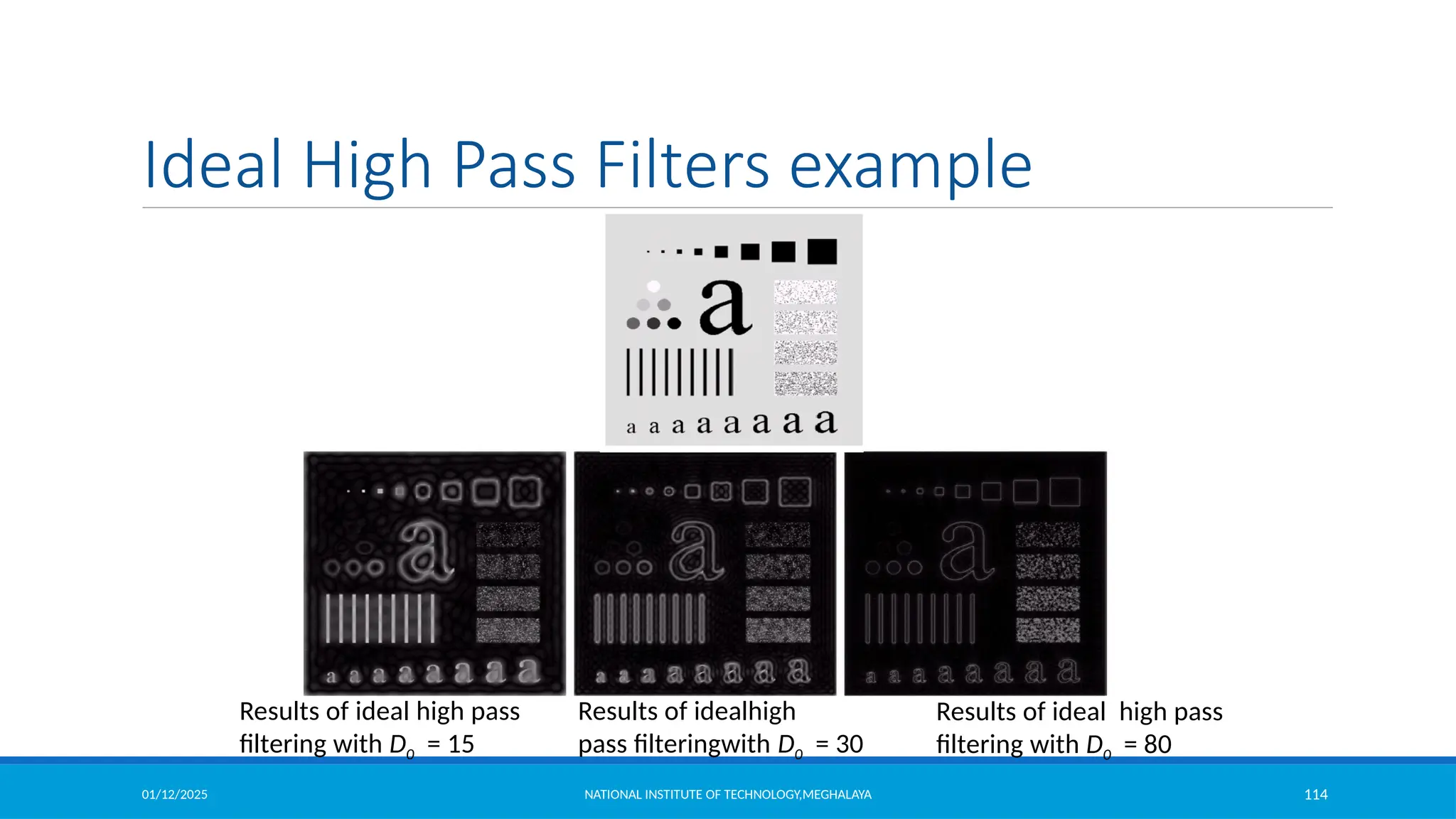
Results of ideal high pass
filtering with D0 = 15
Results of idealhigh
pass filteringwith D0 = 30
Results of ideal high pass
filtering with D0 = 80
Ideal High Pass Filters example
01/12/2025 NATIONAL INSTITUTE OF TECHNOLOGY,MEGHALAYA 115
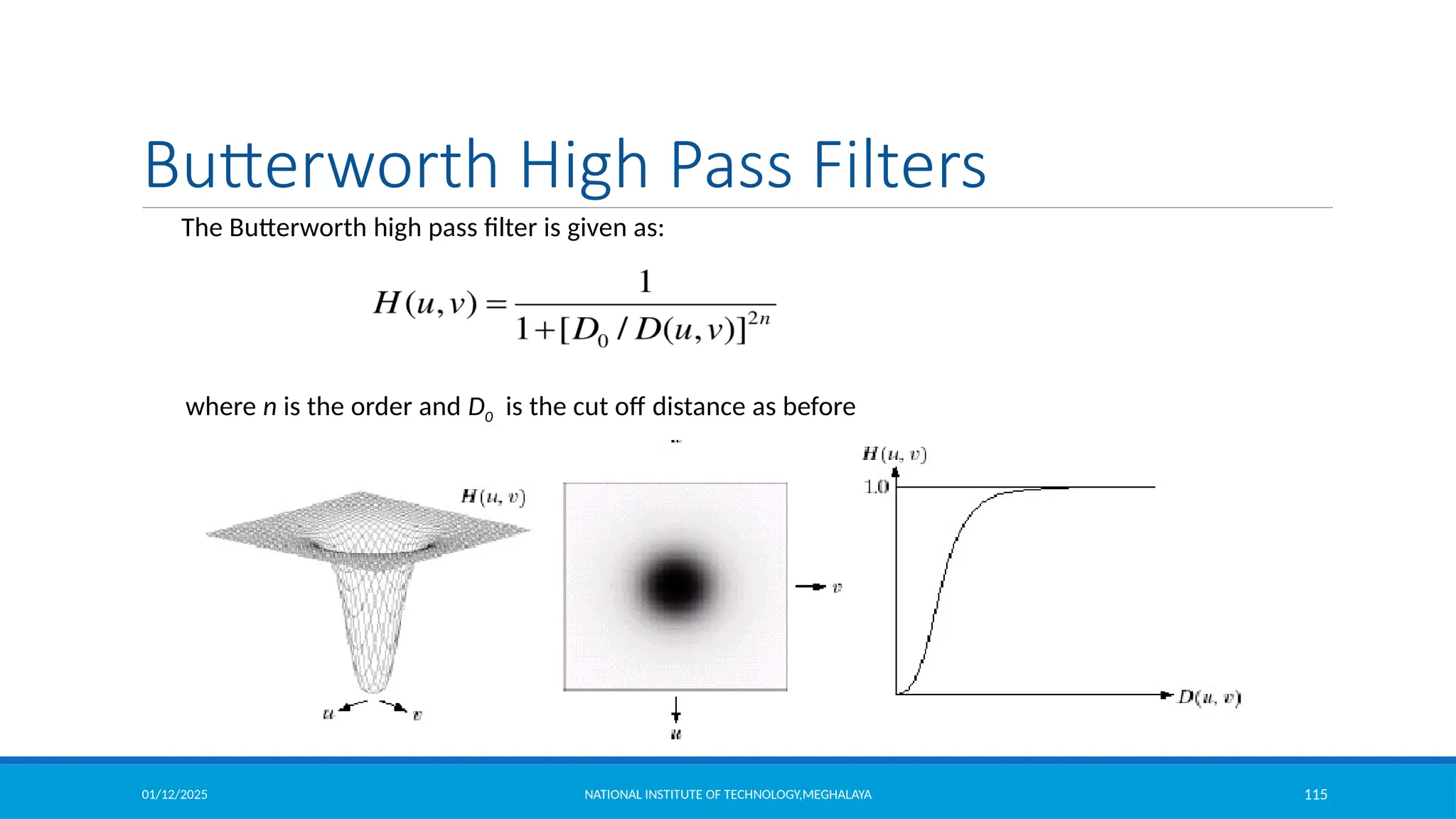
The Butterworth high pass filter is given as:
where n is the order and D0 is the cut off distance as before
Butterworth High Pass Filters
01/12/2025 NATIONAL INSTITUTE OF TECHNOLOGY,MEGHALAYA 116
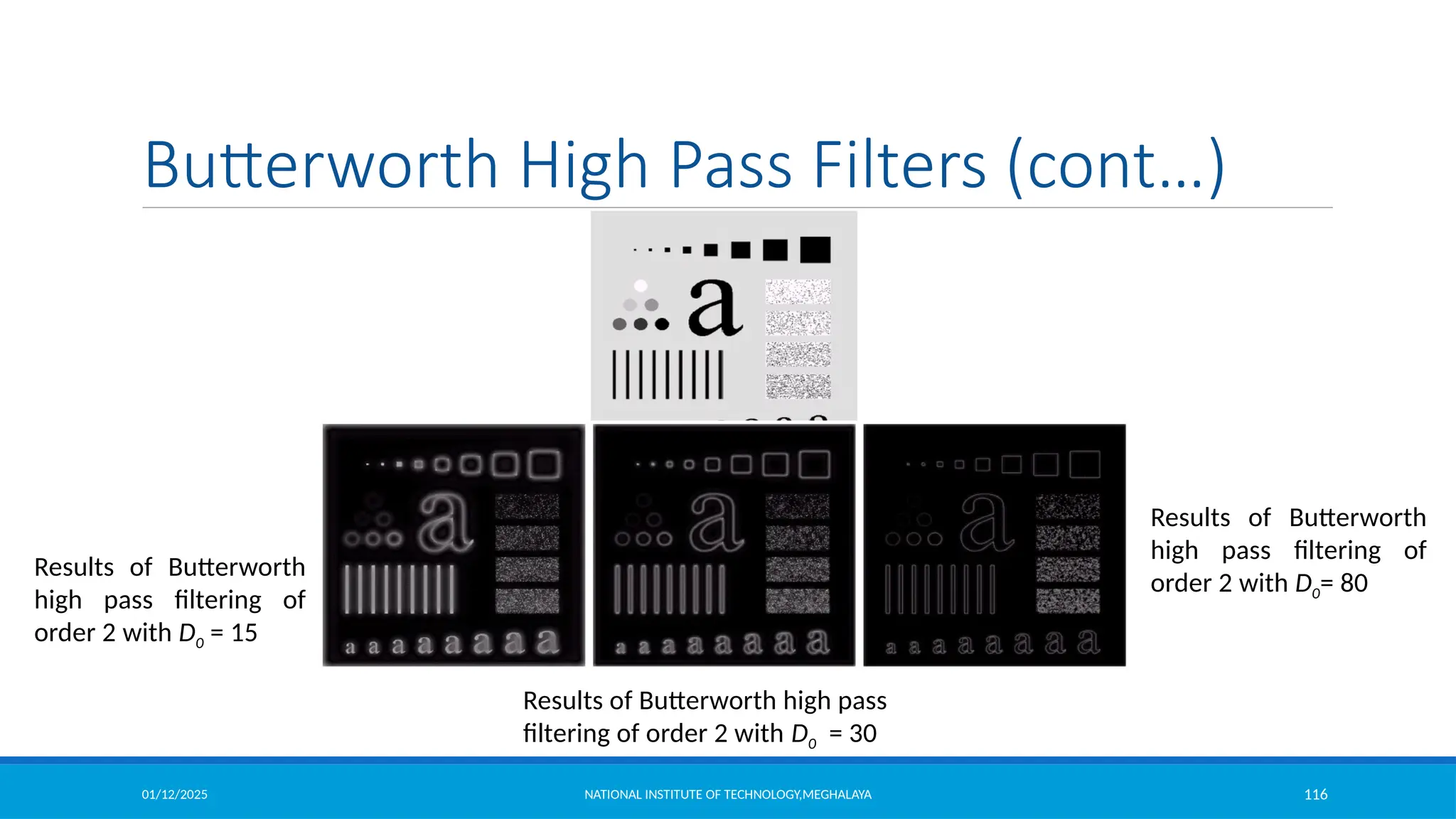
Results of Butterworth
high pass filtering of
order 2 with D0 = 15
Results of Butterworth
high pass filtering of
order 2 with D0= 80
Results of Butterworth high pass
filtering of order 2 with D0 = 30
Butterworth High Pass Filters (cont…)
01/12/2025 NATIONAL INSTITUTE OF TECHNOLOGY,MEGHALAYA 117
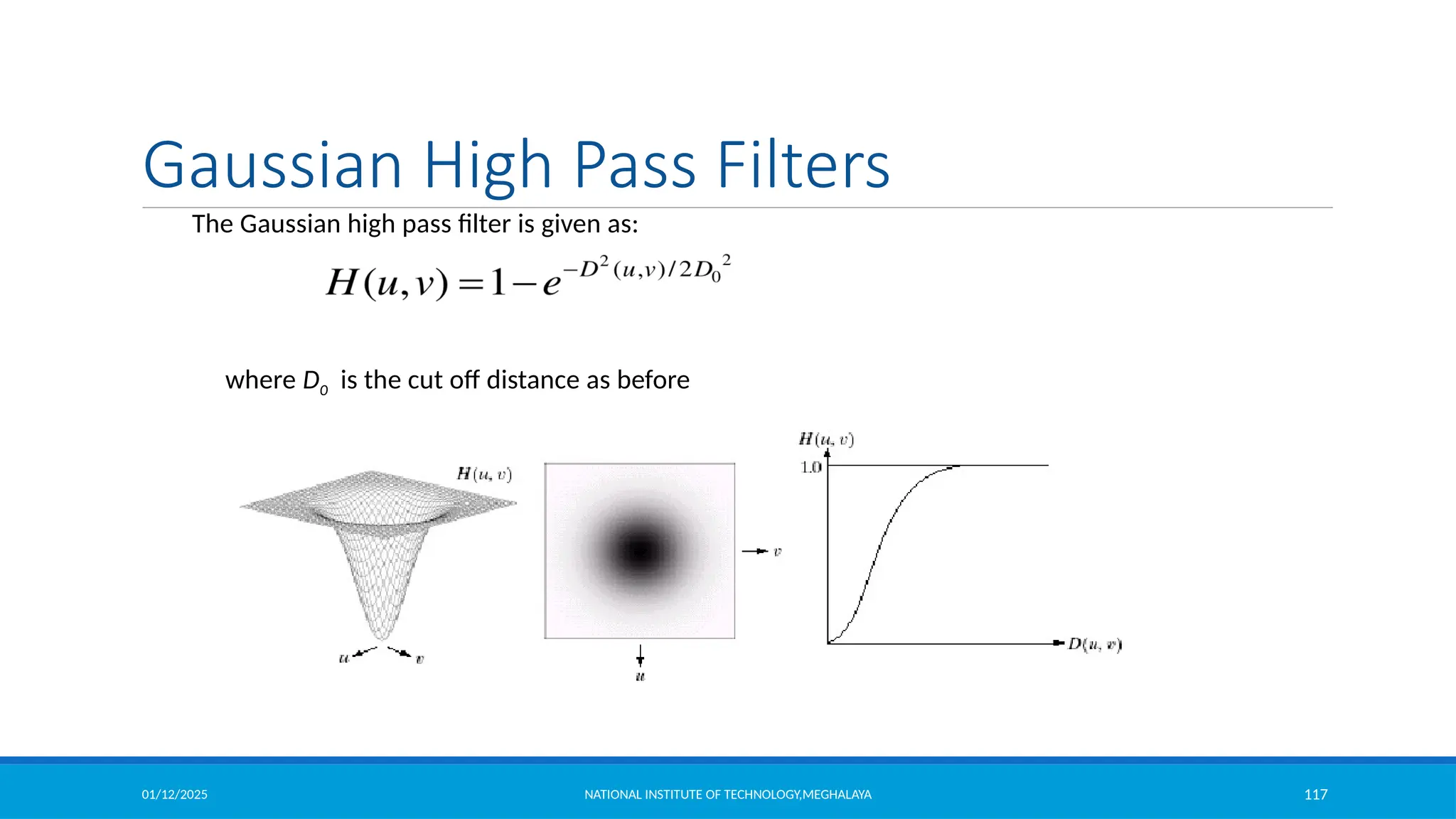
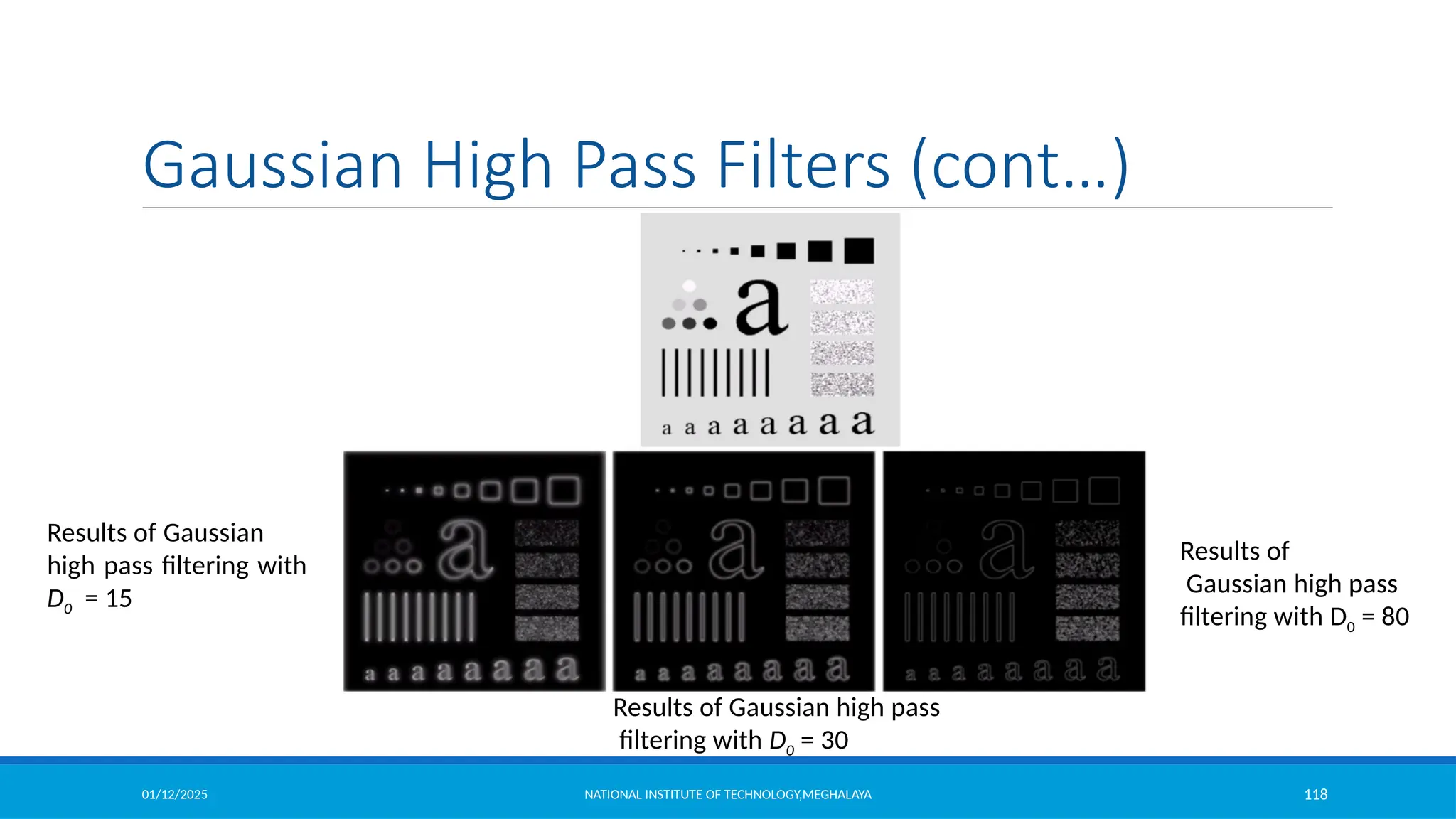
The Gaussian high pass filter is given as:
where D0 is the cut off distance as before
Gaussian High Pass Filters
01/12/2025 NATIONAL INSTITUTE OF TECHNOLOGY,MEGHALAYA 118
Results of Gaussian
high pass filtering with
D0 = 15
Results of
Gaussian high pass
filtering with D0 = 80
Results of Gaussian high pass
filtering with D0 = 30
Gaussian High Pass Filters (cont…)
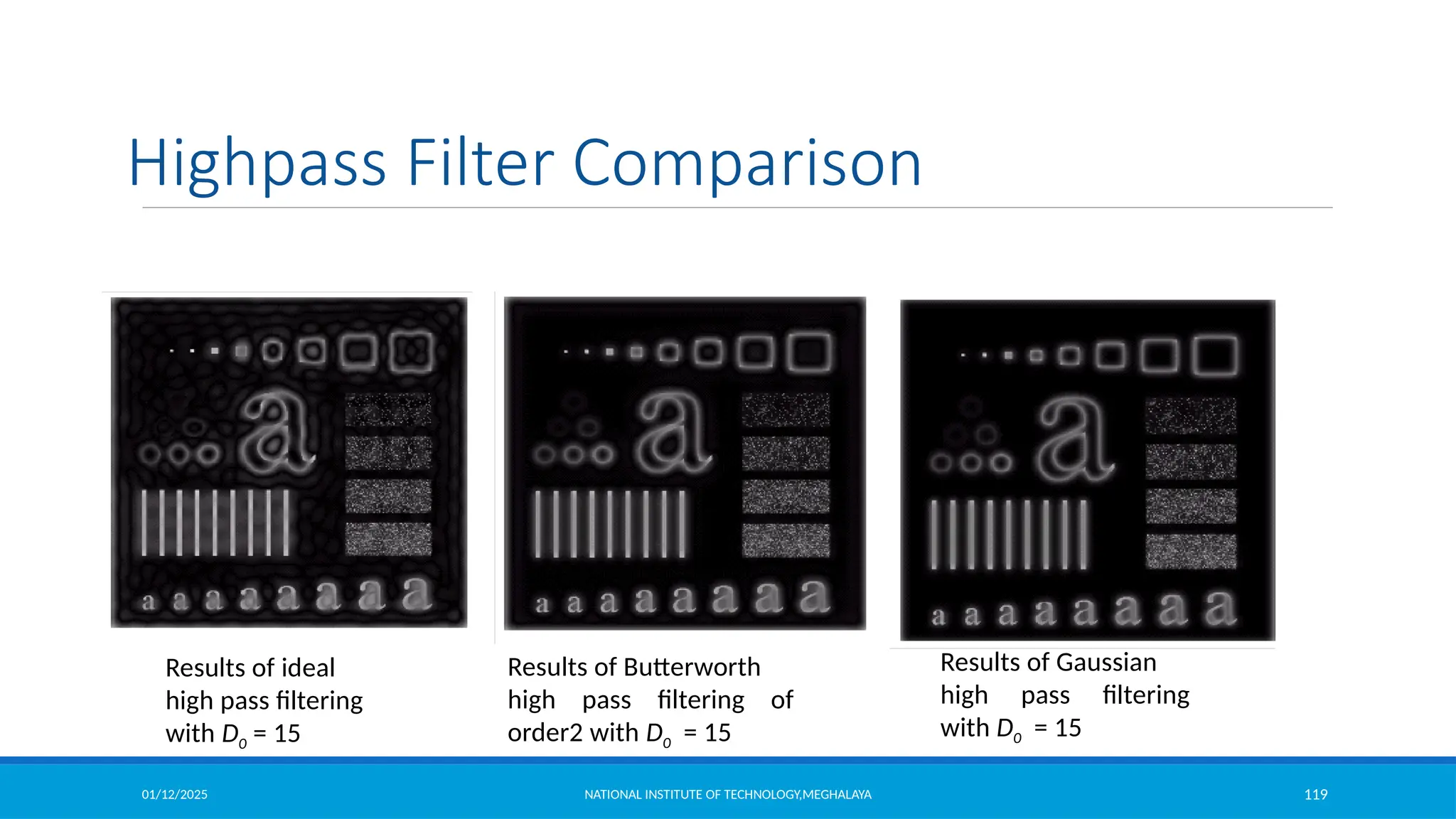
01/12/2025 NATIONAL INSTITUTE OF TECHNOLOGY,MEGHALAYA 119
Results of ideal
high pass filtering
with D0 = 15
Highpass Filter Comparison
Results of Butterworth
high pass filtering of
order2 with D0 = 15
Results of Gaussian
high pass filtering
with D0 = 15
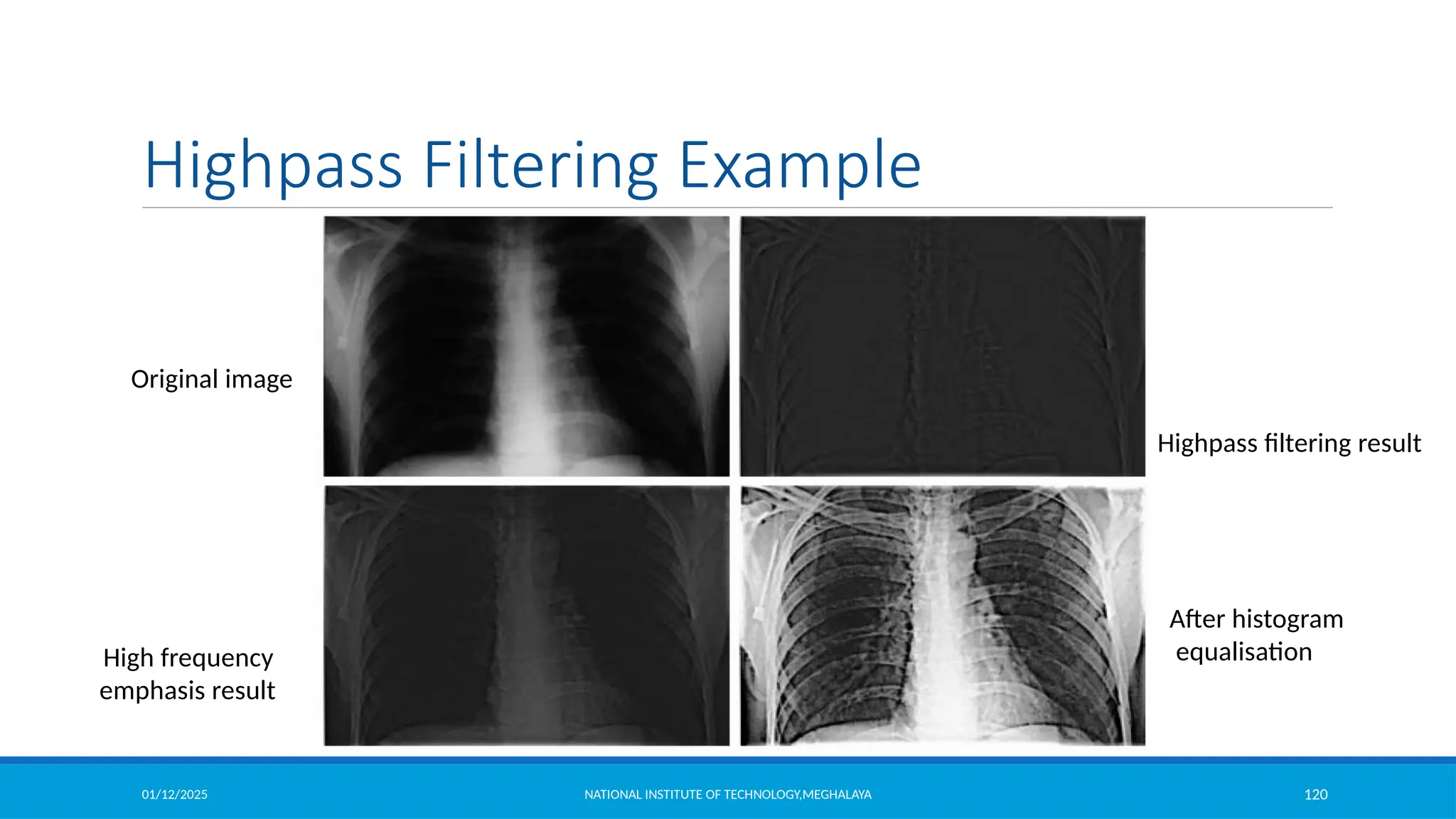
01/12/2025 NATIONAL INSTITUTE OF TECHNOLOGY,MEGHALAYA 120
Original image
Highpass filtering result
High frequency
emphasis result
Highpass Filtering Example
After histogram
equalisation

Image Enhancement in Spatial Domain and Frequency Domain

  • 1.
    Module2 Image Enhancement inSpatial Domain and Frequency Domain
  • 2.
    01/12/2025 NATIONAL INSTITUTEOF TECHNOLOGY,MEGHALAYA 2 Image Enhancement Objective of Image enhancement: Process an image so that the result is more suitable than the original image for a specific application. Category of Image Enhancement:  Spatial Domain Image Enhancement The term spatial domain refers to the image plane itself. Image plane contains the image itself and the approaches in this categories are based on direct manipulation of pixel in an image.  Frequency Domain Image Enhancement The frequency domain in image processing represents, at each point a particular frequency contained in the spatial domain of the image. In frequency domain methods, the image is first transferred into frequency domain, it means that, The Fourier Transform of the image is computed first. All the enhancement operations are performed on the Fourier transform of the image and then the Inverse Fourier transform is performed to get the resultant image.
  • 3.
    01/12/2025 NATIONAL INSTITUTEOF TECHNOLOGY,MEGHALAYA 3 x y (x,y) 3x3 neighborhood of (x,y) Image f Spatial Domain Image Enhancement Special domain process are denoted by the expression Where, f(x,y)= input image T = operator on f defined over some neighbourhood of f(x,y) fig:
  • 4.
    01/12/2025 NATIONAL INSTITUTEOF TECHNOLOGY,MEGHALAYA 4 Grey Level Transformation Function Point Processing 1x1 neighbourhood operation is called as point processing and is represented by the transformation function s= T(r) . Where, s and r represents the intensity of g and f respectively. Contrast stretching function Thresholding function Contrast stretching operation is performed by darkening the level below ‘m’ and brightening the levels above ‘m’ in the original image Thresholding function produces a two level binary image. The value below r are transformed as black and above m are transferred as white.
  • 5.
    01/12/2025 NATIONAL INSTITUTEOF TECHNOLOGY,MEGHALAYA 5 Grey Level Transformation Function Image negative Let the image has an intensity level in the range [0 L-1], then the intensity transformation is given by Where, S is the output intensity value L is the highest intensity levels r is the input intensity value Particularly suited for enhancing white or grey detail embedded in dark regions of an image, especially when the black areas are dominant in size
  • 6.
    01/12/2025 NATIONAL INSTITUTEOF TECHNOLOGY,MEGHALAYA 6 Grey Level Transformation Function Log Transformations For an image having intensity ranging from [0 L-1], log transformation is given by , where c is a constant • log transformation compresses the dynamic range of images with large variations in pixel values. • It maps a narrow range of low intensity values in the input into a wide range of output levels. • The opposite is true of higher values of input levels. • It expands the values of dark pixels in an image while compressing the higher level values.
  • 7.
    01/12/2025 NATIONAL INSTITUTEOF TECHNOLOGY,MEGHALAYA 7 Log Transformations (cont’d) Classical example of log transformation is displaying Fourier spectrum. Fourier spectrum has the values in the range 0 to 1.5x10⁶. These values are scaled linearly for the display in 8 bit system. Fourier spectrum Log transformation with c=1 Grey Level Transformation Function
  • 8.
    01/12/2025 NATIONAL INSTITUTEOF TECHNOLOGY,MEGHALAYA 8 Grey Level Transformation Function Power-law (Gamma ) Transformations This has the basic form where c and γ are positive constants. Plot for c=1 • Fractional values of γ maps a narrow range of dark input values into a wider range of output values. Opposite of this also true for higher values of input levels. • These are also called as gamma correction due to the exponent in the power law equation. • C=gamma=1 means it is an identity transformations.
  • 9.
    01/12/2025 NATIONAL INSTITUTEOF TECHNOLOGY,MEGHALAYA 9 Grey Level Transformation Function • Gamma correction is very important when to reproduce an image exactly on a display system. • Variety of devices used for image capture , printing, and display respond according to a power law. • Power-law transformations are also used in general purpose contrast manipulation. Power-law (Gamma )Transformations
  • 10.
    01/12/2025 NATIONAL INSTITUTEOF TECHNOLOGY,MEGHALAYA 10 Grey Level Transformation Function Example of some basic intensity transformation
  • 11.
    01/12/2025 NATIONAL INSTITUTEOF TECHNOLOGY,MEGHALAYA 11 Grey Level Transformation Function Example of some basic intensity transformation
  • 12.
    01/12/2025 NATIONAL INSTITUTEOF TECHNOLOGY,MEGHALAYA 12 Piece Wise Linear Transformation Function Contrast Stretching Low contrast images result from the following ◦ Poor illumination ◦ lack of dynamic range in the imaging sensor ◦ Wrong settings of the lens aperture during acquisition t is a process that expands the range of intensity levels in an image so that it spans full intensity range of display device. Contrast stretching is obtained by using the following formula =
  • 13.
    01/12/2025 NATIONAL INSTITUTEOF TECHNOLOGY,MEGHALAYA 13 Piece Wise Linear Transformation Function This transformation is linear function that deduces no change in grey levels.
  • 14.
    01/12/2025 NATIONAL INSTITUTEOF TECHNOLOGY,MEGHALAYA 14 Piece Wise Linear Transformation Function This transformation becomes a thresholding function that creates a binary image.
  • 15.
    01/12/2025 NATIONAL INSTITUTEOF TECHNOLOGY,MEGHALAYA 15 Piece Wise Linear Transformation Function Intermediate values of (r1 ,s1 ) and (r2 ,s2 ) produces various degree of spread in the intensity.
  • 16.
    01/12/2025 NATIONAL INSTITUTEOF TECHNOLOGY,MEGHALAYA 16 Piece Wise Linear Transformation Function Contrast stretching (Example)
  • 17.
    01/12/2025 NATIONAL INSTITUTEOF TECHNOLOGY,MEGHALAYA 17 Piece Wise Linear Transformation Function Intensity Level Slicing Highlighting specific range of intensities Example : Enhancing features such as masses of water in the satellite imagery. Enhancing flaws in X-ray images. It can be Implemented two ways: 1. To display only one value (say, white) in the range of interest and rests are black which produces binary image. 2. Brightens (or darkens) the desired range of intensities but leaves all other intensity levels in the image unchanged.
  • 18.
    01/12/2025 NATIONAL INSTITUTEOF TECHNOLOGY,MEGHALAYA 18 Piece Wise Linear Transformation Function Intensity Level Slicing example
  • 19.
    01/12/2025 NATIONAL INSTITUTEOF TECHNOLOGY,MEGHALAYA 19 Piece Wise Linear Transformation Function Intensity Level Slicing example clear all; clc; itemp = imread('intensity_level_slicing.jpg');%read the image image = itemp(:,:,1); rmin = 100; %decide the min. level of intensity level slicing range rmax = 180; %decide the max. level of intensity level slicing range [r,c]= size(image); % get the dimensions of image s = zeros(r,c); % pre allocate a variable to store the result image for i = 1:r for j = 1:c % if the current pixel of original image is in the specfied range then make it 0 in the result image if (rmin < image(i,j)&& image(i,j) < rmax) s(i,j) = 0; else % otherwise store the same value of the pixel in the result image s(i,j) = image(i,j); end end end figure,imshow(uint8(image)) %display original image figure,imshow(uint8(s)) %display result image
  • 20.
    01/12/2025 NATIONAL INSTITUTEOF TECHNOLOGY,MEGHALAYA 20 Piece Wise Linear Transformation Function Intensity Level Slicing example for i = 1:r for j = 1:c % if the current pixel of original image is in the specfie result image if (rmin < image(i,j)&& image(i,j) < rmax) s(i,j) = 0; else % otherwise store the same value of the pixel s(i,j) = image(i,j); end end end figure,imshow(uint8(image)) %display original image figure,imshow(uint8(s)) %display result image
  • 21.
    01/12/2025 NATIONAL INSTITUTEOF TECHNOLOGY,MEGHALAYA 21 Piece Wise Linear Transformation Function Bit Plane Slicing •Pixels are digital numbers composed of bits •This transformation is useful In determining the number of Visually significant bits in an Image •Suppose each pixel is represented by 8 bits it is desired To extract the nth most significant bit And display it •Higher-order bits contain the majority of the visually significant data •256 grey scale image is composed of 8 bits. Instead of highlighting intensity level ranges, we could highlight the contribution made to total image appearance by specific bits. •8-bit image may be considered as being composed of eight 1-bit planes, with plane 1 containing the lowest order bit of all pixels in the image and plane 8 all the highest-order bits. Fig: Bit-Plane representation of a 8 bit number
  • 22.
    01/12/2025 NATIONAL INSTITUTEOF TECHNOLOGY,MEGHALAYA 22 Piece Wise Linear Transformation Function Bit Plane Slicing example Fig: (a) An 8-bit gray-scale image of size 500×1192 pixels. (b) through (i) Bit planes 1 through 8, with bit plane 1 corresponding to the least significant bit. Each bit plane is a binary image.
  • 23.
    01/12/2025 NATIONAL INSTITUTEOF TECHNOLOGY,MEGHALAYA 23 Piece Wise Linear Transformation Function Bit Plane Slicing example Fig: Images reconstructed using (a) bit planes 8 and 7; (b)bit planes 8,7 and 6; (c)bit planes 8,7,6 and 5
  • 24.
    01/12/2025 NATIONAL INSTITUTEOF TECHNOLOGY,MEGHALAYA 24 Histogram • An image histogram is a type of histogram that acts as a graphical representation of the tonal distribution in a digital image. It plots the number of pixels for each tonal value. The vertical axis represents the size of the area (total number of pixels) that is captured in each one of these zones. • In simple terms, it represents the number of pixels for each intensity value considered. What is a histogram and what is its purpose? The purpose of a histogram (Chambers) is to graphically summarize the distribution of a univariate data set.
  • 25.
    01/12/2025 NATIONAL INSTITUTEOF TECHNOLOGY,MEGHALAYA 25 Histogram • A histogram is used to summarize discrete or continuous data. In other words, it provides a visual interpretation of numerical data by showing the number of data points that fall within a specified range of values (called “bins”). • Where are histograms used in real life?  The histograms are mainly used to display and organize a large set of measurements or numerical data in a user-friendly manner. A histogram will make it easy to see where the majority of values fall on a measurement scale, and how much variation is there among those values. • What are the different types of histograms?  The different types of a histogram are uniform histogram, symmetric histogram, bimodal histogram, probability histogram.
  • 26.
    01/12/2025 NATIONAL INSTITUTEOF TECHNOLOGY,MEGHALAYA 26 Histogram • What is the importance of image histogram?  Image histograms are an important tool for inspecting images. They allow you to spot Background and grey value range at a glance. Also clipping and Quantization Noise in image values can be spotted immediately. Types: Bell-shaped: usually presents a normal distribution. Bimodal: A bimodal shape has two peaks. This shape may show that the data has come from two different systems. If this shape occurs, the two sources should be separated and analyzed separately.
  • 27.
    01/12/2025 NATIONAL INSTITUTEOF TECHNOLOGY,MEGHALAYA 27 Histogram Skewed right: Some histograms will show a skewed distribution to the right, as shown in fig. A distribution skewed to the right is said to be positively skewed. This kind of distribution has a large number of occurrences in the lower value cells (left side) and few in the upper value cells (right side). A skewed distribution can result when data is gathered from a system with has a boundary such as zero. In other words, all the collected data has values greater than zero. Skewed left: Some histograms will show a skewed distribution to the left, as shown in fig. A distribution skewed to the left is said to be negatively skewed. This kind of distribution has a large number of occurrences in the upper value cells (right side) and few in the lower value cells (left side). A skewed distribution can result when data is gathered from a system with a boundary such as 100. In other words, all the collected data has values less than 100.
  • 28.
    01/12/2025 NATIONAL INSTITUTEOF TECHNOLOGY,MEGHALAYA 28 Histogram Uniform: A uniform distribution, as shown below, provides little information about the system. An example would be a state lottery, in which each class has about the same number of elements. It may describe a distribution which has several modes (peaks). If your histogram has this shape, check to see if several sources of variation have been combined. If so, analyze them separately. If multiple sources of variation do not seem to be the cause of this pattern, different groupings can be tried to see if a more useful pattern results. This could be as simple as changing the starting and ending points of the cells, or changing the number of cells. A uniform distribution often means that the number of classes is too small. Random: A random distribution, as shown below, has no apparent pattern. Like the uniform distribution, it may describe a distribution that has several modes (peaks). If your histogram has this shape, check to see if several sources of variation have been combined. If so, analyze them separately. If multiple sources of variation do not seem to be the cause of this pattern, different groupings can be tried to see if a more useful pattern results. This could be as simple as changing the starting and ending points of the cells, or changing the number of cells. A random distribution often means there are too many classes.
  • 29.
    01/12/2025 NATIONAL INSTITUTEOF TECHNOLOGY,MEGHALAYA 29 Histogram Why histogram equalization is used in image processing? Histogram equalization is a method to process images in order to adjust the contrast of an image by modifying the intensity distribution of the histogram. The objective of this technique is to give a linear trend to the cumulative probability function associated to the image.
  • 30.
    01/12/2025 NATIONAL INSTITUTEOF TECHNOLOGY,MEGHALAYA 30 Histogram Processing Let the intensity level in the image be in the range from [0 L-1] Histogram is a discrete function , where rk is the kth intensity value nk is the number of pixels in the image with pixel level This histogram is normalized by dividing each component by total number of pixels in the image. Thus normalized histogram is given by, is an estimate of the probability of occurrence of intensity level in an image. (Sum all the components=1)
  • 31.
    01/12/2025 NATIONAL INSTITUTEOF TECHNOLOGY,MEGHALAYA 31 Histogram Processing 6000 5000 4000 3000 2000 1000 0 0 50 100 150 200 250
  • 32.
    01/12/2025 NATIONAL INSTITUTEOF TECHNOLOGY,MEGHALAYA 32 Histogram Processing 7000 6000 5000 4000 3000 2000 1000 0 0 50 100 150 200 250
  • 33.
    01/12/2025 NATIONAL INSTITUTEOF TECHNOLOGY,MEGHALAYA 33 Histogram Processing 7000 6000 5000 4000 3000 2000 1000 0 0 50 100 150 200 250
  • 34.
    01/12/2025 NATIONAL INSTITUTEOF TECHNOLOGY,MEGHALAYA 34 Histogram Processing 4000 3500 3000 2500 2000 1500 1000 500 0 0 50 100 150 200 250
  • 35.
    01/12/2025 NATIONAL INSTITUTEOF TECHNOLOGY,MEGHALAYA 35 Histogram Equilization • A digital image is a two-dimensional matrix of two spatial coordinates, with each cell specifying the intensity level of the image at that point. • So, we have an N x N matrix with integer values ranging from a minimum intensity level of 0 to a maximum level of L-1, where L denotes the number of intensity levels. • Hence, the intensity levels of a pixel r can take on values from 0,1,2,3, …. (L-1). Generally, L = 2m , where m is the number of bits required to represent the intensity levels. • Zero level intensity denotes complete black or dark, whereas L-1 level indicates complete white or absence of grayscale.
  • 36.
    01/12/2025 NATIONAL INSTITUTEOF TECHNOLOGY,MEGHALAYA 36 Histogram Equilization Histogram Equalization is a computer image processing technique used to improve contrast in images. It accomplishes this by effectively spreading out the most frequent intensity values, i.e. stretching out the intensity range of the image. This method usually increases the global contrast of images when its usable data is represented by close contrast values. This allows for areas of lower local contrast to gain a higher contrast.
  • 37.
    01/12/2025 NATIONAL INSTITUTEOF TECHNOLOGY,MEGHALAYA 37 Histogram Equilization Histogram equalization cannot be applied separately to the Red, Green and Blue components of the image as it leads to dramatic changes in the image’s color balance. However, if the image is first converted to another color space, like HSL/HSV color space, then the algorithm can be applied to the luminance or value channel without resulting in changes to the hue and saturation of the image. Adaptive Histogram Equalization Adaptive Histogram Equalization differs from ordinary histogram equalization in the respect that the adaptive method computes several histograms, each corresponding to a distinct section of the image, and uses them to redistribute the lightness values of the image. It is therefore suitable for improving the local contrast and enhancing the definitions of edges in each region of an image.
  • 38.
    01/12/2025 NATIONAL INSTITUTEOF TECHNOLOGY,MEGHALAYA 38 Histogram Equilization Contrastive Limited Adaptive Equalization Contrast Limited AHE (CLAHE) differs from adaptive histogram equalization in its contrast limiting. In the case of CLAHE, the contrast limiting procedure is applied to each neighborhood from which a transformation function is derived. CLAHE was developed to prevent the over amplification of noise that adaptive histogram equalization can give rise to.
  • 39.
    01/12/2025 NATIONAL INSTITUTEOF TECHNOLOGY,MEGHALAYA 39 Histogram Equilization
  • 40.
    01/12/2025 NATIONAL INSTITUTEOF TECHNOLOGY,MEGHALAYA 40 Histogram Equalization Let us denote r [0 L-1] as intensities of the image to be processed r=0 corresponding to black and r=L-1 representing white. Let the intensity transformation is defined by s=T(r) , where0 ≤ r ≤ L-1  T(r) is monotonically increasing function in the interval 0 ≤ r ≤ L-1  0 ≤ T(r)≤ L-1 and 0 ≤ r ≤ L-1 Suppose we use the inverse operation as r=T-1(s) , then the condition should be strictly monotonically increasing.
  • 41.
    01/12/2025 NATIONAL INSTITUTEOF TECHNOLOGY,MEGHALAYA 41 Histogram Equalization Satisfies the condition T(r) is monotonically increasing function in the interval 0 ≤ r ≤ L-1 and 0 ≤ T(r)≤ L-1 and 0 ≤ r≤ L-1 Strictly monotonically increasing Mapping is one to one in both the directions.
  • 42.
    01/12/2025 NATIONAL INSTITUTEOF TECHNOLOGY,MEGHALAYA 42 Histogram Equalization Let us consider intensity levels in the image as random variables in the interval 0 to L-1. Let us now say that the probability density function (pdf) of r is pr (x) and the cumulative distribution function (CDF) of r is Fr (x). Now the CDF of s will be :If pr(r) and T(r) is known, where T(r) is continuous and differentiable over the PDF range , then
  • 43.
    01/12/2025 NATIONAL INSTITUTEOF TECHNOLOGY,MEGHALAYA 43 Histogram Equalization
  • 44.
    01/12/2025 NATIONAL INSTITUTEOF TECHNOLOGY,MEGHALAYA 44 Histogram Equalization 0 d (L 1) dr ds dT (r) dr dr (L 1) pr (r) r pr (w)dw The transformation function of this form satisfies both the conditions 1 0 s L - 1 1 L-1 dr (L-1) pr (r) pr (r) ps (s) pr (r) ds Substituting this for ps(s), we get Now let us compute ps(s), we know s=T(r)
  • 45.
    01/12/2025 NATIONAL INSTITUTEOF TECHNOLOGY,MEGHALAYA 45 Histogram Equalization  Which is a uniform probability density function, this means , performing intensity transformation yields a random variable s characterized by uniform PDF.  It can be noted that T(r) depends on Pr(r) but Ps(s) is always uniform and independently of the form of Pr(r).
  • 46.
    01/12/2025 NATIONAL INSTITUTEOF TECHNOLOGY,MEGHALAYA 46 Histogram Equalization (Example) Suppose intensity values in an image have the PDF 2 2r r r 0 0 wdw (L 1) s T (r) (L 1) pr (w)dw r 2 (L 1) for 0 r (L 1) otherwise pr (r) (L 1)2 0 Suppose L=9 and pixel at location say (x,y) has the value r=3, then s=T(r)= r2/9=1
  • 47.
    01/12/2025 47 Histogram Equalization(Example) The PDF of the intensities in the new image is (r)| = | | = | | = || Assume r is positive and L>1 = Result is uniform PDF NATIONAL INSTITUTE OF TECHNOLOGY,MEGHALAYA
  • 48.
    01/12/2025 NATIONAL INSTITUTEOF TECHNOLOGY,MEGHALAYA 48 Histogram So what is histogram ? You can consider histogram as a graph or plot, which gives you an overall idea about the intensity distribution of an image. It is a plot with pixel values (ranging from 0 to 255, not always) in X-axis and corresponding number of pixels in the image on Y-axis. It is just another way of understanding the image. By looking at the histogram of an image, you get intuition about contrast, brightness, intensity distribution etc of that image. Almost all image processing tools today, provides features on histogram. You can see the image and its histogram. (Remember, this histogram is drawn for grayscale image, not color image). Left region of histogram shows the amount of darker pixels in image and right region shows the amount of brighter pixels. From the histogram, you can see dark region is more than brighter region, and amount of midtones (pixel values in mid-range, say around 127) are very less.
  • 49.
    01/12/2025 NATIONAL INSTITUTEOF TECHNOLOGY,MEGHALAYA 49 Histogram Equalization For the discrete values of the histogram , we deal with summation instead of integration k 0,1,2,.......L 1 MN p(r ) nk k n k 0,1,2,........,L-1 (L 1) MN k j 0 j The discrete form of transformation is given by k sk T (rk ) (L 1) pr (rj ) j 0
  • 50.
    01/12/2025 NATIONAL INSTITUTEOF TECHNOLOGY,MEGHALAYA 50 Histogram Equalization (Example) Let us consider a 3 bit image (L=8) of 64 x 64 (MN=4096), has the intensity distribution shown below. The input pixel rk is mapped to output pixel as sk  The transformation (mapping) T(rk) is called equalization or histogram linearization
  • 51.
    01/12/2025 NATIONAL INSTITUTEOF TECHNOLOGY,MEGHALAYA 51 Histogram Equalization (Example) s0 1.33 1 s1 3.08 3 s2 4.55 5 s3 5.67 6 s4 6.23 6 s5 6.65 7 s6 6.86 7 s7 7.00 7 From the equation of histogram equalization , we have =T()==1.33 =T()=+ Similarly compute
  • 52.
    01/12/2025 NATIONAL INSTITUTEOF TECHNOLOGY,MEGHALAYA 52 Histogram Matching (Specification)  Histogram equalization automatically determines a transformation function produce uniform histogram  When automatic enhancement is desired, equalization is a good approach  There are some applications in which attempting to base enhancement on a uniform histogram is not the best approach  In particular, it is useful sometimes to be able to specify the shape of the histogram that we wish the processed image to have.  The method used to generate a processed image that has a specified histogram is called histogram matching or specification
  • 53.
    01/12/2025 NATIONAL INSTITUTEOF TECHNOLOGY,MEGHALAYA 53 Histogram Matching (Specification) Histogram Specification Procedure: 1. Compute the histogram pr (r) of the given image, and use it to find the histogram equalization transformation in equation and round the resulting values to the integer range [0, L-1] 2. Compute all values of the transformation function G using same equation G(zq ) = (L -1) q =0,1,2,..., L -1 and round values of G 3. For every value of sk, k = 0,1,…,L-1, use the stored values of G to find the corresponding value of zq so that G(zq) is closet to sk and store these mappings from s to z.  , k = 0,1,2,...,L -1 MN k j0 n j sk = T (rk ) = (L -1) i0
  • 54.
    01/12/2025 NATIONAL INSTITUTEOF TECHNOLOGY,MEGHALAYA 54 • Form the histogram-specified image by first histogram- equalizing the input image and then mapping every equalized pixel value, sk , of this image to the corresponding value zq in the histogram-specified image using the mappings found in step 3. Histogram Matching (Specification)
  • 55.
    01/12/2025 NATIONAL INSTITUTEOF TECHNOLOGY,MEGHALAYA 55 Histogram Matching (Specification)
  • 56.
    01/12/2025 NATIONAL INSTITUTEOF TECHNOLOGY,MEGHALAYA 56 Histogram Matching (Specification)
  • 57.
    01/12/2025 NATIONAL INSTITUTEOF TECHNOLOGY,MEGHALAYA 57 Histogram Matching (Specification)
  • 58.
    01/12/2025 NATIONAL INSTITUTEOF TECHNOLOGY,MEGHALAYA 58 Local Histogram Processing To enhance details over small areas in an image Procedure 1. Define a neighborhood and move its center from pixel to pixel 2. At each location, the histogram of the points in the neighborhood is computed. Either histogram equalization or histogram specification transformation function is obtained 3. Map the intensity of the pixel centered in the neighborhood 4. Move to the next location and repeat the procedure Fig: (a) original image (b) Result of global histogram equalization (c) Result of local histogram equalization applied to (a) using 3×3 neighbourhood
  • 59.
    01/12/2025 NATIONAL INSTITUTEOF TECHNOLOGY,MEGHALAYA 59 Histogram Statistics for Image Enhancement Mean gives the average brightness of the image Variance (σ2 ) and its square root the standard deviation gives the deviation of intensities on average from the mean value (average contrast) 1 0 ( ) L i i i m r p r    1 0 ( ) ( ) ( ) L n n i i i u r r m p r      1 2 2 2 0 ( ) ( ) ( ) L i i i u r r m p r        1 1 0 0 1 ( , ) M N x y f x y MN         1 1 2 0 0 1 ( , ) M N x y f x y m MN        Average Intensity Variance 1 2 2 0 Local variance ( ) ( ) xy xy xy L s i s s i i r m p r       1 0 Local average intensity ( ) denotes a neighborhood xy xy L s i s i i xy m r p r s    Sxy: a neighborhood (sub image)centered at (x,y) Let (x,y) denote the coordinates of any pixel in a given image and Sxy denote a neighborhood of specified size, centered on (x,y). The mean value of the pixels in this neighborhood is given by the average intensity.
  • 60.
    01/12/2025 NATIONAL INSTITUTEOF TECHNOLOGY,MEGHALAYA 60 Spatial Filtering Neighborhood operations operate on a larger neighborhood of pixels than point operations as discussed in Image Processing. They are mostly a square around a central pixel and any size rectangle and any shape filter are possible.
  • 61.
    01/12/2025 NATIONAL INSTITUTEOF TECHNOLOGY,MEGHALAYA 61 Spatial Filtering Simple Neighborhood Operations •Min: Set the pixel value to the minimum in the neighborhood. •Max: Set the pixel value to the maximum in the neighborhood. •Median: Set the pixel value to the midpoint in the neighborhood (set). Sometimes the median works better
  • 62.
    01/12/2025 NATIONAL INSTITUTEOF TECHNOLOGY,MEGHALAYA 62 Spatial Filtering
  • 63.
    01/12/2025 NATIONAL INSTITUTEOF TECHNOLOGY,MEGHALAYA 63 Spatial Filtering • Also called spatial masks, kernels, templates, and windows. • It consists of 1. a neighbourhood (typically a small window), and 2. a predefined operation that is performed on the image pixels encompassed by the neighbourhood. • Filtering creates a new pixel with coordinates equal to the centre of the neighbourhood. • If operation is linear, then filter is called a linear spatial filter otherwise nonlinear. ( , ) ( , ) ( , ) a b s a t b g x y w s t f x s y t        a=(m-1)/2 and b=(n-1)/2, m x n (odd numbers) For x=0,1,…,M-1 and y=0,1,…,N-1 Spatial filtering is an image processing technique for changing the intensities of a pixel according to the intensities of the neighboring pixels.
  • 64.
    01/12/2025 NATIONAL INSTITUTEOF TECHNOLOGY,MEGHALAYA 64 Mask coefficients showing coordinate arrangement ( , ) ( , ) ( , ) a b s a t b g x y w s t f x s y t        a=(m-1)/2 and b=(n-1)/2, m x n (odd numbers) For x=0,1,…,M-1 and y=0,1,…,N-1 The basic approach is to sum products between the mask coefficients and the intensities of the pixels under the mask at a specific location in the image: 9 9 2 2 1 1 ... z w z w z w R     (for a 3 x 3 filter)
  • 65.
    01/12/2025 NATIONAL INSTITUTEOF TECHNOLOGY,MEGHALAYA 65 Smoothing Spatial Filters • Smoothing filters are used for blurring and for noise reduction. • Also called as Averaging filters or Lowpass filter. (It will block high frequency component) • By replacing the value of every pixel in an image by the average of the intensity levels in the neighbourhood defined by the filter mask. • Reduced “sharp” transition in intensities. • Random noise typically consists of sharp transition. • Edges also characterized by sharp intensity transitions, so averaging filters have the undesirable side effect that they blur edges. • If all coefficients are equal in filter than it is also called a box filter. Simple Averaging filter
  • 66.
    01/12/2025 NATIONAL INSTITUTEOF TECHNOLOGY,MEGHALAYA 66 Smoothing Spatial Filters Types of Smoothing Spatial Filter 1. Linear Filter (Mean Filter) 2. Order Statistics (Non-linear) filter
  • 67.
    01/12/2025 NATIONAL INSTITUTEOF TECHNOLOGY,MEGHALAYA 67 Smoothing Spatial Filters 1.Mean Filter: Linear spatial filter is simply the average of the pixels contained in the neighborhood of the filter mask. The idea is replacing the value of every pixel in an image by the average of the grey levels in the neighborhood define by the filter mask. Below are the types of mean filter: 1. Averaging filter: It is used in reduction of the detail in image. All coefficients are equal. 2. Weighted averaging filter: In this, pixels are multiplied by different coefficients. Center pixel is multiplied by a higher value than average filter.
  • 68.
    01/12/2025 NATIONAL INSTITUTEOF TECHNOLOGY,MEGHALAYA 68 Smoothing Spatial Filters 2.Order Statistics Filter: It is based on the ordering the pixels contained in the image area encompassed by the filter. It replaces the value of the center pixel with the value determined by the ranking result. Edges are better preserved in this filtering. Below are the types of order statistics filter: 2. Minimum filter: 0th percentile filter is the minimum filter. The value of the center is replaced by the smallest value in the window. 3. Maximum filter: 100th percentile filter is the maximum filter. The value of the center is replaced by the largest value in the window. 4. Median filter: Each pixel in the image is considered. First neighboring pixels are sorted and original values of the pixel is replaced by the median of the list.
  • 69.
    01/12/2025 NATIONAL INSTITUTEOF TECHNOLOGY,MEGHALAYA 69 Smoothing Spatial Filters •The other mask is called weighted average, terminology used to indicate that the pixels are multiplied by different co-efficient. •Centre point is more weighted than any other points. •Strategy behind weighting the centre point the highest and then reducing value of the co-efficient as a function of increasing distance from the origin is simply an attempt to reduce blurring in the smoothing process. •Intensity of smaller object blends with background Average filter
  • 70.
    01/12/2025 NATIONAL INSTITUTEOF TECHNOLOGY,MEGHALAYA 70 Smoothing Filter Example By smoothing the original image we get rid of lots of the finer detail which leaves only the gross features for thresholding Original Image Smoothed Image Thresholded Image
  • 71.
    01/12/2025 NATIONAL INSTITUTEOF TECHNOLOGY,MEGHALAYA 71 Order Statistics Filter • Response is based on ordering (ranking) the pixels contained in the image area encompassed by the filter, and then replacing the value of the centre pixel with the value determined by the ranking result. • Best-known filter is median filter. • Replaces the value of a centre pixel by the median of the intensity values in the neighbourhood of that pixel. • Used to remove impulse or salt-pepper noise. • Median represents the 50th percentile of a ranked set of numbers while 100th or 0th percentile results in the so- called max filter or min filter respectively. (x,y)={g(s,t)} (x,y)={g(s,t)} (x,y)={g(s,t)}
  • 72.
    01/12/2025 NATIONAL INSTITUTEOF TECHNOLOGY,MEGHALAYA 72 Example of some Filter Original image Median filter Averaging filter
  • 73.
    01/12/2025 NATIONAL INSTITUTEOF TECHNOLOGY,MEGHALAYA 73 Sharpening Spatial Filter It is also known as derivative filter. The purpose of the sharpening spatial filter is just the opposite of the smoothing spatial filter. Its main focus in on the removal of blurring and highlight the edges. It is based on the first and second order derivative. First Order Derivative: •Must be zero in flat segments. •Must be non zero at the onset of a grey level step. •Must be non zero along ramps. First order derivative in 1-D is given by: f' = f(x+1) - f(x)
  • 74.
    01/12/2025 NATIONAL INSTITUTEOF TECHNOLOGY,MEGHALAYA 74 Sharpening Spatial Filters Previously we have looked at smoothing filters which remove fine detail Objective of sharpening filter is high-light fine details in an image or to enhance details that have been blurred. Sharpening spatial filters seek to highlight fine detail – Remove blurring from images – Highlight edges Sharpening filters are based on spatial differentiation • image differentiation enhances edges and other discontinuities (such as noise)and • deemphasizes areas with slowly varying intensities.
  • 75.
    01/12/2025 NATIONAL INSTITUTEOF TECHNOLOGY,MEGHALAYA 75 Sharpening Spatial Filters A B Consider a simple 1 dimensional example
  • 76.
    01/12/2025 NATIONAL INSTITUTEOF TECHNOLOGY,MEGHALAYA 76 Sharpening Spatial Filters The first-order derivative of a one-dimensional function f(x) is the difference The second-order derivative of f(x) as the difference The 2nd derivative is more useful for image enhancement than the 1st derivative – Stronger response to fine detail – Simpler implementation – We will come back to the 1st order derivative later on 2 2 ( 1) ( 1) 2 ( ) f f x f x f x x        ( 1) ( ) f f x f x x     
  • 77.
    01/12/2025 NATIONAL INSTITUTEOF TECHNOLOGY,MEGHALAYA 77 Sharpening Spatial Filters  a first order derivative • must be zero in areas of constant intensity • must be nonzero at the onset of an intensity step or ramp and • must be nonzero along ramps.  For a second order derivatives • must be zero in constant areas • must be nonzero at the onset and • must be zero along ramps of constant slope.
  • 78.
    01/12/2025 NATIONAL INSTITUTEOF TECHNOLOGY,MEGHALAYA 78 Sharpening Spatial Filters Second Order Derivative: •Must be zero in flat areas. •Must be non zero at the onset and end of a ramp. •Must be zero along ramps. Second order derivative in 1-D is given by: f'' = f(x+1) + f(x-1) - 2f(x)
  • 79.
    01/12/2025 NATIONAL INSTITUTEOF TECHNOLOGY,MEGHALAYA 79 Sharpening Spatial Filters 2 2 ( , 1) ( , 1) 2 ( , ) f f x y f x y f x y y        The first sharpening filter we will discuss is the Laplacian – Isotropic – One of the simplest sharpening filters – We will look at a digital implementation The Laplacian is defined as follows where., and 2 2 2 2 2 f f f x y        2 2 ( 1, ) ( 1, ) 2 ( , ) f f x y f x y f x y x        2 f  [ f (x 1, y)  f (x 1, y) f (x, y 1)  f (x, y 1)] 4 f (x, y)
  • 80.
    01/12/2025 NATIONAL INSTITUTEOF TECHNOLOGY,MEGHALAYA 80 Laplacian Operator We can easily build a filter based on 2 f. There are lots of slightly different versions of the Laplacian that can be used: 2 f  [ f (x 1, y)  f (x 1,y)  f (x, y 1)  f (x,1)]  4 f (x, y) 1 1 1 1 -8 1 1 1 1 We can easily build a filter based on 2 f. There are lots of slightly different versions of the Laplacian that can be used: -1 -1 -1 -1 8 -1 -1 -1 -1 0 1 0 1 -4 1 0 1 0 0 1 0 1 -4 1 0 1 0 2 f [ f (x 1, y)  f (x 1,y)  f (x, y 1)  f (x,y1)+ f (x 1, y+1)  f (x +1,y- 1)  f (x+1, y 1)  f (x+1,y1] 8 f (x, y
  • 81.
    01/12/2025 NATIONAL INSTITUTEOF TECHNOLOGY,MEGHALAYA 81 Unsharp Masking and High boost Filtering UNSHARP MASKING – Read Original Image f(x,y) – Blurred original image f’(x,y) – Subtract from original image Mask = f(x,y) – f’(x,y) – add resulting mask to original image g(x,y) = f(x,y) + Mask – Read Original Image f(x,y) – Blurred original image f’(x,y) – Subtract from original image Mask = f(x,y) – f’(x,y) – add resulting mask to original image g(x,y) = f(x,y) + k*Mask, where k>1 HIGH BOOST FILTERING
  • 82.
    01/12/2025 NATIONAL INSTITUTEOF TECHNOLOGY,MEGHALAYA 82 Unsharp Masking and High boost Filtering Fig: 1-D illustration of the mechanics of unsharp masking (a)Original signal. (b) blurred signal with original shown dashed for reference. (c) unsharp mask (d) sharpened signal obtained by adding c to a
  • 83.
    01/12/2025 NATIONAL INSTITUTEOF TECHNOLOGY,MEGHALAYA 83 1st Derivative Filtering Implementing 1st derivative filters is difficult in practice For a function f(x, y) the gradient of f at coordinates (x, y) is given as the column vector: For a function f(x, y) the gradient of f at coordinates (x, y) is given as the column vector:
  • 84.
    01/12/2025 NATIONAL INSTITUTEOF TECHNOLOGY,MEGHALAYA 84 Sobel Operators There is some debate as to how best to calculate these gradients which is based on these coordinates Based on these we can derive the Sobel Operators f  z7  2z8  z9  z1  2z2  z3   z3  2z6  z9  z1  2z4  z7  To filter an image it is filtered using both operators the results of which are added together z1 z2 z3 z4 z5 z6 z7 z8 z9 -1 -2 -1 0 0 0 1 2 1 -1 -2 -1 0 0 0 1 2 1
  • 85.
    01/12/2025 NATIONAL INSTITUTEOF TECHNOLOGY,MEGHALAYA 85 Example of Sobel Operators An image of a contact lens which is enhanced in order to make defects (at four and five o’clock in the image) more obvious
  • 86.
    01/12/2025 NATIONAL INSTITUTEOF TECHNOLOGY,MEGHALAYA 86 Comparison of 1st & 2nd Derivatives  1st order derivatives generally produce thicker edges  2nd order derivatives have a stronger response to fine detail e.g. thin lines  1st order derivatives have stronger response to grey level step  2nd order derivatives produce a double response at step changes in grey level
  • 87.
    01/12/2025 NATIONAL INSTITUTEOF TECHNOLOGY,MEGHALAYA 87 Idea Behind Fourier Transform = Any function that periodically repeats itself can be expressed as a sum of sines and cosines of different frequencies each multiplied by a different coefficient – a Fourier series
  • 88.
    01/12/2025 NATIONAL INSTITUTEOF TECHNOLOGY,MEGHALAYA 88 The Discrete Fourier Transform (DFT) Functions that are not periodic can be expressed as the integral of sines and/or cosines multiplied by a weighting functions • Frequency up to infinity Functions -- Fourier transform Operation in frequency domain without loss of information
  • 89.
    01/12/2025 NATIONAL INSTITUTEOF TECHNOLOGY,MEGHALAYA 89 1-D Fourier Transform Fourier transform F(u) of a continuous function f(x) is:       dx e x f u F ux j  2 ) ( ) (      du e u F x f ux j  2 ) ( ) ( Inverse transform: 1   j Forward Fourier transform:
  • 90.
    01/12/2025 NATIONAL INSTITUTEOF TECHNOLOGY,MEGHALAYA 90 2-D Fourier Transform Fourier transform F(u,v) of a continuous function f(x,y) is:           dudv e v u F y x f vy ux j ) ( 2 ) , ( ) , (  Inverse transform: x y u v F
  • 91.
    01/12/2025 NATIONAL INSTITUTEOF TECHNOLOGY,MEGHALAYA 91 1-D Fourier Transform 1950, fast Fourier transform (FFT) ◦ Revolution in the signal processing Discrete Fourier transform (DFT) ◦ For digital computation Fourier transform F(u) of a continuous function f(x) is:       dx e x f u F ux j  2 ) ( ) (      du e u F x f ux j  2 ) ( ) ( Inverse transform: 1   j Forward Fourier transform:
  • 92.
    01/12/2025 NATIONAL INSTITUTEOF TECHNOLOGY,MEGHALAYA 92 1-D Discrete Fourier Transform f(x), x=0,1,…,M-1 . discrete function F(u), u=0,1,…,M-1. DFT of f(x)      1 0 2 ) ( 1 ) ( M x x M u j e x f M u F      1 0 2 ) ( ) ( M u x M u j e u F x f  Inverse transform: Forward discrete Fourier transform:
  • 93.
    01/12/2025 NATIONAL INSTITUTEOF TECHNOLOGY,MEGHALAYA 93 Frequency Domain frequency domain    sin cos j e j    j 1  cos  sin ] 2 sin 2 )[cos ( 1 ) ( 1 0 x M u j x M u x f M u F M x        Euler’s formula: frequency u F(u) for x = 0, 1, 2…M-1 and y = 0, 1, 2…N-1
  • 94.
    01/12/2025 NATIONAL INSTITUTEOF TECHNOLOGY,MEGHALAYA 94 Fourier transform Frequency Domain
  • 95.
    01/12/2025 NATIONAL INSTITUTEOF TECHNOLOGY,MEGHALAYA 95 Complex Quantities to Real Quantities Useful representation 2 / 1 2 2 )] , ( ) , ( [ ) , ( v u I v u R v u F   ] ) , ( ) , ( [ tan ) , ( 1 v u R v u I v u    magnitude phase ) , ( ) , ( ) , ( ) , ( 2 2 2 v u I v u R v u F v u P    Power spectrum
  • 96.
    01/12/2025 NATIONAL INSTITUTEOF TECHNOLOGY,MEGHALAYA 96 Fourier transform Fourier transform works globally ◦ No direct relationship between a specific components in an image and frequencies Intuition about frequency ◦ Frequency content ◦ Rate of change of gray levels in an image
  • 97.
    01/12/2025 NATIONAL INSTITUTEOF TECHNOLOGY,MEGHALAYA 97 Basics of filtering in the frequency domain To filter an image in the frequency domain: – Compute F(u,v) the DFT of the image – Multiply F(u,v) by a filter function H(u,v) – Compute the inverse DFT of the result
  • 98.
    01/12/2025 NATIONAL INSTITUTEOF TECHNOLOGY,MEGHALAYA 98 Smoothing Frequency Domain Filters Smoothing is achieved in the frequency domain by dropping out the high frequency components The basic model for filtering is: G(u,v) = H(u,v)F(u,v) where F(u,v) is the Fourier transform of the image being filtered and H(u,v) is the filter transform function Low pass filters – only pass the low frequencies, drop the high ones.
  • 99.
    01/12/2025 NATIONAL INSTITUTEOF TECHNOLOGY,MEGHALAYA 99 Ideal Low Pass Filter Simply cut off all high frequency components that are a specified distance from the origin of the transform changing the distance changes the behaviour of the filter
  • 100.
    01/12/2025 NATIONAL INSTITUTEOF TECHNOLOGY,MEGHALAYA 100 Ideal Low Pass Filter (cont…) The transfer function for the ideal low pass filter can be given as: where D(u,v) is given as:
  • 101.
    01/12/2025 NATIONAL INSTITUTEOF TECHNOLOGY,MEGHALAYA 101 Original image Result of filtering with ideal low pass filter of radius 5 Result of filtering with ideal low pass filter of radius 30 Result of filtering with ideal low pass filter of radius 230 Result of filtering with ideal low pass filter of radius 80 Result of filtering with ideal low pass filter of radius 15 Ideal Low Pass Filter (cont…)
  • 102.
    01/12/2025 NATIONAL INSTITUTEOF TECHNOLOGY,MEGHALAYA 102 Ideal Low Pass Filter (cont…) Result of filtering with ideal low pass filter of radius 5 Result of filtering with ideal low pass filter of radius 15
  • 103.
    01/12/2025 NATIONAL INSTITUTEOF TECHNOLOGY,MEGHALAYA 103 The transfer function of a Butterworth lowpass filter of order n with cutoff frequency at distance d0 from the origin is defined as: Butterworth Lowpass Filters
  • 104.
    01/12/2025 NATIONAL INSTITUTEOF TECHNOLOGY,MEGHALAYA 104 Original image Result of filtering with Butterworth filter of order 2 and cutoff radius 5 Result of filtering with Butterworth filter of order 2 and cutoff radius 30 Result of filtering with Butterworth filter of order 2 and cutoff radius 230 Result of filtering with Butterworth filter of order 2 and cutoff radius 80 Result of filtering with Butterworth filter of order 2 and cutoff radius 15 Butterworth Lowpass Filter (cont…)
  • 105.
    01/12/2025 NATIONAL INSTITUTEOF TECHNOLOGY,MEGHALAYA 105 Rough Page
  • 106.
    01/12/2025 NATIONAL INSTITUTEOF TECHNOLOGY,MEGHALAYA 106 Rough Page
  • 107.
    01/12/2025 NATIONAL INSTITUTEOF TECHNOLOGY,MEGHALAYA 107 Original image Result of filtering with Butterworth filter of order 2 and cutoff radius 5 Result of filtering with Butterworth filter of order 2 and cutoff radius 15 Butterworth Lowpass Filter (cont…)
  • 108.
    01/12/2025 NATIONAL INSTITUTEOF TECHNOLOGY,MEGHALAYA 108 The transfer function of a Gaussian lowpass filter is defined as: Gaussian Lowpass Filters
  • 109.
    01/12/2025 NATIONAL INSTITUTEOF TECHNOLOGY,MEGHALAYA 109 Original image Result of filtering with Gaussian filter with cutoff radius 5 Result of filtering with Gaussian filter with cutoff radius 30 Result of filtering with Gaussian filter with cutoff radius 230 Result of filtering with Gaussian filter with cutoff radius 85 Result of filtering with Gaussian filter with cutoff radius 15 Gaussian Lowpass Filters (cont…)
  • 110.
    01/12/2025 NATIONAL INSTITUTEOF TECHNOLOGY,MEGHALAYA 110 Result of filtering with ideal low pass filter of radius 15 Result of filtering with Butterworth filter of order 2 and cutoff radius 15 Result of filtering with Gaussian filter with cutoff radius 15 Lowpass Filters Comparision
  • 111.
    01/12/2025 NATIONAL INSTITUTEOF TECHNOLOGY,MEGHALAYA 111 Lowpass Filtering Examples
  • 112.
    01/12/2025 NATIONAL INSTITUTEOF TECHNOLOGY,MEGHALAYA 112 Original image Gaussian lowpass filter Processed image Spectrum of original image Lowpass Filtering Examples (cont…)
  • 113.
    01/12/2025 NATIONAL INSTITUTEOF TECHNOLOGY,MEGHALAYA 113 Edges and fine detail in images are associated with high frequency components High pass filters • only pass the high frequencies, drop the low ones. • High pass frequencies are precisely the reverse of low pass filters H hp (u, v) = 1 – H (u, v) lp Sharpening in the Frequency Domain Ideal High Pass Filters The ideal high pass filter is given as: where D0 is the cut off distance as before
  • 114.
    01/12/2025 NATIONAL INSTITUTEOF TECHNOLOGY,MEGHALAYA 114 Results of ideal high pass filtering with D0 = 15 Results of idealhigh pass filteringwith D0 = 30 Results of ideal high pass filtering with D0 = 80 Ideal High Pass Filters example
  • 115.
    01/12/2025 NATIONAL INSTITUTEOF TECHNOLOGY,MEGHALAYA 115 The Butterworth high pass filter is given as: where n is the order and D0 is the cut off distance as before Butterworth High Pass Filters
  • 116.
    01/12/2025 NATIONAL INSTITUTEOF TECHNOLOGY,MEGHALAYA 116 Results of Butterworth high pass filtering of order 2 with D0 = 15 Results of Butterworth high pass filtering of order 2 with D0= 80 Results of Butterworth high pass filtering of order 2 with D0 = 30 Butterworth High Pass Filters (cont…)
  • 117.
    01/12/2025 NATIONAL INSTITUTEOF TECHNOLOGY,MEGHALAYA 117 The Gaussian high pass filter is given as: where D0 is the cut off distance as before Gaussian High Pass Filters
  • 118.
    01/12/2025 NATIONAL INSTITUTEOF TECHNOLOGY,MEGHALAYA 118 Results of Gaussian high pass filtering with D0 = 15 Results of Gaussian high pass filtering with D0 = 80 Results of Gaussian high pass filtering with D0 = 30 Gaussian High Pass Filters (cont…)
  • 119.
    01/12/2025 NATIONAL INSTITUTEOF TECHNOLOGY,MEGHALAYA 119 Results of ideal high pass filtering with D0 = 15 Highpass Filter Comparison Results of Butterworth high pass filtering of order2 with D0 = 15 Results of Gaussian high pass filtering with D0 = 15
  • 120.
    01/12/2025 NATIONAL INSTITUTEOF TECHNOLOGY,MEGHALAYA 120 Original image Highpass filtering result High frequency emphasis result Highpass Filtering Example After histogram equalisation