Namitha Ramachandran
2
COMPUTER GRAPHICS
&
IMAGE PROCESSING
MODULE 5
GRAY LEVEL TRANSFORMATIONS
Namitha Ramachandran
Module - 5 (Image Enhancement in Spatial Domain and Image Segmentation)
Basic gray level transformation functions - Log transformations, Power-Law transformations,
Contrast stretching. Histogram equalization. Basics of spatial filtering - Smoothing spatial
filter- Linear and nonlinear filters, and Sharpening spatial filters-Gradient and Laplacian.
Fundamentals of Image Segmentation. Thresholding - Basics of Intensity thresholding and
Global Thresholding. Region based Approach - Region Growing, Region Splitting and
Merging. Edge Detection - Edge Operators- Sobel and Prewitt.
Namitha Ramachandran
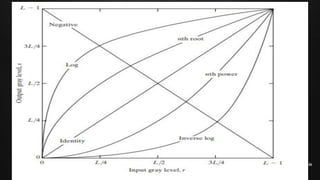
Basic gray level transformation functions
Enhancing an image provides better contrast and a more detailed image as compared
to non enhanced image.
The transformation function has been given below
S=T(r)
where r is the pixels of the input image and s is the pixels of the output image. T is a
transformation function that maps each value of r to each value of s.
Image enhancement can be done through gray level transformations
There are three basic gray level transformation.
•Linear
•Log Transformation
•Power – law Transformation
Namitha Ramachandran
Linear transformation
First, we will look at the linear transformation. The linear transformation includes
simple identity and negative transformation.
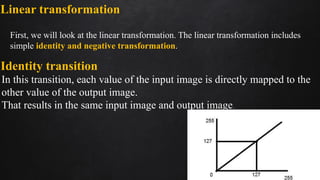
Identity transition
In this transition, each value of the input image is directly mapped to the
other value of the output image.
That results in the same input image and output image.
Namitha Ramachandran
Negative transformation
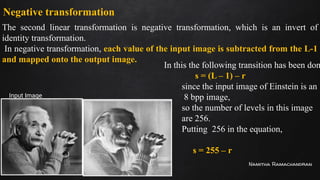
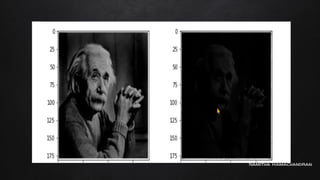
The second linear transformation is negative transformation, which is an invert of
identity transformation.
In negative transformation, each value of the input image is subtracted from the L-1
and mapped onto the output image.
Input Image
In this the following transition has been don
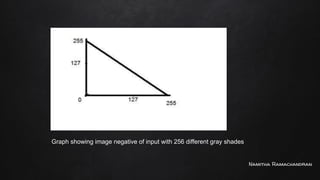
s = (L – 1) – r
since the input image of Einstein is an
8 bpp image,
so the number of levels in this image
are 256.
Putting 256 in the equation,
we get
s = 255 – r
Namitha Ramachandran
Graph showing image negative of input with 256 different gray shades
Namitha Ramachandran
Logarithmic transformations
Logarithmic transformation further contains two types of transformation.
Log transformation and inverse log transformation.
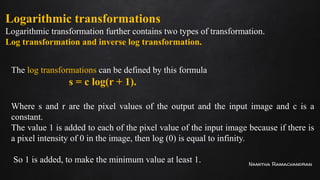
The log transformations can be defined by this formula
s = c log(r + 1).
Where s and r are the pixel values of the output and the input image and c is a
constant.
The value 1 is added to each of the pixel value of the input image because if there is
a pixel intensity of 0 in the image, then log (0) is equal to infinity.
So 1 is added, to make the minimum value at least 1.
Namitha Ramachandran
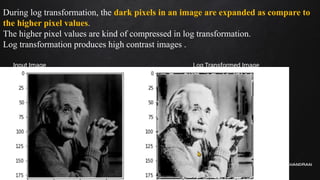
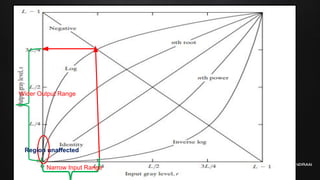
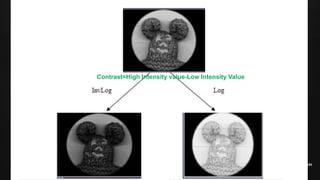
During log transformation, the dark pixels in an image are expanded as compare to
the higher pixel values.
The higher pixel values are kind of compressed in log transformation.
Log transformation produces high contrast images .
Input Image Log Transformed Image
Namitha Ramachandran
Narrow Input Range
Wider Output Range
Region unaffected
Namitha Ramachandran
Inverse log transformation
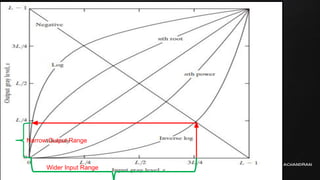
The inverse log transform is opposite to the log transform.
Higher input pixel value, lower output pixel value.
Low contrast output image.
Namitha Ramachandran
Wider Input Range
Narrow Output Range
Namitha Ramachandran
Contrast=High Intensity value-Low Intensity Value
Namitha Ramachandran
Power–Law (Gamma) transformations
Power Law Transformation is of two types of transformation nth
power transformation and nth root transformation.
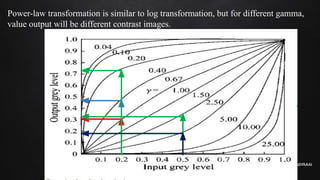
s=cr^γ
Variation in the value of γ varies the enhancement of the images. C is constant.
Different display devices / monitors have their own gamma correction, that’s why they
display their image at different intensity.
This type of transformation is used for enhancing images for a different types of display
devices. (Gamma Correction)
The gamma of different display devices is different.
For example, Gamma of CRT lies in between 1.8 to 2.5,
Namitha Ramachandran
Power-law transformation is similar to log transformation, but for different gamma,
value output will be different contrast images.
Namitha Ramachandran
18
COMPUTER GRAPHICS
&
IMAGE PROCESSING
MODULE 5
CONTRAST STRETCHING
Namitha Ramachandran
Piece-wise Linear Transformation
Piece-wise Linear Transformation is type of gray level
transformation that is used for image enhancement.
It is a spatial domain method. It is used for the manipulation of an
image so that the result is more suitable than the original for a
specific application.
Rather than using a well-defined mathematical function, we can use
arbitrary user-defined transforms
Namitha Ramachandran
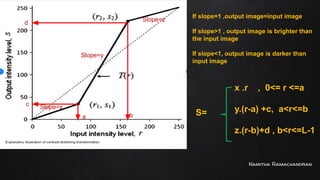
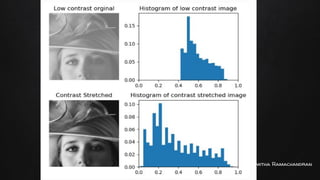
Contrast Stretching:
Low contrast images occur often due to improper illumination or
non-linearly or small dynamic range of an imaging sensor. It increases
the dynamic range of grey levels in the image.
Contrast stretching is a process that expands the range of intensity
levels in an image so that it spans the full intensity range of the
recording medium or display device.
Namitha Ramachandran
If slope=1 ,output image=input image
If slope>1 , output image is brighter than
the input image
If slope<1, output image is darker than
input image
a b
c
d
Slope=x
Slope=y
Slope=z
S=
x .r , 0<= r <=a
y.(r-a) +c, a<r<=b
z.(r-b)+d , b<r<=L-1
Namitha Ramachandran
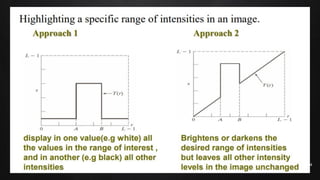
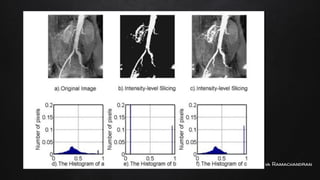
Intensity Level slicing
This technique is used to highlight a specific range of gray levels in a given image
(thresholding).
Other levels can be suppressed or maintained – Useful for highlighting features in
an image.
Two basic themes are:
One approach is to display a high value for all gray levels in the range of interest
and a low value for all other gray levels.
The second approach, based on the transformation brightens the desired range of
gray levels but preserves gray levels unchanged.
Namitha Ramachandran
26
COMPUTER GRAPHICS
&
IMAGE PROCESSING
MODULE 5
Histogram processing
Histogram Equalization
Namitha Ramachandran
Histogram Processing
In digital image processing, the histogram is used for the graphical
representation of a digital image.
In a graph, the horizontal axis of the graph is used to represent tonal
variations whereas the vertical axis is used to represent the number of
pixels in that particular pixel.
Namitha Ramachandran
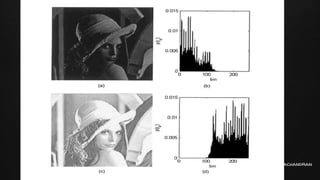
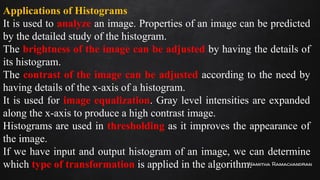
Applications of Histograms
It is used to analyze an image. Properties of an image can be predicted
by the detailed study of the histogram.
The brightness of the image can be adjusted by having the details of
its histogram.
The contrast of the image can be adjusted according to the need by
having details of the x-axis of a histogram.
It is used for image equalization. Gray level intensities are expanded
along the x-axis to produce a high contrast image.
Histograms are used in thresholding as it improves the appearance of
the image.
If we have input and output histogram of an image, we can determine
which type of transformation is applied in the algorithm.
Namitha Ramachandran
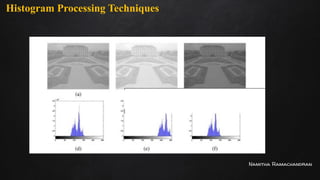
Histogram Processing Techniques
Namitha Ramachandran
Histogram Equalisation
Histogram Equalization is a computer image processing technique used
to improve contrast in images.
Histogram equalization is used for equalizing all the pixel values of an
image, so that a uniformly flattened histogram is produced.
Histogram equalization increases the dynamic range of pixel values and
makes an equal count of pixels at each level which produces a flat
histogram with high contrast image.
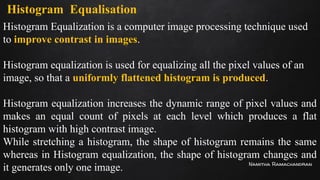
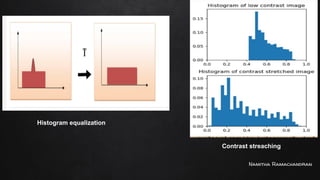
While stretching a histogram, the shape of histogram remains the same
whereas in Histogram equalization, the shape of histogram changes and
it generates only one image.
Namitha Ramachandran
Histogram equalization
Contrast streaching
Namitha Ramachandran
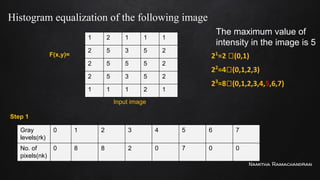
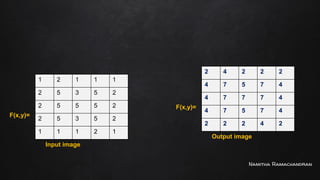
Histogram equalization of the following image
1 2 1 1 1
2 5 3 5 2
2 5 5 5 2
2 5 3 5 2
1 1 1 2 1
F(x,y)=
The maximum value of
intensity in the image is 5
21
=2 🡪(0,1)
22
=4🡪(0,1,2,3)
23
=8🡪(0,1,2,3,4,5,6,7)
Input image
Gray
levels(rk)
0 1 2 3 4 5 6 7
No. of
pixels(nk)
0 8 8 2 0 7 0 0
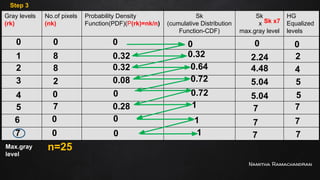
Step 1
Namitha Ramachandran
Gray
levels(rk)
0 1 2 3 4 5 6 7
No. of
pixels(nk)
0 8 8 2 0 7 0 0
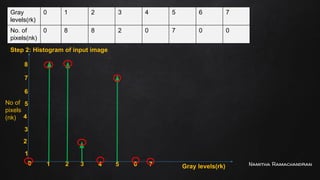
Step 2: Histogram of input image
0 1 2 3 4 5 6 7 Gray levels(rk)
1
2
3
4
5
6
7
No of
pixels
(nk)
8
Namitha Ramachandran
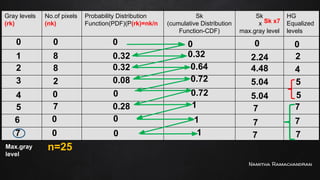
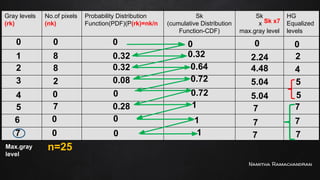
Gray levels
(rk)
No.of pixels
(nk)
Probability Density
Function(PDF)(P(rk)=nk/n)
Sk
(cumulative Distribution
Function-CDF)
Sk
x
max.gray level
HG
Equalized
levels
0
1
2
3
4
5
6
7
Max.gray
level
0
8
8
2
0
7
0
0
n=25
0
0.32
0.32
0.08
0
0.28
0
0
0
0.32
0.64
0.72
0.72
1
1
1
Sk x7
0
2.24
4.48
5.04
5.04
7
7
7
0
2
4
5
5
7
7
7
Step 3
Namitha Ramachandran
Gray levels
(rk)
No.of pixels
(nk)
Probability Distribution
Function(PDF)(P(rk)=nk/n
Sk
(cumulative Distribution
Function-CDF)
Sk
x
max.gray level
HG
Equalized
levels
0
1
2
3
4
5
6
7
Max.gray
level
0
8
8
2
0
7
0
0
n=25
0
0.32
0.32
0.08
0
0.28
0
0
0
0.32
0.64
0.72
0.72
1
1
1
Sk x7
0
2.24
4.48
5.04
5.04
7
7
7
0
2
4
5
5
7
7
7
Namitha Ramachandran
1 2 1 1 1
2 5 3 5 2
2 5 5 5 2
2 5 3 5 2
1 1 1 2 1
F(x,y)=
Input image
2 4 2 2 2
4 7 5 7 4
4 7 7 7 4
4 7 5 7 4
2 2 2 4 2
F(x,y)=
Output image
Namitha Ramachandran
Gray levels
(rk)
No.of pixels
(nk)
Probability Distribution
Function(PDF)(P(rk)=nk/n
Sk
(cumulative Distribution
Function-CDF)
Sk
x
max.gray level
HG
Equalized
levels
0
1
2
3
4
5
6
7
Max.gray
level
0
8
8
2
0
7
0
0
n=25
0
0.32
0.32
0.08
0
0.28
0
0
0
0.32
0.64
0.72
0.72
1
1
1
Sk x7
0
2.24
4.48
5.04
5.04
7
7
7
0
2
4
5
5
7
7
7
Namitha Ramachandran
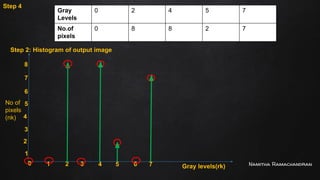
Step 2: Histogram of output image
0 1 2 3 4 5 6 7 Gray levels(rk)
1
2
3
4
5
6
7
No of
pixels
(nk)
8
Gray
Levels
0 2 4 5 7
No.of
pixels
0 8 8 2 7
Step 4
Namitha Ramachandran
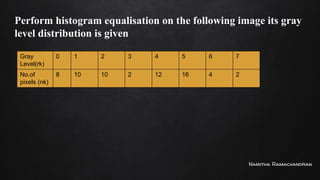
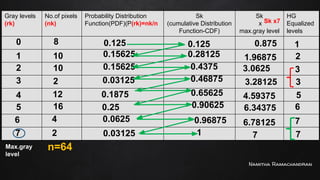
Perform histogram equalisation on the following image its gray
level distribution is given
Gray
Level(rk)
0 1 2 3 4 5 6 7
No.of
pixels (nk)
8 10 10 2 12 16 4 2
Namitha Ramachandran
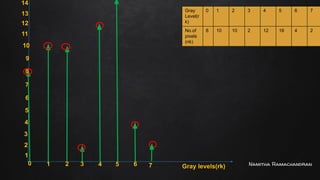
0 1 2 3 4 5 6 7 Gray levels(rk)
1
2
3
4
5
6
7
8
Gray
Level(r
k)
0 1 2 3 4 5 6 7
No.of
pixels
(nk)
8 10 10 2 12 16 4 2
9
10
11
12
13
14
Namitha Ramachandran
Gray levels
(rk)
No.of pixels
(nk)
Probability Distribution
Function(PDF)(P(rk)=nk/n
Sk
(cumulative Distribution
Function-CDF)
Sk
x
max.gray level
HG
Equalized
levels
0
1
2
3
4
5
6
7
Max.gray
level
8
10
10
2
12
16
4
2
n=64
0.125
0.15625
0.15625
0.03125
0.1875
0.25
0.0625
0.03125
0.125
0.28125
0.4375
0.46875
0.65625
0.90625
0.96875
1
Sk x7
0.875
1.96875
3.0625
3.28125
4.59375
6.34375
6.78125
7
1
2
3
3
5
6
7
7
Namitha Ramachandran
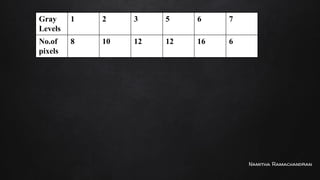
Gray
Levels
1 2 3 5 6 7
No.of
pixels
8 10 12 12 16 6
Namitha Ramachandran
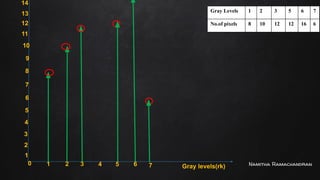
0 1 2 3 4 5 6 7 Gray levels(rk)
1
2
3
4
5
6
7
8
9
10
11
12
13
14
Gray Levels 1 2 3 5 6 7
No.of pixels 8 10 12 12 16 6
Namitha Ramachandran
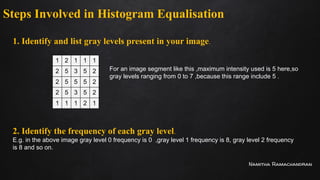
Steps Involved in Histogram Equalisation
1. Identify and list gray levels present in your image.
1 2 1 1 1
2 5 3 5 2
2 5 5 5 2
2 5 3 5 2
1 1 1 2 1
For an image segment like this ,maximum intensity used is 5 here,so
gray levels ranging from 0 to 7 ,because this range include 5 .
2. Identify the frequency of each gray level.
E.g. in the above image gray level 0 frequency is 0 ,gray level 1 frequency is 8, gray level 2 frequency
is 8 and so on.
Namitha Ramachandran
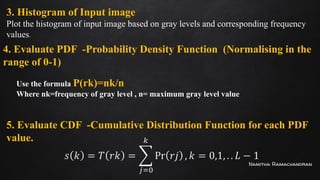
3. Histogram of Input image
Plot the histogram of input image based on gray levels and corresponding frequency
values.
4. Evaluate PDF -Probability Density Function (Normalising in the
range of 0-1)
Use the formula P(rk)=nk/n
Where nk=frequency of gray level , n= maximum gray level value
5. Evaluate CDF -Cumulative Distribution Function for each PDF
value.
Namitha Ramachandran
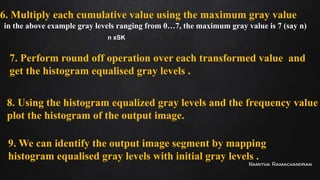
6. Multiply each cumulative value using the maximum gray value
in the above example gray levels ranging from 0…7, the maximum gray value is 7 (say n)
7. Perform round off operation over each transformed value and
get the histogram equalised gray levels .
8. Using the histogram equalized gray levels and the frequency value
plot the histogram of the output image.
9. We can identify the output image segment by mapping
histogram equalised gray levels with initial gray levels .
n xSK
Namitha Ramachandran
THANK YOU
Namitha Ramachandran
49
COMPUTER GRAPHICS
&
IMAGE PROCESSING
MODULE 5
Basics of spatial filtering
(Smoothing Linear Filters)
Namitha Ramachandran
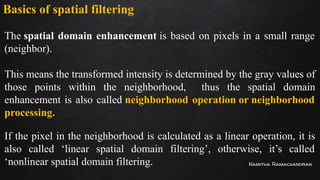
Basics of spatial filtering
The spatial domain enhancement is based on pixels in a small range
(neighbor).
This means the transformed intensity is determined by the gray values of
those points within the neighborhood, thus the spatial domain
enhancement is also called neighborhood operation or neighborhood
processing.
If the pixel in the neighborhood is calculated as a linear operation, it is
also called ‘linear spatial domain filtering’, otherwise, it’s called
‘nonlinear spatial domain filtering.
Namitha Ramachandran
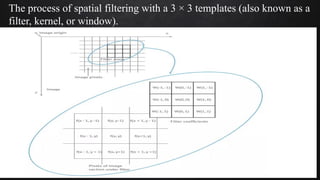
The process of spatial filtering with a 3 × 3 templates (also known as a
filter, kernel, or window).
Namitha Ramachandran
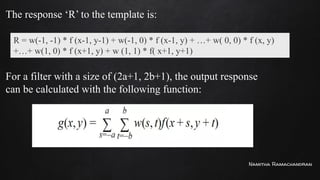
The response ‘R’ to the template is:
For a filter with a size of (2a+1, 2b+1), the output response
can be calculated with the following function:
R = w(-1, -1) * f (x-1, y-1) + w(-1, 0) * f (x-1, y) + …+ w( 0, 0) * f (x, y)
+…+ w(1, 0) * f (x+1, y) + w (1, 1) * f( x+1, y+1)
Namitha Ramachandran
Smoothing Linear Filters
Image smoothing is a digital image processing technique that reduces and suppresses
image noises, also used for image blurring.
Remove small details from an image prior to object extraction.
Bridge small gaps in lines or curves.
In the spatial domain, neighborhood averaging can generally be used to achieve the
purpose of smoothing.
Commonly seen smoothing filters include average smoothing, Gaussian smoothing,
and adaptive smoothing.
It includes average linear filter and order statistics nonlinear filters.
Namitha Ramachandran
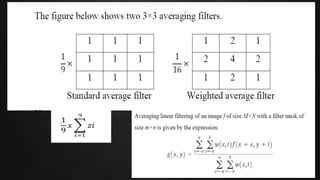
Average Filters
Also referred to as Lowpass filters.
The idea is to replace the value of every pixel in an image by the average of the
intensity levels in the neighbourhood defined by the filter mask.
The application is noise reduction.
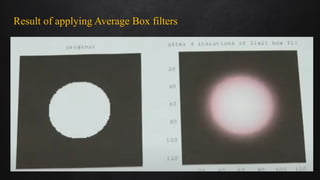
Edges are an important part of an image, applying average filters has undesirable side
effects of blurring an image.
Namitha Ramachandran
Result of applying Average Box filters
Namitha Ramachandran
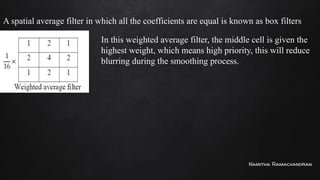
A spatial average filter in which all the coefficients are equal is known as box filters.
In this weighted average filter, the middle cell is given the
highest weight, which means high priority, this will reduce
blurring during the smoothing process.
Namitha Ramachandran
20 30 50 80 100
30 20 80 100 100
20 30 60 10 110
40 30 70 40 100
50 60 80 30 90
Apply standard average filter for pixel at (3,3)
1 1 1
1 1 1
1 1 1
1/9 [20x1+80x1+100x1+30x1+60x1+10x1+30x1+70x1+40x1]
Pixel at (3,3) is 60
Namitha Ramachandran
20 30 50 80 100
30 20 80 100 100
20 30 60 10 110
40 30 70 40 100
50 60 80 30 90
Apply standard average filter for pixel at (1,1)
1/9 [0x1+0x1+0x1+0x1+20x1+30x1+0x1+30x1+20x1]
Pixel at (1,1) is 20
0
0
0
0
0
0 0 0 0 0 0
1 1 1
1 1 1
1 1 1
Namitha Ramachandran
20 30 50 80 100
30 20 80 100 100
20 30 60 10 110
40 30 70 40 100
50 60 80 30 90
Apply standard average filter for pixel at (2,3)
1/16 [30x1+50x2+80x1+20x2+80x4+100x2+30x1+60x2+10x1]
Pixel at (2,3) is 80
1 2 1
2 4 2
1 2 1
Namitha Ramachandran
Order static(Nonlinear ) smoothing Filters
The response of the filter depends on the ordering or ranking of the pixels in the image.
Replacing the center pixel value with the value determined by the ranking result.
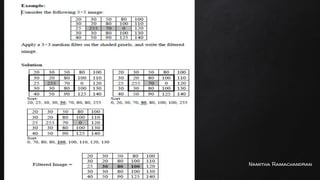
1. Median Filter
The filter replaces the value of a pixel in the image by the median of the gray levels
encompassed by the filter.
Provide excellent noise reduction compared to linear smoothing filters.
Cause less blurring in the image.
Most effective for removing impulse noise (salt and pepper noise).
Namitha Ramachandran
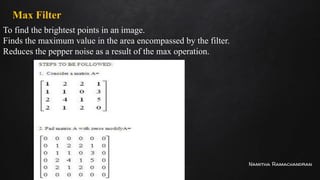
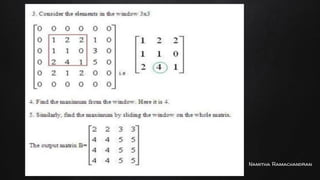
Max Filter
To find the brightest points in an image.
Finds the maximum value in the area encompassed by the filter.
Reduces the pepper noise as a result of the max operation.
Namitha Ramachandran
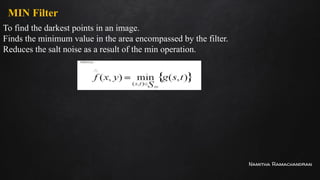
MIN Filter
To find the darkest points in an image.
Finds the minimum value in the area encompassed by the filter.
Reduces the salt noise as a result of the min operation.
Namitha Ramachandran
66
COMPUTER GRAPHICS
&
IMAGE PROCESSING
MODULE 5
Basics of spatial filtering
Sharpening spatial filters-Gradient and Laplacian
Namitha Ramachandran
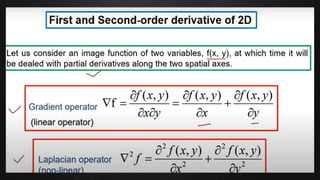
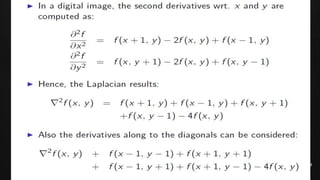
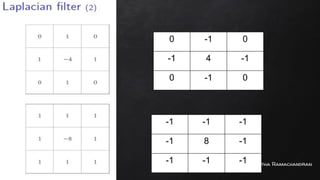
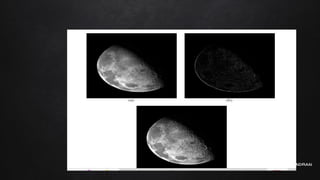
Sharpening spatial filters-Gradient and Laplacian
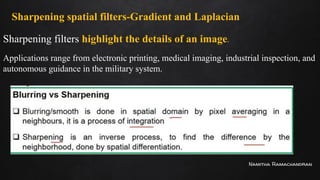
Sharpening filters highlight the details of an image.
Applications range from electronic printing, medical imaging, industrial inspection, and
autonomous guidance in the military system.
Namitha Ramachandran
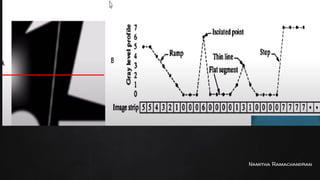
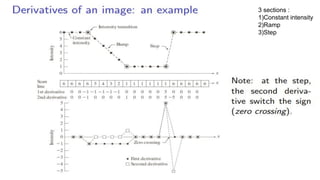
3 sections :
1)Constant intensity
2)Ramp
3)Step
Namitha Ramachandran
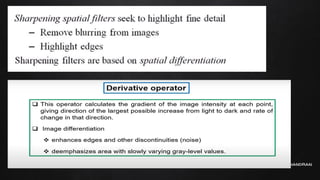
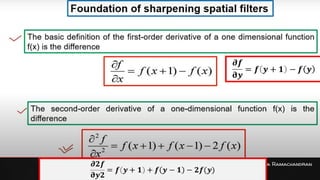
Area of constant intensity: both first-order derivatives and second-order derivatives are
zero.
First order derivative nonzero at onset of ramp and step .
The second-order derivative is nonzero at the onset and end of both the ramp and step.
First-order derivative is nonzero and the second is zero along the ramp.
1st
derivative detects thick edges while the second derivative detects thin edges.
2nd
derivative has a much stronger response at the gray-level step than 1st
derivative.
Second-order derivative enhances fine details(thin edges,lines, including noise.)
than that of 1st
order derivative.
Namitha Ramachandran
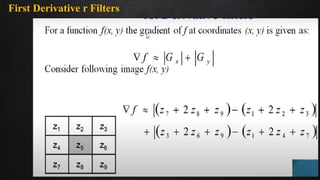
First Derivative r Filters
Namitha Ramachandran
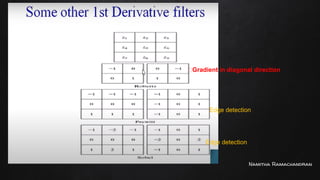
🡨Gradient in diagonal direction
Edge detection
Edge detection
Namitha Ramachandran
0 -1 0
-1 4 -1
0 -1 0
-1 -1 -1
-1 8 -1
-1 -1 -1
Namitha Ramachandran
Fundamentals of Image Segmentation.
Image Segmentation is the process by which a digital image is partitioned into
various subgroups (of pixels) called Image Objects, which can reduce the
complexity of the image, and thus analyzing the image becomes simpler.
Similarity Detection (Region Approach)
This fundamental approach relies on detecting similar pixels in an image – based on a
threshold, region growing, region spreading, and region merging so does
classification, which detects similarity based on a pre-defined (known) set of features.
Discontinuity Detection (Boundary Approach)
This is a stark opposite of the similarity detection approach where the algorithm
rather searches for discontinuity. Image Segmentation Algorithms like Edge
Detection, Point Detection, Line Detection follow this approach – where edges get
detected based on various metrics of discontinuity like intensity, etc
Namitha Ramachandran
Thresholding - Basics of Intensity thresholding and Global
Thresholding.
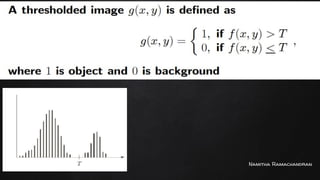
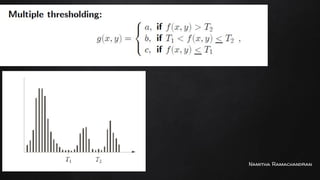
Image thresholding is a technique employed to facilitate easy image
segmentation for various image processing tasks.
Simple thresholding technique (Binary Thresholding)
In a simple thresholding technique, a standard threshold value is set and each pixel
value is compared with the threshold value. If the pixel value is less than the
mentioned threshold value then the value is set to 0 or else it is set to the maximum
value.
Namitha Ramachandran
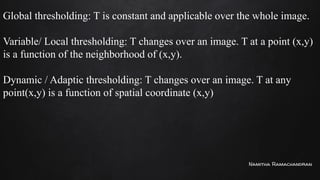
Global thresholding: T is constant and applicable over the whole image.
Variable/ Local thresholding: T changes over an image. T at a point (x,y)
is a function of the neighborhood of (x,y).
Dynamic / Adaptic thresholding: T changes over an image. T at any
point(x,y) is a function of spatial coordinate (x,y)
Namitha Ramachandran
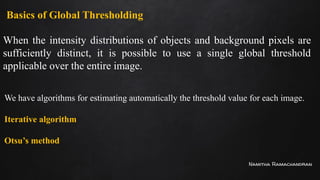
Basics of Global Thresholding
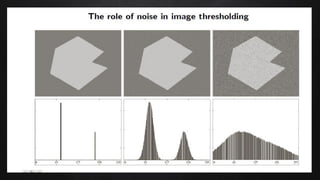
When the intensity distributions of objects and background pixels are
sufficiently distinct, it is possible to use a single global threshold
applicable over the entire image.
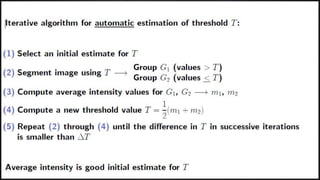
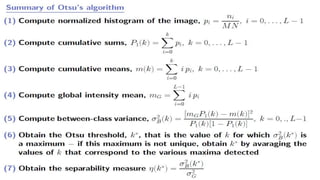
We have algorithms for estimating automatically the threshold value for each image.
Iterative algorithm
Otsu’s method
Namitha Ramachandran
89
COMPUTER GRAPHICS
&
IMAGE PROCESSING
MODULE 5
FUNDAMENTALS OF IMAGE
SEGMENTATION
(Region growing & region splitting and merging)
Namitha Ramachandran
Fundamentals of Image Segmentation.
Image Segmentation is the process by which a digital image is partitioned into
various subgroups (of pixels) called Image Objects, which can reduce the
complexity of the image, and thus analyzing the image becomes simpler.
Similarity Detection (Region Approach)
This fundamental approach relies on detecting similar pixels in an image – based on a
threshold, region growing, region spreading, and region merging so does
classification, which detects similarity based on a pre-defined (known) set of features.
Discontinuity Detection (Boundary Approach)
This is a stark opposite of the similarity detection approach where the algorithm
rather searches for discontinuity. Image Segmentation Algorithms like Edge
Detection, Point Detection, Line Detection follow this approach – where edges get
detected based on various metrics of discontinuity like intensity, etc
Namitha Ramachandran
Region-based Segmentation Approach - Region Growing, Region Splitting and
Merging
A region can be classified as a group of connected pixels exhibiting similar properties.
The similarity between pixels can be in terms of intensity, color, etc. In this type of
segmentation, some predefined rules must be obeyed by a pixel to be classified into
similar pixel regions. Region-based segmentation methods are preferred over
edge-based segmentation methods in case of a noisy image. Region-Based techniques
are further classified into 2 types based on the approaches they follow.
Region growing method
Region splitting and merging method
Namitha Ramachandran
Region Growing Technique
In the case of the Region growing method, we start with some pixel as the seed pixel
and then check the adjacent pixels.
If the adjacent pixels abide by the predefined rules, then that pixel is added to the
region of the seed pixel and the following process continues till there is no similarity
left. This method follows the bottom-up approach.
In case of a region growing, the preferred rule can be set as a threshold.
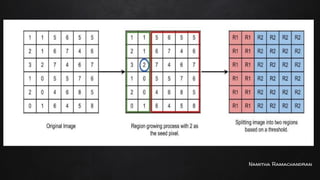
For example: Consider a seed pixel of 2 in the given image and a threshold value
of 3, if a pixel has a value less than 3 then it will be considered inside the seed
pixel region. Otherwise, it will be considered in another region.
Hence 2 regions are formed in the following image based on a threshold value of 3.
Namitha Ramachandran
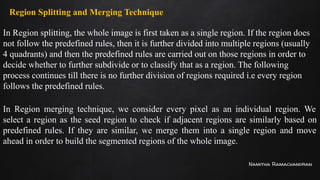
Region Splitting and Merging Technique
In Region splitting, the whole image is first taken as a single region. If the region does
not follow the predefined rules, then it is further divided into multiple regions (usually
4 quadrants) and then the predefined rules are carried out on those regions in order to
decide whether to further subdivide or to classify that as a region. The following
process continues till there is no further division of regions required i.e every region
follows the predefined rules.
In Region merging technique, we consider every pixel as an individual region. We
select a region as the seed region to check if adjacent regions are similarly based on
predefined rules. If they are similar, we merge them into a single region and move
ahead in order to build the segmented regions of the whole image.
Namitha Ramachandran
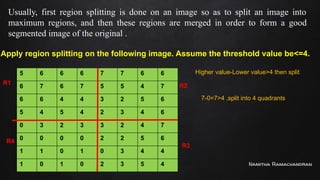
Usually, first region splitting is done on an image so as to split an image into
maximum regions, and then these regions are merged in order to form a good
segmented image of the original .
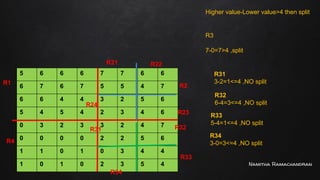
Apply region splitting on the following image. Assume the threshold value be<=4.
5 6 6 6 7 7 6 6
6 7 6 7 5 5 4 7
6 6 4 4 3 2 5 6
5 4 5 4 2 3 4 6
0 3 2 3 3 2 4 7
0 0 0 0 2 2 5 6
1 1 0 1 0 3 4 4
1 0 1 0 2 3 5 4
Higher value-Lower value>4 then split
7-0=7>4 ,split into 4 quadrants
R1 R2
R3
R4
Namitha Ramachandran
5 6 6 6 7 7 6 6
6 7 6 7 5 5 4 7
6 6 4 4 3 2 5 6
5 4 5 4 2 3 4 6
0 3 2 3 3 2 4 7
0 0 0 0 2 2 5 6
1 1 0 1 0 3 4 4
1 0 1 0 2 3 5 4
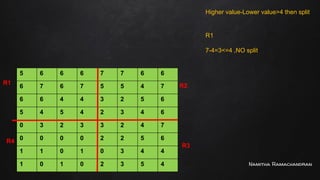
Higher value-Lower value>4 then split
R1
7-4=3<=4 ,NO split
R1 R2
R3
R4
Namitha Ramachandran
5 6 6 6 7 7 6 6
6 7 6 7 5 5 4 7
6 6 4 4 3 2 5 6
5 4 5 4 2 3 4 6
0 3 2 3 3 2 4 7
0 0 0 0 2 2 5 6
1 1 0 1 0 3 4 4
1 0 1 0 2 3 5 4
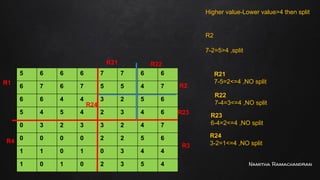
Higher value-Lower value>4 then split
R2
7-2=5>4 ,split
R1 R2
R3
R4
R21 R22
R23
R24
R21
7-5=2<=4 ,NO split
R22
7-4=3<=4 ,NO split
R23
6-4=2<=4 ,NO split
R24
3-2=1<=4 ,NO split
Namitha Ramachandran
5 6 6 6 7 7 6 6
6 7 6 7 5 5 4 7
6 6 4 4 3 2 5 6
5 4 5 4 2 3 4 6
0 3 2 3 3 2 4 7
0 0 0 0 2 2 5 6
1 1 0 1 0 3 4 4
1 0 1 0 2 3 5 4
Higher value-Lower value>4 then split
R3
7-0=7>4 ,split
R1 R2
R33
R4
R21 R22
R23
R24
R31
3-2=1<=4 ,NO split
R32
6-4=3<=4 ,NO split
R33
5-4=1<=4 ,NO split
R34
3-0=3<=4 ,NO split
R31 R32
R34
Namitha Ramachandran
5 6 6 6 7 7 6 6
6 7 6 7 5 5 4 7
6 6 4 4 3 2 5 6
5 4 5 4 2 3 4 6
0 3 2 3 3 2 4 7
0 0 0 0 2 2 5 6
1 1 0 1 0 3 4 4
1 0 1 0 2 3 5 4
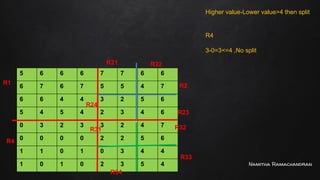
Higher value-Lower value>4 then split
R4
3-0=3<=4 ,No split
R1 R2
R33
R4
R21 R22
R23
R24
R31 R32
R34
Namitha Ramachandran
5 6 6 6 7 7 6 6
6 7 6 7 5 5 4 7
6 6 4 4 3 2 5 6
5 4 5 4 2 3 4 6
0 3 2 3 3 2 4 7
0 0 0 0 2 2 5 6
1 1 0 1 0 3 4 4
1 0 1 0 2 3 5 4
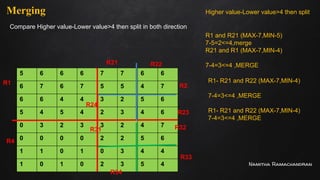
Higher value-Lower value>4 then split
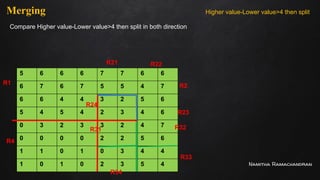
R1 and R21 (MAX-7,MIN-5)
7-5=2<=4,merge
R21 and R1 (MAX-7,MIN-4)
7-4=3<=4 ,MERGE
R1 R2
R33
R4
R21 R22
R23
R24
R31 R32
R34
Merging
R1- R21 and R22 (MAX-7,MIN-4)
7-4=3<=4 ,MERGE
R1- R21 and R22 (MAX-7,MIN-4)
7-4=3<=4 ,MERGE
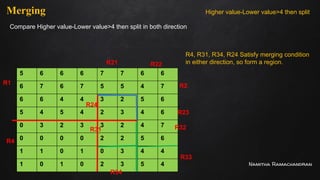
Compare Higher value-Lower value>4 then split in both direction
Namitha Ramachandran
5 6 6 6 7 7 6 6
6 7 6 7 5 5 4 7
6 6 4 4 3 2 5 6
5 4 5 4 2 3 4 6
0 3 2 3 3 2 4 7
0 0 0 0 2 2 5 6
1 1 0 1 0 3 4 4
1 0 1 0 2 3 5 4
Higher value-Lower value>4 then split
R1 R2
R33
R4
R21 R22
R23
R24
R31 R32
R34
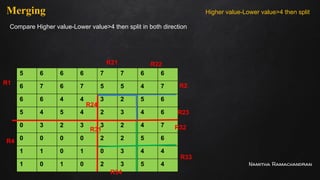
Merging
Compare Higher value-Lower value>4 then split in both direction
Namitha Ramachandran
5 6 6 6 7 7 6 6
6 7 6 7 5 5 4 7
6 6 4 4 3 2 5 6
5 4 5 4 2 3 4 6
0 3 2 3 3 2 4 7
0 0 0 0 2 2 5 6
1 1 0 1 0 3 4 4
1 0 1 0 2 3 5 4
Higher value-Lower value>4 then split
R1 R2
R33
R4
R21 R22
R23
R24
R31 R32
R34
Merging
Compare Higher value-Lower value>4 then split in both direction
Namitha Ramachandran
5 6 6 6 7 7 6 6
6 7 6 7 5 5 4 7
6 6 4 4 3 2 5 6
5 4 5 4 2 3 4 6
0 3 2 3 3 2 4 7
0 0 0 0 2 2 5 6
1 1 0 1 0 3 4 4
1 0 1 0 2 3 5 4
Higher value-Lower value>4 then split
R1 R2
R33
R4
R21 R22
R23
R24
R31 R32
R34
Merging
Compare Higher value-Lower value>4 then split in both direction
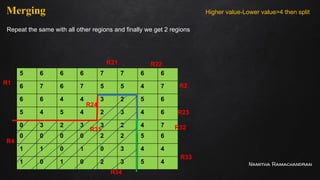
R4, R31, R34, R24 Satisfy merging condition
in either direction, so form a region.
Namitha Ramachandran
5 6 6 6 7 7 6 6
6 7 6 7 5 5 4 7
6 6 4 4 3 2 5 6
5 4 5 4 2 3 4 6
0 3 2 3 3 2 4 7
0 0 0 0 2 2 5 6
1 1 0 1 0 3 4 4
1 0 1 0 2 3 5 4
Higher value-Lower value>4 then split
R1 R2
R33
R4
R21 R22
R23
R24
R31 R32
R34
Merging
Repeat the same with all other regions and finally we get 2 regions
Namitha Ramachandran
Edge Detection - Edge Operators- Sobel and Prewitt
Edge detection is a technique of image processing used to identify points in a digital
image with discontinuities, simply to say, sharp changes in the image brightness. These
points where the image brightness varies sharply are called the edges (or boundaries)
of the image.
With the help of edges and lines, an object’s structure is known. That is why
extracting the edges is a very important technique in graphics processing and feature
extraction.
Namitha Ramachandran
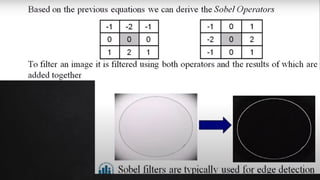
Sobel Edge Detection Operator
The Sobel edge detection operator extracts all the edges of an image, without
worrying about the directions. The main advantage of the Sobel operator is that it
provides differencing and smoothing effect.
Sobel edge detection operator is implemented as the sum of two directional
edges. And the resulting image is a unidirectional outline in the original image.
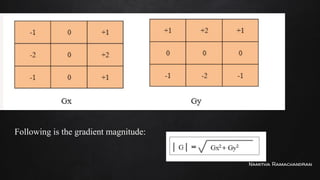
Sobel Edge detection operator consists of 3x3 convolution kernels. Gx is a simple
kernel and Gy is rotated by 90°.
These Kernels are applied separately to the input image.
Namitha Ramachandran
Following is the gradient magnitude:
Namitha Ramachandran
Advantages
Simple and time-efficient computation
Very easy at searching for smooth edges
Limitations:
Highly sensitive to noise
Not very accurate in edge detection
Detect with thick and rough edges does not give appropriate results
Diagonal direction points are not preserved always
Namitha Ramachandran
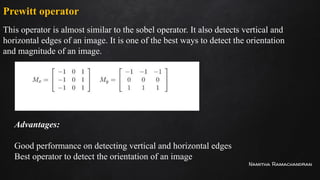
Prewitt operator
This operator is almost similar to the sobel operator. It also detects vertical and
horizontal edges of an image. It is one of the best ways to detect the orientation
and magnitude of an image.
Advantages:
Good performance on detecting vertical and horizontal edges
Best operator to detect the orientation of an image
Namitha Ramachandran
Limitations:
The magnitude of the coefficient is fixed and cannot be changed
Diagonal direction points are not preserved always
Namitha Ramachandran
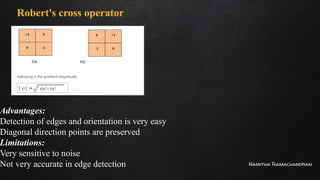
Robert's cross operator
Advantages:
Detection of edges and orientation is very easy
Diagonal direction points are preserved
Limitations:
Very sensitive to noise
Not very accurate in edge detection
Namitha Ramachandran
THANK YOU

Computer graphics is drawing pictures by using computer aided methods and algorithms.

  • 1.
  • 2.
    Namitha Ramachandran 2 COMPUTER GRAPHICS & IMAGEPROCESSING MODULE 5 GRAY LEVEL TRANSFORMATIONS
  • 3.
    Namitha Ramachandran Module -5 (Image Enhancement in Spatial Domain and Image Segmentation) Basic gray level transformation functions - Log transformations, Power-Law transformations, Contrast stretching. Histogram equalization. Basics of spatial filtering - Smoothing spatial filter- Linear and nonlinear filters, and Sharpening spatial filters-Gradient and Laplacian. Fundamentals of Image Segmentation. Thresholding - Basics of Intensity thresholding and Global Thresholding. Region based Approach - Region Growing, Region Splitting and Merging. Edge Detection - Edge Operators- Sobel and Prewitt.
  • 4.
    Namitha Ramachandran Basic graylevel transformation functions Enhancing an image provides better contrast and a more detailed image as compared to non enhanced image. The transformation function has been given below S=T(r) where r is the pixels of the input image and s is the pixels of the output image. T is a transformation function that maps each value of r to each value of s. Image enhancement can be done through gray level transformations There are three basic gray level transformation. •Linear •Log Transformation •Power – law Transformation
  • 5.
    Namitha Ramachandran Linear transformation First,we will look at the linear transformation. The linear transformation includes simple identity and negative transformation. Identity transition In this transition, each value of the input image is directly mapped to the other value of the output image. That results in the same input image and output image.
  • 6.
    Namitha Ramachandran Negative transformation Thesecond linear transformation is negative transformation, which is an invert of identity transformation. In negative transformation, each value of the input image is subtracted from the L-1 and mapped onto the output image. Input Image In this the following transition has been don s = (L – 1) – r since the input image of Einstein is an 8 bpp image, so the number of levels in this image are 256. Putting 256 in the equation, we get s = 255 – r
  • 7.
    Namitha Ramachandran Graph showingimage negative of input with 256 different gray shades
  • 8.
    Namitha Ramachandran Logarithmic transformations Logarithmictransformation further contains two types of transformation. Log transformation and inverse log transformation. The log transformations can be defined by this formula s = c log(r + 1). Where s and r are the pixel values of the output and the input image and c is a constant. The value 1 is added to each of the pixel value of the input image because if there is a pixel intensity of 0 in the image, then log (0) is equal to infinity. So 1 is added, to make the minimum value at least 1.
  • 9.
    Namitha Ramachandran During logtransformation, the dark pixels in an image are expanded as compare to the higher pixel values. The higher pixel values are kind of compressed in log transformation. Log transformation produces high contrast images . Input Image Log Transformed Image
  • 10.
    Namitha Ramachandran Narrow InputRange Wider Output Range Region unaffected
  • 11.
    Namitha Ramachandran Inverse logtransformation The inverse log transform is opposite to the log transform. Higher input pixel value, lower output pixel value. Low contrast output image.
  • 12.
    Namitha Ramachandran Wider InputRange Narrow Output Range
  • 13.
  • 14.
  • 15.
    Namitha Ramachandran Power–Law (Gamma)transformations Power Law Transformation is of two types of transformation nth power transformation and nth root transformation. s=cr^γ Variation in the value of γ varies the enhancement of the images. C is constant. Different display devices / monitors have their own gamma correction, that’s why they display their image at different intensity. This type of transformation is used for enhancing images for a different types of display devices. (Gamma Correction) The gamma of different display devices is different. For example, Gamma of CRT lies in between 1.8 to 2.5,
  • 16.
    Namitha Ramachandran Power-law transformationis similar to log transformation, but for different gamma, value output will be different contrast images.
  • 17.
  • 18.
    Namitha Ramachandran 18 COMPUTER GRAPHICS & IMAGEPROCESSING MODULE 5 CONTRAST STRETCHING
  • 19.
    Namitha Ramachandran Piece-wise LinearTransformation Piece-wise Linear Transformation is type of gray level transformation that is used for image enhancement. It is a spatial domain method. It is used for the manipulation of an image so that the result is more suitable than the original for a specific application. Rather than using a well-defined mathematical function, we can use arbitrary user-defined transforms
  • 20.
    Namitha Ramachandran Contrast Stretching: Lowcontrast images occur often due to improper illumination or non-linearly or small dynamic range of an imaging sensor. It increases the dynamic range of grey levels in the image. Contrast stretching is a process that expands the range of intensity levels in an image so that it spans the full intensity range of the recording medium or display device.
  • 21.
    Namitha Ramachandran If slope=1,output image=input image If slope>1 , output image is brighter than the input image If slope<1, output image is darker than input image a b c d Slope=x Slope=y Slope=z S= x .r , 0<= r <=a y.(r-a) +c, a<r<=b z.(r-b)+d , b<r<=L-1
  • 22.
  • 23.
    Namitha Ramachandran Intensity Levelslicing This technique is used to highlight a specific range of gray levels in a given image (thresholding). Other levels can be suppressed or maintained – Useful for highlighting features in an image. Two basic themes are: One approach is to display a high value for all gray levels in the range of interest and a low value for all other gray levels. The second approach, based on the transformation brightens the desired range of gray levels but preserves gray levels unchanged.
  • 24.
  • 25.
  • 26.
    Namitha Ramachandran 26 COMPUTER GRAPHICS & IMAGEPROCESSING MODULE 5 Histogram processing Histogram Equalization
  • 27.
    Namitha Ramachandran Histogram Processing Indigital image processing, the histogram is used for the graphical representation of a digital image. In a graph, the horizontal axis of the graph is used to represent tonal variations whereas the vertical axis is used to represent the number of pixels in that particular pixel.
  • 28.
  • 29.
    Namitha Ramachandran Applications ofHistograms It is used to analyze an image. Properties of an image can be predicted by the detailed study of the histogram. The brightness of the image can be adjusted by having the details of its histogram. The contrast of the image can be adjusted according to the need by having details of the x-axis of a histogram. It is used for image equalization. Gray level intensities are expanded along the x-axis to produce a high contrast image. Histograms are used in thresholding as it improves the appearance of the image. If we have input and output histogram of an image, we can determine which type of transformation is applied in the algorithm.
  • 30.
  • 31.
    Namitha Ramachandran Histogram Equalisation HistogramEqualization is a computer image processing technique used to improve contrast in images. Histogram equalization is used for equalizing all the pixel values of an image, so that a uniformly flattened histogram is produced. Histogram equalization increases the dynamic range of pixel values and makes an equal count of pixels at each level which produces a flat histogram with high contrast image. While stretching a histogram, the shape of histogram remains the same whereas in Histogram equalization, the shape of histogram changes and it generates only one image.
  • 32.
  • 33.
    Namitha Ramachandran Histogram equalizationof the following image 1 2 1 1 1 2 5 3 5 2 2 5 5 5 2 2 5 3 5 2 1 1 1 2 1 F(x,y)= The maximum value of intensity in the image is 5 21 =2 🡪(0,1) 22 =4🡪(0,1,2,3) 23 =8🡪(0,1,2,3,4,5,6,7) Input image Gray levels(rk) 0 1 2 3 4 5 6 7 No. of pixels(nk) 0 8 8 2 0 7 0 0 Step 1
  • 34.
    Namitha Ramachandran Gray levels(rk) 0 12 3 4 5 6 7 No. of pixels(nk) 0 8 8 2 0 7 0 0 Step 2: Histogram of input image 0 1 2 3 4 5 6 7 Gray levels(rk) 1 2 3 4 5 6 7 No of pixels (nk) 8
  • 35.
    Namitha Ramachandran Gray levels (rk) No.ofpixels (nk) Probability Density Function(PDF)(P(rk)=nk/n) Sk (cumulative Distribution Function-CDF) Sk x max.gray level HG Equalized levels 0 1 2 3 4 5 6 7 Max.gray level 0 8 8 2 0 7 0 0 n=25 0 0.32 0.32 0.08 0 0.28 0 0 0 0.32 0.64 0.72 0.72 1 1 1 Sk x7 0 2.24 4.48 5.04 5.04 7 7 7 0 2 4 5 5 7 7 7 Step 3
  • 36.
    Namitha Ramachandran Gray levels (rk) No.ofpixels (nk) Probability Distribution Function(PDF)(P(rk)=nk/n Sk (cumulative Distribution Function-CDF) Sk x max.gray level HG Equalized levels 0 1 2 3 4 5 6 7 Max.gray level 0 8 8 2 0 7 0 0 n=25 0 0.32 0.32 0.08 0 0.28 0 0 0 0.32 0.64 0.72 0.72 1 1 1 Sk x7 0 2.24 4.48 5.04 5.04 7 7 7 0 2 4 5 5 7 7 7
  • 37.
    Namitha Ramachandran 1 21 1 1 2 5 3 5 2 2 5 5 5 2 2 5 3 5 2 1 1 1 2 1 F(x,y)= Input image 2 4 2 2 2 4 7 5 7 4 4 7 7 7 4 4 7 5 7 4 2 2 2 4 2 F(x,y)= Output image
  • 38.
    Namitha Ramachandran Gray levels (rk) No.ofpixels (nk) Probability Distribution Function(PDF)(P(rk)=nk/n Sk (cumulative Distribution Function-CDF) Sk x max.gray level HG Equalized levels 0 1 2 3 4 5 6 7 Max.gray level 0 8 8 2 0 7 0 0 n=25 0 0.32 0.32 0.08 0 0.28 0 0 0 0.32 0.64 0.72 0.72 1 1 1 Sk x7 0 2.24 4.48 5.04 5.04 7 7 7 0 2 4 5 5 7 7 7
  • 39.
    Namitha Ramachandran Step 2:Histogram of output image 0 1 2 3 4 5 6 7 Gray levels(rk) 1 2 3 4 5 6 7 No of pixels (nk) 8 Gray Levels 0 2 4 5 7 No.of pixels 0 8 8 2 7 Step 4
  • 40.
    Namitha Ramachandran Perform histogramequalisation on the following image its gray level distribution is given Gray Level(rk) 0 1 2 3 4 5 6 7 No.of pixels (nk) 8 10 10 2 12 16 4 2
  • 41.
    Namitha Ramachandran 0 12 3 4 5 6 7 Gray levels(rk) 1 2 3 4 5 6 7 8 Gray Level(r k) 0 1 2 3 4 5 6 7 No.of pixels (nk) 8 10 10 2 12 16 4 2 9 10 11 12 13 14
  • 42.
    Namitha Ramachandran Gray levels (rk) No.ofpixels (nk) Probability Distribution Function(PDF)(P(rk)=nk/n Sk (cumulative Distribution Function-CDF) Sk x max.gray level HG Equalized levels 0 1 2 3 4 5 6 7 Max.gray level 8 10 10 2 12 16 4 2 n=64 0.125 0.15625 0.15625 0.03125 0.1875 0.25 0.0625 0.03125 0.125 0.28125 0.4375 0.46875 0.65625 0.90625 0.96875 1 Sk x7 0.875 1.96875 3.0625 3.28125 4.59375 6.34375 6.78125 7 1 2 3 3 5 6 7 7
  • 43.
    Namitha Ramachandran Gray Levels 1 23 5 6 7 No.of pixels 8 10 12 12 16 6
  • 44.
    Namitha Ramachandran 0 12 3 4 5 6 7 Gray levels(rk) 1 2 3 4 5 6 7 8 9 10 11 12 13 14 Gray Levels 1 2 3 5 6 7 No.of pixels 8 10 12 12 16 6
  • 45.
    Namitha Ramachandran Steps Involvedin Histogram Equalisation 1. Identify and list gray levels present in your image. 1 2 1 1 1 2 5 3 5 2 2 5 5 5 2 2 5 3 5 2 1 1 1 2 1 For an image segment like this ,maximum intensity used is 5 here,so gray levels ranging from 0 to 7 ,because this range include 5 . 2. Identify the frequency of each gray level. E.g. in the above image gray level 0 frequency is 0 ,gray level 1 frequency is 8, gray level 2 frequency is 8 and so on.
  • 46.
    Namitha Ramachandran 3. Histogramof Input image Plot the histogram of input image based on gray levels and corresponding frequency values. 4. Evaluate PDF -Probability Density Function (Normalising in the range of 0-1) Use the formula P(rk)=nk/n Where nk=frequency of gray level , n= maximum gray level value 5. Evaluate CDF -Cumulative Distribution Function for each PDF value.
  • 47.
    Namitha Ramachandran 6. Multiplyeach cumulative value using the maximum gray value in the above example gray levels ranging from 0…7, the maximum gray value is 7 (say n) 7. Perform round off operation over each transformed value and get the histogram equalised gray levels . 8. Using the histogram equalized gray levels and the frequency value plot the histogram of the output image. 9. We can identify the output image segment by mapping histogram equalised gray levels with initial gray levels . n xSK
  • 48.
  • 49.
    Namitha Ramachandran 49 COMPUTER GRAPHICS & IMAGEPROCESSING MODULE 5 Basics of spatial filtering (Smoothing Linear Filters)
  • 50.
    Namitha Ramachandran Basics ofspatial filtering The spatial domain enhancement is based on pixels in a small range (neighbor). This means the transformed intensity is determined by the gray values of those points within the neighborhood, thus the spatial domain enhancement is also called neighborhood operation or neighborhood processing. If the pixel in the neighborhood is calculated as a linear operation, it is also called ‘linear spatial domain filtering’, otherwise, it’s called ‘nonlinear spatial domain filtering.
  • 51.
    Namitha Ramachandran The processof spatial filtering with a 3 × 3 templates (also known as a filter, kernel, or window).
  • 52.
    Namitha Ramachandran The response‘R’ to the template is: For a filter with a size of (2a+1, 2b+1), the output response can be calculated with the following function: R = w(-1, -1) * f (x-1, y-1) + w(-1, 0) * f (x-1, y) + …+ w( 0, 0) * f (x, y) +…+ w(1, 0) * f (x+1, y) + w (1, 1) * f( x+1, y+1)
  • 53.
    Namitha Ramachandran Smoothing LinearFilters Image smoothing is a digital image processing technique that reduces and suppresses image noises, also used for image blurring. Remove small details from an image prior to object extraction. Bridge small gaps in lines or curves. In the spatial domain, neighborhood averaging can generally be used to achieve the purpose of smoothing. Commonly seen smoothing filters include average smoothing, Gaussian smoothing, and adaptive smoothing. It includes average linear filter and order statistics nonlinear filters.
  • 54.
    Namitha Ramachandran Average Filters Alsoreferred to as Lowpass filters. The idea is to replace the value of every pixel in an image by the average of the intensity levels in the neighbourhood defined by the filter mask. The application is noise reduction. Edges are an important part of an image, applying average filters has undesirable side effects of blurring an image.
  • 55.
  • 56.
    Namitha Ramachandran Result ofapplying Average Box filters
  • 57.
    Namitha Ramachandran A spatialaverage filter in which all the coefficients are equal is known as box filters. In this weighted average filter, the middle cell is given the highest weight, which means high priority, this will reduce blurring during the smoothing process.
  • 58.
    Namitha Ramachandran 20 3050 80 100 30 20 80 100 100 20 30 60 10 110 40 30 70 40 100 50 60 80 30 90 Apply standard average filter for pixel at (3,3) 1 1 1 1 1 1 1 1 1 1/9 [20x1+80x1+100x1+30x1+60x1+10x1+30x1+70x1+40x1] Pixel at (3,3) is 60
  • 59.
    Namitha Ramachandran 20 3050 80 100 30 20 80 100 100 20 30 60 10 110 40 30 70 40 100 50 60 80 30 90 Apply standard average filter for pixel at (1,1) 1/9 [0x1+0x1+0x1+0x1+20x1+30x1+0x1+30x1+20x1] Pixel at (1,1) is 20 0 0 0 0 0 0 0 0 0 0 0 1 1 1 1 1 1 1 1 1
  • 60.
    Namitha Ramachandran 20 3050 80 100 30 20 80 100 100 20 30 60 10 110 40 30 70 40 100 50 60 80 30 90 Apply standard average filter for pixel at (2,3) 1/16 [30x1+50x2+80x1+20x2+80x4+100x2+30x1+60x2+10x1] Pixel at (2,3) is 80 1 2 1 2 4 2 1 2 1
  • 61.
    Namitha Ramachandran Order static(Nonlinear) smoothing Filters The response of the filter depends on the ordering or ranking of the pixels in the image. Replacing the center pixel value with the value determined by the ranking result. 1. Median Filter The filter replaces the value of a pixel in the image by the median of the gray levels encompassed by the filter. Provide excellent noise reduction compared to linear smoothing filters. Cause less blurring in the image. Most effective for removing impulse noise (salt and pepper noise).
  • 62.
  • 63.
    Namitha Ramachandran Max Filter Tofind the brightest points in an image. Finds the maximum value in the area encompassed by the filter. Reduces the pepper noise as a result of the max operation.
  • 64.
  • 65.
    Namitha Ramachandran MIN Filter Tofind the darkest points in an image. Finds the minimum value in the area encompassed by the filter. Reduces the salt noise as a result of the min operation.
  • 66.
    Namitha Ramachandran 66 COMPUTER GRAPHICS & IMAGEPROCESSING MODULE 5 Basics of spatial filtering Sharpening spatial filters-Gradient and Laplacian
  • 67.
    Namitha Ramachandran Sharpening spatialfilters-Gradient and Laplacian Sharpening filters highlight the details of an image. Applications range from electronic printing, medical imaging, industrial inspection, and autonomous guidance in the military system.
  • 68.
  • 69.
  • 70.
  • 71.
  • 72.
    Namitha Ramachandran 3 sections: 1)Constant intensity 2)Ramp 3)Step
  • 73.
    Namitha Ramachandran Area ofconstant intensity: both first-order derivatives and second-order derivatives are zero. First order derivative nonzero at onset of ramp and step . The second-order derivative is nonzero at the onset and end of both the ramp and step. First-order derivative is nonzero and the second is zero along the ramp. 1st derivative detects thick edges while the second derivative detects thin edges. 2nd derivative has a much stronger response at the gray-level step than 1st derivative. Second-order derivative enhances fine details(thin edges,lines, including noise.) than that of 1st order derivative.
  • 74.
  • 75.
    Namitha Ramachandran 🡨Gradient indiagonal direction Edge detection Edge detection
  • 76.
  • 77.
  • 78.
    Namitha Ramachandran 0 -10 -1 4 -1 0 -1 0 -1 -1 -1 -1 8 -1 -1 -1 -1
  • 79.
  • 80.
    Namitha Ramachandran Fundamentals ofImage Segmentation. Image Segmentation is the process by which a digital image is partitioned into various subgroups (of pixels) called Image Objects, which can reduce the complexity of the image, and thus analyzing the image becomes simpler. Similarity Detection (Region Approach) This fundamental approach relies on detecting similar pixels in an image – based on a threshold, region growing, region spreading, and region merging so does classification, which detects similarity based on a pre-defined (known) set of features. Discontinuity Detection (Boundary Approach) This is a stark opposite of the similarity detection approach where the algorithm rather searches for discontinuity. Image Segmentation Algorithms like Edge Detection, Point Detection, Line Detection follow this approach – where edges get detected based on various metrics of discontinuity like intensity, etc
  • 81.
    Namitha Ramachandran Thresholding -Basics of Intensity thresholding and Global Thresholding. Image thresholding is a technique employed to facilitate easy image segmentation for various image processing tasks. Simple thresholding technique (Binary Thresholding) In a simple thresholding technique, a standard threshold value is set and each pixel value is compared with the threshold value. If the pixel value is less than the mentioned threshold value then the value is set to 0 or else it is set to the maximum value.
  • 82.
  • 83.
  • 84.
    Namitha Ramachandran Global thresholding:T is constant and applicable over the whole image. Variable/ Local thresholding: T changes over an image. T at a point (x,y) is a function of the neighborhood of (x,y). Dynamic / Adaptic thresholding: T changes over an image. T at any point(x,y) is a function of spatial coordinate (x,y)
  • 85.
  • 86.
    Namitha Ramachandran Basics ofGlobal Thresholding When the intensity distributions of objects and background pixels are sufficiently distinct, it is possible to use a single global threshold applicable over the entire image. We have algorithms for estimating automatically the threshold value for each image. Iterative algorithm Otsu’s method
  • 87.
  • 88.
  • 89.
    Namitha Ramachandran 89 COMPUTER GRAPHICS & IMAGEPROCESSING MODULE 5 FUNDAMENTALS OF IMAGE SEGMENTATION (Region growing & region splitting and merging)
  • 90.
    Namitha Ramachandran Fundamentals ofImage Segmentation. Image Segmentation is the process by which a digital image is partitioned into various subgroups (of pixels) called Image Objects, which can reduce the complexity of the image, and thus analyzing the image becomes simpler. Similarity Detection (Region Approach) This fundamental approach relies on detecting similar pixels in an image – based on a threshold, region growing, region spreading, and region merging so does classification, which detects similarity based on a pre-defined (known) set of features. Discontinuity Detection (Boundary Approach) This is a stark opposite of the similarity detection approach where the algorithm rather searches for discontinuity. Image Segmentation Algorithms like Edge Detection, Point Detection, Line Detection follow this approach – where edges get detected based on various metrics of discontinuity like intensity, etc
  • 91.
    Namitha Ramachandran Region-based SegmentationApproach - Region Growing, Region Splitting and Merging A region can be classified as a group of connected pixels exhibiting similar properties. The similarity between pixels can be in terms of intensity, color, etc. In this type of segmentation, some predefined rules must be obeyed by a pixel to be classified into similar pixel regions. Region-based segmentation methods are preferred over edge-based segmentation methods in case of a noisy image. Region-Based techniques are further classified into 2 types based on the approaches they follow. Region growing method Region splitting and merging method
  • 92.
    Namitha Ramachandran Region GrowingTechnique In the case of the Region growing method, we start with some pixel as the seed pixel and then check the adjacent pixels. If the adjacent pixels abide by the predefined rules, then that pixel is added to the region of the seed pixel and the following process continues till there is no similarity left. This method follows the bottom-up approach. In case of a region growing, the preferred rule can be set as a threshold. For example: Consider a seed pixel of 2 in the given image and a threshold value of 3, if a pixel has a value less than 3 then it will be considered inside the seed pixel region. Otherwise, it will be considered in another region. Hence 2 regions are formed in the following image based on a threshold value of 3.
  • 93.
  • 94.
    Namitha Ramachandran Region Splittingand Merging Technique In Region splitting, the whole image is first taken as a single region. If the region does not follow the predefined rules, then it is further divided into multiple regions (usually 4 quadrants) and then the predefined rules are carried out on those regions in order to decide whether to further subdivide or to classify that as a region. The following process continues till there is no further division of regions required i.e every region follows the predefined rules. In Region merging technique, we consider every pixel as an individual region. We select a region as the seed region to check if adjacent regions are similarly based on predefined rules. If they are similar, we merge them into a single region and move ahead in order to build the segmented regions of the whole image.
  • 95.
    Namitha Ramachandran Usually, firstregion splitting is done on an image so as to split an image into maximum regions, and then these regions are merged in order to form a good segmented image of the original . Apply region splitting on the following image. Assume the threshold value be<=4. 5 6 6 6 7 7 6 6 6 7 6 7 5 5 4 7 6 6 4 4 3 2 5 6 5 4 5 4 2 3 4 6 0 3 2 3 3 2 4 7 0 0 0 0 2 2 5 6 1 1 0 1 0 3 4 4 1 0 1 0 2 3 5 4 Higher value-Lower value>4 then split 7-0=7>4 ,split into 4 quadrants R1 R2 R3 R4
  • 96.
    Namitha Ramachandran 5 66 6 7 7 6 6 6 7 6 7 5 5 4 7 6 6 4 4 3 2 5 6 5 4 5 4 2 3 4 6 0 3 2 3 3 2 4 7 0 0 0 0 2 2 5 6 1 1 0 1 0 3 4 4 1 0 1 0 2 3 5 4 Higher value-Lower value>4 then split R1 7-4=3<=4 ,NO split R1 R2 R3 R4
  • 97.
    Namitha Ramachandran 5 66 6 7 7 6 6 6 7 6 7 5 5 4 7 6 6 4 4 3 2 5 6 5 4 5 4 2 3 4 6 0 3 2 3 3 2 4 7 0 0 0 0 2 2 5 6 1 1 0 1 0 3 4 4 1 0 1 0 2 3 5 4 Higher value-Lower value>4 then split R2 7-2=5>4 ,split R1 R2 R3 R4 R21 R22 R23 R24 R21 7-5=2<=4 ,NO split R22 7-4=3<=4 ,NO split R23 6-4=2<=4 ,NO split R24 3-2=1<=4 ,NO split
  • 98.
    Namitha Ramachandran 5 66 6 7 7 6 6 6 7 6 7 5 5 4 7 6 6 4 4 3 2 5 6 5 4 5 4 2 3 4 6 0 3 2 3 3 2 4 7 0 0 0 0 2 2 5 6 1 1 0 1 0 3 4 4 1 0 1 0 2 3 5 4 Higher value-Lower value>4 then split R3 7-0=7>4 ,split R1 R2 R33 R4 R21 R22 R23 R24 R31 3-2=1<=4 ,NO split R32 6-4=3<=4 ,NO split R33 5-4=1<=4 ,NO split R34 3-0=3<=4 ,NO split R31 R32 R34
  • 99.
    Namitha Ramachandran 5 66 6 7 7 6 6 6 7 6 7 5 5 4 7 6 6 4 4 3 2 5 6 5 4 5 4 2 3 4 6 0 3 2 3 3 2 4 7 0 0 0 0 2 2 5 6 1 1 0 1 0 3 4 4 1 0 1 0 2 3 5 4 Higher value-Lower value>4 then split R4 3-0=3<=4 ,No split R1 R2 R33 R4 R21 R22 R23 R24 R31 R32 R34
  • 100.
    Namitha Ramachandran 5 66 6 7 7 6 6 6 7 6 7 5 5 4 7 6 6 4 4 3 2 5 6 5 4 5 4 2 3 4 6 0 3 2 3 3 2 4 7 0 0 0 0 2 2 5 6 1 1 0 1 0 3 4 4 1 0 1 0 2 3 5 4 Higher value-Lower value>4 then split R1 and R21 (MAX-7,MIN-5) 7-5=2<=4,merge R21 and R1 (MAX-7,MIN-4) 7-4=3<=4 ,MERGE R1 R2 R33 R4 R21 R22 R23 R24 R31 R32 R34 Merging R1- R21 and R22 (MAX-7,MIN-4) 7-4=3<=4 ,MERGE R1- R21 and R22 (MAX-7,MIN-4) 7-4=3<=4 ,MERGE Compare Higher value-Lower value>4 then split in both direction
  • 101.
    Namitha Ramachandran 5 66 6 7 7 6 6 6 7 6 7 5 5 4 7 6 6 4 4 3 2 5 6 5 4 5 4 2 3 4 6 0 3 2 3 3 2 4 7 0 0 0 0 2 2 5 6 1 1 0 1 0 3 4 4 1 0 1 0 2 3 5 4 Higher value-Lower value>4 then split R1 R2 R33 R4 R21 R22 R23 R24 R31 R32 R34 Merging Compare Higher value-Lower value>4 then split in both direction
  • 102.
    Namitha Ramachandran 5 66 6 7 7 6 6 6 7 6 7 5 5 4 7 6 6 4 4 3 2 5 6 5 4 5 4 2 3 4 6 0 3 2 3 3 2 4 7 0 0 0 0 2 2 5 6 1 1 0 1 0 3 4 4 1 0 1 0 2 3 5 4 Higher value-Lower value>4 then split R1 R2 R33 R4 R21 R22 R23 R24 R31 R32 R34 Merging Compare Higher value-Lower value>4 then split in both direction
  • 103.
    Namitha Ramachandran 5 66 6 7 7 6 6 6 7 6 7 5 5 4 7 6 6 4 4 3 2 5 6 5 4 5 4 2 3 4 6 0 3 2 3 3 2 4 7 0 0 0 0 2 2 5 6 1 1 0 1 0 3 4 4 1 0 1 0 2 3 5 4 Higher value-Lower value>4 then split R1 R2 R33 R4 R21 R22 R23 R24 R31 R32 R34 Merging Compare Higher value-Lower value>4 then split in both direction R4, R31, R34, R24 Satisfy merging condition in either direction, so form a region.
  • 104.
    Namitha Ramachandran 5 66 6 7 7 6 6 6 7 6 7 5 5 4 7 6 6 4 4 3 2 5 6 5 4 5 4 2 3 4 6 0 3 2 3 3 2 4 7 0 0 0 0 2 2 5 6 1 1 0 1 0 3 4 4 1 0 1 0 2 3 5 4 Higher value-Lower value>4 then split R1 R2 R33 R4 R21 R22 R23 R24 R31 R32 R34 Merging Repeat the same with all other regions and finally we get 2 regions
  • 105.
    Namitha Ramachandran Edge Detection- Edge Operators- Sobel and Prewitt Edge detection is a technique of image processing used to identify points in a digital image with discontinuities, simply to say, sharp changes in the image brightness. These points where the image brightness varies sharply are called the edges (or boundaries) of the image. With the help of edges and lines, an object’s structure is known. That is why extracting the edges is a very important technique in graphics processing and feature extraction.
  • 106.
    Namitha Ramachandran Sobel EdgeDetection Operator The Sobel edge detection operator extracts all the edges of an image, without worrying about the directions. The main advantage of the Sobel operator is that it provides differencing and smoothing effect. Sobel edge detection operator is implemented as the sum of two directional edges. And the resulting image is a unidirectional outline in the original image. Sobel Edge detection operator consists of 3x3 convolution kernels. Gx is a simple kernel and Gy is rotated by 90°. These Kernels are applied separately to the input image.
  • 107.
    Namitha Ramachandran Following isthe gradient magnitude:
  • 108.
    Namitha Ramachandran Advantages Simple andtime-efficient computation Very easy at searching for smooth edges Limitations: Highly sensitive to noise Not very accurate in edge detection Detect with thick and rough edges does not give appropriate results Diagonal direction points are not preserved always
  • 109.
    Namitha Ramachandran Prewitt operator Thisoperator is almost similar to the sobel operator. It also detects vertical and horizontal edges of an image. It is one of the best ways to detect the orientation and magnitude of an image. Advantages: Good performance on detecting vertical and horizontal edges Best operator to detect the orientation of an image
  • 110.
    Namitha Ramachandran Limitations: The magnitudeof the coefficient is fixed and cannot be changed Diagonal direction points are not preserved always
  • 111.
    Namitha Ramachandran Robert's crossoperator Advantages: Detection of edges and orientation is very easy Diagonal direction points are preserved Limitations: Very sensitive to noise Not very accurate in edge detection
  • 112.