Presenters
1. Ndeshimona Salomo Ndeyamunye
2. Shoombe Rakkel
 Every school need a time table for effective running.
 In the past (before technology) schools used manual
ways to draw up time tables.
 The old way took up much time and become very
stressful.
 A new ICT program was created to overcome some of
these shortcomings.
 The old ways was stressful and paper consuming, let
alone requires numerous calculations.
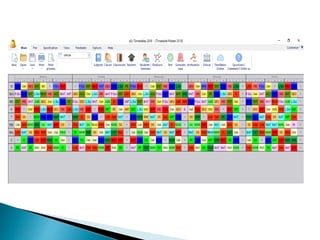
Time Tabling program (by aSc) database
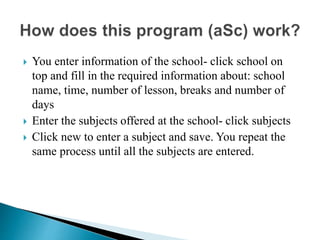
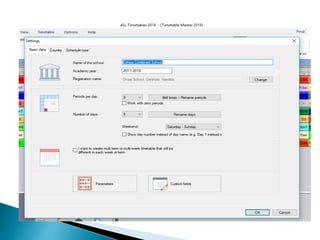
 You enter information of the school- click school on
top and fill in the required information about: school
name, time, number of lesson, breaks and number of
days
 Enter the subjects offered at the school- click subjects
 Click new to enter a subject and save. You repeat the
same process until all the subjects are entered.
 Click classes to enter the class groups you have at the
school and save.
 Click teachers: add all the teachers and allocate them
lessons as per the subject allocation.
 Now you can start generating new time table. The
system allocate teachers to classes and lessons
 Go through to correct wrongly allocated cards until you
are satisfied.
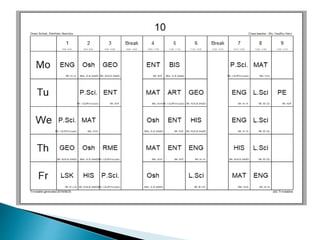
 Print out: there are numbers of reports that you can
print out from this program such as:
1. Master time table (wall poster)
2. Class time table
3. Teachers time table
4. Summary time table for teachers
Those are the only necessary one, hence there are other
more
 It is editable- if one teacher transfer in the middle of a year
and a new subject allocation come into effect, you can edit
 It is convenient- save time
 It is an effective tool for school management- the school
principal will be able to use teachers summary time table to
trace the whereabouts of teachers in the school, thus help
with monitoring [Save time and efforts, substitute
management].
 Reduces error
 Secure and user-friendly
 Easy customization
 Easy calculation
 Paperless environment
 It need extra attention
 It does not allocate correctly- it will still require you to
edit for correct placement of lesson
 This program is very effective
 It save time
 It generate several reports that the school principal can
use to manage the school e.g.
Teachers time table
Class time table
Master time table
Subject time table etc.
http://www.aScTimeTables.com
Ict group presentation

Ict group presentation

  • 1.
    Presenters 1. Ndeshimona SalomoNdeyamunye 2. Shoombe Rakkel
  • 2.
     Every schoolneed a time table for effective running.  In the past (before technology) schools used manual ways to draw up time tables.  The old way took up much time and become very stressful.  A new ICT program was created to overcome some of these shortcomings.  The old ways was stressful and paper consuming, let alone requires numerous calculations. Time Tabling program (by aSc) database
  • 4.
     You enterinformation of the school- click school on top and fill in the required information about: school name, time, number of lesson, breaks and number of days  Enter the subjects offered at the school- click subjects  Click new to enter a subject and save. You repeat the same process until all the subjects are entered.
  • 6.
     Click classesto enter the class groups you have at the school and save.  Click teachers: add all the teachers and allocate them lessons as per the subject allocation.  Now you can start generating new time table. The system allocate teachers to classes and lessons  Go through to correct wrongly allocated cards until you are satisfied.
  • 7.
     Print out:there are numbers of reports that you can print out from this program such as: 1. Master time table (wall poster) 2. Class time table 3. Teachers time table 4. Summary time table for teachers Those are the only necessary one, hence there are other more
  • 8.
     It iseditable- if one teacher transfer in the middle of a year and a new subject allocation come into effect, you can edit  It is convenient- save time  It is an effective tool for school management- the school principal will be able to use teachers summary time table to trace the whereabouts of teachers in the school, thus help with monitoring [Save time and efforts, substitute management].  Reduces error  Secure and user-friendly  Easy customization  Easy calculation  Paperless environment
  • 9.
     It needextra attention  It does not allocate correctly- it will still require you to edit for correct placement of lesson
  • 10.
     This programis very effective  It save time  It generate several reports that the school principal can use to manage the school e.g. Teachers time table Class time table Master time table Subject time table etc.
  • 12.