INSTITUTION
MANAGEMENT
SYSTEM
Designed and Developed by
Konduru Infotech Pvt Ltd
Online Student
Managem ent System
Our main focus is design a Student Data Management System that will improve Data management
in Institutes experience for both Students and the Administration authorities. The whole system will
run on Web Browser. The system is developed in PHP, Java script, jQuery, HTML and CSS. Users will
have the felicity to log in from any place with internet connection OR Particular area offline Web
Brewers. Our Student Management System runs with the various activities related to the students
Centralize Data: Say goodbye to scattered spreadsheets and disparate systems. Our application centralizes
all student data into a single, secure platform, facilitating easy access and comprehensive oversight for
administrators.
Streamline Processes: Time-consuming administrative tasks become a breeze with our intuitive interface and
automated workflows. From enrollment and attendance tracking to grading and reporting, our application
streamlines processes, allowing faculty and staff to focus more on student success.
1.Students Data
2. Exam Docum ents
3. Class Tim e Table
4. Academ ic Calender
5. Online Assignm ents
6. Study Material
7. Fee Managem ent
8. Expenditure & Incom e
9. Vehicle Managem ent
student data management system
Modules
1. Students Data
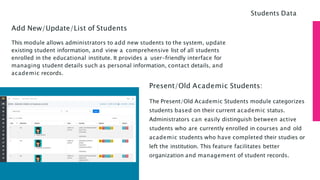
Add New/Update/List of Students
This module allows administrators to add new students to the system, update
existing student information, and view a comprehensive list of all students
enrolled in the educational institute. It provides a user-friendly interface for
managing student details such as personal information, contact details, and
academic records.
Present/Old Academic Students:
The Present/Old Academic Students module categorizes
students based on their current academic status.
Administrators can easily distinguish between active
students who are currently enrolled in courses and old
academic students who have completed their studies or
left the institution. This feature facilitates better
organization and management of student records.
Students Data
Relieved Students:
The Relieved Students module is designed to manage information related to
students who have been relieved from the educational institute for various
reasons such as graduation, withdrawal, or transfer. Administrators can
maintain a separate record for relieved students, ensuring that their data is
properly archived while keeping the active student database up-to-date.
Name & Admission No. wise Search
This module offers a convenient search functionality that allows users to
quickly locate specific students based on their names or admission numbers.
Users can input the student's name or admission number into the search field,
and the system will retrieve relevant information, providing a hassle-free way
to access individual student records.
Students Data
Class/Section and Bus wise Search:
The Class/Section and Bus wise Search module enables administrators to
conduct targeted searches based on class/section assignments and bus
allocations. Users can specify a particular class, section, or bus route, and the
system will generate a list of students associated with the selected criteria. This
feature is particularly useful for organizing student transportation and class
scheduling efficiently.
Excel Sheet Download:
The Excel Sheet Download feature enables administrators to export student
data from the application into an Excel spreadsheet format. This functionality
provides users with the flexibility to analyze, manipulate, and share student
information using familiar spreadsheet software such as Microsoft Excel.
Students Data
2.Exam Docum ents
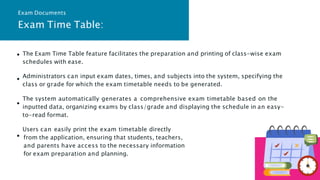
The Exam Time Table feature facilitates the preparation and printing of class-wise exam
schedules with ease.
Administrators can input exam dates, times, and subjects into the system, specifying the
class or grade for which the exam timetable needs to be generated.
The system automatically generates a comprehensive exam timetable based on the
inputted data, organizing exams by class/grade and displaying the schedule in an easy-
to-read format.
Users can easily print the exam timetable directly
from the application, ensuring that students, teachers,
and parents have access to the necessary information
for exam preparation and planning.
Exam Time Table:
Exam Documents
Student Hall Tickets:
The Student Hall Tickets feature streamlines the preparation and printing of exam hall
tickets for students based on their class or grade.
Administrators can input student information, including name, class/grade, and exam
details, into the system to generate hall tickets automatically.
The system generates personalized hall tickets for each student, including essential details
such as exam date, time, venue, and seating arrangement.
Users can easily print the hall tickets directly from the application, allowing students to
receive their hall tickets promptly and ensuring a smooth exam administration process.
Exam Documents
Student Marks Record Sheets:
The Student Marks Record Sheets feature simplifies the preparation and printing of class-
wise exam record sheets for student marks.
Administrators can input student marks and grades into the system, specifying the exam,
class/grade, and subject for which the record sheets need to be generated.
The system generates comprehensive record sheets that display individual student marks,
grades, and overall performance for the specified exam and subject.
Users can easily print the record sheets directly from the application, providing teachers,
students, and parents with a detailed overview of student performance and progress.
Exam Documents
3.Class Tim e Table
Class/Teacher wise Time Table:
The Class/Teacher wise Time Table feature allows administrators to efficiently manage
and generate time tables for classes and teachers, facilitating effective scheduling of
subjects and periods.
Administrators can allocate subjects and periods to specific classes or teachers within the
system, creating a structured timetable for each day of the week.
.
Users can easily access and print these reports directly from the application, providing
teachers, students, and administrators with clear visibility into the daily schedules and
ensuring efficient coordination of academic activities.
Time table & Academic year
4.Academ ic Calendar
Academic Calendar:
The Academic Calendar feature enables administrators to maintain and organize a
comprehensive calendar of academic events, occasions, holidays, and important dates
within the educational institution.
Administrators can input details such as academic terms, exam schedules, optional
holidays, festival holidays, and other significant events into the system, specifying dates
and descriptions for each entry.
The feature includes a reminder function that notifies users of upcoming events and
occasions, providing timely reminders and alerts directly within the application dashboard
.
Users can view the academic calendar on a monthly basis, allowing them to plan and
prepare for academic activities and events well in advance.
Time table & Academic year
5.Online Assig nm ents
Online Assignments & Results
Allows for the storage of assignment questions and answers in a centralized repository,
categorized by class.
Facilitates easy access to assignment materials, streamlining the process for educators
and students.
Automates the process of result generation based on pre-defined criteria and
administrator policies.
Frees up educators' time from manual result computation, allowing them to focus more on
personalized teaching.
6.Study M aterial
Study Material
Digital Storage: Facilitates the storage of study materials in PDF, Word, or Excel formats,
organized by class.
Accessibility: Allows educators and students easy access to a diverse range of study
materials, fostering a rich learning experience
Compatibility: Supports various file formats (PDF, Word, Excel) for study materials, ensuring
compatibility with different devices and applications.
User-Friendly: Enables users to choose the format that best suits their preferences and
needs.
Provides a centralized repository for storing study-related YouTube videos, categorized by
class.
7.Fee M anag em ent
Fee Management
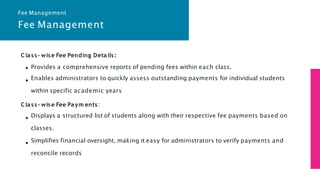
Class- wise Fee Pending Details:
Provides a comprehensive reports of pending fees within each class.
Enables administrators to quickly assess outstanding payments for individual students
within specific academic years
Class- wise Fee Paym ents:
Displays a structured list of students along with their respective fee payments based on
classes.
Simplifies financial oversight, making it easy for administrators to verify payments and
reconcile records
Fee Management
Fee Management
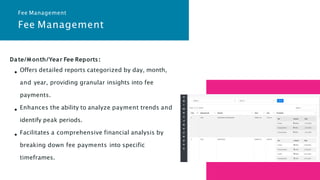
Date/M onth/Year Fee Reports:
Offers detailed reports categorized by day, month,
and year, providing granular insights into fee
payments.
Enhances the ability to analyze payment trends and
identify peak periods.
Facilitates a comprehensive financial analysis by
breaking down fee payments into specific
timeframes.
Fee Management
8.Expenditure & Incom e
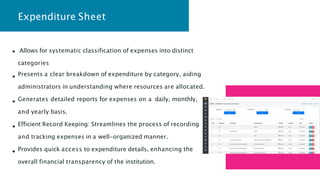
Expenditure Sheet
Allows for systematic classification of expenses into distinct
categories
Presents a clear breakdown of expenditure by category, aiding
administrators in understanding where resources are allocated.
Generates detailed reports for expenses on a daily, monthly,
and yearly basis.
Efficient Record Keeping: Streamlines the process of recording
and tracking expenses in a well-organized manner.
Provides quick access to expenditure details, enhancing the
overall financial transparency of the institution.
Expenditure & Income
Versatile Record-keeping: Allows users to save details of income from various sources such
as tuition fees, donations, grants, etc.
Provides flexibility to input income details based on the nature and origin of the revenue.
Captures relevant information about each income transaction, including date, source, and
amount.
Creates a comprehensive income history that can be audited for financial accountability.
9.Vehicle M anag em ent
Vehicles Maintenance
Vehicles List
Allows for the storage of essential details for all institute vehicles in a centralized database.
Facilitates quick access to information such as vehicle type, model, registration details, and
current status.
Fuel & Maintenance Details
Allows for the input of fuel consumption data, including date, quantity, and cost.
Enables the analysis of fuel consumption patterns, aiding in optimizing vehicle efficiency and
reducing operational costs.

Institution Management System web Application

  • 1.
  • 2.
    Online Student Managem entSystem Our main focus is design a Student Data Management System that will improve Data management in Institutes experience for both Students and the Administration authorities. The whole system will run on Web Browser. The system is developed in PHP, Java script, jQuery, HTML and CSS. Users will have the felicity to log in from any place with internet connection OR Particular area offline Web Brewers. Our Student Management System runs with the various activities related to the students Centralize Data: Say goodbye to scattered spreadsheets and disparate systems. Our application centralizes all student data into a single, secure platform, facilitating easy access and comprehensive oversight for administrators. Streamline Processes: Time-consuming administrative tasks become a breeze with our intuitive interface and automated workflows. From enrollment and attendance tracking to grading and reporting, our application streamlines processes, allowing faculty and staff to focus more on student success.
  • 3.
    1.Students Data 2. ExamDocum ents 3. Class Tim e Table 4. Academ ic Calender 5. Online Assignm ents 6. Study Material 7. Fee Managem ent 8. Expenditure & Incom e 9. Vehicle Managem ent student data management system Modules
  • 4.
  • 5.
    Add New/Update/List ofStudents This module allows administrators to add new students to the system, update existing student information, and view a comprehensive list of all students enrolled in the educational institute. It provides a user-friendly interface for managing student details such as personal information, contact details, and academic records. Present/Old Academic Students: The Present/Old Academic Students module categorizes students based on their current academic status. Administrators can easily distinguish between active students who are currently enrolled in courses and old academic students who have completed their studies or left the institution. This feature facilitates better organization and management of student records. Students Data
  • 6.
    Relieved Students: The RelievedStudents module is designed to manage information related to students who have been relieved from the educational institute for various reasons such as graduation, withdrawal, or transfer. Administrators can maintain a separate record for relieved students, ensuring that their data is properly archived while keeping the active student database up-to-date. Name & Admission No. wise Search This module offers a convenient search functionality that allows users to quickly locate specific students based on their names or admission numbers. Users can input the student's name or admission number into the search field, and the system will retrieve relevant information, providing a hassle-free way to access individual student records. Students Data
  • 7.
    Class/Section and Buswise Search: The Class/Section and Bus wise Search module enables administrators to conduct targeted searches based on class/section assignments and bus allocations. Users can specify a particular class, section, or bus route, and the system will generate a list of students associated with the selected criteria. This feature is particularly useful for organizing student transportation and class scheduling efficiently. Excel Sheet Download: The Excel Sheet Download feature enables administrators to export student data from the application into an Excel spreadsheet format. This functionality provides users with the flexibility to analyze, manipulate, and share student information using familiar spreadsheet software such as Microsoft Excel. Students Data
  • 8.
  • 9.
    The Exam TimeTable feature facilitates the preparation and printing of class-wise exam schedules with ease. Administrators can input exam dates, times, and subjects into the system, specifying the class or grade for which the exam timetable needs to be generated. The system automatically generates a comprehensive exam timetable based on the inputted data, organizing exams by class/grade and displaying the schedule in an easy- to-read format. Users can easily print the exam timetable directly from the application, ensuring that students, teachers, and parents have access to the necessary information for exam preparation and planning. Exam Time Table: Exam Documents
  • 10.
    Student Hall Tickets: TheStudent Hall Tickets feature streamlines the preparation and printing of exam hall tickets for students based on their class or grade. Administrators can input student information, including name, class/grade, and exam details, into the system to generate hall tickets automatically. The system generates personalized hall tickets for each student, including essential details such as exam date, time, venue, and seating arrangement. Users can easily print the hall tickets directly from the application, allowing students to receive their hall tickets promptly and ensuring a smooth exam administration process. Exam Documents
  • 11.
    Student Marks RecordSheets: The Student Marks Record Sheets feature simplifies the preparation and printing of class- wise exam record sheets for student marks. Administrators can input student marks and grades into the system, specifying the exam, class/grade, and subject for which the record sheets need to be generated. The system generates comprehensive record sheets that display individual student marks, grades, and overall performance for the specified exam and subject. Users can easily print the record sheets directly from the application, providing teachers, students, and parents with a detailed overview of student performance and progress. Exam Documents
  • 12.
  • 13.
    Class/Teacher wise TimeTable: The Class/Teacher wise Time Table feature allows administrators to efficiently manage and generate time tables for classes and teachers, facilitating effective scheduling of subjects and periods. Administrators can allocate subjects and periods to specific classes or teachers within the system, creating a structured timetable for each day of the week. . Users can easily access and print these reports directly from the application, providing teachers, students, and administrators with clear visibility into the daily schedules and ensuring efficient coordination of academic activities. Time table & Academic year
  • 14.
  • 15.
    Academic Calendar: The AcademicCalendar feature enables administrators to maintain and organize a comprehensive calendar of academic events, occasions, holidays, and important dates within the educational institution. Administrators can input details such as academic terms, exam schedules, optional holidays, festival holidays, and other significant events into the system, specifying dates and descriptions for each entry. The feature includes a reminder function that notifies users of upcoming events and occasions, providing timely reminders and alerts directly within the application dashboard . Users can view the academic calendar on a monthly basis, allowing them to plan and prepare for academic activities and events well in advance. Time table & Academic year
  • 16.
  • 17.
    Online Assignments &Results Allows for the storage of assignment questions and answers in a centralized repository, categorized by class. Facilitates easy access to assignment materials, streamlining the process for educators and students. Automates the process of result generation based on pre-defined criteria and administrator policies. Frees up educators' time from manual result computation, allowing them to focus more on personalized teaching.
  • 18.
  • 19.
    Study Material Digital Storage:Facilitates the storage of study materials in PDF, Word, or Excel formats, organized by class. Accessibility: Allows educators and students easy access to a diverse range of study materials, fostering a rich learning experience Compatibility: Supports various file formats (PDF, Word, Excel) for study materials, ensuring compatibility with different devices and applications. User-Friendly: Enables users to choose the format that best suits their preferences and needs. Provides a centralized repository for storing study-related YouTube videos, categorized by class.
  • 20.
  • 21.
    Fee Management Class- wiseFee Pending Details: Provides a comprehensive reports of pending fees within each class. Enables administrators to quickly assess outstanding payments for individual students within specific academic years Class- wise Fee Paym ents: Displays a structured list of students along with their respective fee payments based on classes. Simplifies financial oversight, making it easy for administrators to verify payments and reconcile records Fee Management
  • 22.
    Fee Management Date/M onth/YearFee Reports: Offers detailed reports categorized by day, month, and year, providing granular insights into fee payments. Enhances the ability to analyze payment trends and identify peak periods. Facilitates a comprehensive financial analysis by breaking down fee payments into specific timeframes. Fee Management
  • 23.
  • 24.
    Expenditure Sheet Allows forsystematic classification of expenses into distinct categories Presents a clear breakdown of expenditure by category, aiding administrators in understanding where resources are allocated. Generates detailed reports for expenses on a daily, monthly, and yearly basis. Efficient Record Keeping: Streamlines the process of recording and tracking expenses in a well-organized manner. Provides quick access to expenditure details, enhancing the overall financial transparency of the institution.
  • 25.
    Expenditure & Income VersatileRecord-keeping: Allows users to save details of income from various sources such as tuition fees, donations, grants, etc. Provides flexibility to input income details based on the nature and origin of the revenue. Captures relevant information about each income transaction, including date, source, and amount. Creates a comprehensive income history that can be audited for financial accountability.
  • 26.
  • 27.
    Vehicles Maintenance Vehicles List Allowsfor the storage of essential details for all institute vehicles in a centralized database. Facilitates quick access to information such as vehicle type, model, registration details, and current status. Fuel & Maintenance Details Allows for the input of fuel consumption data, including date, quantity, and cost. Enables the analysis of fuel consumption patterns, aiding in optimizing vehicle efficiency and reducing operational costs.