Introduction to Single Sign-On
Worldwide Business Partner Technical Enablement 2016
Van Staub – North America Embedded Solution Agreement Technical Sales
1
Agenda
• General Idea
• SSO techniques
• LTPA
• SAML
• OAuth
• SPNEGO
• External Authentication Managers
Definitions
• Single Sign-On (SSO): not having to login again (or for a while)
• Authentication: the user’s identity, who they are
• Authorization: what the user has access to
General Idea
• a set of servers will share something secret – the key
• after successful user login, a cookie is placed on the user’s browser –
the token
• the cookie is encrypted with the key
• the cookie identifies the user
• participating servers will look for the cookie/token/something to
authenticate the user
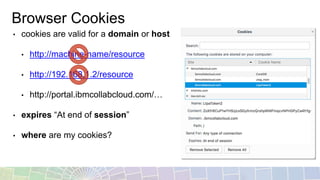
Browser Cookies
• cookies are valid for a domain or host
• http://machine-name/resource
• http://192.168.1.2/resource
• http://portal.ibmcollabcloud.com/…
• expires “At end of session”
• where are my cookies?
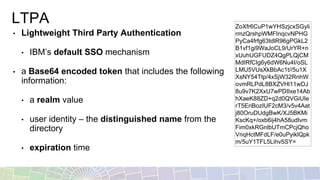
LTPA
• Lightweight Third Party Authentication
• IBM’s default SSO mechanism
• a Base64 encoded token that includes the following
information:
• a realm value
• user identity – the distinguished name from the
directory
• expiration time
ZoXfr6CuP1wYHSzjcxSGyli
rmzQrshpWMFInqcvNPHG
PyCa4frfg63tdlR96gPGkL2
B1vf1gi9WaJoCL9/UrYR+n
xUuhUGFUDZ4QgPLQjCM
MdIRfCIg6y6dW6Nu4I/oSL
LMU5VUsXkBbAc1t//5u1X
XsNY54Ttp/4xSjW32RnhW
ovmRLPdL8BXZVHl11wDJ
8u9v7K2XxU7wPDIIxe14Ab
hXaeK88ZD+q2d0QVGiUIe
rT5EriBozIUF2cM3/v5v4Aat
j80OruDUdgBwK/XJ5BKMi
KscKq+/oxb6ij4hA58udIvm
Fim0xkRGnlbUTmCPcjQho
VnqHctMFdLF/e0uPyiklQpk
m/5uY1TFL5Lihv5SY=
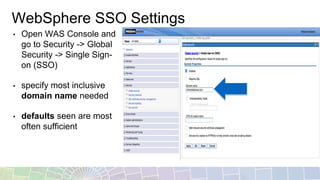
WebSphere SSO Settings
• Open WAS Console and
go to Security -> Global
Security -> Single Sign-
on (SSO)
• specify most inclusive
domain name needed
• defaults seen are most
often sufficient
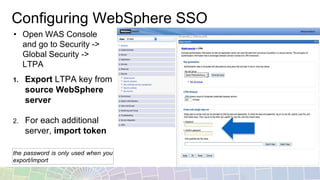
Configuring WebSphere SSO
1. Export LTPA key from
source WebSphere
server
2. For each additional
server, import token
the password is only used when you
export/import
• Open WAS Console
and go to Security ->
Global Security ->
LTPA
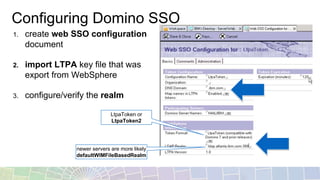
Configuring Domino SSO
1. create web SSO configuration
document
2. import LTPA key file that was
export from WebSphere
3. configure/verify the realm
LtpaToken or
LtpaToken2
newer servers are more likely
defaultWIMFileBasedRealm
Pitfalls
• expiration time is relative to the server that created the LTPAToken2
• session timeouts are not the same as LTPAToken2 expiration
• different directories …
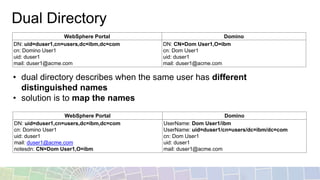
Dual Directory
• dual directory describes when the same user has different
distinguished names
• solution is to map the names
WebSphere Portal Domino
DN: uid=duser1,cn=users,dc=ibm,dc=com
cn: Domino User1
uid: duser1
mail: duser1@acme.com
DN: CN=Dom User1,O=ibm
cn: Dom User1
uid: duser1
mail: duser1@acme.com
WebSphere Portal Domino
DN: uid=duser1,cn=users,dc=ibm,dc=com
cn: Domino User1
uid: duser1
mail: duser1@acme.com
notesdn: CN=Dom User1,O=ibm
UserName: Dom User1/ibm
UserName: uid=duser1/cn=users/dc=ibm/dc=com
cn: Dom User1
uid: duser1
mail: duser1@acme.com
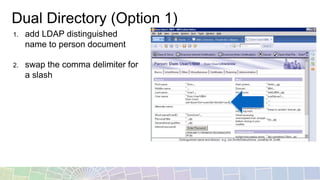
Dual Directory (Option 1)
1. add LDAP distinguished
name to person document
2. swap the comma delimiter for
a slash
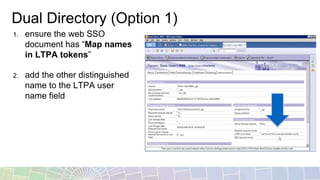
Dual Directory (Option 1)
1. ensure the web SSO
document has “Map names
in LTPA tokens”
2. add the other distinguished
name to the LTPA user
name field
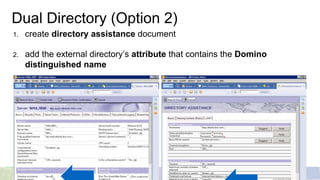
Dual Directory (Option 2)
1. create directory assistance document
2. add the external directory’s attribute that contains the Domino
distinguished name
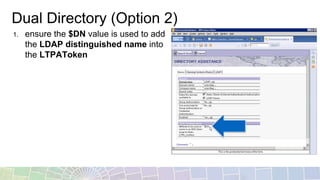
Dual Directory (Option 2)
1. ensure the $DN value is used to add
the LDAP distinguished name into
the LTPAToken
LTPA Resources
Understanding single sign-on
(SSO) between IBM WebSphere
Portal and IBM Lotus Domino
http://www.ibm.com/developerworks/websphere/zones/portal/proddoc/dw-w-sso-portal-
domino/
vanstaub.me http://vanstaub.me/category/cognos
SAML
• SAML stands for Security Assertion Markup Language
• resolves domain boundary using cookies
• requires additional software: Tivoli Federated Identity Manager,
Active Directory Federation Service, etc.
• uses XML based assertion tokens used in between an Identity Provider
(IdP) and a Service Provider (SP).
• SAML 2.0 is the latest version – not compatible with 1.1 and 1.0
SAML
• See yesterday’s NWTL topic Active Directory Single Sign-On
• Install and configure Active Directory Federation Service 2.0 with
WebSphere Portal
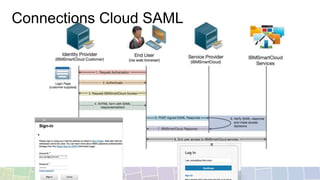
Connections Cloud SAML
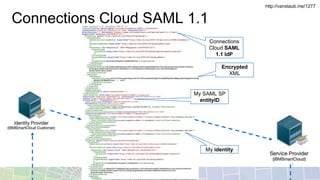
Connections Cloud SAML 1.1
Encrypted
XML
Connections
Cloud SAML
1.1 IdP
My SAML SP
entityID
My identity
http://vanstaub.me/1277
Connections Cloud SAML
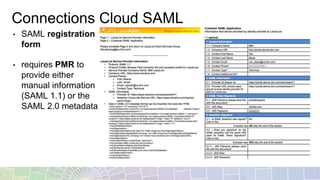
• SAML registration
form
• requires PMR to
provide either
manual information
(SAML 1.1) or the
SAML 2.0 metadata
WebSphere SAML
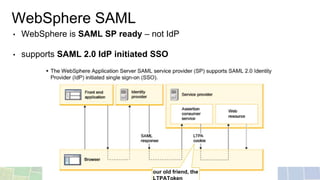
• WebSphere is SAML SP ready – not IdP
• supports SAML 2.0 IdP initiated SSO
our old friend, the
Connections On-Prem SAML
• “IBM supports SAML 2.0 implementations within IBM Connections on a
case-by-case basis depending on your unique environment and
deployment.”
SAML Resources
Understanding the WebSphere
Application Server SAML Trust
Association Interceptor
http://www.ibm.com/developerworks/websphere/techjournal/1307_lansche/1307_lansc
he.html
Step by step guide to implement
SAML 2.0 for Portal 8.5
https://developer.ibm.com/digexp/docs/docs/customization-administration/step-step-
guide-implement-saml-2-0-portal-8-5/
Front Side SAML SSO with
microsoft product (ADFS -> WAS
SAML TAI)
https://www.ibm.com/developerworks/community/blogs/8f2bc166-3bdc-4a9d-bad4-
3620dbb3e46c/entry/Front_Side_SAML_SSO_with_microsoft_product_ADFS_WAS_S
AML_TAI?lang=en
Enabling Federated Identity or
Integration Server for use with IBM
Connections Cloud
http://www-01.ibm.com/support/docview.wss?uid=swg21626501
AD + SAML + Kerberos + IBM
Notes and Domino = SSO!
http://www.andypedisich.com/blogs/andysblog.nsf/dx/robs-saml-presentation-from-
mwlug-has-been-posted.htm
vanstaub.me http://vanstaub.me/?s=saml
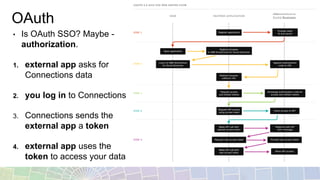
OAuth
• Is OAuth SSO? Maybe -
authorization.
1. external app asks for
Connections data
2. you log in to Connections
3. Connections sends the
external app a token
4. external app uses the
token to access your data
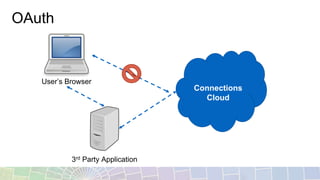
OAuth
Connections
Cloud
3rd Party Application
User’s Browser
OAuth Resources
Connection Allowing third-party
applications access to data via the
OAuth2 protocol
https://www.ibm.com/support/knowledgecenter/SSYGQH_5.5.0/admin/admin/c_admin_
common_oauth.dita
Connections Cloud Using OAuth
for API Authorization
https://www-
10.lotus.com/ldd/appdevwiki.nsf/xpAPIViewer.xsp?lookupName=API+Reference#action
=openDocument&res_title=Open_Authorization_sbt&content=apicontent
Developing an IBM SmartCloud for
Social Business application
https://www.ibm.com/developerworks/lotus/documentation/developingsmartcloudapp/
Building an IBM OAuth Consumer
in PHP
http://vanstaub.me/679
SPNEGO
• Simple and Protected GSS-API Negotiation Mechanism
• login in to Windows, SSO to IBM Software – pretty simple
SPNEGO Resources
Step-by-Step guide to Configure
Single sign-on for HTTP requests
using SPNEGO web authentication
https://www-10.lotus.com/ldd/portalwiki.nsf/dx/Step-by-
Step_guide_to_Configure_Single_sign-
on_for_HTTP_requests_using_SPNEGO_web_authentication
BP104 Simplifying The S’s: Single
Sign-On, SPNEGO and SAML
(2014)
http://www.idonotes.com/IdoNotes/IdoConnect2013.nsf/dx/bp104-simplifying-the-ss-
single-sign-on-spnego-and-saml-2014.htm
External Security Managers
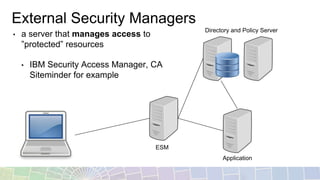
• a server that manages access to
”protected” resources
• IBM Security Access Manager, CA
Siteminder for example
Directory and Policy Server
ESM
Application
Things to Consider
• the LTPA token is still very relevant
• after SAML is done, LTPA is still used
• after SPNEGO is done, LTPA is still used
• OAuth applies more to developers than users
• External Security Managers do more than just authenticate
Thank You
32

IBM Single Sign-On

  • 1.
    Introduction to SingleSign-On Worldwide Business Partner Technical Enablement 2016 Van Staub – North America Embedded Solution Agreement Technical Sales 1
  • 2.
    Agenda • General Idea •SSO techniques • LTPA • SAML • OAuth • SPNEGO • External Authentication Managers
  • 3.
    Definitions • Single Sign-On(SSO): not having to login again (or for a while) • Authentication: the user’s identity, who they are • Authorization: what the user has access to
  • 4.
    General Idea • aset of servers will share something secret – the key • after successful user login, a cookie is placed on the user’s browser – the token • the cookie is encrypted with the key • the cookie identifies the user • participating servers will look for the cookie/token/something to authenticate the user
  • 5.
    Browser Cookies • cookiesare valid for a domain or host • http://machine-name/resource • http://192.168.1.2/resource • http://portal.ibmcollabcloud.com/… • expires “At end of session” • where are my cookies?
  • 6.
    LTPA • Lightweight ThirdParty Authentication • IBM’s default SSO mechanism • a Base64 encoded token that includes the following information: • a realm value • user identity – the distinguished name from the directory • expiration time ZoXfr6CuP1wYHSzjcxSGyli rmzQrshpWMFInqcvNPHG PyCa4frfg63tdlR96gPGkL2 B1vf1gi9WaJoCL9/UrYR+n xUuhUGFUDZ4QgPLQjCM MdIRfCIg6y6dW6Nu4I/oSL LMU5VUsXkBbAc1t//5u1X XsNY54Ttp/4xSjW32RnhW ovmRLPdL8BXZVHl11wDJ 8u9v7K2XxU7wPDIIxe14Ab hXaeK88ZD+q2d0QVGiUIe rT5EriBozIUF2cM3/v5v4Aat j80OruDUdgBwK/XJ5BKMi KscKq+/oxb6ij4hA58udIvm Fim0xkRGnlbUTmCPcjQho VnqHctMFdLF/e0uPyiklQpk m/5uY1TFL5Lihv5SY=
  • 7.
    WebSphere SSO Settings •Open WAS Console and go to Security -> Global Security -> Single Sign- on (SSO) • specify most inclusive domain name needed • defaults seen are most often sufficient
  • 8.
    Configuring WebSphere SSO 1.Export LTPA key from source WebSphere server 2. For each additional server, import token the password is only used when you export/import • Open WAS Console and go to Security -> Global Security -> LTPA
  • 9.
    Configuring Domino SSO 1.create web SSO configuration document 2. import LTPA key file that was export from WebSphere 3. configure/verify the realm LtpaToken or LtpaToken2 newer servers are more likely defaultWIMFileBasedRealm
  • 10.
    Pitfalls • expiration timeis relative to the server that created the LTPAToken2 • session timeouts are not the same as LTPAToken2 expiration • different directories …
  • 11.
    Dual Directory • dualdirectory describes when the same user has different distinguished names • solution is to map the names WebSphere Portal Domino DN: uid=duser1,cn=users,dc=ibm,dc=com cn: Domino User1 uid: duser1 mail: duser1@acme.com DN: CN=Dom User1,O=ibm cn: Dom User1 uid: duser1 mail: duser1@acme.com WebSphere Portal Domino DN: uid=duser1,cn=users,dc=ibm,dc=com cn: Domino User1 uid: duser1 mail: duser1@acme.com notesdn: CN=Dom User1,O=ibm UserName: Dom User1/ibm UserName: uid=duser1/cn=users/dc=ibm/dc=com cn: Dom User1 uid: duser1 mail: duser1@acme.com
  • 12.
    Dual Directory (Option1) 1. add LDAP distinguished name to person document 2. swap the comma delimiter for a slash
  • 13.
    Dual Directory (Option1) 1. ensure the web SSO document has “Map names in LTPA tokens” 2. add the other distinguished name to the LTPA user name field
  • 14.
    Dual Directory (Option2) 1. create directory assistance document 2. add the external directory’s attribute that contains the Domino distinguished name
  • 15.
    Dual Directory (Option2) 1. ensure the $DN value is used to add the LDAP distinguished name into the LTPAToken
  • 16.
    LTPA Resources Understanding singlesign-on (SSO) between IBM WebSphere Portal and IBM Lotus Domino http://www.ibm.com/developerworks/websphere/zones/portal/proddoc/dw-w-sso-portal- domino/ vanstaub.me http://vanstaub.me/category/cognos
  • 17.
    SAML • SAML standsfor Security Assertion Markup Language • resolves domain boundary using cookies • requires additional software: Tivoli Federated Identity Manager, Active Directory Federation Service, etc. • uses XML based assertion tokens used in between an Identity Provider (IdP) and a Service Provider (SP). • SAML 2.0 is the latest version – not compatible with 1.1 and 1.0
  • 18.
    SAML • See yesterday’sNWTL topic Active Directory Single Sign-On • Install and configure Active Directory Federation Service 2.0 with WebSphere Portal
  • 19.
  • 20.
    Connections Cloud SAML1.1 Encrypted XML Connections Cloud SAML 1.1 IdP My SAML SP entityID My identity http://vanstaub.me/1277
  • 21.
    Connections Cloud SAML •SAML registration form • requires PMR to provide either manual information (SAML 1.1) or the SAML 2.0 metadata
  • 22.
    WebSphere SAML • WebSphereis SAML SP ready – not IdP • supports SAML 2.0 IdP initiated SSO our old friend, the
  • 23.
    Connections On-Prem SAML •“IBM supports SAML 2.0 implementations within IBM Connections on a case-by-case basis depending on your unique environment and deployment.”
  • 24.
    SAML Resources Understanding theWebSphere Application Server SAML Trust Association Interceptor http://www.ibm.com/developerworks/websphere/techjournal/1307_lansche/1307_lansc he.html Step by step guide to implement SAML 2.0 for Portal 8.5 https://developer.ibm.com/digexp/docs/docs/customization-administration/step-step- guide-implement-saml-2-0-portal-8-5/ Front Side SAML SSO with microsoft product (ADFS -> WAS SAML TAI) https://www.ibm.com/developerworks/community/blogs/8f2bc166-3bdc-4a9d-bad4- 3620dbb3e46c/entry/Front_Side_SAML_SSO_with_microsoft_product_ADFS_WAS_S AML_TAI?lang=en Enabling Federated Identity or Integration Server for use with IBM Connections Cloud http://www-01.ibm.com/support/docview.wss?uid=swg21626501 AD + SAML + Kerberos + IBM Notes and Domino = SSO! http://www.andypedisich.com/blogs/andysblog.nsf/dx/robs-saml-presentation-from- mwlug-has-been-posted.htm vanstaub.me http://vanstaub.me/?s=saml
  • 25.
    OAuth • Is OAuthSSO? Maybe - authorization. 1. external app asks for Connections data 2. you log in to Connections 3. Connections sends the external app a token 4. external app uses the token to access your data
  • 26.
  • 27.
    OAuth Resources Connection Allowingthird-party applications access to data via the OAuth2 protocol https://www.ibm.com/support/knowledgecenter/SSYGQH_5.5.0/admin/admin/c_admin_ common_oauth.dita Connections Cloud Using OAuth for API Authorization https://www- 10.lotus.com/ldd/appdevwiki.nsf/xpAPIViewer.xsp?lookupName=API+Reference#action =openDocument&res_title=Open_Authorization_sbt&content=apicontent Developing an IBM SmartCloud for Social Business application https://www.ibm.com/developerworks/lotus/documentation/developingsmartcloudapp/ Building an IBM OAuth Consumer in PHP http://vanstaub.me/679
  • 28.
    SPNEGO • Simple andProtected GSS-API Negotiation Mechanism • login in to Windows, SSO to IBM Software – pretty simple
  • 29.
    SPNEGO Resources Step-by-Step guideto Configure Single sign-on for HTTP requests using SPNEGO web authentication https://www-10.lotus.com/ldd/portalwiki.nsf/dx/Step-by- Step_guide_to_Configure_Single_sign- on_for_HTTP_requests_using_SPNEGO_web_authentication BP104 Simplifying The S’s: Single Sign-On, SPNEGO and SAML (2014) http://www.idonotes.com/IdoNotes/IdoConnect2013.nsf/dx/bp104-simplifying-the-ss- single-sign-on-spnego-and-saml-2014.htm
  • 30.
    External Security Managers •a server that manages access to ”protected” resources • IBM Security Access Manager, CA Siteminder for example Directory and Policy Server ESM Application
  • 31.
    Things to Consider •the LTPA token is still very relevant • after SAML is done, LTPA is still used • after SPNEGO is done, LTPA is still used • OAuth applies more to developers than users • External Security Managers do more than just authenticate
  • 32.