



Single-Sign-On
considerations and best
practices
Venkat Gattamaneni
Enterprise Architect
Venkat@ermlabs.com
Why are we here?
• To discuss
• Different Mechanisms for Authentication
• When to choose what protocol
• Best practice for implementations
• To help you understand
• Single Sign-On Using SAML 2.0
• API access using OAuth
• Authentication Providers
• To demonstrate
• The amazing things that can be built using our Authentication services
What is Single Sign On?
Per wikipedia..
Single sign-on (SSO) is a property of access control of multiple related,
but independent software systems. With this property a user logs in once
and gains access to all systems without being prompted to log in again at
each of them
In simple terms..
Ability for systems to establish Authentication using a mutually
agreed upon an identity mechanism
Authentication Mechanisms
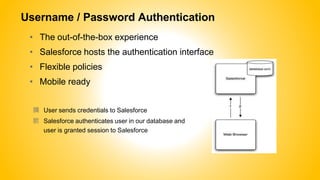
Username / Password Authentication
• The out-of-the-box experience
• Salesforce hosts the authentication interface
• Flexible policies
• Mobile ready
䐟 User sends credentials to Salesforce
䐠 Salesforce authenticates user in our database and
user is granted session to Salesforce
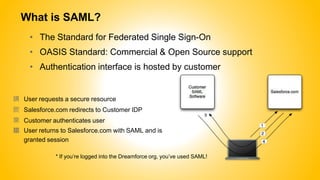
What is SAML?
• The Standard for Federated Single Sign-On
• OASIS Standard: Commercial & Open Source support
• Authentication interface is hosted by customer
䐟 User requests a secure resource
䐠 Salesforce.com redirects to Customer IDP
䐡 Customer authenticates user
䐢 User returns to Salesforce.com with SAML and is
granted session
* If you’re logged into the Dreamforce org, you’ve used SAML!
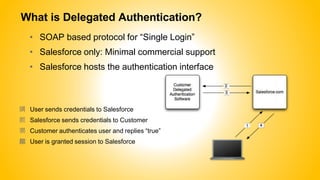
What is Delegated Authentication?
• SOAP based protocol for “Single Login”
• Salesforce only: Minimal commercial support
• Salesforce hosts the authentication interface
䐟 User sends credentials to Salesforce
䐠 Salesforce sends credentials to Customer
䐡 Customer authenticates user and replies “true”
䐢 User is granted session to Salesforce
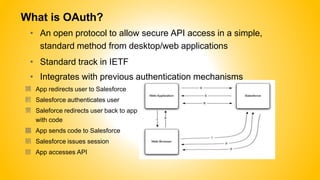
What is OAuth?
• An open protocol to allow secure API access in a simple,
standard method from desktop/web applications
• Standard track in IETF
• Integrates with previous authentication mechanisms
䐟 App redirects user to Salesforce
䐠 Salesforce authenticates user
䐡 Saleforce redirects user back to app
with code
䐢 App sends code to Salesforce
䐣 Salesforce issues session
䐤 App accesses API
When do I use what?
• UserId/Password
• When you just want the basics
• SAML
•
•
•
• OAuth
•
Single Sign-On for the web and applications
SAML provides the best commercial support
SAML provides re-use across other Cloud services
Building an API client or connected application (including Mobile)
• Delegated Auth
• SF Mobile CRM and older API clients with your own credentials
* Not mutually exclusive…you can mix and match
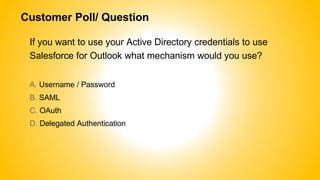
Customer Poll/ Question
If you want to use your Active Directory credentials to use
Salesforce for Outlook what mechanism would you use?
A. Username / Password
B. SAML
C. OAuth
D. Delegated Authentication
SSO in Action
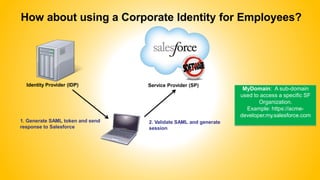
How about using a Corporate Identity for Employees?
Identity Provider (IDP)
1. Generate SAML token and send
response to Salesforce
2. Validate SAML and generate
session
Service Provider (SP)
MyDomain: A sub-domain
used to access a specific SF
Organization.
Example: https://acme-
developer.my.salesforce.com
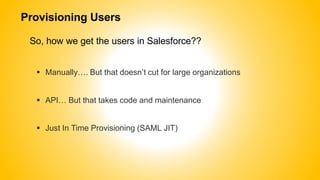
Provisioning Users
So, how we get the users in Salesforce??
 Manually…. But that doesn’t cut for large organizations
 API… But that takes code and maintenance
 Just In Time Provisioning (SAML JIT)
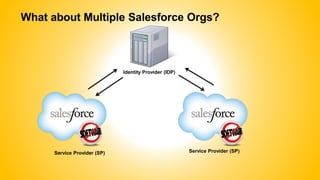
What about Multiple Salesforce Orgs?
Identity Provider (IDP)
Service Provider (SP)Service Provider (SP)
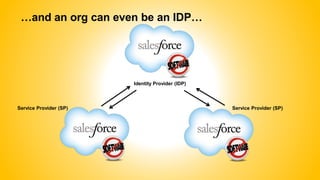
…and an org can even be an IDP…
Identity Provider (IDP)
Service Provider (SP) Service Provider (SP)
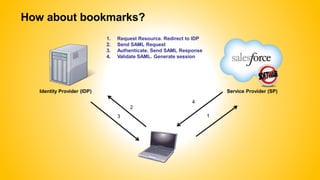
How about bookmarks?
Identity Provider (IDP)
1. Request Resource. Redirect to IDP
2. Send SAML Request
3. Authenticate. Send SAML Response
4. Validate SAML. Generate session
4
2
3 1
Service Provider (SP)
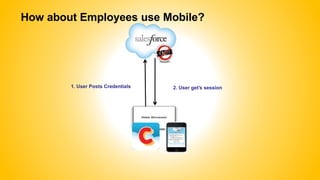
How about Employees use Mobile?
1. User Posts Credentials 2. User get’s session
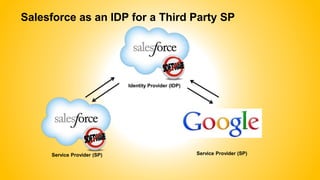
Salesforce as an IDP for a Third Party SP
Identity Provider (IDP)
Service Provider (SP)Service Provider (SP)
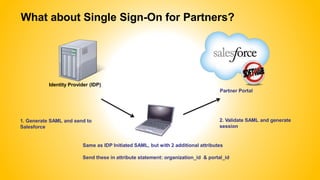
What about Single Sign-On for Partners?
Identity Provider (IDP)
Partner Portal
Same as IDP Initiated SAML, but with 2 additional attributes
Send these in attribute statement: organization_id & portal_id
1. Generate SAML and send to
Salesforce
2. Validate SAML and generate
session
What about the Consumers?
Social Sign On
 Login using ‘Social’ Credentials
 Facebook and Janrain Authentication Providers
 Link Accounts
 Dyanamic Provisioning
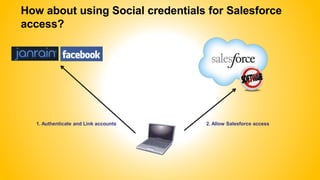
How about using Social credentials for Salesforce
access?
1. Authenticate and Link accounts 2. Allow Salesforce access
SSO Best Practices
Best Practices
Develop troubleshooting practices for SSO failures
 SSO is in critical path since no login means no access to users
S A M L S e t t i n g
R e l a t e d I s s u e ? ( 1 )
Y E S
I s S A M L
T o k e n
V a l i d ? ( 2 )
N O
Y E S
M a k e
a p p r o p r i a t e
c h a n g e s t o S A M L
S e t t i n g s
E r r o r M e s s a g e s
l i k e :- F a i l e d : A u d i e n c e M i s m a t c h e d
- F a i l e d : R e c i p i e n t M i s m a t c h e d
- F a i l e d : C e r t i f i c a t e M i s m a t c h e d
N O
Y E S
i S S O S A M L I s s u e s T r o u b l e s h o o t i n g P r o c e s s
S A M L S S O I s s u e
i s R e p o r t e d
G a t h e r
I n f o r m a t i o n :
- U s e r I d
- E r r o r
M e s s a g e
A n y L o g i n E r r o r
M e s s a g e i n U s e r ’ s
L o g i n H i s t o r y ?
I s U s e r P r o f i l e
C o n f i g u r e d w i t h
P r o p e r F e d e r a t i o n I d ?
N O
Y E S
T y p e “ S A M L I d p
I n i t i a t e d
S S O ”
E r r o r M e s s a g e s l i k e :
- F a i l e d : I s s u e r
M i s m a t c h e d- F a i l e d : C e r t i f i c a t e
M i s m a t h e d
A D D I T I O N A L N O T E S
1 ) F o r C e r t i f i c a t e r e l a t e d i s s u e s , v e r i f y C e r t i f i c a t e t h a t i s u p l o a d e d u n d e r S A M L s e t t i n g s
2 ) A S A M L T o k e n c a n b e v a l i d a t e d u s i n g t h e S A M L T o k e n D e b u g g e r t o o l t h a t i s a c c e s s i b l e o n t h e S A M L S e t t i n g s S c r e e n
3 ) R e p l a y r e l a t e d i s s u e i s a t e m p o r a r y i s s u e a n d h a p p e n s i f m u l t i p l e S A M L r e q u e s t s f o r t h e s a m e u s e r i s m a d e
M a k e
a p p r o p r i a t e
c h a n g e s t o U s e r
P r o f i l e
V e r i f y i f i t r e s o l v e s t h e i s s u e
T a l k t o C i t i
S T S t e a m a n d
g e t t h e i r h e l p i n
r e s o l u t i o n o f t h e
i s s u e
I f n e c e s s a r y
o p e n s u p p o r t
t i c k e t w i t h S F D C
C i t
SAML Best Practices – Prevent Failures
• Make sure the IDP server is on a high available environment
• Be proactive with regards to certificate (Salesforce and client)
expirations
• Check for any time skews that may lead to inconsistent timeout/
session creation issues
• Implement custom logout, error pages to present custom
messages instead of defaults
• TEST and TEST and TEST
SAML Best Practices – Reliable & Scalable
• Use Federation Id instead of SF username as subject Id
• Identity based on login and no mapping required to know SF username
• Login post is org specific and hence no time needed by SF to resolve org instance
• Disabling users from directly logging into SF if SAML is
enabled
• Enable DA and implement a service that always return false
• Use the “My Domains” feature and redirect the user when attempting to login
directly. Also, disable flag that allows users to log into Salesforce.com directly
 Administrators should be excluded from SSO
Where do we go from here?
Learn more on developer force:
• http://wiki.developerforce.com/index.php/Single_Sign-
On_for_Desktop_and_Mobile_Applications_using_SAML_and_OAuth
• http://wiki.developerforce.com/index.php/CRC:SSO
Attend these sessions:
• Hands-on Training: Enable Single Sign-on with SAML
Thursday, September 20th: 3:00 PM - 4:00 PM
• Authentication with OAuth and Connected Apps
Thursday, September 20th: 10:30 AM - 11:30 AM
Venkat Gattamaneni
@venkilive
https://www.linkedin.com/in/venkatgattamaneni

Single Sign On Considerations

  • 1.
    Single-Sign-On considerations and best practices VenkatGattamaneni Enterprise Architect Venkat@ermlabs.com
  • 2.
    Why are wehere? • To discuss • Different Mechanisms for Authentication • When to choose what protocol • Best practice for implementations • To help you understand • Single Sign-On Using SAML 2.0 • API access using OAuth • Authentication Providers • To demonstrate • The amazing things that can be built using our Authentication services
  • 3.
    What is SingleSign On? Per wikipedia.. Single sign-on (SSO) is a property of access control of multiple related, but independent software systems. With this property a user logs in once and gains access to all systems without being prompted to log in again at each of them In simple terms.. Ability for systems to establish Authentication using a mutually agreed upon an identity mechanism
  • 4.
  • 5.
    Username / PasswordAuthentication • The out-of-the-box experience • Salesforce hosts the authentication interface • Flexible policies • Mobile ready 䐟 User sends credentials to Salesforce 䐠 Salesforce authenticates user in our database and user is granted session to Salesforce
  • 6.
    What is SAML? •The Standard for Federated Single Sign-On • OASIS Standard: Commercial & Open Source support • Authentication interface is hosted by customer 䐟 User requests a secure resource 䐠 Salesforce.com redirects to Customer IDP 䐡 Customer authenticates user 䐢 User returns to Salesforce.com with SAML and is granted session * If you’re logged into the Dreamforce org, you’ve used SAML!
  • 7.
    What is DelegatedAuthentication? • SOAP based protocol for “Single Login” • Salesforce only: Minimal commercial support • Salesforce hosts the authentication interface 䐟 User sends credentials to Salesforce 䐠 Salesforce sends credentials to Customer 䐡 Customer authenticates user and replies “true” 䐢 User is granted session to Salesforce
  • 8.
    What is OAuth? •An open protocol to allow secure API access in a simple, standard method from desktop/web applications • Standard track in IETF • Integrates with previous authentication mechanisms 䐟 App redirects user to Salesforce 䐠 Salesforce authenticates user 䐡 Saleforce redirects user back to app with code 䐢 App sends code to Salesforce 䐣 Salesforce issues session 䐤 App accesses API
  • 9.
    When do Iuse what? • UserId/Password • When you just want the basics • SAML • • • • OAuth • Single Sign-On for the web and applications SAML provides the best commercial support SAML provides re-use across other Cloud services Building an API client or connected application (including Mobile) • Delegated Auth • SF Mobile CRM and older API clients with your own credentials * Not mutually exclusive…you can mix and match
  • 10.
    Customer Poll/ Question Ifyou want to use your Active Directory credentials to use Salesforce for Outlook what mechanism would you use? A. Username / Password B. SAML C. OAuth D. Delegated Authentication
  • 11.
  • 12.
    How about usinga Corporate Identity for Employees? Identity Provider (IDP) 1. Generate SAML token and send response to Salesforce 2. Validate SAML and generate session Service Provider (SP) MyDomain: A sub-domain used to access a specific SF Organization. Example: https://acme- developer.my.salesforce.com
  • 13.
    Provisioning Users So, howwe get the users in Salesforce??  Manually…. But that doesn’t cut for large organizations  API… But that takes code and maintenance  Just In Time Provisioning (SAML JIT)
  • 14.
    What about MultipleSalesforce Orgs? Identity Provider (IDP) Service Provider (SP)Service Provider (SP)
  • 15.
    …and an orgcan even be an IDP… Identity Provider (IDP) Service Provider (SP) Service Provider (SP)
  • 16.
    How about bookmarks? IdentityProvider (IDP) 1. Request Resource. Redirect to IDP 2. Send SAML Request 3. Authenticate. Send SAML Response 4. Validate SAML. Generate session 4 2 3 1 Service Provider (SP)
  • 17.
    How about Employeesuse Mobile? 1. User Posts Credentials 2. User get’s session
  • 18.
    Salesforce as anIDP for a Third Party SP Identity Provider (IDP) Service Provider (SP)Service Provider (SP)
  • 19.
    What about SingleSign-On for Partners? Identity Provider (IDP) Partner Portal Same as IDP Initiated SAML, but with 2 additional attributes Send these in attribute statement: organization_id & portal_id 1. Generate SAML and send to Salesforce 2. Validate SAML and generate session
  • 20.
    What about theConsumers? Social Sign On  Login using ‘Social’ Credentials  Facebook and Janrain Authentication Providers  Link Accounts  Dyanamic Provisioning
  • 21.
    How about usingSocial credentials for Salesforce access? 1. Authenticate and Link accounts 2. Allow Salesforce access
  • 22.
  • 23.
    Best Practices Develop troubleshootingpractices for SSO failures  SSO is in critical path since no login means no access to users S A M L S e t t i n g R e l a t e d I s s u e ? ( 1 ) Y E S I s S A M L T o k e n V a l i d ? ( 2 ) N O Y E S M a k e a p p r o p r i a t e c h a n g e s t o S A M L S e t t i n g s E r r o r M e s s a g e s l i k e :- F a i l e d : A u d i e n c e M i s m a t c h e d - F a i l e d : R e c i p i e n t M i s m a t c h e d - F a i l e d : C e r t i f i c a t e M i s m a t c h e d N O Y E S i S S O S A M L I s s u e s T r o u b l e s h o o t i n g P r o c e s s S A M L S S O I s s u e i s R e p o r t e d G a t h e r I n f o r m a t i o n : - U s e r I d - E r r o r M e s s a g e A n y L o g i n E r r o r M e s s a g e i n U s e r ’ s L o g i n H i s t o r y ? I s U s e r P r o f i l e C o n f i g u r e d w i t h P r o p e r F e d e r a t i o n I d ? N O Y E S T y p e “ S A M L I d p I n i t i a t e d S S O ” E r r o r M e s s a g e s l i k e : - F a i l e d : I s s u e r M i s m a t c h e d- F a i l e d : C e r t i f i c a t e M i s m a t h e d A D D I T I O N A L N O T E S 1 ) F o r C e r t i f i c a t e r e l a t e d i s s u e s , v e r i f y C e r t i f i c a t e t h a t i s u p l o a d e d u n d e r S A M L s e t t i n g s 2 ) A S A M L T o k e n c a n b e v a l i d a t e d u s i n g t h e S A M L T o k e n D e b u g g e r t o o l t h a t i s a c c e s s i b l e o n t h e S A M L S e t t i n g s S c r e e n 3 ) R e p l a y r e l a t e d i s s u e i s a t e m p o r a r y i s s u e a n d h a p p e n s i f m u l t i p l e S A M L r e q u e s t s f o r t h e s a m e u s e r i s m a d e M a k e a p p r o p r i a t e c h a n g e s t o U s e r P r o f i l e V e r i f y i f i t r e s o l v e s t h e i s s u e T a l k t o C i t i S T S t e a m a n d g e t t h e i r h e l p i n r e s o l u t i o n o f t h e i s s u e I f n e c e s s a r y o p e n s u p p o r t t i c k e t w i t h S F D C C i t
  • 24.
    SAML Best Practices– Prevent Failures • Make sure the IDP server is on a high available environment • Be proactive with regards to certificate (Salesforce and client) expirations • Check for any time skews that may lead to inconsistent timeout/ session creation issues • Implement custom logout, error pages to present custom messages instead of defaults • TEST and TEST and TEST
  • 25.
    SAML Best Practices– Reliable & Scalable • Use Federation Id instead of SF username as subject Id • Identity based on login and no mapping required to know SF username • Login post is org specific and hence no time needed by SF to resolve org instance • Disabling users from directly logging into SF if SAML is enabled • Enable DA and implement a service that always return false • Use the “My Domains” feature and redirect the user when attempting to login directly. Also, disable flag that allows users to log into Salesforce.com directly  Administrators should be excluded from SSO
  • 26.
    Where do wego from here? Learn more on developer force: • http://wiki.developerforce.com/index.php/Single_Sign- On_for_Desktop_and_Mobile_Applications_using_SAML_and_OAuth • http://wiki.developerforce.com/index.php/CRC:SSO Attend these sessions: • Hands-on Training: Enable Single Sign-on with SAML Thursday, September 20th: 3:00 PM - 4:00 PM • Authentication with OAuth and Connected Apps Thursday, September 20th: 10:30 AM - 11:30 AM
  • 27.