Hi! Ho! Hi! Ho!
SQL Server on Linux We Go!
Janis Griffin, Database Performance Evangelist
© 2018 SolarWinds Worldwide, LLC. All rights reserved.
Who Am I
• Senior DBA / Performance Evangelist for SolarWinds
• Janis.Griffin@solarwinds.com
• Twitter® – @DoBoutAnything
• Current – 25+ years in Oracle®, DB2®, ASE, SQL Server®, MySQL®
• DBA and developer
• Specialize in performance tuning
• Review database performance for customers and prospects
• Common question – How do I tune it?
• All my presentations
• https://thwack.solarwinds.com/pages/dpa-resources
• Excited about SQL Server on Linux®!
• Opens up a whole new area to explore
• Why put SQL Server on Linux and Docker®
• Distributions, architecture, and licensing
• How to install, back up, and maintain
• Several Linux commands
• SQLCMD
• Client connectivity and tools
• SQL Operations Studio
• Demo
• Summary
Agenda
© 2018 SolarWinds Worldwide, LLC. All rights reserved.
• IT landscape is constantly changing
• Many OSs (Linux, Windows, etc.), different languages, multiple data types
• Mix of on-premises/cloud/hybrid environments
• Complex environments can challenge IT to:
• Require specific skill sets (personnel)
• Reduce operational costs
• Microsoft has committed to providing interoperability to open source
• Gives industry leading performance and security
• TPC benchmark stats for SQL Server 2017 on Linux
• http://www.tpc.org/tpch/results/tpch_result_detail.asp?id=117041701
• Security supports Active Directory® authentication
• Single sign-on with no password
• Uses domain credentials and Kerberos protocol
Why SQL Server 2017 on Linux and Docker?
© 2018 SolarWinds Worldwide, LLC. All rights reserved.
• Red Hat 7.3 or 7.4
• Red Hat® Enterprise Linux
• Oracle Enterprise Linux
• CentOS
• SUSE v12 SP2
• SUSE® Enterprise Linux
• Debian® 16.04
• Ubuntu® Server
• Ubuntu Workstation
• Docker Engine 1.8+
• For Mac® and Linux
• SQL-server-linux-setup
Distributions and Architecture
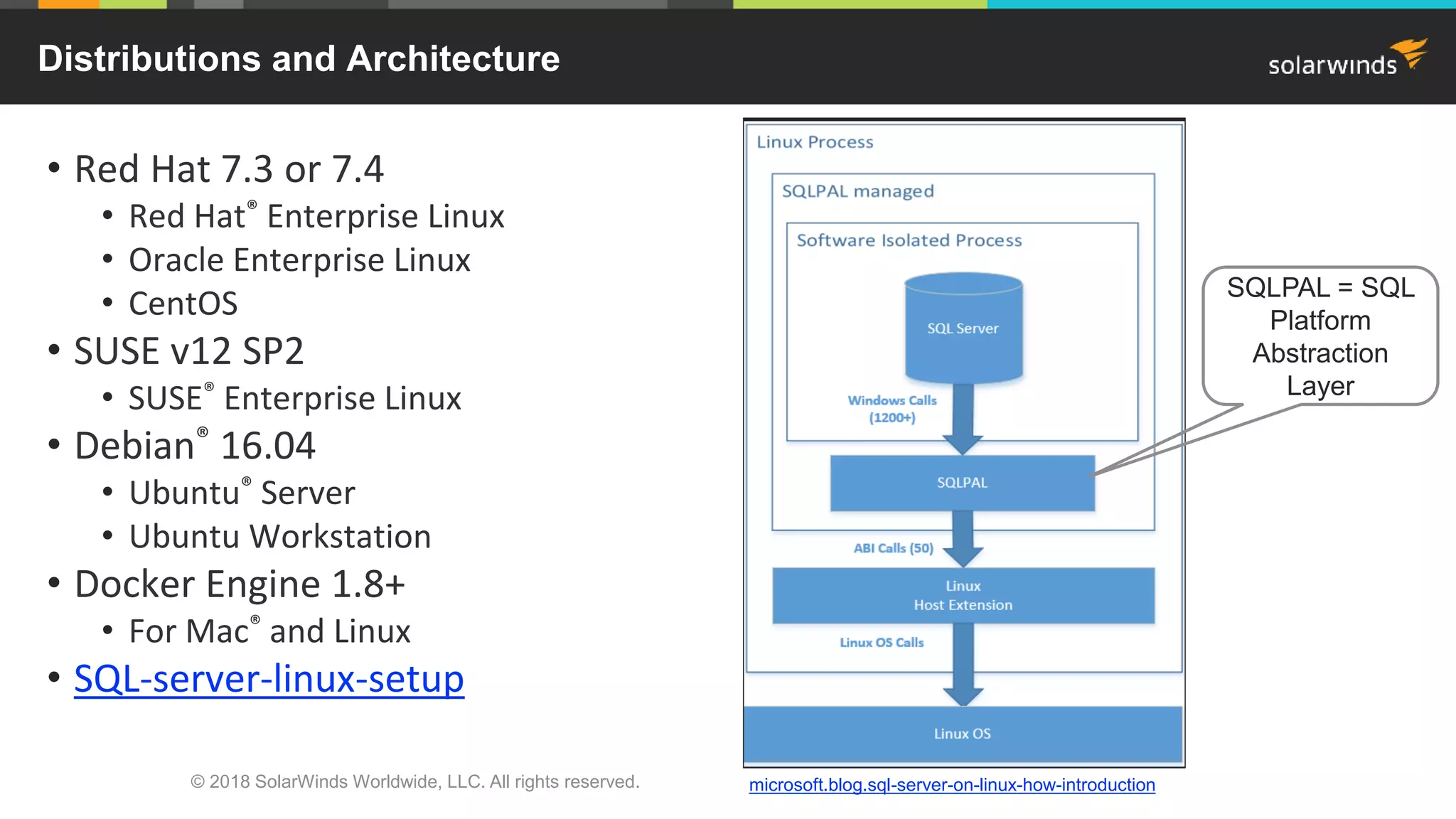
SQLPAL = SQL
Platform
Abstraction
Layer
microsoft.blog.sql-server-on-linux-how-introduction
• Three main editions – Express, Standard, and Enterprise
• Rewritten so there is common programming across all editions
• Develop once and purchase different editions to scale
• Developer and Test edition include Enterprise features
• Buy same SKUs and get rights to run on both Windows and Linux
• SQL Server Software Assurance benefits (SA)
• Standard / Enterprise
• Next version rights
• License Mobility to shared third-party servers
• Failover servers for high availability
• Enterprise
• Machine Learning Server for Hadoop®
• https://blogs.technet.microsoft.com/dataplatforminsider/2017/09/26/in-database-machine-
learning-in-sql-server-2017/
• Power BI Report Server
• Need to acquire when buying initial license – can’t add later
SQL Server 2017 Licensing
© 2018 SolarWinds Worldwide, LLC. All rights reserved.
• License Mobility
• Requires SA on licenses running the workload
• Deploy your workload only to authorized mobility partners
• Failover servers for high availability
• Combined with License Mobility, provides full flexibility on dedicated or third-party
• For planned or unplanned downtime
• Secondary/passive SQL server is granted through SA
• Without SA, both active and passive servers need to be licensed
• 90 day reassignment rule is waived due to License Mobility SA benefits
SQL Server 2017 Licensing – Cont.
© 2018 SolarWinds Worldwide, LLC. All rights reserved.
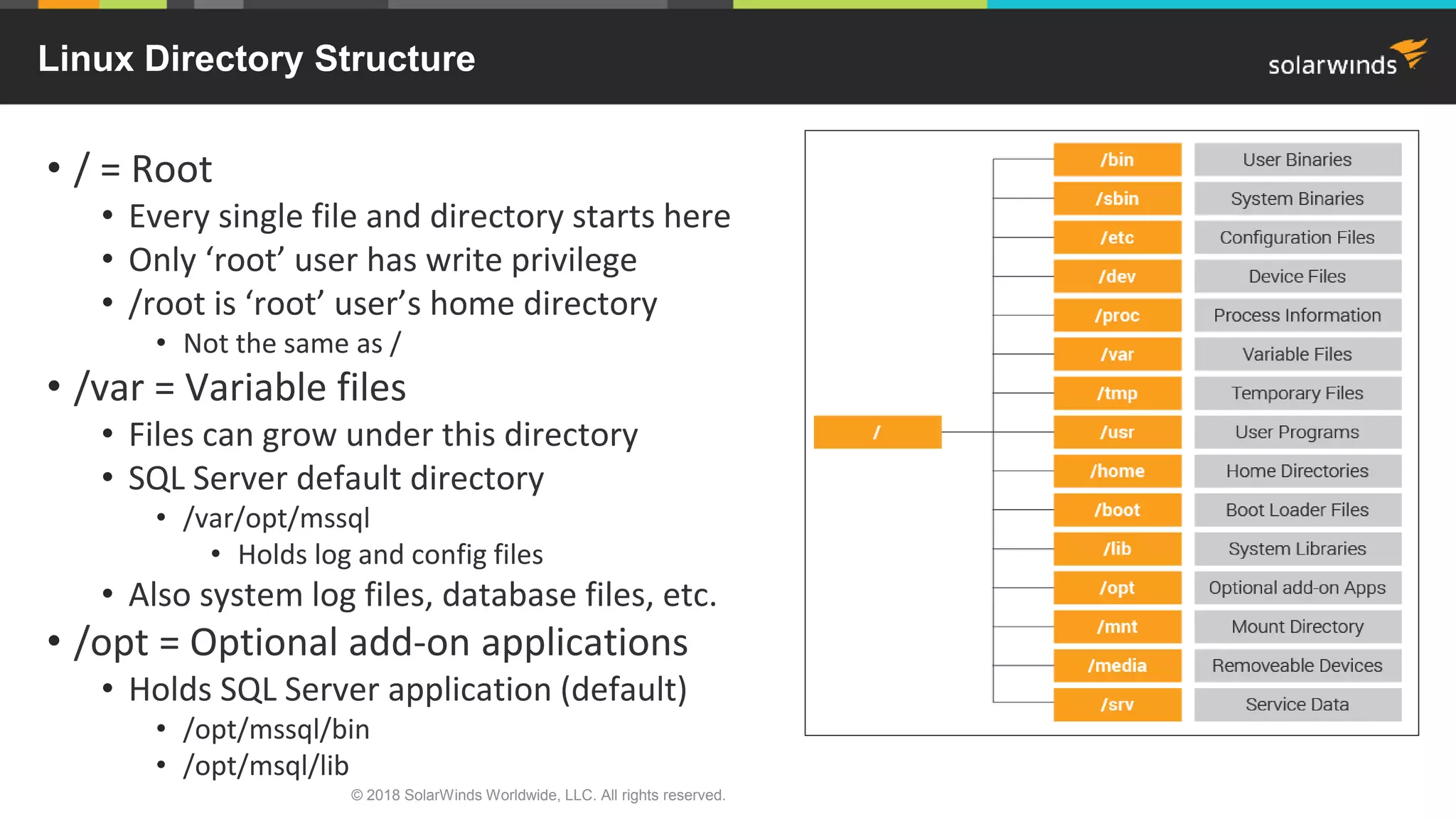
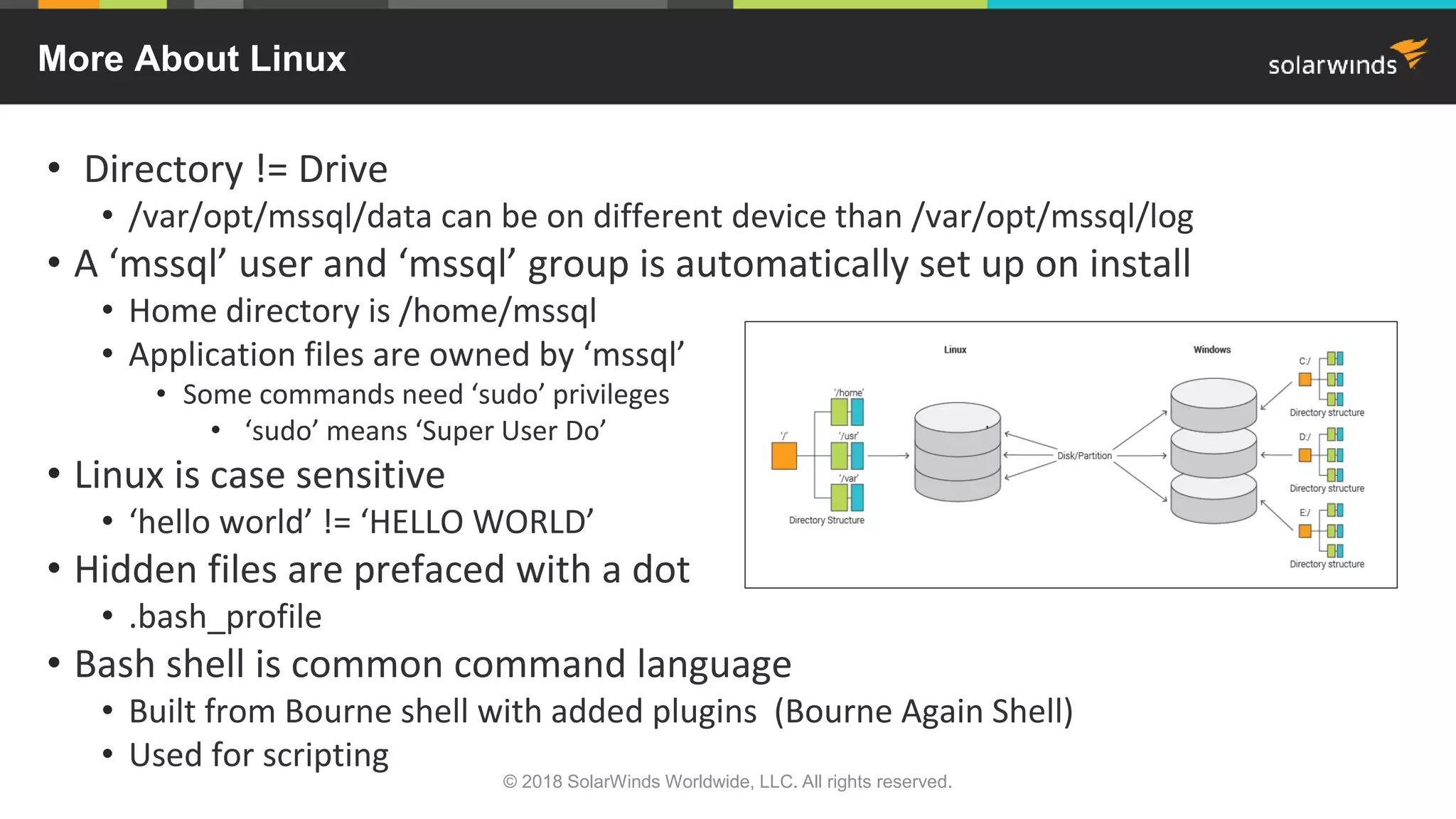
• / = Root
• Every single file and directory starts here
• Only ‘root’ user has write privilege
• /root is ‘root’ user’s home directory
• Not the same as /
• /var = Variable files
• Files can grow under this directory
• SQL Server default directory
• /var/opt/mssql
• Holds log and config files
• Also system log files, database files, etc.
• /opt = Optional add-on applications
• Holds SQL Server application (default)
• /opt/mssql/bin
• /opt/msql/lib
Linux Directory Structure
• Directory != Drive
• /var/opt/mssql/data can be on different device than /var/opt/mssql/log
• A ‘mssql’ user and ‘mssql’ group is automatically set up on install
• Home directory is /home/mssql
• Application files are owned by ‘mssql’
• Some commands need ‘sudo’ privileges
• ‘sudo’ means ‘Super User Do’
• Linux is case sensitive
• ‘hello world’ != ‘HELLO WORLD’
• Hidden files are prefaced with a dot
• .bash_profile
• Bash shell is common command language
• Built from Bourne shell with added plugins (Bourne Again Shell)
• Used for scripting
More About Linux
© 2018 SolarWinds Worldwide, LLC. All rights reserved.
• ls -ltra
• List directory contents (i.e., ls –ltra /var/opt/mssql)
• -l = long listing –t = sort newest first –r = reverse –a all files
• cd
• Change directory (i.e., cd /var/opt/mssql/log)
• ps –ef
• Displays active processes (i.e., ps –ef | grep sql)
• -e = every process –f = full format listing
• top = interactive view
• grep
• Searches files or standard output for pattern matching
• Example: history | grep –i mssql-conf
• man
• Interface to on-line reference manuals (i.e., man ps)
Useful Linux Commands
A great way to get familiar with
Linux commands is to download:
http://www.cygwin.com/
Provides functionality similar to a
Linux distribution on Windows.
© 2018 SolarWinds Worldwide, LLC. All rights reserved.
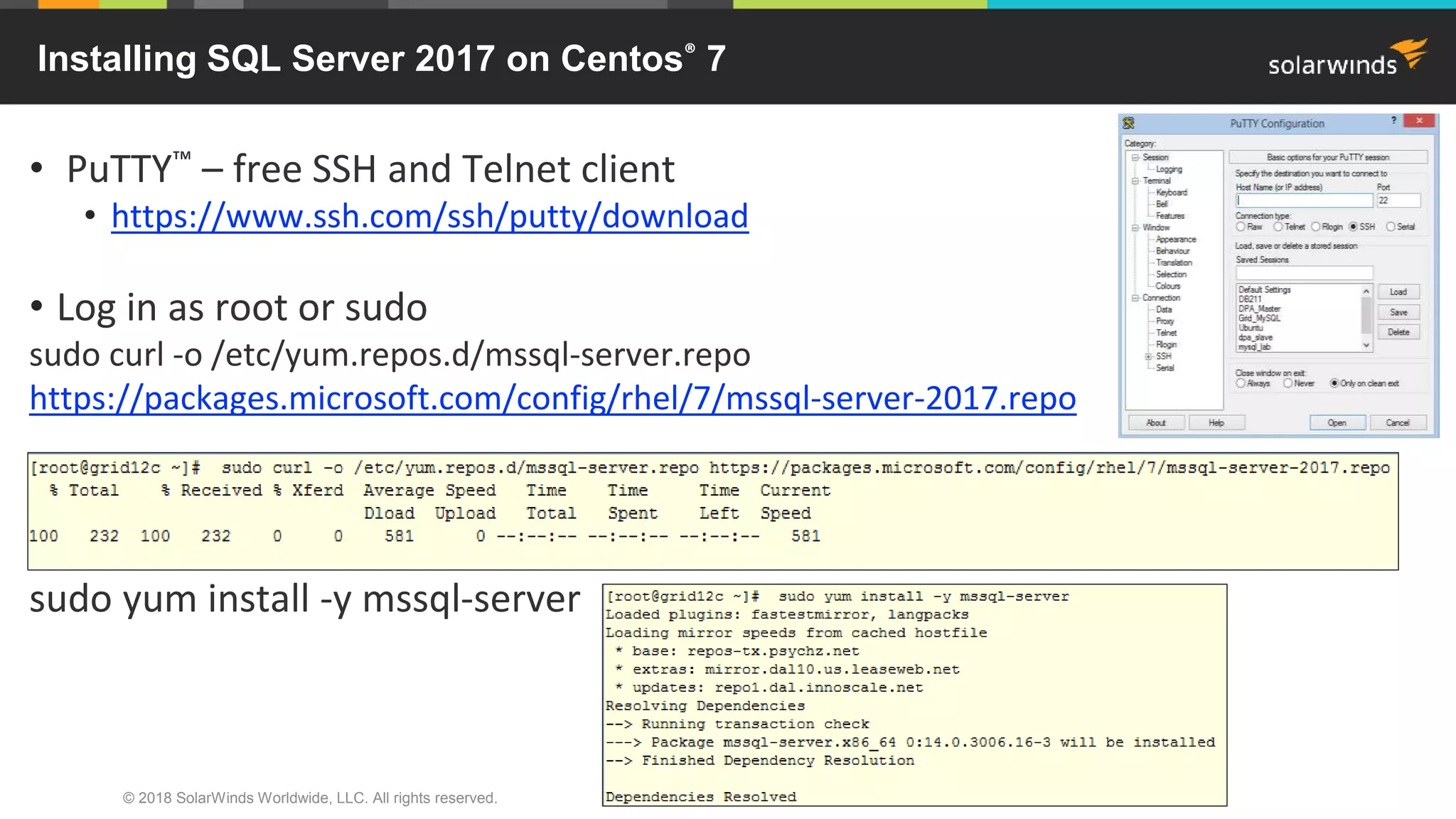
• PuTTY™ – free SSH and Telnet client
• https://www.ssh.com/ssh/putty/download
• Log in as root or sudo
sudo curl -o /etc/yum.repos.d/mssql-server.repo
https://packages.microsoft.com/config/rhel/7/mssql-server-2017.repo
sudo yum install -y mssql-server
Installing SQL Server 2017 on Centos® 7
© 2018 SolarWinds Worldwide, LLC. All rights reserved.
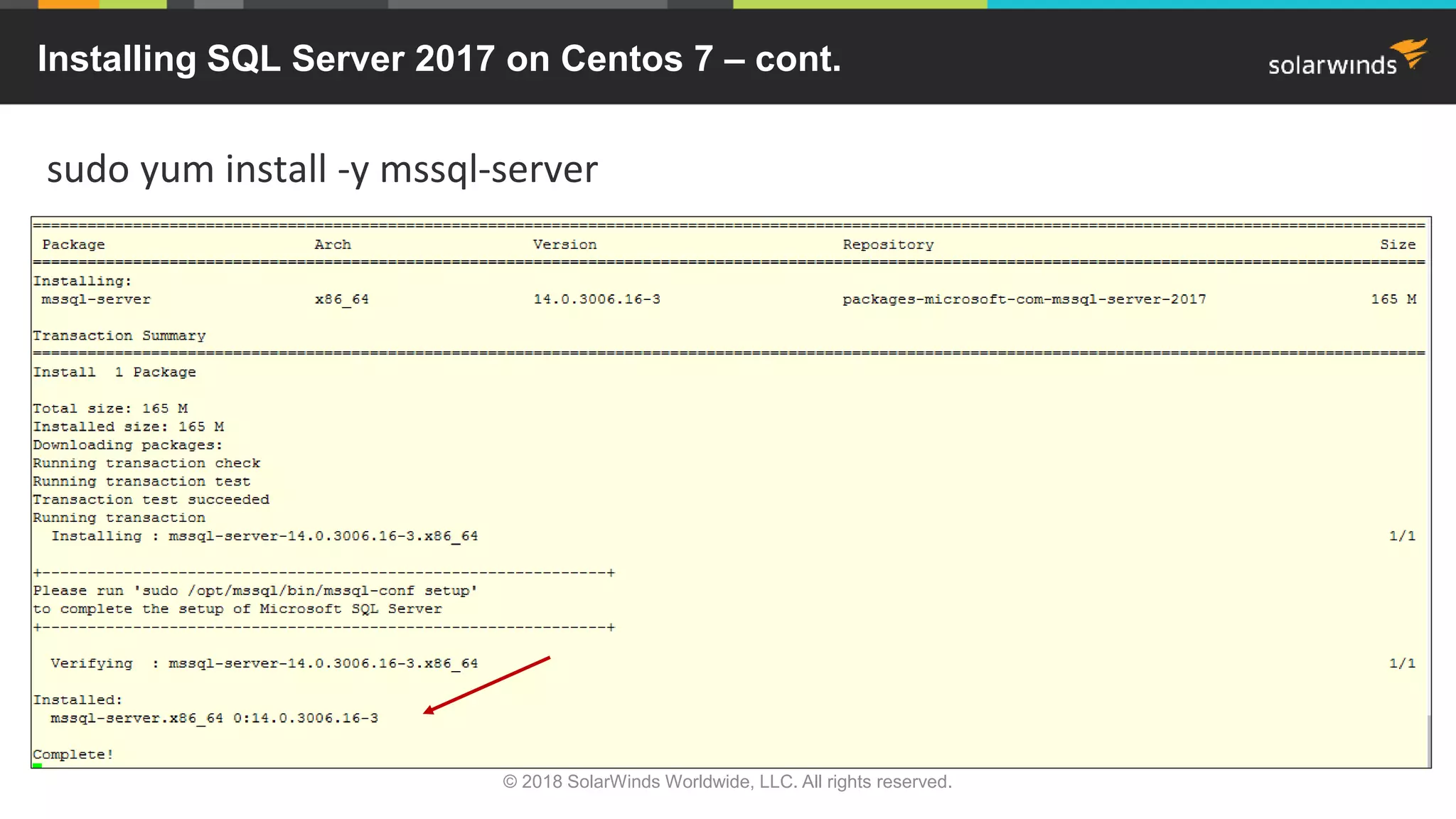
sudo yum install -y mssql-server
Installing SQL Server 2017 on Centos 7 – cont.
© 2018 SolarWinds Worldwide, LLC. All rights reserved.
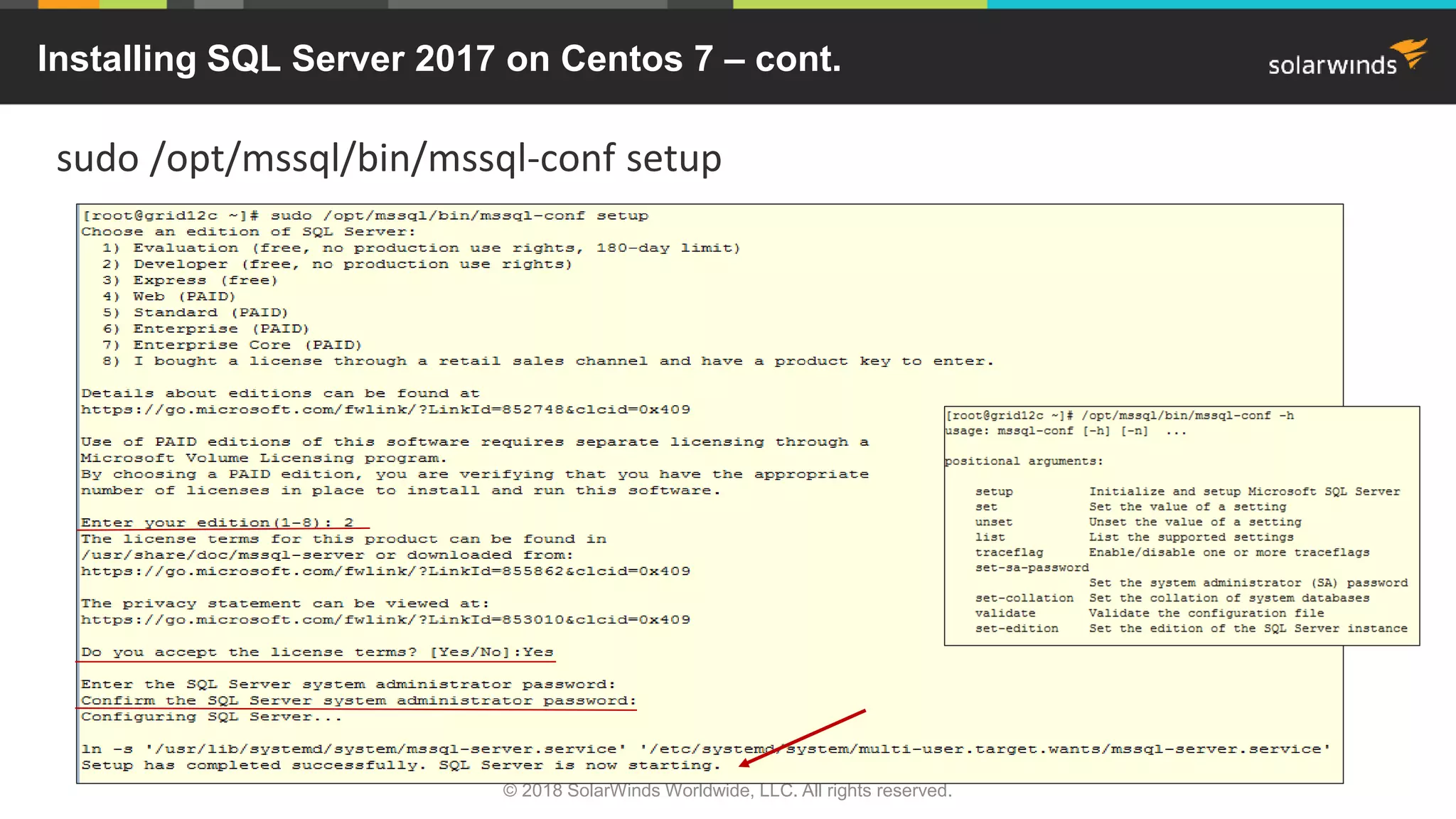
sudo /opt/mssql/bin/mssql-conf setup
Installing SQL Server 2017 on Centos 7 – cont.
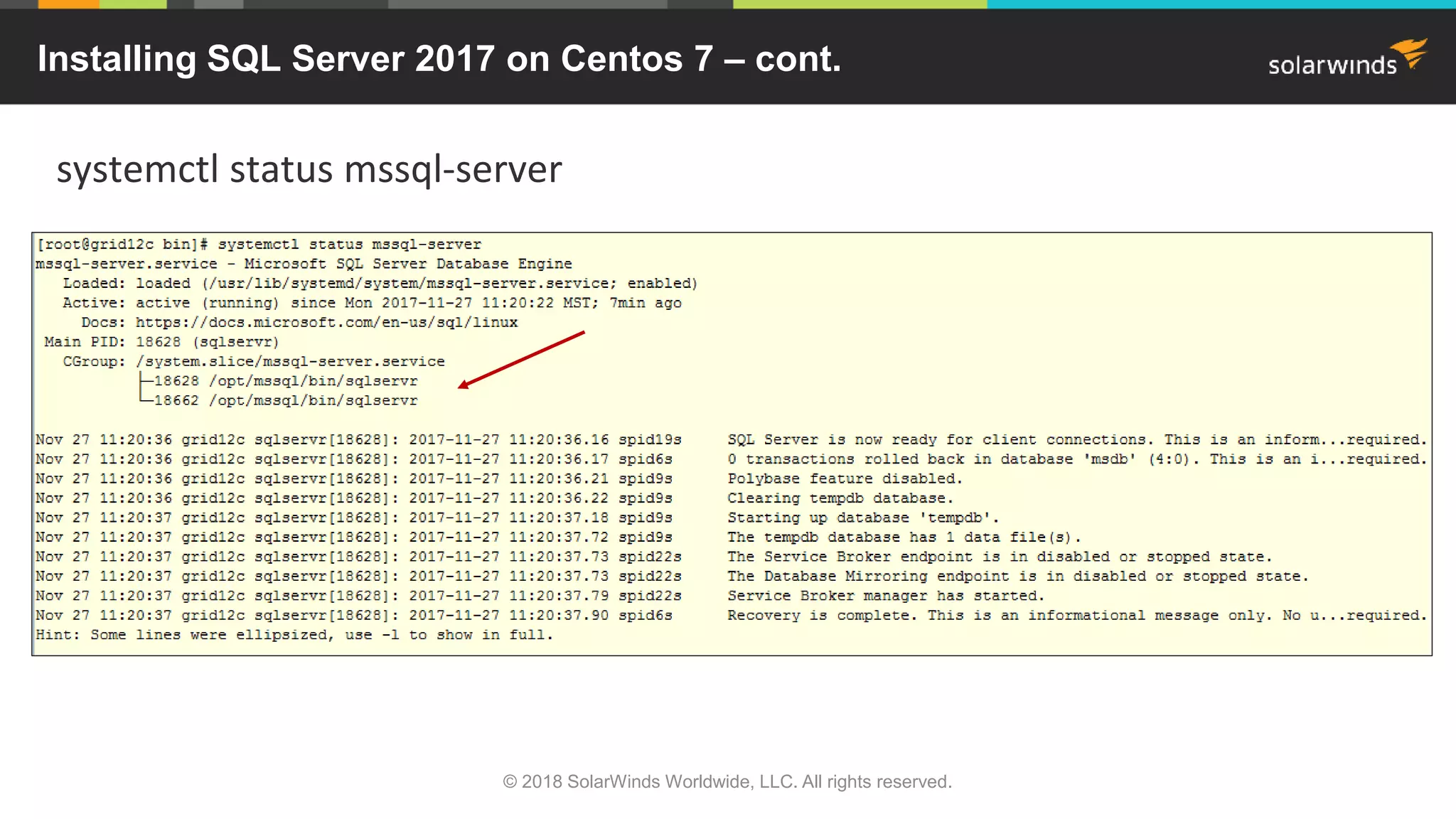
systemctl status mssql-server
Installing SQL Server 2017 on Centos 7 – cont.
© 2018 SolarWinds Worldwide, LLC. All rights reserved.
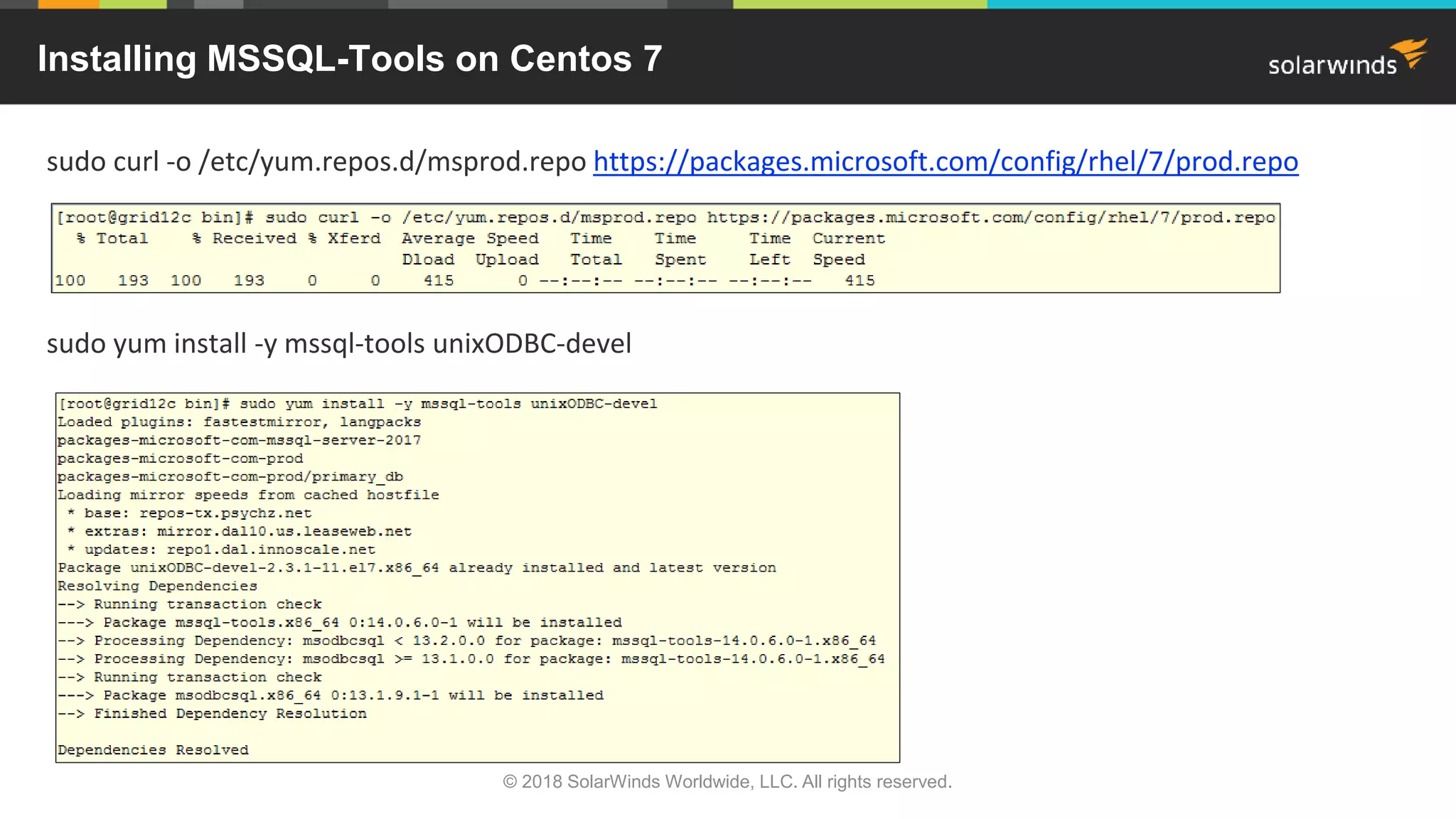
sudo curl -o /etc/yum.repos.d/msprod.repo https://packages.microsoft.com/config/rhel/7/prod.repo
sudo yum install -y mssql-tools unixODBC-devel
Installing MSSQL-Tools on Centos 7
© 2018 SolarWinds Worldwide, LLC. All rights reserved.
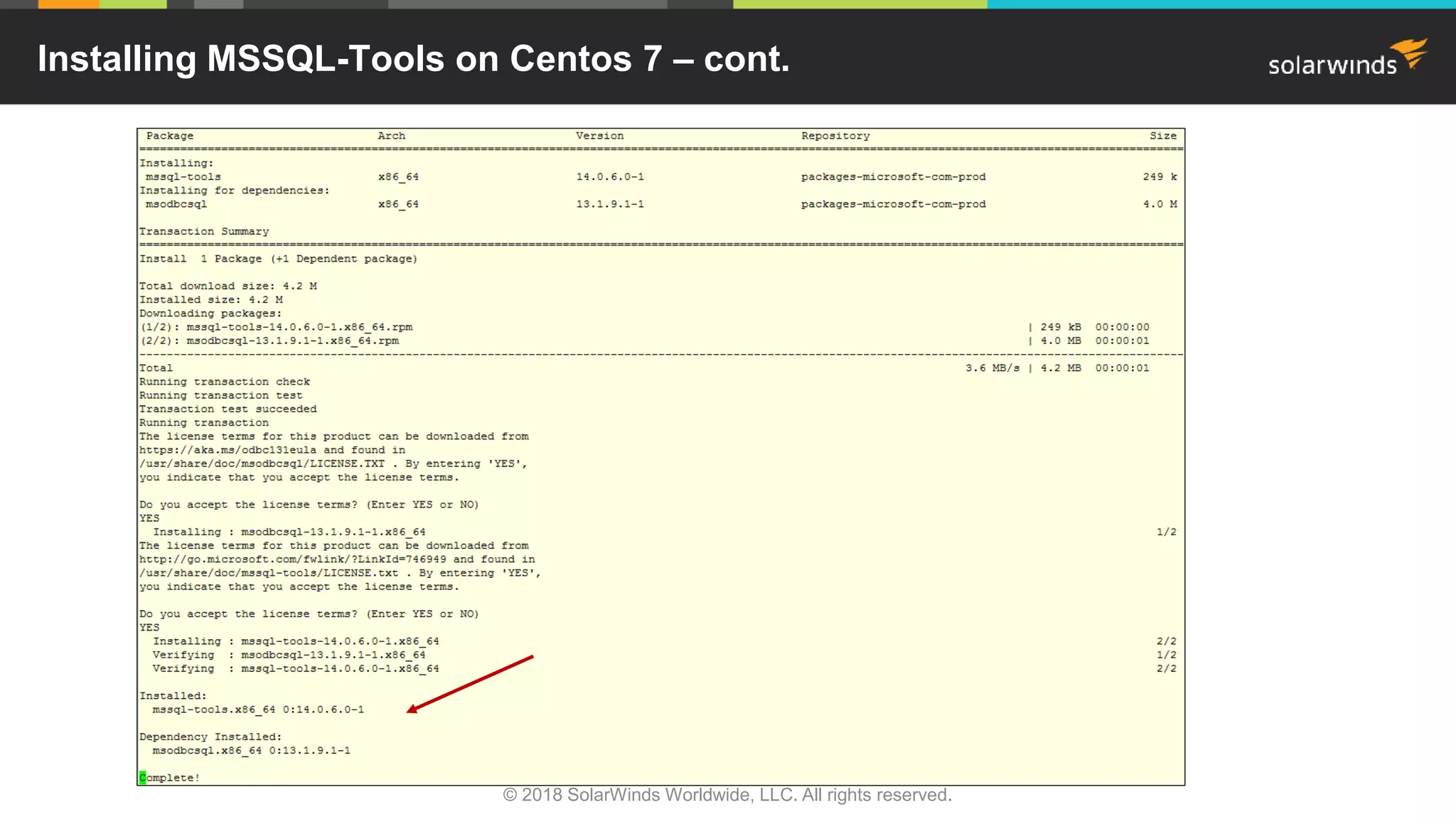
Installing MSSQL-Tools on Centos 7 – cont.
© 2018 SolarWinds Worldwide, LLC. All rights reserved.
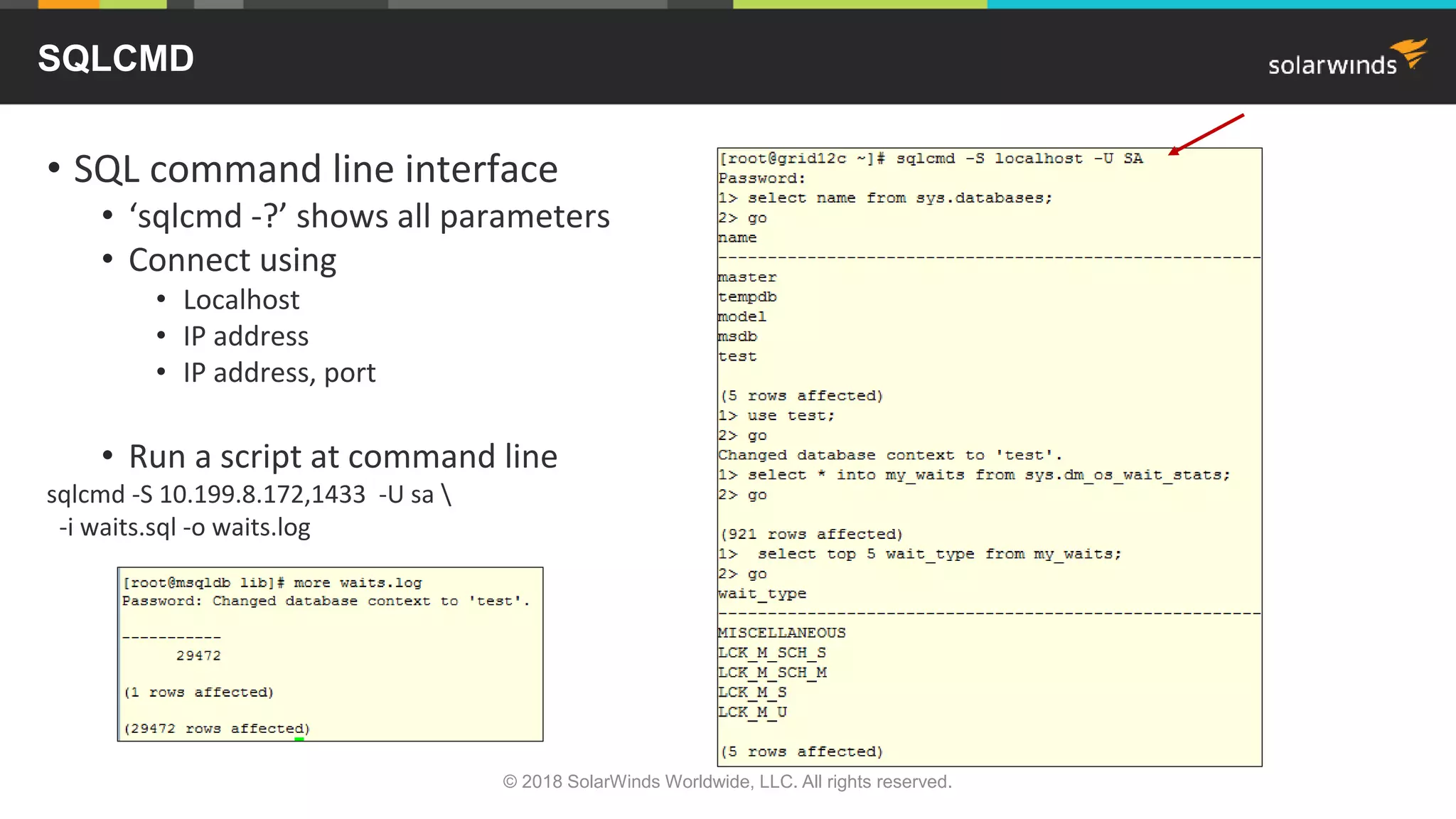
• SQL command line interface
• ‘sqlcmd -?’ shows all parameters
• Connect using
• Localhost
• IP address
• IP address, port
• Run a script at command line
sqlcmd -S 10.199.8.172,1433 -U sa 
-i waits.sql -o waits.log
SQLCMD
© 2018 SolarWinds Worldwide, LLC. All rights reserved.
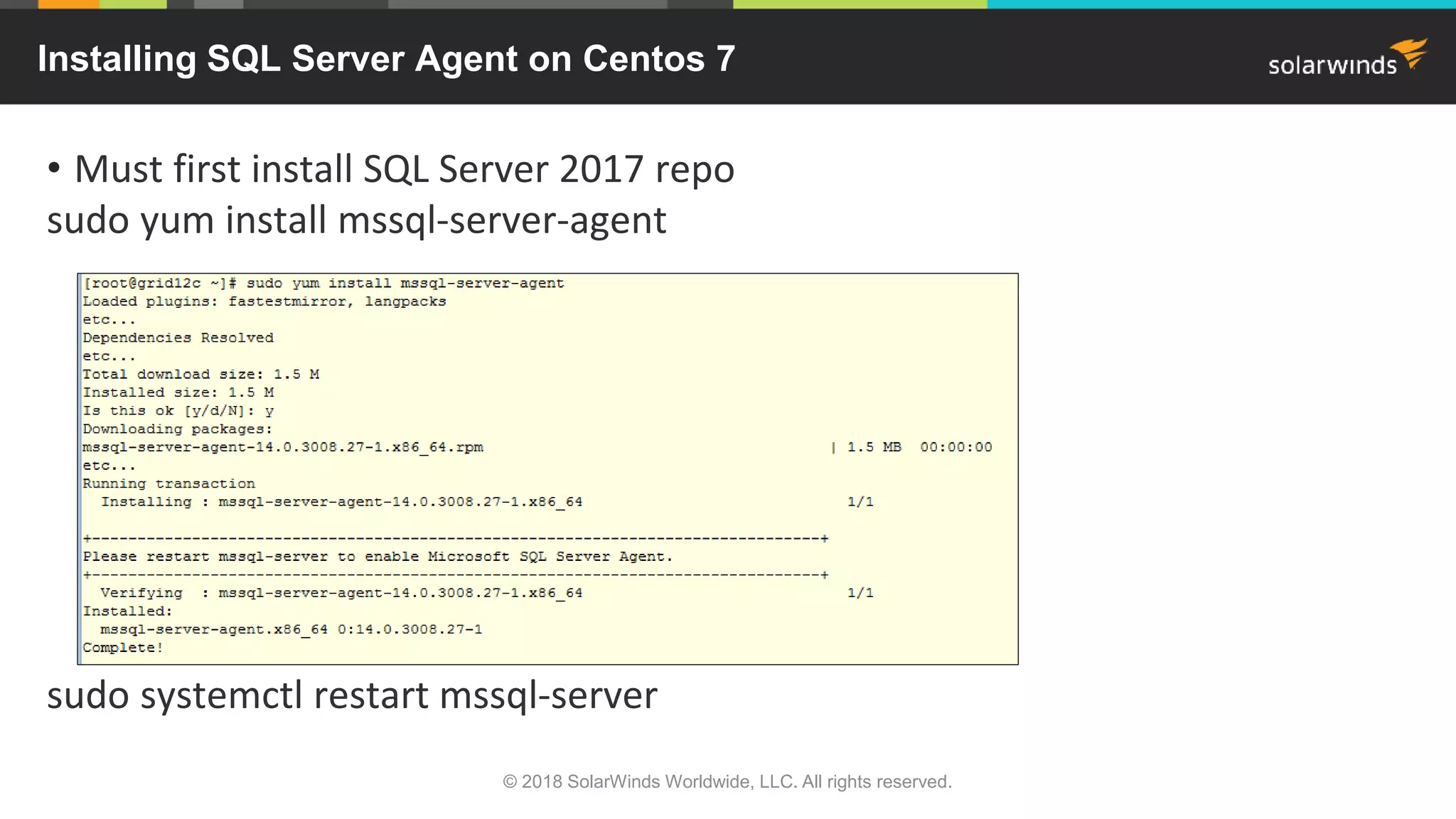
• Must first install SQL Server 2017 repo
sudo yum install mssql-server-agent
sudo systemctl restart mssql-server
Installing SQL Server Agent on Centos 7
© 2018 SolarWinds Worldwide, LLC. All rights reserved.
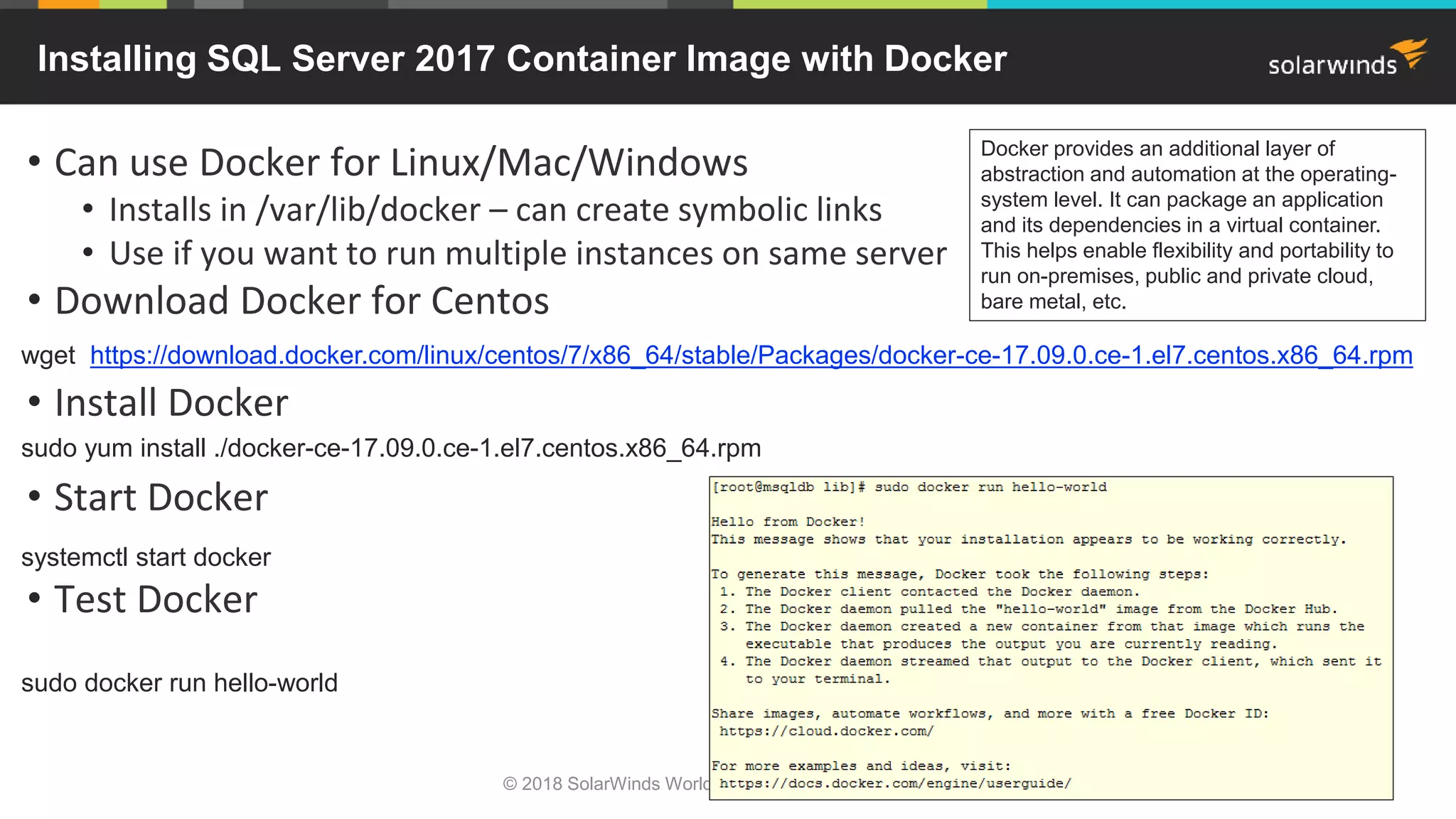
• Can use Docker for Linux/Mac/Windows
• Installs in /var/lib/docker – can create symbolic links
• Use if you want to run multiple instances on same server
• Download Docker for Centos
• Install Docker
• Start Docker
• Test Docker
Installing SQL Server 2017 Container Image with Docker
wget https://download.docker.com/linux/centos/7/x86_64/stable/Packages/docker-ce-17.09.0.ce-1.el7.centos.x86_64.rpm
sudo yum install ./docker-ce-17.09.0.ce-1.el7.centos.x86_64.rpm
systemctl start docker
sudo docker run hello-world
Docker provides an additional layer of
abstraction and automation at the operating-
system level. It can package an application
and its dependencies in a virtual container.
This helps enable flexibility and portability to
run on-premises, public and private cloud,
bare metal, etc.
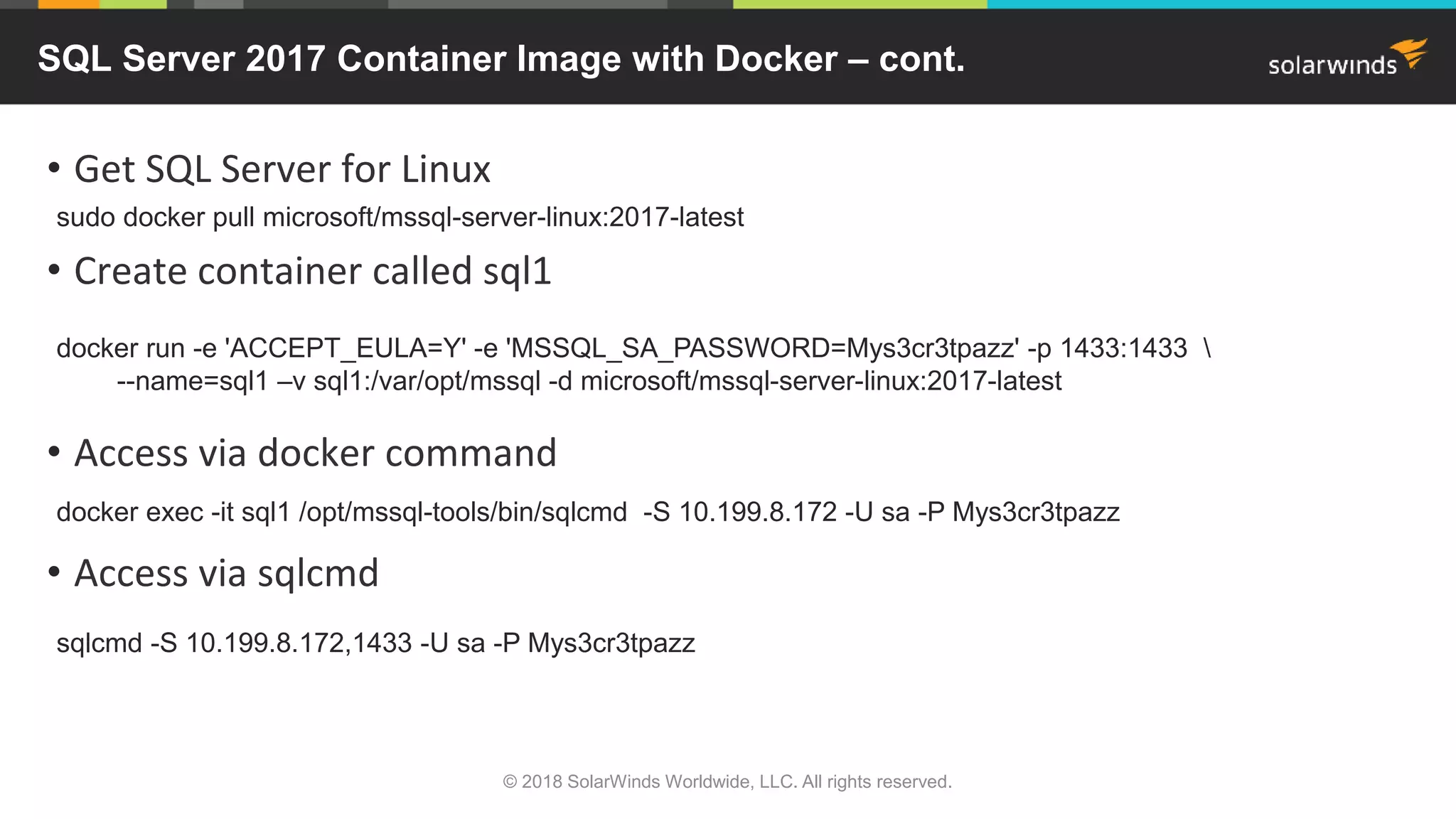
• Get SQL Server for Linux
• Create container called sql1
• Access via docker command
• Access via sqlcmd
SQL Server 2017 Container Image with Docker – cont.
sudo docker pull microsoft/mssql-server-linux:2017-latest
docker run -e 'ACCEPT_EULA=Y' -e 'MSSQL_SA_PASSWORD=Mys3cr3tpazz' -p 1433:1433 
--name=sql1 –v sql1:/var/opt/mssql -d microsoft/mssql-server-linux:2017-latest
docker exec -it sql1 /opt/mssql-tools/bin/sqlcmd -S 10.199.8.172 -U sa -P Mys3cr3tpazz
sqlcmd -S 10.199.8.172,1433 -U sa -P Mys3cr3tpazz
© 2018 SolarWinds Worldwide, LLC. All rights reserved.
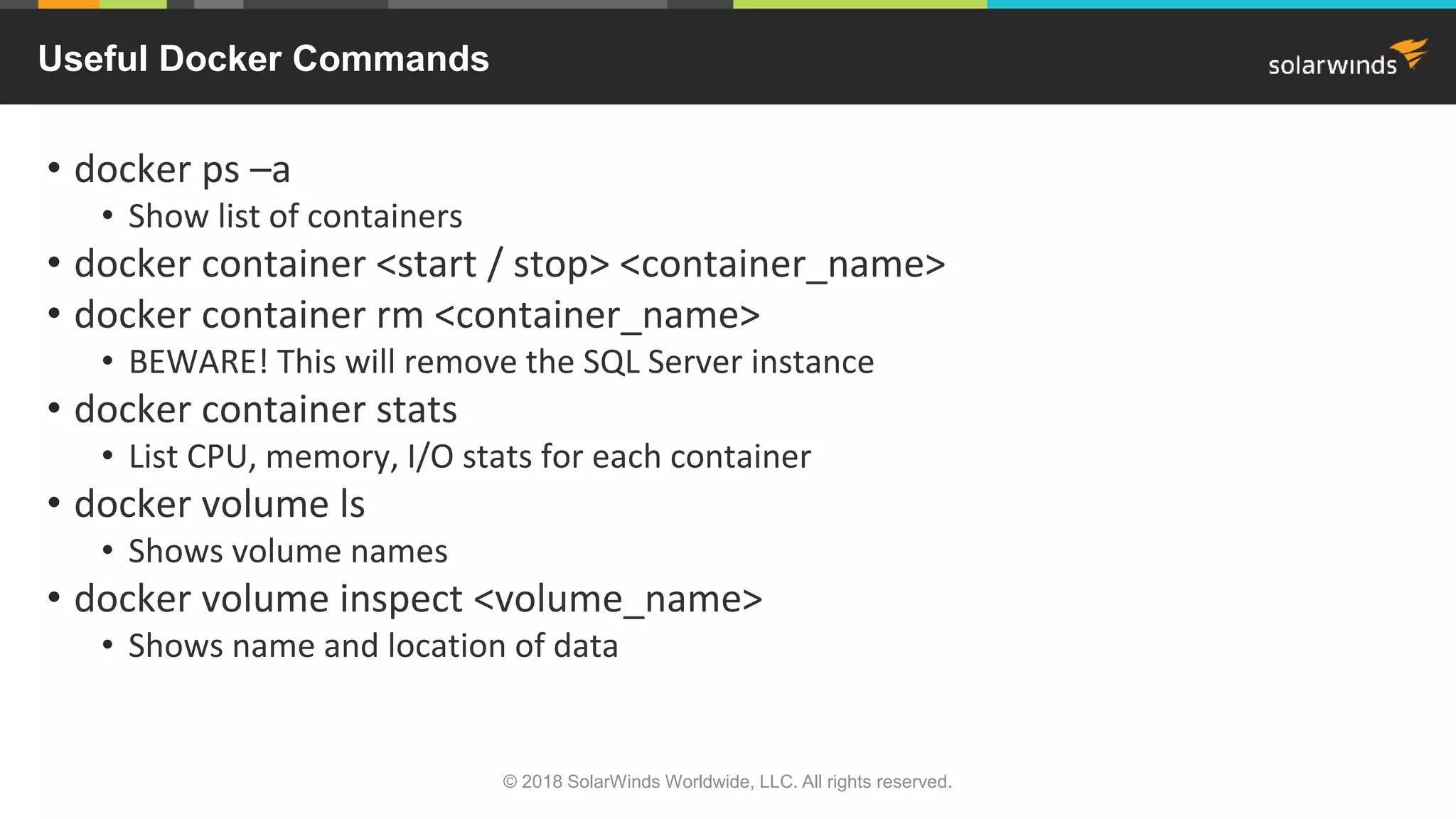
• docker ps –a
• Show list of containers
• docker container <start / stop> <container_name>
• docker container rm <container_name>
• BEWARE! This will remove the SQL Server instance
• docker container stats
• List CPU, memory, I/O stats for each container
• docker volume ls
• Shows volume names
• docker volume inspect <volume_name>
• Shows name and location of data
Useful Docker Commands
© 2018 SolarWinds Worldwide, LLC. All rights reserved.
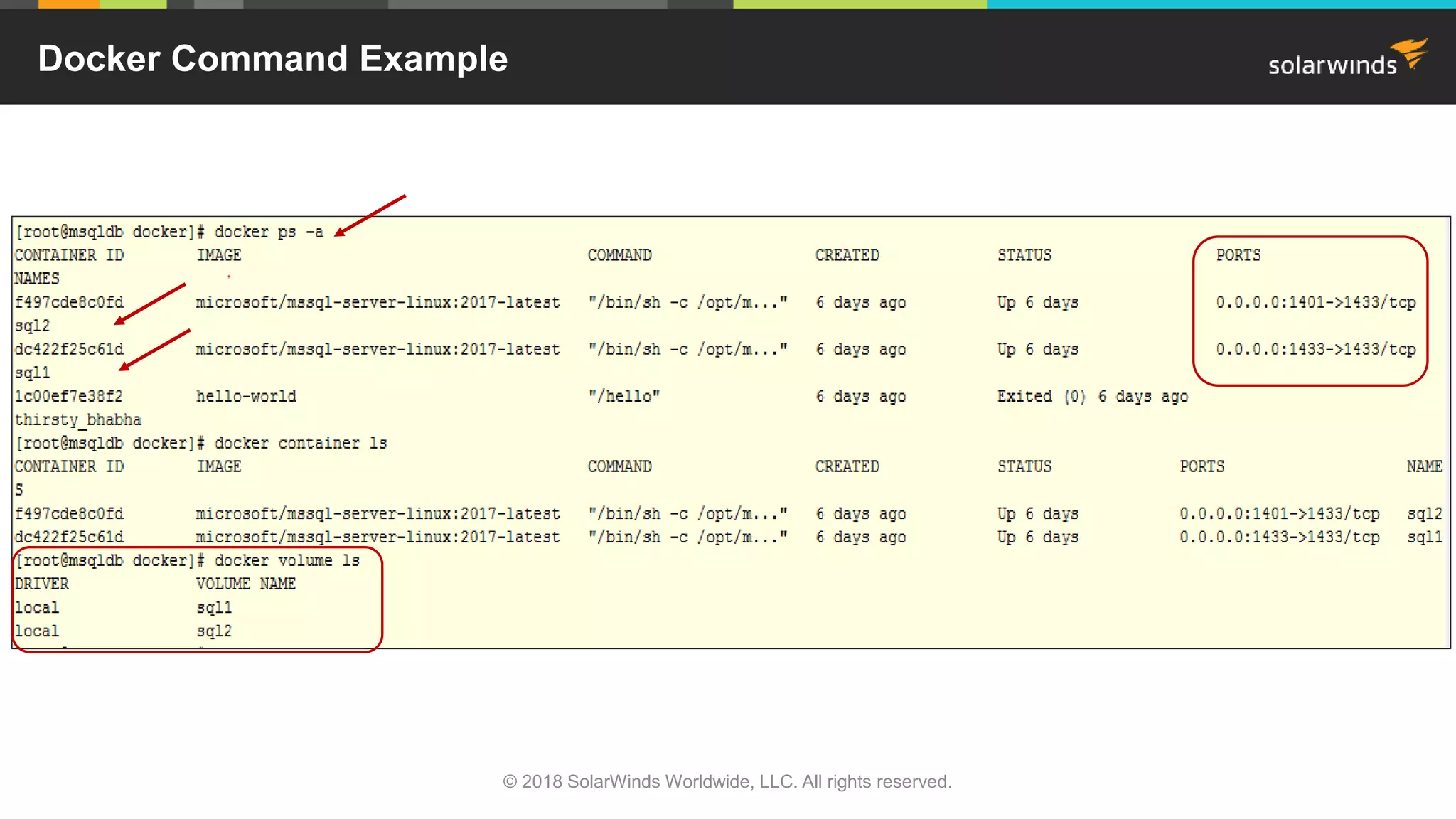
Docker Command Example
© 2018 SolarWinds Worldwide, LLC. All rights reserved.
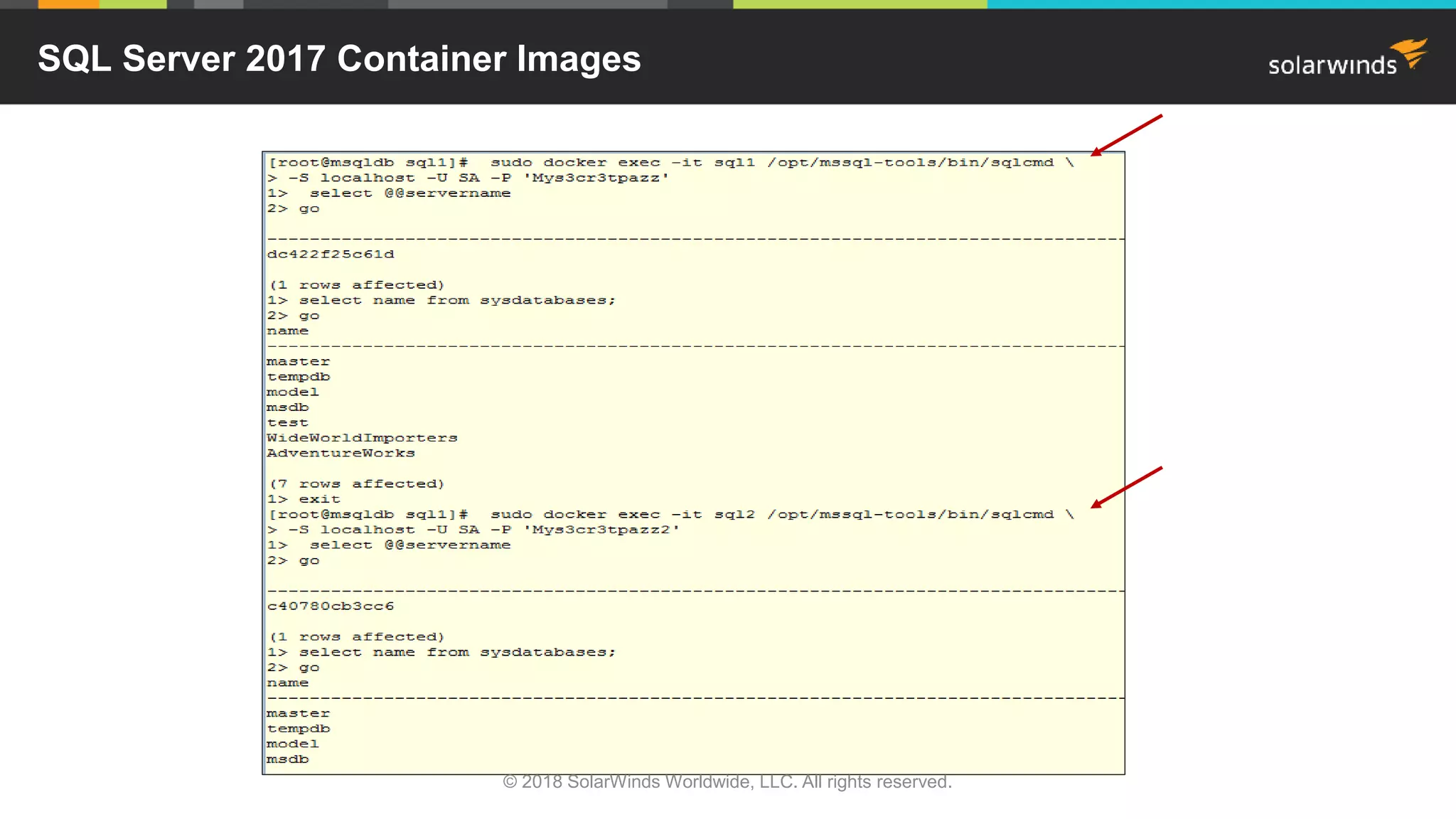
SQL Server 2017 Container Images
© 2018 SolarWinds Worldwide, LLC. All rights reserved.
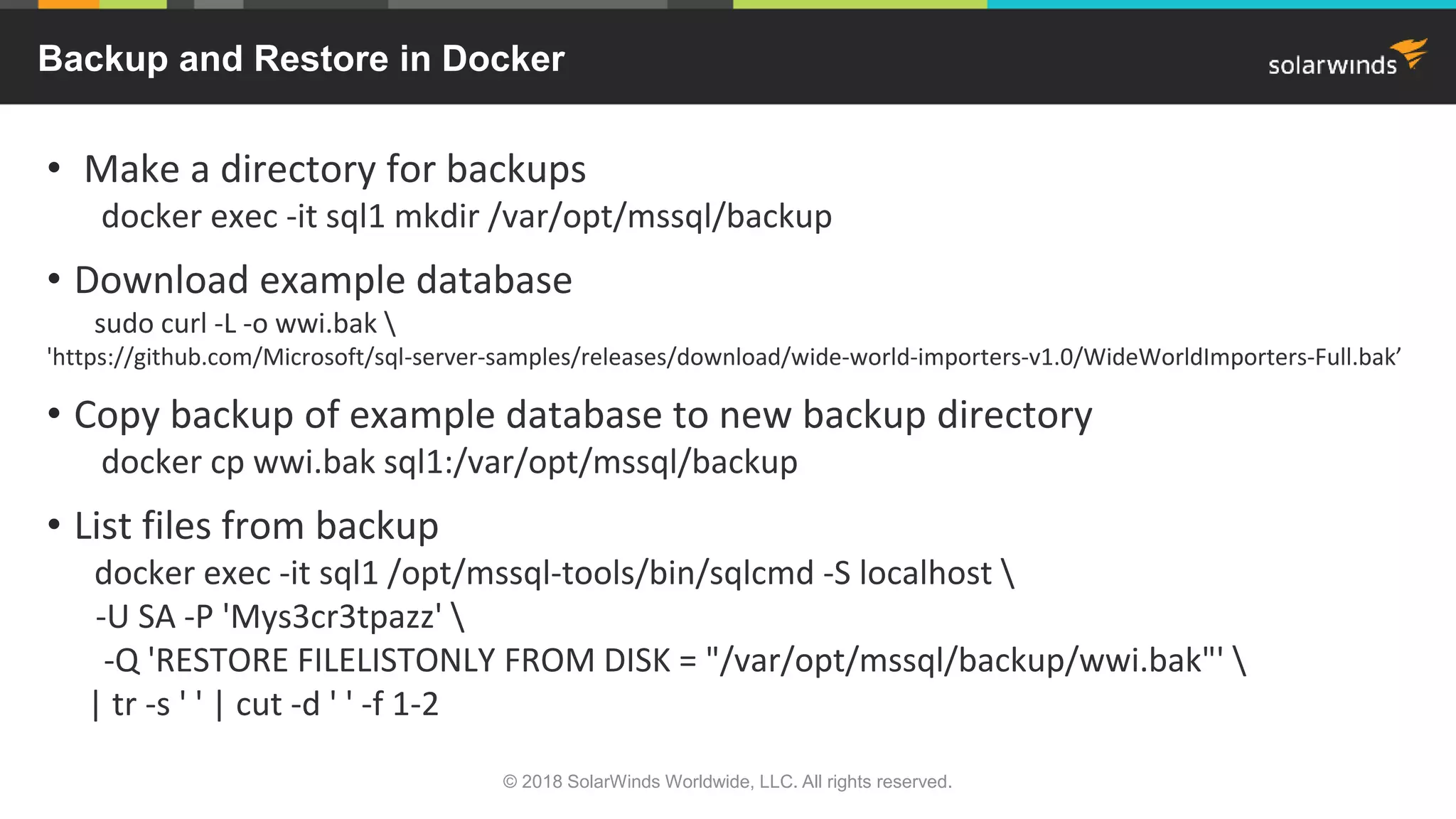
• Make a directory for backups
docker exec -it sql1 mkdir /var/opt/mssql/backup
• Download example database
sudo curl -L -o wwi.bak 
'https://github.com/Microsoft/sql-server-samples/releases/download/wide-world-importers-v1.0/WideWorldImporters-Full.bak’
• Copy backup of example database to new backup directory
docker cp wwi.bak sql1:/var/opt/mssql/backup
• List files from backup
docker exec -it sql1 /opt/mssql-tools/bin/sqlcmd -S localhost 
-U SA -P 'Mys3cr3tpazz' 
-Q 'RESTORE FILELISTONLY FROM DISK = "/var/opt/mssql/backup/wwi.bak"' 
| tr -s ' ' | cut -d ' ' -f 1-2
Backup and Restore in Docker
© 2018 SolarWinds Worldwide, LLC. All rights reserved.
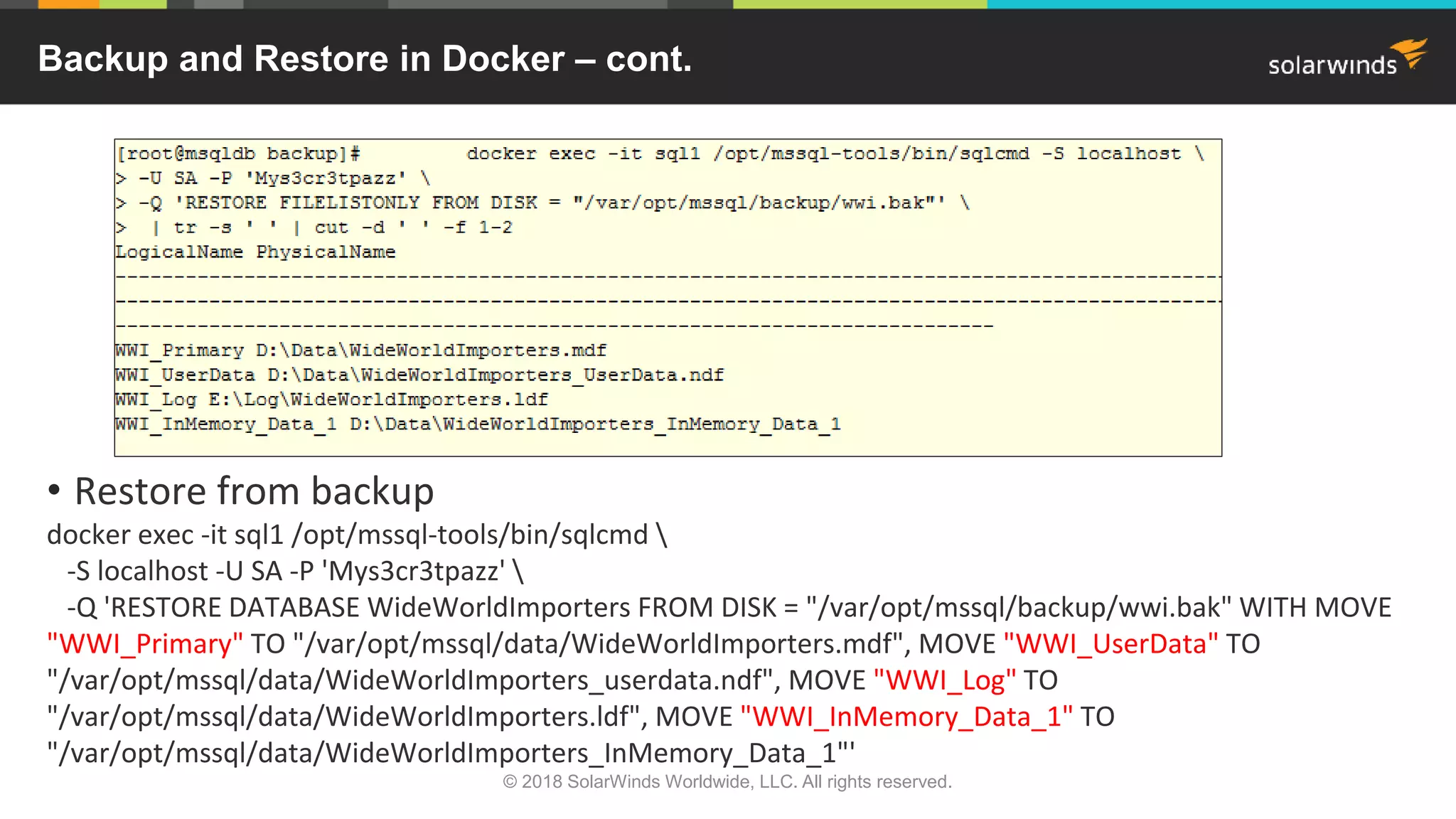
• Restore from backup
docker exec -it sql1 /opt/mssql-tools/bin/sqlcmd 
-S localhost -U SA -P 'Mys3cr3tpazz' 
-Q 'RESTORE DATABASE WideWorldImporters FROM DISK = "/var/opt/mssql/backup/wwi.bak" WITH MOVE
"WWI_Primary" TO "/var/opt/mssql/data/WideWorldImporters.mdf", MOVE "WWI_UserData" TO
"/var/opt/mssql/data/WideWorldImporters_userdata.ndf", MOVE "WWI_Log" TO
"/var/opt/mssql/data/WideWorldImporters.ldf", MOVE "WWI_InMemory_Data_1" TO
"/var/opt/mssql/data/WideWorldImporters_InMemory_Data_1"'
Backup and Restore in Docker – cont.
© 2018 SolarWinds Worldwide, LLC. All rights reserved.
docker exec -it sql1 /opt/mssql-tools/bin/sqlcmd 
-S localhost -U SA -P 'Mys3cr3tpazz' 
-Q "BACKUP DATABASE [WideWorldImporters] TO DISK =
N'/var/opt/mssql/backup/wwi_20171127.bak' WITH NOFORMAT, NOINIT, NAME =
'WideWorldImporters-full', SKIP, NOREWIND, NOUNLOAD, STATS = 10"
docker cp sql1:/var/opt/mssql/backup/wwi_20171127.bak /backup/wwi_20171127.bak
Backup and Copy Files Out of Container
© 2018 SolarWinds Worldwide, LLC. All rights reserved.
• Command-line tools
• sqlcmd and bcp
• SSMS
• Connect remotely from Windows
• Includes PowerShell®
• Visual Studio Code
• How-to-develop-use-vscode
• SQL Server Data Tools (SSDT)
• For Visual Studio
• Build project on Windows
• Deploy to Linux
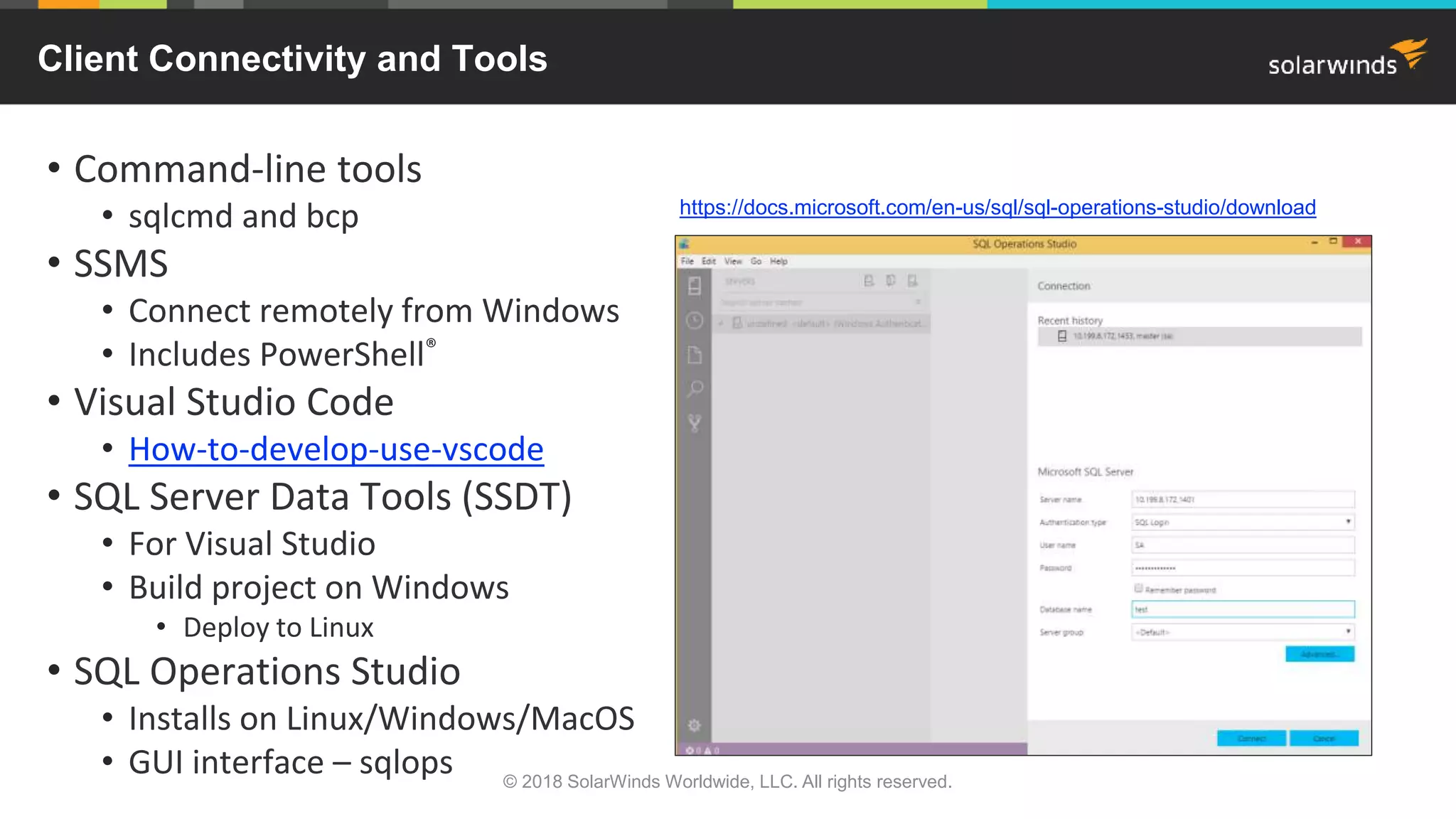
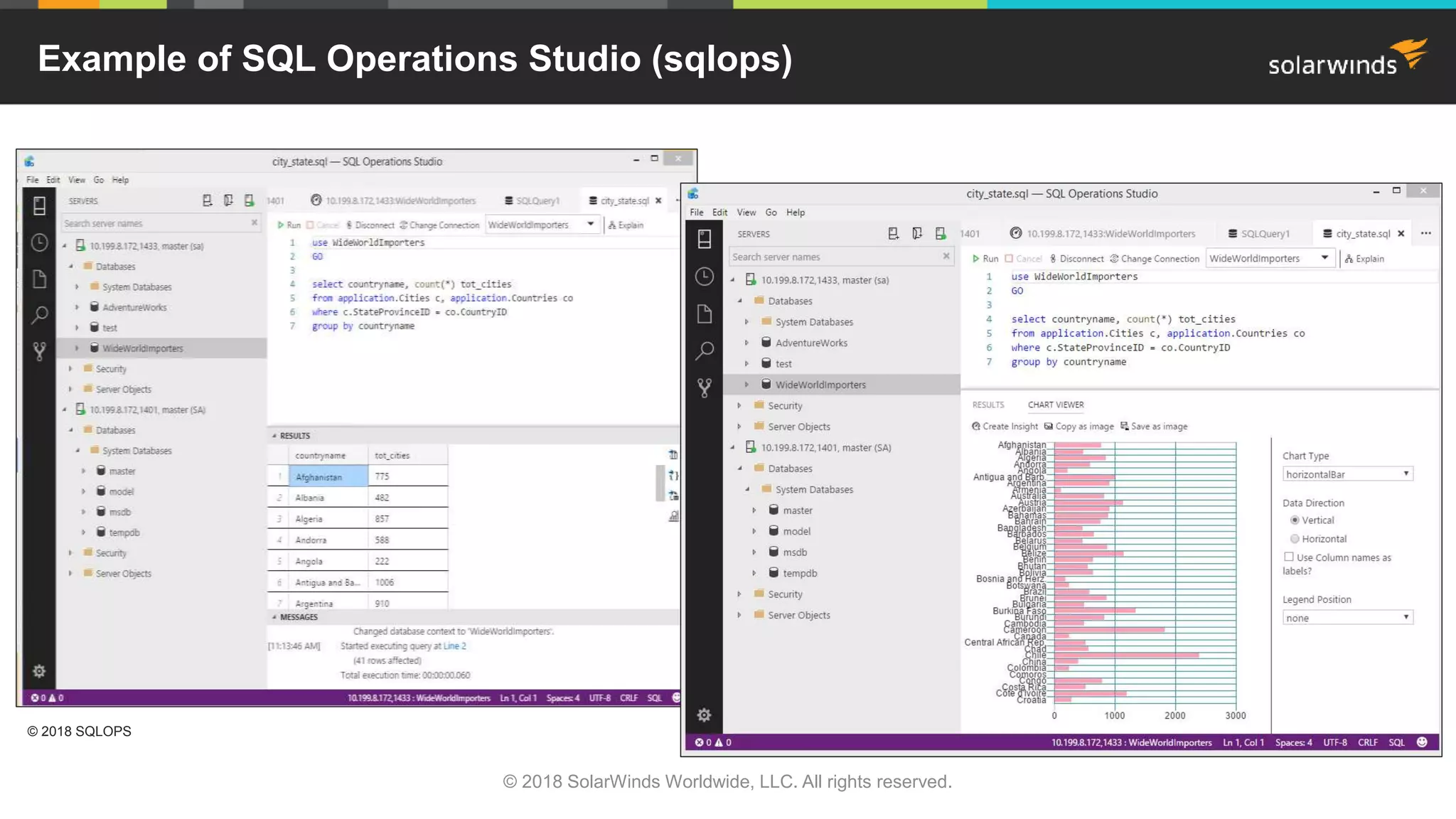
• SQL Operations Studio
• Installs on Linux/Windows/MacOS
• GUI interface – sqlops
https://docs.microsoft.com/en-us/sql/sql-operations-studio/download
Client Connectivity and Tools
© 2018 SolarWinds Worldwide, LLC. All rights reserved.
Example of SQL Operations Studio (sqlops)
© 2018 SolarWinds Worldwide, LLC. All rights reserved.
© 2018 SQLOPS
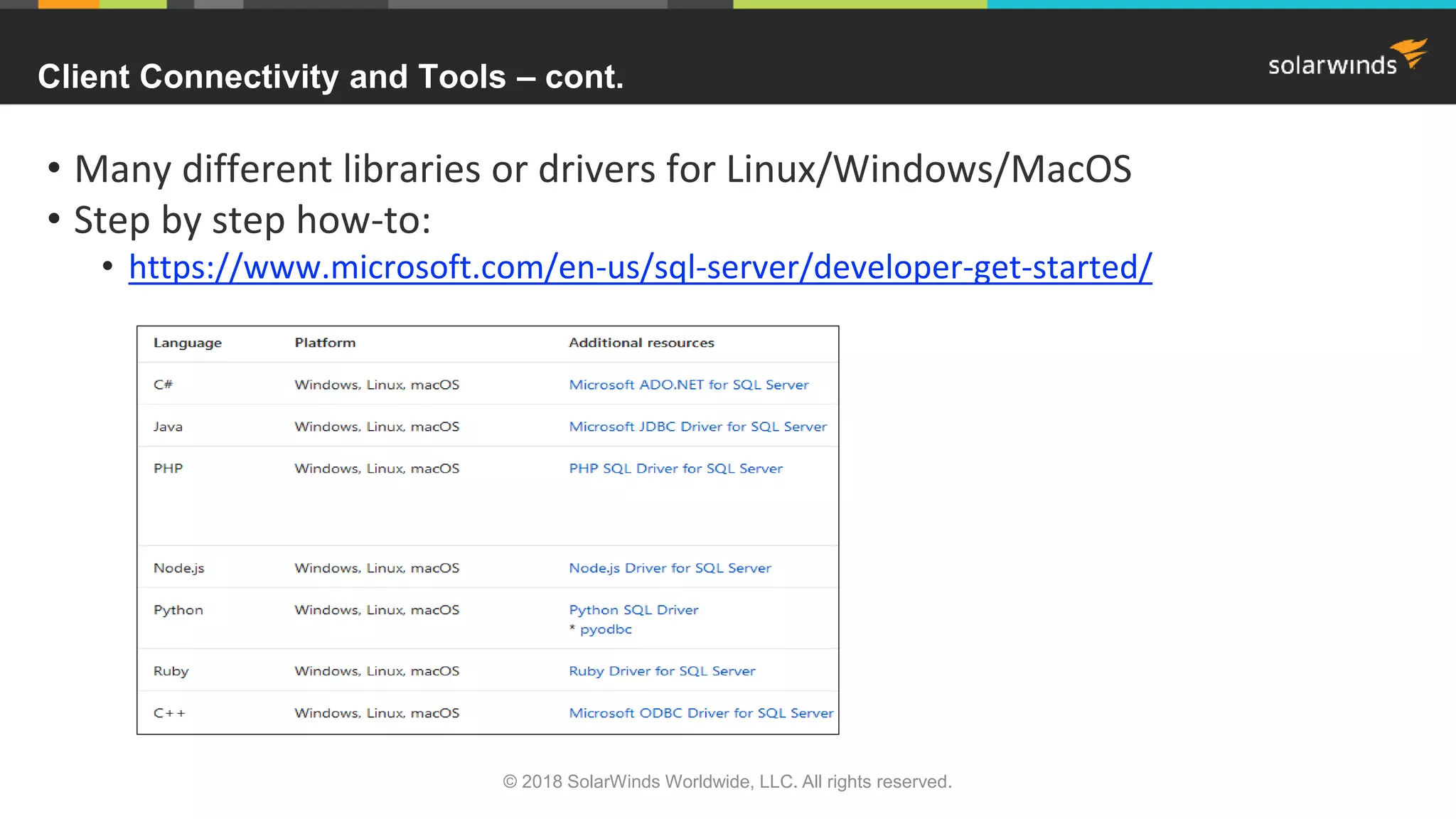
• Many different libraries or drivers for Linux/Windows/MacOS
• Step by step how-to:
• https://www.microsoft.com/en-us/sql-server/developer-get-started/
Client Connectivity and Tools – cont.
© 2018 SolarWinds Worldwide, LLC. All rights reserved.
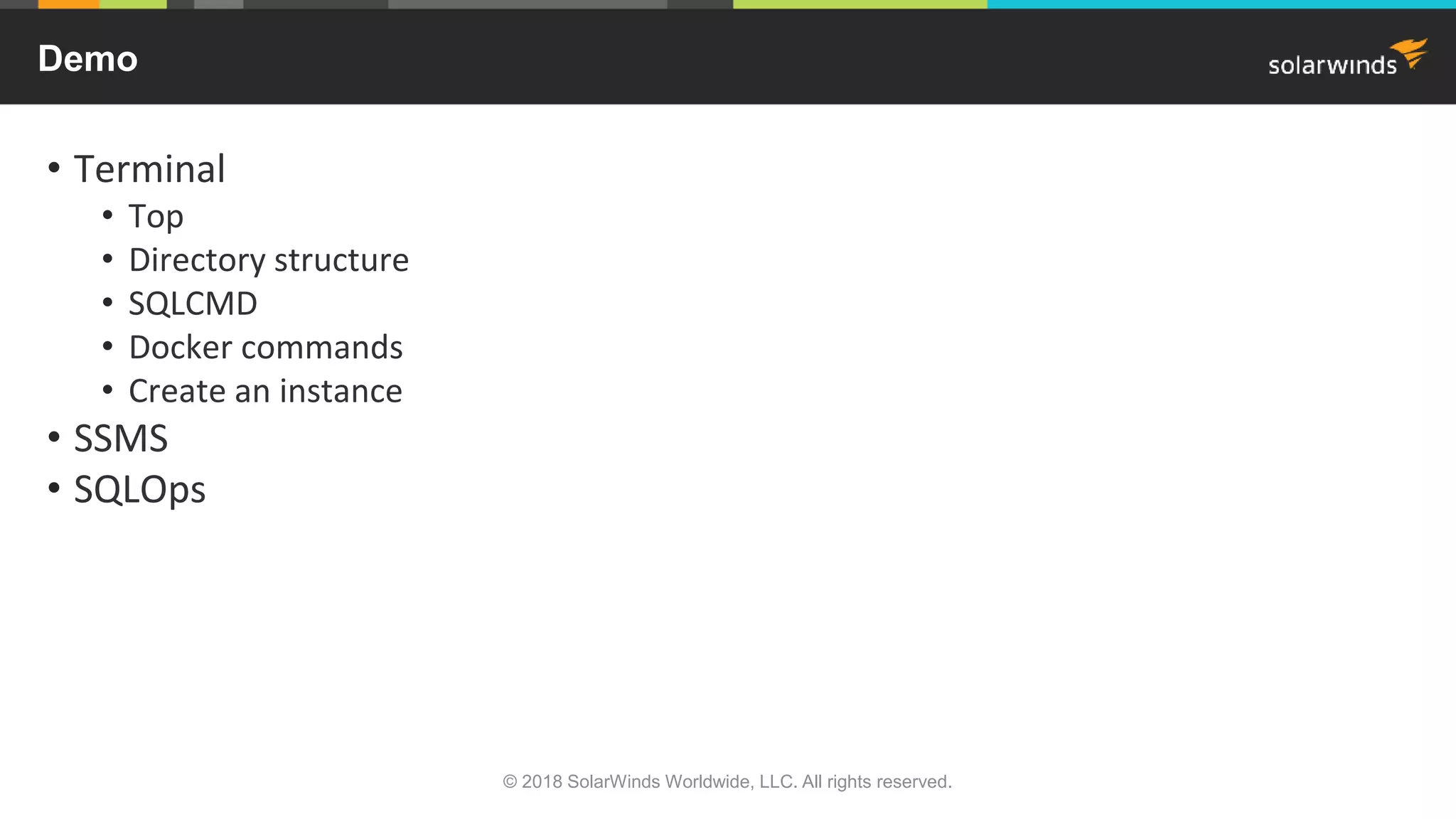
• Terminal
• Top
• Directory structure
• SQLCMD
• Docker commands
• Create an instance
• SSMS
• SQLOps
Demo
© 2018 SolarWinds Worldwide, LLC. All rights reserved.
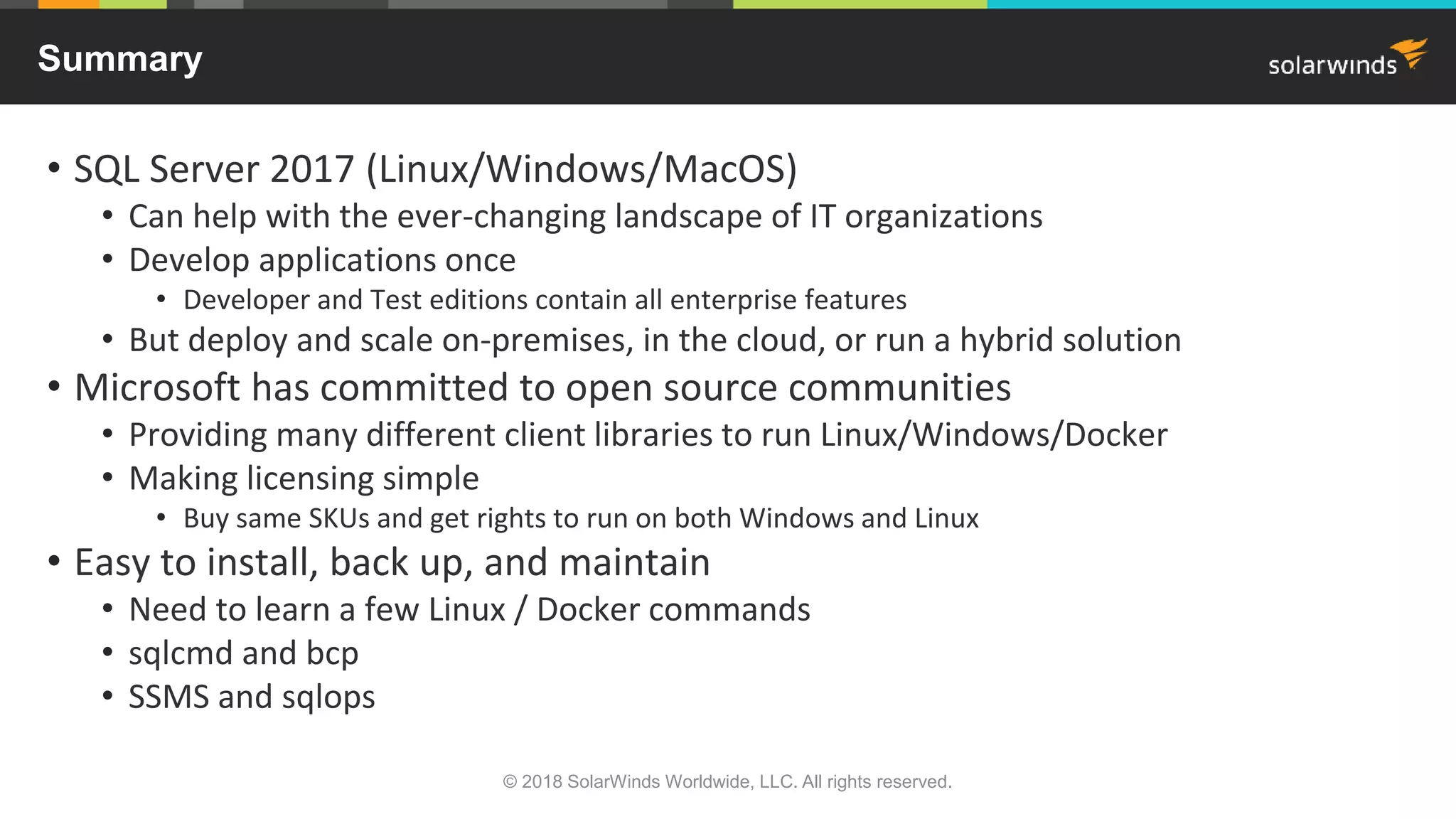
• SQL Server 2017 (Linux/Windows/MacOS)
• Can help with the ever-changing landscape of IT organizations
• Develop applications once
• Developer and Test editions contain all enterprise features
• But deploy and scale on-premises, in the cloud, or run a hybrid solution
• Microsoft has committed to open source communities
• Providing many different client libraries to run Linux/Windows/Docker
• Making licensing simple
• Buy same SKUs and get rights to run on both Windows and Linux
• Easy to install, back up, and maintain
• Need to learn a few Linux / Docker commands
• sqlcmd and bcp
• SSMS and sqlops
Summary
© 2018 SolarWinds Worldwide, LLC. All rights reserved.
• Try Database Performance Analyzer FREE for 14 days
• Quickly find the root cause of complex problems
• Response Time Analysis shows you exactly what needs fixing
• Whether you are a database expert or not
• Dynamic baselines compare historic performance to identify issues
• Understand impact of VMware® performance
• Agentless architecture is safe for production and scalable to monitor hundreds of
databases
• Developers, DBAs, storage teams and server teams work together to help eliminate
finger pointing with full visibility
© 2018 SolarWinds Worldwide, LLC. All rights reserved.
Resolve Performance Issues quickly—Free Trial
The SolarWinds, SolarWinds & Design, Orion, and THWACK trademarks are the exclusive
property of SolarWinds Worldwide, LLC or its affiliates, are registered with the U.S.
Patent and Trademark Office, and may be registered or pending registration in other
countries. All other SolarWinds trademarks, service marks, and logos may be common
law marks or are registered or pending registration. All other trademarks mentioned
herein are used for identification purposes only and are trademarks of (and may be
registered trademarks) of their respective companies.

Hi! Ho! Hi! Ho! SQL Server on Linux We Go!

  • 1.
    Hi! Ho! Hi!Ho! SQL Server on Linux We Go! Janis Griffin, Database Performance Evangelist
  • 2.
    © 2018 SolarWindsWorldwide, LLC. All rights reserved. Who Am I • Senior DBA / Performance Evangelist for SolarWinds • Janis.Griffin@solarwinds.com • Twitter® – @DoBoutAnything • Current – 25+ years in Oracle®, DB2®, ASE, SQL Server®, MySQL® • DBA and developer • Specialize in performance tuning • Review database performance for customers and prospects • Common question – How do I tune it? • All my presentations • https://thwack.solarwinds.com/pages/dpa-resources • Excited about SQL Server on Linux®! • Opens up a whole new area to explore
  • 3.
    • Why putSQL Server on Linux and Docker® • Distributions, architecture, and licensing • How to install, back up, and maintain • Several Linux commands • SQLCMD • Client connectivity and tools • SQL Operations Studio • Demo • Summary Agenda © 2018 SolarWinds Worldwide, LLC. All rights reserved.
  • 4.
    • IT landscapeis constantly changing • Many OSs (Linux, Windows, etc.), different languages, multiple data types • Mix of on-premises/cloud/hybrid environments • Complex environments can challenge IT to: • Require specific skill sets (personnel) • Reduce operational costs • Microsoft has committed to providing interoperability to open source • Gives industry leading performance and security • TPC benchmark stats for SQL Server 2017 on Linux • http://www.tpc.org/tpch/results/tpch_result_detail.asp?id=117041701 • Security supports Active Directory® authentication • Single sign-on with no password • Uses domain credentials and Kerberos protocol Why SQL Server 2017 on Linux and Docker? © 2018 SolarWinds Worldwide, LLC. All rights reserved.
  • 5.
    © 2018 SolarWindsWorldwide, LLC. All rights reserved. • Red Hat 7.3 or 7.4 • Red Hat® Enterprise Linux • Oracle Enterprise Linux • CentOS • SUSE v12 SP2 • SUSE® Enterprise Linux • Debian® 16.04 • Ubuntu® Server • Ubuntu Workstation • Docker Engine 1.8+ • For Mac® and Linux • SQL-server-linux-setup Distributions and Architecture SQLPAL = SQL Platform Abstraction Layer microsoft.blog.sql-server-on-linux-how-introduction
  • 6.
    • Three maineditions – Express, Standard, and Enterprise • Rewritten so there is common programming across all editions • Develop once and purchase different editions to scale • Developer and Test edition include Enterprise features • Buy same SKUs and get rights to run on both Windows and Linux • SQL Server Software Assurance benefits (SA) • Standard / Enterprise • Next version rights • License Mobility to shared third-party servers • Failover servers for high availability • Enterprise • Machine Learning Server for Hadoop® • https://blogs.technet.microsoft.com/dataplatforminsider/2017/09/26/in-database-machine- learning-in-sql-server-2017/ • Power BI Report Server • Need to acquire when buying initial license – can’t add later SQL Server 2017 Licensing © 2018 SolarWinds Worldwide, LLC. All rights reserved.
  • 7.
    • License Mobility •Requires SA on licenses running the workload • Deploy your workload only to authorized mobility partners • Failover servers for high availability • Combined with License Mobility, provides full flexibility on dedicated or third-party • For planned or unplanned downtime • Secondary/passive SQL server is granted through SA • Without SA, both active and passive servers need to be licensed • 90 day reassignment rule is waived due to License Mobility SA benefits SQL Server 2017 Licensing – Cont. © 2018 SolarWinds Worldwide, LLC. All rights reserved.
  • 8.
    © 2018 SolarWindsWorldwide, LLC. All rights reserved. • / = Root • Every single file and directory starts here • Only ‘root’ user has write privilege • /root is ‘root’ user’s home directory • Not the same as / • /var = Variable files • Files can grow under this directory • SQL Server default directory • /var/opt/mssql • Holds log and config files • Also system log files, database files, etc. • /opt = Optional add-on applications • Holds SQL Server application (default) • /opt/mssql/bin • /opt/msql/lib Linux Directory Structure
  • 9.
    • Directory !=Drive • /var/opt/mssql/data can be on different device than /var/opt/mssql/log • A ‘mssql’ user and ‘mssql’ group is automatically set up on install • Home directory is /home/mssql • Application files are owned by ‘mssql’ • Some commands need ‘sudo’ privileges • ‘sudo’ means ‘Super User Do’ • Linux is case sensitive • ‘hello world’ != ‘HELLO WORLD’ • Hidden files are prefaced with a dot • .bash_profile • Bash shell is common command language • Built from Bourne shell with added plugins (Bourne Again Shell) • Used for scripting More About Linux © 2018 SolarWinds Worldwide, LLC. All rights reserved.
  • 10.
    • ls -ltra •List directory contents (i.e., ls –ltra /var/opt/mssql) • -l = long listing –t = sort newest first –r = reverse –a all files • cd • Change directory (i.e., cd /var/opt/mssql/log) • ps –ef • Displays active processes (i.e., ps –ef | grep sql) • -e = every process –f = full format listing • top = interactive view • grep • Searches files or standard output for pattern matching • Example: history | grep –i mssql-conf • man • Interface to on-line reference manuals (i.e., man ps) Useful Linux Commands A great way to get familiar with Linux commands is to download: http://www.cygwin.com/ Provides functionality similar to a Linux distribution on Windows. © 2018 SolarWinds Worldwide, LLC. All rights reserved.
  • 11.
    © 2018 SolarWindsWorldwide, LLC. All rights reserved. • PuTTY™ – free SSH and Telnet client • https://www.ssh.com/ssh/putty/download • Log in as root or sudo sudo curl -o /etc/yum.repos.d/mssql-server.repo https://packages.microsoft.com/config/rhel/7/mssql-server-2017.repo sudo yum install -y mssql-server Installing SQL Server 2017 on Centos® 7
  • 12.
    © 2018 SolarWindsWorldwide, LLC. All rights reserved. sudo yum install -y mssql-server Installing SQL Server 2017 on Centos 7 – cont.
  • 13.
    © 2018 SolarWindsWorldwide, LLC. All rights reserved. sudo /opt/mssql/bin/mssql-conf setup Installing SQL Server 2017 on Centos 7 – cont.
  • 14.
    systemctl status mssql-server InstallingSQL Server 2017 on Centos 7 – cont. © 2018 SolarWinds Worldwide, LLC. All rights reserved.
  • 15.
    sudo curl -o/etc/yum.repos.d/msprod.repo https://packages.microsoft.com/config/rhel/7/prod.repo sudo yum install -y mssql-tools unixODBC-devel Installing MSSQL-Tools on Centos 7 © 2018 SolarWinds Worldwide, LLC. All rights reserved.
  • 16.
    Installing MSSQL-Tools onCentos 7 – cont. © 2018 SolarWinds Worldwide, LLC. All rights reserved.
  • 17.
    • SQL commandline interface • ‘sqlcmd -?’ shows all parameters • Connect using • Localhost • IP address • IP address, port • Run a script at command line sqlcmd -S 10.199.8.172,1433 -U sa -i waits.sql -o waits.log SQLCMD © 2018 SolarWinds Worldwide, LLC. All rights reserved.
  • 18.
    • Must firstinstall SQL Server 2017 repo sudo yum install mssql-server-agent sudo systemctl restart mssql-server Installing SQL Server Agent on Centos 7 © 2018 SolarWinds Worldwide, LLC. All rights reserved.
  • 19.
    © 2018 SolarWindsWorldwide, LLC. All rights reserved. • Can use Docker for Linux/Mac/Windows • Installs in /var/lib/docker – can create symbolic links • Use if you want to run multiple instances on same server • Download Docker for Centos • Install Docker • Start Docker • Test Docker Installing SQL Server 2017 Container Image with Docker wget https://download.docker.com/linux/centos/7/x86_64/stable/Packages/docker-ce-17.09.0.ce-1.el7.centos.x86_64.rpm sudo yum install ./docker-ce-17.09.0.ce-1.el7.centos.x86_64.rpm systemctl start docker sudo docker run hello-world Docker provides an additional layer of abstraction and automation at the operating- system level. It can package an application and its dependencies in a virtual container. This helps enable flexibility and portability to run on-premises, public and private cloud, bare metal, etc.
  • 20.
    • Get SQLServer for Linux • Create container called sql1 • Access via docker command • Access via sqlcmd SQL Server 2017 Container Image with Docker – cont. sudo docker pull microsoft/mssql-server-linux:2017-latest docker run -e 'ACCEPT_EULA=Y' -e 'MSSQL_SA_PASSWORD=Mys3cr3tpazz' -p 1433:1433 --name=sql1 –v sql1:/var/opt/mssql -d microsoft/mssql-server-linux:2017-latest docker exec -it sql1 /opt/mssql-tools/bin/sqlcmd -S 10.199.8.172 -U sa -P Mys3cr3tpazz sqlcmd -S 10.199.8.172,1433 -U sa -P Mys3cr3tpazz © 2018 SolarWinds Worldwide, LLC. All rights reserved.
  • 21.
    • docker ps–a • Show list of containers • docker container <start / stop> <container_name> • docker container rm <container_name> • BEWARE! This will remove the SQL Server instance • docker container stats • List CPU, memory, I/O stats for each container • docker volume ls • Shows volume names • docker volume inspect <volume_name> • Shows name and location of data Useful Docker Commands © 2018 SolarWinds Worldwide, LLC. All rights reserved.
  • 22.
    Docker Command Example ©2018 SolarWinds Worldwide, LLC. All rights reserved.
  • 23.
    SQL Server 2017Container Images © 2018 SolarWinds Worldwide, LLC. All rights reserved.
  • 24.
    • Make adirectory for backups docker exec -it sql1 mkdir /var/opt/mssql/backup • Download example database sudo curl -L -o wwi.bak 'https://github.com/Microsoft/sql-server-samples/releases/download/wide-world-importers-v1.0/WideWorldImporters-Full.bak’ • Copy backup of example database to new backup directory docker cp wwi.bak sql1:/var/opt/mssql/backup • List files from backup docker exec -it sql1 /opt/mssql-tools/bin/sqlcmd -S localhost -U SA -P 'Mys3cr3tpazz' -Q 'RESTORE FILELISTONLY FROM DISK = "/var/opt/mssql/backup/wwi.bak"' | tr -s ' ' | cut -d ' ' -f 1-2 Backup and Restore in Docker © 2018 SolarWinds Worldwide, LLC. All rights reserved.
  • 25.
    • Restore frombackup docker exec -it sql1 /opt/mssql-tools/bin/sqlcmd -S localhost -U SA -P 'Mys3cr3tpazz' -Q 'RESTORE DATABASE WideWorldImporters FROM DISK = "/var/opt/mssql/backup/wwi.bak" WITH MOVE "WWI_Primary" TO "/var/opt/mssql/data/WideWorldImporters.mdf", MOVE "WWI_UserData" TO "/var/opt/mssql/data/WideWorldImporters_userdata.ndf", MOVE "WWI_Log" TO "/var/opt/mssql/data/WideWorldImporters.ldf", MOVE "WWI_InMemory_Data_1" TO "/var/opt/mssql/data/WideWorldImporters_InMemory_Data_1"' Backup and Restore in Docker – cont. © 2018 SolarWinds Worldwide, LLC. All rights reserved.
  • 26.
    docker exec -itsql1 /opt/mssql-tools/bin/sqlcmd -S localhost -U SA -P 'Mys3cr3tpazz' -Q "BACKUP DATABASE [WideWorldImporters] TO DISK = N'/var/opt/mssql/backup/wwi_20171127.bak' WITH NOFORMAT, NOINIT, NAME = 'WideWorldImporters-full', SKIP, NOREWIND, NOUNLOAD, STATS = 10" docker cp sql1:/var/opt/mssql/backup/wwi_20171127.bak /backup/wwi_20171127.bak Backup and Copy Files Out of Container © 2018 SolarWinds Worldwide, LLC. All rights reserved.
  • 27.
    • Command-line tools •sqlcmd and bcp • SSMS • Connect remotely from Windows • Includes PowerShell® • Visual Studio Code • How-to-develop-use-vscode • SQL Server Data Tools (SSDT) • For Visual Studio • Build project on Windows • Deploy to Linux • SQL Operations Studio • Installs on Linux/Windows/MacOS • GUI interface – sqlops https://docs.microsoft.com/en-us/sql/sql-operations-studio/download Client Connectivity and Tools © 2018 SolarWinds Worldwide, LLC. All rights reserved.
  • 28.
    Example of SQLOperations Studio (sqlops) © 2018 SolarWinds Worldwide, LLC. All rights reserved. © 2018 SQLOPS
  • 29.
    • Many differentlibraries or drivers for Linux/Windows/MacOS • Step by step how-to: • https://www.microsoft.com/en-us/sql-server/developer-get-started/ Client Connectivity and Tools – cont. © 2018 SolarWinds Worldwide, LLC. All rights reserved.
  • 30.
    • Terminal • Top •Directory structure • SQLCMD • Docker commands • Create an instance • SSMS • SQLOps Demo © 2018 SolarWinds Worldwide, LLC. All rights reserved.
  • 31.
    • SQL Server2017 (Linux/Windows/MacOS) • Can help with the ever-changing landscape of IT organizations • Develop applications once • Developer and Test editions contain all enterprise features • But deploy and scale on-premises, in the cloud, or run a hybrid solution • Microsoft has committed to open source communities • Providing many different client libraries to run Linux/Windows/Docker • Making licensing simple • Buy same SKUs and get rights to run on both Windows and Linux • Easy to install, back up, and maintain • Need to learn a few Linux / Docker commands • sqlcmd and bcp • SSMS and sqlops Summary © 2018 SolarWinds Worldwide, LLC. All rights reserved.
  • 32.
    • Try DatabasePerformance Analyzer FREE for 14 days • Quickly find the root cause of complex problems • Response Time Analysis shows you exactly what needs fixing • Whether you are a database expert or not • Dynamic baselines compare historic performance to identify issues • Understand impact of VMware® performance • Agentless architecture is safe for production and scalable to monitor hundreds of databases • Developers, DBAs, storage teams and server teams work together to help eliminate finger pointing with full visibility © 2018 SolarWinds Worldwide, LLC. All rights reserved. Resolve Performance Issues quickly—Free Trial
  • 33.
    The SolarWinds, SolarWinds& Design, Orion, and THWACK trademarks are the exclusive property of SolarWinds Worldwide, LLC or its affiliates, are registered with the U.S. Patent and Trademark Office, and may be registered or pending registration in other countries. All other SolarWinds trademarks, service marks, and logos may be common law marks or are registered or pending registration. All other trademarks mentioned herein are used for identification purposes only and are trademarks of (and may be registered trademarks) of their respective companies.

Editor's Notes

  • #2 Welcome to PASS Marathon: Developer Edition! We’re excited you could join us today for Janis Griffin’s session, HiHo! HiHo! SQL Server on Linux, We Go!. This PASS Marathon consists of 6 consecutive live webinars, delivered by expert speakers from the PASS community. The sessions will be recorded and posted online after the event. You will receive an email letting you know when the recordings are available. My name is Tracy Boggiano [you can say a bit about yourself here if you’d like] I have a few introductory slides before I hand over the reins to Janis Griffin. [move to next slide]
  • #3 A little bit about myself
  • #11 .
  • #15 .