


www.teachertrainingvideos.com
Russell Stannard
www.teachertrainingvideos.com
Today’s Talk
 Quick bit of information about me
 The Connected Classroom –research that I have been
doing at Warwick
 Getting students talking/Digital Story Telling
 Conclusions and Questions
www.teachertrainingvideos.com
Easy Peazy Lemon Squeezy
www.teachertrainingvideos.com
Me
Write “Webwatcher” in the ET Professional
Teach on MA in TESOL at the University of Warwick
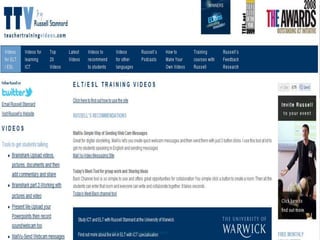
Run www.teachertrainingvideos.com
Help teachers get up and running with technology by
providing step by step screen casts
 287,000 visitors in 2011
 7800 people on the newsletter
www.teachertrainingvideos.com
Congratulations to Erika Osvath
 http://www.erikaosvath.com/
 Donate button on my site raised about $450
 I topped it up and gave Erika $600 to come to IATEFL
 Big thanks to all those who donated money
 Please donate this year. I would love to run the scheme
again.
 Will be sending information about her blog and ideas
in my next newsletter.
www.teachertrainingvideos.com
The Connected Classroom
 Frustrated in what I could get students to do for
homework
 Frustrated with the amount of speaking I could get my
students to do
 Result of various experiments going back over nearly
10 years
 Basic finding is that we need to connect the classroom
part of the lesson with the homework part
www.teachertrainingvideos.com
Help Videos-5 tools I use for Connected
Classroom
 Eyejot
http://www.teachertrainingvideos.com/eyejot/index.html
 MailVu
http://www.teachertrainingvideos.com/mailVu/index.html
 Jing
http://www.teachertrainingvideos.com/Jing/index.html
http://www.teachertrainingvideos.com/jingInReality/index.html
 AudioBoo
http://www.teachertrainingvideos.com/audioboo/index.html
 myBrainShark
http://www.teachertrainingvideos.com/brain/index.html
http://www.teachertrainingvideos.com/brain2/index.html
www.teachertrainingvideos.com
http://vocaroo.com/
www.teachertrainingvideos.com
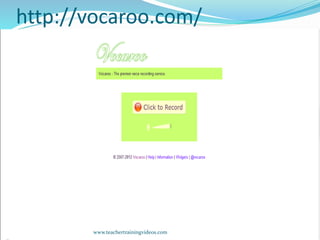
Vocaroo.com
 They don’t come easier than this tool
 Click the button, record yourself speaking
 Then click button, write in an email address and send
it
 Limited to 5 minutes
 Can embed player into a blog , wiki too
www.teachertrainingvideos.com
Experiments with Vocaroo
 Interviews
 Explanations of typical day
 What you did last weekend
 Telling a story
 Opinions on a topic
 Read aloud
 Basic personal information
 Students/Teacher
www.teachertrainingvideos.com
MailVu and EyeJot
 Simple tools
 This tool includes use of Webcam
 Can record webcam/voice
 Click one button to record, one button to send
 Great for the Connected Classroom idea-used in a
series of experiments at the University of Warwick.
www.teachertrainingvideos.com
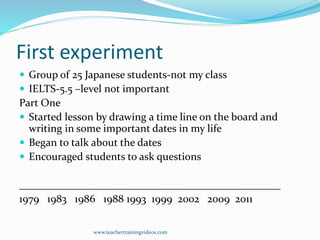
First experiment
 Group of 25 Japanese students-not my class
 IELTS-5.5 –level not important
Part One
 Started lesson by drawing a time line on the board and
writing in some important dates in my life
 Began to talk about the dates
 Encouraged students to ask questions
_________________________________________________
1979 1983 1986 1988 1993 1999 2002 2009 2011
www.teachertrainingvideos.com
Part Two
 Ask students to draw their own line
 Encouraged them to think of different things to add
 Put the students in pairs.
 Students talked about their timelines (a to b/b to a)
 Moved around listening
 Took notes and provided feedback
Part Three
 Introduced Mailvu
 Told students to make recordings at home and send
them to me
www.teachertrainingvideos.com
Results
 Several students made recordings of 10 minutes
 All students did the exercise
 Not one student thought the activity was odd-speaking
at home and sending recordings to me
 Very positive feedback from students
 Little transfer-only one student used the technology
for something else
 Could be useful for e-portfolios
 Played the best examples in the next class
www.teachertrainingvideos.com
The problems
 Feedback
 Listened, took notes and gave notes to students in next
lesson
 Listened to each recording twice
 Enormous amount of data and language to deal with
 e-Portfolios-students choose what to put in. Could
make several recordings over a term then choose one
to get feedback on
 Peer feedback could also be a solution
www.teachertrainingvideos.com
The Connected Classroom
 Most successful exercise yet
 Had done several previously
 Began to realise how important the link between the
lesson and the homework was really important
 Technology breaks down the barrier between the class
and the homework/coursework
 But more than that-really the lesson plan was one
whole-the class part and the homework part were
totally linked. It was really just one lesson plan.
 E-Portfolios (eyejot, brainshark, jing)
 Apps for iPhone iPad etcwww.teachertrainingvideos.com
myBrainShark
 My favourite discovery of 2011
 Free site
 Allows you to load up Powerpoint, Word, PDF, Picture
and even video and then add voice
 myBrainShark packs the sound and files and then
produces a link which you can share/embed
 Used in business, teaching for distance courses,
training, OER,teacher/students
www.teachertrainingvideos.com
myBrainShark-can do more
 Mix video, pictures, PPT etc
 Embed the presentations as well as send as e-mail
 Edit, add or change audio at click of button
 Change order of videos
www.teachertrainingvideos.com
Examples of myBrainShark
 http://www.teacherphilisictinelt.blogspot.co.uk/searc
h/label/powerpoints
www.teachertrainingvideos.com
Follow me
 www.teachertrainingvideos.com
 http://www.facebook.com/teachertrainingvideos
 Twitter=Russell1955
www.teachertrainingvideos.com

Iatefl

  • 1.
  • 2.
    Today’s Talk  Quickbit of information about me  The Connected Classroom –research that I have been doing at Warwick  Getting students talking/Digital Story Telling  Conclusions and Questions www.teachertrainingvideos.com
  • 3.
    Easy Peazy LemonSqueezy www.teachertrainingvideos.com
  • 4.
    Me Write “Webwatcher” inthe ET Professional Teach on MA in TESOL at the University of Warwick Run www.teachertrainingvideos.com Help teachers get up and running with technology by providing step by step screen casts  287,000 visitors in 2011  7800 people on the newsletter www.teachertrainingvideos.com
  • 5.
  • 6.
    Congratulations to ErikaOsvath  http://www.erikaosvath.com/  Donate button on my site raised about $450  I topped it up and gave Erika $600 to come to IATEFL  Big thanks to all those who donated money  Please donate this year. I would love to run the scheme again.  Will be sending information about her blog and ideas in my next newsletter. www.teachertrainingvideos.com
  • 7.
    The Connected Classroom Frustrated in what I could get students to do for homework  Frustrated with the amount of speaking I could get my students to do  Result of various experiments going back over nearly 10 years  Basic finding is that we need to connect the classroom part of the lesson with the homework part www.teachertrainingvideos.com
  • 8.
    Help Videos-5 toolsI use for Connected Classroom  Eyejot http://www.teachertrainingvideos.com/eyejot/index.html  MailVu http://www.teachertrainingvideos.com/mailVu/index.html  Jing http://www.teachertrainingvideos.com/Jing/index.html http://www.teachertrainingvideos.com/jingInReality/index.html  AudioBoo http://www.teachertrainingvideos.com/audioboo/index.html  myBrainShark http://www.teachertrainingvideos.com/brain/index.html http://www.teachertrainingvideos.com/brain2/index.html www.teachertrainingvideos.com
  • 9.
  • 10.
    Vocaroo.com  They don’tcome easier than this tool  Click the button, record yourself speaking  Then click button, write in an email address and send it  Limited to 5 minutes  Can embed player into a blog , wiki too www.teachertrainingvideos.com
  • 11.
    Experiments with Vocaroo Interviews  Explanations of typical day  What you did last weekend  Telling a story  Opinions on a topic  Read aloud  Basic personal information  Students/Teacher www.teachertrainingvideos.com
  • 12.
    MailVu and EyeJot Simple tools  This tool includes use of Webcam  Can record webcam/voice  Click one button to record, one button to send  Great for the Connected Classroom idea-used in a series of experiments at the University of Warwick. www.teachertrainingvideos.com
  • 13.
    First experiment  Groupof 25 Japanese students-not my class  IELTS-5.5 –level not important Part One  Started lesson by drawing a time line on the board and writing in some important dates in my life  Began to talk about the dates  Encouraged students to ask questions _________________________________________________ 1979 1983 1986 1988 1993 1999 2002 2009 2011 www.teachertrainingvideos.com
  • 14.
    Part Two  Askstudents to draw their own line  Encouraged them to think of different things to add  Put the students in pairs.  Students talked about their timelines (a to b/b to a)  Moved around listening  Took notes and provided feedback Part Three  Introduced Mailvu  Told students to make recordings at home and send them to me www.teachertrainingvideos.com
  • 15.
    Results  Several studentsmade recordings of 10 minutes  All students did the exercise  Not one student thought the activity was odd-speaking at home and sending recordings to me  Very positive feedback from students  Little transfer-only one student used the technology for something else  Could be useful for e-portfolios  Played the best examples in the next class www.teachertrainingvideos.com
  • 16.
    The problems  Feedback Listened, took notes and gave notes to students in next lesson  Listened to each recording twice  Enormous amount of data and language to deal with  e-Portfolios-students choose what to put in. Could make several recordings over a term then choose one to get feedback on  Peer feedback could also be a solution www.teachertrainingvideos.com
  • 17.
    The Connected Classroom Most successful exercise yet  Had done several previously  Began to realise how important the link between the lesson and the homework was really important  Technology breaks down the barrier between the class and the homework/coursework  But more than that-really the lesson plan was one whole-the class part and the homework part were totally linked. It was really just one lesson plan.  E-Portfolios (eyejot, brainshark, jing)  Apps for iPhone iPad etcwww.teachertrainingvideos.com
  • 18.
    myBrainShark  My favouritediscovery of 2011  Free site  Allows you to load up Powerpoint, Word, PDF, Picture and even video and then add voice  myBrainShark packs the sound and files and then produces a link which you can share/embed  Used in business, teaching for distance courses, training, OER,teacher/students www.teachertrainingvideos.com
  • 19.
    myBrainShark-can do more Mix video, pictures, PPT etc  Embed the presentations as well as send as e-mail  Edit, add or change audio at click of button  Change order of videos www.teachertrainingvideos.com
  • 20.
    Examples of myBrainShark http://www.teacherphilisictinelt.blogspot.co.uk/searc h/label/powerpoints www.teachertrainingvideos.com
  • 21.
  • 22.
    Follow me  www.teachertrainingvideos.com http://www.facebook.com/teachertrainingvideos  Twitter=Russell1955 www.teachertrainingvideos.com