A paperless way to get a copy
of everything you will be
shown during this workshop.
moourl.com/z680t
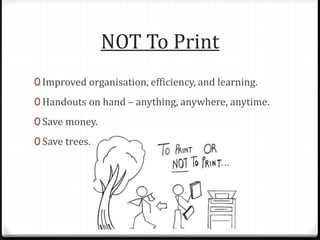
NOT To Print
0 Improved organisation, efficiency, and learning.
0 Handouts on hand – anything, anywhere, anytime.
0 Save money.
0 Save trees.
Assumptions
0 You’re keen. 
0 Students have a personal learning device (laptop,
tablets, etc).
0 There is consistent access to the internet at school.
0 Students can take their devices home (or they have an
alternate device at home). 83%*
0 Students can access the internet at home. 83%^
* 2010/11 ABS – on the rise
^ 2012/13 ABS – on the rise
Student Access
There are many online learning environments. These are just some places to start.
0 Office 365 Online learning environment. Free, but
bound to your place of work.
0 Wikispaces Collaborative learning environment. Free.
0 Edmodo Collaborative learning environment. Free.
0 TeachEm Collaborative learning environment. Free.
Wikispaces
What I choose to use. Compulsory for students to join.
0 Exemplar 1 – 12 English Communications
0 Exemplar 2 – 10 English
0 Exemplar 3 – Stage 1 English Communications by
Colin McKenzie
Planning
Year 10s and Year 12s.
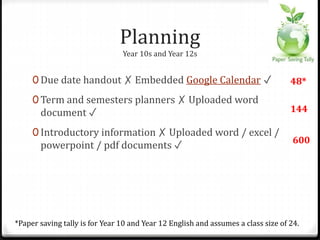
0 Due date handout ✗ Embedded Google Calendar ✓
0 Term and semesters planners ✗ Uploaded word
document ✓
0 Introductory information ✗ Uploaded word / excel /
powerpoint / pdf documents ✓
*Paper saving tally is for Year 10 and Year 12 English and assumes a class size of 24.
48*
144
600
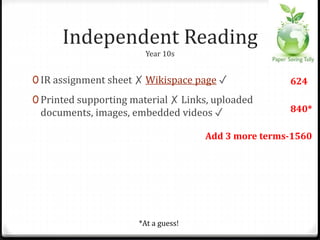
Independent Reading
Year 10s.
0 IR assignment sheet ✗ Wikispace page ✓
0 Printed supporting material ✗ Links, uploaded
documents, images, embedded videos ✓
*At a guess!
624
840*
Add 3 more terms-1560
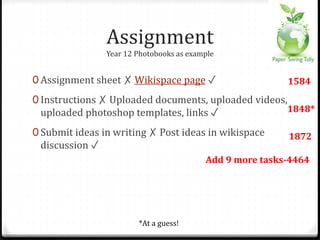
Assignment
Year 12 Photobooks as example.
0 Assignment sheet ✗ Wikispace page ✓
0 Instructions ✗ Uploaded documents, uploaded videos,
uploaded photoshop templates, links ✓
0 Submit ideas in writing ✗ Post ideas in wikispace
discussion ✓
*At a guess!
1584
1848*
1872
Add 9 more tasks-4464
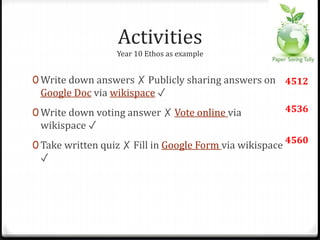
Activities
Year 10 Ethos as example.
0 Write down answers ✗ Publicly sharing answers on
Google Doc via wikispace ✓
0 Write down voting answer ✗ Vote online via
wikispace ✓
0 Take written quiz ✗ Fill in Google Form via wikispace
✓
4512
4536
4560
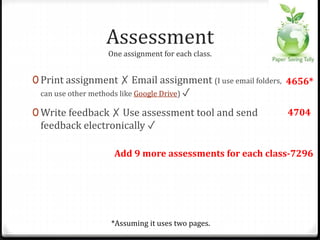
Assessment
One assignment for each class.
0 Print assignment ✗ Email assignment (I use email folders,
can use other methods like Google Drive) ✓
0 Write feedback ✗ Use assessment tool and send
feedback electronically ✓
*Assuming it uses two pages.
4656*
4704
Add 9 more assessments for each class-7296
Exams
0 Print exam ✗ Use online space for exam. ✓ Here is a
Stage 1 English Communications example
0 Students write exam ✗ Students submit exam
electronically ✓
0 Write feedback ✗ Use assessment tool and send
feedback electronically ✓
7320
7344
7368
Flipping The Classroom
Established online learning environments form the basis for flipping.
0 Wikispace with some information about flipping.
0 Blog entries about the Year 10 unit done as a flipped
classroom.
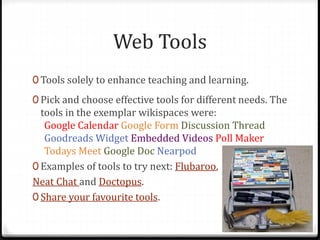
Web Tools
0 Tools solely to enhance teaching and learning.
0 Pick and choose effective tools for different needs. The
tools in the exemplar wikispaces were:
Google Calendar Google Form Discussion Thread
Goodreads Widget Embedded Videos Poll Maker
Todays Meet Google Doc Nearpod
0 Examples of tools to try next: Flubaroo,
Neat Chat and Doctopus.
0 Share your favourite tools.
Learning Difficulties
Teaching strategies for students with learning difficulties are generally effective
for all students.
A paperless classroom allows you to:
0 Provide visual support and use visual technologies.
0 Allow students to retain instructions, notes, charts, etc.
0 Present information in a multisensory way.
0 Provide direct access to video footage, web sites, etc.
0 Regularly draw student attention to due dates.
Flipping the classroom allows you to:
0 Check students’ understanding of the concept / task 1 on 1.
0 Control the delivery of information (eg pause, replay) and
have it delivered multiple times exactly the same.
Final Words
0 It is a gradual transition, not something you suddenly do.
0 It’s hard work to set up, but worth it and ultimately time
saving.
0 You still plan, prepare, and execute with the same care.
0 Master and use only a few online tools at once.
0 Become knowledgeable and comfortable with all online
tools first.
0 Dive in!
Bibliography
Images in order of appearance
0 Moourl Logo. Retrieved from http://moourl.com/
0 Armato, J. (2008). Assume. Retrieved from
https://www.flickr.com/photos/armatoj/2591181606/
0 Upadhyay, A. (2010). To print or NOT to print. Retrieved from
https://www.flickr.com/photos/adarshupadhyay/4950965275
0 Ter Haar, K. (2010) Seeing My World Through a Keyhole. Retrieved from
http://www.jisc.ac.uk/network/authentication
0 Noble, D. (2007). Wikispaces. Retrieved from
https://www.flickr.com/photos/noble1885/877839966/
0 nickrate. (2010). Web 2.0 Collage v2. Retrieved from
https://www.flickr.com/photos/nickrate/4504163196
0 StarWatcher307. (2010). Toolbox in tackle box. Retrieved from
https://www.flickr.com/photos/starwatcher307/5931855835/
0 Emiliano. (2007). the brave pig is still undecided. Retrieved from
https://www.flickr.com/photos/loungerie/1524745711

Saeta presentation

  • 1.
    A paperless wayto get a copy of everything you will be shown during this workshop. moourl.com/z680t
  • 3.
    NOT To Print 0Improved organisation, efficiency, and learning. 0 Handouts on hand – anything, anywhere, anytime. 0 Save money. 0 Save trees.
  • 4.
    Assumptions 0 You’re keen. 0 Students have a personal learning device (laptop, tablets, etc). 0 There is consistent access to the internet at school. 0 Students can take their devices home (or they have an alternate device at home). 83%* 0 Students can access the internet at home. 83%^ * 2010/11 ABS – on the rise ^ 2012/13 ABS – on the rise
  • 5.
    Student Access There aremany online learning environments. These are just some places to start. 0 Office 365 Online learning environment. Free, but bound to your place of work. 0 Wikispaces Collaborative learning environment. Free. 0 Edmodo Collaborative learning environment. Free. 0 TeachEm Collaborative learning environment. Free.
  • 6.
    Wikispaces What I chooseto use. Compulsory for students to join. 0 Exemplar 1 – 12 English Communications 0 Exemplar 2 – 10 English 0 Exemplar 3 – Stage 1 English Communications by Colin McKenzie
  • 7.
    Planning Year 10s andYear 12s. 0 Due date handout ✗ Embedded Google Calendar ✓ 0 Term and semesters planners ✗ Uploaded word document ✓ 0 Introductory information ✗ Uploaded word / excel / powerpoint / pdf documents ✓ *Paper saving tally is for Year 10 and Year 12 English and assumes a class size of 24. 48* 144 600
  • 8.
    Independent Reading Year 10s. 0IR assignment sheet ✗ Wikispace page ✓ 0 Printed supporting material ✗ Links, uploaded documents, images, embedded videos ✓ *At a guess! 624 840* Add 3 more terms-1560
  • 9.
    Assignment Year 12 Photobooksas example. 0 Assignment sheet ✗ Wikispace page ✓ 0 Instructions ✗ Uploaded documents, uploaded videos, uploaded photoshop templates, links ✓ 0 Submit ideas in writing ✗ Post ideas in wikispace discussion ✓ *At a guess! 1584 1848* 1872 Add 9 more tasks-4464
  • 10.
    Activities Year 10 Ethosas example. 0 Write down answers ✗ Publicly sharing answers on Google Doc via wikispace ✓ 0 Write down voting answer ✗ Vote online via wikispace ✓ 0 Take written quiz ✗ Fill in Google Form via wikispace ✓ 4512 4536 4560
  • 11.
    Assessment One assignment foreach class. 0 Print assignment ✗ Email assignment (I use email folders, can use other methods like Google Drive) ✓ 0 Write feedback ✗ Use assessment tool and send feedback electronically ✓ *Assuming it uses two pages. 4656* 4704 Add 9 more assessments for each class-7296
  • 12.
    Exams 0 Print exam✗ Use online space for exam. ✓ Here is a Stage 1 English Communications example 0 Students write exam ✗ Students submit exam electronically ✓ 0 Write feedback ✗ Use assessment tool and send feedback electronically ✓ 7320 7344 7368
  • 13.
    Flipping The Classroom Establishedonline learning environments form the basis for flipping. 0 Wikispace with some information about flipping. 0 Blog entries about the Year 10 unit done as a flipped classroom.
  • 14.
    Web Tools 0 Toolssolely to enhance teaching and learning. 0 Pick and choose effective tools for different needs. The tools in the exemplar wikispaces were: Google Calendar Google Form Discussion Thread Goodreads Widget Embedded Videos Poll Maker Todays Meet Google Doc Nearpod 0 Examples of tools to try next: Flubaroo, Neat Chat and Doctopus. 0 Share your favourite tools.
  • 15.
    Learning Difficulties Teaching strategiesfor students with learning difficulties are generally effective for all students. A paperless classroom allows you to: 0 Provide visual support and use visual technologies. 0 Allow students to retain instructions, notes, charts, etc. 0 Present information in a multisensory way. 0 Provide direct access to video footage, web sites, etc. 0 Regularly draw student attention to due dates. Flipping the classroom allows you to: 0 Check students’ understanding of the concept / task 1 on 1. 0 Control the delivery of information (eg pause, replay) and have it delivered multiple times exactly the same.
  • 16.
    Final Words 0 Itis a gradual transition, not something you suddenly do. 0 It’s hard work to set up, but worth it and ultimately time saving. 0 You still plan, prepare, and execute with the same care. 0 Master and use only a few online tools at once. 0 Become knowledgeable and comfortable with all online tools first. 0 Dive in!
  • 17.
    Bibliography Images in orderof appearance 0 Moourl Logo. Retrieved from http://moourl.com/ 0 Armato, J. (2008). Assume. Retrieved from https://www.flickr.com/photos/armatoj/2591181606/ 0 Upadhyay, A. (2010). To print or NOT to print. Retrieved from https://www.flickr.com/photos/adarshupadhyay/4950965275 0 Ter Haar, K. (2010) Seeing My World Through a Keyhole. Retrieved from http://www.jisc.ac.uk/network/authentication 0 Noble, D. (2007). Wikispaces. Retrieved from https://www.flickr.com/photos/noble1885/877839966/ 0 nickrate. (2010). Web 2.0 Collage v2. Retrieved from https://www.flickr.com/photos/nickrate/4504163196 0 StarWatcher307. (2010). Toolbox in tackle box. Retrieved from https://www.flickr.com/photos/starwatcher307/5931855835/ 0 Emiliano. (2007). the brave pig is still undecided. Retrieved from https://www.flickr.com/photos/loungerie/1524745711

Editor's Notes

  • #2 Moourl.com This URL is all you need to have all notes! Trick to hyperlinks on slideshare - 4th slide onwards.
  • #3 Just don’t photocopy any more! Great! Journey to get to that point - 3 year journey. Progressive, cumulative.
  • #4 Using tools – normalised, used as TOOLS. Improved access. Makes life easier for myself and for students. ----- Meeting Notes (15/05/2015 14:39) ----- Organisation - used to not repeat units, too much work to tweak!
  • #5 Becoming normalised. If flipping the classroom, h/w is material like videos. Can use phone, free wi fi at maccas, etc.
  • #6 Essential to create a virtual space for the class. Whether a whole school learning management system like Blackboard, or create your own websites, need a space to gel everything together. Serves as the backbone for paperless classroom and flipping the classroom.
  • #7 I also use this as the important 2nd step – where to keep all the documents. Some people use Google Drive, or Drop Box, etc.
  • #10 Doesn’t include Year 10!!
  • #11 Just one set of activities in one unit for one class! Take the time to find the right tools for the right job. Experiment, get comfortable with, and master them.
  • #13 Just one exam for one class!
  • #17 Gradual transition – for me all began because school intranet was unreliable a few years ago, so I wanted a guaranteed place to save documents. Also school laptop died twice in 6 months.