UNIVERSIDAD CAPITAN GENERAL GERARDO BARRIOS
School of Art and Science
Foreign Language Department
Bachelor Degree in English Language
Module IV
Tech in Education
Yesenia Xiomara Cortez Gómez
Final Paper UGB 2014
San Miguel 5th, 2014
Final Paper UGB 2014
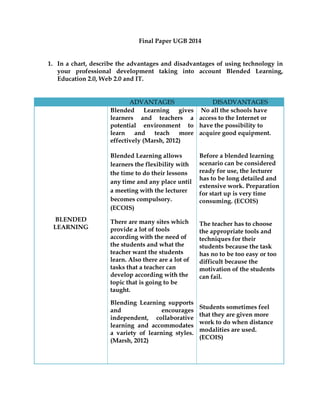
1. In a chart, describe the advantages and disadvantages of using technology in
your professional development taking into account Blended Learning,
Education 2.0, Web 2.0 and IT.
ADVANTAGES DISADVANTAGES
BLENDED
LEARNING
Blended Learning gives
learners and teachers a
potential environment to
learn and teach more
effectively (Marsh, 2012)
Blended Learning allows
learners the flexibility with
the time to do their lessons
any time and any place until
a meeting with the lecturer
becomes compulsory.
(ECOIS)
There are many sites which
provide a lot of tools
according with the need of
the students and what the
teacher want the students
learn. Also there are a lot of
tasks that a teacher can
develop according with the
topic that is going to be
taught.
Blending Learning supports
and encourages
independent, collaborative
learning and accommodates
a variety of learning styles.
(Marsh, 2012)
No all the schools have
access to the Internet or
have the possibility to
acquire good equipment.
Before a blended learning
scenario can be considered
ready for use, the lecturer
has to be long detailed and
extensive work. Preparation
for start up is very time
consuming. (ECOIS)
The teacher has to choose
the appropriate tools and
techniques for their
students because the task
has no to be too easy or too
difficult because the
motivation of the students
can fail.
Students sometimes feel
that they are given more
work to do when distance
modalities are used.
(ECOIS)
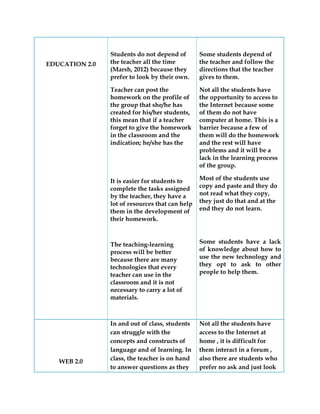
EDUCATION 2.0
Students do not depend of
the teacher all the time
(Marsh, 2012) because they
prefer to look by their own.
Teacher can post the
homework on the profile of
the group that she/he has
created for his/her students,
this mean that if a teacher
forget to give the homework
in the classroom and the
indication; he/she has the
It is easier for students to
complete the tasks assigned
by the teacher, they have a
lot of resources that can help
them in the development of
their homework.
The teaching-learning
process will be better
because there are many
technologies that every
teacher can use in the
classroom and it is not
necessary to carry a lot of
materials.
Some students depend of
the teacher and follow the
directions that the teacher
gives to them.
Not all the students have
the opportunity to access to
the Internet because some
of them do not have
computer at home. This is a
barrier because a few of
them will do the homework
and the rest will have
problems and it will be a
lack in the learning process
of the group.
Most of the students use
copy and paste and they do
not read what they copy,
they just do that and at the
end they do not learn.
Some students have a lack
of knowledge about how to
use the new technology and
they opt to ask to other
people to help them.
WEB 2.0
In and out of class, students
can struggle with the
concepts and constructs of
language and of learning. In
class, the teacher is on hand
to answer questions as they
Not all the students have
access to the Internet at
home , it is difficult for
them interact in a forum ,
also there are students who
prefer no ask and just look
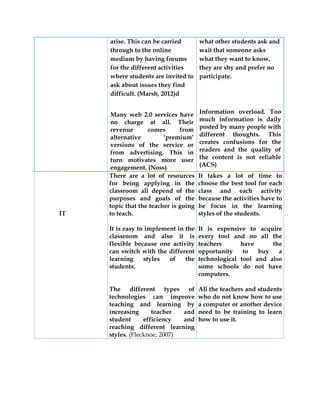
arise. This can be carried
through to the online
medium by having forums
for the different activities
where students are invited to
ask about issues they find
difficult. (Marsh, 2012)d
Many web 2.0 services have
no charge at all. Their
revenue comes from
alternative ‘premium’
versions of the service or
from advertising. This in
turn motivates more user
engagement. (Noss)
what other students ask and
wait that someone asks
what they want to know,
they are shy and prefer no
participate.
Information overload. Too
much information is daily
posted by many people with
different thoughts. This
creates confusions for the
readers and the quality of
the content is not reliable
(ACS)
IT
There are a lot of resources
for being applying in the
classroom all depend of the
purposes and goals of the
topic that the teacher is going
to teach.
It is easy to implement in the
classroom and also it is
flexible because one activity
can switch with the different
learning styles of the
students.
The different types of
technologies can improve
teaching and learning by
increasing teacher and
student efficiency and
reaching different learning
styles. (Flecknoe, 2007)
It takes a lot of time to
choose the best tool for each
class and each activity
because the activities have to
be focus in the learning
styles of the students.
It is expensive to acquire
every tool and no all the
teachers have the
opportunity to buy a
technological tool and also
some schools do not have
computers.
All the teachers and students
who do not know how to use
a computer or another device
need to be training to learn
how to use it.
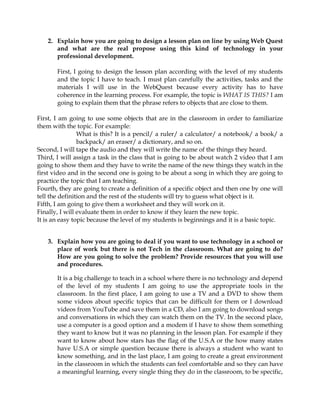
2. Explain how you are going to design a lesson plan on line by using Web Quest
and what are the real propose using this kind of technology in your
professional development.
First, I going to design the lesson plan according with the level of my students
and the topic I have to teach. I must plan carefully the activities, tasks and the
materials I will use in the WebQuest because every activity has to have
coherence in the learning process. For example, the topic is WHAT IS THIS? I am
going to explain them that the phrase refers to objects that are close to them.
First, I am going to use some objects that are in the classroom in order to familiarize
them with the topic. For example:
What is this? It is a pencil/ a ruler/ a calculator/ a notebook/ a book/ a
backpack/ an eraser/ a dictionary, and so on.
Second, I will tape the audio and they will write the name of the things they heard.
Third, I will assign a task in the class that is going to be about watch 2 video that I am
going to show them and they have to write the name of the new things they watch in the
first video and in the second one is going to be about a song in which they are going to
practice the topic that I am teaching.
Fourth, they are going to create a definition of a specific object and then one by one will
tell the definition and the rest of the students will try to guess what object is it.
Fifth, I am going to give them a worksheet and they will work on it.
Finally, I will evaluate them in order to know if they learn the new topic.
It is an easy topic because the level of my students is beginnings and it is a basic topic.
3. Explain how you are going to deal if you want to use technology in a school or
place of work but there is not Tech in the classroom. What are going to do?
How are you going to solve the problem? Provide resources that you will use
and procedures.
It is a big challenge to teach in a school where there is no technology and depend
of the level of my students I am going to use the appropriate tools in the
classroom. In the first place, I am going to use a TV and a DVD to show them
some videos about specific topics that can be difficult for them or I download
videos from YouTube and save them in a CD, also I am going to download songs
and conversations in which they can watch them on the TV. In the second place,
use a computer is a good option and a modem if I have to show them something
they want to know but it was no planning in the lesson plan. For example if they
want to know about how stars has the flag of the U.S.A or the how many states
have U.S.A or simple question because there is always a student who want to
know something, and in the last place, I am going to create a great environment
in the classroom in which the students can feel comfortable and so they can have
a meaningful learning, every single thing they do in the classroom, to be specific,
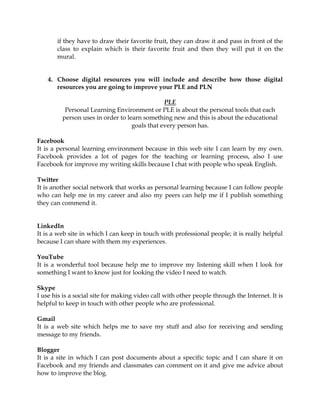
if they have to draw their favorite fruit, they can draw it and pass in front of the
class to explain which is their favorite fruit and then they will put it on the
mural.
4. Choose digital resources you will include and describe how those digital
resources you are going to improve your PLE and PLN
PLE
Personal Learning Environment or PLE is about the personal tools that each
person uses in order to learn something new and this is about the educational
goals that every person has.
Facebook
It is a personal learning environment because in this web site I can learn by my own.
Facebook provides a lot of pages for the teaching or learning process, also I use
Facebook for improve my writing skills because I chat with people who speak English.
Twitter
It is another social network that works as personal learning because I can follow people
who can help me in my career and also my peers can help me if I publish something
they can commend it.
LinkedIn
It is a web site in which I can keep in touch with professional people; it is really helpful
because I can share with them my experiences.
YouTube
It is a wonderful tool because help me to improve my listening skill when I look for
something I want to know just for looking the video I need to watch.
Skype
I use his is a social site for making video call with other people through the Internet. It is
helpful to keep in touch with other people who are professional.
Gmail
It is a web site which helps me to save my stuff and also for receiving and sending
message to my friends.
Blogger
It is a site in which I can post documents about a specific topic and I can share it on
Facebook and my friends and classmates can comment on it and give me advice about
how to improve the blog.
Zunal
It is a great tool for making lesson plans on line and at the same time I can include a lot
of documents in it, like power point presentation, videos from YouTube or word
documents in which I assign the activities that the students must develop.
VocabSuchi
I use it for learning vocabulary with real-world, contextual examples found in the daily
news.
BBC Learning English
I use this website for learning vocabulary, grammar, pronunciation, and also I can take
tests in order to evaluate my work on the site.
Exam English
It is a site in which I can test my English level by reading, listening, grammar,
vocabulary, or writing.
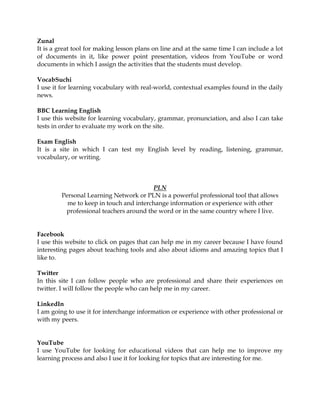
PLN
Personal Learning Network or PLN is a powerful professional tool that allows
me to keep in touch and interchange information or experience with other
professional teachers around the word or in the same country where I live.
Facebook
I use this website to click on pages that can help me in my career because I have found
interesting pages about teaching tools and also about idioms and amazing topics that I
like to.
Twitter
In this site I can follow people who are professional and share their experiences on
twitter. I will follow the people who can help me in my career.
LinkedIn
I am going to use it for interchange information or experience with other professional or
with my peers.
YouTube
I use YouTube for looking for educational videos that can help me to improve my
learning process and also I use it for looking for topics that are interesting for me.
Wikipedia
I use it when I want to know a definition of a word or a specific topic when I do not
understand it in the class.
Merriam Webstern
It is a dictionary that helps me to know the definition of a word that is new for me. I
have it in my cellphone.
Wordreference
It an online dictionary that helps me to look for the definition of a word.
Google
It is a big site in which I can look for images, information, news, and videos.
English Club
I use it for learning idioms, phrasal verbs, the history of the week, and a lot of thing that
this good page provides to everybody.
Blogger
I use blogger to interact with my peers or teachers who have the same interest in the
teaching process.
Gmail
I use this site to send and receive message from my peers or colleagues. In addition,
everybody can interchange their experience.
Free Printables for Teachers
This is a good site that provides a lot of materials for the teaching process like: short
stories, nursery tales, worksheets, pictures for coloring, and games for the playground,
simple stories for kids, faire tales and lesson plans.

Final Paper UGB 2014

  • 1.
    UNIVERSIDAD CAPITAN GENERALGERARDO BARRIOS School of Art and Science Foreign Language Department Bachelor Degree in English Language Module IV Tech in Education Yesenia Xiomara Cortez Gómez Final Paper UGB 2014 San Miguel 5th, 2014
  • 2.
    Final Paper UGB2014 1. In a chart, describe the advantages and disadvantages of using technology in your professional development taking into account Blended Learning, Education 2.0, Web 2.0 and IT. ADVANTAGES DISADVANTAGES BLENDED LEARNING Blended Learning gives learners and teachers a potential environment to learn and teach more effectively (Marsh, 2012) Blended Learning allows learners the flexibility with the time to do their lessons any time and any place until a meeting with the lecturer becomes compulsory. (ECOIS) There are many sites which provide a lot of tools according with the need of the students and what the teacher want the students learn. Also there are a lot of tasks that a teacher can develop according with the topic that is going to be taught. Blending Learning supports and encourages independent, collaborative learning and accommodates a variety of learning styles. (Marsh, 2012) No all the schools have access to the Internet or have the possibility to acquire good equipment. Before a blended learning scenario can be considered ready for use, the lecturer has to be long detailed and extensive work. Preparation for start up is very time consuming. (ECOIS) The teacher has to choose the appropriate tools and techniques for their students because the task has no to be too easy or too difficult because the motivation of the students can fail. Students sometimes feel that they are given more work to do when distance modalities are used. (ECOIS)
  • 3.
    EDUCATION 2.0 Students donot depend of the teacher all the time (Marsh, 2012) because they prefer to look by their own. Teacher can post the homework on the profile of the group that she/he has created for his/her students, this mean that if a teacher forget to give the homework in the classroom and the indication; he/she has the It is easier for students to complete the tasks assigned by the teacher, they have a lot of resources that can help them in the development of their homework. The teaching-learning process will be better because there are many technologies that every teacher can use in the classroom and it is not necessary to carry a lot of materials. Some students depend of the teacher and follow the directions that the teacher gives to them. Not all the students have the opportunity to access to the Internet because some of them do not have computer at home. This is a barrier because a few of them will do the homework and the rest will have problems and it will be a lack in the learning process of the group. Most of the students use copy and paste and they do not read what they copy, they just do that and at the end they do not learn. Some students have a lack of knowledge about how to use the new technology and they opt to ask to other people to help them. WEB 2.0 In and out of class, students can struggle with the concepts and constructs of language and of learning. In class, the teacher is on hand to answer questions as they Not all the students have access to the Internet at home , it is difficult for them interact in a forum , also there are students who prefer no ask and just look
  • 4.
    arise. This canbe carried through to the online medium by having forums for the different activities where students are invited to ask about issues they find difficult. (Marsh, 2012)d Many web 2.0 services have no charge at all. Their revenue comes from alternative ‘premium’ versions of the service or from advertising. This in turn motivates more user engagement. (Noss) what other students ask and wait that someone asks what they want to know, they are shy and prefer no participate. Information overload. Too much information is daily posted by many people with different thoughts. This creates confusions for the readers and the quality of the content is not reliable (ACS) IT There are a lot of resources for being applying in the classroom all depend of the purposes and goals of the topic that the teacher is going to teach. It is easy to implement in the classroom and also it is flexible because one activity can switch with the different learning styles of the students. The different types of technologies can improve teaching and learning by increasing teacher and student efficiency and reaching different learning styles. (Flecknoe, 2007) It takes a lot of time to choose the best tool for each class and each activity because the activities have to be focus in the learning styles of the students. It is expensive to acquire every tool and no all the teachers have the opportunity to buy a technological tool and also some schools do not have computers. All the teachers and students who do not know how to use a computer or another device need to be training to learn how to use it.
  • 5.
    2. Explain howyou are going to design a lesson plan on line by using Web Quest and what are the real propose using this kind of technology in your professional development. First, I going to design the lesson plan according with the level of my students and the topic I have to teach. I must plan carefully the activities, tasks and the materials I will use in the WebQuest because every activity has to have coherence in the learning process. For example, the topic is WHAT IS THIS? I am going to explain them that the phrase refers to objects that are close to them. First, I am going to use some objects that are in the classroom in order to familiarize them with the topic. For example: What is this? It is a pencil/ a ruler/ a calculator/ a notebook/ a book/ a backpack/ an eraser/ a dictionary, and so on. Second, I will tape the audio and they will write the name of the things they heard. Third, I will assign a task in the class that is going to be about watch 2 video that I am going to show them and they have to write the name of the new things they watch in the first video and in the second one is going to be about a song in which they are going to practice the topic that I am teaching. Fourth, they are going to create a definition of a specific object and then one by one will tell the definition and the rest of the students will try to guess what object is it. Fifth, I am going to give them a worksheet and they will work on it. Finally, I will evaluate them in order to know if they learn the new topic. It is an easy topic because the level of my students is beginnings and it is a basic topic. 3. Explain how you are going to deal if you want to use technology in a school or place of work but there is not Tech in the classroom. What are going to do? How are you going to solve the problem? Provide resources that you will use and procedures. It is a big challenge to teach in a school where there is no technology and depend of the level of my students I am going to use the appropriate tools in the classroom. In the first place, I am going to use a TV and a DVD to show them some videos about specific topics that can be difficult for them or I download videos from YouTube and save them in a CD, also I am going to download songs and conversations in which they can watch them on the TV. In the second place, use a computer is a good option and a modem if I have to show them something they want to know but it was no planning in the lesson plan. For example if they want to know about how stars has the flag of the U.S.A or the how many states have U.S.A or simple question because there is always a student who want to know something, and in the last place, I am going to create a great environment in the classroom in which the students can feel comfortable and so they can have a meaningful learning, every single thing they do in the classroom, to be specific,
  • 6.
    if they haveto draw their favorite fruit, they can draw it and pass in front of the class to explain which is their favorite fruit and then they will put it on the mural. 4. Choose digital resources you will include and describe how those digital resources you are going to improve your PLE and PLN PLE Personal Learning Environment or PLE is about the personal tools that each person uses in order to learn something new and this is about the educational goals that every person has. Facebook It is a personal learning environment because in this web site I can learn by my own. Facebook provides a lot of pages for the teaching or learning process, also I use Facebook for improve my writing skills because I chat with people who speak English. Twitter It is another social network that works as personal learning because I can follow people who can help me in my career and also my peers can help me if I publish something they can commend it. LinkedIn It is a web site in which I can keep in touch with professional people; it is really helpful because I can share with them my experiences. YouTube It is a wonderful tool because help me to improve my listening skill when I look for something I want to know just for looking the video I need to watch. Skype I use his is a social site for making video call with other people through the Internet. It is helpful to keep in touch with other people who are professional. Gmail It is a web site which helps me to save my stuff and also for receiving and sending message to my friends. Blogger It is a site in which I can post documents about a specific topic and I can share it on Facebook and my friends and classmates can comment on it and give me advice about how to improve the blog.
  • 7.
    Zunal It is agreat tool for making lesson plans on line and at the same time I can include a lot of documents in it, like power point presentation, videos from YouTube or word documents in which I assign the activities that the students must develop. VocabSuchi I use it for learning vocabulary with real-world, contextual examples found in the daily news. BBC Learning English I use this website for learning vocabulary, grammar, pronunciation, and also I can take tests in order to evaluate my work on the site. Exam English It is a site in which I can test my English level by reading, listening, grammar, vocabulary, or writing. PLN Personal Learning Network or PLN is a powerful professional tool that allows me to keep in touch and interchange information or experience with other professional teachers around the word or in the same country where I live. Facebook I use this website to click on pages that can help me in my career because I have found interesting pages about teaching tools and also about idioms and amazing topics that I like to. Twitter In this site I can follow people who are professional and share their experiences on twitter. I will follow the people who can help me in my career. LinkedIn I am going to use it for interchange information or experience with other professional or with my peers. YouTube I use YouTube for looking for educational videos that can help me to improve my learning process and also I use it for looking for topics that are interesting for me.
  • 8.
    Wikipedia I use itwhen I want to know a definition of a word or a specific topic when I do not understand it in the class. Merriam Webstern It is a dictionary that helps me to know the definition of a word that is new for me. I have it in my cellphone. Wordreference It an online dictionary that helps me to look for the definition of a word. Google It is a big site in which I can look for images, information, news, and videos. English Club I use it for learning idioms, phrasal verbs, the history of the week, and a lot of thing that this good page provides to everybody. Blogger I use blogger to interact with my peers or teachers who have the same interest in the teaching process. Gmail I use this site to send and receive message from my peers or colleagues. In addition, everybody can interchange their experience. Free Printables for Teachers This is a good site that provides a lot of materials for the teaching process like: short stories, nursery tales, worksheets, pictures for coloring, and games for the playground, simple stories for kids, faire tales and lesson plans.