IPhone Programming Project
UNSW’s Map and Videos


7/25/2010
The University of New South Wales


Supervisor:

Dr. Salil Kanhere
Senior Lecturer
School of Computer Science and Engineering
The University of New South Wales
Email: salilk@cse.unsw.edu.au


Supervisee:

Dhara Manojkumar Shah
Email: dhara.shah@student.unsw.edu.au
Student Id: 3299353
IPhone Programming Project


Acknowledgment
I wish to express my deepest gratitude towards my supervisor Dr. Salil
Kanhere and PH.D Candidate Kuanlun Huang for their constant support
and motivation which helped me learning and programming IPhone and
making application for it.


Date: - 25th June, 2010


                                       Dhara Shah

                                       Student id: - z3299353


The University of New South Wales                                Page 2
IPhone Programming Project


Abstract


In this project I had given videos for almost each and every important
location of the University of New South Wales. Also the User can know his
current location. User can see all the Important Departments, Theatres
and Services being provided by the University and see the videos
associated to it. Apart from the project the learning of iPhone
programming is what has been concentrated.


The University of New South Wales                                  Page 3
IPhone Programming Project


Table of Contents


   1. Introduction..............................................................5


       1.1    Motivation......................................................................6
       1.2    Technology Overview......................................................7
       1.3    Related Work................................................................18


   2. System Design........................................................21


       2.1    Program Flow................................................................22
       2.2    Design Approach...........................................................25


   3. Conclusion...............................................................36


       3.1    Future Work..................................................................37


References....................................................................38


The University of New South Wales                                                        Page 4
IPhone Programming Project


Chapter 1:- Introduction
IPhone is the upcoming and promising platform available to create
applications which would reach masses. Programming in iPhone is done
using software development kit of Cocoa.

Cocoa has been in the developer’s network since 20-25 years. It’s a very
high level platform and a very rich software development kit. It enables
developer to create application with much ease.

Model View Controller is the pattern used in programming this project.
Model View Controller is much synchronised design pattern.

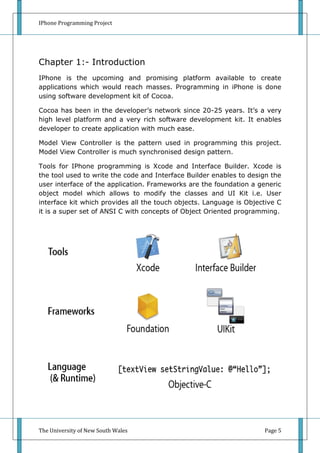
Tools for IPhone programming is Xcode and Interface Builder. Xcode is
the tool used to write the code and Interface Builder enables to design the
user interface of the application. Frameworks are the foundation a generic
object model which allows to modify the classes and UI Kit i.e. User
interface kit which provides all the touch objects. Language is Objective C
it is a super set of ANSI C with concepts of Object Oriented programming.


The University of New South Wales                                    Page 5
IPhone Programming Project


1.1 Motivation


As the University of New South Wales are a very renowned and a
University having lot of intake of International Students. Due to its huge
campus it is very important that students who are new to it get
acquainted to it. This kind of application would be help students to get the
feel of the University even before being there.


The University of New South Wales                                     Page 6
IPhone Programming Project


1.2 Technology Overview


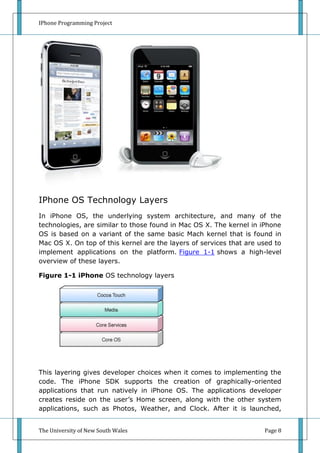
IPhone is a very popular and powerful tool which inspires to make
applications in it. IPhone is a phone, iPod and a communication device. It
has entire MAC OS in it except the UI which instead of Cocoa is cocoa
touch. This makes it a very desirable platform to work on as it gives
freedom of building applications with maximum resources and minimum
effort.

IPhone OS Overview
IPhone OS comprises the operating system and technologies that
developer use to run applications natively on iPhone and iPod touch
devices. Although it shares a common heritage and many underlying
technologies with Mac OS X, iPhone OS was designed to meet the needs
of a mobile environment, where user’s needs are slightly different.
Existing Mac OS X developers will find many familiar technologies, but
they’ll also find technologies that are available only on iPhone OS, such as
the Multi-Touch interface and accelerometer support.

The iPhone SDK contains the code, information, and tools developer need
to develop, test, run, debug, and tune applications for the iPhone OS. The
Xcode tools have been updated to support development for the iPhone
OS. In addition to providing the basic editing, compilation, and debugging
environment for developer code, Xcode also provides the launching point
for testing developer applications on an iPhone or iPod touch device.
Xcode also lets developer run applications in iPhone simulator, a platform
that mimics the basic iPhone OS environment on developer local
Macintosh computer.


The University of New South Wales                                     Page 7
IPhone Programming Project


IPhone OS Technology Layers
In iPhone OS, the underlying system architecture, and many of the
technologies, are similar to those found in Mac OS X. The kernel in iPhone
OS is based on a variant of the same basic Mach kernel that is found in
Mac OS X. On top of this kernel are the layers of services that are used to
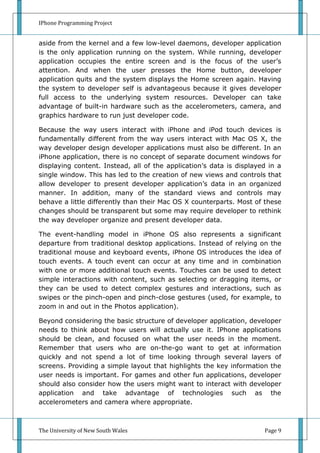
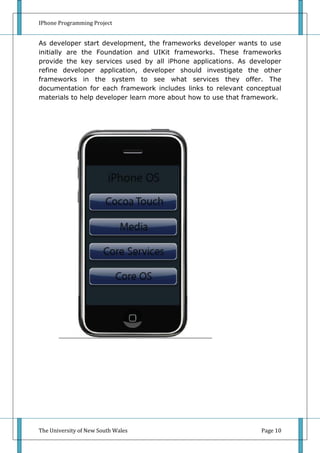
implement applications on the platform. Figure 1-1 shows a high-level
overview of these layers.

Figure 1-1 iPhone OS technology layers


This layering gives developer choices when it comes to implementing the
code. The iPhone SDK supports the creation of graphically-oriented
applications that run natively in iPhone OS. The applications developer
creates reside on the user’s Home screen, along with the other system
applications, such as Photos, Weather, and Clock. After it is launched,


The University of New South Wales                                    Page 8
IPhone Programming Project


aside from the kernel and a few low-level daemons, developer application
is the only application running on the system. While running, developer
application occupies the entire screen and is the focus of the user’s
attention. And when the user presses the Home button, developer
application quits and the system displays the Home screen again. Having
the system to developer self is advantageous because it gives developer
full access to the underlying system resources. Developer can take
advantage of built-in hardware such as the accelerometers, camera, and
graphics hardware to run just developer code.

Because the way users interact with iPhone and iPod touch devices is
fundamentally different from the way users interact with Mac OS X, the
way developer design developer applications must also be different. In an
iPhone application, there is no concept of separate document windows for
displaying content. Instead, all of the application’s data is displayed in a
single window. This has led to the creation of new views and controls that
allow developer to present developer application’s data in an organized
manner. In addition, many of the standard views and controls may
behave a little differently than their Mac OS X counterparts. Most of these
changes should be transparent but some may require developer to rethink
the way developer organize and present developer data.

The event-handling model in iPhone OS also represents a significant
departure from traditional desktop applications. Instead of relying on the
traditional mouse and keyboard events, iPhone OS introduces the idea of
touch events. A touch event can occur at any time and in combination
with one or more additional touch events. Touches can be used to detect
simple interactions with content, such as selecting or dragging items, or
they can be used to detect complex gestures and interactions, such as
swipes or the pinch-open and pinch-close gestures (used, for example, to
zoom in and out in the Photos application).

Beyond considering the basic structure of developer application, developer
needs to think about how users will actually use it. IPhone applications
should be clean, and focused on what the user needs in the moment.
Remember that users who are on-the-go want to get at information
quickly and not spend a lot of time looking through several layers of
screens. Providing a simple layout that highlights the key information the
user needs is important. For games and other fun applications, developer
should also consider how the users might want to interact with developer
application and take advantage of technologies such as the
accelerometers and camera where appropriate.


The University of New South Wales                                     Page 9
IPhone Programming Project


As developer start development, the frameworks developer wants to use
initially are the Foundation and UIKit frameworks. These frameworks
provide the key services used by all iPhone applications. As developer
refine developer application, developer should investigate the other
frameworks in the system to see what services they offer. The
documentation for each framework includes links to relevant conceptual
materials to help developer learn more about how to use that framework.


The University of New South Wales                                Page 10
IPhone Programming Project


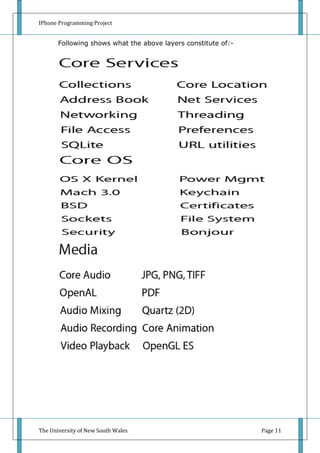
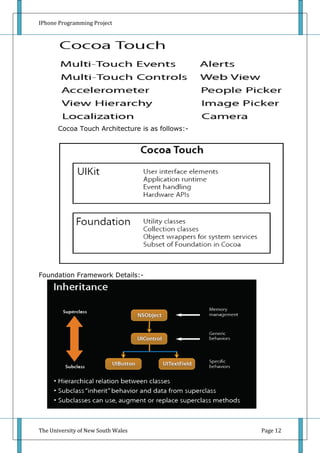
       Following shows what the above layers constitute of:-


The University of New South Wales                              Page 11
IPhone Programming Project


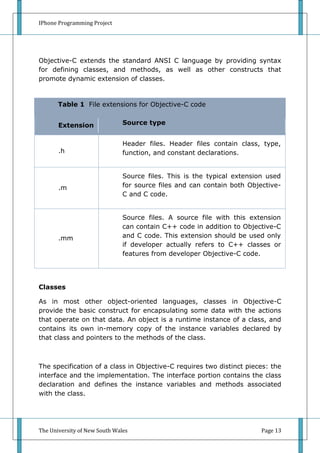
       Cocoa Touch Architecture is as follows:-


Foundation Framework Details:-


       Objective – C:-


The University of New South Wales                 Page 12
IPhone Programming Project


Objective-C extends the standard ANSI C language by providing syntax
for defining classes, and methods, as well as other constructs that
promote dynamic extension of classes.


       Table 1 File extensions for Objective-C code


       Extension               Source type


                               Header files. Header files contain class, type,
       .h                      function, and constant declarations.


                               Source files. This is the typical extension used
       .m                      for source files and can contain both Objective-
                               C and C code.


                               Source files. A source file with this extension
                               can contain C++ code in addition to Objective-C
       .mm                     and C code. This extension should be used only
                               if developer actually refers to C++ classes or
                               features from developer Objective-C code.


Classes

As in most other object-oriented languages, classes in Objective-C
provide the basic construct for encapsulating some data with the actions
that operate on that data. An object is a runtime instance of a class, and
contains its own in-memory copy of the instance variables declared by
that class and pointers to the methods of the class.


The specification of a class in Objective-C requires two distinct pieces: the
interface and the implementation. The interface portion contains the class
declaration and defines the instance variables and methods associated
with the class.


The University of New South Wales                                        Page 13
IPhone Programming Project


The interface is usually in an .h file. The implementation portion contains
the actual code for the methods of the class. The implementation is
usually in an .m file.


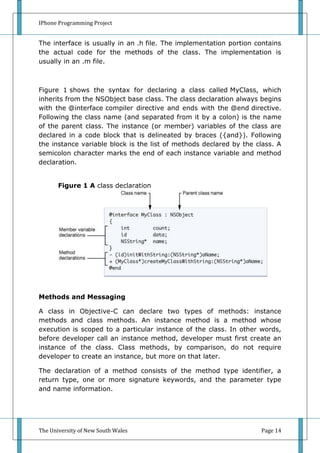
Figure 1 shows the syntax for declaring a class called MyClass, which
inherits from the NSObject base class. The class declaration always begins
with the @interface compiler directive and ends with the @end directive.
Following the class name (and separated from it by a colon) is the name
of the parent class. The instance (or member) variables of the class are
declared in a code block that is delineated by braces ({and}). Following
the instance variable block is the list of methods declared by the class. A
semicolon character marks the end of each instance variable and method
declaration.


       Figure 1 A class declaration


Methods and Messaging

A class in Objective-C can declare two types of methods: instance
methods and class methods. An instance method is a method whose
execution is scoped to a particular instance of the class. In other words,
before developer call an instance method, developer must first create an
instance of the class. Class methods, by comparison, do not require
developer to create an instance, but more on that later.

The declaration of a method consists of the method type identifier, a
return type, one or more signature keywords, and the parameter type
and name information.


The University of New South Wales                                   Page 14
IPhone Programming Project


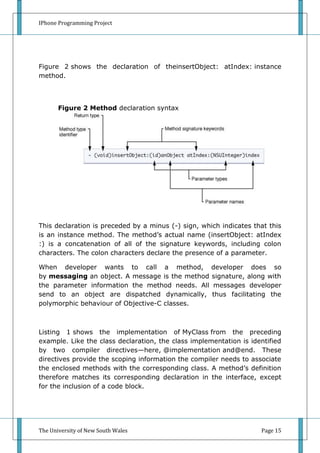
Figure 2 shows the declaration of theinsertObject: atIndex: instance
method.


       Figure 2 Method declaration syntax


This declaration is preceded by a minus (-) sign, which indicates that this
is an instance method. The method’s actual name (insertObject: atIndex
:) is a concatenation of all of the signature keywords, including colon
characters. The colon characters declare the presence of a parameter.

When developer wants to call a method,               developer does so
by messaging an object. A message is the method      signature, along with
the parameter information the method needs. All       messages developer
send to an object are dispatched dynamically,        thus facilitating the
polymorphic behaviour of Objective-C classes.


Listing 1 shows the implementation of MyClass from the preceding
example. Like the class declaration, the class implementation is identified
by two compiler directives—here, @implementation and@end. These
directives provide the scoping information the compiler needs to associate
the enclosed methods with the corresponding class. A method’s definition
therefore matches its corresponding declaration in the interface, except
for the inclusion of a code block.


The University of New South Wales                                   Page 15
IPhone Programming Project


Listing 1 A class implementation

       @implementation MyClass


       - (id)initWithString:(NSString *)aName


       {


           if (self = [super init]) {


               name = [aName copy];


           }


           return self;


       }


       + (MyClass *)createMyClassWithString: (NSString *)aName


       {


           return [[[self alloc] initWithString:aName] autorelease];


       }


       @end


The University of New South Wales                                      Page 16
IPhone Programming Project


Declared Properties

Declared properties are a convenience notation used to replace the
declaration and, optionally, implementation of accessor methods.

Developer includes property declarations with the method declarations in
developer     class    interface.     The    basic    definition   uses
the @property compiler directive, followed by the type information and
name of the property. Developer can also configure the property with
custom options, which define how the accessor methods behave. The
following example shows a few simple property declarations:

       @property BOOL flag;


       @property (copy) NSString *nameObject; // Copy the object during
       assignment.


       @property (readonly) UIView *rootView; // Declare only a getter
       method.

Each readable property specifies a method with the same name as the
property. Each writable property specifies an additional method of the
form setPropertyName: where the first letter of the property name is
capitalized.

In   developer     class    implementation,       developer can    use
the @synthesize compiler directive to ask the compiler to generate the
methods according to the specification in the declaration:

       @synthesize flag;


       @synthesize nameObject;


       @synthesize rootView;

Developer can combine the @synthesize statements in a single line if
developer wants:

       @synthesize flag, nameObject, rootView;


The University of New South Wales                                 Page 17
IPhone Programming Project


1.3 Related Work
Following efforts had been made:-

   1. I tried to locate places on Google earth and then placing their
      latitudes and longitudes value on Google maps. As Google allows
      adding places on the maps if they are not listed. But the problem
      was as they were not verified they were not uploaded also the
      Google map kit being used by apple is not the latest one.

   2. Also deep study of the map kit and media kit from Apple’s
      Developer’s Portal was done to understand them properly so that
      they could be integrated.

   3. Hence code was written to capture the latitude and longitude of the
      location by IPhone. So I went to all the major buildings of the
      UNSW and captured their geographic coordinates. This was
      necessary as the coordinates available by Google earth were not
      accurate as it had altitude factor also added to it and moreover it
      was a simulation and not exact representation.

   4. Next all the videos relevant to the location were taken.


The University of New South Wales                                  Page 18
IPhone Programming Project


CHAPTER 2 System Design

       Program was designed on the MVC Design based i.e. Model View
       Controller Design.

       All the coding was done in Objective C.


The University of New South Wales                            Page 19
IPhone Programming Project


2.1 Program Flow


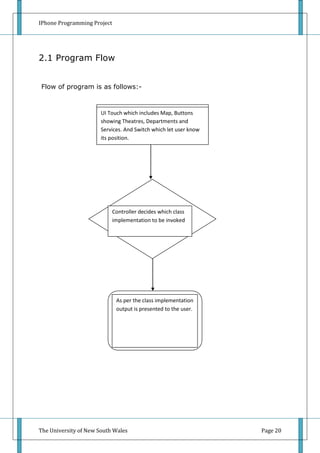
Flow of program is as follows:-


                       UI Touch which includes Map, Buttons
                       showing Theatres, Departments and
                       Services. And Switch which let user know
                       its position.


                             Controller decides which class
                             implementation to be invoked


                              As per the class implementation
                              output is presented to the user.


The University of New South Wales                                 Page 20
IPhone Programming Project


2.2 Design Approach
Designing had been completed independent and reusable. All the
annotations correspond to their respective interfaces which are
implemented in their respective classes.

Hence in future if more annotations are required to be implemented they
can be done by simply adding new interfaces and implementing them in
classes.

Annotation’s right callout button has been overwritten to show specific
video regarding that department, services or theatres.

Prior their used to be trouble that threads were colliding one showing the
map and other showing the video. But with this independent approach
both could be shown without colliding their thread times.


The University of New South Wales                                  Page 21
IPhone Programming Project


3.0 Conclusion
       Overall the project gave completely new experience of learning
       IPhone programming. It made me release that it’s so powerful
       platform that very powerful applications can be made through it
       with minimal effort once it’s fully understood.

       It took me time to understand it properly but the end result was
       that it could program it very easily and with minimum amount of
       effort.

       Had there been more amount of time lot more improvements could
       have been possible in the application.


The University of New South Wales                                Page 22
IPhone Programming Project


3.1 Future Work
Following improvements can be made in the application:-

   1. Videos can be shown as soon as it is detected near the location. For
      example if the user is near UNSW Library, application can ask the
      user if he wishes to play the video of the library.

   2. Also right now it covers only UNSW it can be made to cover all
      Universities across the world.

   3. More professionally shoot videos should be integrated showing the
      insights of the building that would give the user more insight and
      more wonderful experience rather then only seeing the pictures of
      the place.


The University of New South Wales                                  Page 23
IPhone Programming Project


References

   1. http://developer.apple.com/iphone/index.action
   2. http://www.stanford.edu/class/cs193p/cgi-bin/drupal/


The University of New South Wales                        Page 24

I phone programming project report

  • 1.
    IPhone Programming Project UNSW’sMap and Videos 7/25/2010 The University of New South Wales Supervisor: Dr. Salil Kanhere Senior Lecturer School of Computer Science and Engineering The University of New South Wales Email: salilk@cse.unsw.edu.au Supervisee: Dhara Manojkumar Shah Email: dhara.shah@student.unsw.edu.au Student Id: 3299353
  • 2.
    IPhone Programming Project Acknowledgment Iwish to express my deepest gratitude towards my supervisor Dr. Salil Kanhere and PH.D Candidate Kuanlun Huang for their constant support and motivation which helped me learning and programming IPhone and making application for it. Date: - 25th June, 2010 Dhara Shah Student id: - z3299353 The University of New South Wales Page 2
  • 3.
    IPhone Programming Project Abstract Inthis project I had given videos for almost each and every important location of the University of New South Wales. Also the User can know his current location. User can see all the Important Departments, Theatres and Services being provided by the University and see the videos associated to it. Apart from the project the learning of iPhone programming is what has been concentrated. The University of New South Wales Page 3
  • 4.
    IPhone Programming Project Tableof Contents 1. Introduction..............................................................5 1.1 Motivation......................................................................6 1.2 Technology Overview......................................................7 1.3 Related Work................................................................18 2. System Design........................................................21 2.1 Program Flow................................................................22 2.2 Design Approach...........................................................25 3. Conclusion...............................................................36 3.1 Future Work..................................................................37 References....................................................................38 The University of New South Wales Page 4
  • 5.
    IPhone Programming Project Chapter1:- Introduction IPhone is the upcoming and promising platform available to create applications which would reach masses. Programming in iPhone is done using software development kit of Cocoa. Cocoa has been in the developer’s network since 20-25 years. It’s a very high level platform and a very rich software development kit. It enables developer to create application with much ease. Model View Controller is the pattern used in programming this project. Model View Controller is much synchronised design pattern. Tools for IPhone programming is Xcode and Interface Builder. Xcode is the tool used to write the code and Interface Builder enables to design the user interface of the application. Frameworks are the foundation a generic object model which allows to modify the classes and UI Kit i.e. User interface kit which provides all the touch objects. Language is Objective C it is a super set of ANSI C with concepts of Object Oriented programming. The University of New South Wales Page 5
  • 6.
    IPhone Programming Project 1.1Motivation As the University of New South Wales are a very renowned and a University having lot of intake of International Students. Due to its huge campus it is very important that students who are new to it get acquainted to it. This kind of application would be help students to get the feel of the University even before being there. The University of New South Wales Page 6
  • 7.
    IPhone Programming Project 1.2Technology Overview IPhone is a very popular and powerful tool which inspires to make applications in it. IPhone is a phone, iPod and a communication device. It has entire MAC OS in it except the UI which instead of Cocoa is cocoa touch. This makes it a very desirable platform to work on as it gives freedom of building applications with maximum resources and minimum effort. IPhone OS Overview IPhone OS comprises the operating system and technologies that developer use to run applications natively on iPhone and iPod touch devices. Although it shares a common heritage and many underlying technologies with Mac OS X, iPhone OS was designed to meet the needs of a mobile environment, where user’s needs are slightly different. Existing Mac OS X developers will find many familiar technologies, but they’ll also find technologies that are available only on iPhone OS, such as the Multi-Touch interface and accelerometer support. The iPhone SDK contains the code, information, and tools developer need to develop, test, run, debug, and tune applications for the iPhone OS. The Xcode tools have been updated to support development for the iPhone OS. In addition to providing the basic editing, compilation, and debugging environment for developer code, Xcode also provides the launching point for testing developer applications on an iPhone or iPod touch device. Xcode also lets developer run applications in iPhone simulator, a platform that mimics the basic iPhone OS environment on developer local Macintosh computer. The University of New South Wales Page 7
  • 8.
    IPhone Programming Project IPhoneOS Technology Layers In iPhone OS, the underlying system architecture, and many of the technologies, are similar to those found in Mac OS X. The kernel in iPhone OS is based on a variant of the same basic Mach kernel that is found in Mac OS X. On top of this kernel are the layers of services that are used to implement applications on the platform. Figure 1-1 shows a high-level overview of these layers. Figure 1-1 iPhone OS technology layers This layering gives developer choices when it comes to implementing the code. The iPhone SDK supports the creation of graphically-oriented applications that run natively in iPhone OS. The applications developer creates reside on the user’s Home screen, along with the other system applications, such as Photos, Weather, and Clock. After it is launched, The University of New South Wales Page 8
  • 9.
    IPhone Programming Project asidefrom the kernel and a few low-level daemons, developer application is the only application running on the system. While running, developer application occupies the entire screen and is the focus of the user’s attention. And when the user presses the Home button, developer application quits and the system displays the Home screen again. Having the system to developer self is advantageous because it gives developer full access to the underlying system resources. Developer can take advantage of built-in hardware such as the accelerometers, camera, and graphics hardware to run just developer code. Because the way users interact with iPhone and iPod touch devices is fundamentally different from the way users interact with Mac OS X, the way developer design developer applications must also be different. In an iPhone application, there is no concept of separate document windows for displaying content. Instead, all of the application’s data is displayed in a single window. This has led to the creation of new views and controls that allow developer to present developer application’s data in an organized manner. In addition, many of the standard views and controls may behave a little differently than their Mac OS X counterparts. Most of these changes should be transparent but some may require developer to rethink the way developer organize and present developer data. The event-handling model in iPhone OS also represents a significant departure from traditional desktop applications. Instead of relying on the traditional mouse and keyboard events, iPhone OS introduces the idea of touch events. A touch event can occur at any time and in combination with one or more additional touch events. Touches can be used to detect simple interactions with content, such as selecting or dragging items, or they can be used to detect complex gestures and interactions, such as swipes or the pinch-open and pinch-close gestures (used, for example, to zoom in and out in the Photos application). Beyond considering the basic structure of developer application, developer needs to think about how users will actually use it. IPhone applications should be clean, and focused on what the user needs in the moment. Remember that users who are on-the-go want to get at information quickly and not spend a lot of time looking through several layers of screens. Providing a simple layout that highlights the key information the user needs is important. For games and other fun applications, developer should also consider how the users might want to interact with developer application and take advantage of technologies such as the accelerometers and camera where appropriate. The University of New South Wales Page 9
  • 10.
    IPhone Programming Project Asdeveloper start development, the frameworks developer wants to use initially are the Foundation and UIKit frameworks. These frameworks provide the key services used by all iPhone applications. As developer refine developer application, developer should investigate the other frameworks in the system to see what services they offer. The documentation for each framework includes links to relevant conceptual materials to help developer learn more about how to use that framework. The University of New South Wales Page 10
  • 11.
    IPhone Programming Project Following shows what the above layers constitute of:- The University of New South Wales Page 11
  • 12.
    IPhone Programming Project Cocoa Touch Architecture is as follows:- Foundation Framework Details:- Objective – C:- The University of New South Wales Page 12
  • 13.
    IPhone Programming Project Objective-Cextends the standard ANSI C language by providing syntax for defining classes, and methods, as well as other constructs that promote dynamic extension of classes. Table 1 File extensions for Objective-C code Extension Source type Header files. Header files contain class, type, .h function, and constant declarations. Source files. This is the typical extension used .m for source files and can contain both Objective- C and C code. Source files. A source file with this extension can contain C++ code in addition to Objective-C .mm and C code. This extension should be used only if developer actually refers to C++ classes or features from developer Objective-C code. Classes As in most other object-oriented languages, classes in Objective-C provide the basic construct for encapsulating some data with the actions that operate on that data. An object is a runtime instance of a class, and contains its own in-memory copy of the instance variables declared by that class and pointers to the methods of the class. The specification of a class in Objective-C requires two distinct pieces: the interface and the implementation. The interface portion contains the class declaration and defines the instance variables and methods associated with the class. The University of New South Wales Page 13
  • 14.
    IPhone Programming Project Theinterface is usually in an .h file. The implementation portion contains the actual code for the methods of the class. The implementation is usually in an .m file. Figure 1 shows the syntax for declaring a class called MyClass, which inherits from the NSObject base class. The class declaration always begins with the @interface compiler directive and ends with the @end directive. Following the class name (and separated from it by a colon) is the name of the parent class. The instance (or member) variables of the class are declared in a code block that is delineated by braces ({and}). Following the instance variable block is the list of methods declared by the class. A semicolon character marks the end of each instance variable and method declaration. Figure 1 A class declaration Methods and Messaging A class in Objective-C can declare two types of methods: instance methods and class methods. An instance method is a method whose execution is scoped to a particular instance of the class. In other words, before developer call an instance method, developer must first create an instance of the class. Class methods, by comparison, do not require developer to create an instance, but more on that later. The declaration of a method consists of the method type identifier, a return type, one or more signature keywords, and the parameter type and name information. The University of New South Wales Page 14
  • 15.
    IPhone Programming Project Figure2 shows the declaration of theinsertObject: atIndex: instance method. Figure 2 Method declaration syntax This declaration is preceded by a minus (-) sign, which indicates that this is an instance method. The method’s actual name (insertObject: atIndex :) is a concatenation of all of the signature keywords, including colon characters. The colon characters declare the presence of a parameter. When developer wants to call a method, developer does so by messaging an object. A message is the method signature, along with the parameter information the method needs. All messages developer send to an object are dispatched dynamically, thus facilitating the polymorphic behaviour of Objective-C classes. Listing 1 shows the implementation of MyClass from the preceding example. Like the class declaration, the class implementation is identified by two compiler directives—here, @implementation and@end. These directives provide the scoping information the compiler needs to associate the enclosed methods with the corresponding class. A method’s definition therefore matches its corresponding declaration in the interface, except for the inclusion of a code block. The University of New South Wales Page 15
  • 16.
    IPhone Programming Project Listing1 A class implementation @implementation MyClass - (id)initWithString:(NSString *)aName { if (self = [super init]) { name = [aName copy]; } return self; } + (MyClass *)createMyClassWithString: (NSString *)aName { return [[[self alloc] initWithString:aName] autorelease]; } @end The University of New South Wales Page 16
  • 17.
    IPhone Programming Project DeclaredProperties Declared properties are a convenience notation used to replace the declaration and, optionally, implementation of accessor methods. Developer includes property declarations with the method declarations in developer class interface. The basic definition uses the @property compiler directive, followed by the type information and name of the property. Developer can also configure the property with custom options, which define how the accessor methods behave. The following example shows a few simple property declarations: @property BOOL flag; @property (copy) NSString *nameObject; // Copy the object during assignment. @property (readonly) UIView *rootView; // Declare only a getter method. Each readable property specifies a method with the same name as the property. Each writable property specifies an additional method of the form setPropertyName: where the first letter of the property name is capitalized. In developer class implementation, developer can use the @synthesize compiler directive to ask the compiler to generate the methods according to the specification in the declaration: @synthesize flag; @synthesize nameObject; @synthesize rootView; Developer can combine the @synthesize statements in a single line if developer wants: @synthesize flag, nameObject, rootView; The University of New South Wales Page 17
  • 18.
    IPhone Programming Project 1.3Related Work Following efforts had been made:- 1. I tried to locate places on Google earth and then placing their latitudes and longitudes value on Google maps. As Google allows adding places on the maps if they are not listed. But the problem was as they were not verified they were not uploaded also the Google map kit being used by apple is not the latest one. 2. Also deep study of the map kit and media kit from Apple’s Developer’s Portal was done to understand them properly so that they could be integrated. 3. Hence code was written to capture the latitude and longitude of the location by IPhone. So I went to all the major buildings of the UNSW and captured their geographic coordinates. This was necessary as the coordinates available by Google earth were not accurate as it had altitude factor also added to it and moreover it was a simulation and not exact representation. 4. Next all the videos relevant to the location were taken. The University of New South Wales Page 18
  • 19.
    IPhone Programming Project CHAPTER2 System Design Program was designed on the MVC Design based i.e. Model View Controller Design. All the coding was done in Objective C. The University of New South Wales Page 19
  • 20.
    IPhone Programming Project 2.1Program Flow Flow of program is as follows:- UI Touch which includes Map, Buttons showing Theatres, Departments and Services. And Switch which let user know its position. Controller decides which class implementation to be invoked As per the class implementation output is presented to the user. The University of New South Wales Page 20
  • 21.
    IPhone Programming Project 2.2Design Approach Designing had been completed independent and reusable. All the annotations correspond to their respective interfaces which are implemented in their respective classes. Hence in future if more annotations are required to be implemented they can be done by simply adding new interfaces and implementing them in classes. Annotation’s right callout button has been overwritten to show specific video regarding that department, services or theatres. Prior their used to be trouble that threads were colliding one showing the map and other showing the video. But with this independent approach both could be shown without colliding their thread times. The University of New South Wales Page 21
  • 22.
    IPhone Programming Project 3.0Conclusion Overall the project gave completely new experience of learning IPhone programming. It made me release that it’s so powerful platform that very powerful applications can be made through it with minimal effort once it’s fully understood. It took me time to understand it properly but the end result was that it could program it very easily and with minimum amount of effort. Had there been more amount of time lot more improvements could have been possible in the application. The University of New South Wales Page 22
  • 23.
    IPhone Programming Project 3.1Future Work Following improvements can be made in the application:- 1. Videos can be shown as soon as it is detected near the location. For example if the user is near UNSW Library, application can ask the user if he wishes to play the video of the library. 2. Also right now it covers only UNSW it can be made to cover all Universities across the world. 3. More professionally shoot videos should be integrated showing the insights of the building that would give the user more insight and more wonderful experience rather then only seeing the pictures of the place. The University of New South Wales Page 23
  • 24.
    IPhone Programming Project References 1. http://developer.apple.com/iphone/index.action 2. http://www.stanford.edu/class/cs193p/cgi-bin/drupal/ The University of New South Wales Page 24