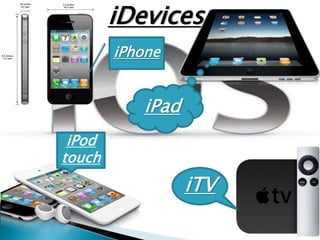
iDevices
iPhone
iPod
touch
iPad
iTV
 Apples mobile operating system considered
the foundation of the iPhone
 Originally designed for the iPhone but now
supports iPod touch, iPad, and Apple TV
 It is updated just like Itunes for iPods
 As of Oct 2011 Apple contains over 500,000
iOS applications
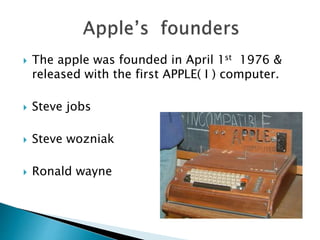
 The apple was founded in April 1st 1976 &
released with the first APPLE( I ) computer.
 Steve jobs
 Steve wozniak
 Ronald wayne
 Ios(iphone o.s) is a mobile operating system
developed by Apple.Inc started in 2007 with
the first iphone 2G.
 It extended to support other apple devices
such as ipod,ipad etc..
 It is programmed in C,C++,Objective-C.
 Apple doesn’t license ios for installation on
non- apple hardware.
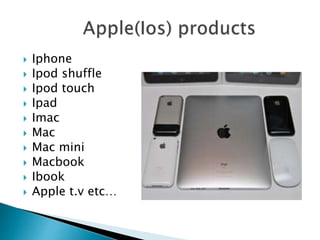
 Iphone
 Ipod shuffle
 Ipod touch
 Ipad
 Imac
 Mac
 Mac mini
 Macbook
 Ibook
 Apple t.v etc…
 Ilife suits : It is used for organising , editing
,publishing photos , videos & music.
 Iwork : It is the easiest way to create great-looking
documents , spreadsheets & presentations.
 Itunes: Through the iTunes Store , users can purchase
and download music, music videos, television
shows, audiobooks etc..
 Icloud : The service allows users to store music,ios
applications on remote computer server.
1.Backups our data online.
2.It our music, photos, apps,
mail, contacts, calendars,
documents.
3.It transfer all our data to other
devices using our apple id.
Inbuilt iCLOUD in iOS
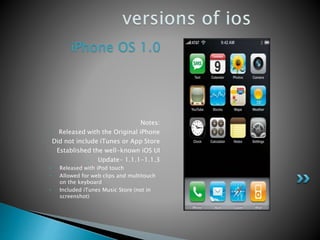
iPhone OS 1.0
Notes:
• Released with the Original iPhone
• Did not include iTunes or App Store
• Established the well-known iOS UI
• Update- 1.1.1-1.1.3
• Released with iPod touch
• Allowed for web clips and multitouch
on the keyboard
• Included iTunes Music Store (not in
screenshot)
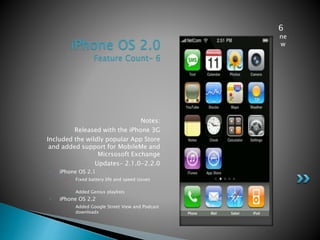
iPhone OS 2.0
Feature Count- 6
Notes:
• Released with the iPhone 3G
• Included the wildly popular App Store
and added support for MobileMe and
Micrsosoft Exchange
• Updates- 2.1.0-2.2.0
• iPhone OS 2.1
• Fixed battery life and speed issues
• Added Genius playlists
• iPhone OS 2.2
• Added Google Street View and Podcast
downloads
6
ne
w
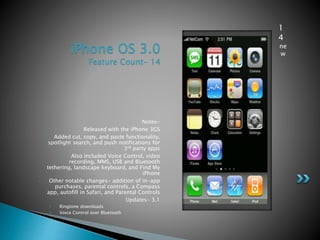
iPhone OS 3.0
Feature Count- 14
Notes-
• Released with the iPhone 3GS
• Added cut, copy, and paste functionality,
spotlight search, and push notifications for
3rd party apps
• Also included Voice Control, video
recording, MMS, USB and Bluetooth
tethering, landscape keyboard, and Find My
iPhone
• Other notable changes- addition of in-app
purchases, parental controls, a Compass
app, autofill in Safari, and Parental Controls
• Updates- 3.1
• Ringtone downloads
• Voice Control over Bluetooth
1
4
ne
w
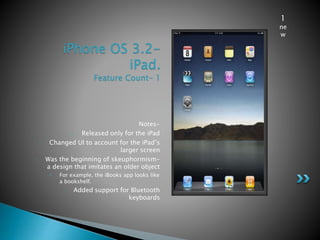
iPhone OS 3.2-
iPad.
Feature Count- 1
Notes-
• Released only for the iPad
• Changed UI to account for the iPad’s
larger screen
• Was the beginning of skeuphormism-
a design that imitates an older object
• For example, the iBooks app looks like
a bookshelf.
• Added support for Bluetooth
keyboards
1
ne
w
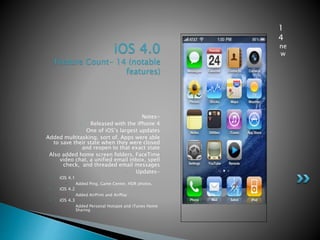
iOS 4.0
Feature Count- 14 (notable
features)
Notes-
• Released with the iPhone 4
• One of iOS’s largest updates
• Added multitasking, sort of. Apps were able
to save their state when they were closed
and reopen to that exact state
• Also added home screen folders, FaceTime
video chat, a unified email inbox, spell
check, and threaded email messages
• Updates-
• iOS 4.1
• Added Ping, Game Center, HDR photos,
• iOS 4.2
• Added AirPrint and AirPlay
• iOS 4.3
• Added Personal Hotspot and iTunes Home
Sharing
1
4
ne
w
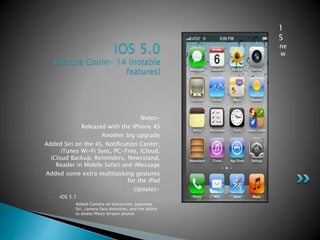
iOS 5.0
Feature Count- 14 (notable
features)
Notes-
• Released with the iPhone 4S
• Another big upgrade
• Added Siri on the 4S, Notification Center,
iTunes Wi-Fi Sync, PC-Free, iCloud,
iCloud Backup, Reminders, Newsstand,
Reader in Mobile Safari and iMessage
• Added some extra multitasking gestures
for the iPad
• Updates-
• iOS 5.1
• Added Camera on lockscreen, Japanese
Siri, camera face detection, and the ability
to delete Photo Stream photos
1
5
ne
w
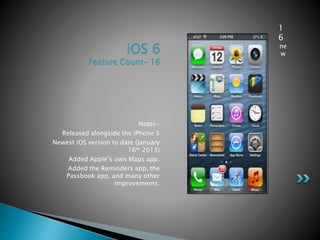
iOS 6
Feature Count- 16
Notes-
• Released alongside the iPhone 5
• Newest iOS version to date (January
16th 2013)
• Added Apple’s own Maps app.
• Added the Reminders app, the
Passbook app, and many other
improvements.
1
6
ne
w
 Block unwanted callers
 Auto Focus
 Air drop :: New restrictions to prevent changes to passcodes, device names and
wallpapers, or to disable AirDrop on managed devices
 Itunes Radio
 Notification center
 Multi tasking
 Gesture Control
 Undelete emails
 Turn off automatic app update
 Look at Most Visited Areas
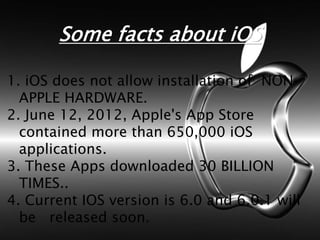
Some facts about iOS
1. iOS does not allow installation of NON-
APPLE HARDWARE.
2. June 12, 2012, Apple's App Store
contained more than 650,000 iOS
applications.
3. These Apps downloaded 30 BILLION
TIMES..
4. Current IOS version is 6.0 and 6.0.1 will
be released soon.
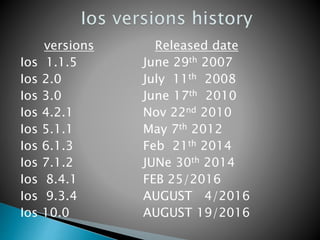
versions
Ios 1.1.5
Ios 2.0
Ios 3.0
Ios 4.2.1
Ios 5.1.1
Ios 6.1.3
Ios 7.1.2
Ios 8.4.1
Ios 9.3.4
Ios 10.0
Released date
June 29th 2007
July 11th 2008
June 17th 2010
Nov 22nd 2010
May 7th 2012
Feb 21th 2014
JUNe 30th 2014
FEB 25/2016
AUGUST 4/2016
AUGUST 19/2016
 Safari
 Music
 Mail
 Phone
 Face time video calling
 Camera, Camcorder
 Photos
 Calendar
 Messaging
 YouTube
 Stocks
 Map
 Clock
 etc.
 An operating system is needed in order to
use various applications on your computer
and wireless devices
 Without iOS and its continual upgrades there
would be no way to operate today’s trend
setting wireless Apple devices
Ios seminar

Ios seminar

  • 2.
  • 3.
     Apples mobileoperating system considered the foundation of the iPhone  Originally designed for the iPhone but now supports iPod touch, iPad, and Apple TV  It is updated just like Itunes for iPods  As of Oct 2011 Apple contains over 500,000 iOS applications
  • 4.
     The applewas founded in April 1st 1976 & released with the first APPLE( I ) computer.  Steve jobs  Steve wozniak  Ronald wayne
  • 5.
     Ios(iphone o.s)is a mobile operating system developed by Apple.Inc started in 2007 with the first iphone 2G.  It extended to support other apple devices such as ipod,ipad etc..  It is programmed in C,C++,Objective-C.  Apple doesn’t license ios for installation on non- apple hardware.
  • 6.
     Iphone  Ipodshuffle  Ipod touch  Ipad  Imac  Mac  Mac mini  Macbook  Ibook  Apple t.v etc…
  • 7.
     Ilife suits: It is used for organising , editing ,publishing photos , videos & music.  Iwork : It is the easiest way to create great-looking documents , spreadsheets & presentations.  Itunes: Through the iTunes Store , users can purchase and download music, music videos, television shows, audiobooks etc..  Icloud : The service allows users to store music,ios applications on remote computer server.
  • 8.
    1.Backups our dataonline. 2.It our music, photos, apps, mail, contacts, calendars, documents. 3.It transfer all our data to other devices using our apple id. Inbuilt iCLOUD in iOS
  • 9.
    iPhone OS 1.0 Notes: •Released with the Original iPhone • Did not include iTunes or App Store • Established the well-known iOS UI • Update- 1.1.1-1.1.3 • Released with iPod touch • Allowed for web clips and multitouch on the keyboard • Included iTunes Music Store (not in screenshot)
  • 10.
    iPhone OS 2.0 FeatureCount- 6 Notes: • Released with the iPhone 3G • Included the wildly popular App Store and added support for MobileMe and Micrsosoft Exchange • Updates- 2.1.0-2.2.0 • iPhone OS 2.1 • Fixed battery life and speed issues • Added Genius playlists • iPhone OS 2.2 • Added Google Street View and Podcast downloads 6 ne w
  • 11.
    iPhone OS 3.0 FeatureCount- 14 Notes- • Released with the iPhone 3GS • Added cut, copy, and paste functionality, spotlight search, and push notifications for 3rd party apps • Also included Voice Control, video recording, MMS, USB and Bluetooth tethering, landscape keyboard, and Find My iPhone • Other notable changes- addition of in-app purchases, parental controls, a Compass app, autofill in Safari, and Parental Controls • Updates- 3.1 • Ringtone downloads • Voice Control over Bluetooth 1 4 ne w
  • 12.
    iPhone OS 3.2- iPad. FeatureCount- 1 Notes- • Released only for the iPad • Changed UI to account for the iPad’s larger screen • Was the beginning of skeuphormism- a design that imitates an older object • For example, the iBooks app looks like a bookshelf. • Added support for Bluetooth keyboards 1 ne w
  • 13.
    iOS 4.0 Feature Count-14 (notable features) Notes- • Released with the iPhone 4 • One of iOS’s largest updates • Added multitasking, sort of. Apps were able to save their state when they were closed and reopen to that exact state • Also added home screen folders, FaceTime video chat, a unified email inbox, spell check, and threaded email messages • Updates- • iOS 4.1 • Added Ping, Game Center, HDR photos, • iOS 4.2 • Added AirPrint and AirPlay • iOS 4.3 • Added Personal Hotspot and iTunes Home Sharing 1 4 ne w
  • 14.
    iOS 5.0 Feature Count-14 (notable features) Notes- • Released with the iPhone 4S • Another big upgrade • Added Siri on the 4S, Notification Center, iTunes Wi-Fi Sync, PC-Free, iCloud, iCloud Backup, Reminders, Newsstand, Reader in Mobile Safari and iMessage • Added some extra multitasking gestures for the iPad • Updates- • iOS 5.1 • Added Camera on lockscreen, Japanese Siri, camera face detection, and the ability to delete Photo Stream photos 1 5 ne w
  • 15.
    iOS 6 Feature Count-16 Notes- • Released alongside the iPhone 5 • Newest iOS version to date (January 16th 2013) • Added Apple’s own Maps app. • Added the Reminders app, the Passbook app, and many other improvements. 1 6 ne w
  • 16.
     Block unwantedcallers  Auto Focus  Air drop :: New restrictions to prevent changes to passcodes, device names and wallpapers, or to disable AirDrop on managed devices  Itunes Radio  Notification center  Multi tasking  Gesture Control  Undelete emails  Turn off automatic app update  Look at Most Visited Areas
  • 17.
    Some facts aboutiOS 1. iOS does not allow installation of NON- APPLE HARDWARE. 2. June 12, 2012, Apple's App Store contained more than 650,000 iOS applications. 3. These Apps downloaded 30 BILLION TIMES.. 4. Current IOS version is 6.0 and 6.0.1 will be released soon.
  • 18.
    versions Ios 1.1.5 Ios 2.0 Ios3.0 Ios 4.2.1 Ios 5.1.1 Ios 6.1.3 Ios 7.1.2 Ios 8.4.1 Ios 9.3.4 Ios 10.0 Released date June 29th 2007 July 11th 2008 June 17th 2010 Nov 22nd 2010 May 7th 2012 Feb 21th 2014 JUNe 30th 2014 FEB 25/2016 AUGUST 4/2016 AUGUST 19/2016
  • 19.
     Safari  Music Mail  Phone  Face time video calling
  • 20.
     Camera, Camcorder Photos  Calendar  Messaging  YouTube  Stocks  Map  Clock  etc.
  • 21.
     An operatingsystem is needed in order to use various applications on your computer and wireless devices  Without iOS and its continual upgrades there would be no way to operate today’s trend setting wireless Apple devices