Introduction to
iOS Development
Resources
•   http://developer.apple.com/iOS
•   iPhone Programming, The Big Nerd Ranch Guide
•   Joe Conway & Aaron Hillegass
•   Programming in Objective-C
•   Kochan
•   http://www.raywenderlich.com Excellent iOS5 tutorials!
•   Stanford - free iOS lectures. Worth the time to watch!
Prerequisites for iOS
Development
• Previous experience in another Object Oriented
  Programming(OOP) language will be helpful
• Understanding of OOP concepts.
• Some understanding of C can be helpful, but is not required.
  Objective-C builds on top of C. You will eventually run into
  pointers and other fundamental “C” features
• Previous experience with an Integrated Development
  Environment (IDE) is helpful, but not required
• Mac computer running OS X Lion
• If you plan to submit to the App Store, you will need Apple
  devices to do real testing on. The simulator is not good
  enough.
Introduction
• iOS is the operating system that runs iPhones, iPod
  Touches,iPads, and Apple TVs.
• The language used to develop software for iOS is
  Objective-C.
• This class will teach you how to get started but will not
  havetime to teach you everything.
What is iOS?
• iOS is an operating system – it’s a subset of Mac OS X.
• The iOS SDK is the software development kit that allows
  application programs to utilize classes and frameworks
  provided by the SDK. This class will focus on iOS
  SDK6.
• iOS is multitasking and runs on several different
  devices(iPhones, iPod Touches, iPads, and Apple TVs).
• Apple provides an IDE called Xcode.
• Xcode is the IDE used by iOS (and OS X) developers.
• Xcode provides an interface to the compiler, editor,
  debugger, and code profiling tools.
Device Features
• For the rest of the presentation, assume we are discussing
  iPhones, iPads, and iPod Touches. Although Apple TV runs
  iOS, Apple currently does not allow developers to create
  custom code for this device (yet).
• SQLite for structured data storage
• Media support for common audio, video, and still image
  formats (MPEG4, H.264, MP3, AAC, AMR, JPG, PNG, GIF)
• GSM Telephony (hardware dependent)
• Bluetooth, EDGE, 3G, and WiFi (hardware dependent)
• Camera, GPS, compass, and accelerometer (hardware
  dependent)
• Rich development environment, including a device simulator,
  tools for debugging, memory and performance profiling
Capabilities of Mobile
Devices
Internet access
• Touch screen
• GPS (global positioning system – satellite-based system
  todetermine a location)
• Local storage
• Camera
• Media playback
• Phone
• Bluetooth for device communication
Limitation of Mobile Devices
• Screen size
• Touch screen
• No physical keyboard or trackball – a finger or stylus is
  the primary interface to the device
• Memory
• Storage
• Battery Life
• Cell network
• Sometimes flaky networks
• Ergonomics
Download the iOS SDK
• Download the latest from the Apple App store
• This is only available for Apple Macintosh computers
• It’s free
• To build to device and submit to the app store, you will
  berequired to becomes a register Apple iOS developer
• It is $99 year for the basic account
The Xcode – Integrated
Development Environment

• This consists of a single-window user interface,
  consisting of the Project Window, Jump and Navigation
  Bars, and the newly integrated Interface Builder designer.
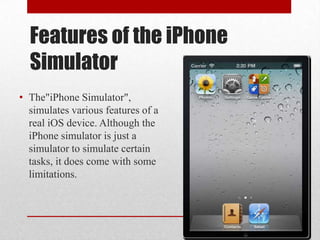
Features of the iPhone
  Simulator
• The"iPhone Simulator",
  simulates various features of a
  real iOS device. Although the
  iPhone simulator is just a
  simulator to simulate certain
  tasks, it does come with some
  limitations.
Simulator Limitations
•   Making Phone calls
•   Accessing the Accelerometer/Gyroscope
•   Sending and Receiving SMS messages
•   Installing applications from the App Store
•   Accessibility to the Camera
•   Use of the Microphone
•   Several Core OpenGL ES Features
Instruments
• The Xcode instruments allow you to dynamically trace
  and profile the performance of your Mac OSX, iPhone,
  and iPad applications. You can also create your own
  Instruments using DTrace and the Instruments custom
  builder.
• Monitor your applications for memory leaks, which can
  cause unexpected results.
• Gain a deeper understanding of the execution behavior of
  your applications.
Quick Terminology: MVC
• Model-View-Controller (MVC)
• MVC is the paradigm of iOS programming
• Model: Hold data, should know nothing of the interface
• View: code for getting data in/out of a view. Deals with
  items like buttons, lists, tables, etc
• Controller: keeps the Model objects and View objects in
  sync

Introduction to iOS Development

  • 1.
  • 2.
    Resources • http://developer.apple.com/iOS • iPhone Programming, The Big Nerd Ranch Guide • Joe Conway & Aaron Hillegass • Programming in Objective-C • Kochan • http://www.raywenderlich.com Excellent iOS5 tutorials! • Stanford - free iOS lectures. Worth the time to watch!
  • 3.
    Prerequisites for iOS Development •Previous experience in another Object Oriented Programming(OOP) language will be helpful • Understanding of OOP concepts. • Some understanding of C can be helpful, but is not required. Objective-C builds on top of C. You will eventually run into pointers and other fundamental “C” features • Previous experience with an Integrated Development Environment (IDE) is helpful, but not required • Mac computer running OS X Lion • If you plan to submit to the App Store, you will need Apple devices to do real testing on. The simulator is not good enough.
  • 4.
    Introduction • iOS isthe operating system that runs iPhones, iPod Touches,iPads, and Apple TVs. • The language used to develop software for iOS is Objective-C. • This class will teach you how to get started but will not havetime to teach you everything.
  • 5.
    What is iOS? •iOS is an operating system – it’s a subset of Mac OS X. • The iOS SDK is the software development kit that allows application programs to utilize classes and frameworks provided by the SDK. This class will focus on iOS SDK6. • iOS is multitasking and runs on several different devices(iPhones, iPod Touches, iPads, and Apple TVs). • Apple provides an IDE called Xcode. • Xcode is the IDE used by iOS (and OS X) developers. • Xcode provides an interface to the compiler, editor, debugger, and code profiling tools.
  • 7.
    Device Features • Forthe rest of the presentation, assume we are discussing iPhones, iPads, and iPod Touches. Although Apple TV runs iOS, Apple currently does not allow developers to create custom code for this device (yet). • SQLite for structured data storage • Media support for common audio, video, and still image formats (MPEG4, H.264, MP3, AAC, AMR, JPG, PNG, GIF) • GSM Telephony (hardware dependent) • Bluetooth, EDGE, 3G, and WiFi (hardware dependent) • Camera, GPS, compass, and accelerometer (hardware dependent) • Rich development environment, including a device simulator, tools for debugging, memory and performance profiling
  • 8.
    Capabilities of Mobile Devices Internetaccess • Touch screen • GPS (global positioning system – satellite-based system todetermine a location) • Local storage • Camera • Media playback • Phone • Bluetooth for device communication
  • 9.
    Limitation of MobileDevices • Screen size • Touch screen • No physical keyboard or trackball – a finger or stylus is the primary interface to the device • Memory • Storage • Battery Life • Cell network • Sometimes flaky networks • Ergonomics
  • 10.
    Download the iOSSDK • Download the latest from the Apple App store • This is only available for Apple Macintosh computers • It’s free • To build to device and submit to the app store, you will berequired to becomes a register Apple iOS developer • It is $99 year for the basic account
  • 12.
    The Xcode –Integrated Development Environment • This consists of a single-window user interface, consisting of the Project Window, Jump and Navigation Bars, and the newly integrated Interface Builder designer.
  • 14.
    Features of theiPhone Simulator • The"iPhone Simulator", simulates various features of a real iOS device. Although the iPhone simulator is just a simulator to simulate certain tasks, it does come with some limitations.
  • 15.
    Simulator Limitations • Making Phone calls • Accessing the Accelerometer/Gyroscope • Sending and Receiving SMS messages • Installing applications from the App Store • Accessibility to the Camera • Use of the Microphone • Several Core OpenGL ES Features
  • 16.
    Instruments • The Xcodeinstruments allow you to dynamically trace and profile the performance of your Mac OSX, iPhone, and iPad applications. You can also create your own Instruments using DTrace and the Instruments custom builder. • Monitor your applications for memory leaks, which can cause unexpected results. • Gain a deeper understanding of the execution behavior of your applications.
  • 18.
    Quick Terminology: MVC •Model-View-Controller (MVC) • MVC is the paradigm of iOS programming • Model: Hold data, should know nothing of the interface • View: code for getting data in/out of a view. Deals with items like buttons, lists, tables, etc • Controller: keeps the Model objects and View objects in sync