PRESENTED TO WORDCAMP OMAHA
BY ANDY MELICHAR
FIRST THINGS FIRST
A LITTLE ABOUT ME…
THIS IS MY FIRST WORCAMP
SPEAKING GIG… WOOO!!
Thanks for the opportunity!
I LOVE
KARAOKE.
Serial
Hobbyist
Current obsession:
HAM Radio.
My callsign is KEØATA
I just might
know my way
around the
kitchen…
Look familiar?
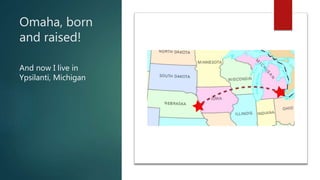
Omaha, born
and raised!
And now I live in
Ypsilanti, Michigan
What the heck does a serial hobbyist,
karaoke-singing culinary guy know
about WordPress?
Director of Web
Development and
Agile Product Owner
for A2 Hosting
We spend a lot of time on making
WordPress better for our customers!
Ask me about Agile/Scrum!
From the Perspective of a Hosting
Company…
 A high percentage of our current and new customers are
WordPress users, and the number keeps rising
 Being on the hosting end, we can dig into common
performance issues MUCH deeper because we know our web
servers inside and out
 The very high percentage of WordPress related support
requests that we receive are performance related, so we’ve
looked at many different ways to improve performance
SECOND THINGS SECOND
TIME FOR YOU ALL TO FESS UP!
How many of you…
 Have attempted to optimize your WP Site?
 Have installed/configured a caching plugin?
 Know what a CDN is?
 Have added configurations to an .htaccess file
 Are running your own server (VPS/dedicated/cloud) ?
Why should we care about
performance?
Some statistics…
 40% of people abandon a website that takes more
than 3 seconds to load
 A 1 second delay in page response can result in a 7%
reduction in conversions
 If an e-commerce site is making $100,000 per day, a
1 second page delay could potentially cost you $2.5
million in lost sales every year
Source: https://blog.kissmetrics.com/loading-time/
Bottom line…
 A poorly optimized website can cost you real $$ in
support and hosting costs
 By diving into performance and optimization, you’ll
learn more about WordPress, and more about web
systems and infrastructure
 By becoming a performance expert, you’ll be able to
deliver a much more reliable, robust product to your
customers!
How do you measure performance?
Performance Measurement Tools
 Gtmetrix.com – my favorite!
 Free
 Easy to use/understand
 Has a WordPress Plugin
 WebPageTest.org
 Also Free
 Lots of great detailed information
 LoadImpact.com
 Free + Paid plans
 Simulates multiple, concurrent users hitting your site
What Measurements Matter?
 Page Load Time
 Most representative of the customer experience
 Best “overall” performance metric
 Total Page Size
 Good to keep an eye on this for major problems such
as
Uncompressed images
High-resource themes/plugins
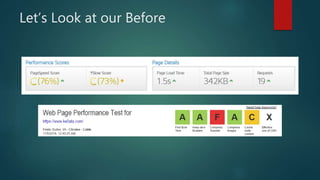
Let’s Look at our Before
Where can we
“haz more performanz?”
Areas of Focus for Performance
 Optimizations within WordPress
 Our Web Server Environment
 External Services
Optimizations within WordPress
 Clean house!
Get rid of unused themes/plugins/etc.
Don’t just deactivate… DELETE
Be sure everything is up-to-date
Most recent WordPress version
Plugins are all updated to latest version
Optimizations within WordPress
 Utilize a Caching Plugin
Optimizations within WordPress
 Utilize a Caching Plugin
W3 Total Cache or Fix-W3TC
Free and HIGHLY configurable
WP Rocket
Paid, but comes well-recommended
WP Super Cache
Robust and easy to use
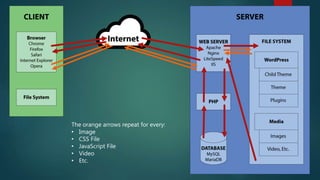
The Client/Server Process
WITHOUT Caching
The orange arrows repeat for every:
• Image
• CSS File
• JavaScript File
• Video
• Etc.
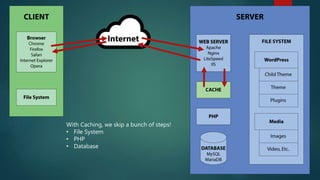
The Client/Server Process
WITH Caching
With Caching, we skip a bunch of steps!
• File System
• PHP
• Database
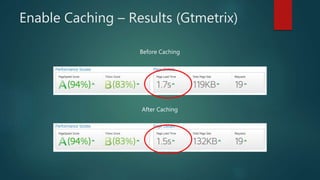
Enable Caching – Results (Gtmetrix)
Before Caching
After Caching
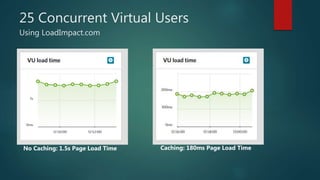
25 Concurrent Virtual Users
Using LoadImpact.com
No Caching: 1.5s Page Load Time Caching: 180ms Page Load Time
Optimizations within WordPress
 Turn on Minification
 Most caching plugins will have an option for this, but it
may not be enabled by default
 You DO have to be careful, because Minification can
break some themes/plugins, YMMV
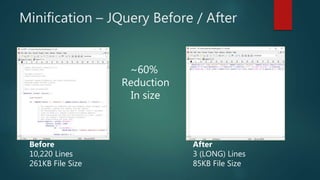
Minification – JQuery Before / After
Before
10,220 Lines
261KB File Size
After
3 (LONG) Lines
85KB File Size
~60%
Reduction
In size
Optimizations within WordPress
 Turn on GZip Compression
 Vast majority of hosts (especially shared hosts) support
GZip from the server level, it just needs to be enabled
 Easily enabled via .htaccess rules
 Most caching plugins will also have an option to
enable GZip compression
https://codex.wordpress.org/Output_Compression
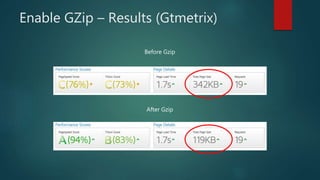
Enable GZip – Results (Gtmetrix)
Before Gzip
After Gzip
Optimizations within WordPress
 Optimize Images
 Images are a significant amount of data that has to get
transferred from the server to the client
 Compress them!
Before you upload
During upload with a plugin, such as WP Smush
Now let’s look at the server!
Server-Side Optimizations for
WordPress
 Add “Expires” headers for static content
 This tells the user’s browser to cache static files locally
so they don’t have to transferred repeatedly
 Done in either .htaccess or nginx config
 Plugins like W3 Total Cache can help you do this,
though you may still need to edit an .htaccess or nginx
config file
Server-Side Optimizations for
WordPress
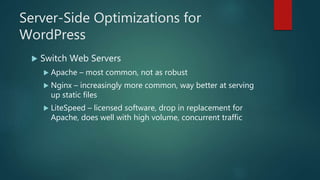
 Switch Web Servers
 Apache – most common, not as robust
 Nginx – increasingly more common, way better at serving
up static files
 LiteSpeed – licensed software, drop in replacement for
Apache, does well with high volume, concurrent traffic
Server-Side Optimizations for
WordPress
 Switch Web Servers
 To switch, typically need to be on your own server
(VPS/Dedicated/Cloud) OR you can find a host that
specifically offers hosting that uses one of the alternative
web servers
Server-Side Optimizations for
WordPress
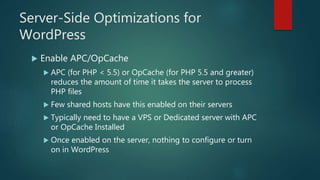
 Enable APC/OpCache
 APC (for PHP < 5.5) or OpCache (for PHP 5.5 and greater)
reduces the amount of time it takes the server to process
PHP files
 Few shared hosts have this enabled on their servers
 Typically need to have a VPS or Dedicated server with APC
or OpCache Installed
 Once enabled on the server, nothing to configure or turn
on in WordPress
External Service Optimizations
AKA CDN’S
What is a CDN?
(Content Delivery Network)
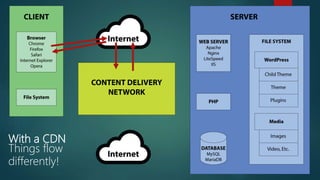
 CDN Sits between the server and the client,
and handles serving up some/all of your files
 CDN’s typically have a large infrastructure of
multiple servers located in strategic
geographic locations
What is a CDN?
(Content Delivery Network)
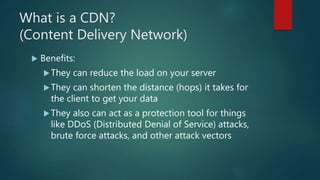
 Benefits:
They can reduce the load on your server
They can shorten the distance (hops) it takes for
the client to get your data
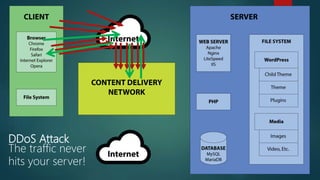
They also can act as a protection tool for things
like DDoS (Distributed Denial of Service) attacks,
brute force attacks, and other attack vectors
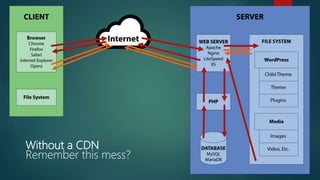
Without a CDN
Remember this mess?
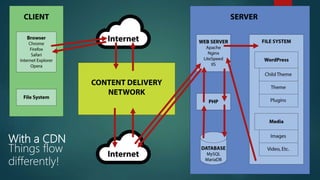
With a CDN
Things flow
differently!
With a CDN
Things flow
differently!
DDoS Attack
The traffic never
hits your server!
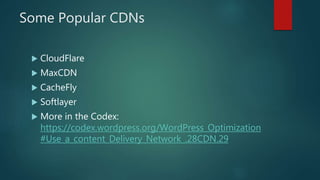
Some Popular CDNs
 CloudFlare
 MaxCDN
 CacheFly
 Softlayer
 More in the Codex:
https://codex.wordpress.org/WordPress_Optimization
#Use_a_content_Delivery_Network_.28CDN.29
The Downside of CDNs
 To be effective they required DNS entry
changes
 Typically also need to have a corresponding
WordPress plugin to talk to the CDN and
coordinate content updates
 Depending on how much protection / caching
/ etc, can cost $$$
What all did we do to our test site?
 Enabled GZip
 Added Expires
Headers
 Installed W3 Total
Cache
 Turned on
Minification
 Enabled CloudFlare
CDN
 Utilized nginx
 Enabled opCache
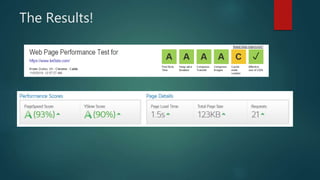
The Results!
What’s up with that ‘C’ ?
 If we wanted to further optimize, we could
bring these JS/CSS files local so they would
get Minified/GZipped
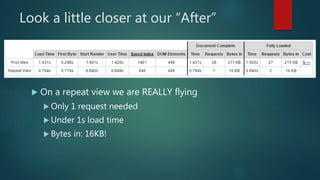
Look a little closer at our “After”
 On a repeat view we are REALLY flying
 Only 1 request needed
 Under 1s load time
 Bytes in: 16KB!
Final Thoughts
 There are LOTS of options to optimize/gain
performance
 You don’t have to do them all
 Many people in the WordPress community
know how to help you with these
configurations
 The Codex is your friend!
Questions?

I Can Haz More Performanz?

  • 1.
    PRESENTED TO WORDCAMPOMAHA BY ANDY MELICHAR
  • 2.
    FIRST THINGS FIRST ALITTLE ABOUT ME…
  • 3.
    THIS IS MYFIRST WORCAMP SPEAKING GIG… WOOO!! Thanks for the opportunity!
  • 4.
  • 5.
  • 6.
    I just might knowmy way around the kitchen… Look familiar?
  • 7.
    Omaha, born and raised! Andnow I live in Ypsilanti, Michigan
  • 8.
    What the heckdoes a serial hobbyist, karaoke-singing culinary guy know about WordPress?
  • 9.
    Director of Web Developmentand Agile Product Owner for A2 Hosting We spend a lot of time on making WordPress better for our customers! Ask me about Agile/Scrum!
  • 10.
    From the Perspectiveof a Hosting Company…  A high percentage of our current and new customers are WordPress users, and the number keeps rising  Being on the hosting end, we can dig into common performance issues MUCH deeper because we know our web servers inside and out  The very high percentage of WordPress related support requests that we receive are performance related, so we’ve looked at many different ways to improve performance
  • 11.
    SECOND THINGS SECOND TIMEFOR YOU ALL TO FESS UP!
  • 12.
    How many ofyou…  Have attempted to optimize your WP Site?  Have installed/configured a caching plugin?  Know what a CDN is?  Have added configurations to an .htaccess file  Are running your own server (VPS/dedicated/cloud) ?
  • 13.
    Why should wecare about performance?
  • 14.
    Some statistics…  40%of people abandon a website that takes more than 3 seconds to load  A 1 second delay in page response can result in a 7% reduction in conversions  If an e-commerce site is making $100,000 per day, a 1 second page delay could potentially cost you $2.5 million in lost sales every year Source: https://blog.kissmetrics.com/loading-time/
  • 15.
    Bottom line…  Apoorly optimized website can cost you real $$ in support and hosting costs  By diving into performance and optimization, you’ll learn more about WordPress, and more about web systems and infrastructure  By becoming a performance expert, you’ll be able to deliver a much more reliable, robust product to your customers!
  • 16.
    How do youmeasure performance?
  • 17.
    Performance Measurement Tools Gtmetrix.com – my favorite!  Free  Easy to use/understand  Has a WordPress Plugin  WebPageTest.org  Also Free  Lots of great detailed information  LoadImpact.com  Free + Paid plans  Simulates multiple, concurrent users hitting your site
  • 18.
    What Measurements Matter? Page Load Time  Most representative of the customer experience  Best “overall” performance metric  Total Page Size  Good to keep an eye on this for major problems such as Uncompressed images High-resource themes/plugins
  • 19.
    Let’s Look atour Before
  • 20.
    Where can we “hazmore performanz?”
  • 21.
    Areas of Focusfor Performance  Optimizations within WordPress  Our Web Server Environment  External Services
  • 22.
    Optimizations within WordPress Clean house! Get rid of unused themes/plugins/etc. Don’t just deactivate… DELETE Be sure everything is up-to-date Most recent WordPress version Plugins are all updated to latest version
  • 23.
    Optimizations within WordPress Utilize a Caching Plugin
  • 24.
    Optimizations within WordPress Utilize a Caching Plugin W3 Total Cache or Fix-W3TC Free and HIGHLY configurable WP Rocket Paid, but comes well-recommended WP Super Cache Robust and easy to use
  • 25.
  • 26.
    The orange arrowsrepeat for every: • Image • CSS File • JavaScript File • Video • Etc.
  • 27.
  • 28.
    With Caching, weskip a bunch of steps! • File System • PHP • Database
  • 29.
    Enable Caching –Results (Gtmetrix) Before Caching After Caching
  • 30.
    25 Concurrent VirtualUsers Using LoadImpact.com No Caching: 1.5s Page Load Time Caching: 180ms Page Load Time
  • 31.
    Optimizations within WordPress Turn on Minification  Most caching plugins will have an option for this, but it may not be enabled by default  You DO have to be careful, because Minification can break some themes/plugins, YMMV
  • 32.
    Minification – JQueryBefore / After Before 10,220 Lines 261KB File Size After 3 (LONG) Lines 85KB File Size ~60% Reduction In size
  • 33.
    Optimizations within WordPress Turn on GZip Compression  Vast majority of hosts (especially shared hosts) support GZip from the server level, it just needs to be enabled  Easily enabled via .htaccess rules  Most caching plugins will also have an option to enable GZip compression https://codex.wordpress.org/Output_Compression
  • 34.
    Enable GZip –Results (Gtmetrix) Before Gzip After Gzip
  • 35.
    Optimizations within WordPress Optimize Images  Images are a significant amount of data that has to get transferred from the server to the client  Compress them! Before you upload During upload with a plugin, such as WP Smush
  • 36.
    Now let’s lookat the server!
  • 37.
    Server-Side Optimizations for WordPress Add “Expires” headers for static content  This tells the user’s browser to cache static files locally so they don’t have to transferred repeatedly  Done in either .htaccess or nginx config  Plugins like W3 Total Cache can help you do this, though you may still need to edit an .htaccess or nginx config file
  • 38.
    Server-Side Optimizations for WordPress Switch Web Servers  Apache – most common, not as robust  Nginx – increasingly more common, way better at serving up static files  LiteSpeed – licensed software, drop in replacement for Apache, does well with high volume, concurrent traffic
  • 39.
    Server-Side Optimizations for WordPress Switch Web Servers  To switch, typically need to be on your own server (VPS/Dedicated/Cloud) OR you can find a host that specifically offers hosting that uses one of the alternative web servers
  • 40.
    Server-Side Optimizations for WordPress Enable APC/OpCache  APC (for PHP < 5.5) or OpCache (for PHP 5.5 and greater) reduces the amount of time it takes the server to process PHP files  Few shared hosts have this enabled on their servers  Typically need to have a VPS or Dedicated server with APC or OpCache Installed  Once enabled on the server, nothing to configure or turn on in WordPress
  • 41.
  • 42.
    What is aCDN? (Content Delivery Network)  CDN Sits between the server and the client, and handles serving up some/all of your files  CDN’s typically have a large infrastructure of multiple servers located in strategic geographic locations
  • 43.
    What is aCDN? (Content Delivery Network)  Benefits: They can reduce the load on your server They can shorten the distance (hops) it takes for the client to get your data They also can act as a protection tool for things like DDoS (Distributed Denial of Service) attacks, brute force attacks, and other attack vectors
  • 44.
  • 45.
    With a CDN Thingsflow differently!
  • 46.
    With a CDN Thingsflow differently!
  • 47.
    DDoS Attack The trafficnever hits your server!
  • 48.
    Some Popular CDNs CloudFlare  MaxCDN  CacheFly  Softlayer  More in the Codex: https://codex.wordpress.org/WordPress_Optimization #Use_a_content_Delivery_Network_.28CDN.29
  • 49.
    The Downside ofCDNs  To be effective they required DNS entry changes  Typically also need to have a corresponding WordPress plugin to talk to the CDN and coordinate content updates  Depending on how much protection / caching / etc, can cost $$$
  • 50.
    What all didwe do to our test site?  Enabled GZip  Added Expires Headers  Installed W3 Total Cache  Turned on Minification  Enabled CloudFlare CDN  Utilized nginx  Enabled opCache
  • 51.
  • 52.
    What’s up withthat ‘C’ ?
  • 53.
    What’s up withthat ‘C’ ?  If we wanted to further optimize, we could bring these JS/CSS files local so they would get Minified/GZipped
  • 54.
    Look a littlecloser at our “After”  On a repeat view we are REALLY flying  Only 1 request needed  Under 1s load time  Bytes in: 16KB!
  • 55.
    Final Thoughts  Thereare LOTS of options to optimize/gain performance  You don’t have to do them all  Many people in the WordPress community know how to help you with these configurations  The Codex is your friend!
  • 56.

Editor's Notes

  • #7 If that kitchen doesn’t look familiar go downstairs! I unfortunately had to cut my studies short when I moved to Michigan.
  • #11 One of the nice things about working for a hosting company is that I, and my colleagues, get to know WordPress really well.
  • #27 (talk through each step)
  • #29 Talk through each step and explain how it is a much shorter process.
  • #30 On the GTMetrix we can see a direct result in our page load time. It’s not huge, but my website also isn’t very complex, so it’s harder for us to see enormous improvements. The other thing to remember about caching, is that when it REALLY shines, is with concurrent website traffic. Let’s take a look!

  • #31 Here’s where we really see the difference – this test was conducted with LoadImpact sending 25 users to my site over 5 minutes.
  • #33 Jquery is a fairly common javascript library used in many frameworks and themes. If you compare the the full, development-ready version of Jquery against the same version run through minification, you can see the difference in size.
  • #35 Here’s a before and after, you can see the direct results in both our PageSpeed and Yslow scores, but also the Total Page Size is reduced by about a third.
  • #45 Without a CDN, every connection from the client is DIRECTLY to your server.
  • #46 The first time we hit a page, we go through the whole cycle so the CDN can capture the content from your site.
  • #47 The second time, the CDN can take over and serves up your content without even hitting your server. Occasionally the CDN will hit your server to check that it is still serving up valid content, and will update it’s internal cache if it detects a change. Also of note… there are many types of CDN’s, some of them work differently than others or have different subscription levels. For example, some CDN’s only serve up images and JS/CSS files, and it will still contact your server for the page content. This still saves resources on your server and speeds up the page loading time because we aren’t relying on our server to do all the work.
  • #48 Now let’s say your CDN service also provides DDoS / Brute Force protection. In this case when a DDoS attack commences, the attack is absorbed by the CDN, and it only routes valid traffic back to the client. Why is this important for optimization? Because your site doesn’t go down!!
  • #55 Where we really see a benefit is in the repeat view…