

WordPress Server Security 
Best Practices 
Peter Baylies aka 
@pbaylies on Twitter 
Semper Fi Web Design
Security 
• isn't simple 
• isn't perfect 
• isn't ever finished 
• ...no pressure!
Basic Tips and Gotchas 
• Backups, backups, backups. 
• Change the defaults 
• Use strong passwords 
(and password salts!) 
• Use SFTP and HTTPS 
• Update all the things 
• Trust no one.
Do I Need To Do All This? 
• Probably? - depends on your situation. 
• Find a great managed hosting company? 
• http://wpdevshed.com/managed-wordpress-hosting/ 
• Have a good sysadmin - or be one.
Good Advice 
• Limiting Access - reduce possible entry points 
• Containment - minimize potential damage 
• Preparation and Knowledge - backups! 
• Trusted Sources - download from reputable sites 
• http://codex.wordpress.org/Hardening_WordPress
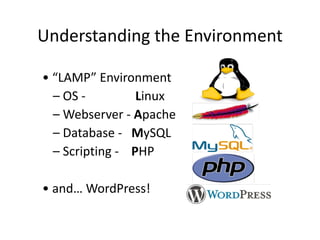
Understanding 
the 
Environment 
• 
“LAMP” 
Environment 
– 
OS 
-­‐ 
Linux 
– 
Webserver 
-­‐ 
Apache 
– 
Database 
-­‐ 
MySQL 
– 
Scripting 
-­‐ 
PHP 
• 
and… 
WordPress!
WordPress Security 
• Move wp-config.php out of the webroot 
• Friends don't let friends use any eval plugins. 
• iThemes Security - https://ithemes.com/tutorials/ 
getting-started-ithemes-security-part-1/ 
• Wordfence - https://wordpress.org/plugins/wordfence/ 
• BruteProtect (soon to be JetPack) - https:// 
wordpress.org/plugins/bruteprotect/
OS Level Security 
• File permissions 
• User groups 
• mount / chroot / jail 
• Firewalls - csf / lfd 
• Virtual Machines 
• ...and much more. 
http://en.wikipedia.org/wiki/Unix_security
Web Server Security 
• Turn off indexing 
• Disable unnecessary modules 
• Use Deny / Allow directives, .htaccess 
• Hardening - mod_security, mod_evasive 
• Consider using a service like CloudFlare 
• http://www.tecmint.com/apache-security-tips/
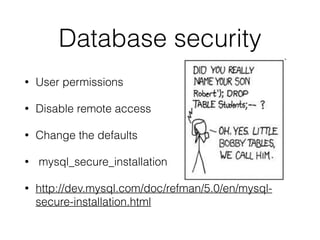
Database security 
• User permissions 
• Disable remote access 
• Change the defaults 
• mysql_secure_installation 
• http://dev.mysql.com/doc/refman/5.0/en/mysql-secure- 
installation.html
PHP Security 
• suPHP - http://www.suphp.org/Home.html 
• Suhosin - back from the dead - https://github.com/ 
stefanesser/suhosin 
• php.ini - disable_functions - http://php.net/manual/en/ 
ini.core.php#ini.disable-functions 
• php.ini - set open_basedir - http://php.net/manual/en/ 
ini.core.php#ini.open-basedir
More Tools and Testing 
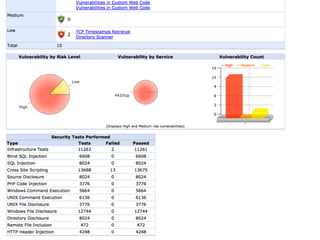
• Sucuri Sitecheck - http://sitecheck.sucuri.net/ 
• Beyond Security - https://www.scanmyserver.com/ 
• Hacker Target - http://hackertarget.com/wordpress-security- 
scan/ 
• WPScan - https://github.com/wpscanteam/wpscan
So You Think You Got 
• Don't Panic! 
• Contact your host 
• Remember those backups I 
mentioned? 
• Change passwords, 
check logs 
• Tools - rkhunter, ClamAV, 
Linux Malware Detect 
• http://codex.wordpress.org/ 
FAQ_My_site_was_hacked
Questions? 
• Thank you! 
• Slides available here -

WordPress Server Security

  • 1.
    WordPress Server Security Best Practices Peter Baylies aka @pbaylies on Twitter Semper Fi Web Design
  • 2.
    Security • isn'tsimple • isn't perfect • isn't ever finished • ...no pressure!
  • 3.
    Basic Tips andGotchas • Backups, backups, backups. • Change the defaults • Use strong passwords (and password salts!) • Use SFTP and HTTPS • Update all the things • Trust no one.
  • 5.
    Do I NeedTo Do All This? • Probably? - depends on your situation. • Find a great managed hosting company? • http://wpdevshed.com/managed-wordpress-hosting/ • Have a good sysadmin - or be one.
  • 7.
    Good Advice •Limiting Access - reduce possible entry points • Containment - minimize potential damage • Preparation and Knowledge - backups! • Trusted Sources - download from reputable sites • http://codex.wordpress.org/Hardening_WordPress
  • 9.
    Understanding the Environment • “LAMP” Environment – OS -­‐ Linux – Webserver -­‐ Apache – Database -­‐ MySQL – Scripting -­‐ PHP • and… WordPress!
  • 10.
    WordPress Security •Move wp-config.php out of the webroot • Friends don't let friends use any eval plugins. • iThemes Security - https://ithemes.com/tutorials/ getting-started-ithemes-security-part-1/ • Wordfence - https://wordpress.org/plugins/wordfence/ • BruteProtect (soon to be JetPack) - https:// wordpress.org/plugins/bruteprotect/
  • 11.
    OS Level Security • File permissions • User groups • mount / chroot / jail • Firewalls - csf / lfd • Virtual Machines • ...and much more. http://en.wikipedia.org/wiki/Unix_security
  • 12.
    Web Server Security • Turn off indexing • Disable unnecessary modules • Use Deny / Allow directives, .htaccess • Hardening - mod_security, mod_evasive • Consider using a service like CloudFlare • http://www.tecmint.com/apache-security-tips/
  • 13.
    Database security •User permissions • Disable remote access • Change the defaults • mysql_secure_installation • http://dev.mysql.com/doc/refman/5.0/en/mysql-secure- installation.html
  • 14.
    PHP Security •suPHP - http://www.suphp.org/Home.html • Suhosin - back from the dead - https://github.com/ stefanesser/suhosin • php.ini - disable_functions - http://php.net/manual/en/ ini.core.php#ini.disable-functions • php.ini - set open_basedir - http://php.net/manual/en/ ini.core.php#ini.open-basedir
  • 15.
    More Tools andTesting • Sucuri Sitecheck - http://sitecheck.sucuri.net/ • Beyond Security - https://www.scanmyserver.com/ • Hacker Target - http://hackertarget.com/wordpress-security- scan/ • WPScan - https://github.com/wpscanteam/wpscan
  • 17.
    So You ThinkYou Got • Don't Panic! • Contact your host • Remember those backups I mentioned? • Change passwords, check logs • Tools - rkhunter, ClamAV, Linux Malware Detect • http://codex.wordpress.org/ FAQ_My_site_was_hacked
  • 18.
    Questions? • Thankyou! • Slides available here -