Agenda
Why optimize WordPress?
Hosting Options
Caching
Tools, Tips & Tricks
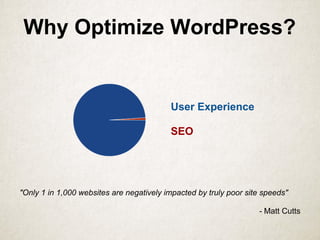
Why Optimize WordPress?
User Experience
SEO
"Only 1 in 1,000 websites are negatively impacted by truly poor site speeds"
- Matt Cutts
Optimize for a Better
Customer Experience
● A 1 second delay can decrease conversions by 7%
● Shopzilla achieved a 25% increase in pageviews and a
7-12% revenue increase by speeding up its site
● 75% of users said that they would not return to a
website that took longer than 4 seconds to load
● Nearly half of users expect webpages to load in 2
seconds or less
● AOL presented data showing that page load speeds can
impact pageviews per visit by up to 50%
http://www.webpronews.com/how-page-load-speed-impacts-seo-and-user-experience-2013-04
WordPress Hosting Options
● Free (WordPress.com, Ad based)
● Shared WordPress Hosting $
● Virtual Private Server (VPS) $$
● Dedicated Server $$$
● Managed WordPress Hosting $$
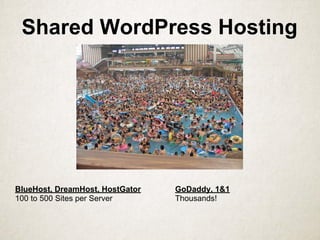
Shared WordPress Hosting
BlueHost, DreamHost, HostGator GoDaddy, 1&1
100 to 500 Sites per Server Thousands!
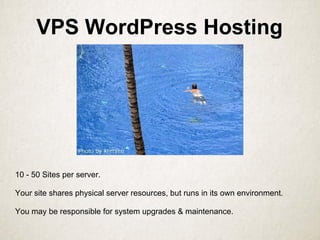
VPS WordPress Hosting
10 - 50 Sites per server.
Your site shares physical server resources, but runs in its own environment.
You may be responsible for system upgrades & maintenance.
Dedicated Hosting
All your resource are belong to you!
You are responsible for all server upgrades & maintenance.
Run as many sites as YOU choose.
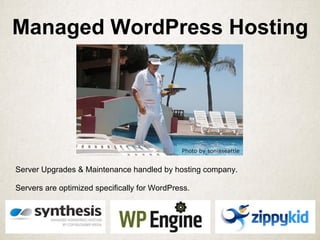
Managed WordPress Hosting
Server Upgrades & Maintenance handled by hosting company.
Servers are optimized specifically for WordPress.
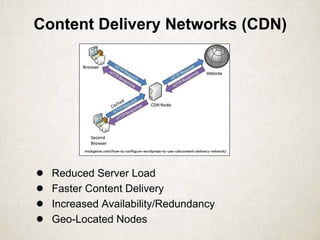
Content Delivery Networks (CDN)
● Reduced Server Load
● Faster Content Delivery
● Increased Availability/Redundancy
● Geo-Located Nodes
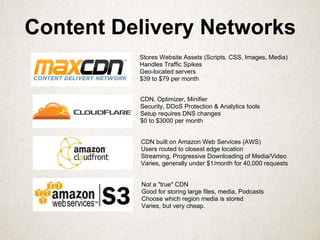
Content Delivery Networks
Stores Website Assets (Scripts, CSS, Images, Media)
Handles Traffic Spikes
Geo-located servers
$39 to $79 per month
CDN, Optimizer, Minifier
Security, DDoS Protection & Analytics tools
Setup requires DNS changes
$0 to $3000 per month
CDN built on Amazon Web Services (AWS)
Users routed to closest edge location
Streaming, Progressive Downloading of Media/Video
Varies, generally under $1/month for 40,000 requests
Not a "true" CDN
Good for storing large files, media, Podcasts
Choose which region media is stored
Varies, but very cheap.
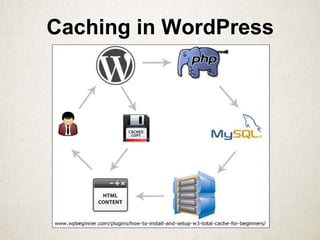
Caching in WordPress
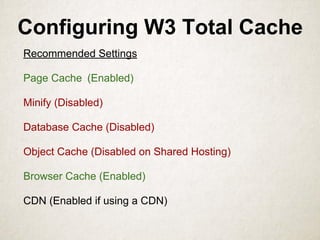
Configuring W3 Total Cache
Recommended Settings
Page Cache (Enabled)
Minify (Disabled)
Database Cache (Disabled)
Object Cache (Disabled on Shared Hosting)
Browser Cache (Enabled)
CDN (Enabled if using a CDN)
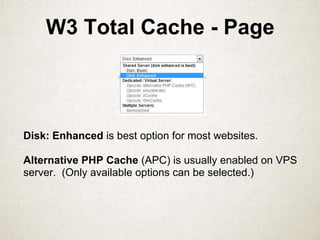
W3 Total Cache - Page
Disk: Enhanced is best option for most websites.
Alternative PHP Cache (APC) is usually enabled on VPS
server. (Only available options can be selected.)
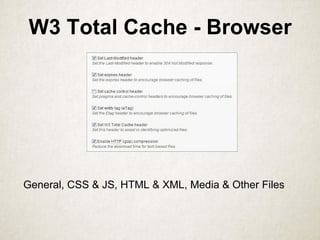
W3 Total Cache - Browser
General, CSS & JS, HTML & XML, Media & Other Files
W3 Total Cache
DEMO
Optimization Tools,
Tips & Tricks
Speed Testing
Image Optimization
Minified Files
P3 Plugin
Speed Testing & Monitoring
Pingdom.com
Free Website Speed Test
Uptime & Performance Monitoring ($9.95 Month)
Torbit Insight
Free Website Performance Monitoring
Synthesis Site Sensor
Uptime & Performance Monitor
($22-375/year, Free with Synthesis Hosting)
WebPageTest.org
Free Website Speed Test
Details impact of page scripts, images, etc.
Yahoo YSlow
Rules based browser extension to analyze pages
Google Page Speed Insights
Analyzes your site and provides suggestions to speed up performance.
PageSpeed Apache/Nginx module to automatically optimize website
resources. (Not available for most shared hosting plans. May be included in
VPS or Dedicated).
Page Speed Dashboard integrated with W3 Total Cache
PAGE SPEED DEMO
https://developers.google.com/speed/pagespeed/insights
Image Optimization
● Optimize Images for the web & use the right file format.
● Combine images as Sprites to reduce http requests.
○ http://spritepad.wearekiss.com/
○ http://spriteme.org/
● Use Font Icons when possible
○ Single request
○ Works well in Responsive Designs
○ Font can be delivered via CDN
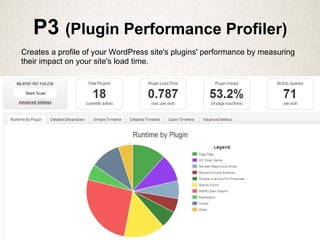
P3 (Plugin Performance Profiler)
Creates a profile of your WordPress site's plugins' performance by measuring
their impact on your site's load time.
Questions?

WordPress Optimization Tips for Performance & Speed

  • 2.
    Agenda Why optimize WordPress? HostingOptions Caching Tools, Tips & Tricks
  • 3.
    Why Optimize WordPress? UserExperience SEO "Only 1 in 1,000 websites are negatively impacted by truly poor site speeds" - Matt Cutts
  • 4.
    Optimize for aBetter Customer Experience ● A 1 second delay can decrease conversions by 7% ● Shopzilla achieved a 25% increase in pageviews and a 7-12% revenue increase by speeding up its site ● 75% of users said that they would not return to a website that took longer than 4 seconds to load ● Nearly half of users expect webpages to load in 2 seconds or less ● AOL presented data showing that page load speeds can impact pageviews per visit by up to 50% http://www.webpronews.com/how-page-load-speed-impacts-seo-and-user-experience-2013-04
  • 5.
    WordPress Hosting Options ●Free (WordPress.com, Ad based) ● Shared WordPress Hosting $ ● Virtual Private Server (VPS) $$ ● Dedicated Server $$$ ● Managed WordPress Hosting $$
  • 6.
    Shared WordPress Hosting BlueHost,DreamHost, HostGator GoDaddy, 1&1 100 to 500 Sites per Server Thousands!
  • 7.
    VPS WordPress Hosting 10- 50 Sites per server. Your site shares physical server resources, but runs in its own environment. You may be responsible for system upgrades & maintenance.
  • 8.
    Dedicated Hosting All yourresource are belong to you! You are responsible for all server upgrades & maintenance. Run as many sites as YOU choose.
  • 9.
    Managed WordPress Hosting ServerUpgrades & Maintenance handled by hosting company. Servers are optimized specifically for WordPress.
  • 10.
    Content Delivery Networks(CDN) ● Reduced Server Load ● Faster Content Delivery ● Increased Availability/Redundancy ● Geo-Located Nodes
  • 11.
    Content Delivery Networks StoresWebsite Assets (Scripts, CSS, Images, Media) Handles Traffic Spikes Geo-located servers $39 to $79 per month CDN, Optimizer, Minifier Security, DDoS Protection & Analytics tools Setup requires DNS changes $0 to $3000 per month CDN built on Amazon Web Services (AWS) Users routed to closest edge location Streaming, Progressive Downloading of Media/Video Varies, generally under $1/month for 40,000 requests Not a "true" CDN Good for storing large files, media, Podcasts Choose which region media is stored Varies, but very cheap.
  • 12.
  • 13.
    Configuring W3 TotalCache Recommended Settings Page Cache (Enabled) Minify (Disabled) Database Cache (Disabled) Object Cache (Disabled on Shared Hosting) Browser Cache (Enabled) CDN (Enabled if using a CDN)
  • 14.
    W3 Total Cache- Page Disk: Enhanced is best option for most websites. Alternative PHP Cache (APC) is usually enabled on VPS server. (Only available options can be selected.)
  • 15.
    W3 Total Cache- Browser General, CSS & JS, HTML & XML, Media & Other Files
  • 16.
  • 17.
    Optimization Tools, Tips &Tricks Speed Testing Image Optimization Minified Files P3 Plugin
  • 18.
    Speed Testing &Monitoring Pingdom.com Free Website Speed Test Uptime & Performance Monitoring ($9.95 Month) Torbit Insight Free Website Performance Monitoring Synthesis Site Sensor Uptime & Performance Monitor ($22-375/year, Free with Synthesis Hosting) WebPageTest.org Free Website Speed Test Details impact of page scripts, images, etc. Yahoo YSlow Rules based browser extension to analyze pages
  • 19.
    Google Page SpeedInsights Analyzes your site and provides suggestions to speed up performance. PageSpeed Apache/Nginx module to automatically optimize website resources. (Not available for most shared hosting plans. May be included in VPS or Dedicated). Page Speed Dashboard integrated with W3 Total Cache PAGE SPEED DEMO https://developers.google.com/speed/pagespeed/insights
  • 20.
    Image Optimization ● OptimizeImages for the web & use the right file format. ● Combine images as Sprites to reduce http requests. ○ http://spritepad.wearekiss.com/ ○ http://spriteme.org/ ● Use Font Icons when possible ○ Single request ○ Works well in Responsive Designs ○ Font can be delivered via CDN
  • 21.
    P3 (Plugin PerformanceProfiler) Creates a profile of your WordPress site's plugins' performance by measuring their impact on your site's load time.
  • 22.