









“Optimizing the performance of WordPress”


  Josh Highland
NewLeafLabs.com
www.NewLeafLabs.com
Who is Josh?
Josh Highland - Computer Scientist

Redlands, California (909!)

Founder of New Leaf Labs

Web & iPhone apps

WordPress since 2004 (1.2.1)

Social Media Addict (follow @JoshHighland)
What we will cover?
 Defining performance

 Hosting choices

 Server configurations

 WordPress plugins

 WordPress themes

 Your content

 Tools
What is Performance?
The manner in which something reacts or fulfills its intended purpose
                                                        dictionary.com


               How fast your WordPress
                site can deliver content
Some reasons for a slow
Web host mismatch

Server configurations

Misbehaving plugins - heavy queries, 3rd party interactions

Not all WordPress themes are equal

The content you server up
Shared Web Hosting
Most popular

Your site is on a server along with many others

The hosting company manage the web server for you

Little control over server settings and so on

Good for small site with little traffic

Very affordable
Virtual / Dedicated Servers
Dedicated hardware resources

Full control of server settings

Storage space

Often located in a hosting facility

Can get expensive
Web Servers
Apache

  Very popular

  Lots of tuning resources available

Nginx

  Faster than Apache

  Harder to use

  Used by WordPress, Hulu and Others


Only load the modules that you need! Keep it lean and mean.
Caching?
Remember the results of an action, use them again if possible

Greatly speeds up performance

Reduces load on the server

Transparent to the end user

Things you should be caching:

   Data base queries

   PHP code

   Page requests

   Assets (images, javasscript, css)
MySQL Query Caching
Pros

  Easy to enable (MySQL config file settings)

  Instant performance gains

  Reduces server load

  Effects all apps on the server

Cons

  Can be tough to tune properly

  Consumes server RAM
PHP OPCode Caching
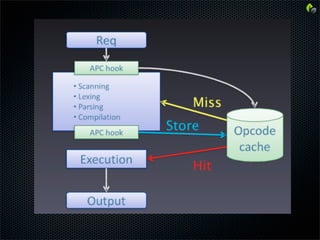
OpCode?

  Readable PHP Code -> Compiler -> Opcode -> Executed

Popular Solutions

  Eaccelarator

  APC

Pros

  Huge performance gains

  Reduces server load

Cons

  Can be hard to tune

  RAM Usage
WordPress Cache Plugins
WP Super Cache

  Very popular (2.2 million downloads!)

  Creates and serves static pages

  CDN Support


W3 Total Cache

  Page caching

  CSS / JS minifying (smaller sizes)

  HTTP Compression

  CDN Support
WordPress Themes
Not all themes are created equal!

Things to look for

  Number of CSS / JS / Images being loaded

  Are the CSS / JS files minified?

  Are the images optimized?

  Is the code optimized?


Sometimes you pay for what you get

Do your home work
Your Content - Images
Images

  How many are you loading?

  Are the images optimized?

    Use the Photoshop “save for web” option

    Use the right file type

    Upload the file in the appropriate size

    Don’t resize the image in WP with the size %


CDN - Content Delivery Network

  Image heavy sites should use a CDN

  Amazon S3, RackSpace Cloud, Akamai, etc.
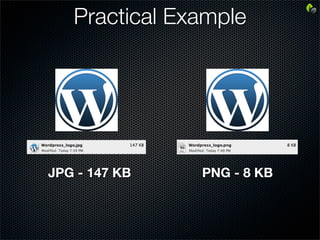
Practical Example


JPG - 147 KB   PNG - 8 KB
Your Content - Widgets
3rd party content widgets

  How many are you loading?

  Do you really need that widget?

     Your speed now depends on their speed

     Is their content optimized?

     Often not cached

     Often adds javascript / flash dependencies


Think lean and mean!
Your Content - Plugins
Because you can, doesn’t mean you should

Often the performance choking point on many sites

Only load what you need

Do you really need that plugin?

  Increased database calls

  Increased 3rd party dependencies


Case Study

  Load time was 11 seconds

  Disabled the “YARPP” (Yet another related posts plugin)

  Load time was 4 seconds - huge improvement!
Other Tweaks
Separate your web server and database server

Load Balancing

  Multiple Servers - when one is busy, the next takes over

Apache .htaccess tweaks

  improved re-write rules

Load jQuery from Google

wp-config tweaks
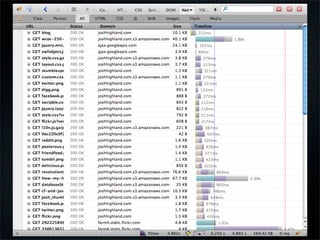
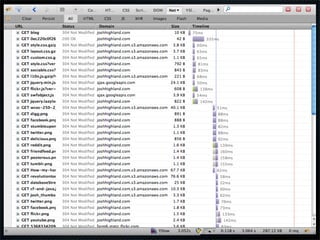
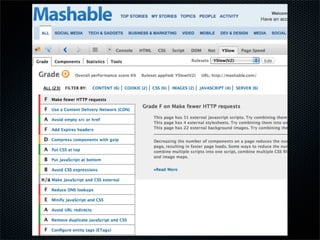
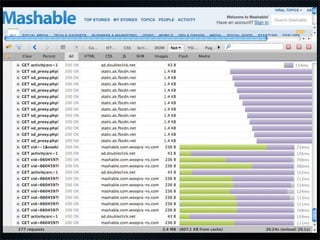
Measuring Performance
       From The Browser
FireFox Browser

  lori (life-of-request info) plugin

  FireBug plugin

     “Net” tab

     YSlow

     Google Speed


Advanced tools for server performance testing are available
Review
Hosting matters

Optimize your server

  Hire a good system admin if you have to

Cache everything possible

Use a quality theme

Only use what you need

Be mindful of 3rd party connections

Firefox + Firebug are awesome

Everything in moderation
Q&A


@JoshHighland
 JoshHighland.com

Optimizing the performance of WordPress

  • 1.
    “Optimizing the performanceof WordPress” Josh Highland NewLeafLabs.com www.NewLeafLabs.com
  • 2.
    Who is Josh? JoshHighland - Computer Scientist Redlands, California (909!) Founder of New Leaf Labs Web & iPhone apps WordPress since 2004 (1.2.1) Social Media Addict (follow @JoshHighland)
  • 3.
    What we willcover? Defining performance Hosting choices Server configurations WordPress plugins WordPress themes Your content Tools
  • 4.
    What is Performance? Themanner in which something reacts or fulfills its intended purpose dictionary.com How fast your WordPress site can deliver content
  • 5.
    Some reasons fora slow Web host mismatch Server configurations Misbehaving plugins - heavy queries, 3rd party interactions Not all WordPress themes are equal The content you server up
  • 6.
    Shared Web Hosting Mostpopular Your site is on a server along with many others The hosting company manage the web server for you Little control over server settings and so on Good for small site with little traffic Very affordable
  • 7.
    Virtual / DedicatedServers Dedicated hardware resources Full control of server settings Storage space Often located in a hosting facility Can get expensive
  • 8.
    Web Servers Apache Very popular Lots of tuning resources available Nginx Faster than Apache Harder to use Used by WordPress, Hulu and Others Only load the modules that you need! Keep it lean and mean.
  • 9.
    Caching? Remember the resultsof an action, use them again if possible Greatly speeds up performance Reduces load on the server Transparent to the end user Things you should be caching: Data base queries PHP code Page requests Assets (images, javasscript, css)
  • 10.
    MySQL Query Caching Pros Easy to enable (MySQL config file settings) Instant performance gains Reduces server load Effects all apps on the server Cons Can be tough to tune properly Consumes server RAM
  • 11.
    PHP OPCode Caching OpCode? Readable PHP Code -> Compiler -> Opcode -> Executed Popular Solutions Eaccelarator APC Pros Huge performance gains Reduces server load Cons Can be hard to tune RAM Usage
  • 13.
    WordPress Cache Plugins WPSuper Cache Very popular (2.2 million downloads!) Creates and serves static pages CDN Support W3 Total Cache Page caching CSS / JS minifying (smaller sizes) HTTP Compression CDN Support
  • 14.
    WordPress Themes Not allthemes are created equal! Things to look for Number of CSS / JS / Images being loaded Are the CSS / JS files minified? Are the images optimized? Is the code optimized? Sometimes you pay for what you get Do your home work
  • 15.
    Your Content -Images Images How many are you loading? Are the images optimized? Use the Photoshop “save for web” option Use the right file type Upload the file in the appropriate size Don’t resize the image in WP with the size % CDN - Content Delivery Network Image heavy sites should use a CDN Amazon S3, RackSpace Cloud, Akamai, etc.
  • 16.
    Practical Example JPG -147 KB PNG - 8 KB
  • 17.
    Your Content -Widgets 3rd party content widgets How many are you loading? Do you really need that widget? Your speed now depends on their speed Is their content optimized? Often not cached Often adds javascript / flash dependencies Think lean and mean!
  • 18.
    Your Content -Plugins Because you can, doesn’t mean you should Often the performance choking point on many sites Only load what you need Do you really need that plugin? Increased database calls Increased 3rd party dependencies Case Study Load time was 11 seconds Disabled the “YARPP” (Yet another related posts plugin) Load time was 4 seconds - huge improvement!
  • 19.
    Other Tweaks Separate yourweb server and database server Load Balancing Multiple Servers - when one is busy, the next takes over Apache .htaccess tweaks improved re-write rules Load jQuery from Google wp-config tweaks
  • 20.
    Measuring Performance From The Browser FireFox Browser lori (life-of-request info) plugin FireBug plugin “Net” tab YSlow Google Speed Advanced tools for server performance testing are available
  • 29.
    Review Hosting matters Optimize yourserver Hire a good system admin if you have to Cache everything possible Use a quality theme Only use what you need Be mindful of 3rd party connections Firefox + Firebug are awesome Everything in moderation
  • 30.