Measuring
Web Performance
Dave Olsen, @dmolsen
West Virginia University
RWD Summit
http://flic.kr/p/7A8xxN
slideshare.net/dmolsenwvu
introduction about me
@dmolsen
What I’ll Talk About
• Quick Intro About Why We
Should Care About Web Perf
• Tools for Measuring Web
Performance
• Setting Up a Device Lab
• Responsive Design + Server-
side Solutions
WHY SHOULD WE CARE ABOUT
WEB PERFORMANCE?
http://flic.kr/p/4JY1Yr
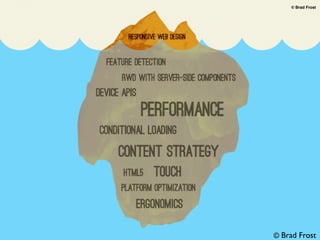
brad’s iceberg
© Brad Frost
© Brad Frost
The way in which CSS media
queries have been promoted for
mobile hides tough problems
and gives developers a false
promise of a simple solution for
designing for small screens.
Source: Jason Grigsby on Speakerdeck
“
”- Jason Grigsby
@grigs
brad’s iceberg
© Brad Frost© Brad Frost
© Brad Frost
The average weight of a web page today.
Source: HTTP Archive
Images JavaScript
Flash
HTML
CSS
Other
77%
1.3 MB
RWD sites whose
small screen design
weighs the same as the
large screen design.
Source: Podjarny
72%
Users expect your
mobile site to load
as quickly as your
desktop site.
71%
Source: Gomez
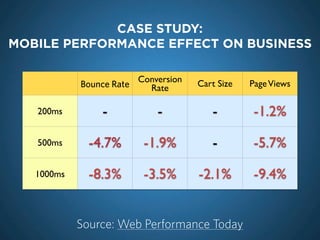
Bounce Rate
Conversion
Rate Cart Size PageViews
200ms - - - -1.2%
500ms -4.7% -1.9% - -5.7%
1000ms -8.3% -3.5% -2.1% -9.4%
CASE STUDY:
MOBILE PERFORMANCE EFFECT ON BUSINESS
Source: Web Performance Today
Mobile first means
performance first.
(start thinking about performance at the design stage)
Over Downloading
Download & Hide
Download & Shrink
Download & Ignore
PRIMARY PERFORMANCE ISSUES FOR RWD
Poor Networks
High Latency
Variable Bandwidth
Packet Loss
BREAKING DOWN A REQUEST
DNS (1ms)
Connecting (61ms)
Waiting (199ms)
Receiving (790ms)
MOBILE OPTIMIZATION
FOCUS
1. Reduce requests
2. Reduce asset size
3. Speed-up page
render
http://flic.kr/p/4zzKee
Best request is no request.
Worst request is one that
blocks the parser.
Source: Ilya Grigorik
“
”- Ilya Grigorik
@ilyagrigorik
Browser
cache
The simplest way to reduce requests is to make sure the
browser doesn’t need to make them. Make sure assets
are bring cached on the browser.
Concatenate
JS & CSS
Combine similar files together in one or multiple larger
files to reduce requests. May harm performance too.
Lazy load
content
Don’t make requests until necessary. Filament Group’s
AJAX Include Pattern or lazyBlock.
data: URI For small images & fonts try embedding them in your
CSS file by using the data: URI.
Conditional
loading
Use a resource loader like Modernizr.load to
conditionally include JavaScript & CSS files.
1. REDUCE REQUESTS
HTML & CSS
compression
Use mod_deflate to make sure text-based assets are
compressed for transfer.
Image
compression
Use a service like kraken.io to optimize images.
Also use CSS sprites as appropriate.
Try to avoid
images
When possible think about avoiding images.
Implement with CSS or Canvas. Or use SVG or
Progressive JPEGs.
Minification Use a minifying service to make sure text-based assets
are as small as possible. If using PHP use Minify.
MicroJS or,
even better,
Vanilla JS
Avoid using bulky frameworks if you’re using them for
simple tasks like selectors. Try microjs.com to find
libraries that may be smaller & more suitable.
JavaScript also blocks the rendering of the page.
2. REDUCE ASSET SIZE
Avoid DOM
reflows &
repaints
By using JS to modify the DOM you can cause
unnecessary reflows & repaints of your browser. They
slow down page render time as well as burn battery.
Defer
loading of
JavaScript
Use HTML5’s script defer & async attributes to delay
downloading files. Can also insert script elements into
the DOM using the onLoad event.
Lazy load
JavaScript
Comment out JavaScript that isn’t required at page load.
Uncomment & eval() when required.
Touch beats
onClick
While not directly related to page render, by making
sure your links use a Touch event rather than an onClick
event user interactions will speed up by 300ms.
Avoid SM
widgets
Try using simple links to services rather than utilizing the
JavaScript widgets. They’re performance hogs.
3. SPEED-UP PAGE RENDER
Testing Tools
toolbox, tools
WEB PERFORMANCE
TOOLS
http://flic.kr/p/4BZsQJ
Diagnostic
Tools
Automated
Tools
Diagnostic
Tools
Automated
Tools
LEARN TO LOVE THE INSPECTOR
FOLLOW ALONG BY OPENING THE
DEVELOPER TOOLS IN CHROME
SAVE YOURSELF A HEADACHE &
DISABLE CACHE WHEN TESTING
EXPLAINING THE NETWORK PANEL:
RESOURCE SIZE
transferred size
real size
re-order
EXPLAINING THE NETWORK PANEL:
LATENCY
latency + download
latency
re-order
EXPLAINING THE NETWORK PANEL:
EVENTS
domcontentloaded
onload
EXPLAINING THE NETWORK PANEL:
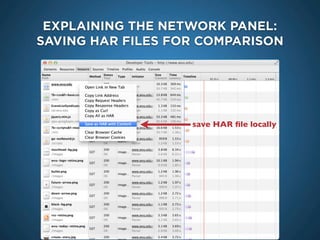
SAVING HAR FILES FOR COMPARISON
save HAR file locally
A narrower, shorter
waterfall is the goal.
http://flic.kr/p/bMdzZ2
Performance
http://timkadlec.com/2013/01/setting-a-performance-budget/http://flic.kr/p/7BBs6e
A guide, not a hard & fast limit.
Performance tweaks are compromises.
EXPLAINING THE TIMELINE PANEL
EXPLAINING THE PROFILES PANEL:
CSS SELECTORS
EXPLAINING THE PROFILES PANEL:
CSS SELECTORS
EXPLAINING THE AUDITS PANEL
PAGESPEED INSIGHTS EXTENSION
https://developers.google.com/speed/pagespeed/insights
REMOTE DEBUGGING
Google Analytics Site Speed
http://www.httpwatch.com
IE & FIREFOX PERFORMANCE ISSUES
Google Analytics Site Speed
GOOGLE ANALYTICS’ SITE SPEED
PERFORMANCE TESTING PROXIES
MobitestWebPagetest
Google Analytics Site Speed
http://www.slideshare.net/AndyDavies/web-page-test-beyond-the-basics
WebPagetest - BEYOND THE BASICS
Google Analytics Site Speed
CUSTOMIZING WebPagetest:
CAPTURING EVENTS AFTER ONLOAD
CUSTOMIZING WebPagetest:
BLACKHOLES FOR REQUESTS
Google Analytics Site Speed
CUSTOMIZING WebPagetest:
SCRIPTING & CUSTOM VIEWPORTS
CUSTOMIZING WebPageTest:
VIDEO COMPARISON
CUSTOMIZING WebPageTest:
VIDEO COMPARISON - SMALL VIEWPORT
mobile bookmarklet
THE ULTIMATE MOBILE
PERFORMANCE BOOKMARKLET
charlesproxy.com
SLOWING THINGS DOWN
ThrottleCharles
USING CHARLES PROXY
http://blog.cloudfour.com/using-charles-proxy-to-examine-ios-apps/
TEST & OPTIMIZE JAVASCRIPT WITH JSPERF
http://jsperf.com
W3C’s NAVIGATION TIMING
http://www.w3.org/TR/navigation-timing/
http://www.html5rocks.com/en/tutorials/webperformance/basics/
Diagnostic
Tools
Automated
Tools
mod_pagespeed AUTOMATES A LOT
http://developers.google.com/speed/pagespeed/mod
  add_head
  combine_css
   convert_jpeg_to_progressive
   convert_meta_tags
   extend_cache
   flatten_css_imports
   inline_css
   inline_import_to_link
   inline_javascript
   rewrite_css
   rewrite_images
   rewrite_javascript
   rewrite_style_attributes_with_url
Default Filters
CodeKit
CODEKIT: WEB PERF IN YOUR WORKFLOW
  Optimize Images
  Combine & Minify
Features
http://incident57.com/codekit/
DEVICES
http://flic.kr/p/cfkZhN
charlesproxy.com
EMULATING MOBILE DEVICES
EmulatorsBrowserStack
eBay
MobileKarma.com
Cellphone store leftovers
Open device labs
GET YOUR HANDS ON
REAL DEVICES
http://flic.kr/p/7972f6
OPENDEVICELAB.COM
Base on:
WiFi-capable, Analytics
Rank, OS, Screen
Dimensions, & Cost
Suggested focus:
iPod Touch, mid-level
Android, high-end Android,
a tablet, Blackberry,
Windows Phone 7
HOW TO DECIDE WHICH TO GET
iPod Touch
Samsung Fascinate +
Google Nexus +
$438
Example:
ADOBE EDGE INSPECT
(THE APP FORMERLY KNOWN AS ADOBE SHADOW)
RESS* can be a scalpel
for your responsive designs.
REsponsive Design + Server Side Components
http://flic.kr/p/a4VsPv
One...
URL.
Set of Mark-up.
Deployment.
WHY USE RWD
futurefriend.ly
balloons
http://flic.kr/p/h6McT
TIME TO PARTY!
http://flic.kr/p/8x6b8X
NOT SO FAST, MY FRIENDS...
Image & Video Media
3rd Party Content
One Set of Mark-up
CHALLENGES FOR RWD
STANDARDS ARE STILL DEVELOPING
What is RESS?
Responsive Web Design +
Server Side Components
(I have no idea what becomes of the W, D, or C)
- Luke Wroblewski
@lukew
http://www.lukew.com/ff/entry.asp?1392
In a nutshell, RESS combines adaptive layouts
with server side component (not full page)
optimization. So a single set of page templates
define an entire Web site for all devices but key
components within that site have device-class
specific implementations that are rendered
server side.
“
”
http://www.lukew.com/ff/entry.asp?1509
- Luke Wroblewski
@lukew
• If you want layout adjustments across devices.
• And optimization at the component level to
increase performance or tune user experience.
• You trust server-side device detection with
sensible defaults.
“
”
DESKTOPWEBM-ADVANCED
ress.dmolsen.com
MOBILEBASIC
Infancy
http://flic.kr/p/7B7uyp
RESS IS IN ITS INFANCY
ND data
http://weedygarden.net/2012/05/a-case-for-ress/
Large Screen:
136 requests @ 2.7MB
Small Screen:
23 requests @ 291K
developers and designers
http://flic.kr/p/7Ma9n
DESIGNERS + DEVELOPERS?
Two Possible Solutions
Server-side
Solutions
http://flic.kr/p/9jatna
Browser Detection#1
Server-side
Feature Detection#2
• Requires server-side
languages.
• Server-side feature detection
so it can be spoofed.
• RESS isn’t a silver bullet.
• Data needs to be separated
from layout.
CHALLENGES FOR RESS
- Jon Arnes Sæterås
@jonarnes
http://mpulp.mobi/2011/05/next-steps-of-responsive-web-design/
It is not only the design of the web site and
the layout of content that needs to be adapted
or enhanced; the idea of being responsive,
adaptive and enhancing, must be implemented
in the whole value chain.
“
”
WEB PERF TWEEPS TO FOLLOW
@ilyagrigorik
@andydavies
@souders @patmeenan
@stoyanstefanov
@joshuabixby @yoavweiss@scottjehl
just a sampling
Doug Gapinski
Strategist
mStoner
@thedougco
SPECIAL THANKS TO...
QUESTIONS?
Dave Olsen
Professional Technologist
West Virginia University
@dmolsen
THANKS FOR LISTENING

Measuring Web Performance