WordPress
Optimizations
How to Get From a D to an A
Who Is Shawn?
Shawn DeWolfe
Web developer. Web designer. Entrepreneur.
Started in WordPress in 2011.
Started with Web design in 1996.
Started programming in 1984.
Consulting site:
Shawn DeWolfe Consulting || https://shawndewolfe.com
What Makes A Site Slow?
● Bad Server
● Bad Connectivity (both from the server and the client)
● Bulky Code
● Bad Code
● Big Images
● Third Party Apps
● Too Many Files to Fetch
Why Does It Matter?
For Users:
● Long wait times means they will give up and leave your site.
● Big downloads could trip their data limits on mobile
● Slow to download makes it hard to share.
For Search Engines (read: Google):
● They will server out the “best” site.
● Download speed and size are ranking factors.
● Your site will be ranked below that of your competitors who deliver their
content better.
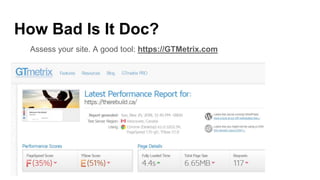
How Bad Is It Doc?
Assess your site. A good tool: https://GTMetrix.com
What Will A Speed Test Tell You?
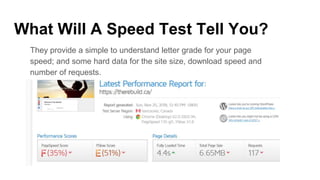
They provide a simple to understand letter grade for your page
speed; and some hard data for the site size, download speed and
number of requests.
What Will A Speed Test Tell You?
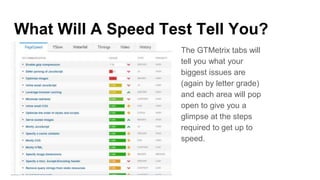
The GTMetrix tabs will
tell you what your
biggest issues are
(again by letter grade)
and each area will pop
open to give you a
glimpse at the steps
required to get up to
speed.
What Will A Speed Test Tell You?
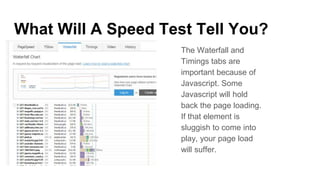
The Waterfall and
Timings tabs are
important because of
Javascript. Some
Javascript will hold
back the page loading.
If that element is
sluggish to come into
play, your page load
will suffer.
The Usual Suspects:Things to fix
● Image sizing: Get the right image for the job.
● Javascript placement: header vs. footer
● Javascript compression: collect all the JS in a few files
● CSS (style sheet) compression: collect all of the CSS into a few files
● Zipping (GZip) responses
● Code density. Don’t get too smart. The KISS rule is the best.
● Caching. While the first page is resource intensive, follow up pages and
loads will be cheaper / faster
● Content Expiry
● Third Party Assets: Like buttons, Google Fonts, Analytics, Hubspot, etc.
Things to fix: Image Sizing
● Images can be too big. Eg. a 72x72 pixel icon could actually use a
1400x800 image. Sometimes, this will be because of problems with planning.
Sometimes, a plugin will fail you and request and image that is too big to be
optimal.
● Images can be good un-optimized. Some images have more colour depth
than they need. The GTMetrix report will generate optimized images for you.
● Image format choices. Know the difference between GIFs (or is that GIF?),
JPEGs, PNGs, SVGs and bitmaps. Use the ideal image for the role in the
presentation.
Things to fix: Image Sprites
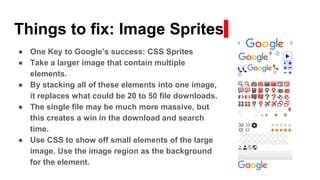
● One Key to Google’s success: CSS Sprites
● Take a larger image that contain multiple
elements.
● By stacking all of these elements into one image,
it replaces what could be 20 to 50 file downloads.
● The single file may be much more massive, but
this creates a win in the download and search
time.
● Use CSS to show off small elements of the large
image. Use the image region as the background
for the element.
Things to fix: JavaScript Placement
● The Header Is the best (except when it isn’t) When Javascript code goes
into the header, that code executes best. It will block the display of content
until the Javascript fully executes. From an end-user perspective, this is
horrible. They will be left with a white screen for much long than is ideal
● Put some stuff into the Footer. Some code can always go into the footer:
analytics code, helper code, code relevant to the lower sections of the page
(eg. a dynamic footer).
● Handy plugins. [LIST THE OKAY TO GOOD SCRIPT TO FOOTER
PLUGINS]
Things to fix: Compression & GZip
● File downloads are a big time suck.
● Fewer files to request and smaller files are key.
● Each plugin and theme is likely to introduce several CSS and JS files
apiece. This can quickly add to upto 20+ CSS and 20+ Javascript file
requests.
● Plugins like AutoOptimize can consolidate the CSS into fewer files; and
it can do the same with JavaScript.
● Almost every web server is capable of serving out files compressed
with GZip. Almost every web browser is capable of decoding GZipped
files.
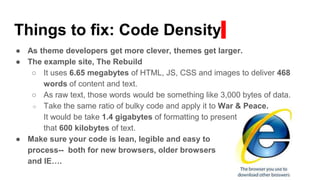
Things to fix: Code Density
● As theme developers get more clever, themes get larger.
● The example site, The Rebuild
○ It uses 6.65 megabytes of HTML, JS, CSS and images to deliver 468
words of content and text.
○ As raw text, those words would be something like 3,000 bytes of data.
○ Take the same ratio of bulky code and apply it to War & Peace.
It would be take 1.4 gigabytes of formatting to present
that 600 kilobytes of text.
● Make sure your code is lean, legible and easy to
process-- both for new browsers, older browsers
and IE….
Things to fix: Server Side Caching
● Server Caching:
○ Store complex output (eg. leaderboards, lists of recent posts, stats).
○ Optimize code on the server before it is shipped to the client.
○ Deploy a plugin like W3 Total Cache, WP Cache or [OTHER?]
● Keep-Alive
○ Time is lost when some browsers reacquire the path to your server with
each file request. By tweaking the server’s Keep Alive, you can keep that
connection active.
● Content Delivery Networks (CDNs)
○ Use a CDN to stow and deliver some of the content.
○ A CDN can take the pressure off of the server.
A CDN can deliver content from a closer server-- closer to the end client.
Things to fix: Client Side Caching
● Caching takes two forms: browser side and server side.
● Client side Caching:
○ Make content cacheable. WordPress will put Query strings onto the tail
end of some assets and change that string with each load to give you a
new fresh and expensive load.
○ Change the Expiry date (it’s a meta data setting in the served asssets) to
push it days or even months into the future. Keep your assets on the
client side as much as is practical.
Things to fix: Third Party Assets
● Easy to deploy third party code-- Instagram widgets, Facebook widgets,
Google Font, Click-to-chat, CRM tools-- they almost always kill
performance.
● Pull as much as possible into your control. Download Google fonts and
serve them from your site or your CDN.
● Deliver the content from server side generated HTML, not Javascript
delivered / built code.
● Elect to leave out some of the third party assets on some pages. If
performance is really important, be cautious of third party apps.
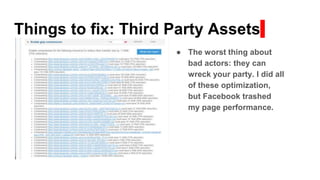
Things to fix: Third Party Assets
● The worst thing about
bad actors: they can
wreck your party. I did all
of these optimization,
but Facebook trashed
my page performance.
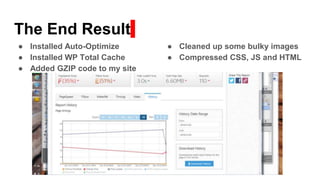
The End Result
● Installed Auto-Optimize
● Installed WP Total Cache
● Added GZIP code to my site
● Cleaned up some bulky images
● Compressed CSS, JS and HTML
Questions???
???
??? ???
???
Want to talk?
https://shawndewolfe.com || shawn@shawndewolfe.com
Twitter: dewolfe001

Word press optimizations

  • 1.
  • 2.
    Who Is Shawn? ShawnDeWolfe Web developer. Web designer. Entrepreneur. Started in WordPress in 2011. Started with Web design in 1996. Started programming in 1984. Consulting site: Shawn DeWolfe Consulting || https://shawndewolfe.com
  • 3.
    What Makes ASite Slow? ● Bad Server ● Bad Connectivity (both from the server and the client) ● Bulky Code ● Bad Code ● Big Images ● Third Party Apps ● Too Many Files to Fetch
  • 4.
    Why Does ItMatter? For Users: ● Long wait times means they will give up and leave your site. ● Big downloads could trip their data limits on mobile ● Slow to download makes it hard to share. For Search Engines (read: Google): ● They will server out the “best” site. ● Download speed and size are ranking factors. ● Your site will be ranked below that of your competitors who deliver their content better.
  • 5.
    How Bad IsIt Doc? Assess your site. A good tool: https://GTMetrix.com
  • 6.
    What Will ASpeed Test Tell You? They provide a simple to understand letter grade for your page speed; and some hard data for the site size, download speed and number of requests.
  • 7.
    What Will ASpeed Test Tell You? The GTMetrix tabs will tell you what your biggest issues are (again by letter grade) and each area will pop open to give you a glimpse at the steps required to get up to speed.
  • 8.
    What Will ASpeed Test Tell You? The Waterfall and Timings tabs are important because of Javascript. Some Javascript will hold back the page loading. If that element is sluggish to come into play, your page load will suffer.
  • 9.
    The Usual Suspects:Thingsto fix ● Image sizing: Get the right image for the job. ● Javascript placement: header vs. footer ● Javascript compression: collect all the JS in a few files ● CSS (style sheet) compression: collect all of the CSS into a few files ● Zipping (GZip) responses ● Code density. Don’t get too smart. The KISS rule is the best. ● Caching. While the first page is resource intensive, follow up pages and loads will be cheaper / faster ● Content Expiry ● Third Party Assets: Like buttons, Google Fonts, Analytics, Hubspot, etc.
  • 10.
    Things to fix:Image Sizing ● Images can be too big. Eg. a 72x72 pixel icon could actually use a 1400x800 image. Sometimes, this will be because of problems with planning. Sometimes, a plugin will fail you and request and image that is too big to be optimal. ● Images can be good un-optimized. Some images have more colour depth than they need. The GTMetrix report will generate optimized images for you. ● Image format choices. Know the difference between GIFs (or is that GIF?), JPEGs, PNGs, SVGs and bitmaps. Use the ideal image for the role in the presentation.
  • 11.
    Things to fix:Image Sprites ● One Key to Google’s success: CSS Sprites ● Take a larger image that contain multiple elements. ● By stacking all of these elements into one image, it replaces what could be 20 to 50 file downloads. ● The single file may be much more massive, but this creates a win in the download and search time. ● Use CSS to show off small elements of the large image. Use the image region as the background for the element.
  • 12.
    Things to fix:JavaScript Placement ● The Header Is the best (except when it isn’t) When Javascript code goes into the header, that code executes best. It will block the display of content until the Javascript fully executes. From an end-user perspective, this is horrible. They will be left with a white screen for much long than is ideal ● Put some stuff into the Footer. Some code can always go into the footer: analytics code, helper code, code relevant to the lower sections of the page (eg. a dynamic footer). ● Handy plugins. [LIST THE OKAY TO GOOD SCRIPT TO FOOTER PLUGINS]
  • 13.
    Things to fix:Compression & GZip ● File downloads are a big time suck. ● Fewer files to request and smaller files are key. ● Each plugin and theme is likely to introduce several CSS and JS files apiece. This can quickly add to upto 20+ CSS and 20+ Javascript file requests. ● Plugins like AutoOptimize can consolidate the CSS into fewer files; and it can do the same with JavaScript. ● Almost every web server is capable of serving out files compressed with GZip. Almost every web browser is capable of decoding GZipped files.
  • 14.
    Things to fix:Code Density ● As theme developers get more clever, themes get larger. ● The example site, The Rebuild ○ It uses 6.65 megabytes of HTML, JS, CSS and images to deliver 468 words of content and text. ○ As raw text, those words would be something like 3,000 bytes of data. ○ Take the same ratio of bulky code and apply it to War & Peace. It would be take 1.4 gigabytes of formatting to present that 600 kilobytes of text. ● Make sure your code is lean, legible and easy to process-- both for new browsers, older browsers and IE….
  • 15.
    Things to fix:Server Side Caching ● Server Caching: ○ Store complex output (eg. leaderboards, lists of recent posts, stats). ○ Optimize code on the server before it is shipped to the client. ○ Deploy a plugin like W3 Total Cache, WP Cache or [OTHER?] ● Keep-Alive ○ Time is lost when some browsers reacquire the path to your server with each file request. By tweaking the server’s Keep Alive, you can keep that connection active. ● Content Delivery Networks (CDNs) ○ Use a CDN to stow and deliver some of the content. ○ A CDN can take the pressure off of the server. A CDN can deliver content from a closer server-- closer to the end client.
  • 16.
    Things to fix:Client Side Caching ● Caching takes two forms: browser side and server side. ● Client side Caching: ○ Make content cacheable. WordPress will put Query strings onto the tail end of some assets and change that string with each load to give you a new fresh and expensive load. ○ Change the Expiry date (it’s a meta data setting in the served asssets) to push it days or even months into the future. Keep your assets on the client side as much as is practical.
  • 17.
    Things to fix:Third Party Assets ● Easy to deploy third party code-- Instagram widgets, Facebook widgets, Google Font, Click-to-chat, CRM tools-- they almost always kill performance. ● Pull as much as possible into your control. Download Google fonts and serve them from your site or your CDN. ● Deliver the content from server side generated HTML, not Javascript delivered / built code. ● Elect to leave out some of the third party assets on some pages. If performance is really important, be cautious of third party apps.
  • 18.
    Things to fix:Third Party Assets ● The worst thing about bad actors: they can wreck your party. I did all of these optimization, but Facebook trashed my page performance.
  • 19.
    The End Result ●Installed Auto-Optimize ● Installed WP Total Cache ● Added GZIP code to my site ● Cleaned up some bulky images ● Compressed CSS, JS and HTML
  • 20.
  • 21.
    Want to talk? https://shawndewolfe.com|| shawn@shawndewolfe.com Twitter: dewolfe001