







Squeeze Maximum Performance
  From Your Joomla! Website
         Tenko Nikolov
       CEO at SiteGround
Before we start – who am I
•   17+ years of IT life
•   8 years with SiteGround
•   7 years CEO at SiteGround
•   Husband, dad
•   Passionate about photography and geeky toys
•   Addicted to cars and everything fast
Speaking of cars…
PERFORMANCE = OPTIMIZATIONS
Why optimize?
•   Your speed affects your Google rankings!
•   Stay up under heavy load
•   Save $$$ from servers, Save the Planet too!
•   When your site is fast, you look professional
•   Keep readers/customers happy & paying
Let’s get the basics done


• Keep Joomla! up to date
• Choose extensions wisely
• Deactivate unused extensions, update used
Don’t mind some cache?
• Use Joomla Cache in Global Configuration
  – Setup Cache Properly – eg. Time to Live


• Some very good tutorials on Joomla Cache

   http://www.theartofjoomla.com/joomla-caching-explained.html
Building your own templates?

• Simplify your templates as much as possible
• Keep in mind HTTP requests are expensive

• Minify and combine CSS and JS files
• Enable GZIP compression
Optimize your images
• Offload when possible
  – serve images from a CDN or Flickr
• Never let the browser do your job! Resize
  images for the web before uploading them!
• Smush your images -> smush.it
• Use image sprites when possible
Check how’s your website doing?

   Check your template’s performance:

          »Google PageSpeed Insights
https://developers.google.com/speed/pagespeed/insights


          »YSlow
         https://developer.yahoo.com/yslow/
Joomla has you covered!

• If you don’t know how to do it or are just lazy -
  Explore the JED!

• You can use extensions to boost your website
  performance!
Some highly rated extensions from the
                 JED
• JCH Optimize – Combines JS and
  CSS, Combines images in Sprites, Minify and
  Gzip
• Jbetolo – same as above but w/ CDN support
• JotCache – further improves the functionality
  of the Joomla Built in Core Cache
• Cache Cleaner – allows for easier cache
  cleaning within the Joomla Admin panel
The advanced stuff

• Most of these require SSH access/dedicated
  environment/, and would require a skilled
  sysadmin to do.

• Should be done by your host, should you use a
  managed service.
Software tweaks
• Install RAM caching mechanisms
  Memcache and APC/Eaccellerator
• Install reverse proxy
  NginX or Varnish
• Choose your hosting platform wisely
• Use staging environment to benchmark
More software tweaks

• Use fast & secure PHP like FastCGI
• Move PHP binaries into RAM
• Move MySQL to a different hard drive. Use RAID
  & SSD for lightning fast performance.
• Keep log files separate and small in size
• Move TMP to RAM
Use CDN!
• CDN will help avoid unneeded I/O on your HDDs
• CDN will make your website faster
• CDN will appeal to both Google and your users

          Easy to setup FREE CDN Providers
           CloudFlare www.cloudflare.com
            InCapsula www.incapsula.com
Hardware matters!
•   Invest in hardware
 Test   at least 3 different hardware setups
    before proceeding.

 Always benchmark performance and reliability
 Add more RAM and Flash based disks and use
    them on maximum capacity for caching and
    databases
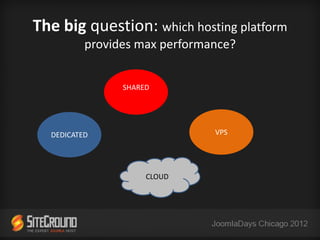
The big question: which hosting platform
          provides max performance?


                SHARED


  DEDICATED                    VPS


                     CLOUD
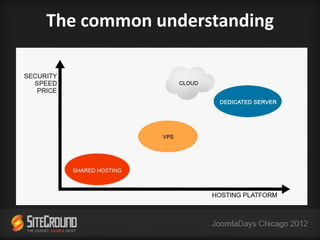
The common understanding
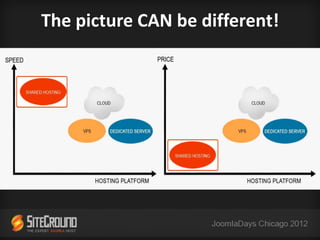
The picture CAN be different!
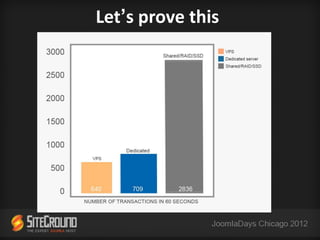
Let’s prove this
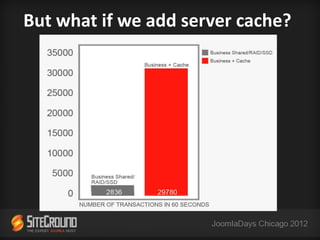
But what if we add server cache?
Some key takes
• Shared can be a good platform contrary to the
  common belief, but not always the right one

• If you need custom setup/deep customizations &
  have a big website -> go for VPS/dedicated

• Dedicated/VPS & Cloud can perform much better
  for you if you KNOW how to tweak them
More key takes
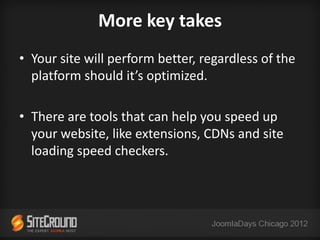
• Your site will perform better, regardless of the
  platform should it’s optimized.

• There are tools that can help you speed up
  your website, like extensions, CDNs and site
  loading speed checkers.
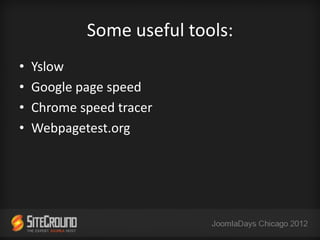
Some useful tools:
•   Yslow
•   Google page speed
•   Chrome speed tracer
•   Webpagetest.org
It’s your turn!

Questions time!
THANK YOU!
Tenko Nikolov

SiteGround.com

Email: tenko@siteground.com

Twitter: @tnikolov

Squeeze Maximum Performance From Your Joomla Website

  • 1.
    Squeeze Maximum Performance From Your Joomla! Website Tenko Nikolov CEO at SiteGround
  • 2.
    Before we start– who am I • 17+ years of IT life • 8 years with SiteGround • 7 years CEO at SiteGround • Husband, dad • Passionate about photography and geeky toys • Addicted to cars and everything fast
  • 3.
  • 4.
  • 5.
    Why optimize? • Your speed affects your Google rankings! • Stay up under heavy load • Save $$$ from servers, Save the Planet too! • When your site is fast, you look professional • Keep readers/customers happy & paying
  • 6.
    Let’s get thebasics done • Keep Joomla! up to date • Choose extensions wisely • Deactivate unused extensions, update used
  • 7.
    Don’t mind somecache? • Use Joomla Cache in Global Configuration – Setup Cache Properly – eg. Time to Live • Some very good tutorials on Joomla Cache http://www.theartofjoomla.com/joomla-caching-explained.html
  • 8.
    Building your owntemplates? • Simplify your templates as much as possible • Keep in mind HTTP requests are expensive • Minify and combine CSS and JS files • Enable GZIP compression
  • 9.
    Optimize your images •Offload when possible – serve images from a CDN or Flickr • Never let the browser do your job! Resize images for the web before uploading them! • Smush your images -> smush.it • Use image sprites when possible
  • 10.
    Check how’s yourwebsite doing? Check your template’s performance: »Google PageSpeed Insights https://developers.google.com/speed/pagespeed/insights »YSlow https://developer.yahoo.com/yslow/
  • 11.
    Joomla has youcovered! • If you don’t know how to do it or are just lazy - Explore the JED! • You can use extensions to boost your website performance!
  • 12.
    Some highly ratedextensions from the JED • JCH Optimize – Combines JS and CSS, Combines images in Sprites, Minify and Gzip • Jbetolo – same as above but w/ CDN support • JotCache – further improves the functionality of the Joomla Built in Core Cache • Cache Cleaner – allows for easier cache cleaning within the Joomla Admin panel
  • 13.
    The advanced stuff •Most of these require SSH access/dedicated environment/, and would require a skilled sysadmin to do. • Should be done by your host, should you use a managed service.
  • 14.
    Software tweaks • InstallRAM caching mechanisms Memcache and APC/Eaccellerator • Install reverse proxy NginX or Varnish • Choose your hosting platform wisely • Use staging environment to benchmark
  • 15.
    More software tweaks •Use fast & secure PHP like FastCGI • Move PHP binaries into RAM • Move MySQL to a different hard drive. Use RAID & SSD for lightning fast performance. • Keep log files separate and small in size • Move TMP to RAM
  • 16.
    Use CDN! • CDNwill help avoid unneeded I/O on your HDDs • CDN will make your website faster • CDN will appeal to both Google and your users Easy to setup FREE CDN Providers CloudFlare www.cloudflare.com InCapsula www.incapsula.com
  • 17.
    Hardware matters! • Invest in hardware  Test at least 3 different hardware setups before proceeding.  Always benchmark performance and reliability  Add more RAM and Flash based disks and use them on maximum capacity for caching and databases
  • 18.
    The big question:which hosting platform provides max performance? SHARED DEDICATED VPS CLOUD
  • 19.
  • 20.
    The picture CANbe different!
  • 21.
  • 22.
    But what ifwe add server cache?
  • 23.
    Some key takes •Shared can be a good platform contrary to the common belief, but not always the right one • If you need custom setup/deep customizations & have a big website -> go for VPS/dedicated • Dedicated/VPS & Cloud can perform much better for you if you KNOW how to tweak them
  • 24.
    More key takes •Your site will perform better, regardless of the platform should it’s optimized. • There are tools that can help you speed up your website, like extensions, CDNs and site loading speed checkers.
  • 25.
    Some useful tools: • Yslow • Google page speed • Chrome speed tracer • Webpagetest.org
  • 26.
  • 27.
    THANK YOU! Tenko Nikolov SiteGround.com Email:tenko@siteground.com Twitter: @tnikolov

Editor's Notes

  • #5 So the question I’ll try to answer today is How to optimize my Joomla site to achieve maximum performance?
  • #9 I have a question – how many of you do their own templates?
  • #11 I have a question – how many of you do their own templates?
  • #19 The big Q is on what platform to achieve all that?