Speed!... it up please
     Rafael Corral, Lead Developer 'corePHP'
                            CMS Expo 2011
Hi!


  Lead Developer @ 'corePHP'
  Creator of WordPress for Joomla
  Creator of JPhoto
  Creator of jomCDN
Speed? Who cares?

  Your customers!
     Customer satisfaction is important!
     Happy customers = Returning customers
  You
     SEO Improvements
     More page views
     Improved server performance
     Higher conversion rates
Discovery

  Who takes performance seriously?
  Custom developed extensions for a CMS?
  Do you rely on your website for most of your
   income?
  Has no interest in looking at any code?
What we think we are delivering…
What we actually deliver…
Why is my website slow?

  How slow is slow?
  Too many assets
  Images not optimized
  Files not compressed
  Slow server
  No caching
  No CDN
Your users are what matter!

  Users are likely to leave when waiting
  Akamai sets the bar to 2 seconds
  Google sets the bar to 1.5 seconds
  50% of users stated that a quick site is
   important for loyalty
Your Goal: Reduce HTTP Requests
           Less is more
         Keep this in mind!
Combine, combine, combine!

  Combine all scripts into one script
  Even if they are not needed for that page
  Combine all CSS into a single style sheet
  CSS can be tricky mostly when using a CMS


                                         Step 1
Optimize images & CSS Sprites

  Convert GIFs to PNGs, possible savings
  http://www.smushit.com/ysmush.it/
  Combine images to reduce HTTP requests
  Group them by color
  Arrange images horizontally (smaller file sizes)


                                              Step 2
Optimize, Compress & Gzip

  Optimize JS
    http://closure-compiler.appspot.com/home
  Compress CSS and JS
    http://refresh-sf.com/yui/
    http://tools.w3clubs.com/cssmin/
  Gzip CSS and JS before sending them to the
   browser


                                                Step 3
Script Placement

  Place Stylesheets at the top
     Inside the <head> tag
  Place Scripts at the bottom
     Before the ending </body> tag


                                      Step 4
No 404s

  HTTP calls are expensive!
  Useless calls are even worse
  If a css or js is not there, the browser tries
   to parse through that 404 page that the
   server returns.


                                                    Step 5
Use a CDN

  Focus on dispersing static content only
    Images, CSS, JS, Flash, etc...
  Separate assets across domains
    No more than 4 different domains


  WordPress – W3 Total Cache
  http://drupal.org/project/cdn
  http://extensions.joomla.org/extensions/site-
   management/content-networking


                                             Step 6
Cache

  Server cache
    APC
    Opcode
  Browser cache
    Expires
    Cache-Control
    ETags


                     Step 7
Testing

  Total page load time
  Total page size
  Number of assets
  Time to render
  Check Google Analytics statistics


                                       Step 8
Tools

  YSlow
  Google Pagespeed
  Pingdom
  http://code.google.com/speed/
Examples

   Combined Files
     `corePHP`
   Optimized images, CSS Sprites and pre-loading
     Google.com
   Script placement
   CDN
     Google Maps
   Caching
     Mashable
Examples

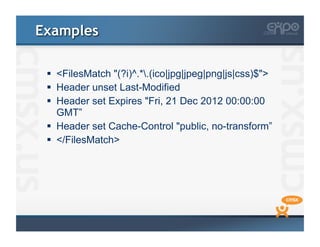
   <FilesMatch "(?i)^.*.(ico|jpg|jpeg|png|js|css)$">
   Header unset Last-Modified
   Header set Expires "Fri, 21 Dec 2012 00:00:00
    GMT”
   Header set Cache-Control "public, no-transform”
   </FilesMatch>
Developer improvements

  Use GET for AJAX requests
  Uses one TCP packet instead of two
  Post-load components
    Load the JavaScript to do animation only when needed
    Load images that are not needed
  Preload components
    Unconditional
    Conditional
    Anticipated
  Use <link> over @import
Developer improvements

  Reduce number of DOM Elements
  Don't scale images in HTML
  Keep components under 25k
     iPhone does not cache anything bigger
  Avoid empty src=""
  Lazy load images
What about the server?

  Think about the 80/20 rule
  Ideally the page should be stitched together in
   200-500ms
      A page should load in 1.5 seconds
      ~20% of the time you spend requesting the
       HTML
  ~80% is spent retrieving the assets
      Images
      CSS
      and JS files
Thank you!

Questions? or Site review?
References
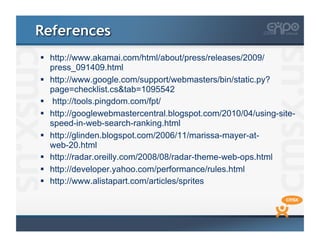
  http://www.akamai.com/html/about/press/releases/2009/
   press_091409.html
  http://www.google.com/support/webmasters/bin/static.py?
   page=checklist.cs&tab=1095542
  http://tools.pingdom.com/fpt/
  http://googlewebmastercentral.blogspot.com/2010/04/using-site-
   speed-in-web-search-ranking.html
  http://glinden.blogspot.com/2006/11/marissa-mayer-at-
   web-20.html
  http://radar.oreilly.com/2008/08/radar-theme-web-ops.html
  http://developer.yahoo.com/performance/rules.html
  http://www.alistapart.com/articles/sprites

Speed!

  • 1.
    Speed!... it upplease Rafael Corral, Lead Developer 'corePHP' CMS Expo 2011
  • 2.
    Hi!   Lead Developer@ 'corePHP'   Creator of WordPress for Joomla   Creator of JPhoto   Creator of jomCDN
  • 3.
    Speed? Who cares?  Your customers!   Customer satisfaction is important!   Happy customers = Returning customers   You   SEO Improvements   More page views   Improved server performance   Higher conversion rates
  • 4.
    Discovery   Who takesperformance seriously?   Custom developed extensions for a CMS?   Do you rely on your website for most of your income?   Has no interest in looking at any code?
  • 5.
    What we thinkwe are delivering…
  • 6.
    What we actuallydeliver…
  • 7.
    Why is mywebsite slow?   How slow is slow?   Too many assets   Images not optimized   Files not compressed   Slow server   No caching   No CDN
  • 8.
    Your users arewhat matter!   Users are likely to leave when waiting   Akamai sets the bar to 2 seconds   Google sets the bar to 1.5 seconds   50% of users stated that a quick site is important for loyalty
  • 9.
    Your Goal: ReduceHTTP Requests Less is more Keep this in mind!
  • 10.
    Combine, combine, combine!  Combine all scripts into one script   Even if they are not needed for that page   Combine all CSS into a single style sheet   CSS can be tricky mostly when using a CMS Step 1
  • 11.
    Optimize images &CSS Sprites   Convert GIFs to PNGs, possible savings   http://www.smushit.com/ysmush.it/   Combine images to reduce HTTP requests   Group them by color   Arrange images horizontally (smaller file sizes) Step 2
  • 12.
    Optimize, Compress &Gzip   Optimize JS   http://closure-compiler.appspot.com/home   Compress CSS and JS   http://refresh-sf.com/yui/   http://tools.w3clubs.com/cssmin/   Gzip CSS and JS before sending them to the browser Step 3
  • 13.
    Script Placement   PlaceStylesheets at the top   Inside the <head> tag   Place Scripts at the bottom   Before the ending </body> tag Step 4
  • 14.
    No 404s   HTTPcalls are expensive!   Useless calls are even worse   If a css or js is not there, the browser tries to parse through that 404 page that the server returns. Step 5
  • 15.
    Use a CDN  Focus on dispersing static content only   Images, CSS, JS, Flash, etc...   Separate assets across domains   No more than 4 different domains   WordPress – W3 Total Cache   http://drupal.org/project/cdn   http://extensions.joomla.org/extensions/site- management/content-networking Step 6
  • 16.
    Cache   Server cache   APC   Opcode   Browser cache   Expires   Cache-Control   ETags Step 7
  • 17.
    Testing   Total pageload time   Total page size   Number of assets   Time to render   Check Google Analytics statistics Step 8
  • 18.
    Tools   YSlow   GooglePagespeed   Pingdom   http://code.google.com/speed/
  • 19.
    Examples   CombinedFiles   `corePHP`   Optimized images, CSS Sprites and pre-loading   Google.com   Script placement   CDN   Google Maps   Caching   Mashable
  • 20.
    Examples   <FilesMatch"(?i)^.*.(ico|jpg|jpeg|png|js|css)$">   Header unset Last-Modified   Header set Expires "Fri, 21 Dec 2012 00:00:00 GMT”   Header set Cache-Control "public, no-transform”   </FilesMatch>
  • 21.
    Developer improvements   UseGET for AJAX requests   Uses one TCP packet instead of two   Post-load components   Load the JavaScript to do animation only when needed   Load images that are not needed   Preload components   Unconditional   Conditional   Anticipated   Use <link> over @import
  • 22.
    Developer improvements   Reducenumber of DOM Elements   Don't scale images in HTML   Keep components under 25k   iPhone does not cache anything bigger   Avoid empty src=""   Lazy load images
  • 23.
    What about theserver?   Think about the 80/20 rule   Ideally the page should be stitched together in 200-500ms   A page should load in 1.5 seconds   ~20% of the time you spend requesting the HTML   ~80% is spent retrieving the assets   Images   CSS   and JS files
  • 24.
  • 25.
    References   http://www.akamai.com/html/about/press/releases/2009/ press_091409.html   http://www.google.com/support/webmasters/bin/static.py? page=checklist.cs&tab=1095542   http://tools.pingdom.com/fpt/   http://googlewebmastercentral.blogspot.com/2010/04/using-site- speed-in-web-search-ranking.html   http://glinden.blogspot.com/2006/11/marissa-mayer-at- web-20.html   http://radar.oreilly.com/2008/08/radar-theme-web-ops.html   http://developer.yahoo.com/performance/rules.html   http://www.alistapart.com/articles/sprites