




WordPress Meetup Varna, 24.02.2017
Radka Nacheva
Department of Informatics, University of Economics – Varna
UsabilityIssues( )
Name: Radka Nacheva
Current Occupation: Assistant Professor & PhD Student at
Department of Informatics, University of
Economics – Varna
Scientific Interests: HCI, Usability, Cognitive Science
@radka.v.nacheva
@Radka_Nacheva @radka-nacheva
r.nacheva@ue-varna.bg
@radka-nacheva @radka-nacheva
 The Importance of Design
 Design Conventions & Usability Heuristics /
Principles
 How to Check The Usability of Your (WordPress)
Website
 Conclusion
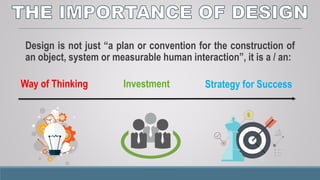
Design is not just “a plan or convention for the construction of
an object, system or measurable human interaction”, it is a / an:
Way of Thinking Investment Strategy for Success
The good design:
 expresses in simple way functionality of the product;
 helps users to take a decision for using the product;
 encourages users to trust the product;
 engages their attention;
The good design:
 helps users to complete successfully their tasks and to
achieve their goals;
 increases users’ efficiency;
 manages users’ emotions by using appropriate colors,
fonts, forms and arrangement of user interface elements;
 provides comfort to users when they are working with the
website or application.
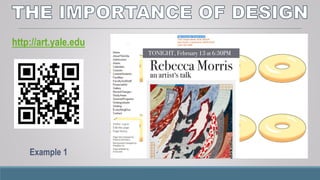
http://art.yale.edu
Example 1
www.patimex.com
Example 2
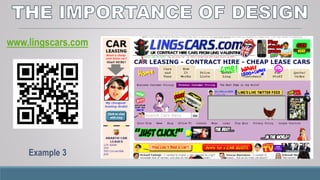
www.lingscars.com
Example 3
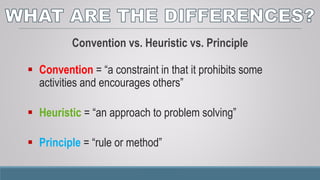
Convention vs. Heuristic vs. Principle
 Convention = “a constraint in that it prohibits some
activities and encourages others”1
 Heuristic = “an approach to problem solving”
 Principle = “rule or method”
1 Source: http://www.jnd.org/dn.mss/affordance_conv.html
Google Material Design: https://goo.gl/t5BS1L
 Android: https://goo.gl/FpWB4o
Microsoft: https://goo.gl/L824e3
 Windows Phone: https://goo.gl/RCijXa
Apple: https://goo.gl/KLlTIg
 iOS: https://goo.gl/oWvM4p
IBM: https://goo.gl/4xIWs0
Start with the following:
 Jakob Nielsen’s Heuristics
 Ben Shneiderman’s 8 Golden Rules
 Donald Norman’s Principles of Everyday Design
 Dieter Rams’ Ten Principles of “Good Design”
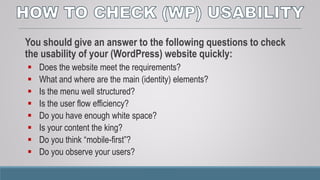
You should give an answer to the following questions to check
the usability of your (WordPress) website quickly:
 Does the website meet the requirements?
 What and where are the main (identity) elements?
 Is the menu well structured?
 Is the user flow efficiency?
 Do you have enough white space?
 Is your content the king?
 Do you think “mobile-first”?
 Do you observe your users?
You could use some tools for usability testing:
 Userlytics
 Loop11
 Mobile-Friendly Test
 Leanplum
Don’t forget to keep it as simple as possible!
and
Don’t make them think!
Don’t forget their opinions about design …
Ferdinand Porsche: „Design must be functional, and functionality must be
translated into visual aesthetics without any reliance on gimmicks that have
to be explained.”
Ivan Chermayeff: „Design is directed toward human beings. To design is to
solve human problems by identifying them and executing the best solution.”
“ Life is really simple,
but we insist on
making it complicated. ”
Confucius
Thank you for your attention!

Lecture - (WordPress) Usability Issues

  • 1.
    WordPress Meetup Varna,24.02.2017 Radka Nacheva Department of Informatics, University of Economics – Varna UsabilityIssues( )
  • 2.
    Name: Radka Nacheva CurrentOccupation: Assistant Professor & PhD Student at Department of Informatics, University of Economics – Varna Scientific Interests: HCI, Usability, Cognitive Science
  • 3.
  • 4.
     The Importanceof Design  Design Conventions & Usability Heuristics / Principles  How to Check The Usability of Your (WordPress) Website  Conclusion
  • 6.
    Design is notjust “a plan or convention for the construction of an object, system or measurable human interaction”, it is a / an: Way of Thinking Investment Strategy for Success
  • 7.
    The good design: expresses in simple way functionality of the product;  helps users to take a decision for using the product;  encourages users to trust the product;  engages their attention;
  • 8.
    The good design: helps users to complete successfully their tasks and to achieve their goals;  increases users’ efficiency;  manages users’ emotions by using appropriate colors, fonts, forms and arrangement of user interface elements;  provides comfort to users when they are working with the website or application.
  • 9.
  • 10.
  • 11.
  • 12.
    Convention vs. Heuristicvs. Principle  Convention = “a constraint in that it prohibits some activities and encourages others”1  Heuristic = “an approach to problem solving”  Principle = “rule or method” 1 Source: http://www.jnd.org/dn.mss/affordance_conv.html
  • 13.
    Google Material Design:https://goo.gl/t5BS1L  Android: https://goo.gl/FpWB4o Microsoft: https://goo.gl/L824e3  Windows Phone: https://goo.gl/RCijXa Apple: https://goo.gl/KLlTIg  iOS: https://goo.gl/oWvM4p IBM: https://goo.gl/4xIWs0
  • 14.
    Start with thefollowing:  Jakob Nielsen’s Heuristics  Ben Shneiderman’s 8 Golden Rules  Donald Norman’s Principles of Everyday Design  Dieter Rams’ Ten Principles of “Good Design”
  • 15.
    You should givean answer to the following questions to check the usability of your (WordPress) website quickly:  Does the website meet the requirements?  What and where are the main (identity) elements?  Is the menu well structured?  Is the user flow efficiency?  Do you have enough white space?  Is your content the king?  Do you think “mobile-first”?  Do you observe your users?
  • 16.
    You could usesome tools for usability testing:  Userlytics  Loop11  Mobile-Friendly Test  Leanplum
  • 17.
    Don’t forget tokeep it as simple as possible! and Don’t make them think!
  • 18.
    Don’t forget theiropinions about design … Ferdinand Porsche: „Design must be functional, and functionality must be translated into visual aesthetics without any reliance on gimmicks that have to be explained.” Ivan Chermayeff: „Design is directed toward human beings. To design is to solve human problems by identifying them and executing the best solution.”
  • 19.
    “ Life isreally simple, but we insist on making it complicated. ” Confucius
  • 20.
    Thank you foryour attention!

Editor's Notes

  • #15 Jakob Nielsen’s Heuristics Visibility of system status Consistency and standards User control and freedom Match between system and the real world Error prevention Recognition rather than recall Flexibility and efficiency of use Aesthetic and minimalist design Help users recognize, diagnose, and recover from errors Help and documentation --------------------- Ben Shneiderman’s 8 Golden Rules Strive for consistency Cater to universal usability Offer informative feedback Design dialog to yield closure Prevent errors Permit easy reversal of actions Support internal locus of control Reduce short-term memory load ---------------------- Donald Norman’s Principles of Everyday Design Visibility Consistency Feedback Mapping Constraints Affordance ----------------------------- Dieter Rams’ Ten Principles of “Good Design” Is innovative makes a product useful is aesthetic makes a product understandable is unobtrusive is honest is long-lasting is thorough down to the last detail is environmentally friendly is as little design as possible
  • #16 When you assess the designs, don’t forget for the first expression! According to some studies the users judge the product after the first 50 milliseconds of interaction with it. Before that, the good and pleasant design could influence over users and help them to take a decision for using or not the product. Attention web designers: You have 50 milliseconds to make a good first impression! <http://www.tandfonline.com/doi/abs/10.1080/01449290500330448#.V0NVCJF9600 >