COMPUTER APPLICATIONS
CLASS X (Code 165)
TOPIC:
UNIT 2: HTML Multimedia
By
HIMANSHU PATHAK
Contents
• Introduction
• Common Video Format
• Common Audio Format
• HTML Audio
• HTML Video
Introduction
• Multimedia can be almost anything we can hear
or see, like images, music, sound, videos,
records, films, animations, and more.
• Web pages often contain multimedia elements of
different types and formats.
• HTML allows us to create standards-based video
and audio players that don’t require the use of
any plugins.
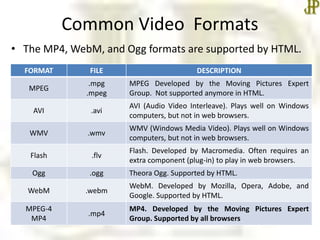
Common Video Formats
• The MP4, WebM, and Ogg formats are supported by HTML.
FORMAT FILE DESCRIPTION
MPEG
.mpg
.mpeg
MPEG Developed by the Moving Pictures Expert
Group. Not supported anymore in HTML.
AVI .avi
AVI (Audio Video Interleave). Plays well on Windows
computers, but not in web browsers.
WMV .wmv
WMV (Windows Media Video). Plays well on Windows
computers, but not in web browsers.
Flash .flv
Flash. Developed by Macromedia. Often requires an
extra component (plug-in) to play in web browsers.
Ogg .ogg Theora Ogg. Supported by HTML.
WebM .webm
WebM. Developed by Mozilla, Opera, Adobe, and
Google. Supported by HTML.
MPEG-4
MP4
.mp4
MP4. Developed by the Moving Pictures Expert
Group. Supported by all browsers
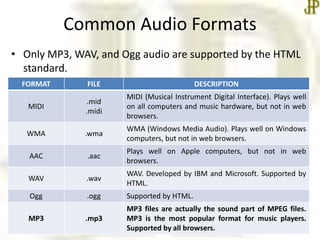
Common Audio Formats
• Only MP3, WAV, and Ogg audio are supported by the HTML
standard.
FORMAT FILE DESCRIPTION
MIDI
.mid
.midi
MIDI (Musical Instrument Digital Interface). Plays well
on all computers and music hardware, but not in web
browsers.
WMA .wma
WMA (Windows Media Audio). Plays well on Windows
computers, but not in web browsers.
AAC .aac
Plays well on Apple computers, but not in web
browsers.
WAV .wav
WAV. Developed by IBM and Microsoft. Supported by
HTML.
Ogg .ogg Supported by HTML.
MP3 .mp3
MP3 files are actually the sound part of MPEG files.
MP3 is the most popular format for music players.
Supported by all browsers.
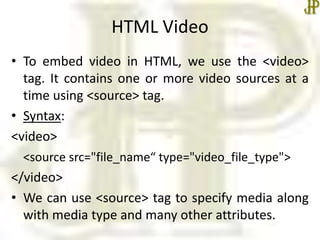
HTML Video
• To embed video in HTML, we use the <video>
tag. It contains one or more video sources at a
time using <source> tag.
• Syntax:
<video>
<source src="file_name“ type="video_file_type">
</video>
• We can use <source> tag to specify media along
with media type and many other attributes.
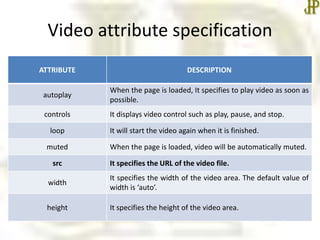
Video attribute specification
ATTRIBUTE DESCRIPTION
autoplay
When the page is loaded, It specifies to play video as soon as
possible.
controls It displays video control such as play, pause, and stop.
loop It will start the video again when it is finished.
muted When the page is loaded, video will be automatically muted.
src It specifies the URL of the video file.
width
It specifies the width of the video area. The default value of
width is ‘auto’.
height It specifies the height of the video area.
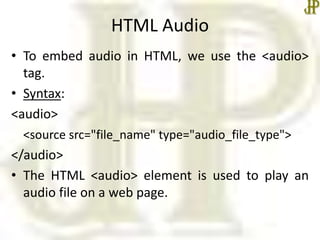
HTML Audio
• To embed audio in HTML, we use the <audio>
tag.
• Syntax:
<audio>
<source src="file_name" type="audio_file_type">
</audio>
• The HTML <audio> element is used to play an
audio file on a web page.
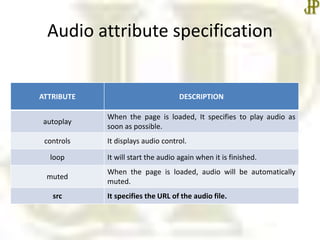
Audio attribute specification
ATTRIBUTE DESCRIPTION
autoplay
When the page is loaded, It specifies to play audio as
soon as possible.
controls It displays audio control.
loop It will start the audio again when it is finished.
muted
When the page is loaded, audio will be automatically
muted.
src It specifies the URL of the audio file.
Summary
• HTML embedded audio and video
• In the next class, we will start Unit II –
Cascading Style Sheet in detail.
•Thanks

Html multimedia

  • 1.
    COMPUTER APPLICATIONS CLASS X(Code 165) TOPIC: UNIT 2: HTML Multimedia By HIMANSHU PATHAK
  • 2.
    Contents • Introduction • CommonVideo Format • Common Audio Format • HTML Audio • HTML Video
  • 3.
    Introduction • Multimedia canbe almost anything we can hear or see, like images, music, sound, videos, records, films, animations, and more. • Web pages often contain multimedia elements of different types and formats. • HTML allows us to create standards-based video and audio players that don’t require the use of any plugins.
  • 4.
    Common Video Formats •The MP4, WebM, and Ogg formats are supported by HTML. FORMAT FILE DESCRIPTION MPEG .mpg .mpeg MPEG Developed by the Moving Pictures Expert Group. Not supported anymore in HTML. AVI .avi AVI (Audio Video Interleave). Plays well on Windows computers, but not in web browsers. WMV .wmv WMV (Windows Media Video). Plays well on Windows computers, but not in web browsers. Flash .flv Flash. Developed by Macromedia. Often requires an extra component (plug-in) to play in web browsers. Ogg .ogg Theora Ogg. Supported by HTML. WebM .webm WebM. Developed by Mozilla, Opera, Adobe, and Google. Supported by HTML. MPEG-4 MP4 .mp4 MP4. Developed by the Moving Pictures Expert Group. Supported by all browsers
  • 5.
    Common Audio Formats •Only MP3, WAV, and Ogg audio are supported by the HTML standard. FORMAT FILE DESCRIPTION MIDI .mid .midi MIDI (Musical Instrument Digital Interface). Plays well on all computers and music hardware, but not in web browsers. WMA .wma WMA (Windows Media Audio). Plays well on Windows computers, but not in web browsers. AAC .aac Plays well on Apple computers, but not in web browsers. WAV .wav WAV. Developed by IBM and Microsoft. Supported by HTML. Ogg .ogg Supported by HTML. MP3 .mp3 MP3 files are actually the sound part of MPEG files. MP3 is the most popular format for music players. Supported by all browsers.
  • 6.
    HTML Video • Toembed video in HTML, we use the <video> tag. It contains one or more video sources at a time using <source> tag. • Syntax: <video> <source src="file_name“ type="video_file_type"> </video> • We can use <source> tag to specify media along with media type and many other attributes.
  • 7.
    Video attribute specification ATTRIBUTEDESCRIPTION autoplay When the page is loaded, It specifies to play video as soon as possible. controls It displays video control such as play, pause, and stop. loop It will start the video again when it is finished. muted When the page is loaded, video will be automatically muted. src It specifies the URL of the video file. width It specifies the width of the video area. The default value of width is ‘auto’. height It specifies the height of the video area.
  • 8.
    HTML Audio • Toembed audio in HTML, we use the <audio> tag. • Syntax: <audio> <source src="file_name" type="audio_file_type"> </audio> • The HTML <audio> element is used to play an audio file on a web page.
  • 9.
    Audio attribute specification ATTRIBUTEDESCRIPTION autoplay When the page is loaded, It specifies to play audio as soon as possible. controls It displays audio control. loop It will start the audio again when it is finished. muted When the page is loaded, audio will be automatically muted. src It specifies the URL of the audio file.
  • 10.
    Summary • HTML embeddedaudio and video • In the next class, we will start Unit II – Cascading Style Sheet in detail. •Thanks