Audio
&Video
in HTML5

Aaron Gustafson
Easy Designs, LLC
slideshare.net/AaronGustafson
Audio & Video


                2
Audio & Video


“I want to see
   the end of
  the plug-in”
         —HTML5
Audio & Video


We’re almost there
Audio & Video


  Older browsers
still need a fallback
Audio & Video


  Older browsers
still need a fallback
      (Usually Flash)
Audio & Video


Music to our ears
Audio & Video


Can you hear me now?
The audio element
<audio src="my.oga" controls="controls"></audio>
Audio & Video


Can you hear me now?
    Browser            .aac   .mp3   .oga    .wav

Chrome 6+              YES    YES    YES       NO


Firefox 3.6+           NO      NO    YES       YES


Internet Explorer 9+   YES    YES    NO        YES


Opera 10.5+            NO      NO    YES       YES


Safari 5+              YES    YES    NO        YES
Audio & Video


Can you hear me now?
<audio controls="controls">
 <source src="my.mp3"/>
 <source src="my.oga"/>
 <!-- fallback -->
</audio>
Audio & Video


Available attributes
src
URL for the audio file.
autoplay
A boolean specifying whether or not the file should play as soon as it can.
loop
A boolean specifying whether or not playback of the file should be repeated.
controls
A boolean that tells the browser to use its default media controls.
preload
Tells the browser what to content to preload. Options: “none,” “metadata,” and “auto.”
autobuffer (deprecated)
A boolean defining whether the file should be buffered in advance. Replaced by preload.
Audio & Video


Can you hear me now?
<audio controls="controls" autobuffer="autobuffer"
        preload="auto">
 <source src="my.mp3"/>
 <source src="my.oga"/>
 <!-- fallback -->
</audio>
Audio & Video


Fallback options
<audio controls="controls" autobuffer="autobuffer"
        preload="auto">
 <source src="my.mp3"/>
 <source src="my.oga"/>
 <ul>
   <li><a href="my.mp3">Download as audio/mp3</a></li>
   <li><a href="my.oga">Download as audio/ogg</a></li>
 </ul>
</audio>
Audio & Video


Fallback options
<audio controls="controls" autobuffer="autobuffer"
        preload="auto">
 <source src="my.mp3"/>
 <source src="my.oga"/>
 <object …>
   <!-- flash player goes here -->
 </object>
</audio>
Audio & Video


Fallback options
$('audio').each(function(){
   var $audio = $(this), media = {}, formats = [];
   $audio.find('source').each(function(){
     var src = $(this).attr('src'),
         ext = src.split('.').pop();
     media[ext] = src;
     formats.push(ext);
   });
    $audio.jPlayer({
     swfPath: '/vendors/jPlayer',
     ready:    function(){
       $audio.jPlayer('setMedia', media);
     },
     supplied: formats.join(', ')
   });
 });
                                                     Using jQuery & jPlayer
Audio & Video


Roll your own
$('audio').each(function(){
   var audio = this,
   $button = $('<button>Play</button>')
               .click(function(){
                  audio.play();
                });
   $(this)
    .removeAttr('controls')
    .after($button);
 });
                                             Using jQuery
Audio & Video


Opiate of the masses
Audio & Video


Elementary, my dear Watson
The video element
<video src="my.ogv" controls="controls"></video>
Audio & Video


Not so elementary
Video file = container file (like ZIP)

๏ 1 video track
๏ 1 (or more) audio tracks
๏ metadata
๏ subtitle/caption tracks (optional)
Audio & Video


Not so elementary
Video formats
Flash Video (.flv)
Prior to 2008, the only video format supported in Adobe Flash.

MPEG 4 (.m4v or .mp4)
Based on QuickTime; iTunes uses this format.

Ogg (.ogv)
Open source container format.

WebM (.webm)
New format announced in May 2010.
Audio & Video


Not so elementary
Video codecs
H.264
Used primarily in MPEG 4. Only video codec natively supported on iOS. Patented.

Theora
Used primarily in Ogg. Royalty free. Supported in Firefox 3.5+ (in Ogg).

VP8
Used primarily in WebM. Owned by Google, but licensed royalty-free.
Audio & Video


Not so elementary
Audio codecs
MP3
Nearly universal in usage, but was part of FLV. Patented.

AAC (Advanced Audio Coding)
Used primarily in MP4. Patented.

Vorbis
Used in Ogg audio & video as well as WebM. Royalty-free.
Audio & Video


Not so elementary
          Browser    .m4v               .ogv            .webm
                    (AAC + H.264)   (Vorbis + Theora)   (Vorbis + VP8)


Chrome                   3+               3+                 6+
                      (for now)


Firefox                 NO               3.5+                4+


Internet Explorer       9+                NO              MAYBE


Opera                   NO              10.5+              10.6+


Safari                  3.1+           MAYBE              MAYBE
Audio & Video


Format juggling
<video controls="controls" width="640" height="480">
 <source src="my.m4v"/>
 <source src="my.webm"/>
 <source src="my.ogv"/>
 <!-- fallback -->
</video>
Audio & Video


A good first impression
<video controls="controls" width="640" height="480"
        poster="my.png">
 <source src="my.m4v"/>
 <source src="my.webm"/>
 <source src="my.ogv"/>
 <!-- fallback -->
</video>
Audio & Video


Kindness to strangers
 <video controls="controls" width="640" height="480"
         poster="my.png">
  <source src="my.m4v"
            type='video/mp4; codecs="avc1.42E01E, mp4a.40.2"'/>
  <source src="my.webm"
            type='video/webm; codecs="vp8, vorbis"'/>
  <source src="my.ogv"
            type='video/ogg; codecs="theora, vorbis"'/>
  <!-- fallback -->
 </video>

Note: The MPEG 4 codec will depend on the encoding “profiles” you use.
Audio & Video


Available attributes
src
URL for the audio file.
autoplay
A boolean specifying whether or not the file should play as soon as it can.
loop
A boolean specifying whether or not playback of the file should be repeated.
controls
A boolean that tells the browser to use its default media controls.
poster
The image to be shown while the video is not activated.
preload
Tells the browser what to content to preload. Options: “none,” “metadata,” and “auto.”
autobuffer (deprecated)
A boolean defining whether the file should be buffered in advance. Replaced by preload.
Audio & Video


No MIME, no service
AddType video/ogg .ogv
AddType video/mp4 .mp4
AddType video/webm .webm
Audio & Video


Fallback options
<video width="600" height="400" poster="/r/2-5.png"
        controls="controls" preload="none">
 <source src="/r/2-5.m4v" type="video/mp4"/>
 <source src="/r/2-5.webm" type="video/webm"/>
 <source src="/r/2-5.ogv" type="video/ogg"/>
 <img src="/r/2-5.png" width="600" height="400" alt=""/>
 <ul>
   <li><a href="/r/2-5.m4v">Download as video/mp4</a></li>
   <li><a href="/r/2-5.webm">Download as video/webm</a></li>
   <li><a href="/r/2-5.ogv">Download as video/ogg</a></li>
 </ul>
</video>
Audio & Video


Fallback options
<video width="600" height="400" poster="/r/2-5.png"
       controls="controls" preload="none">
 <source src="/r/2-5.m4v" type="video/mp4"/>
 <source src="/r/2-5.webm" type="video/webm"/>
 <source src="/r/2-5.ogv" type="video/ogg"/>
 <object width="600" height="400"
         type="application/x-shockwave-flash"
         data="flowplayer-3.2.1.swf">
   <param name="movie" value="flowplayer-3.2.1.swf"/>
   <param name="allowfullscreen" value="true"/>
   <param name="flashvars" value='config={"clip": {"url":
           "/r/2-5.m4v", "autoPlay":false,
           "autoBuffering":true}}'/>
   <img src="/r/2-5.png" width="600" height="400" alt=""/>
   <ul><!-- links --></ul>
 </object>
</video>
Audio & Video


How the sausage is made
Audio & Video


Tools of the trade

                     RoadMovie
   Firefogg
Audio & Video


Working with RoadMovie
Audio & Video


Working with RoadMovie
Audio & Video


Working with RoadMovie
Audio & Video


Working with RoadMovie
Subtitle formats
SubRip (.srt)
SubViewer (.sub)
SubStation Alpha (.ssa/.ass)
MicroDVD
Audio & Video


Working with RoadMovie
Subtitle formats
SubRip (.srt)

 1
 00:01:31,041 --> 00:01:32,000
 Hello?

 2
 00:02:10,164 --> 00:02:12,082
 Good morning, is your mother in?
Audio & Video


Working with RoadMovie
Subtitle formats
SubViewer (.sub)

 00:01:31.04,00:01:32.00
 Hello?

 00:02:10.16,00:02:12.08
 Good morning, is your mother in?
Audio & Video


Working with RoadMovie
Audio & Video


Working with Firefogg
Audio & Video


Working with Firefogg
Audio & Video


Working with Firefogg
Audio & Video


Working with Firefogg
Audio & Video


Working with Firefogg
Audio & Video


Working with Firefogg
Audio & Video


Service please
Audio & Video


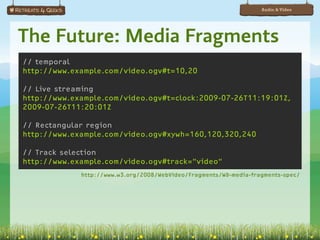
The Future: Media Fragments
// temporal
http://www.example.com/video.ogv#t=10,20

// Live streaming
http://www.example.com/video.ogv#t=clock:2009-07-26T11:19:01Z,
2009-07-26T11:20:01Z

// Rectangular region
http://www.example.com/video.ogv#xywh=160,120,320,240

// Track selection
http://www.example.com/video.ogv#track=”video”
             http://www.w3.org/2008/WebVideo/Fragments/WD-media-fragments-spec/
Audio & Video


The Future: Media Annotations
var title = song.getMediaProperty(["title"]);

if ( noErrorStatus(title[0].status) == true )
{
    // title = [ { "Title" : {
    //      "propertyName" : "title",
    //      "titleLabel" : "Artificial Horizon" ,
    //      "typeLink" : "http://www.ebu.ch/metadata/cs/
ebu_ObjectTypeCodeCS.xml#21",
    //      "typeLabel" : "Album title",
    //      "statusCode" : 200
    // } } ]
}
       http://dev.w3.org/2008/video/mediaann/mediaont-api-1.0/mediaont-api-1.0.html
Audio & Video


The Future: Timed Text
<video src="elephant.ogv" poster="elephant.png">
   <itext id="video_ar" lang="ar" type="text/srt"
          charset="Windows-1256" display="auto"
          src="elephant.ar.srt" category="SUB"></itext>
   <itext id="video_zh" lang="zh" type="text/srt"
          charset="GB18030" display="auto"
          src="elephant.zh.srt" category="SUB"></itext>
   <itext id="video_es" lang="es" type="text/srt"
          charset="ISO-8859" display="auto"
          src="elephant.es.srt" category="SUB"></itext>
   <itext id="audiodesc" lang="en" type="text/srt"
          charset="ISO-8859" display="yes"
          src="audiodescription.srt" category="TAD"></itext>
</video>
Audio & Video


The Future: Timed Text
<video src="elephant.ogv" poster="elephant.png">
   <track srclang="ar" src="elephant.ar.srt"
           label=”!"#$%&‫ ”ا‬kind="subtitles"/>
   <track srclang="zh" src="elephant.zh.srt"
          label=”汉语” kind="subtitles"/>
   <track srclang="es" src="elephant.es.srt"
          label=”Español” kind="subtitles"/>
   <track src="audiodescription.srt" kind="descriptions"
          label=”Audio Descriptions”/>
</video>
Audio & Video


The Future: Timed Text


    http://www.annodex.net/~silvia/itext/elephant_no_skin_v2.html
Audio & Video


             Slides available at
  http://slideshare.net/AaronGustafson

     This presentation is licensed under
             Creative Commons
Attribution-Noncommercial-Share Alike 3.0

               flickr Photo Credits
    “Revolutionary Technology…” by Jimee, Jackie, Tom & Asha
                   “08-jan-28” by sashafatcat
              “Revere EIGHT - 8mm…” by Kevitivity
              “Sausage Making Machinery” by erix!

HTML5 Audio & Video

  • 1.
    Audio &Video in HTML5 Aaron Gustafson EasyDesigns, LLC slideshare.net/AaronGustafson
  • 2.
  • 3.
    Audio & Video “Iwant to see the end of the plug-in” —HTML5
  • 4.
  • 5.
    Audio & Video Older browsers still need a fallback
  • 6.
    Audio & Video Older browsers still need a fallback (Usually Flash)
  • 7.
  • 8.
    Audio & Video Canyou hear me now? The audio element <audio src="my.oga" controls="controls"></audio>
  • 9.
    Audio & Video Canyou hear me now? Browser .aac .mp3 .oga .wav Chrome 6+ YES YES YES NO Firefox 3.6+ NO NO YES YES Internet Explorer 9+ YES YES NO YES Opera 10.5+ NO NO YES YES Safari 5+ YES YES NO YES
  • 10.
    Audio & Video Canyou hear me now? <audio controls="controls"> <source src="my.mp3"/> <source src="my.oga"/> <!-- fallback --> </audio>
  • 11.
    Audio & Video Availableattributes src URL for the audio file. autoplay A boolean specifying whether or not the file should play as soon as it can. loop A boolean specifying whether or not playback of the file should be repeated. controls A boolean that tells the browser to use its default media controls. preload Tells the browser what to content to preload. Options: “none,” “metadata,” and “auto.” autobuffer (deprecated) A boolean defining whether the file should be buffered in advance. Replaced by preload.
  • 12.
    Audio & Video Canyou hear me now? <audio controls="controls" autobuffer="autobuffer" preload="auto"> <source src="my.mp3"/> <source src="my.oga"/> <!-- fallback --> </audio>
  • 13.
    Audio & Video Fallbackoptions <audio controls="controls" autobuffer="autobuffer" preload="auto"> <source src="my.mp3"/> <source src="my.oga"/> <ul> <li><a href="my.mp3">Download as audio/mp3</a></li> <li><a href="my.oga">Download as audio/ogg</a></li> </ul> </audio>
  • 14.
    Audio & Video Fallbackoptions <audio controls="controls" autobuffer="autobuffer" preload="auto"> <source src="my.mp3"/> <source src="my.oga"/> <object …> <!-- flash player goes here --> </object> </audio>
  • 15.
    Audio & Video Fallbackoptions $('audio').each(function(){ var $audio = $(this), media = {}, formats = []; $audio.find('source').each(function(){ var src = $(this).attr('src'), ext = src.split('.').pop(); media[ext] = src; formats.push(ext); }); $audio.jPlayer({ swfPath: '/vendors/jPlayer', ready: function(){ $audio.jPlayer('setMedia', media); }, supplied: formats.join(', ') }); }); Using jQuery & jPlayer
  • 16.
    Audio & Video Rollyour own $('audio').each(function(){ var audio = this, $button = $('<button>Play</button>') .click(function(){ audio.play(); }); $(this) .removeAttr('controls') .after($button); }); Using jQuery
  • 17.
    Audio & Video Opiateof the masses
  • 18.
    Audio & Video Elementary,my dear Watson The video element <video src="my.ogv" controls="controls"></video>
  • 19.
    Audio & Video Notso elementary Video file = container file (like ZIP) ๏ 1 video track ๏ 1 (or more) audio tracks ๏ metadata ๏ subtitle/caption tracks (optional)
  • 20.
    Audio & Video Notso elementary Video formats Flash Video (.flv) Prior to 2008, the only video format supported in Adobe Flash. MPEG 4 (.m4v or .mp4) Based on QuickTime; iTunes uses this format. Ogg (.ogv) Open source container format. WebM (.webm) New format announced in May 2010.
  • 21.
    Audio & Video Notso elementary Video codecs H.264 Used primarily in MPEG 4. Only video codec natively supported on iOS. Patented. Theora Used primarily in Ogg. Royalty free. Supported in Firefox 3.5+ (in Ogg). VP8 Used primarily in WebM. Owned by Google, but licensed royalty-free.
  • 22.
    Audio & Video Notso elementary Audio codecs MP3 Nearly universal in usage, but was part of FLV. Patented. AAC (Advanced Audio Coding) Used primarily in MP4. Patented. Vorbis Used in Ogg audio & video as well as WebM. Royalty-free.
  • 23.
    Audio & Video Notso elementary Browser .m4v .ogv .webm (AAC + H.264) (Vorbis + Theora) (Vorbis + VP8) Chrome 3+ 3+ 6+ (for now) Firefox NO 3.5+ 4+ Internet Explorer 9+ NO MAYBE Opera NO 10.5+ 10.6+ Safari 3.1+ MAYBE MAYBE
  • 24.
    Audio & Video Formatjuggling <video controls="controls" width="640" height="480"> <source src="my.m4v"/> <source src="my.webm"/> <source src="my.ogv"/> <!-- fallback --> </video>
  • 25.
    Audio & Video Agood first impression <video controls="controls" width="640" height="480" poster="my.png"> <source src="my.m4v"/> <source src="my.webm"/> <source src="my.ogv"/> <!-- fallback --> </video>
  • 26.
    Audio & Video Kindnessto strangers <video controls="controls" width="640" height="480" poster="my.png"> <source src="my.m4v" type='video/mp4; codecs="avc1.42E01E, mp4a.40.2"'/> <source src="my.webm" type='video/webm; codecs="vp8, vorbis"'/> <source src="my.ogv" type='video/ogg; codecs="theora, vorbis"'/> <!-- fallback --> </video> Note: The MPEG 4 codec will depend on the encoding “profiles” you use.
  • 27.
    Audio & Video Availableattributes src URL for the audio file. autoplay A boolean specifying whether or not the file should play as soon as it can. loop A boolean specifying whether or not playback of the file should be repeated. controls A boolean that tells the browser to use its default media controls. poster The image to be shown while the video is not activated. preload Tells the browser what to content to preload. Options: “none,” “metadata,” and “auto.” autobuffer (deprecated) A boolean defining whether the file should be buffered in advance. Replaced by preload.
  • 28.
    Audio & Video NoMIME, no service AddType video/ogg .ogv AddType video/mp4 .mp4 AddType video/webm .webm
  • 29.
    Audio & Video Fallbackoptions <video width="600" height="400" poster="/r/2-5.png" controls="controls" preload="none"> <source src="/r/2-5.m4v" type="video/mp4"/> <source src="/r/2-5.webm" type="video/webm"/> <source src="/r/2-5.ogv" type="video/ogg"/> <img src="/r/2-5.png" width="600" height="400" alt=""/> <ul> <li><a href="/r/2-5.m4v">Download as video/mp4</a></li> <li><a href="/r/2-5.webm">Download as video/webm</a></li> <li><a href="/r/2-5.ogv">Download as video/ogg</a></li> </ul> </video>
  • 30.
    Audio & Video Fallbackoptions <video width="600" height="400" poster="/r/2-5.png" controls="controls" preload="none"> <source src="/r/2-5.m4v" type="video/mp4"/> <source src="/r/2-5.webm" type="video/webm"/> <source src="/r/2-5.ogv" type="video/ogg"/> <object width="600" height="400" type="application/x-shockwave-flash" data="flowplayer-3.2.1.swf"> <param name="movie" value="flowplayer-3.2.1.swf"/> <param name="allowfullscreen" value="true"/> <param name="flashvars" value='config={"clip": {"url": "/r/2-5.m4v", "autoPlay":false, "autoBuffering":true}}'/> <img src="/r/2-5.png" width="600" height="400" alt=""/> <ul><!-- links --></ul> </object> </video>
  • 31.
    Audio & Video Howthe sausage is made
  • 32.
    Audio & Video Toolsof the trade RoadMovie Firefogg
  • 33.
    Audio & Video Workingwith RoadMovie
  • 34.
    Audio & Video Workingwith RoadMovie
  • 35.
    Audio & Video Workingwith RoadMovie
  • 36.
    Audio & Video Workingwith RoadMovie Subtitle formats SubRip (.srt) SubViewer (.sub) SubStation Alpha (.ssa/.ass) MicroDVD
  • 37.
    Audio & Video Workingwith RoadMovie Subtitle formats SubRip (.srt) 1 00:01:31,041 --> 00:01:32,000 Hello? 2 00:02:10,164 --> 00:02:12,082 Good morning, is your mother in?
  • 38.
    Audio & Video Workingwith RoadMovie Subtitle formats SubViewer (.sub) 00:01:31.04,00:01:32.00 Hello? 00:02:10.16,00:02:12.08 Good morning, is your mother in?
  • 39.
    Audio & Video Workingwith RoadMovie
  • 40.
    Audio & Video Workingwith Firefogg
  • 41.
    Audio & Video Workingwith Firefogg
  • 42.
    Audio & Video Workingwith Firefogg
  • 43.
    Audio & Video Workingwith Firefogg
  • 44.
    Audio & Video Workingwith Firefogg
  • 45.
    Audio & Video Workingwith Firefogg
  • 46.
  • 47.
    Audio & Video TheFuture: Media Fragments // temporal http://www.example.com/video.ogv#t=10,20 // Live streaming http://www.example.com/video.ogv#t=clock:2009-07-26T11:19:01Z, 2009-07-26T11:20:01Z // Rectangular region http://www.example.com/video.ogv#xywh=160,120,320,240 // Track selection http://www.example.com/video.ogv#track=”video” http://www.w3.org/2008/WebVideo/Fragments/WD-media-fragments-spec/
  • 48.
    Audio & Video TheFuture: Media Annotations var title = song.getMediaProperty(["title"]); if ( noErrorStatus(title[0].status) == true ) { // title = [ { "Title" : { // "propertyName" : "title", // "titleLabel" : "Artificial Horizon" , // "typeLink" : "http://www.ebu.ch/metadata/cs/ ebu_ObjectTypeCodeCS.xml#21", // "typeLabel" : "Album title", // "statusCode" : 200 // } } ] } http://dev.w3.org/2008/video/mediaann/mediaont-api-1.0/mediaont-api-1.0.html
  • 49.
    Audio & Video TheFuture: Timed Text <video src="elephant.ogv" poster="elephant.png"> <itext id="video_ar" lang="ar" type="text/srt" charset="Windows-1256" display="auto" src="elephant.ar.srt" category="SUB"></itext> <itext id="video_zh" lang="zh" type="text/srt" charset="GB18030" display="auto" src="elephant.zh.srt" category="SUB"></itext> <itext id="video_es" lang="es" type="text/srt" charset="ISO-8859" display="auto" src="elephant.es.srt" category="SUB"></itext> <itext id="audiodesc" lang="en" type="text/srt" charset="ISO-8859" display="yes" src="audiodescription.srt" category="TAD"></itext> </video>
  • 50.
    Audio & Video TheFuture: Timed Text <video src="elephant.ogv" poster="elephant.png"> <track srclang="ar" src="elephant.ar.srt" label=”!"#$%&‫ ”ا‬kind="subtitles"/> <track srclang="zh" src="elephant.zh.srt" label=”汉语” kind="subtitles"/> <track srclang="es" src="elephant.es.srt" label=”Español” kind="subtitles"/> <track src="audiodescription.srt" kind="descriptions" label=”Audio Descriptions”/> </video>
  • 51.
    Audio & Video TheFuture: Timed Text http://www.annodex.net/~silvia/itext/elephant_no_skin_v2.html
  • 52.
    Audio & Video Slides available at http://slideshare.net/AaronGustafson This presentation is licensed under Creative Commons Attribution-Noncommercial-Share Alike 3.0 flickr Photo Credits “Revolutionary Technology…” by Jimee, Jackie, Tom & Asha “08-jan-28” by sashafatcat “Revere EIGHT - 8mm…” by Kevitivity “Sausage Making Machinery” by erix!