[Day Nine]
HTML Video, HTML Audio,
HTML Plug-ins, HTML
YouTube
Course: Web Design and Develop
Date: 2017/05/22
Lecturer: Mohammad Rafi Haidari
Last Lesson Conclusion!
• What does API stands for?
• Talk about HTML Geolocation
• Talk about HTML Drag and Drop
• Talk about HTML Local Storage
• Talk about HTML Web Workers
• Talk about HTML SSE
HTML Multimedia
Multimedia comes in many different formats. It can
be almost anything you can hear or see.
Examples: Images, music, sound, videos, records,
films, animations, and more.
Web pages often contain multimedia elements of
different types and formats.
Browser Support
The first web browsers had support for text only,
limited to a single font in a single color.
Later came browsers with support for colors and
fonts, and images!
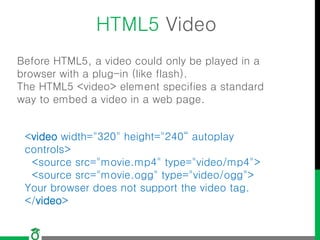
HTML5 Video
Before HTML5, a video could only be played in a
browser with a plug-in (like flash).
The HTML5 <video> element specifies a standard
way to embed a video in a web page.
<video width="320" height="240“ autoplay
controls>
<source src="movie.mp4" type="video/mp4">
<source src="movie.ogg" type="video/ogg">
Your browser does not support the video tag.
</video>
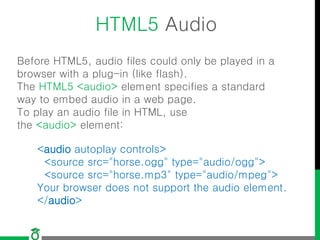
HTML5 Audio
Before HTML5, audio files could only be played in a
browser with a plug-in (like flash).
The HTML5 <audio> element specifies a standard
way to embed audio in a web page.
To play an audio file in HTML, use
the <audio> element:
<audio autoplay controls>
<source src="horse.ogg" type="audio/ogg">
<source src="horse.mp3" type="audio/mpeg">
Your browser does not support the audio element.
</audio>
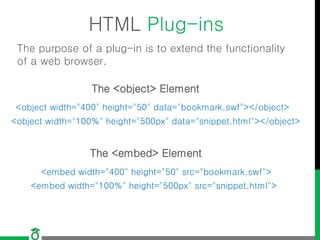
HTML Plug-ins
The purpose of a plug-in is to extend the functionality
of a web browser.
The <object> Element
<object width="400" height="50" data="bookmark.swf"></object>
<object width="100%" height="500px" data="snippet.html"></object>
The <embed> Element
<embed width="400" height="50" src="bookmark.swf">
<embed width="100%" height="500px" src="snippet.html">
HTML YouTube Videos
The easiest way to play videos in HTML, is to use
YouTube.
<iframe width="420" height="315"
src="https://www.youtube.com/embed/XGSy3_Czz8k?autoplay=1">
</iframe>
<object width="420" height="315"
data="https://www.youtube.com/embed/XGSy3_Czz8k">
</object>
Using iFrame (recommended)
<embed width="420" height="315"
src="https://www.youtube.com/embed/XGSy3_Czz8k">
Using <object> (deprecated)
Using <embed> (deprecated)
Lesson Conclusion Game!
• What are Multimedia?
• The first web browsers had support multiple fonts
and colors
• Tags and attributes for inserting Videos in HTML
• Tags and attributes for inserting Audios in HTML
• What are plugins in HTML?
• How to insert videos fro Youtube?
Question?
Thank you!

Lecture9 web design and development

  • 1.
    [Day Nine] HTML Video,HTML Audio, HTML Plug-ins, HTML YouTube Course: Web Design and Develop Date: 2017/05/22 Lecturer: Mohammad Rafi Haidari
  • 2.
    Last Lesson Conclusion! •What does API stands for? • Talk about HTML Geolocation • Talk about HTML Drag and Drop • Talk about HTML Local Storage • Talk about HTML Web Workers • Talk about HTML SSE
  • 3.
    HTML Multimedia Multimedia comesin many different formats. It can be almost anything you can hear or see. Examples: Images, music, sound, videos, records, films, animations, and more. Web pages often contain multimedia elements of different types and formats.
  • 4.
    Browser Support The firstweb browsers had support for text only, limited to a single font in a single color. Later came browsers with support for colors and fonts, and images!
  • 5.
    HTML5 Video Before HTML5,a video could only be played in a browser with a plug-in (like flash). The HTML5 <video> element specifies a standard way to embed a video in a web page. <video width="320" height="240“ autoplay controls> <source src="movie.mp4" type="video/mp4"> <source src="movie.ogg" type="video/ogg"> Your browser does not support the video tag. </video>
  • 6.
    HTML5 Audio Before HTML5,audio files could only be played in a browser with a plug-in (like flash). The HTML5 <audio> element specifies a standard way to embed audio in a web page. To play an audio file in HTML, use the <audio> element: <audio autoplay controls> <source src="horse.ogg" type="audio/ogg"> <source src="horse.mp3" type="audio/mpeg"> Your browser does not support the audio element. </audio>
  • 7.
    HTML Plug-ins The purposeof a plug-in is to extend the functionality of a web browser. The <object> Element <object width="400" height="50" data="bookmark.swf"></object> <object width="100%" height="500px" data="snippet.html"></object> The <embed> Element <embed width="400" height="50" src="bookmark.swf"> <embed width="100%" height="500px" src="snippet.html">
  • 8.
    HTML YouTube Videos Theeasiest way to play videos in HTML, is to use YouTube. <iframe width="420" height="315" src="https://www.youtube.com/embed/XGSy3_Czz8k?autoplay=1"> </iframe> <object width="420" height="315" data="https://www.youtube.com/embed/XGSy3_Czz8k"> </object> Using iFrame (recommended) <embed width="420" height="315" src="https://www.youtube.com/embed/XGSy3_Czz8k"> Using <object> (deprecated) Using <embed> (deprecated)
  • 9.
    Lesson Conclusion Game! •What are Multimedia? • The first web browsers had support multiple fonts and colors • Tags and attributes for inserting Videos in HTML • Tags and attributes for inserting Audios in HTML • What are plugins in HTML? • How to insert videos fro Youtube?
  • 10.
  • 11.