How To Use The Excel Basic Functions
Advance excel training in Chandigarh
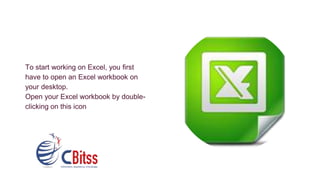
To start working on Excel, you first
have to open an Excel workbook on
your desktop.
Open your Excel workbook by double-
clicking on this icon
Here are some
important tools Excel
For Beginners
Menu Bar:
Toolbars
Formula Bar
Cell Name Box
Cell Editor
Column Headings
Row Headings
Status Bar
Worksheet Tabs
Task Pane
Let’s understand the different
basic navigation panes which
one can use in Excel For
Beginners
To Move Command
One Cell Up, Down, Left or
Right
Up One Screen [PAGE UP]
Down One Screen [PAGE DOWN]
Left One Screen [ALT][PAGE UP]
Right One Screen [ALT][PAGE DOWN]
To Edge of Worksheet (or
current block of data)
[CTRL][Relevant Arrow Key]
To a Particular Cell [F5] then type the reference
for the cell required & press
Return
To column A in the current
row
[HOME]
To cell A1 [CTRL][HOME]
Moving between
the workbook
sheets
Each new workbook has
worksheets, which are
sheets of Sheet1 called 3.
The name of the sheet
appears on a tab bottom
the workbook window
Click on the appropriate tab
If the required sheet is not
kept in view, then use the
tab scrolling button to
display the sheet.
To move to the previous
sheet, press CTRL Page
below to go to the next
sheet or CTRL PAGE UP
Excel Basic Functions –
Entering Values:
Enter - When data is entered; Active cell will be
next cell bottom
Tab - Enter the text and go to the next cell on the
right
Arrow key - enter text and go to another cell
ESC - If you made a mistake and you want to
cancel or edit your entry
Data can be text or numeric
The text is defined as a combination of numbers
and letters.
Numeric entries are limited to numbers
Here are some Editing the Data point for Excel For Beginners
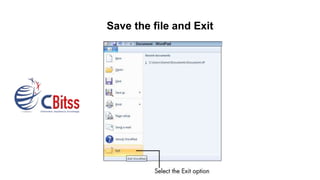
Save the file and Exit
For view youtube video click this link- https://youtu.be/HVPITP2Uoxk
CBitss technologies
Address: Sector 34A, sco-23,24,25, near passport office,
Chandigarh, 160022
Phone no : 9914641983
Website: cbitss.co.in/advance-excel-training-in-chandigarh.html

How to use the excel basic functions

  • 1.
    How To UseThe Excel Basic Functions Advance excel training in Chandigarh
  • 2.
    To start workingon Excel, you first have to open an Excel workbook on your desktop. Open your Excel workbook by double- clicking on this icon
  • 3.
    Here are some importanttools Excel For Beginners Menu Bar: Toolbars Formula Bar Cell Name Box Cell Editor Column Headings Row Headings Status Bar Worksheet Tabs Task Pane
  • 4.
    Let’s understand thedifferent basic navigation panes which one can use in Excel For Beginners To Move Command One Cell Up, Down, Left or Right Up One Screen [PAGE UP] Down One Screen [PAGE DOWN] Left One Screen [ALT][PAGE UP] Right One Screen [ALT][PAGE DOWN] To Edge of Worksheet (or current block of data) [CTRL][Relevant Arrow Key] To a Particular Cell [F5] then type the reference for the cell required & press Return To column A in the current row [HOME] To cell A1 [CTRL][HOME]
  • 5.
    Moving between the workbook sheets Eachnew workbook has worksheets, which are sheets of Sheet1 called 3. The name of the sheet appears on a tab bottom the workbook window Click on the appropriate tab If the required sheet is not kept in view, then use the tab scrolling button to display the sheet. To move to the previous sheet, press CTRL Page below to go to the next sheet or CTRL PAGE UP
  • 6.
    Excel Basic Functions– Entering Values: Enter - When data is entered; Active cell will be next cell bottom Tab - Enter the text and go to the next cell on the right Arrow key - enter text and go to another cell ESC - If you made a mistake and you want to cancel or edit your entry Data can be text or numeric The text is defined as a combination of numbers and letters. Numeric entries are limited to numbers
  • 7.
    Here are someEditing the Data point for Excel For Beginners
  • 8.
    Save the fileand Exit
  • 9.
    For view youtubevideo click this link- https://youtu.be/HVPITP2Uoxk
  • 10.
    CBitss technologies Address: Sector34A, sco-23,24,25, near passport office, Chandigarh, 160022 Phone no : 9914641983 Website: cbitss.co.in/advance-excel-training-in-chandigarh.html