How to use SMTP endpoint
16-05-2015
Abstract
• The main motto of this PPT is How to use
SMTP endpoint in our applications.
Introduction
• The SMTP transport can be used for sending
messages over SMTP using thejavax.mail API. The
implementation supports CC/BCC/ReplyTo
addresses, attachments and custom Header
properties. It also provides support
forjavax.mail.Message transformation. The
SMTPS connector enables SMTP over SSL using
the javax.mail APIs. It supports all the elements
and attributes of the SMTP transport, plus some
required properties for setting up the client key
store and the trust store for the SSL connection.
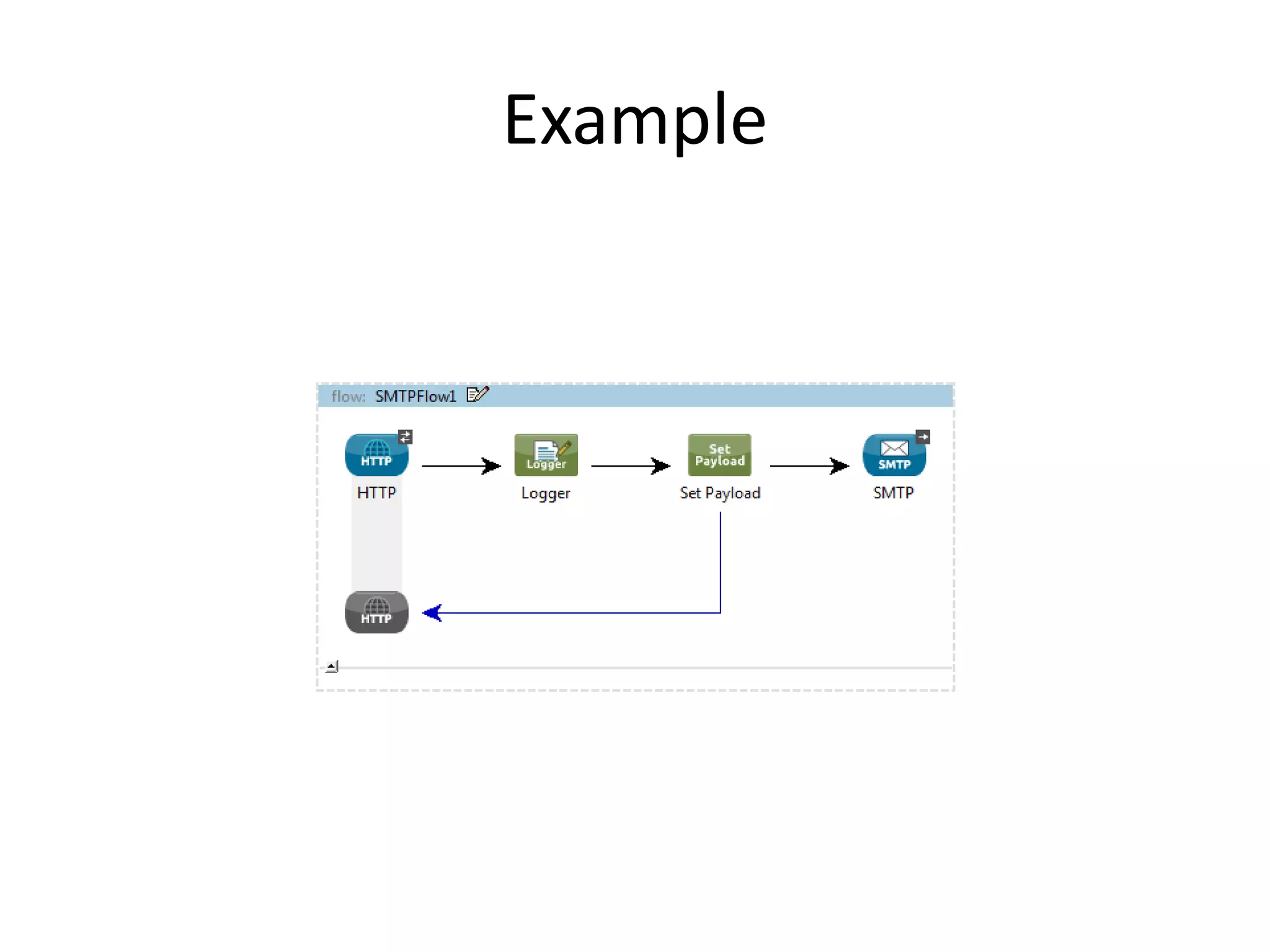
Example
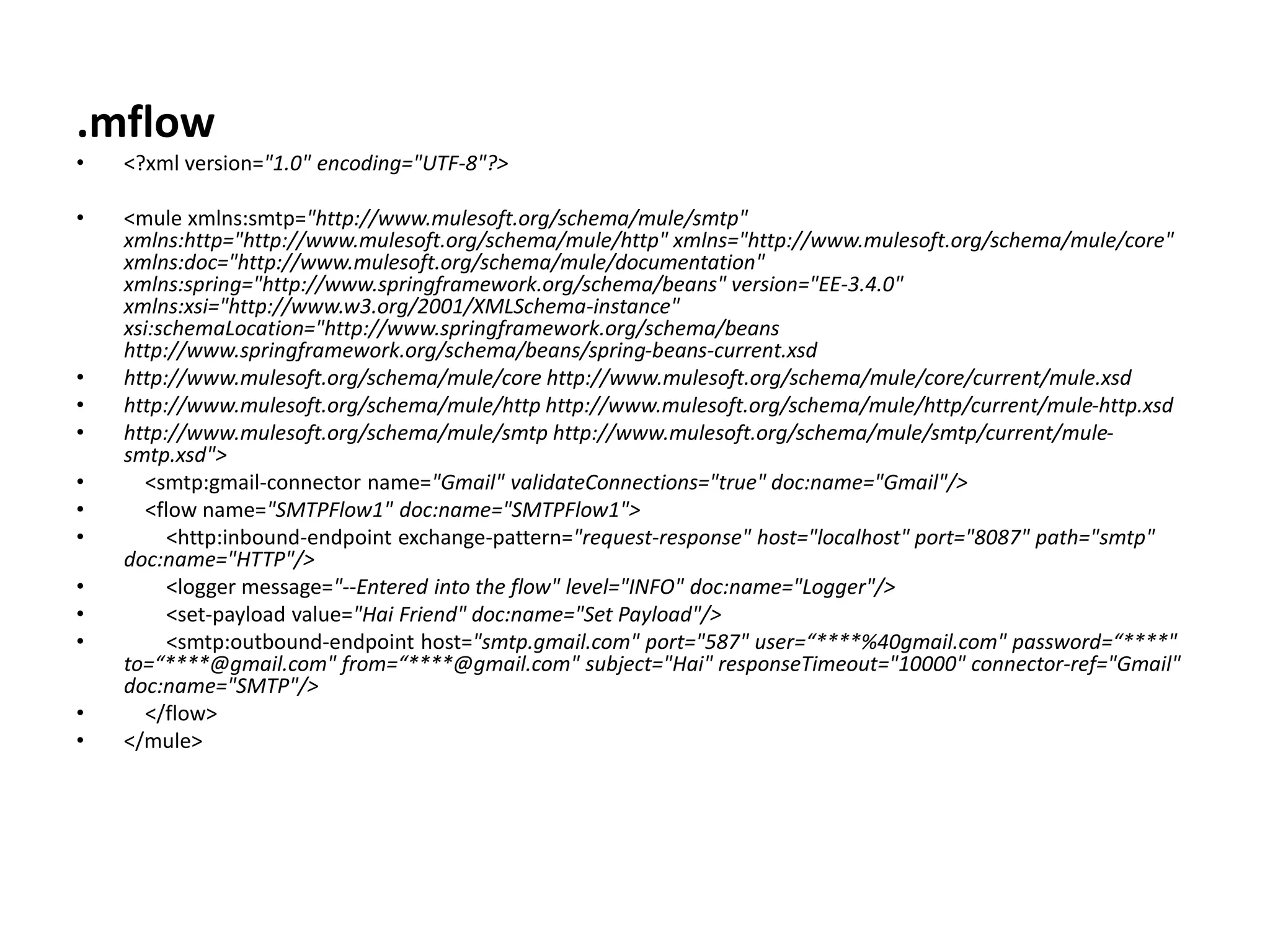
.mflow
• <?xml version="1.0" encoding="UTF-8"?>
• <mule xmlns:smtp="http://www.mulesoft.org/schema/mule/smtp"
xmlns:http="http://www.mulesoft.org/schema/mule/http" xmlns="http://www.mulesoft.org/schema/mule/core"
xmlns:doc="http://www.mulesoft.org/schema/mule/documentation"
xmlns:spring="http://www.springframework.org/schema/beans" version="EE-3.4.0"
xmlns:xsi="http://www.w3.org/2001/XMLSchema-instance"
xsi:schemaLocation="http://www.springframework.org/schema/beans
http://www.springframework.org/schema/beans/spring-beans-current.xsd
• http://www.mulesoft.org/schema/mule/core http://www.mulesoft.org/schema/mule/core/current/mule.xsd
• http://www.mulesoft.org/schema/mule/http http://www.mulesoft.org/schema/mule/http/current/mule-http.xsd
• http://www.mulesoft.org/schema/mule/smtp http://www.mulesoft.org/schema/mule/smtp/current/mule-
smtp.xsd">
• <smtp:gmail-connector name="Gmail" validateConnections="true" doc:name="Gmail"/>
• <flow name="SMTPFlow1" doc:name="SMTPFlow1">
• <http:inbound-endpoint exchange-pattern="request-response" host="localhost" port="8087" path="smtp"
doc:name="HTTP"/>
• <logger message="--Entered into the flow" level="INFO" doc:name="Logger"/>
• <set-payload value="Hai Friend" doc:name="Set Payload"/>
• <smtp:outbound-endpoint host="smtp.gmail.com" port="587" user=“****%40gmail.com" password=“****"
to=“****@gmail.com" from=“****@gmail.com" subject="Hai" responseTimeout="10000" connector-ref="Gmail"
doc:name="SMTP"/>
• </flow>
• </mule>
• Output:
• Email will come to your inbox
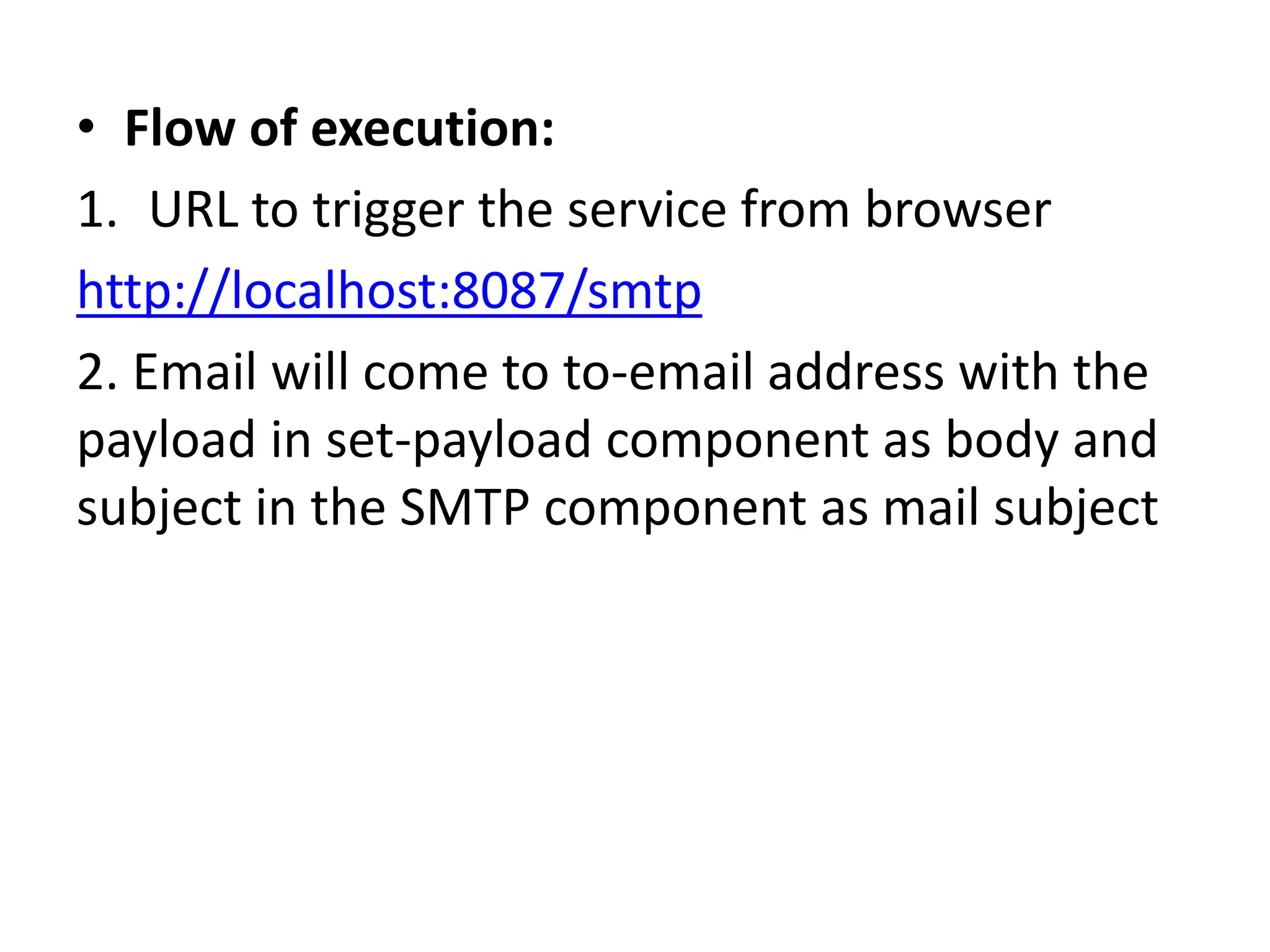
• Flow of execution:
1. URL to trigger the service from browser
http://localhost:8087/smtp
2. Email will come to to-email address with the
payload in set-payload component as body and
subject in the SMTP component as mail subject
References
• https://docs.mulesoft.com/mule-user-
guide/v/3.7/smtp-transport-reference

How to use smtp endpoint

  • 1.
    How to useSMTP endpoint 16-05-2015
  • 2.
    Abstract • The mainmotto of this PPT is How to use SMTP endpoint in our applications.
  • 3.
    Introduction • The SMTPtransport can be used for sending messages over SMTP using thejavax.mail API. The implementation supports CC/BCC/ReplyTo addresses, attachments and custom Header properties. It also provides support forjavax.mail.Message transformation. The SMTPS connector enables SMTP over SSL using the javax.mail APIs. It supports all the elements and attributes of the SMTP transport, plus some required properties for setting up the client key store and the trust store for the SSL connection.
  • 4.
  • 5.
    .mflow • <?xml version="1.0"encoding="UTF-8"?> • <mule xmlns:smtp="http://www.mulesoft.org/schema/mule/smtp" xmlns:http="http://www.mulesoft.org/schema/mule/http" xmlns="http://www.mulesoft.org/schema/mule/core" xmlns:doc="http://www.mulesoft.org/schema/mule/documentation" xmlns:spring="http://www.springframework.org/schema/beans" version="EE-3.4.0" xmlns:xsi="http://www.w3.org/2001/XMLSchema-instance" xsi:schemaLocation="http://www.springframework.org/schema/beans http://www.springframework.org/schema/beans/spring-beans-current.xsd • http://www.mulesoft.org/schema/mule/core http://www.mulesoft.org/schema/mule/core/current/mule.xsd • http://www.mulesoft.org/schema/mule/http http://www.mulesoft.org/schema/mule/http/current/mule-http.xsd • http://www.mulesoft.org/schema/mule/smtp http://www.mulesoft.org/schema/mule/smtp/current/mule- smtp.xsd"> • <smtp:gmail-connector name="Gmail" validateConnections="true" doc:name="Gmail"/> • <flow name="SMTPFlow1" doc:name="SMTPFlow1"> • <http:inbound-endpoint exchange-pattern="request-response" host="localhost" port="8087" path="smtp" doc:name="HTTP"/> • <logger message="--Entered into the flow" level="INFO" doc:name="Logger"/> • <set-payload value="Hai Friend" doc:name="Set Payload"/> • <smtp:outbound-endpoint host="smtp.gmail.com" port="587" user=“****%40gmail.com" password=“****" to=“****@gmail.com" from=“****@gmail.com" subject="Hai" responseTimeout="10000" connector-ref="Gmail" doc:name="SMTP"/> • </flow> • </mule>
  • 6.
    • Output: • Emailwill come to your inbox
  • 7.
    • Flow ofexecution: 1. URL to trigger the service from browser http://localhost:8087/smtp 2. Email will come to to-email address with the payload in set-payload component as body and subject in the SMTP component as mail subject
  • 8.