What is Mule ESB ?
 Mule ESB is a lightweight Java-based
enterprise service bus (ESB) and
integration platform that allows developers
to connect applications together quickly
and easily, enabling them to exchange
data. Mule ESB enables easy integration of
existing systems, regardless of the different
technologies that the applications use,
including JMS, Web Services, JDBC,
HTTP, and more.
 This example shows how we can send email
attachment using SMTP connector to self or another
email. We simply put a file in a source directory and
Mule will read the file from the source directory.
Using Mule ESB it’s very easy to read the file from a
location. If we had to read the file using manual
coding then we had to write many lines of code. But
using Mule ESB we just simply put a file in a
directory and let the Mule know the file path and
Mule does the rest of the thing. You can put any
kind of file to the source for reading. The file that we
put into a source directory will be an attachment to
the intended recipient’s mail address. So finally
when we will see the file as an attachment in the
mailbox.
What is Attachment
transformer ?
 Attachment transformer lets us attach a
file or document which will be sent to the
email address.
What is SMTP connector ?
 The SMTP endpoint allows Mule
messages to be sent as email or email
attachments with the Simple Mail
Transfer Protocol (SMTP) using Java
mail API.
Prerequisites
 Mule Studio 3.5.1
JDK 1.6
Maven 3
Mule Runtime 3.5.0 CE
Knowledge of XML
 Open Mule Studio and create a mule project.
Go to File->New->Mule Project. Now enter the
Project Name, selectRuntime – Mule Server,
check the check box for Use Maven. Now enter
the following information
 Group Id: your Mail(ex. gmail.com)
Artifact Id: project name – file-
attachment(automatically populated when
project name is getting typed)
V
 Click Next and verify project Location and
JRE/JDK are set correctly. Click
Finishersion: Mule studio generates default
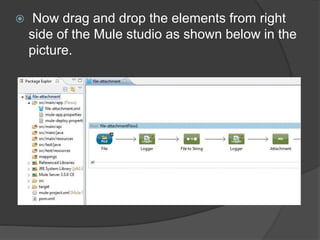
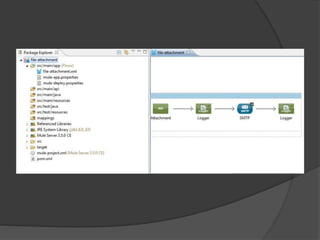
 Now drag and drop the elements from right
side of the Mule studio as shown below in the
picture.
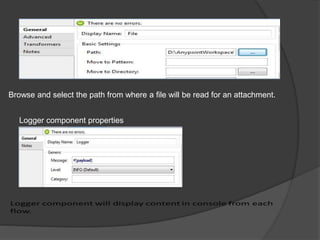
Browse and select the path from where a file will be read for an attachment.
Logger component properties
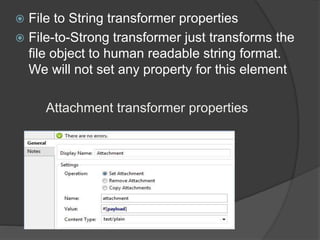
 File to String transformer properties
 File-to-Strong transformer just transforms the
file object to human readable string format.
We will not set any property for this element
Attachment transformer properties
 Using attachment transformer we can set
payload from previous flow as an attachment.
We have to select Content Type, operation as
Set Attachment, Name, Value
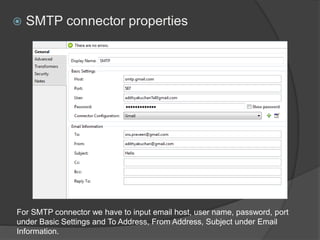
 SMTP connector properties
For SMTP connector we have to input email host, user name, password, port
under Basic Settings and To Address, From Address, Subject under Email
Information.
 The whole XML file of entire flow
 <?xml version="1.0" encoding="UTF-8"?>

 <mule xmlns:smtp="http://www.mulesoft.org/schema/mule/smtp"
 xmlns:file="http://www.mulesoft.org/schema/mule/file" xmlns="http://www.mulesoft.org/schema/mule/core"
 xmlns:doc="http://www.mulesoft.org/schema/mule/documentation"
 xmlns:spring="http://www.springframework.org/schema/beans" version="CE-3.5.0"
 xmlns:xsi="http://www.w3.org/2001/XMLSchema-instance"
 xsi:schemaLocation="http://www.springframework.org/schema/beans
http://www.springframework.org/schema/beans/spring-beans-current.xsd
 http://www.mulesoft.org/schema/mule/core http://www.mulesoft.org/schema/mule/core/current/mule.xsd
 http://www.mulesoft.org/schema/mule/file http://www.mulesoft.org/schema/mule/file/current/mule-file.xsd
 http://www.mulesoft.org/schema/mule/smtp http://www.mulesoft.org/schema/mule/smtp/current/mule-smtp.xsd">
 <flow name="file-attachmentFlow1" doc:name="file-attachmentFlow1">
 <file:inbound-endpoint path="D:AnypointWorkspacesource"
 responseTimeout="10000" doc:name="File" />
 <logger message="#[payload]" level="INFO" doc:name="Logger" />
 <file:file-to-string-transformer
 doc:name="File to String" />
 <logger message="#[payload]" level="INFO" doc:name="Logger" />
 <set-attachment attachmentName="attachment" value="#[payload]"
 contentType="text/plain" doc:name="Attachment" />
 <logger message="#[payload]" level="INFO" doc:name="Logger" />
 <smtp:outbound-endpoint host="mail.domain.com"
 user="emailAddress@domain.com" password="password" to="emailAddress@domain.com"
 from="emailAddress@domain.com" subject="Test Email" responseTimeout="10000"
 doc:name="SMTP" />
 <logger message="#[payload]" level="INFO" doc:name="Logger" />
 </flow>
 </mule>
 Now create a text file called file-
attachment.txt and put it under selected path,
i.e., as per the above XML the file path
is D:AnypointWorkspacesource.
 Do right-click on file-attachment.xml and click
on Run As -> Mule Application with Maven.
Once the application up and running you will get
the console output and email attachment in your
mailbox where you have sent the email.
 Output in console
 INFO 2015-03-05 09:25:46,372 [[file-
attachment].connector.file.mule.default.receiver.01]
org.mule.transport.file.FileMessageReceiver: Lock obtained on file:
D:AnypointWorkspacesourcefile-attachment.txt
 INFO 2015-03-05 09:25:46,404 [[file-attachment].file-attachmentFlow1.stage1.02]
org.mule.api.processor.LoggerMessageProcessor:
org.mule.transport.file.ReceiverFileInputStream@6a150e
 INFO 2015-03-05 09:25:46,406 [[file-attachment].file-attachmentFlow1.stage1.02]
org.mule.api.processor.LoggerMessageProcessor: This is a file content
 INFO 2015-03-05 09:25:46,407 [[file-attachment].file-attachmentFlow1.stage1.02]
org.mule.api.processor.LoggerMessageProcessor: This is a file content
 INFO 2015-03-05 09:25:46,419 [[file-attachment].file-attachmentFlow1.stage1.02]
org.mule.api.processor.LoggerMessageProcessor: This is a file content
 INFO 2015-03-05 09:25:46,422 [[file-
attachment].connector.smtp.mule.default.dispatcher.01]
org.mule.transport.service.DefaultTransportServiceDescriptor: Loading default
outbound transformer: org.mule.transport.email.transformers.ObjectToMimeMessage
 INFO 2015-03-05 09:25:46,428 [[file-
attachment].connector.smtp.mule.default.dispatcher.01]
org.mule.lifecycle.AbstractLifecycleManager: Initialising:
'connector.smtp.mule.default.dispatcher.1213248'. Object is:
SmtpMessageDispatcher
 INFO 2015-03-05 09:25:48,878 [[file-
attachment].connector.smtp.mule.default.dispatcher.01]
org.mule.lifecycle.AbstractLifecycleManager: Starting:
'connector.smtp.mule.default.dispatcher.1213248'. Object is:
SmtpMessageDispatcher
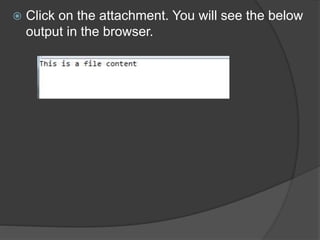
 Click on the attachment. You will see the below
output in the browser.
THANK YOU

Send email attachment using smtp in mule esb

  • 2.
    What is MuleESB ?  Mule ESB is a lightweight Java-based enterprise service bus (ESB) and integration platform that allows developers to connect applications together quickly and easily, enabling them to exchange data. Mule ESB enables easy integration of existing systems, regardless of the different technologies that the applications use, including JMS, Web Services, JDBC, HTTP, and more.
  • 3.
     This exampleshows how we can send email attachment using SMTP connector to self or another email. We simply put a file in a source directory and Mule will read the file from the source directory. Using Mule ESB it’s very easy to read the file from a location. If we had to read the file using manual coding then we had to write many lines of code. But using Mule ESB we just simply put a file in a directory and let the Mule know the file path and Mule does the rest of the thing. You can put any kind of file to the source for reading. The file that we put into a source directory will be an attachment to the intended recipient’s mail address. So finally when we will see the file as an attachment in the mailbox.
  • 4.
    What is Attachment transformer?  Attachment transformer lets us attach a file or document which will be sent to the email address.
  • 5.
    What is SMTPconnector ?  The SMTP endpoint allows Mule messages to be sent as email or email attachments with the Simple Mail Transfer Protocol (SMTP) using Java mail API.
  • 6.
    Prerequisites  Mule Studio3.5.1 JDK 1.6 Maven 3 Mule Runtime 3.5.0 CE Knowledge of XML
  • 7.
     Open MuleStudio and create a mule project. Go to File->New->Mule Project. Now enter the Project Name, selectRuntime – Mule Server, check the check box for Use Maven. Now enter the following information  Group Id: your Mail(ex. gmail.com) Artifact Id: project name – file- attachment(automatically populated when project name is getting typed) V  Click Next and verify project Location and JRE/JDK are set correctly. Click Finishersion: Mule studio generates default
  • 8.
     Now dragand drop the elements from right side of the Mule studio as shown below in the picture.
  • 10.
    Browse and selectthe path from where a file will be read for an attachment. Logger component properties
  • 11.
     File toString transformer properties  File-to-Strong transformer just transforms the file object to human readable string format. We will not set any property for this element Attachment transformer properties
  • 12.
     Using attachmenttransformer we can set payload from previous flow as an attachment. We have to select Content Type, operation as Set Attachment, Name, Value
  • 13.
     SMTP connectorproperties For SMTP connector we have to input email host, user name, password, port under Basic Settings and To Address, From Address, Subject under Email Information.
  • 14.
     The wholeXML file of entire flow  <?xml version="1.0" encoding="UTF-8"?>   <mule xmlns:smtp="http://www.mulesoft.org/schema/mule/smtp"  xmlns:file="http://www.mulesoft.org/schema/mule/file" xmlns="http://www.mulesoft.org/schema/mule/core"  xmlns:doc="http://www.mulesoft.org/schema/mule/documentation"  xmlns:spring="http://www.springframework.org/schema/beans" version="CE-3.5.0"  xmlns:xsi="http://www.w3.org/2001/XMLSchema-instance"  xsi:schemaLocation="http://www.springframework.org/schema/beans http://www.springframework.org/schema/beans/spring-beans-current.xsd  http://www.mulesoft.org/schema/mule/core http://www.mulesoft.org/schema/mule/core/current/mule.xsd  http://www.mulesoft.org/schema/mule/file http://www.mulesoft.org/schema/mule/file/current/mule-file.xsd  http://www.mulesoft.org/schema/mule/smtp http://www.mulesoft.org/schema/mule/smtp/current/mule-smtp.xsd">  <flow name="file-attachmentFlow1" doc:name="file-attachmentFlow1">  <file:inbound-endpoint path="D:AnypointWorkspacesource"  responseTimeout="10000" doc:name="File" />  <logger message="#[payload]" level="INFO" doc:name="Logger" />  <file:file-to-string-transformer  doc:name="File to String" />  <logger message="#[payload]" level="INFO" doc:name="Logger" />  <set-attachment attachmentName="attachment" value="#[payload]"  contentType="text/plain" doc:name="Attachment" />  <logger message="#[payload]" level="INFO" doc:name="Logger" />  <smtp:outbound-endpoint host="mail.domain.com"  user="emailAddress@domain.com" password="password" to="emailAddress@domain.com"  from="emailAddress@domain.com" subject="Test Email" responseTimeout="10000"  doc:name="SMTP" />  <logger message="#[payload]" level="INFO" doc:name="Logger" />  </flow>  </mule>
  • 15.
     Now createa text file called file- attachment.txt and put it under selected path, i.e., as per the above XML the file path is D:AnypointWorkspacesource.  Do right-click on file-attachment.xml and click on Run As -> Mule Application with Maven. Once the application up and running you will get the console output and email attachment in your mailbox where you have sent the email.
  • 16.
     Output inconsole  INFO 2015-03-05 09:25:46,372 [[file- attachment].connector.file.mule.default.receiver.01] org.mule.transport.file.FileMessageReceiver: Lock obtained on file: D:AnypointWorkspacesourcefile-attachment.txt  INFO 2015-03-05 09:25:46,404 [[file-attachment].file-attachmentFlow1.stage1.02] org.mule.api.processor.LoggerMessageProcessor: org.mule.transport.file.ReceiverFileInputStream@6a150e  INFO 2015-03-05 09:25:46,406 [[file-attachment].file-attachmentFlow1.stage1.02] org.mule.api.processor.LoggerMessageProcessor: This is a file content  INFO 2015-03-05 09:25:46,407 [[file-attachment].file-attachmentFlow1.stage1.02] org.mule.api.processor.LoggerMessageProcessor: This is a file content  INFO 2015-03-05 09:25:46,419 [[file-attachment].file-attachmentFlow1.stage1.02] org.mule.api.processor.LoggerMessageProcessor: This is a file content  INFO 2015-03-05 09:25:46,422 [[file- attachment].connector.smtp.mule.default.dispatcher.01] org.mule.transport.service.DefaultTransportServiceDescriptor: Loading default outbound transformer: org.mule.transport.email.transformers.ObjectToMimeMessage  INFO 2015-03-05 09:25:46,428 [[file- attachment].connector.smtp.mule.default.dispatcher.01] org.mule.lifecycle.AbstractLifecycleManager: Initialising: 'connector.smtp.mule.default.dispatcher.1213248'. Object is: SmtpMessageDispatcher  INFO 2015-03-05 09:25:48,878 [[file- attachment].connector.smtp.mule.default.dispatcher.01] org.mule.lifecycle.AbstractLifecycleManager: Starting: 'connector.smtp.mule.default.dispatcher.1213248'. Object is: SmtpMessageDispatcher
  • 17.
     Click onthe attachment. You will see the below output in the browser.
  • 18.