By : Sourabh Aggarwal & Sumit Gole
Date : 21 OCT 2015
●
Mule ESB is a lightweight Java-based enterprise service bus (ESB) and integration platform that allows
developers to connect applications together quickly and easily, enabling them to exchange data. Mule ESB
enables easy integration of existing systems, regardless of the different technologies that the applications use,
including JMS, Web Services, JDBC, HTTP, and more.
● The key advantage of an ESB is that it allows different applications to communicate with each other by acting as
a transit system for carrying data between applications within your enterprise or across the Internet. Mule ESB
includes powerful capabilities that include:
– Service creation and hosting — expose and host reusable services, using Mule ESB as a lightweight service container
– Service mediation — shield services from message formats and protocols, separate business logic from messaging, and
enable location-independent service calls
– Message routing — route, filter, aggregate, and re-sequence messages based on content and rules
– Data transformation — exchange data across varying formats and transport protocols.
What is Mule?
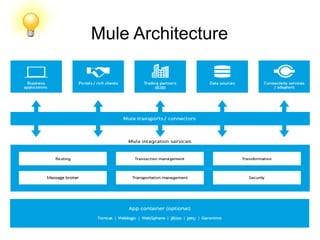
Mule Architecture
Component
●
Anypoint Platform - Transform your business with API-led
connectivity.
●
Mule runtime engine - Deploy an ESB, iPaaS or API gateway on
a single, unified runtime.
●
Studio - Connect apps and data on our powerful IDE
●
API Designer - Build, design and test enterprise grade APIs,
using RAML.
●
API Manager - Generate proxies, or apply pre-built or custom
policies with clicks.
●
Analytics - Get real-time views on API consumption and
performance.
●
API Portal - Create a rich onramp for your API with docs, sample
code, and interactive tools.
Component
●
Anypoint Platform - Transform your business with API-led
connectivity.
●
Mule runtime engine - Deploy an ESB, iPaaS or API gateway on
a single, unified runtime.
●
Studio - Connect apps and data on our powerful IDE
●
API Designer - Build, design and test enterprise grade APIs,
using RAML.
●
API Manager - Generate proxies, or apply pre-built or custom
policies with clicks.
●
Analytics - Get real-time views on API consumption and
performance.
●
API Portal - Create a rich onramp for your API with docs, sample
code, and interactive tools.
Mule Connectors.
https://docs.mulesoft.com/mule-fundamentals/v/3.7/mule-connectors
SFTP Transport
●
We can use the SFTP transport to download from or upload to a secured
resource accessible via SFTP. This transport does not currently support
transactions or retry policies. Some uses for the SFTP transport are
downloading data into a database and picking up files and uploading them via
SFTP.
●
We can use this transport to implement the file transfer Enterprise Integration
Pattern. As explained in the EIP book, the file transfer pattern allows you to
loosely couple two applications together, with delays in processing time
●
Using the SFTP transport allows you to optionally use streaming support for
larger files and asynchronous and synchronously chain other endpoints with
an SFTP endpoint. It also allows you to use Mule’s robust error handling in
your Mule application.
●
Features:
1. Streaming support of resources.
2. For inbound endpoints, poll the resource at a specified interval.
3. For outbound endpoints, choices on how to handle duplicate files: throw and
exception, overwrite, append a sequence number to the file name.
SFTP Transport
●
The Secure Shell (SSH) File Transfer Protocol (SFTP) transport
allows files to be read and written to and from directories over
SFTP. Unlike the Virtual File System (VFS) transport, it can
handle large files because it streams message payloads. The
SFTP transport can be used as an inbound or an outbound
endpoint. Files can be retrieved from an SFTP server and
processed as Mule messages, or Mule messages can be
uploaded as files to an SFTP server. Mule uses the JCraft library
for SFTP SSH.
●
XML Namespace:
xmlns:sftp="http://www.mulesoft.org/schema/mule/sftp"
●
XML Schema Location:
http://www.mulesoft.org/schema/mule/sftp
http://www.mulesoft.org/schema/mule/sftp/3.7/mule-sftp.xsd
SFTP Transport
●
Connector Syntax:
<sftp:connector name="sftp-default" archiveDir=""
archiveTempReceivingDir="/tmp/get"
archiveTempSendingDir="/tmp/send" autoDelete="true"
duplicateHandling="throwException" fileAge="60000"
identityFile="/home/sourabh/.ssh/id_rsa" keepFileOnError="false"
outputPattern="#[message.inboundProperties.originalFilename]"
passphrase="passPhrase" pollingFrequency="10000"
sizeCheckWaitTime="30000" tempDirInbound="/tmp/inbound"
tempDirOutbound="/tmp/outbound"
useTempFileTimestampSuffix="true" />
SFTP Transport
●
Endpoint Syntax :
We can define your endpoints two different ways:
●
Prefixed endpoint:
<sftp:inbound-endpoint user="sourabh" password="sa"
path="/tmp/sftp" host="localhost" pollingFrequency="500"
name="inboundEndpoint1"/>
<sftp:outbound-endpoint user="sourabh" password="sa"
path="/tmp/sftp" host="localhost" name="outboundEndpoint2"
keepFileOnError="false"/>
●
Non-prefixed URI:
<inbound-endpoint
address="sftp://sourabh:sa@localhost/tmp/sftp"/>
<outbound-endpoint
address="sftp://sourabh:sa@localhost/tmp/sftp"/>
SFTP Transport
●
Usage:
To include the SFTP transport in your configuration:
1. Define namespaces :
<?xml version="1.0" encoding="utf-8"?>
<mule xmlns="http://www.mulesoft.org/schema/mule/core"
xmlns:xsi="http://www.w3.org/2001/XMLSchema-instance"
xmlns:sftp="http://www.mulesoft.org/schema/mule/sftp"
xsi:schemaLocation="
http://www.mulesoft.org/schema/mule/core
http://www.mulesoft.org/schema/mule/core/current/mule.xsd
http://www.mulesoft.org/schema/mule/sftp
http://www.mulesoft.org/schema/mule/sftp/current/mule-sftp.xsd
">
2. Define a connector:
<sftp:connector name="sftp-default"/>
SFTP Transport
●
Define an inbound and/or outbound endpoint:
1. Use an inbound endpoint if you want new files found on the
SFTP site to trigger a Mule flow
2. Use an outbound endpoint if you want to upload files to an
SFTP site. These files typically start as Mule messages and are
converted to files.
●
Code :
<sftp:inbound-endpoint name="inboundEndpoint1" connector-
ref="sftp" address="sftp://user:password@host/~/data1"/>
<sftp:outbound-endpoint
address="sftp://user:password@host/~/data"
outputPattern="#[function:count]-#[function:systime].dat"/>
SFTP Transport
●
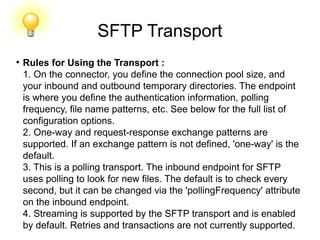
Rules for Using the Transport :
1. On the connector, you define the connection pool size, and
your inbound and outbound temporary directories. The endpoint
is where you define the authentication information, polling
frequency, file name patterns, etc. See below for the full list of
configuration options.
2. One-way and request-response exchange patterns are
supported. If an exchange pattern is not defined, 'one-way' is the
default.
3. This is a polling transport. The inbound endpoint for SFTP
uses polling to look for new files. The default is to check every
second, but it can be changed via the 'pollingFrequency' attribute
on the inbound endpoint.
4. Streaming is supported by the SFTP transport and is enabled
by default. Retries and transactions are not currently supported.
SFTP Transport
●
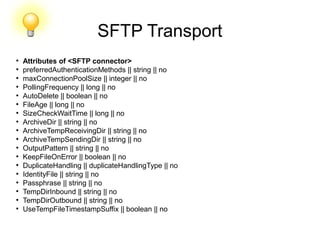
Attributes of <SFTP connector>
●
preferredAuthenticationMethods || string || no
●
maxConnectionPoolSize || integer || no
●
PollingFrequency || long || no
●
AutoDelete || boolean || no
●
FileAge || long || no
●
SizeCheckWaitTime || long || no
●
ArchiveDir || string || no
●
ArchiveTempReceivingDir || string || no
●
ArchiveTempSendingDir || string || no
●
OutputPattern || string || no
●
KeepFileOnError || boolean || no
●
DuplicateHandling || duplicateHandlingType || no
●
IdentityFile || string || no
●
Passphrase || string || no
●
TempDirInbound || string || no
●
TempDirOutbound || string || no
●
UseTempFileTimestampSuffix || boolean || no
SFTP Transport
●
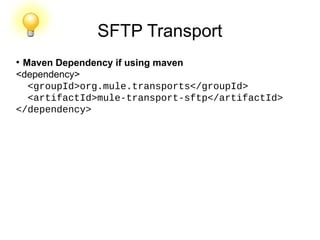
Maven Dependency if using maven
<dependency>
  <groupId>org.mule.transports</groupId>
  <artifactId>mule-transport-sftp</artifactId>
</dependency>
Example
●
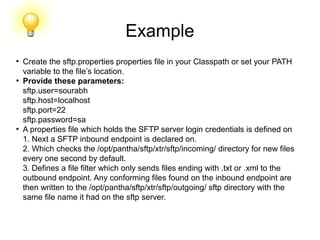
Create the sftp.properties properties file in your Classpath or set your PATH
variable to the file’s location.
●
Provide these parameters:
sftp.user=sourabh
sftp.host=localhost
sftp.port=22
sftp.password=sa
●
A properties file which holds the SFTP server login credentials is defined on
1. Next a SFTP inbound endpoint is declared on.
2. Which checks the /opt/pantha/sftp/xtr/sftp/incoming/ directory for new files
every one second by default.
3. Defines a file filter which only sends files ending with .txt or .xml to the
outbound endpoint. Any conforming files found on the inbound endpoint are
then written to the /opt/pantha/sftp/xtr/sftp/outgoing/ sftp directory with the
same file name it had on the sftp server.
<mule xmlns:doc="http://www.mulesoft.org/schema/mule/documentation" xmlns="http://www.mulesoft.org/schema/mule/core"
xmlns:xsi="http://www.w3.org/2001/XMLSchema-instance"
xmlns:sftp="http://www.mulesoft.org/schema/mule/sftp"
xmlns:file="http://www.mulesoft.org/schema/mule/file"
xmlns:spring="http://www.springframework.org/schema/beans" xsi:schemaLocation="http://www.springframework.org/schema/beans
http://www.springframework.org/schema/beans/spring-beans-current.xsdhttp://www.mulesoft.org/schema/mule/sftp
http://www.mulesoft.org/schema/mule/sftp/current/mule-sftp.xsd
http://www.mulesoft.org/schema/mule/file http://www.mulesoft.org/schema/mule/file/current/mule-file.xsd
http://www.mulesoft.org/schema/mule/core http://www.mulesoft.org/schema/mule/core/current/mule.xsd" version="EE-3.6.1">
<spring:beans>
<spring:bean id="property-placeholder" class="org.springframework.beans.factory.config.PropertyPlaceholderConfigurer">
<spring:property name="location" value="classpath:sftp.properties"/>
</spring:bean>
</spring:beans>
<!-- This placeholder bean lets you import the properties from the sftp.properties file. -->
<flow name="sftp_to_sftp_transport_example">
<sftp:inbound-endpoint host="${sftp.host}" port="${sftp.port}" path="/opt/pantha/sftp/xtr/sftp/incoming/" user="${sftp.user}" password="$
{sftp.password}" doc:name="SFTP">
<file:filename-wildcard-filter pattern="*.txt,*.xml"/>
</sftp:inbound-endpoint>
<component class="com.xebia.xtr.sftp.SFTPConnectorExample" doc:name="Java">
<logging-interceptor/>
</component>
<sftp:outbound-endpoint host="${sftp.host}" port="${sftp.port}" user="${sftp.user}" password="${sftp.password}"
path="/opt/pantha/sftp/xtr/sftp/outgoing/"
name="outboundEndpoint2" outputPattern="#[message.inboundProperties.originalFilename]" doc:name="SFTP">
</sftp:outbound-endpoint>
<logger level="INFO" doc:name="Logger" message="************** File successfully wrote with name
#[message.inboundProperties.originalFilename]*****************"/>
</flow>
</mule>
Example
SFTP
l
Hands on!!!!
http://www.mulesoft.org/docs/site/current3/schemadocs/namespaces/http_www_mulesoft_org_sche
ma_mule_sftp/namespace-overview.html
HTTP Transport
●
The HTTP transport provides support for exposing applications over HTTP
and making HTTP client requests from Mule flows to external services. Mule
supports inbound, outbound, and polling HTTP endpoints. These endpoints
support all common features of the HTTP spec, such as ETag processing,
cookies, and keepAlive. Both HTTP 1.0 and 1.1 are supported.
●
HTTP/S endpoints are synchronous by default, so you do not have to set
exchange-pattern="request-response". If you set exchange-pattern="one-
way", the messages are sent asynchronously.
●
For asynchronous POST, streaming is disabled.
●
Namespace and Syntax :
http://www.mulesoft.org/schema/mule/http
●
XML schema location
http://www.mulesoft.org/schema/mule/http/3.6/mule-http.xsd
HTTP Transport
●
URI Example :
http://sourabh:sa@localhost:8080/httptestpath?query
●
XML Version :
<http:endpoint host="localhost" port="8080" path="/httptestpath"
user="sourabh" password="sa"/>
●
Features :
1. Server acts as an HTTP server or client
2. Create HTTP services such as SOAP, REST, or XML-RPC
3. Make HTTP requests to external services
4. Support for polling an HTTP endpoints including ETag support
5. Transfer binary or text files, including forms and attachment
6. Security includes SSL, certificates, and authentication
7. Build flows to different paths on the same port
8. Support for reading and writing cookies
9. Streaming for transferring large files
10. Custom HTTP header support
11. Redirect Handling
12. Handling of Content-Type and Encoding
13. Serve up static content such as HTML, JavaScript, Images, and CSS (since Mule
3.2).
HTTP Transport
●
To create a HTTP server : you just need to create a flow with an inbound HTTP
endpoint.
<flow name="testComponent">
<http:inbound-endpoint name="clientEndpoint" address="http://localhost:8080/sourabh"/>
<echo-component/>
</flow>
●
This with accept incoming HTTP requests on 'http://localhost:8080/sourabh'
and echo the response back to the client.
●
To make a client invocation of an HTTP endpoint we can use the Mule client to
invoke an HTTP endpoint directly in your code.
<flow name="OutboundDelete">
<vm:inbound-endpoint path="doDelete" exchange-pattern="one-way" />
<http:outbound-endpoint host="localhost" port="8080" path="sourabh" method="DELETE"
exchange-pattern="one-way" />
</flow>
Or from within your code :
MuleClient client = muleContext.getClient();
MuleMessage result = client.send("http://localhost:8080/sourabh", "");
HTTP Transport
●
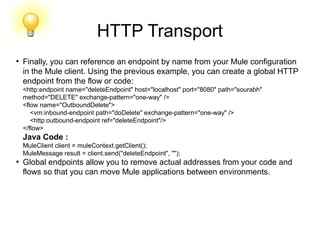
Finally, you can reference an endpoint by name from your Mule configuration
in the Mule client. Using the previous example, you can create a global HTTP
endpoint from the flow or code:
<http:endpoint name="deleteEndpoint" host="localhost" port="8080" path="sourabh"
method="DELETE" exchange-pattern="one-way" />
<flow name="OutboundDelete">
<vm:inbound-endpoint path="doDelete" exchange-pattern="one-way" />
<http:outbound-endpoint ref="deleteEndpoint"/>
</flow>
Java Code :
MuleClient client = muleContext.getClient();
MuleMessage result = client.send("deleteEndpoint", "");
●
Global endpoints allow you to remove actual addresses from your code and
flows so that you can move Mule applications between environments.
HTTP Transport
●
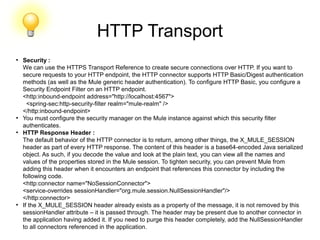
Security :
We can use the HTTPS Transport Reference to create secure connections over HTTP. If you want to
secure requests to your HTTP endpoint, the HTTP connector supports HTTP Basic/Digest authentication
methods (as well as the Mule generic header authentication). To configure HTTP Basic, you configure a
Security Endpoint Filter on an HTTP endpoint.
<http:inbound-endpoint address="http://localhost:4567">
<spring-sec:http-security-filter realm="mule-realm" />
</http:inbound-endpoint>
●
You must configure the security manager on the Mule instance against which this security filter
authenticates.
●
HTTP Response Header :
The default behavior of the HTTP connector is to return, among other things, the X_MULE_SESSION
header as part of every HTTP response. The content of this header is a base64-encoded Java serialized
object. As such, if you decode the value and look at the plain text, you can view all the names and
values of the properties stored in the Mule session. To tighten security, you can prevent Mule from
adding this header when it encounters an endpoint that references this connector by including the
following code.
<http:connector name="NoSessionConnector">
<service-overrides sessionHandler="org.mule.session.NullSessionHandler"/>
</http:connector>
●
If the X_MULE_SESSION header already exists as a property of the message, it is not removed by this
sessionHandler attribute – it is passed through. The header may be present due to another connector in
the application having added it. If you need to purge this header completely, add the NullSessionHandler
to all connectors referenced in the application.
HTTP Transport
●
Sending Credentials :
If you want to make an HTTP request that requires authentication, you can set
the credentials on the endpoint:
http://user:password@mycompany.com/secure
●
Cookies :
If you want to send cookies along on your outgoing request, simply configure
them on the endpoint:
<set-property value="#[['customCookie':'yes']]" propertyName="cookies" doc:name="Property" />
<http:outbound-endpoint address="http://localhost:8080" method="POST"/>
●
Polling HTTP Services :
The HTTP transport supports polling an HTTP URL, which is useful for
grabbing periodic data from a page that changes or to invoke a REST service,
such as polling an Amazon Queue.
1. To configure the HTTP Polling receiver, you include an HTTP polling-
connector :
<http:polling-connector name="PollingHttpConnector" pollingFrequency="30000"
reuseAddress="true" />
2. To use the connector in your endpoints, use:
<http:inbound-endpoint user="marie" password="marie" host="localhost" port="61205" connector-
ref="PollingHttpConnector" />
HTTP Transport
●
Handling HTTP Content-Type and Encoding :
Sending :
●
For a String, char[], Reader, or similar:
If the endpoint has encoding set explicitly, use that
Otherwise, take it from the message’s property Content-Type
If none of these is set, use the Mule Context’s configuration default.
●
For Content-Type, send the message’s property Content-Type but with the actual encoding
set.
For binary content, encoding is not relevant. Content-Type is set as follows:
If the Content-Type property is set on the message, send that.
Send "application/octet-stream" as Content-Type if none is set on the message.
●
Receiving :
When receiving HTTP responses, the payload of the MuleMessage will always be the InputStream
of the HTTP response.
●
Including Custom Header Properties :
When making a new HTTP client request, Mule filters out any existing HTTP request headers
because they are often from a previous request. For example, if you have an HTTP endpoint that
proxies another HTTP endpoint, you wouldn’t want to copy the Content-Type header property from
the first HTTP request to the second request.
HTTP Transport
●
Including Custom Header Properties :
If you do want to include HTTP headers, you can specify them as properties
on the outbound endpoint as follows:
<http:outbound-endpoint address="http://localhost:9002/events" connector-ref="HttpConnector"
contentType="image/png">
<set-property propertyName="Accept" value="*.*"/>
</http:outbound-endpoint>
●
or use Message Properties Transformer, as follows:
<message-properties-transformer scope="outbound">
<add-message-property key="Accept" value="*.*"/>
</message-properties-transformer>
<http:outbound-endpoint address="http://localhost:9002/events" connector-ref="HttpConnector"
contentType="image/png"/>
●
Building the Target URL from the Request :
The HTTP request URL is available in the Mule header. You can access this
using the expression #[message.inboundProperties['http.request']]. For
example, if you want to redirect the request to a different server based on a
filter, you can build the target URL as shown below:
<http:outbound-endpoint
address="http://localhost:8080#[message.inboundProperties['http.request']" />
HTTP Transport
●
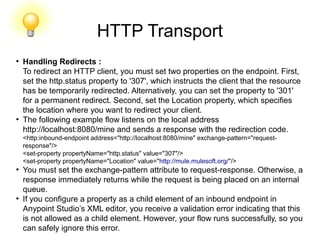
Handling Redirects :
To redirect an HTTP client, you must set two properties on the endpoint. First,
set the http.status property to '307', which instructs the client that the resource
has be temporarily redirected. Alternatively, you can set the property to '301'
for a permanent redirect. Second, set the Location property, which specifies
the location where you want to redirect your client.
●
The following example flow listens on the local address
http://localhost:8080/mine and sends a response with the redirection code.
<http:inbound-endpoint address="http://localhost:8080/mine" exchange-pattern="request-
response"/>
<set-property propertyName="http.status" value="307"/>
<set-property propertyName="Location" value="http://mule.mulesoft.org/"/>
●
You must set the exchange-pattern attribute to request-response. Otherwise, a
response immediately returns while the request is being placed on an internal
queue.
●
If you configure a property as a child element of an inbound endpoint in
Anypoint Studio’s XML editor, you receive a validation error indicating that this
is not allowed as a child element. However, your flow runs successfully, so you
can safely ignore this error.
HTTP Transport
●
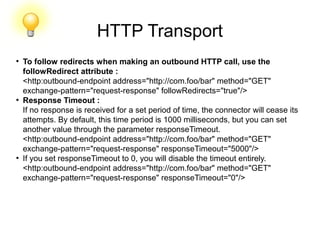
To follow redirects when making an outbound HTTP call, use the
followRedirect attribute :
<http:outbound-endpoint address="http://com.foo/bar" method="GET"
exchange-pattern="request-response" followRedirects="true"/>
●
Response Timeout :
If no response is received for a set period of time, the connector will cease its
attempts. By default, this time period is 1000 milliseconds, but you can set
another value through the parameter responseTimeout.
<http:outbound-endpoint address="http://com.foo/bar" method="GET"
exchange-pattern="request-response" responseTimeout="5000"/>
●
If you set responseTimeout to 0, you will disable the timeout entirely.
<http:outbound-endpoint address="http://com.foo/bar" method="GET"
exchange-pattern="request-response" responseTimeout="0"/>
HTTP Transport
●
Getting a Hash Map of POST Body Parameters :
We can use the custom transformer
HttpRequestBodyToParamMap
on your inbound endpoint to return the message properties as a hash map of
name-value pairs. This transformer handles GET and POST with application/x-
www-form-urlencoded content type.
●
Example :
<http:inbound-endpoint ...>
<http:body-to-parameter-map-transformer />
</http:inbound-endpoint>
●
Processing GET Query Parameters :
GET parameters posted to an HTTP inbound endpoint are automatically
available in the payload on the Mule Message in their raw form and the query
parameters are also passed and stored as inbound-scoped headers of the
Mule Message.
●
Example to creates a simple HTTP server :
<flow name="flows1Flow1">
<http:inbound-endpoint host="localhost" port="8081" encoding="UTF-8"/>
<logger message="#[groovy:return message.toString();]" level="INFO"/>
</flow>
HTTP Transport
●
Doing a request from a browser using the URL:
http://localhost:8081/echo?reverb=4&flange=2
●
Results in a message payload of /echo?reverb=4&flange=2 and two additional inbound
headers on the message reverb=4 and flange=2.
●
You can access these headers using expressions such as the following, which can be
used in filters and routers, or injected into code:
●
#[header:INBOUND:reverb]
●
Serving Static Content :
The HTTP connector can be used as a web server to deliver static content such as
images, HTML, JavaScript, CSS files etc. To enable this, configure a flow with an HTTP
static-resource-handler:
<flow name="main-http">
<http:inbound-endpoint address="http://localhost:8080/static"/>
<http:static-resource-handler resourceBase="${app.home}/docroot"
defaultFile="index.html"/>
</flow>
●
The important attribute here is the resourceBase since it defines where on the local
system from which to serve files. Typically, set this to ${app.home}/docroot, but it can
point to any fully qualified location.
●
The default file allows you to specify the default resource to load if none is specified. If
not set the default is index.html.
HTTP Transport
●
Content-Type Handling :
The static-resource-handler uses the same MIME type mapping system as the JDK, if you need to add
your own MIME type to file extension mappings, add the following file to your application <project
home>/src/main/resources/META-INF/mime.types:
●
HTTP Properties :
http.context.path: The context path of the endpoint being accessed. This is the path that the HTTP
endpoint is listening on.
http.context.uri: The context URI of the endpoint being accessed, it corresponds to the address of the
endpoint.
http.headers: A Map containing all the HTTP headers.
http.method: The name of the HTTP method as used in the HTTP request line.
http.query.params: A Map containing all the query parameters. It supports multiple values per key and
both key and value are unescaped.
http.query.string: The query string of the URL.
http.request: The path and query portions of the URL being accessed.
http.request.path: The path the URL being accessed. It does not include the query portion.
http.relative.path: The relative path of the URI being accessed in relation to the context path.
http.status: The status code associated with the latest response.
http.version: The HTTP-Version.
●
parameters are also stored plain on the inbound properties. This behavior was improved in Mule 3.3 with
the http.headers and http.query.params properties.
●
For example, giving the following HTTP GET request: http://localhost:8080/clients?min=1&max=10, the
query parameters can be easily accessed by:
●
#[message.inboundProperties['min']] and` #[message.inboundProperties['max']]`
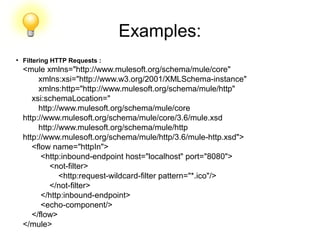
Examples:
●
Filtering HTTP Requests :
<mule xmlns="http://www.mulesoft.org/schema/mule/core"
xmlns:xsi="http://www.w3.org/2001/XMLSchema-instance"
xmlns:http="http://www.mulesoft.org/schema/mule/http"
xsi:schemaLocation="
http://www.mulesoft.org/schema/mule/core
http://www.mulesoft.org/schema/mule/core/3.6/mule.xsd
http://www.mulesoft.org/schema/mule/http
http://www.mulesoft.org/schema/mule/http/3.6/mule-http.xsd">
<flow name="httpIn">
<http:inbound-endpoint host="localhost" port="8080">
<not-filter>
<http:request-wildcard-filter pattern="*.ico"/>
</not-filter>
</http:inbound-endpoint>
<echo-component/>
</flow>
</mule>
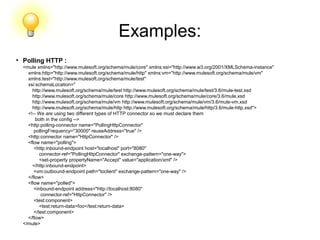
Examples:
●
Polling HTTP :
<mule xmlns="http://www.mulesoft.org/schema/mule/core" xmlns:xsi="http://www.w3.org/2001/XMLSchema-instance"
xmlns:http="http://www.mulesoft.org/schema/mule/http" xmlns:vm="http://www.mulesoft.org/schema/mule/vm"
xmlns:test="http://www.mulesoft.org/schema/mule/test"
xsi:schemaLocation="
http://www.mulesoft.org/schema/mule/test http://www.mulesoft.org/schema/mule/test/3.6/mule-test.xsd
http://www.mulesoft.org/schema/mule/core http://www.mulesoft.org/schema/mule/core/3.6/mule.xsd
http://www.mulesoft.org/schema/mule/vm http://www.mulesoft.org/schema/mule/vm/3.6/mule-vm.xsd
http://www.mulesoft.org/schema/mule/http http://www.mulesoft.org/schema/mule/http/3.6/mule-http.xsd">
<!-- We are using two different types of HTTP connector so we must declare them
both in the config -->
<http:polling-connector name="PollingHttpConnector"
pollingFrequency="30000" reuseAddress="true" />
<http:connector name="HttpConnector" />
<flow name="polling">
<http:inbound-endpoint host="localhost" port="8080"
connector-ref="PollingHttpConnector" exchange-pattern="one-way">
<set-property propertyName="Accept" value="application/xml" />
</http:inbound-endpoint>
<vm:outbound-endpoint path="toclient" exchange-pattern="one-way" />
</flow>
<flow name="polled">
<inbound-endpoint address="http://localhost:8080"
connector-ref="HttpConnector" />
<test:component>
<test:return-data>foo</test:return-data>
</test:component>
</flow>
</mule>
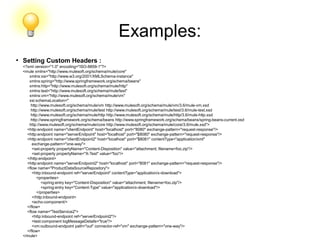
Examples:
●
Setting Custom Headers :
<?xml version="1.0" encoding="ISO-8859-1"?>
<mule xmlns="http://www.mulesoft.org/schema/mule/core"
xmlns:xsi="http://www.w3.org/2001/XMLSchema-instance"
xmlns:spring="http://www.springframework.org/schema/beans"
xmlns:http="http://www.mulesoft.org/schema/mule/http"
xmlns:test="http://www.mulesoft.org/schema/mule/test"
xmlns:vm="http://www.mulesoft.org/schema/mule/vm"
xsi:schemaLocation="
http://www.mulesoft.org/schema/mule/vm http://www.mulesoft.org/schema/mule/vm/3.6/mule-vm.xsd
http://www.mulesoft.org/schema/mule/test http://www.mulesoft.org/schema/mule/test/3.6/mule-test.xsd
http://www.mulesoft.org/schema/mule/http http://www.mulesoft.org/schema/mule/http/3.6/mule-http.xsd
http://www.springframework.org/schema/beans http://www.springframework.org/schema/beans/spring-beans-current.xsd
http://www.mulesoft.org/schema/mule/core http://www.mulesoft.org/schema/mule/core/3.6/mule.xsd">
<http:endpoint name="clientEndpoint" host="localhost" port="8080" exchange-pattern="request-response"/>
<http:endpoint name="serverEndpoint" host="localhost" port="$8080" exchange-pattern="request-response"/>
<http:endpoint name="clientEndpoint2" host="localhost" port="$8081" contentType="application/xml"
exchange-pattern="one-way">
<set-property propertyName="Content-Disposition" value="attachment; filename=foo.zip"/>
<set-property propertyName="X-Test" value="foo"/>
</http:endpoint>
<http:endpoint name="serverEndpoint2" host="localhost" port="8081" exchange-pattern="request-response"/>
<flow name="ProductDataSourceRepository">
<http:inbound-endpoint ref="serverEndpoint" contentType="application/x-download">
<properties>
<spring:entry key="Content-Disposition" value="attachment; filename=foo.zip"/>
<spring:entry key="Content-Type" value="application/x-download"/>
</properties>
</http:inbound-endpoint>
<echo-component/>
</flow>
<flow name="TestService2">
<http:inbound-endpoint ref="serverEndpoint2"/>
<test:component logMessageDetails="true"/>
<vm:outbound-endpoint path="out" connector-ref="vm" exchange-pattern="one-way"/>
</flow>
</mule>
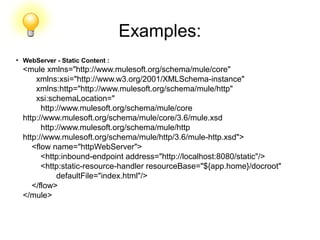
Examples:
●
WebServer - Static Content :
<mule xmlns="http://www.mulesoft.org/schema/mule/core"
xmlns:xsi="http://www.w3.org/2001/XMLSchema-instance"
xmlns:http="http://www.mulesoft.org/schema/mule/http"
xsi:schemaLocation="
http://www.mulesoft.org/schema/mule/core
http://www.mulesoft.org/schema/mule/core/3.6/mule.xsd
http://www.mulesoft.org/schema/mule/http
http://www.mulesoft.org/schema/mule/http/3.6/mule-http.xsd">
<flow name="httpWebServer">
<http:inbound-endpoint address="http://localhost:8080/static"/>
<http:static-resource-handler resourceBase="${app.home}/docroot"
defaultFile="index.html"/>
</flow>
</mule>
Examples:
●
Setting Cookies on a Request :
<mule xmlns="http://www.mulesoft.org/schema/mule/core" xmlns:xsi="http://www.w3.org/2001/XMLSchema-instance"
xmlns:spring="http://www.springframework.org/schema/beans"
xmlns:http="http://www.mulesoft.org/schema/mule/http" xmlns:vm="http://www.mulesoft.org/schema/mule/vm"
xsi:schemaLocation="
http://www.springframework.org/schema/beans http://www.springframework.org/schema/beans/spring-beans-current.xsd
http://www.mulesoft.org/schema/mule/core http://www.mulesoft.org/schema/mule/core/3.6/mule.xsd
http://www.mulesoft.org/schema/mule/http http://www.mulesoft.org/schema/mule/http/3.6/mule-http.xsd
http://www.mulesoft.org/schema/mule/vm http://www.mulesoft.org/schema/mule/vm/3.6/mule-vm.xsd">
<http:connector name="httpConnector" enableCookies="true" />
<flow name="testService">
<vm:inbound-endpoint path="vm-in" exchange-pattern="one-way" />
<http:outbound-endpoint address="http://localhost:${port1}"
method="POST" exchange-pattern="one-way" content-type="text/xml">
<properties>
<spring:entry key="cookies">
<spring:map>
<spring:entry key="customCookie" value="yes"/>
<spring:entry key="expressionCookie" value="#[header:INBOUND:COOKIE_HEADER]"/>
</spring:map>
</spring:entry>
</properties>
</http:outbound-endpoint>
</flow>
</mule>
HTTP Transport
●
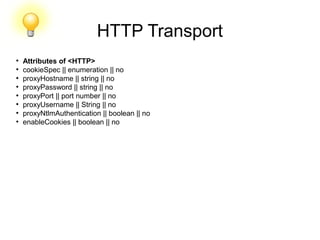
Attributes of <HTTP>
●
cookieSpec || enumeration || no
●
proxyHostname || string || no
●
proxyPassword || string || no
●
proxyPort || port number || no
●
proxyUsername || String || no
●
proxyNtlmAuthentication || boolean || no
●
enableCookies || boolean || no
HTTP Transport
●
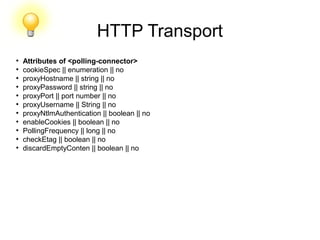
Attributes of <polling-connector>
●
cookieSpec || enumeration || no
●
proxyHostname || string || no
●
proxyPassword || string || no
●
proxyPort || port number || no
●
proxyUsername || String || no
●
proxyNtlmAuthentication || boolean || no
●
enableCookies || boolean || no
●
PollingFrequency || long || no
●
checkEtag || boolean || no
●
discardEmptyConten || boolean || no
HTTP Transport
●
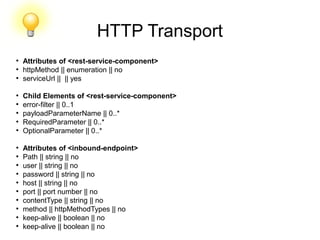
Attributes of <rest-service-component>
●
httpMethod || enumeration || no
●
serviceUrl || || yes
●
Child Elements of <rest-service-component>
●
error-filter || 0..1
●
payloadParameterName || 0..*
●
RequiredParameter || 0..*
●
OptionalParameter || 0..*
●
Attributes of <inbound-endpoint>
●
Path || string || no
●
user || string || no
●
password || string || no
●
host || string || no
●
port || port number || no
●
contentType || string || no
●
method || httpMethodTypes || no
●
keep-alive || boolean || no
●
keep-alive || boolean || no
HTTP Transport
●
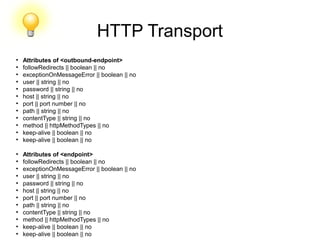
Attributes of <outbound-endpoint>
●
followRedirects || boolean || no
●
exceptionOnMessageError || boolean || no
●
user || string || no
●
password || string || no
●
host || string || no
●
port || port number || no
●
path || string || no
●
contentType || string || no
●
method || httpMethodTypes || no
●
keep-alive || boolean || no
●
keep-alive || boolean || no
●
Attributes of <endpoint>
●
followRedirects || boolean || no
●
exceptionOnMessageError || boolean || no
●
user || string || no
●
password || string || no
●
host || string || no
●
port || port number || no
●
path || string || no
●
contentType || string || no
●
method || httpMethodTypes || no
●
keep-alive || boolean || no
●
keep-alive || boolean || no
HTTP
l
Hands on!!!!
https://docs.mulesoft.com/mule-user-guide/v/3.7/http-transport-reference
FTP Transport
●
The FTP transport allows integration of the File Transfer Protocol into Mule.
Mule can poll a remote FTP server directory, retrieve files. and process them
as Mule messages. Messages can also be uploaded as files to a directory on
a remote FTP server.
●
Namespace and Syntax :
Namespace (Community):
http://www.mulesoft.org/schema/mule/ftp
Namespace (Enterprise):
http://www.mulesoft.org/schema/mule/ee/ftp
●
Syntax:
Straight URI example ftp://theUser:secret@theHost:port/path
Xml VERSION :
<ftp:endpoint host="localhost" port="22" path="/path" user="sourabh"
password="sa"/>
Connector and endpoint syntax :
<ftp:connector name="ftpConnector" passive="true" binary="true"
streaming="true"/>
FTP Transport
●
Features :
1. Poll a directory on a remote FTP server for new files
2. Retrieve files an FTP server
3. Transfer binary or text files
4. Filter files at the endpoint based on filename wildcards
5. Filter files at the endpoint based on Mule expressions
6. Upload and store files on an FTP server
7. Rename output files based on Mule expressions
8. Streaming for transferring large files
9. Support for reconnection strategies
●
Usage :
●
Each endpoint carries all the information for the FTP connection, such as, host, port, path, username
and password at least. Additional properties (like binary or passive) can be specified on the connector
and overridden at the endpoint level.
●
The FTP transport periodically polls the FTP server. Upon each poll request, a new connection to the
FTP server is opened, the specified user is logged in and all files are listed under the specified path.
This means that if the FTP server goes down no special provisions need to be made - the current poll
attempt fails but polling doesn’t stop.
●
If reconnection strategies are configured, the FTP connection can be re-established automatically by
Mule based on the policy you have configured.
●
The FTP transport does not support transactions as the File Transfer Protocol itself is not transactional.
Instead you should design compensating transactions into your architecture using exception strategies
in Mule.
FTP Transport
●
Attributes of <FTP connector>
●
Path || string || no
●
user || string || no
●
password || string || no
●
host || string || no
●
port || port number || no
●
outputPattern || string || no
●
keepFileOnError || boolean || no
●
duplicateHandling || duplicateHandlingType || no
●
IdentityFile || string || no
●
Passphrase || string || no
●
TempDir || string || no
●
UseTempFileTimestampSuffix || boolean || no
Example
●
This example shows a simple flow that picks up all available files on the FTP server (in
its root directory) and stores them into a directory on the local filesystem.
●
This example shows how to pick only certain files on the FTP server. You do this by
configuring filename filters to control which files the endpoint receives. The filters are
expressed in a comma-separated list. Note that in order to use a filter from the file
transport’s schema it must be included.
<mule xmlns="http://www.mulesoft.org/schema/mule/core"
xmlns:xsi="http://www.w3.org/2001/XMLSchema-instance"
xmlns:ftp="http://www.mulesoft.org/schema/mule/ftp"
xmlns:file="http://www.mulesoft.org/schema/mule/file"
xsi:schemaLocation="
http://www.mulesoft.org/schema/mule/core
http://www.mulesoft.org/schema/mule/core/current/mule.xsd
http://www.mulesoft.org/schema/mule/file http://www.mulesoft.org/schema/mule/file/current/mule-
file.xsd
●
http://www.mulesoft.org/schema/mule/ftp http://www.mulesoft.org/schema/mule/ftp/current/mule-
ftp.xsd">
<flow name="ftp2file">
<ftp:inbound-endpoint host="localhost" port="21" path="/" user="theUser" password="secret"/>
<file:outbound-endpoint path="/some/directory" outputPattern="#[header:originalFilename]"/>
</flow>
</mule>
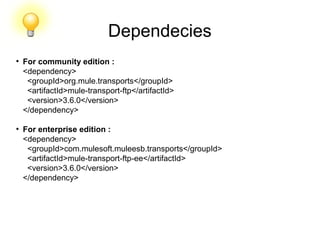
Dependecies
●
For community edition :
<dependency>
<groupId>org.mule.transports</groupId>
<artifactId>mule-transport-ftp</artifactId>
<version>3.6.0</version>
</dependency>
●
For enterprise edition :
<dependency>
<groupId>com.mulesoft.muleesb.transports</groupId>
<artifactId>mule-transport-ftp-ee</artifactId>
<version>3.6.0</version>
</dependency>
Example
●
This example shows a simple flow that picks up all available files on the FTP server (in
its root directory) and stores them into a directory on the local filesystem.
●
This example shows how to pick only certain files on the FTP server. You do this by
configuring filename filters to control which files the endpoint receives. The filters are
expressed in a comma-separated list. Note that in order to use a filter from the file
transport’s schema it must be included.
<mule xmlns="http://www.mulesoft.org/schema/mule/core"
xmlns:xsi="http://www.w3.org/2001/XMLSchema-instance"
xmlns:ftp="http://www.mulesoft.org/schema/mule/ftp"
xmlns:file="http://www.mulesoft.org/schema/mule/file"
xsi:schemaLocation="
http://www.mulesoft.org/schema/mule/core http://www.mulesoft.org/schema/mule/core/3.6/mule.xsd
http://www.mulesoft.org/schema/mule/file http://www.mulesoft.org/schema/mule/file/3.6/mule-file.xsd
http://www.mulesoft.org/schema/mule/ftp http://www.mulesoft.org/schema/mule/ftp/3.6/mule-
ftp.xsd">
<flow name="fileFilter">
<ftp:inbound-endpoint host="localhost" port="21" path="/" user="theUser" password="secret"/>
<file:filename-wildcard-filter pattern="*.txt,*.xml"/>
</ftp:endpoint>
<file:outbound-endpoint path="/some/directory" outputPattern="#[header:originalFilename]"/>
</flow>
</mule>
FTP
l
Hands on!!!!
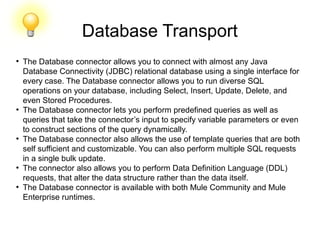
Database Transport
●
The Database connector allows you to connect with almost any Java
Database Connectivity (JDBC) relational database using a single interface for
every case. The Database connector allows you to run diverse SQL
operations on your database, including Select, Insert, Update, Delete, and
even Stored Procedures.
●
The Database connector lets you perform predefined queries as well as
queries that take the connector’s input to specify variable parameters or even
to construct sections of the query dynamically.
●
The Database connector also allows the use of template queries that are both
self sufficient and customizable. You can also perform multiple SQL requests
in a single bulk update.
●
The connector also allows you to perform Data Definition Language (DDL)
requests, that alter the data structure rather than the data itself.
●
The Database connector is available with both Mule Community and Mule
Enterprise runtimes.
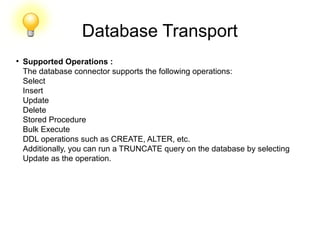
Database Transport
●
Supported Operations :
The database connector supports the following operations:
Select
Insert
Update
Delete
Stored Procedure
Bulk Execute
DDL operations such as CREATE, ALTER, etc.
Additionally, you can run a TRUNCATE query on the database by selecting
Update as the operation.
Database Transport
●
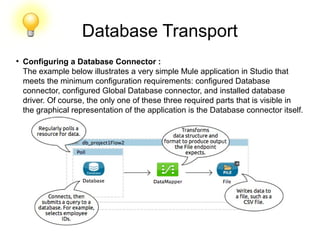
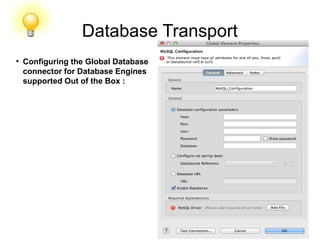
Configuring a Database Connector :
The example below illustrates a very simple Mule application in Studio that
meets the minimum configuration requirements: configured Database
connector, configured Global Database connector, and installed database
driver. Of course, the only one of these three required parts that is visible in
the graphical representation of the application is the Database connector itself.
Database Transport
●
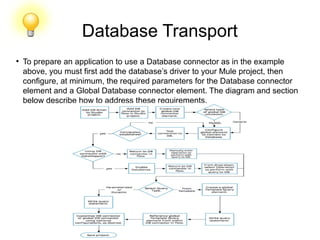
To prepare an application to use a Database connector as in the example
above, you must first add the database’s driver to your Mule project, then
configure, at minimum, the required parameters for the Database connector
element and a Global Database connector element. The diagram and section
below describe how to address these requirements.
Database Transport
●
Database Engines Supported Out of the Box :
The database connector currently includes out of the box support for three
database engines:
Oracle
MySQL
Derby
All other database engines – including MS SQL – are supported by the
Generic Database Configuration option.
When using the Generic Database Configuration, you manually import the
driver for your database engine and specify the driver class as one of the
connection parameters. This allows you to use the database connector with
any database engine for which you have a driver.
Database Transport
●
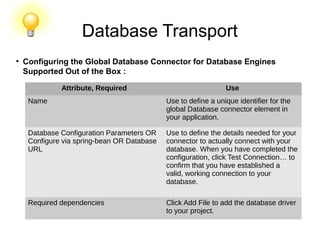
Configuring the Global Database Connector for Database Engines
Supported Out of the Box :
Attribute, Required Use
Name Use to define a unique identifier for the
global Database connector element in
your application.
Database Configuration Parameters OR
Configure via spring-bean OR Database
URL
Use to define the details needed for your
connector to actually connect with your
database. When you have completed the
configuration, click Test Connection… to​
confirm that you have established a
valid, working connection to your
database.
Required dependencies Click Add File to add the database driver
to your project.
Database Transport
●
Configuring the Global Database
connector for Database Engines
supported Out of the Box :
Example
●
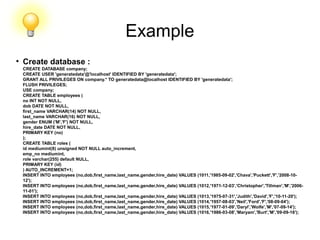
Create database :
CREATE DATABASE company;
CREATE USER 'generatedata'@'localhost' IDENTIFIED BY 'generatedata';
GRANT ALL PRIVILEGES ON company.* TO generatedata@localhost IDENTIFIED BY 'generatedata';
FLUSH PRIVILEGES;
USE company;
CREATE TABLE employees (
no INT NOT NULL,
dob DATE NOT NULL,
first_name VARCHAR(14) NOT NULL,
last_name VARCHAR(16) NOT NULL,
gender ENUM ('M','F') NOT NULL,
hire_date DATE NOT NULL,
PRIMARY KEY (no)
);
CREATE TABLE roles (
id mediumint(8) unsigned NOT NULL auto_increment,
emp_no mediumint,
role varchar(255) default NULL,
PRIMARY KEY (id)
) AUTO_INCREMENT=1;
INSERT INTO employees (no,dob,first_name,last_name,gender,hire_date) VALUES (1011,'1985-09-02','Chava','Puckett','F','2008-10-
12');
INSERT INTO employees (no,dob,first_name,last_name,gender,hire_date) VALUES (1012,'1971-12-03','Christopher','Tillman','M','2006-
11-01');
INSERT INTO employees (no,dob,first_name,last_name,gender,hire_date) VALUES (1013,'1975-07-31','Judith','David','F','10-11-20');
INSERT INTO employees (no,dob,first_name,last_name,gender,hire_date) VALUES (1014,'1957-08-03','Neil','Ford','F','08-09-04');
INSERT INTO employees (no,dob,first_name,last_name,gender,hire_date) VALUES (1015,'1977-01-09','Daryl','Wolfe','M','07-09-14');
INSERT INTO employees (no,dob,first_name,last_name,gender,hire_date) VALUES (1016,'1986-03-08','Maryam','Burt','M','09-09-16');
Example
●
Mule FLOW :
<?xml version="1.0" encoding="UTF-8"?>
<mule xmlns:json="http://www.mulesoft.org/schema/mule/json" xmlns:db="http://www.mulesoft.org/schema/mule/db"
xmlns:tracking="http://www.mulesoft.org/schema/mule/ee/tracking" xmlns:http="http://www.mulesoft.org/schema/mule/http"
xmlns="http://www.mulesoft.org/schema/mule/core" xmlns:doc="http://www.mulesoft.org/schema/mule/documentation"
xmlns:spring="http://www.springframework.org/schema/beans" version="EE-3.6.1"
xmlns:xsi="http://www.w3.org/2001/XMLSchema-instance"
xsi:schemaLocation="http://www.springframework.org/schema/beans http://www.springframework.org/schema/beans/spring-
beans-current.xsd
http://www.mulesoft.org/schema/mule/core http://www.mulesoft.org/schema/mule/core/current/mule.xsd
http://www.mulesoft.org/schema/mule/db http://www.mulesoft.org/schema/mule/db/current/mule-db.xsd
http://www.mulesoft.org/schema/mule/http http://www.mulesoft.org/schema/mule/http/current/mule-http.xsd
http://www.mulesoft.org/schema/mule/ee/tracking http://www.mulesoft.org/schema/mule/ee/tracking/current/mule-tracking-ee.xsd
http://www.mulesoft.org/schema/mule/json http://www.mulesoft.org/schema/mule/json/current/mule-json.xsd">
<db:mysql-config name="MySQL_Configuration" url="jdbc:mysql://localhost:3306/company?
user=root&amp;password=root&amp;generateSimpleParameterMetadata=true" doc:name="MySQL Configuration"/>
<http:listener-config name="HTTP_Listener_Configuration" host="localhost" port="8081" doc:name="HTTP Listener
Configuration"/>
<flow name="databaseConnectorFlowForMysqlDatabase" >
<http:listener config-ref="HTTP_Listener_Configuration" path="employee" doc:name="HTTP"/>
<db:select config-ref="MySQL_Configuration" doc:name="Database">
<db:parameterized-query><![CDATA[select * from employees;]]></db:parameterized-query>
</db:select>
<json:object-to-json-transformer doc:name="Object to JSON"/>
●
</flow>
</mule>
Database
l
Hands on!!!!
FILE Transport
●
The File transport allows files on the local file system to be read from and
written to. The connector can be configured to filter the file it reads and the
way files are written, such as whether Mule places the output in a new file or
appends the output to an existing file.
●
Namespace and Syntax:
XML Namespace :
xmlns:file="http://www.mulesoft.org/schema/mule/file"
XML Schema Location :
http://www.mulesoft.org/schema/mule/file
http://www.mulesoft.org/schema/mule/file/3.6/mule-file.xsd
●
Connector Syntax:
<!-- Typical Connector for Inbound Endpoint: Read files -->
<file:connector name="input" fileAge="500" autoDelete="true" pollingFrequency="100"
moveToDirectory="/backup"
moveToPattern="#[message.inboundProperties['originalFilename']].backup"/>
<!-- Typical Connector for Outbound Endpoint: Write files -->
<file:connector name="output" outputAppend="true" outputPattern="#[server.dateTime]-
#[message.inboundProperties['originalFilename']]" />
FILE Transport
●
Endpoint Syntax :
file://<path>[MULE:?params]
●
Inbound Endpoint :
<file:inbound-endpoint connector-ref="input" path="/tmp/input"/>
●
Outbound Endpoint :
<file:outbound-endpoint connector-ref="output" path="/tmp/output"/>
●
Features :
1. Read files at a regular polling interval
2. Write files
●
To use the file transport in your Mule configuration, Schema and use the
<file:connector>, <file:inbound-endpoint> and/or <file:outbound-endpoint>
elements.
●
You can use the following expressions inside attributes:
●
#[function:dateStamp]
●
#[function:datestamp:dd-MM-yy]
●
#[function:systime]
●
#[function:uuid]
●
#[message.inboundProperties.originalFilename]
●
#[function:count]
●
#[message.inboundProperties['_messagepropertyname'_]
Example
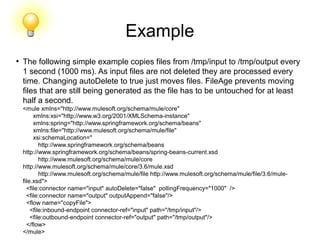
●
The following simple example copies files from /tmp/input to /tmp/output every
1 second (1000 ms). As input files are not deleted they are processed every
time. Changing autoDelete to true just moves files. FileAge prevents moving
files that are still being generated as the file has to be untouched for at least
half a second.
<mule xmlns="http://www.mulesoft.org/schema/mule/core"
xmlns:xsi="http://www.w3.org/2001/XMLSchema-instance"
xmlns:spring="http://www.springframework.org/schema/beans"
xmlns:file="http://www.mulesoft.org/schema/mule/file"
xsi:schemaLocation="
http://www.springframework.org/schema/beans
http://www.springframework.org/schema/beans/spring-beans-current.xsd
http://www.mulesoft.org/schema/mule/core
http://www.mulesoft.org/schema/mule/core/3.6/mule.xsd
http://www.mulesoft.org/schema/mule/file http://www.mulesoft.org/schema/mule/file/3.6/mule-
file.xsd">
<file:connector name="input" autoDelete="false" pollingFrequency="1000" />
<file:connector name="output" outputAppend="false"/>
<flow name="copyFile">
<file:inbound-endpoint connector-ref="input" path="/tmp/input"/>
<file:outbound-endpoint connector-ref="output" path="/tmp/output"/>
</flow>
</mule>
File
l
Hands on!!!!
https://docs.mulesoft.com/mule-user-guide/v/3.7/file-transport-reference
Web service consumers
l
Hands on!!!!
RMI
l
Hands on!!!!
Mule Components.
https://docs.mulesoft.com/mule-fundamentals/v/3.7/mule-components
Mule Transformers.
https://docs.mulesoft.com/mule-fundamentals/v/3.7/mule-transformers
Mule Filters.
https://docs.mulesoft.com/mule-fundamentals/v/3.7/mule-filters-scopes-and-routers
Mule scopes.
https://docs.mulesoft.com/mule-fundamentals/v/3.7/mule-filters-scopes-and-routers
Scopes
●
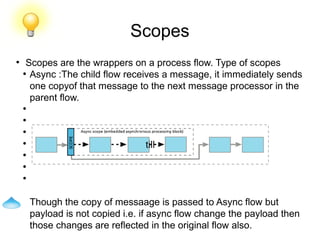
Scopes are the wrappers on a process flow. Type of scopes
●
Async :The child flow receives a message, it immediately sends
one copyof that message to the next message processor in the
parent flow.
●
●
●
●
●
●
●
Though the copy of messaage is passed to Async flow but
payload is not copied i.e. if async flow change the payload then
those changes are reflected in the original flow also.
till
Scopes
●
Sync :the main flow halts, and all the message processors in the
child flow execute before the parent flow resumes processing.
●
Cache: caches the subflow output for reusability.
●
How this works?
●
Mule genrate a key corresponding to a message’s payload.
●
Cache scope checks the value corresponding to key.
●
If key exist then corresponding value is passed without
executing the flow.
●
Else the value present in the memory iss passed.
Scopes
●
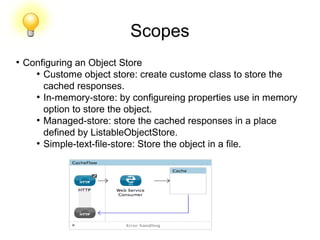
Configuring an Object Store
●
Custome object store: create custome class to store the
cached responses.
●
In-memory-store: by configureing properties use in memory
option to store the object.
●
Managed-store: store the cached responses in a place
defined by ListableObjectStore.
●
Simple-text-file-store: Store the object in a file.
Scopes
●
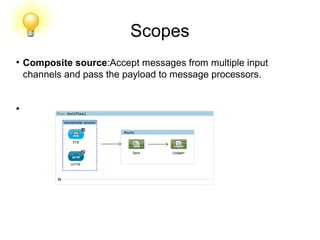
Composite source:Accept messages from multiple input
channels and pass the payload to message processors.
●
Scopes
●
Message Enricher: Used to enrich the incoming message with
additional information.
Eg:
●
<flow name="orderProcessingFlow">
●
<inbound-endpoint ref="orderEndpoint"/>
●
<enricher target="#[variable:state]">
●
<outbound-endpoint ref="stateLookup"/>
●
</enricher>
●
<outbound-endpoint ref="orderStep2"/>
●
</flow>
Mule currently supports enrichment of flow variables and
message headers only.
Scopes
●
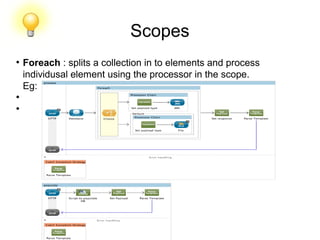
Foreach : splits a collection in to elements and process
individusal element using the processor in the scope.
Eg:
●
●
Scopes
●
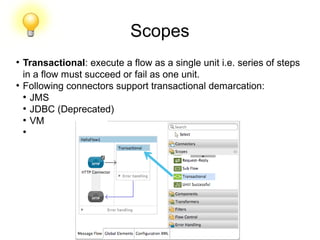
Transactional: execute a flow as a single unit i.e. series of steps
in a flow must succeed or fail as one unit.
●
Following connectors support transactional demarcation:
●
JMS
●
JDBC (Deprecated)
●
VM
●
Scopes
●
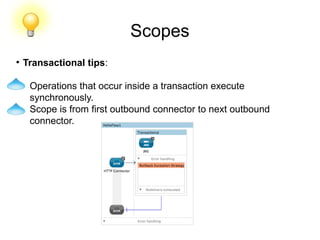
Transactional tips:
Operations that occur inside a transaction execute
synchronously.
Scope is from first outbound connector to next outbound
connector.
Scopes
●
Until Successful: scope processes messages through the
processors within it until the process succeeds.
●
<until-successful objectStore-ref="objectStore" maxRetries="5"
secondsBetweenRetries="60" doc:name="Until Successful">
---------
</until-successful>
●
Scopes
l
Hands on!!!!
Mule routers or flow control.
https://docs.mulesoft.com/mule-fundamentals/v/3.7/mule-filters-scopes-and-routers
Mule Error handling.
https://docs.mulesoft.com/mule-fundamentals/v/3.7/mule-exception-strategies
Exception Handling
●
When ever any activity in mule instance fails then mule throws
an exception. Mule exceptions are categorised in two parts.
●
System Exceptions
●
Messaging Exceptions
●
System Exceptions :
●
For instance exceptions occures during application startup.
●
When a connection to external system fails.
Eg: Before receving any message , Mule tries to connect to any
messaging server and get exception. Then this is called system
exception.
System Exception strategy is not configurable in mule.
Exception Handling
●
When ever any activity in mule instance fails then mule throws
an exception. Mule exceptions are categorised in two parts.
●
System Exceptions
●
Messaging Exceptions
●
System Exceptions :
●
For instance exceptions occures during application startup.
●
When a connection to external system fails.
Exception Handling
●
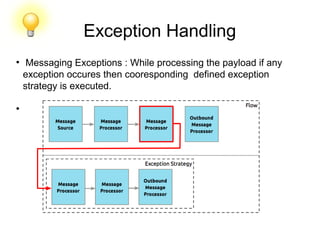
Messaging Exceptions : While processing the payload if any
exception occures then cooresponding defined exception
strategy is executed.
●
Exception Handling
●
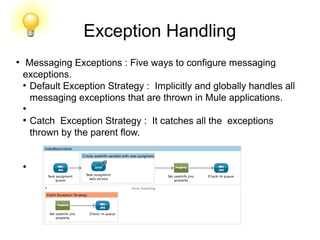
Messaging Exceptions : Five ways to configure messaging
exceptions.
●
Default Exception Strategy : Implicitly and globally handles all
messaging exceptions that are thrown in Mule applications.
●
●
Catch Exception Strategy : It catches all the exceptions
thrown by the parent flow.
●
Exception Handling
●
Choice Exceptions : Catches all the exceptions of parent flow and
on the bases of message content route the message to
appropriate exception strategy.
●
Rollback Exception Strategy: For transactional flow if exception
occures then it rollback the transaction in the flow.
●
The rollback exception strategy catches the exception and rolls
the message back for reprocessing; the message throws an
error again, the rollback exception strategy catches the
exception again
Exception Handling
●
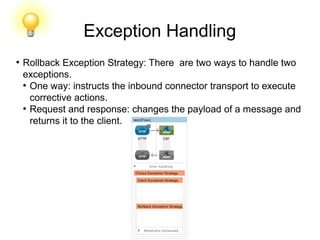
Rollback Exception Strategy: There are two ways to handle two
exceptions.
●
One way: instructs the inbound connector transport to execute
corrective actions.
●
Request and response: changes the payload of a message and
returns it to the client.
Exception Handling
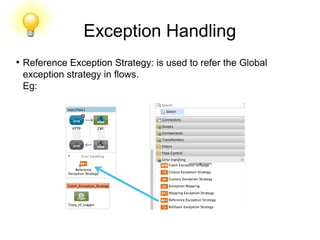
●
Reference Exception Strategy: is used to refer the Global
exception strategy in flows.
Eg:
Exception Handling
l
Hands on!!!!

Mule Complete Training

  • 1.
    By : SourabhAggarwal & Sumit Gole Date : 21 OCT 2015
  • 2.
    ● Mule ESB isa lightweight Java-based enterprise service bus (ESB) and integration platform that allows developers to connect applications together quickly and easily, enabling them to exchange data. Mule ESB enables easy integration of existing systems, regardless of the different technologies that the applications use, including JMS, Web Services, JDBC, HTTP, and more. ● The key advantage of an ESB is that it allows different applications to communicate with each other by acting as a transit system for carrying data between applications within your enterprise or across the Internet. Mule ESB includes powerful capabilities that include: – Service creation and hosting — expose and host reusable services, using Mule ESB as a lightweight service container – Service mediation — shield services from message formats and protocols, separate business logic from messaging, and enable location-independent service calls – Message routing — route, filter, aggregate, and re-sequence messages based on content and rules – Data transformation — exchange data across varying formats and transport protocols. What is Mule?
  • 3.
  • 4.
    Component ● Anypoint Platform -Transform your business with API-led connectivity. ● Mule runtime engine - Deploy an ESB, iPaaS or API gateway on a single, unified runtime. ● Studio - Connect apps and data on our powerful IDE ● API Designer - Build, design and test enterprise grade APIs, using RAML. ● API Manager - Generate proxies, or apply pre-built or custom policies with clicks. ● Analytics - Get real-time views on API consumption and performance. ● API Portal - Create a rich onramp for your API with docs, sample code, and interactive tools.
  • 5.
    Component ● Anypoint Platform -Transform your business with API-led connectivity. ● Mule runtime engine - Deploy an ESB, iPaaS or API gateway on a single, unified runtime. ● Studio - Connect apps and data on our powerful IDE ● API Designer - Build, design and test enterprise grade APIs, using RAML. ● API Manager - Generate proxies, or apply pre-built or custom policies with clicks. ● Analytics - Get real-time views on API consumption and performance. ● API Portal - Create a rich onramp for your API with docs, sample code, and interactive tools.
  • 6.
  • 7.
    SFTP Transport ● We canuse the SFTP transport to download from or upload to a secured resource accessible via SFTP. This transport does not currently support transactions or retry policies. Some uses for the SFTP transport are downloading data into a database and picking up files and uploading them via SFTP. ● We can use this transport to implement the file transfer Enterprise Integration Pattern. As explained in the EIP book, the file transfer pattern allows you to loosely couple two applications together, with delays in processing time ● Using the SFTP transport allows you to optionally use streaming support for larger files and asynchronous and synchronously chain other endpoints with an SFTP endpoint. It also allows you to use Mule’s robust error handling in your Mule application. ● Features: 1. Streaming support of resources. 2. For inbound endpoints, poll the resource at a specified interval. 3. For outbound endpoints, choices on how to handle duplicate files: throw and exception, overwrite, append a sequence number to the file name.
  • 8.
    SFTP Transport ● The SecureShell (SSH) File Transfer Protocol (SFTP) transport allows files to be read and written to and from directories over SFTP. Unlike the Virtual File System (VFS) transport, it can handle large files because it streams message payloads. The SFTP transport can be used as an inbound or an outbound endpoint. Files can be retrieved from an SFTP server and processed as Mule messages, or Mule messages can be uploaded as files to an SFTP server. Mule uses the JCraft library for SFTP SSH. ● XML Namespace: xmlns:sftp="http://www.mulesoft.org/schema/mule/sftp" ● XML Schema Location: http://www.mulesoft.org/schema/mule/sftp http://www.mulesoft.org/schema/mule/sftp/3.7/mule-sftp.xsd
  • 9.
    SFTP Transport ● Connector Syntax: <sftp:connectorname="sftp-default" archiveDir="" archiveTempReceivingDir="/tmp/get" archiveTempSendingDir="/tmp/send" autoDelete="true" duplicateHandling="throwException" fileAge="60000" identityFile="/home/sourabh/.ssh/id_rsa" keepFileOnError="false" outputPattern="#[message.inboundProperties.originalFilename]" passphrase="passPhrase" pollingFrequency="10000" sizeCheckWaitTime="30000" tempDirInbound="/tmp/inbound" tempDirOutbound="/tmp/outbound" useTempFileTimestampSuffix="true" />
  • 10.
    SFTP Transport ● Endpoint Syntax: We can define your endpoints two different ways: ● Prefixed endpoint: <sftp:inbound-endpoint user="sourabh" password="sa" path="/tmp/sftp" host="localhost" pollingFrequency="500" name="inboundEndpoint1"/> <sftp:outbound-endpoint user="sourabh" password="sa" path="/tmp/sftp" host="localhost" name="outboundEndpoint2" keepFileOnError="false"/> ● Non-prefixed URI: <inbound-endpoint address="sftp://sourabh:sa@localhost/tmp/sftp"/> <outbound-endpoint address="sftp://sourabh:sa@localhost/tmp/sftp"/>
  • 11.
    SFTP Transport ● Usage: To includethe SFTP transport in your configuration: 1. Define namespaces : <?xml version="1.0" encoding="utf-8"?> <mule xmlns="http://www.mulesoft.org/schema/mule/core" xmlns:xsi="http://www.w3.org/2001/XMLSchema-instance" xmlns:sftp="http://www.mulesoft.org/schema/mule/sftp" xsi:schemaLocation=" http://www.mulesoft.org/schema/mule/core http://www.mulesoft.org/schema/mule/core/current/mule.xsd http://www.mulesoft.org/schema/mule/sftp http://www.mulesoft.org/schema/mule/sftp/current/mule-sftp.xsd "> 2. Define a connector: <sftp:connector name="sftp-default"/>
  • 12.
    SFTP Transport ● Define aninbound and/or outbound endpoint: 1. Use an inbound endpoint if you want new files found on the SFTP site to trigger a Mule flow 2. Use an outbound endpoint if you want to upload files to an SFTP site. These files typically start as Mule messages and are converted to files. ● Code : <sftp:inbound-endpoint name="inboundEndpoint1" connector- ref="sftp" address="sftp://user:password@host/~/data1"/> <sftp:outbound-endpoint address="sftp://user:password@host/~/data" outputPattern="#[function:count]-#[function:systime].dat"/>
  • 13.
    SFTP Transport ● Rules forUsing the Transport : 1. On the connector, you define the connection pool size, and your inbound and outbound temporary directories. The endpoint is where you define the authentication information, polling frequency, file name patterns, etc. See below for the full list of configuration options. 2. One-way and request-response exchange patterns are supported. If an exchange pattern is not defined, 'one-way' is the default. 3. This is a polling transport. The inbound endpoint for SFTP uses polling to look for new files. The default is to check every second, but it can be changed via the 'pollingFrequency' attribute on the inbound endpoint. 4. Streaming is supported by the SFTP transport and is enabled by default. Retries and transactions are not currently supported.
  • 14.
    SFTP Transport ● Attributes of<SFTP connector> ● preferredAuthenticationMethods || string || no ● maxConnectionPoolSize || integer || no ● PollingFrequency || long || no ● AutoDelete || boolean || no ● FileAge || long || no ● SizeCheckWaitTime || long || no ● ArchiveDir || string || no ● ArchiveTempReceivingDir || string || no ● ArchiveTempSendingDir || string || no ● OutputPattern || string || no ● KeepFileOnError || boolean || no ● DuplicateHandling || duplicateHandlingType || no ● IdentityFile || string || no ● Passphrase || string || no ● TempDirInbound || string || no ● TempDirOutbound || string || no ● UseTempFileTimestampSuffix || boolean || no
  • 15.
    SFTP Transport ● Maven Dependencyif using maven <dependency>   <groupId>org.mule.transports</groupId>   <artifactId>mule-transport-sftp</artifactId> </dependency>
  • 16.
    Example ● Create the sftp.propertiesproperties file in your Classpath or set your PATH variable to the file’s location. ● Provide these parameters: sftp.user=sourabh sftp.host=localhost sftp.port=22 sftp.password=sa ● A properties file which holds the SFTP server login credentials is defined on 1. Next a SFTP inbound endpoint is declared on. 2. Which checks the /opt/pantha/sftp/xtr/sftp/incoming/ directory for new files every one second by default. 3. Defines a file filter which only sends files ending with .txt or .xml to the outbound endpoint. Any conforming files found on the inbound endpoint are then written to the /opt/pantha/sftp/xtr/sftp/outgoing/ sftp directory with the same file name it had on the sftp server.
  • 17.
    <mule xmlns:doc="http://www.mulesoft.org/schema/mule/documentation" xmlns="http://www.mulesoft.org/schema/mule/core" xmlns:xsi="http://www.w3.org/2001/XMLSchema-instance" xmlns:sftp="http://www.mulesoft.org/schema/mule/sftp" xmlns:file="http://www.mulesoft.org/schema/mule/file" xmlns:spring="http://www.springframework.org/schema/beans"xsi:schemaLocation="http://www.springframework.org/schema/beans http://www.springframework.org/schema/beans/spring-beans-current.xsdhttp://www.mulesoft.org/schema/mule/sftp http://www.mulesoft.org/schema/mule/sftp/current/mule-sftp.xsd http://www.mulesoft.org/schema/mule/file http://www.mulesoft.org/schema/mule/file/current/mule-file.xsd http://www.mulesoft.org/schema/mule/core http://www.mulesoft.org/schema/mule/core/current/mule.xsd" version="EE-3.6.1"> <spring:beans> <spring:bean id="property-placeholder" class="org.springframework.beans.factory.config.PropertyPlaceholderConfigurer"> <spring:property name="location" value="classpath:sftp.properties"/> </spring:bean> </spring:beans> <!-- This placeholder bean lets you import the properties from the sftp.properties file. --> <flow name="sftp_to_sftp_transport_example"> <sftp:inbound-endpoint host="${sftp.host}" port="${sftp.port}" path="/opt/pantha/sftp/xtr/sftp/incoming/" user="${sftp.user}" password="$ {sftp.password}" doc:name="SFTP"> <file:filename-wildcard-filter pattern="*.txt,*.xml"/> </sftp:inbound-endpoint> <component class="com.xebia.xtr.sftp.SFTPConnectorExample" doc:name="Java"> <logging-interceptor/> </component> <sftp:outbound-endpoint host="${sftp.host}" port="${sftp.port}" user="${sftp.user}" password="${sftp.password}" path="/opt/pantha/sftp/xtr/sftp/outgoing/" name="outboundEndpoint2" outputPattern="#[message.inboundProperties.originalFilename]" doc:name="SFTP"> </sftp:outbound-endpoint> <logger level="INFO" doc:name="Logger" message="************** File successfully wrote with name #[message.inboundProperties.originalFilename]*****************"/> </flow> </mule> Example
  • 18.
  • 19.
    HTTP Transport ● The HTTPtransport provides support for exposing applications over HTTP and making HTTP client requests from Mule flows to external services. Mule supports inbound, outbound, and polling HTTP endpoints. These endpoints support all common features of the HTTP spec, such as ETag processing, cookies, and keepAlive. Both HTTP 1.0 and 1.1 are supported. ● HTTP/S endpoints are synchronous by default, so you do not have to set exchange-pattern="request-response". If you set exchange-pattern="one- way", the messages are sent asynchronously. ● For asynchronous POST, streaming is disabled. ● Namespace and Syntax : http://www.mulesoft.org/schema/mule/http ● XML schema location http://www.mulesoft.org/schema/mule/http/3.6/mule-http.xsd
  • 20.
    HTTP Transport ● URI Example: http://sourabh:sa@localhost:8080/httptestpath?query ● XML Version : <http:endpoint host="localhost" port="8080" path="/httptestpath" user="sourabh" password="sa"/> ● Features : 1. Server acts as an HTTP server or client 2. Create HTTP services such as SOAP, REST, or XML-RPC 3. Make HTTP requests to external services 4. Support for polling an HTTP endpoints including ETag support 5. Transfer binary or text files, including forms and attachment 6. Security includes SSL, certificates, and authentication 7. Build flows to different paths on the same port 8. Support for reading and writing cookies 9. Streaming for transferring large files 10. Custom HTTP header support 11. Redirect Handling 12. Handling of Content-Type and Encoding 13. Serve up static content such as HTML, JavaScript, Images, and CSS (since Mule 3.2).
  • 21.
    HTTP Transport ● To createa HTTP server : you just need to create a flow with an inbound HTTP endpoint. <flow name="testComponent"> <http:inbound-endpoint name="clientEndpoint" address="http://localhost:8080/sourabh"/> <echo-component/> </flow> ● This with accept incoming HTTP requests on 'http://localhost:8080/sourabh' and echo the response back to the client. ● To make a client invocation of an HTTP endpoint we can use the Mule client to invoke an HTTP endpoint directly in your code. <flow name="OutboundDelete"> <vm:inbound-endpoint path="doDelete" exchange-pattern="one-way" /> <http:outbound-endpoint host="localhost" port="8080" path="sourabh" method="DELETE" exchange-pattern="one-way" /> </flow> Or from within your code : MuleClient client = muleContext.getClient(); MuleMessage result = client.send("http://localhost:8080/sourabh", "");
  • 22.
    HTTP Transport ● Finally, youcan reference an endpoint by name from your Mule configuration in the Mule client. Using the previous example, you can create a global HTTP endpoint from the flow or code: <http:endpoint name="deleteEndpoint" host="localhost" port="8080" path="sourabh" method="DELETE" exchange-pattern="one-way" /> <flow name="OutboundDelete"> <vm:inbound-endpoint path="doDelete" exchange-pattern="one-way" /> <http:outbound-endpoint ref="deleteEndpoint"/> </flow> Java Code : MuleClient client = muleContext.getClient(); MuleMessage result = client.send("deleteEndpoint", ""); ● Global endpoints allow you to remove actual addresses from your code and flows so that you can move Mule applications between environments.
  • 23.
    HTTP Transport ● Security : Wecan use the HTTPS Transport Reference to create secure connections over HTTP. If you want to secure requests to your HTTP endpoint, the HTTP connector supports HTTP Basic/Digest authentication methods (as well as the Mule generic header authentication). To configure HTTP Basic, you configure a Security Endpoint Filter on an HTTP endpoint. <http:inbound-endpoint address="http://localhost:4567"> <spring-sec:http-security-filter realm="mule-realm" /> </http:inbound-endpoint> ● You must configure the security manager on the Mule instance against which this security filter authenticates. ● HTTP Response Header : The default behavior of the HTTP connector is to return, among other things, the X_MULE_SESSION header as part of every HTTP response. The content of this header is a base64-encoded Java serialized object. As such, if you decode the value and look at the plain text, you can view all the names and values of the properties stored in the Mule session. To tighten security, you can prevent Mule from adding this header when it encounters an endpoint that references this connector by including the following code. <http:connector name="NoSessionConnector"> <service-overrides sessionHandler="org.mule.session.NullSessionHandler"/> </http:connector> ● If the X_MULE_SESSION header already exists as a property of the message, it is not removed by this sessionHandler attribute – it is passed through. The header may be present due to another connector in the application having added it. If you need to purge this header completely, add the NullSessionHandler to all connectors referenced in the application.
  • 24.
    HTTP Transport ● Sending Credentials: If you want to make an HTTP request that requires authentication, you can set the credentials on the endpoint: http://user:password@mycompany.com/secure ● Cookies : If you want to send cookies along on your outgoing request, simply configure them on the endpoint: <set-property value="#[['customCookie':'yes']]" propertyName="cookies" doc:name="Property" /> <http:outbound-endpoint address="http://localhost:8080" method="POST"/> ● Polling HTTP Services : The HTTP transport supports polling an HTTP URL, which is useful for grabbing periodic data from a page that changes or to invoke a REST service, such as polling an Amazon Queue. 1. To configure the HTTP Polling receiver, you include an HTTP polling- connector : <http:polling-connector name="PollingHttpConnector" pollingFrequency="30000" reuseAddress="true" /> 2. To use the connector in your endpoints, use: <http:inbound-endpoint user="marie" password="marie" host="localhost" port="61205" connector- ref="PollingHttpConnector" />
  • 25.
    HTTP Transport ● Handling HTTPContent-Type and Encoding : Sending : ● For a String, char[], Reader, or similar: If the endpoint has encoding set explicitly, use that Otherwise, take it from the message’s property Content-Type If none of these is set, use the Mule Context’s configuration default. ● For Content-Type, send the message’s property Content-Type but with the actual encoding set. For binary content, encoding is not relevant. Content-Type is set as follows: If the Content-Type property is set on the message, send that. Send "application/octet-stream" as Content-Type if none is set on the message. ● Receiving : When receiving HTTP responses, the payload of the MuleMessage will always be the InputStream of the HTTP response. ● Including Custom Header Properties : When making a new HTTP client request, Mule filters out any existing HTTP request headers because they are often from a previous request. For example, if you have an HTTP endpoint that proxies another HTTP endpoint, you wouldn’t want to copy the Content-Type header property from the first HTTP request to the second request.
  • 26.
    HTTP Transport ● Including CustomHeader Properties : If you do want to include HTTP headers, you can specify them as properties on the outbound endpoint as follows: <http:outbound-endpoint address="http://localhost:9002/events" connector-ref="HttpConnector" contentType="image/png"> <set-property propertyName="Accept" value="*.*"/> </http:outbound-endpoint> ● or use Message Properties Transformer, as follows: <message-properties-transformer scope="outbound"> <add-message-property key="Accept" value="*.*"/> </message-properties-transformer> <http:outbound-endpoint address="http://localhost:9002/events" connector-ref="HttpConnector" contentType="image/png"/> ● Building the Target URL from the Request : The HTTP request URL is available in the Mule header. You can access this using the expression #[message.inboundProperties['http.request']]. For example, if you want to redirect the request to a different server based on a filter, you can build the target URL as shown below: <http:outbound-endpoint address="http://localhost:8080#[message.inboundProperties['http.request']" />
  • 27.
    HTTP Transport ● Handling Redirects: To redirect an HTTP client, you must set two properties on the endpoint. First, set the http.status property to '307', which instructs the client that the resource has be temporarily redirected. Alternatively, you can set the property to '301' for a permanent redirect. Second, set the Location property, which specifies the location where you want to redirect your client. ● The following example flow listens on the local address http://localhost:8080/mine and sends a response with the redirection code. <http:inbound-endpoint address="http://localhost:8080/mine" exchange-pattern="request- response"/> <set-property propertyName="http.status" value="307"/> <set-property propertyName="Location" value="http://mule.mulesoft.org/"/> ● You must set the exchange-pattern attribute to request-response. Otherwise, a response immediately returns while the request is being placed on an internal queue. ● If you configure a property as a child element of an inbound endpoint in Anypoint Studio’s XML editor, you receive a validation error indicating that this is not allowed as a child element. However, your flow runs successfully, so you can safely ignore this error.
  • 28.
    HTTP Transport ● To followredirects when making an outbound HTTP call, use the followRedirect attribute : <http:outbound-endpoint address="http://com.foo/bar" method="GET" exchange-pattern="request-response" followRedirects="true"/> ● Response Timeout : If no response is received for a set period of time, the connector will cease its attempts. By default, this time period is 1000 milliseconds, but you can set another value through the parameter responseTimeout. <http:outbound-endpoint address="http://com.foo/bar" method="GET" exchange-pattern="request-response" responseTimeout="5000"/> ● If you set responseTimeout to 0, you will disable the timeout entirely. <http:outbound-endpoint address="http://com.foo/bar" method="GET" exchange-pattern="request-response" responseTimeout="0"/>
  • 29.
    HTTP Transport ● Getting aHash Map of POST Body Parameters : We can use the custom transformer HttpRequestBodyToParamMap on your inbound endpoint to return the message properties as a hash map of name-value pairs. This transformer handles GET and POST with application/x- www-form-urlencoded content type. ● Example : <http:inbound-endpoint ...> <http:body-to-parameter-map-transformer /> </http:inbound-endpoint> ● Processing GET Query Parameters : GET parameters posted to an HTTP inbound endpoint are automatically available in the payload on the Mule Message in their raw form and the query parameters are also passed and stored as inbound-scoped headers of the Mule Message. ● Example to creates a simple HTTP server : <flow name="flows1Flow1"> <http:inbound-endpoint host="localhost" port="8081" encoding="UTF-8"/> <logger message="#[groovy:return message.toString();]" level="INFO"/> </flow>
  • 30.
    HTTP Transport ● Doing arequest from a browser using the URL: http://localhost:8081/echo?reverb=4&flange=2 ● Results in a message payload of /echo?reverb=4&flange=2 and two additional inbound headers on the message reverb=4 and flange=2. ● You can access these headers using expressions such as the following, which can be used in filters and routers, or injected into code: ● #[header:INBOUND:reverb] ● Serving Static Content : The HTTP connector can be used as a web server to deliver static content such as images, HTML, JavaScript, CSS files etc. To enable this, configure a flow with an HTTP static-resource-handler: <flow name="main-http"> <http:inbound-endpoint address="http://localhost:8080/static"/> <http:static-resource-handler resourceBase="${app.home}/docroot" defaultFile="index.html"/> </flow> ● The important attribute here is the resourceBase since it defines where on the local system from which to serve files. Typically, set this to ${app.home}/docroot, but it can point to any fully qualified location. ● The default file allows you to specify the default resource to load if none is specified. If not set the default is index.html.
  • 31.
    HTTP Transport ● Content-Type Handling: The static-resource-handler uses the same MIME type mapping system as the JDK, if you need to add your own MIME type to file extension mappings, add the following file to your application <project home>/src/main/resources/META-INF/mime.types: ● HTTP Properties : http.context.path: The context path of the endpoint being accessed. This is the path that the HTTP endpoint is listening on. http.context.uri: The context URI of the endpoint being accessed, it corresponds to the address of the endpoint. http.headers: A Map containing all the HTTP headers. http.method: The name of the HTTP method as used in the HTTP request line. http.query.params: A Map containing all the query parameters. It supports multiple values per key and both key and value are unescaped. http.query.string: The query string of the URL. http.request: The path and query portions of the URL being accessed. http.request.path: The path the URL being accessed. It does not include the query portion. http.relative.path: The relative path of the URI being accessed in relation to the context path. http.status: The status code associated with the latest response. http.version: The HTTP-Version. ● parameters are also stored plain on the inbound properties. This behavior was improved in Mule 3.3 with the http.headers and http.query.params properties. ● For example, giving the following HTTP GET request: http://localhost:8080/clients?min=1&max=10, the query parameters can be easily accessed by: ● #[message.inboundProperties['min']] and` #[message.inboundProperties['max']]`
  • 32.
    Examples: ● Filtering HTTP Requests: <mule xmlns="http://www.mulesoft.org/schema/mule/core" xmlns:xsi="http://www.w3.org/2001/XMLSchema-instance" xmlns:http="http://www.mulesoft.org/schema/mule/http" xsi:schemaLocation=" http://www.mulesoft.org/schema/mule/core http://www.mulesoft.org/schema/mule/core/3.6/mule.xsd http://www.mulesoft.org/schema/mule/http http://www.mulesoft.org/schema/mule/http/3.6/mule-http.xsd"> <flow name="httpIn"> <http:inbound-endpoint host="localhost" port="8080"> <not-filter> <http:request-wildcard-filter pattern="*.ico"/> </not-filter> </http:inbound-endpoint> <echo-component/> </flow> </mule>
  • 33.
    Examples: ● Polling HTTP : <mulexmlns="http://www.mulesoft.org/schema/mule/core" xmlns:xsi="http://www.w3.org/2001/XMLSchema-instance" xmlns:http="http://www.mulesoft.org/schema/mule/http" xmlns:vm="http://www.mulesoft.org/schema/mule/vm" xmlns:test="http://www.mulesoft.org/schema/mule/test" xsi:schemaLocation=" http://www.mulesoft.org/schema/mule/test http://www.mulesoft.org/schema/mule/test/3.6/mule-test.xsd http://www.mulesoft.org/schema/mule/core http://www.mulesoft.org/schema/mule/core/3.6/mule.xsd http://www.mulesoft.org/schema/mule/vm http://www.mulesoft.org/schema/mule/vm/3.6/mule-vm.xsd http://www.mulesoft.org/schema/mule/http http://www.mulesoft.org/schema/mule/http/3.6/mule-http.xsd"> <!-- We are using two different types of HTTP connector so we must declare them both in the config --> <http:polling-connector name="PollingHttpConnector" pollingFrequency="30000" reuseAddress="true" /> <http:connector name="HttpConnector" /> <flow name="polling"> <http:inbound-endpoint host="localhost" port="8080" connector-ref="PollingHttpConnector" exchange-pattern="one-way"> <set-property propertyName="Accept" value="application/xml" /> </http:inbound-endpoint> <vm:outbound-endpoint path="toclient" exchange-pattern="one-way" /> </flow> <flow name="polled"> <inbound-endpoint address="http://localhost:8080" connector-ref="HttpConnector" /> <test:component> <test:return-data>foo</test:return-data> </test:component> </flow> </mule>
  • 34.
    Examples: ● Setting Custom Headers: <?xml version="1.0" encoding="ISO-8859-1"?> <mule xmlns="http://www.mulesoft.org/schema/mule/core" xmlns:xsi="http://www.w3.org/2001/XMLSchema-instance" xmlns:spring="http://www.springframework.org/schema/beans" xmlns:http="http://www.mulesoft.org/schema/mule/http" xmlns:test="http://www.mulesoft.org/schema/mule/test" xmlns:vm="http://www.mulesoft.org/schema/mule/vm" xsi:schemaLocation=" http://www.mulesoft.org/schema/mule/vm http://www.mulesoft.org/schema/mule/vm/3.6/mule-vm.xsd http://www.mulesoft.org/schema/mule/test http://www.mulesoft.org/schema/mule/test/3.6/mule-test.xsd http://www.mulesoft.org/schema/mule/http http://www.mulesoft.org/schema/mule/http/3.6/mule-http.xsd http://www.springframework.org/schema/beans http://www.springframework.org/schema/beans/spring-beans-current.xsd http://www.mulesoft.org/schema/mule/core http://www.mulesoft.org/schema/mule/core/3.6/mule.xsd"> <http:endpoint name="clientEndpoint" host="localhost" port="8080" exchange-pattern="request-response"/> <http:endpoint name="serverEndpoint" host="localhost" port="$8080" exchange-pattern="request-response"/> <http:endpoint name="clientEndpoint2" host="localhost" port="$8081" contentType="application/xml" exchange-pattern="one-way"> <set-property propertyName="Content-Disposition" value="attachment; filename=foo.zip"/> <set-property propertyName="X-Test" value="foo"/> </http:endpoint> <http:endpoint name="serverEndpoint2" host="localhost" port="8081" exchange-pattern="request-response"/> <flow name="ProductDataSourceRepository"> <http:inbound-endpoint ref="serverEndpoint" contentType="application/x-download"> <properties> <spring:entry key="Content-Disposition" value="attachment; filename=foo.zip"/> <spring:entry key="Content-Type" value="application/x-download"/> </properties> </http:inbound-endpoint> <echo-component/> </flow> <flow name="TestService2"> <http:inbound-endpoint ref="serverEndpoint2"/> <test:component logMessageDetails="true"/> <vm:outbound-endpoint path="out" connector-ref="vm" exchange-pattern="one-way"/> </flow> </mule>
  • 35.
    Examples: ● WebServer - StaticContent : <mule xmlns="http://www.mulesoft.org/schema/mule/core" xmlns:xsi="http://www.w3.org/2001/XMLSchema-instance" xmlns:http="http://www.mulesoft.org/schema/mule/http" xsi:schemaLocation=" http://www.mulesoft.org/schema/mule/core http://www.mulesoft.org/schema/mule/core/3.6/mule.xsd http://www.mulesoft.org/schema/mule/http http://www.mulesoft.org/schema/mule/http/3.6/mule-http.xsd"> <flow name="httpWebServer"> <http:inbound-endpoint address="http://localhost:8080/static"/> <http:static-resource-handler resourceBase="${app.home}/docroot" defaultFile="index.html"/> </flow> </mule>
  • 36.
    Examples: ● Setting Cookies ona Request : <mule xmlns="http://www.mulesoft.org/schema/mule/core" xmlns:xsi="http://www.w3.org/2001/XMLSchema-instance" xmlns:spring="http://www.springframework.org/schema/beans" xmlns:http="http://www.mulesoft.org/schema/mule/http" xmlns:vm="http://www.mulesoft.org/schema/mule/vm" xsi:schemaLocation=" http://www.springframework.org/schema/beans http://www.springframework.org/schema/beans/spring-beans-current.xsd http://www.mulesoft.org/schema/mule/core http://www.mulesoft.org/schema/mule/core/3.6/mule.xsd http://www.mulesoft.org/schema/mule/http http://www.mulesoft.org/schema/mule/http/3.6/mule-http.xsd http://www.mulesoft.org/schema/mule/vm http://www.mulesoft.org/schema/mule/vm/3.6/mule-vm.xsd"> <http:connector name="httpConnector" enableCookies="true" /> <flow name="testService"> <vm:inbound-endpoint path="vm-in" exchange-pattern="one-way" /> <http:outbound-endpoint address="http://localhost:${port1}" method="POST" exchange-pattern="one-way" content-type="text/xml"> <properties> <spring:entry key="cookies"> <spring:map> <spring:entry key="customCookie" value="yes"/> <spring:entry key="expressionCookie" value="#[header:INBOUND:COOKIE_HEADER]"/> </spring:map> </spring:entry> </properties> </http:outbound-endpoint> </flow> </mule>
  • 37.
    HTTP Transport ● Attributes of<HTTP> ● cookieSpec || enumeration || no ● proxyHostname || string || no ● proxyPassword || string || no ● proxyPort || port number || no ● proxyUsername || String || no ● proxyNtlmAuthentication || boolean || no ● enableCookies || boolean || no
  • 38.
    HTTP Transport ● Attributes of<polling-connector> ● cookieSpec || enumeration || no ● proxyHostname || string || no ● proxyPassword || string || no ● proxyPort || port number || no ● proxyUsername || String || no ● proxyNtlmAuthentication || boolean || no ● enableCookies || boolean || no ● PollingFrequency || long || no ● checkEtag || boolean || no ● discardEmptyConten || boolean || no
  • 39.
    HTTP Transport ● Attributes of<rest-service-component> ● httpMethod || enumeration || no ● serviceUrl || || yes ● Child Elements of <rest-service-component> ● error-filter || 0..1 ● payloadParameterName || 0..* ● RequiredParameter || 0..* ● OptionalParameter || 0..* ● Attributes of <inbound-endpoint> ● Path || string || no ● user || string || no ● password || string || no ● host || string || no ● port || port number || no ● contentType || string || no ● method || httpMethodTypes || no ● keep-alive || boolean || no ● keep-alive || boolean || no
  • 40.
    HTTP Transport ● Attributes of<outbound-endpoint> ● followRedirects || boolean || no ● exceptionOnMessageError || boolean || no ● user || string || no ● password || string || no ● host || string || no ● port || port number || no ● path || string || no ● contentType || string || no ● method || httpMethodTypes || no ● keep-alive || boolean || no ● keep-alive || boolean || no ● Attributes of <endpoint> ● followRedirects || boolean || no ● exceptionOnMessageError || boolean || no ● user || string || no ● password || string || no ● host || string || no ● port || port number || no ● path || string || no ● contentType || string || no ● method || httpMethodTypes || no ● keep-alive || boolean || no ● keep-alive || boolean || no
  • 41.
  • 42.
    FTP Transport ● The FTPtransport allows integration of the File Transfer Protocol into Mule. Mule can poll a remote FTP server directory, retrieve files. and process them as Mule messages. Messages can also be uploaded as files to a directory on a remote FTP server. ● Namespace and Syntax : Namespace (Community): http://www.mulesoft.org/schema/mule/ftp Namespace (Enterprise): http://www.mulesoft.org/schema/mule/ee/ftp ● Syntax: Straight URI example ftp://theUser:secret@theHost:port/path Xml VERSION : <ftp:endpoint host="localhost" port="22" path="/path" user="sourabh" password="sa"/> Connector and endpoint syntax : <ftp:connector name="ftpConnector" passive="true" binary="true" streaming="true"/>
  • 43.
    FTP Transport ● Features : 1.Poll a directory on a remote FTP server for new files 2. Retrieve files an FTP server 3. Transfer binary or text files 4. Filter files at the endpoint based on filename wildcards 5. Filter files at the endpoint based on Mule expressions 6. Upload and store files on an FTP server 7. Rename output files based on Mule expressions 8. Streaming for transferring large files 9. Support for reconnection strategies ● Usage : ● Each endpoint carries all the information for the FTP connection, such as, host, port, path, username and password at least. Additional properties (like binary or passive) can be specified on the connector and overridden at the endpoint level. ● The FTP transport periodically polls the FTP server. Upon each poll request, a new connection to the FTP server is opened, the specified user is logged in and all files are listed under the specified path. This means that if the FTP server goes down no special provisions need to be made - the current poll attempt fails but polling doesn’t stop. ● If reconnection strategies are configured, the FTP connection can be re-established automatically by Mule based on the policy you have configured. ● The FTP transport does not support transactions as the File Transfer Protocol itself is not transactional. Instead you should design compensating transactions into your architecture using exception strategies in Mule.
  • 44.
    FTP Transport ● Attributes of<FTP connector> ● Path || string || no ● user || string || no ● password || string || no ● host || string || no ● port || port number || no ● outputPattern || string || no ● keepFileOnError || boolean || no ● duplicateHandling || duplicateHandlingType || no ● IdentityFile || string || no ● Passphrase || string || no ● TempDir || string || no ● UseTempFileTimestampSuffix || boolean || no
  • 45.
    Example ● This example showsa simple flow that picks up all available files on the FTP server (in its root directory) and stores them into a directory on the local filesystem. ● This example shows how to pick only certain files on the FTP server. You do this by configuring filename filters to control which files the endpoint receives. The filters are expressed in a comma-separated list. Note that in order to use a filter from the file transport’s schema it must be included. <mule xmlns="http://www.mulesoft.org/schema/mule/core" xmlns:xsi="http://www.w3.org/2001/XMLSchema-instance" xmlns:ftp="http://www.mulesoft.org/schema/mule/ftp" xmlns:file="http://www.mulesoft.org/schema/mule/file" xsi:schemaLocation=" http://www.mulesoft.org/schema/mule/core http://www.mulesoft.org/schema/mule/core/current/mule.xsd http://www.mulesoft.org/schema/mule/file http://www.mulesoft.org/schema/mule/file/current/mule- file.xsd ● http://www.mulesoft.org/schema/mule/ftp http://www.mulesoft.org/schema/mule/ftp/current/mule- ftp.xsd"> <flow name="ftp2file"> <ftp:inbound-endpoint host="localhost" port="21" path="/" user="theUser" password="secret"/> <file:outbound-endpoint path="/some/directory" outputPattern="#[header:originalFilename]"/> </flow> </mule>
  • 46.
    Dependecies ● For community edition: <dependency> <groupId>org.mule.transports</groupId> <artifactId>mule-transport-ftp</artifactId> <version>3.6.0</version> </dependency> ● For enterprise edition : <dependency> <groupId>com.mulesoft.muleesb.transports</groupId> <artifactId>mule-transport-ftp-ee</artifactId> <version>3.6.0</version> </dependency>
  • 47.
    Example ● This example showsa simple flow that picks up all available files on the FTP server (in its root directory) and stores them into a directory on the local filesystem. ● This example shows how to pick only certain files on the FTP server. You do this by configuring filename filters to control which files the endpoint receives. The filters are expressed in a comma-separated list. Note that in order to use a filter from the file transport’s schema it must be included. <mule xmlns="http://www.mulesoft.org/schema/mule/core" xmlns:xsi="http://www.w3.org/2001/XMLSchema-instance" xmlns:ftp="http://www.mulesoft.org/schema/mule/ftp" xmlns:file="http://www.mulesoft.org/schema/mule/file" xsi:schemaLocation=" http://www.mulesoft.org/schema/mule/core http://www.mulesoft.org/schema/mule/core/3.6/mule.xsd http://www.mulesoft.org/schema/mule/file http://www.mulesoft.org/schema/mule/file/3.6/mule-file.xsd http://www.mulesoft.org/schema/mule/ftp http://www.mulesoft.org/schema/mule/ftp/3.6/mule- ftp.xsd"> <flow name="fileFilter"> <ftp:inbound-endpoint host="localhost" port="21" path="/" user="theUser" password="secret"/> <file:filename-wildcard-filter pattern="*.txt,*.xml"/> </ftp:endpoint> <file:outbound-endpoint path="/some/directory" outputPattern="#[header:originalFilename]"/> </flow> </mule>
  • 48.
  • 49.
    Database Transport ● The Databaseconnector allows you to connect with almost any Java Database Connectivity (JDBC) relational database using a single interface for every case. The Database connector allows you to run diverse SQL operations on your database, including Select, Insert, Update, Delete, and even Stored Procedures. ● The Database connector lets you perform predefined queries as well as queries that take the connector’s input to specify variable parameters or even to construct sections of the query dynamically. ● The Database connector also allows the use of template queries that are both self sufficient and customizable. You can also perform multiple SQL requests in a single bulk update. ● The connector also allows you to perform Data Definition Language (DDL) requests, that alter the data structure rather than the data itself. ● The Database connector is available with both Mule Community and Mule Enterprise runtimes.
  • 50.
    Database Transport ● Supported Operations: The database connector supports the following operations: Select Insert Update Delete Stored Procedure Bulk Execute DDL operations such as CREATE, ALTER, etc. Additionally, you can run a TRUNCATE query on the database by selecting Update as the operation.
  • 51.
    Database Transport ● Configuring aDatabase Connector : The example below illustrates a very simple Mule application in Studio that meets the minimum configuration requirements: configured Database connector, configured Global Database connector, and installed database driver. Of course, the only one of these three required parts that is visible in the graphical representation of the application is the Database connector itself.
  • 52.
    Database Transport ● To preparean application to use a Database connector as in the example above, you must first add the database’s driver to your Mule project, then configure, at minimum, the required parameters for the Database connector element and a Global Database connector element. The diagram and section below describe how to address these requirements.
  • 53.
    Database Transport ● Database EnginesSupported Out of the Box : The database connector currently includes out of the box support for three database engines: Oracle MySQL Derby All other database engines – including MS SQL – are supported by the Generic Database Configuration option. When using the Generic Database Configuration, you manually import the driver for your database engine and specify the driver class as one of the connection parameters. This allows you to use the database connector with any database engine for which you have a driver.
  • 54.
    Database Transport ● Configuring theGlobal Database Connector for Database Engines Supported Out of the Box : Attribute, Required Use Name Use to define a unique identifier for the global Database connector element in your application. Database Configuration Parameters OR Configure via spring-bean OR Database URL Use to define the details needed for your connector to actually connect with your database. When you have completed the configuration, click Test Connection… to​ confirm that you have established a valid, working connection to your database. Required dependencies Click Add File to add the database driver to your project.
  • 55.
    Database Transport ● Configuring theGlobal Database connector for Database Engines supported Out of the Box :
  • 56.
    Example ● Create database : CREATEDATABASE company; CREATE USER 'generatedata'@'localhost' IDENTIFIED BY 'generatedata'; GRANT ALL PRIVILEGES ON company.* TO generatedata@localhost IDENTIFIED BY 'generatedata'; FLUSH PRIVILEGES; USE company; CREATE TABLE employees ( no INT NOT NULL, dob DATE NOT NULL, first_name VARCHAR(14) NOT NULL, last_name VARCHAR(16) NOT NULL, gender ENUM ('M','F') NOT NULL, hire_date DATE NOT NULL, PRIMARY KEY (no) ); CREATE TABLE roles ( id mediumint(8) unsigned NOT NULL auto_increment, emp_no mediumint, role varchar(255) default NULL, PRIMARY KEY (id) ) AUTO_INCREMENT=1; INSERT INTO employees (no,dob,first_name,last_name,gender,hire_date) VALUES (1011,'1985-09-02','Chava','Puckett','F','2008-10- 12'); INSERT INTO employees (no,dob,first_name,last_name,gender,hire_date) VALUES (1012,'1971-12-03','Christopher','Tillman','M','2006- 11-01'); INSERT INTO employees (no,dob,first_name,last_name,gender,hire_date) VALUES (1013,'1975-07-31','Judith','David','F','10-11-20'); INSERT INTO employees (no,dob,first_name,last_name,gender,hire_date) VALUES (1014,'1957-08-03','Neil','Ford','F','08-09-04'); INSERT INTO employees (no,dob,first_name,last_name,gender,hire_date) VALUES (1015,'1977-01-09','Daryl','Wolfe','M','07-09-14'); INSERT INTO employees (no,dob,first_name,last_name,gender,hire_date) VALUES (1016,'1986-03-08','Maryam','Burt','M','09-09-16');
  • 57.
    Example ● Mule FLOW : <?xmlversion="1.0" encoding="UTF-8"?> <mule xmlns:json="http://www.mulesoft.org/schema/mule/json" xmlns:db="http://www.mulesoft.org/schema/mule/db" xmlns:tracking="http://www.mulesoft.org/schema/mule/ee/tracking" xmlns:http="http://www.mulesoft.org/schema/mule/http" xmlns="http://www.mulesoft.org/schema/mule/core" xmlns:doc="http://www.mulesoft.org/schema/mule/documentation" xmlns:spring="http://www.springframework.org/schema/beans" version="EE-3.6.1" xmlns:xsi="http://www.w3.org/2001/XMLSchema-instance" xsi:schemaLocation="http://www.springframework.org/schema/beans http://www.springframework.org/schema/beans/spring- beans-current.xsd http://www.mulesoft.org/schema/mule/core http://www.mulesoft.org/schema/mule/core/current/mule.xsd http://www.mulesoft.org/schema/mule/db http://www.mulesoft.org/schema/mule/db/current/mule-db.xsd http://www.mulesoft.org/schema/mule/http http://www.mulesoft.org/schema/mule/http/current/mule-http.xsd http://www.mulesoft.org/schema/mule/ee/tracking http://www.mulesoft.org/schema/mule/ee/tracking/current/mule-tracking-ee.xsd http://www.mulesoft.org/schema/mule/json http://www.mulesoft.org/schema/mule/json/current/mule-json.xsd"> <db:mysql-config name="MySQL_Configuration" url="jdbc:mysql://localhost:3306/company? user=root&amp;password=root&amp;generateSimpleParameterMetadata=true" doc:name="MySQL Configuration"/> <http:listener-config name="HTTP_Listener_Configuration" host="localhost" port="8081" doc:name="HTTP Listener Configuration"/> <flow name="databaseConnectorFlowForMysqlDatabase" > <http:listener config-ref="HTTP_Listener_Configuration" path="employee" doc:name="HTTP"/> <db:select config-ref="MySQL_Configuration" doc:name="Database"> <db:parameterized-query><![CDATA[select * from employees;]]></db:parameterized-query> </db:select> <json:object-to-json-transformer doc:name="Object to JSON"/> ● </flow> </mule>
  • 58.
  • 59.
    FILE Transport ● The Filetransport allows files on the local file system to be read from and written to. The connector can be configured to filter the file it reads and the way files are written, such as whether Mule places the output in a new file or appends the output to an existing file. ● Namespace and Syntax: XML Namespace : xmlns:file="http://www.mulesoft.org/schema/mule/file" XML Schema Location : http://www.mulesoft.org/schema/mule/file http://www.mulesoft.org/schema/mule/file/3.6/mule-file.xsd ● Connector Syntax: <!-- Typical Connector for Inbound Endpoint: Read files --> <file:connector name="input" fileAge="500" autoDelete="true" pollingFrequency="100" moveToDirectory="/backup" moveToPattern="#[message.inboundProperties['originalFilename']].backup"/> <!-- Typical Connector for Outbound Endpoint: Write files --> <file:connector name="output" outputAppend="true" outputPattern="#[server.dateTime]- #[message.inboundProperties['originalFilename']]" />
  • 60.
    FILE Transport ● Endpoint Syntax: file://<path>[MULE:?params] ● Inbound Endpoint : <file:inbound-endpoint connector-ref="input" path="/tmp/input"/> ● Outbound Endpoint : <file:outbound-endpoint connector-ref="output" path="/tmp/output"/> ● Features : 1. Read files at a regular polling interval 2. Write files ● To use the file transport in your Mule configuration, Schema and use the <file:connector>, <file:inbound-endpoint> and/or <file:outbound-endpoint> elements. ● You can use the following expressions inside attributes: ● #[function:dateStamp] ● #[function:datestamp:dd-MM-yy] ● #[function:systime] ● #[function:uuid] ● #[message.inboundProperties.originalFilename] ● #[function:count] ● #[message.inboundProperties['_messagepropertyname'_]
  • 61.
    Example ● The following simpleexample copies files from /tmp/input to /tmp/output every 1 second (1000 ms). As input files are not deleted they are processed every time. Changing autoDelete to true just moves files. FileAge prevents moving files that are still being generated as the file has to be untouched for at least half a second. <mule xmlns="http://www.mulesoft.org/schema/mule/core" xmlns:xsi="http://www.w3.org/2001/XMLSchema-instance" xmlns:spring="http://www.springframework.org/schema/beans" xmlns:file="http://www.mulesoft.org/schema/mule/file" xsi:schemaLocation=" http://www.springframework.org/schema/beans http://www.springframework.org/schema/beans/spring-beans-current.xsd http://www.mulesoft.org/schema/mule/core http://www.mulesoft.org/schema/mule/core/3.6/mule.xsd http://www.mulesoft.org/schema/mule/file http://www.mulesoft.org/schema/mule/file/3.6/mule- file.xsd"> <file:connector name="input" autoDelete="false" pollingFrequency="1000" /> <file:connector name="output" outputAppend="false"/> <flow name="copyFile"> <file:inbound-endpoint connector-ref="input" path="/tmp/input"/> <file:outbound-endpoint connector-ref="output" path="/tmp/output"/> </flow> </mule>
  • 62.
  • 63.
  • 64.
  • 65.
  • 66.
  • 67.
  • 68.
  • 69.
    Scopes ● Scopes are thewrappers on a process flow. Type of scopes ● Async :The child flow receives a message, it immediately sends one copyof that message to the next message processor in the parent flow. ● ● ● ● ● ● ● Though the copy of messaage is passed to Async flow but payload is not copied i.e. if async flow change the payload then those changes are reflected in the original flow also. till
  • 70.
    Scopes ● Sync :the mainflow halts, and all the message processors in the child flow execute before the parent flow resumes processing. ● Cache: caches the subflow output for reusability. ● How this works? ● Mule genrate a key corresponding to a message’s payload. ● Cache scope checks the value corresponding to key. ● If key exist then corresponding value is passed without executing the flow. ● Else the value present in the memory iss passed.
  • 71.
    Scopes ● Configuring an ObjectStore ● Custome object store: create custome class to store the cached responses. ● In-memory-store: by configureing properties use in memory option to store the object. ● Managed-store: store the cached responses in a place defined by ListableObjectStore. ● Simple-text-file-store: Store the object in a file.
  • 72.
    Scopes ● Composite source:Accept messagesfrom multiple input channels and pass the payload to message processors. ●
  • 73.
    Scopes ● Message Enricher: Usedto enrich the incoming message with additional information. Eg: ● <flow name="orderProcessingFlow"> ● <inbound-endpoint ref="orderEndpoint"/> ● <enricher target="#[variable:state]"> ● <outbound-endpoint ref="stateLookup"/> ● </enricher> ● <outbound-endpoint ref="orderStep2"/> ● </flow> Mule currently supports enrichment of flow variables and message headers only.
  • 74.
    Scopes ● Foreach : splitsa collection in to elements and process individusal element using the processor in the scope. Eg: ● ●
  • 75.
    Scopes ● Transactional: execute aflow as a single unit i.e. series of steps in a flow must succeed or fail as one unit. ● Following connectors support transactional demarcation: ● JMS ● JDBC (Deprecated) ● VM ●
  • 76.
    Scopes ● Transactional tips: Operations thatoccur inside a transaction execute synchronously. Scope is from first outbound connector to next outbound connector.
  • 77.
    Scopes ● Until Successful: scopeprocesses messages through the processors within it until the process succeeds. ● <until-successful objectStore-ref="objectStore" maxRetries="5" secondsBetweenRetries="60" doc:name="Until Successful"> --------- </until-successful> ●
  • 78.
  • 79.
    Mule routers orflow control. https://docs.mulesoft.com/mule-fundamentals/v/3.7/mule-filters-scopes-and-routers
  • 80.
  • 81.
    Exception Handling ● When everany activity in mule instance fails then mule throws an exception. Mule exceptions are categorised in two parts. ● System Exceptions ● Messaging Exceptions ● System Exceptions : ● For instance exceptions occures during application startup. ● When a connection to external system fails. Eg: Before receving any message , Mule tries to connect to any messaging server and get exception. Then this is called system exception. System Exception strategy is not configurable in mule.
  • 82.
    Exception Handling ● When everany activity in mule instance fails then mule throws an exception. Mule exceptions are categorised in two parts. ● System Exceptions ● Messaging Exceptions ● System Exceptions : ● For instance exceptions occures during application startup. ● When a connection to external system fails.
  • 83.
    Exception Handling ● Messaging Exceptions: While processing the payload if any exception occures then cooresponding defined exception strategy is executed. ●
  • 84.
    Exception Handling ● Messaging Exceptions: Five ways to configure messaging exceptions. ● Default Exception Strategy : Implicitly and globally handles all messaging exceptions that are thrown in Mule applications. ● ● Catch Exception Strategy : It catches all the exceptions thrown by the parent flow. ●
  • 85.
    Exception Handling ● Choice Exceptions: Catches all the exceptions of parent flow and on the bases of message content route the message to appropriate exception strategy. ● Rollback Exception Strategy: For transactional flow if exception occures then it rollback the transaction in the flow. ● The rollback exception strategy catches the exception and rolls the message back for reprocessing; the message throws an error again, the rollback exception strategy catches the exception again
  • 86.
    Exception Handling ● Rollback ExceptionStrategy: There are two ways to handle two exceptions. ● One way: instructs the inbound connector transport to execute corrective actions. ● Request and response: changes the payload of a message and returns it to the client.
  • 87.
    Exception Handling ● Reference ExceptionStrategy: is used to refer the Global exception strategy in flows. Eg:
  • 88.