IMAP Connector
IMAP Connector
 The IMAP Connector, which is configurable only as an inbound endpoint (also
known as a message source) with a one-way exchange pattern, implements a
transport channel that enables your Mule application to retrieve email from an
IMAP email server.
 IMAP is similar to POP3, except IMAP supports both online and offline modes. For
instance, IMAP users can leave email messages on the IMAP server until they
explicitly delete them. Like POP3, IMAP cannot send email; for that, you must
implement an SMTP outbound endpoint.
Configuration
 IMAP endpoint configuration consists of two stages:
 Place your IMAP endpoint at the head of the sequence of building blocks that
make up your Mule flow. Since it must serve as the message source for your flow,
it cannot occupy any other position. (You can also use the Composite Sourcescope
to wrap the IMAP endpoint along with the POP3 endpoint so that your flow can
receive email through multiple transport channels).
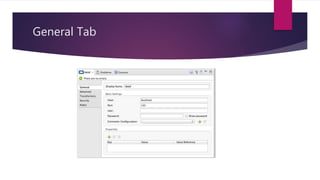
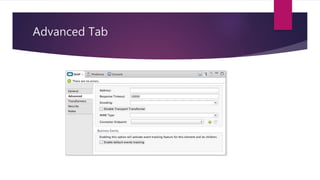
 Configure the IMAP endpoint by providing values for the fields on the various tabs
on the properties editor, which you open by double-clicking the IMAP endpoint
icon on the Message Flow canvas.
General Tab
Advanced Tab
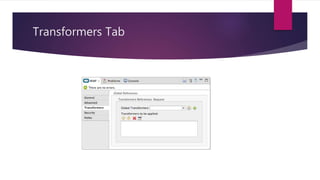
Transformers Tab
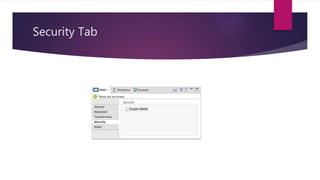
Security Tab
Example Flow
<?xml version="1.0" encoding="UTF-8"?>
<mule xmlns="http://www.mulesoft.org/schema/mule/core" xmlns:xsi="http://www.w3.org/2001/XMLSchema-instance"
xmlns:spring="http://www.springframework.org/schema/beans" xmlns:imap="http://www.mulesoft.org/schema/mule/imap"
xmlns:vm="http://www.mulesoft.org/schema/mule/vm" xmlns:file="http://www.mulesoft.org/schema/mule/file"
xmlns:email="http://www.mulesoft.org/schema/mule/email" xsi:schemaLocation="
http://www.springframework.org/schema/beans http://www.springframework.org/schema/beans/spring-beans-current.xsd
http://www.mulesoft.org/schema/mule/core http://www.mulesoft.org/schema/mule/core/3.6/mule.xsd
http://www.mulesoft.org/schema/mule/file http://www.mulesoft.org/schema/mule/file/3.6/mule-file.xsd
http://www.mulesoft.org/schema/mule/imap http://www.mulesoft.org/schema/mule/imap/3.6/mule-imap.xsd
http://www.mulesoft.org/schema/mule/email http://www.mulesoft.org/schema/mule/email/3.6/mule-email.xsd
http://www.mulesoft.org/schema/mule/vm http://www.mulesoft.org/schema/mule/vm/3.6/mule-vm.xsd">
<imap:connector name="imapConnector" />
<expression-transformer name="returnAttachments" <return-argument evaluator="attachments-list" expression="*"
optional="false"/>
</expression-transformer>
<file:connector name="fileName">
<file:expression-filename-parser/>
</file:connector>
<flow name="incoming-orders">
<imap:inbound-endpoint user="bob" password="password" host="emailHost" port="143"
transformer-refs="returnAttachments" disableTransportTransformer="true"/>
<collection-splitter/>
<file:outbound-endpoint path="./received" outputPattern="#[function:datestamp].dat">
<expression-transformer>
<return-argument expression="payload.inputStream" evaluator="groovy" />
</expression-transformer>
</file:outbound-endpoint>
</flow>
</mule>
Thank You

Imap connector

  • 1.
  • 2.
    IMAP Connector  TheIMAP Connector, which is configurable only as an inbound endpoint (also known as a message source) with a one-way exchange pattern, implements a transport channel that enables your Mule application to retrieve email from an IMAP email server.  IMAP is similar to POP3, except IMAP supports both online and offline modes. For instance, IMAP users can leave email messages on the IMAP server until they explicitly delete them. Like POP3, IMAP cannot send email; for that, you must implement an SMTP outbound endpoint.
  • 3.
    Configuration  IMAP endpointconfiguration consists of two stages:  Place your IMAP endpoint at the head of the sequence of building blocks that make up your Mule flow. Since it must serve as the message source for your flow, it cannot occupy any other position. (You can also use the Composite Sourcescope to wrap the IMAP endpoint along with the POP3 endpoint so that your flow can receive email through multiple transport channels).  Configure the IMAP endpoint by providing values for the fields on the various tabs on the properties editor, which you open by double-clicking the IMAP endpoint icon on the Message Flow canvas.
  • 4.
  • 5.
  • 6.
  • 7.
  • 8.
    Example Flow <?xml version="1.0"encoding="UTF-8"?> <mule xmlns="http://www.mulesoft.org/schema/mule/core" xmlns:xsi="http://www.w3.org/2001/XMLSchema-instance" xmlns:spring="http://www.springframework.org/schema/beans" xmlns:imap="http://www.mulesoft.org/schema/mule/imap" xmlns:vm="http://www.mulesoft.org/schema/mule/vm" xmlns:file="http://www.mulesoft.org/schema/mule/file" xmlns:email="http://www.mulesoft.org/schema/mule/email" xsi:schemaLocation=" http://www.springframework.org/schema/beans http://www.springframework.org/schema/beans/spring-beans-current.xsd http://www.mulesoft.org/schema/mule/core http://www.mulesoft.org/schema/mule/core/3.6/mule.xsd http://www.mulesoft.org/schema/mule/file http://www.mulesoft.org/schema/mule/file/3.6/mule-file.xsd http://www.mulesoft.org/schema/mule/imap http://www.mulesoft.org/schema/mule/imap/3.6/mule-imap.xsd http://www.mulesoft.org/schema/mule/email http://www.mulesoft.org/schema/mule/email/3.6/mule-email.xsd http://www.mulesoft.org/schema/mule/vm http://www.mulesoft.org/schema/mule/vm/3.6/mule-vm.xsd"> <imap:connector name="imapConnector" /> <expression-transformer name="returnAttachments" <return-argument evaluator="attachments-list" expression="*" optional="false"/> </expression-transformer> <file:connector name="fileName"> <file:expression-filename-parser/> </file:connector> <flow name="incoming-orders"> <imap:inbound-endpoint user="bob" password="password" host="emailHost" port="143" transformer-refs="returnAttachments" disableTransportTransformer="true"/> <collection-splitter/> <file:outbound-endpoint path="./received" outputPattern="#[function:datestamp].dat"> <expression-transformer> <return-argument expression="payload.inputStream" evaluator="groovy" /> </expression-transformer> </file:outbound-endpoint> </flow> </mule>
  • 9.