How To Create A Blog? Meshail Alsheail
How to create a blog? First of all: What is a blog? Blog is a short of weblog: a website that allows users to reflect, share opinions, and discuss various topics in the form of an online journal while readers may comment on posts.
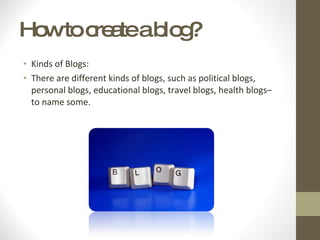
How to create a blog? Kinds of Blogs: There are different kinds of blogs, such as political blogs, personal blogs, educational blogs, travel blogs, health blogs– to name some.
How to create a blog? The first thing that you're going to have to do is to choose the blog software that you plan on using .  You can use one of the free platforms that are available to create a blog website for free. These would be at locations such as blogger.com, or even WordPress.com .
How to create a blog?  I will show you how to create a blog on Blogger.com The reason that I chose to talk about blogger because it’s free, easy to use, and has a big community of users.
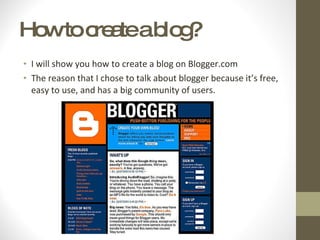
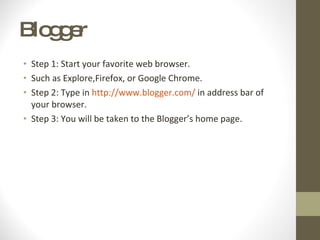
Blogger  Step 1: Start your favorite web browser . Such as Explore,Firefox, or Google Chrome. Step 2: Type in  http://www.blogger.com/  in address bar of your browser.  Step 3: You will be taken to the Blogger’s home page.
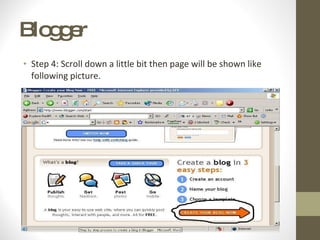
Blogger  Step 4: Scroll down a little bit then page will be shown like following picture .
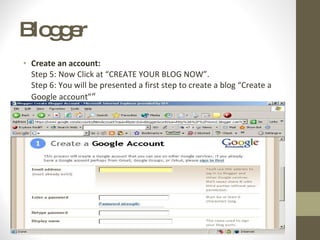
Blogger  Create an account: Step 5: Now Click at “CREATE YOUR BLOG NOW”. Step 6: You will be presented a first step to create a blog “Create a Google account” “
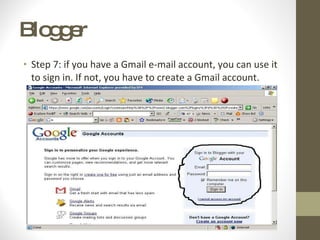
Blogger  Step 7: if you have a Gmail e-mail account, you can use it to sign in. If not, you have to create a Gmail account.
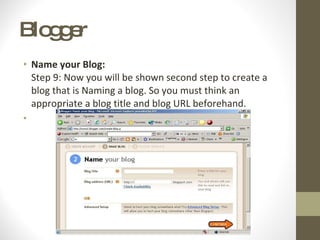
Blogger  Name your Blog: Step 9: Now you will be shown second step to create a blog that is Naming a blog. So you must think an appropriate a blog title and blog URL beforehand.
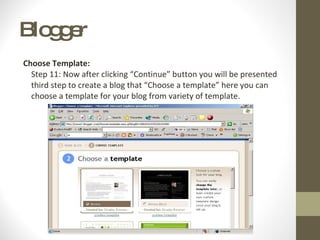
Blogger  Choose Template:  Step 11: Now after clicking “Continue” button you will be presented third step to create a blog that “Choose a template” here you can choose a template for your blog from variety of template.
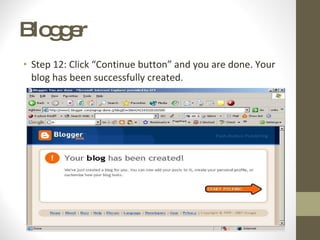
Blogger  Step 12: Click “Continue button” and you are done. Your blog has been successfully created .
Blogger  Step 13: Now click “Start Posting” button to write a first post for your blog. This is my blog:  http://meshaiel-celcis.blogspot.com/
Are there any questions?

How to create_a_blog

  • 1.
    How To CreateA Blog? Meshail Alsheail
  • 2.
    How to createa blog? First of all: What is a blog? Blog is a short of weblog: a website that allows users to reflect, share opinions, and discuss various topics in the form of an online journal while readers may comment on posts.
  • 3.
    How to createa blog? Kinds of Blogs: There are different kinds of blogs, such as political blogs, personal blogs, educational blogs, travel blogs, health blogs– to name some.
  • 4.
    How to createa blog? The first thing that you're going to have to do is to choose the blog software that you plan on using . You can use one of the free platforms that are available to create a blog website for free. These would be at locations such as blogger.com, or even WordPress.com .
  • 5.
    How to createa blog? I will show you how to create a blog on Blogger.com The reason that I chose to talk about blogger because it’s free, easy to use, and has a big community of users.
  • 6.
    Blogger Step1: Start your favorite web browser . Such as Explore,Firefox, or Google Chrome. Step 2: Type in  http://www.blogger.com/  in address bar of your browser. Step 3: You will be taken to the Blogger’s home page.
  • 7.
    Blogger Step4: Scroll down a little bit then page will be shown like following picture .
  • 8.
    Blogger Createan account: Step 5: Now Click at “CREATE YOUR BLOG NOW”. Step 6: You will be presented a first step to create a blog “Create a Google account” “
  • 9.
    Blogger Step7: if you have a Gmail e-mail account, you can use it to sign in. If not, you have to create a Gmail account.
  • 10.
    Blogger Nameyour Blog: Step 9: Now you will be shown second step to create a blog that is Naming a blog. So you must think an appropriate a blog title and blog URL beforehand.
  • 11.
    Blogger ChooseTemplate: Step 11: Now after clicking “Continue” button you will be presented third step to create a blog that “Choose a template” here you can choose a template for your blog from variety of template.
  • 12.
    Blogger Step12: Click “Continue button” and you are done. Your blog has been successfully created .
  • 13.
    Blogger Step13: Now click “Start Posting” button to write a first post for your blog. This is my blog: http://meshaiel-celcis.blogspot.com/
  • 14.
    Are there anyquestions?