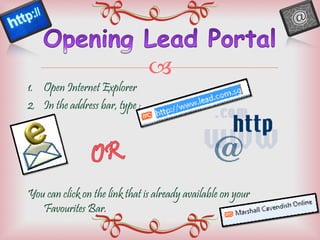
Open Internet Explorer In the address bar, type : You can click on the link that is already available on your Favourites Bar.
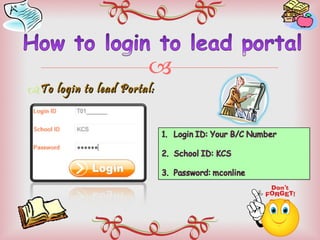
To login to lead Portal:
After a successful login, you will be directed to the home page From here, click on the collaboration tab. Under ‘Blogs’ , you will see 3 different options.
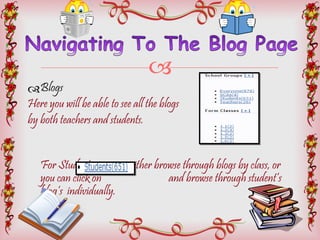
Blogs Here you will be able to see all the blogs  by both teachers and students.  For Students, you can either browse through blogs by class, or  you can click on  and browse through student’s blog’s  individually.
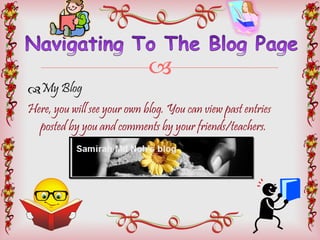
My Blog Here, you will see your own blog. You can view past entries posted by you and comments by your friends/teachers.
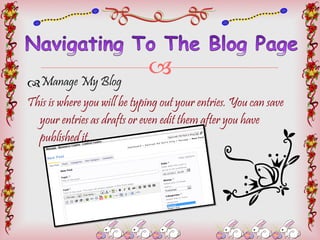
Manage My Blog This is where you will be typing out your entries. You can save your entries as drafts or even edit them after you have published it.
Do not post offensive images/videos on your blog The content of your blog should not contain any vulgarities or hurtful words. This applies even when you’re commenting on your friend’s blogs. Plagiarism is not allowed.
Here are the elements of a good blog: They use descriptive headlines.  This is important especially in blogs used for marketing and advertising. Descriptive headlines captures the attention of readers.
Here are the elements of a good blog: 2. Do not have too many links on your blog.  If you have one, ensure the most important  link is showed first. Readers would always click the first link shown. They may not necessarily click on all the links shown on your blog.
Here are the elements of a good blog: 3. Include Images, videos or tables Inserting visuals to your blogs makes your blogs more lively and interesting. It will draw the attention of readers better.  When your blog as too many words and no visuals, your readers will get bored easily and thus, they may stop reading your blog.
Here are the elements of a good blog: 4. Always credit your sources No matter where you get your sources from, as long as what is on your blog does not originally come from you, credit them. Provide a link to where you got your sources from.
Here are the elements of a good blog: 5. Update your blog regularly You may not need to update your blog everyday. But update it regularly, about 3-4 times in a week. Do not leave your blog unattended for weeks. Readers do not want to keep coming back to your blog, only to find it not updated. And when you actually do update, they are not sure when your next entry would be. As such, they may still drop by your blog, but not as frequent as you would want them to.
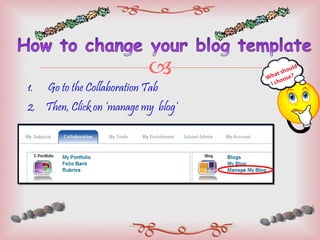
Go to the Collaboration Tab Then, Click on ‘manage my  blog’ What should  I choose?
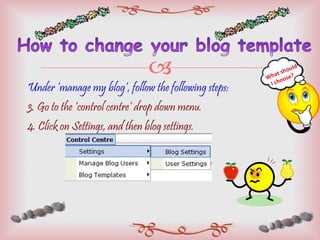
Under ‘manage my blog’, follow the following steps: 3. Go to the ‘control centre’ drop down menu. 4. Click on Settings, and then blog settings. What should  I choose?
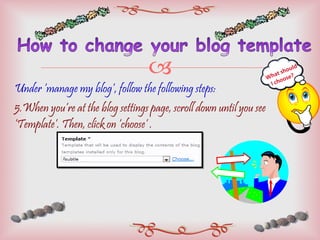
Under ‘manage my blog’, follow the following steps: 5.When you’re at the blog settings page, scroll down until you see ‘Template’. Then, click on ‘choose’ . What should  I choose?
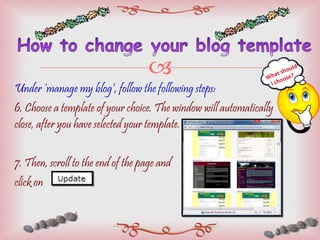
Under ‘manage my blog’, follow the following steps: 6. Choose a template of your choice. The window will automatically close, after you have selected your template. 7. Then, scroll to the end of the page and  click on  What should  I choose?
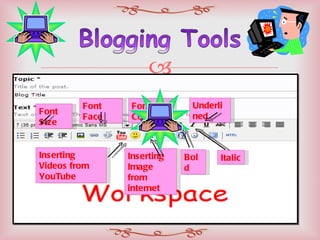
Font Size  Font Face Font Colour Bold Italic Underlined Inserting Videos from YouTube Inserting Image from internet
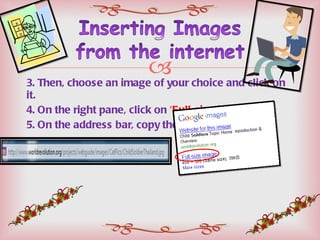
Go to  www.google.com.sg Under Google images, type something you wish to search for.
3. Then, choose an image of your choice and click on it. 4. On the right pane, click on  ‘Full-size image’ 5. On the address bar, copy the URL.
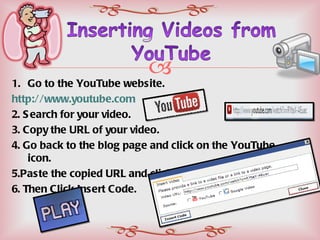
Go to the YouTube website.  http://www.youtube.com 2. Search for your video.  3. Copy the URL of your video.  4. Go back to the blog page and click on the YouTube icon. 5.Paste the copied URL and click on ‘YouTube’.  6. Then Click Insert Code.
 

Interactive blogging

  • 1.
  • 2.
  • 3.
    Open Internet ExplorerIn the address bar, type : You can click on the link that is already available on your Favourites Bar.
  • 4.
    To login tolead Portal:
  • 5.
    After a successfullogin, you will be directed to the home page From here, click on the collaboration tab. Under ‘Blogs’ , you will see 3 different options.
  • 6.
    Blogs Here youwill be able to see all the blogs by both teachers and students. For Students, you can either browse through blogs by class, or you can click on and browse through student’s blog’s individually.
  • 7.
    My Blog Here,you will see your own blog. You can view past entries posted by you and comments by your friends/teachers.
  • 8.
    Manage My BlogThis is where you will be typing out your entries. You can save your entries as drafts or even edit them after you have published it.
  • 9.
    Do not postoffensive images/videos on your blog The content of your blog should not contain any vulgarities or hurtful words. This applies even when you’re commenting on your friend’s blogs. Plagiarism is not allowed.
  • 10.
    Here are theelements of a good blog: They use descriptive headlines. This is important especially in blogs used for marketing and advertising. Descriptive headlines captures the attention of readers.
  • 11.
    Here are theelements of a good blog: 2. Do not have too many links on your blog. If you have one, ensure the most important link is showed first. Readers would always click the first link shown. They may not necessarily click on all the links shown on your blog.
  • 12.
    Here are theelements of a good blog: 3. Include Images, videos or tables Inserting visuals to your blogs makes your blogs more lively and interesting. It will draw the attention of readers better. When your blog as too many words and no visuals, your readers will get bored easily and thus, they may stop reading your blog.
  • 13.
    Here are theelements of a good blog: 4. Always credit your sources No matter where you get your sources from, as long as what is on your blog does not originally come from you, credit them. Provide a link to where you got your sources from.
  • 14.
    Here are theelements of a good blog: 5. Update your blog regularly You may not need to update your blog everyday. But update it regularly, about 3-4 times in a week. Do not leave your blog unattended for weeks. Readers do not want to keep coming back to your blog, only to find it not updated. And when you actually do update, they are not sure when your next entry would be. As such, they may still drop by your blog, but not as frequent as you would want them to.
  • 15.
    Go to theCollaboration Tab Then, Click on ‘manage my blog’ What should I choose?
  • 16.
    Under ‘manage myblog’, follow the following steps: 3. Go to the ‘control centre’ drop down menu. 4. Click on Settings, and then blog settings. What should I choose?
  • 17.
    Under ‘manage myblog’, follow the following steps: 5.When you’re at the blog settings page, scroll down until you see ‘Template’. Then, click on ‘choose’ . What should I choose?
  • 18.
    Under ‘manage myblog’, follow the following steps: 6. Choose a template of your choice. The window will automatically close, after you have selected your template. 7. Then, scroll to the end of the page and click on What should I choose?
  • 19.
    Font Size Font Face Font Colour Bold Italic Underlined Inserting Videos from YouTube Inserting Image from internet
  • 20.
    Go to www.google.com.sg Under Google images, type something you wish to search for.
  • 21.
    3. Then, choosean image of your choice and click on it. 4. On the right pane, click on ‘Full-size image’ 5. On the address bar, copy the URL.
  • 22.
    Go to theYouTube website. http://www.youtube.com 2. Search for your video. 3. Copy the URL of your video. 4. Go back to the blog page and click on the YouTube icon. 5.Paste the copied URL and click on ‘YouTube’. 6. Then Click Insert Code.
  • 23.