How to create a Blog By Ruth Williams
Where do we start... Are you feeling confused! Not sure where to start, well I am here to help you. First things first, we need to get the internet up and running, so click  on the internet launch button and lets go!
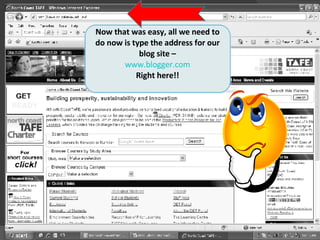
Now that was easy, all we need to do now is type the address for our blog site – www.blogger.com Right here!!
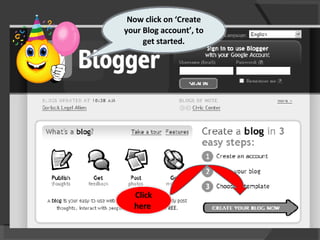
Now click on ‘Create your Blog account’, to get started. Click here
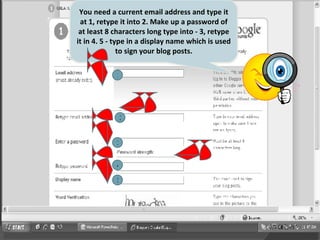
1 2 3 4 5 You need a current email address and type it at 1, retype it into 2. Make up a password of at least 8 characters long type into - 3, retype it in 4. 5 - type in a display name which is used to sign your blog posts.
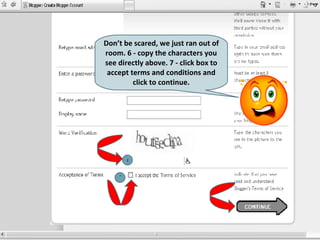
Don’t be scared, we just ran out of room. 6 - copy the characters you see directly above. 7 - click box to accept terms and conditions and click to continue. 6 7
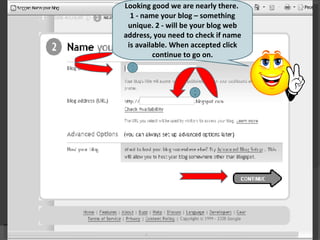
Looking good we are nearly there.  1 - name your blog – something unique. 2 - will be your blog web address, you need to check if name is available. When accepted click continue to go on. 1 2
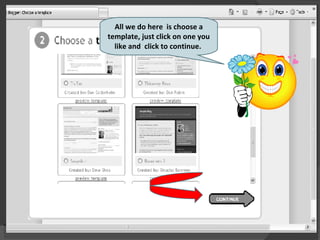
All we do here  is choose a template, just click on one you like and  click to continue.
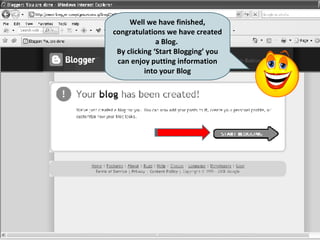
Well we have finished, congratulations we have created a Blog.  By clicking ‘Start Blogging’ you can enjoy putting information into your Blog
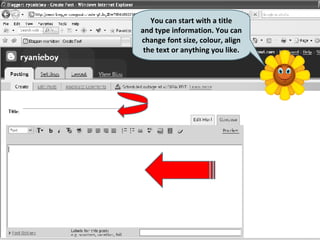
You can start with a title and type information. You can change font size, colour, align the text or anything you like.
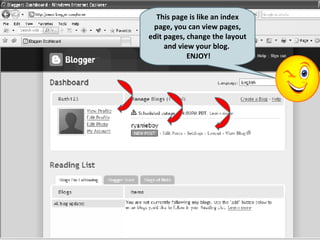
This page is like an index page, you can view pages, edit pages, change the layout and view your blog.  ENJOY!
 

Assessment Julie

  • 1.
    How to createa Blog By Ruth Williams
  • 2.
    Where do westart... Are you feeling confused! Not sure where to start, well I am here to help you. First things first, we need to get the internet up and running, so click on the internet launch button and lets go!
  • 3.
    Now that waseasy, all we need to do now is type the address for our blog site – www.blogger.com Right here!!
  • 4.
    Now click on‘Create your Blog account’, to get started. Click here
  • 5.
    1 2 34 5 You need a current email address and type it at 1, retype it into 2. Make up a password of at least 8 characters long type into - 3, retype it in 4. 5 - type in a display name which is used to sign your blog posts.
  • 6.
    Don’t be scared,we just ran out of room. 6 - copy the characters you see directly above. 7 - click box to accept terms and conditions and click to continue. 6 7
  • 7.
    Looking good weare nearly there. 1 - name your blog – something unique. 2 - will be your blog web address, you need to check if name is available. When accepted click continue to go on. 1 2
  • 8.
    All we dohere is choose a template, just click on one you like and click to continue.
  • 9.
    Well we havefinished, congratulations we have created a Blog. By clicking ‘Start Blogging’ you can enjoy putting information into your Blog
  • 10.
    You can startwith a title and type information. You can change font size, colour, align the text or anything you like.
  • 11.
    This page islike an index page, you can view pages, edit pages, change the layout and view your blog. ENJOY!
  • 12.